-
-
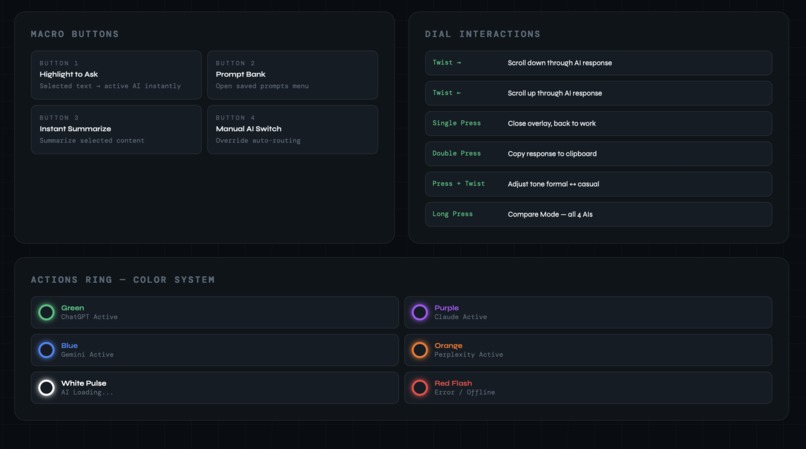
hardware interaction map
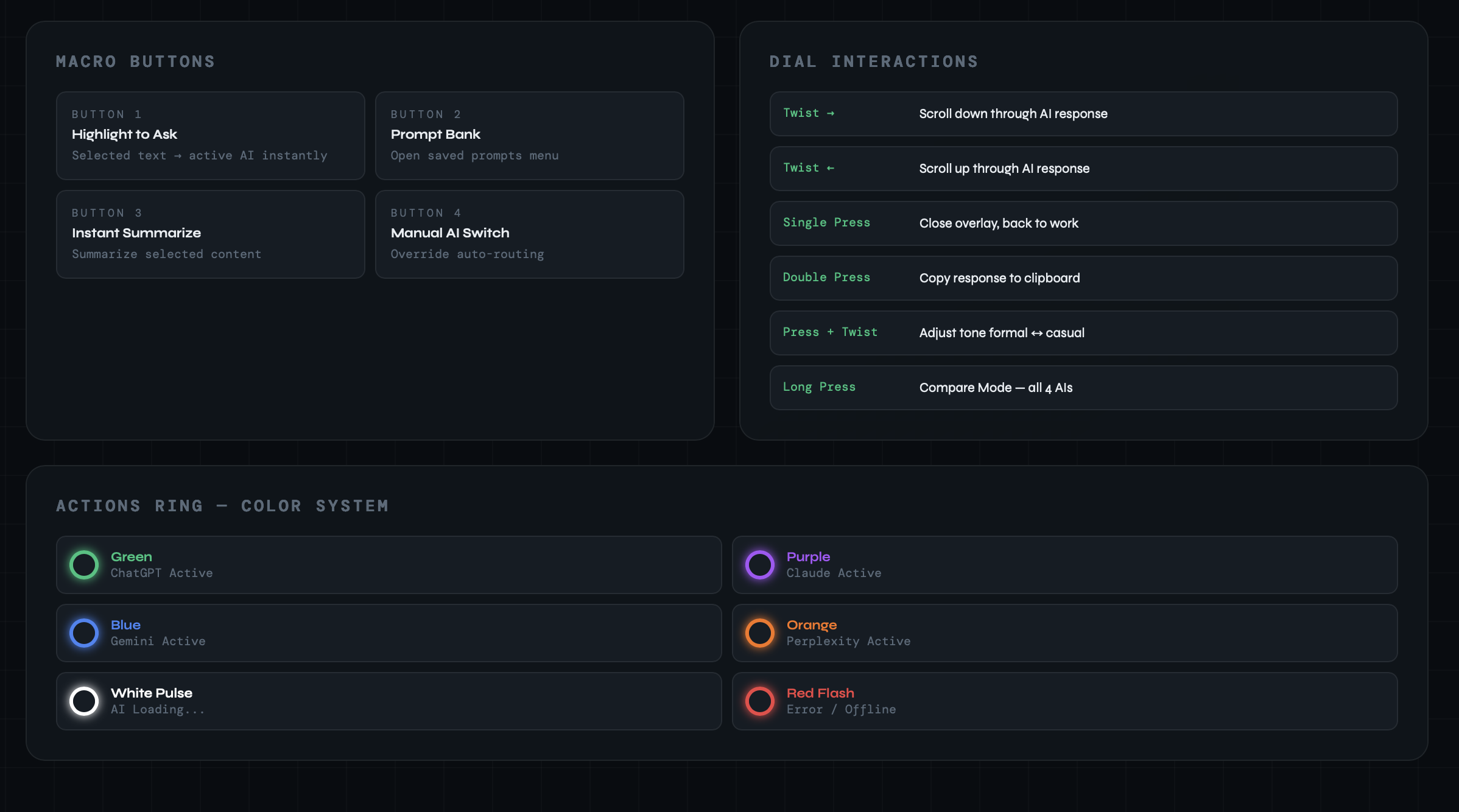
Inspiration
Every day I found myself with four AI tabs open — ChatGPT for coding, Claude for writing, Gemini for Google tasks, Perplexity for research. I was constantly switching tabs, copy-pasting, and losing focus every single time. The mental cost of breaking concentration dozens of times a day just to ask an AI something was unbearable. That is when the question hit me — what if instead of going to the AI, the AI came to you? Mind Mojo was born from that idea.
Problems it solved
Tab Chaos — Constantly switching between 4 AI tabs breaks focus and kills productivity. Wrong AI for the Wrong Job — People default to one AI for everything even when another would give a better result. Copy Paste Hell — Getting AI help takes 8 manual steps every single time. Broken Focus — Every tab switch is an interruption. Research shows it takes 23 minutes to regain deep focus after one. No Physical Awareness — No way to know which AI is active without looking at your screen. Repetitive Prompting — Same prompts typed over and over, every single day.
What I built
Mind Mojo is a plugin on the Logitech Actions SDK that turns the MX Creative Console and MX Master 4 into a physical AI switchboard. Smart AI Routing — Detects your active app and automatically switches to the right AI. VS Code triggers ChatGPT. Notion triggers Claude. Chrome triggers Perplexity. Floating Overlay — One button press brings the AI response directly on top of your current app. You never leave your workflow. Actions Ring Color System — The ring glows green for ChatGPT, purple for Claude, blue for Gemini, orange for Perplexity. Your AI status is always visible at a glance. Compare Mode — Long press the dial and all four AIs respond at once. Twist to compare. Pick the best. Done in seconds. Prompt Bank — Save your most used prompts and fire them instantly with one button press.
how I built
The plugin core is built in C# using the Logitech Actions SDK and .NET 8. The floating overlay is built with Tauri, Reactjs and JavaScript. App detection uses the active-win library. AI responses come from the OpenAI, Anthropic, Gemini, and Perplexity APIs. Settings and prompts are stored locally using SQLite and JSON.
Challenges we ran into
Getting four AI APIs to respond simultaneously in Compare Mode required careful async handling. Making the overlay appear correctly across different screen sizes and multi-monitor setups was tricky.
Accomplishments that we're proud of
Reducing an 8-step AI workflow down to a single button press. Building a system that makes four completely different AI models feel like one seamless tool. Designing an interaction model where the hardware itself communicates status through color — so the user never has to look away from their work.
What we learned
We learned the Logitech Actions SDK from the ground up — LED control, event mapping, and plugin lifecycle management. Working with four AI APIs simultaneously taught us how to handle different response formats and rate limits in one unified system.
What's next for Mind Mojo - physical ai switchboard(Future Scope)
Voice Input via the Dial Instead of only using highlighted text as a prompt, the user could press and hold the dial to speak their prompt. The dial becomes a push-to-talk button. The voice is transcribed and sent to the active AI instantly. Mind Mojo could expand from a personal tool to a team tool: Share prompt banks across a team. Shared routing rules for company-wide consistency. Team prompt libraries with the best prompts curated by the whole team

Log in or sign up for Devpost to join the conversation.