-
-
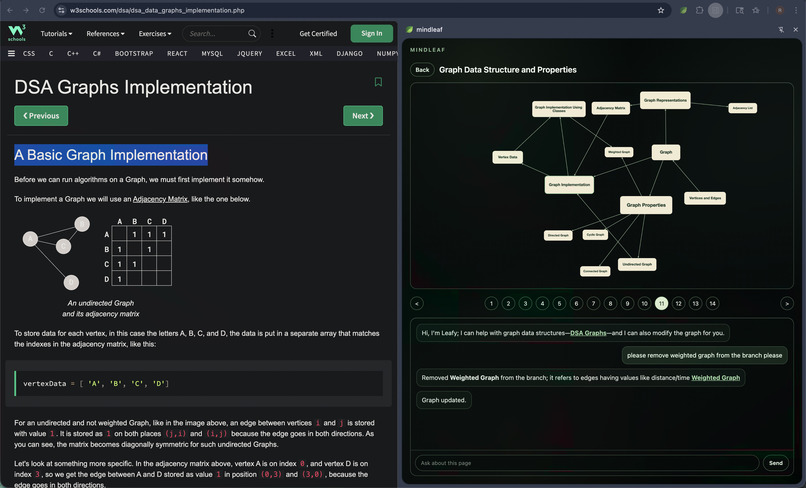
knowledge graph
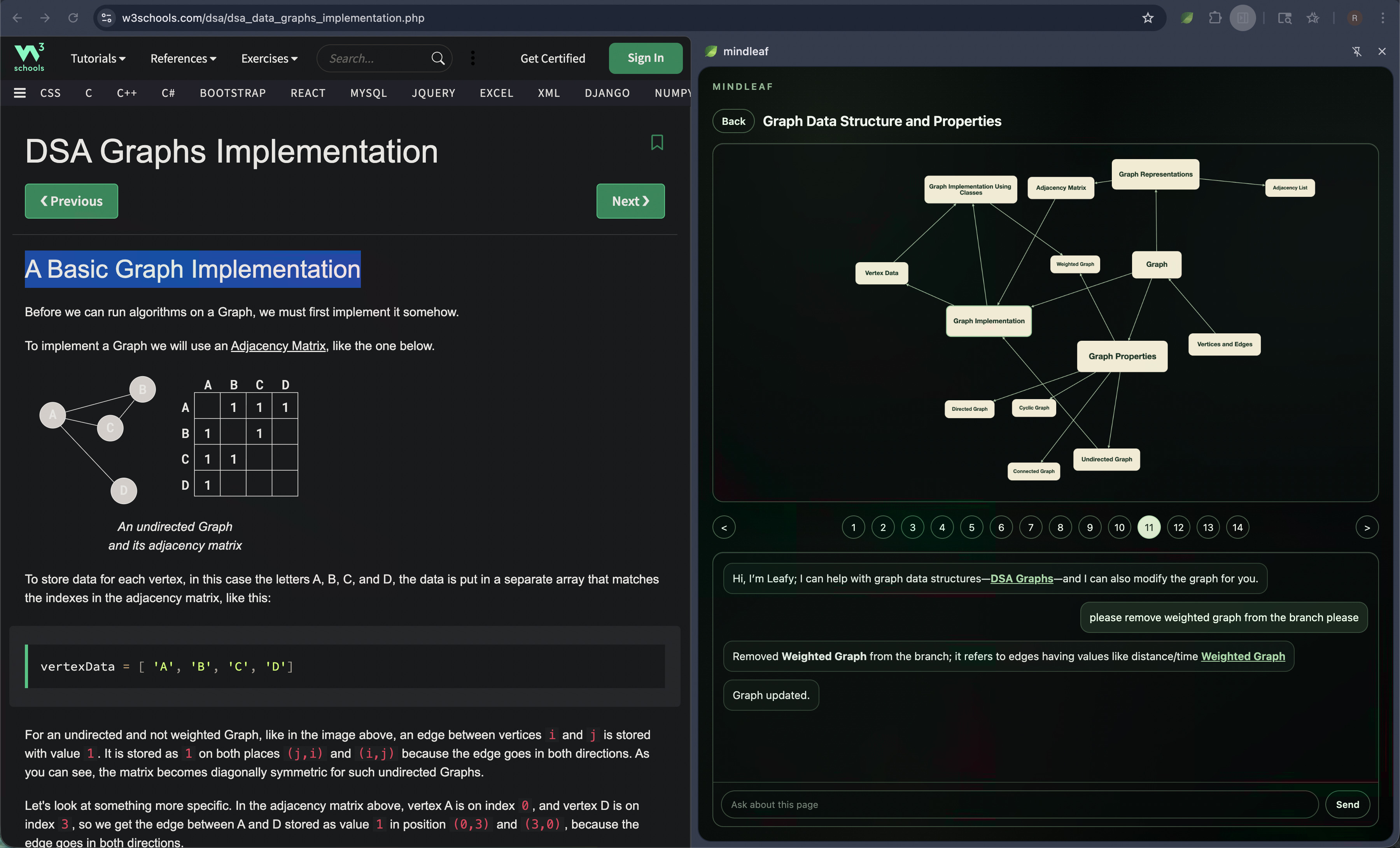
The modern web is non-linear, but learning is sequential. MindLeaf turns any webpage into a guided learning path.
It uses AI to build a knowledge graph and guide you step by step through key concepts in the right order, linking directly to where each topic appears. It doesn’t just read pages; it understands the relationships between them.
What It Does
MindLeaf is a Chrome side panel extension that transforms the active webpage into an interactive learning experience.
- Builds an AI-generated knowledge graph from the visible text on the current page.
- Displays concepts as connected graph nodes using Cytoscape.js.
- Creates a sequential lesson path from the graph using topological sorting.
- Lets users click graph nodes or lesson steps to jump directly to the matching quote on the webpage.
- Highlights the relevant sentence on the page so the user always stays grounded in the source.
- Includes Leafy, an AI chatbot that answers questions using the current webpage and graph.
- Lets the chatbot modify the graph when the user asks for learning-path changes.
- Stores graphs and conversations locally in browser storage.
Why It Matters
Most webpages are designed for browsing, not learning. Articles, docs, papers, and tutorials often contain many interconnected ideas, but users still have to decide what to read first, what matters, and how ideas connect.
MindLeaf turns that messy reading experience into a structured path. The graph shows how concepts relate, while the lesson bar gives users a clear next step.
How We Built It
MindLeaf is a Manifest V3 Chrome extension built around Chrome's Side Panel API.
The side panel is the main interface. It contains the graph view, lesson bar, and chatbot. The extension reads visible text from the active tab with chrome.scripting.executeScript, sends that page text to OpenAI, and stores generated graphs in chrome.storage.local.
The graph generation flow uses two AI calls:
- A lightweight model generates a concise graph title.
- A reasoning model generates the knowledge graph from the webpage text.
The generated graph is stored as an adjacency list:
{
  "nodes": {
    "Concept name": {
      "quote": "exact quote from the page",
      "url": "https://example.com/page",
      "outgoing": ["Related concept"]
    }
  }
}
Cytoscape.js renders the graph as a directed concept map. Nodes with more outgoing edges are larger and use larger text, making more foundational concepts visually stand out.
The lesson bar uses a Kahn-style topological sort to order concepts into a guided sequence. It dynamically adjusts how many steps are visible based on the side panel width, always keeping an odd number of visible steps so the selected lesson can stay centered when possible.
The chatbot uses a separate conversation prompt and receives:
- The current graph.
- The visible webpage text.
- The previous five conversation messages.
When Leafy cites the page, it outputs quote links in a custom delimiter format. The extension injects the current URL afterward, then renders those links as clickable controls that focus the correct tab, scroll to the quote, and highlight it through the end of the sentence.
Long-running graph generation is handled in the background service worker. This keeps graph creation and the initial Leafy message reliable even if the side panel is closed before generation finishes.
Challenge We Ran Into
The hardest part was syncing the chatbot, the graph, and the webpage so they all worked together as one interface.
A graph node click, lesson step click, and chatbot citation click all need to agree on the same source quote and URL. If the target page is already open, MindLeaf switches to that tab. If it is not open, it opens the URL, waits for the page to load, then highlights and scrolls to the quote.
We also had to handle background generation safely. Early versions could lose graph updates or leave the chatbot stuck in a loading state if the side panel closed or browser storage updated while a request was still running. We solved this by moving graph creation into the background worker and carefully syncing local conversation state with chrome.storage.local.
Tech Stack
- Chrome Extension Manifest V3
- Chrome Side Panel API
- Chrome Scripting, Tabs, and Storage APIs
- OpenAI Responses API
- Cytoscape.js
- Vanilla JavaScript, HTML, and CSS
What’s Next
- Export and share learning graphs.
- Add progress tracking across pages.
- Support multi-page learning paths.
- Let users manually edit graph nodes and relationships.
- Add quiz generation from the lesson path.
Built With
- chatgpt
- css
- html
- javascript


Log in or sign up for Devpost to join the conversation.