
Inspiration
What it does
How we built it
Challenges we ran into
Accomplishments that we're proud of
What we learned
What's next for Mily
I have always hated how I looked on camera. But there were always these tiny moments — on video, mostly — where I actually liked how I looked. A single frame where everything lined up: the pose, the expression, all of it.
That's the whole idea behind Mily: the best version of every person in your group photo already exists — inside the burst you just took. You just can't get at it. I built Mily because I wanted to see the best poses of me, the best parts of me, really. And everyone else in the photo deserves the same.
What it does
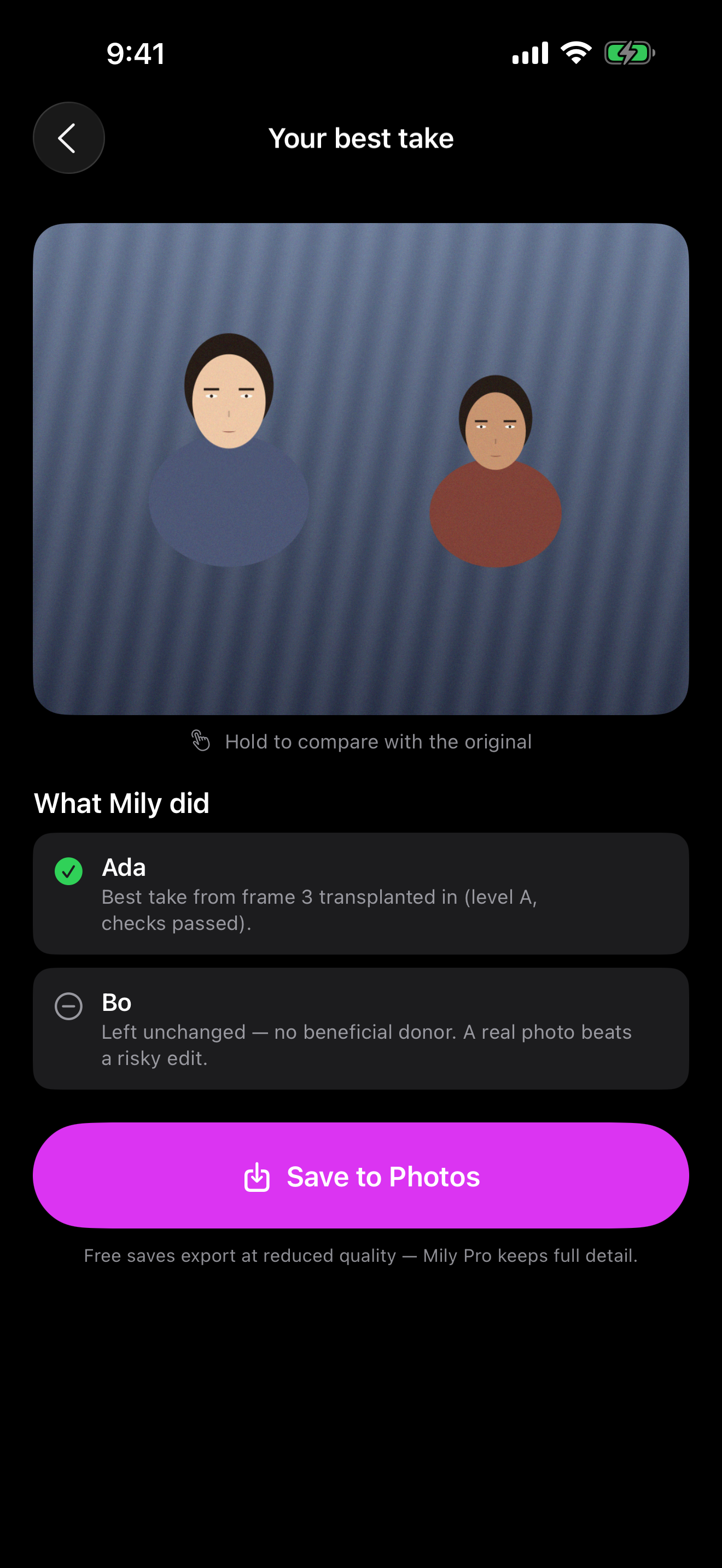
In every burst of group photos, someone is blinking, mid-word, or caught mid-sneeze. Record a short clip (or pick a burst from Photos), and Mily analyzes every frame with on-device Vision — faces, landmarks, person matting — scores each person's expression per frame (smile, open eyes, mid-word detection), then transplants each person's best moment into one frame. All on-device, in seconds.
The result screen tells you exactly what happened per person — swapped from frame N (checks passed) or left unchanged, and why. Hold the photo to compare before/after. Saving is full-quality and always free.
The safety policy
Mily is least-invasive-first, and every stage can answer "no": a donor face must be inside a near-same-pose envelope, and every transplant passes artifact and identity checks — otherwise the person is left unchanged. A real photo of the person you took beats a generated one. That's a product promise, not a fallback.
How I built it
The app is SwiftUI on iOS 17; MilyCore, a local Swift package, is the engine: Vision face analysis, expression scoring, a group planner that picks base and donor frames, a landmark-fitted direct transplant synthesizer (weighted by measured landmark jitter so rigid points outvote the moving mouth), grain- and sharpness-matching, and artifact + identity verification.
Monetization runs on RevenueCat: purchases-ios + RevenueCatUI power a one-time tip purchase (mily_lifetime → pro entitlement), with entitlement state streamed through customerInfoStream and an offering-driven paywall. StoreKit 2 is enabled and the repo ships a StoreKit configuration, so the whole funnel — demo burst → result → paywall → purchase — runs in the simulator with zero App Store Connect setup, and is covered by a UI test.
Challenges
Making a transplant honest was the hard part: naive face swaps look great in demos and terrible in real life. I gated every edit behind measured landmark jitter, feather-matted compositing, grain/sharpness matching, and identity checks — and gave every stage the power to say "leave this person unchanged."
What I learned
- The pipeline is fast because it touches few bytes: strided vDSP gathers lose to sequential passes on interleaved data, and one composite must move ~39 MB no matter what — physics sets the floor. An optimization pass took the composite from 290 ms to ~8.8 ms median (~33×) with decisions unchanged.
- Restraint is a feature. Users trust the app more when it explains who it left alone and why.
- RevenueCat let me ship the entire purchase funnel without writing server code.
Mily is entering the Next Gen Award (student track).

Log in or sign up for Devpost to join the conversation.