Inspiration
We cook almost every day, and it's the one thing where your hands are mostly busy. Most recipe apps out there assume you can tap and scroll, but try doing that while you're flipping a pancake or kneading dough. It doesn't work.
We wanted something different: a cooking assistant you could actually talk to, hands-free, like having a friend in the kitchen who knows what they're doing.
What it does
Mia is a voice-first cooking assistant that runs in the browser on your phone. You talk, she listens, and she talks back in real time.
Here's what she can do:
- Have a real conversation: not turn-based chat, actual back-and-forth dialogue with Gemini's native audio
- Handle interruptions: you can cut her off mid-sentence and she'll stop and listen (barge-in)
- Remember your allergies: tell her once ("I'm allergic to nuts") and she'll keep it in mind for the rest of the session
- Set cooking timers: just say "set a timer for 8 minutes for the pasta" and she'll track it, with a visual countdown and a beep when it's done
- See what you're cooking: toggle the camera on and Mia can watch your pan, your ingredients, or your technique, and give you feedback in real time
- Look things up: she can search Google mid-conversation for nutritional info, ingredient substitutions, or cooking techniques
- Pick up on your tone: if you sound frustrated or excited, she adjusts how she responds
How we built it
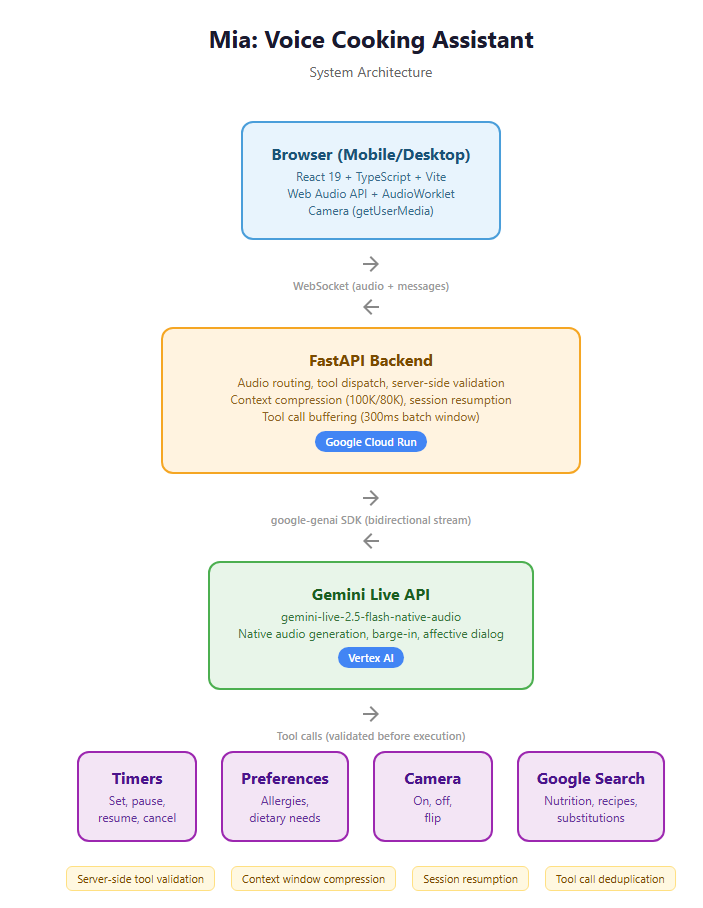
The frontend is a React + TypeScript web app built with Vite. It handles audio capture and playback using the Web Audio API with AudioWorklet processors for low-latency streaming. The camera feature uses getUserMedia for video, and there's a timer overlay component that shows active timers on screen.
The backend is a Python FastAPI server. It sits between the browser (connected via WebSocket) and Google's Gemini Live API (connected via a persistent bidirectional stream through Vertex AI). The backend handles all the tool calls (timers, preferences, camera control, search) and routes audio back and forth.
Some of the trickier parts we had to figure out:
- Server-side tool validation: Gemini sometimes tries to call tools based on what it thinks you said rather than what you actually said. We validate every tool call against the real speech transcript before executing it, so hallucinated actions get silently dropped.
- Context window compression: Native audio eats through tokens fast. With camera on, you can hit the context limit in under 8 minutes. We set up automatic compression (triggers at 100K tokens, summarizes down to 80K) so Mia can keep going through a whole cooking session.
- Session resumption: Vertex AI drops the connection roughly every 10 minutes. We store resume tokens so Mia reconnects transparently without losing context.
- Tool call buffering: Gemini sometimes fires multiple tool calls within milliseconds of each other. A 300ms batching window groups them so they execute together instead of tripping over each other.
Everything runs on Google Cloud Run. No databases; all session state lives in memory. Vertex AI handles the Gemini API calls.
Third-party open-source libraries: FastAPI (MIT), React (MIT), Vite (MIT). No non-Google external APIs.
Challenges we ran into
The biggest headache was double-talk. Vertex AI silently strips the parameters that tell Gemini to stay quiet during tool execution. So Mia would say something, trigger a tool, and then say something again, like she was talking over herself. We tried an audio gate approach but it created garbled audio fragments. What actually worked was the server-side validation layer: check every tool call, reject the bad ones, and let the model move on without telling the user anything happened.
The second challenge was keeping sessions alive. Audio tokens accumulate way faster than text, and with camera frames being sent every second, you hit the context window ceiling quickly. Without compression, camera sessions would crash in about 7-8 minutes. The compression system fixed that, but we also had to make sure allergies and active timers survived the compression (they get injected into updated system instructions).
Connection drops were the third one. The Live API has roughly a 10-minute connection lifetime, which means during any real cooking session, the connection will reset at least once. Session resumption with resume tokens handles this: the user doesn't even notice.
What we learned
- Gemini's native audio model is surprisingly natural. Barge-in and tone awareness make it feel like you're talking to someone, not a bot.
- When the model hallucinates tool calls, trying to fix it with prompt engineering is a losing battle. Server-side validation is way more reliable: just check before you execute.
- Designing for hands-free use is a completely different UX challenge. Every feature has to work without the user ever touching the screen.

Log in or sign up for Devpost to join the conversation.