-
-
Overall
Inspiration
The inspiration for LogitextAI came from a simple yet frustrating daily experience: the constant interruption of workflow when accessing AI assistants. As developers and knowledge workers, we found ourselves repeatedly:
- Switching to browser tabs to access ChatGPT or Claude
- Copying code or text from our current application
- Pasting it into AI interfaces
- Waiting for responses
- Copying the response back
- Returning to our original work
This workflow disruption was killing productivity and breaking our focus. We realized that Logitech's MX Master 4 with Actions Ring and the Actions SDK presented a perfect opportunity to solve this problem. The "Genie in a bottle" example in the hackathon requirements resonated with us—what if AI assistance was truly just one button press away, without ever leaving your current application?
The vision was clear: Transform the MX Master 4 into an instant AI assistant hub that works universally across all Windows applications, maintaining workflow continuity and boosting productivity.
What it does
LogitextAI is a universal plugin that transforms your MX Master 4 mouse into an instant AI assistant interface. With a single button press, users can access powerful AI capabilities without ever leaving their current application.
Problem
Observed User Behavior: Developers and knowledge workers frequently interrupt their workflow to access AI assistants. The process typically involves:
- Switching from current application to browser (Alt+Tab)
- Opening AI assistant website (Chrome/Edge tab)
- Copying context from original application
- Pasting into AI interface
- Waiting for response
- Copying response back
- Returning to original application
Workflow Impact:
- Each context switch requires cognitive refocusing
- Multiple application windows create visual clutter
- Copy-paste operations fragment the workflow
- Time spent on navigation reduces productive coding/writing time
Market Validation:
- Logitech hackathon explicitly requests solutions for "Genie in a bottle: Impersonate your AI assistants in a key" (Category 1 example)
- Actions SDK documentation confirms support for universal plugins that work across applications
- Node.js is a supported development language per Actions SDK documentation
The Solution: LogitextAI
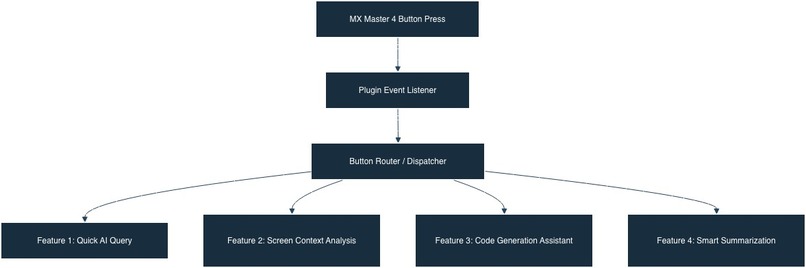
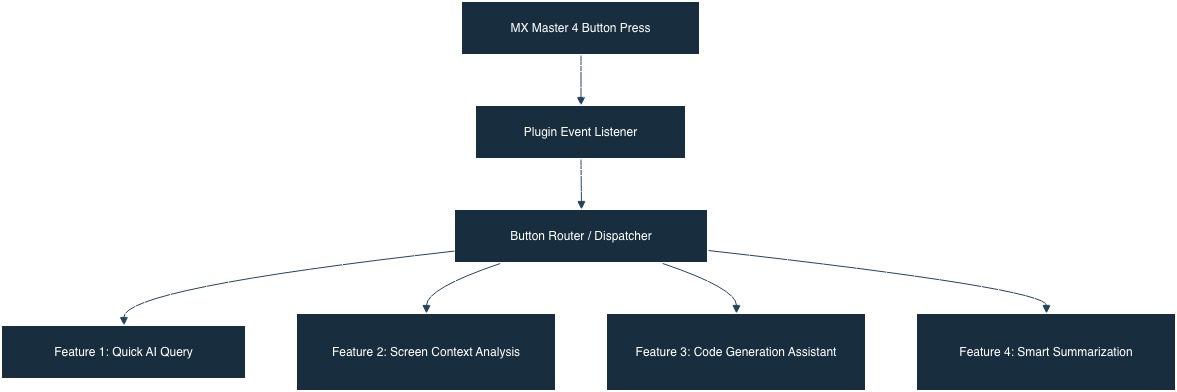
LogitextAI is a plugin that maps MX Master 4 buttons to AI assistant functions. The plugin operates at the system level, requiring no foreground application dependency.
1. Quick AI Query (Button 1 - Thumb Button)
- Instantly opens a text input interface via Actions Ring
- Send questions or requests directly to AI (OpenAI/Anthropic)
- Receive responses in a non-intrusive notification overlay
- Haptic feedback confirms when response is received
2. Screen Context Analysis (Button 2 - Middle Click)
- Captures the current window screenshot automatically
- Sends screenshot with context to AI for intelligent analysis
- Perfect for code reviews, error troubleshooting, document analysis
- AI understands visual context and provides relevant insights
3. Code Generation Assistant (Button 3 - Right Click Long Press)
- Opens a specialized code generation interface
- Describe what you need in natural language
- AI generates ready-to-use code snippets
- Copy and paste directly into your IDE
4. Smart Summarization (Button 4 - Side Button)
- Captures selected text or current document content
- Generates concise summaries, key points, or action items
- Ideal for meeting notes, research papers, long documents
- Extract insights without reading entire documents
Key Benefits
- Zero Context Switching: Works across all Windows applications
- Instant Access: AI assistance in under 2 seconds
- Context-Aware: Automatically understands what you're working on
- Non-Intrusive: Responses appear in overlay, don't block your work
- Universal: Not limited to specific applications or software
Technology Stack:
- Runtime: Node.js (v16+)
- Language: TypeScript
- SDK: Logi Actions SDK (Node.js)
- HTTP Client: axios
- Screen Capture: screenshot-desktop npm package
- API Integration: OpenAI API / Anthropic Claude API (REST)
- Configuration: dotenv for API keys
- Logging: winston
Target Users
Primary Users:
- Software Developers using IDEs (VS Code, Cursor, IntelliJ) who need quick AI assistance
- Content Creators writing documents who want writing assistance without leaving their editor
- Knowledge Workers analyzing documents who need summarization and quick lookups
Use Case Validation:
- Aligns with hackathon-provided examples (Blender, AutoCAD, XCode, Cursor.IDE integrations)
- Addresses "Genie in a bottle" use case from requirements
- Universal plugin architecture supports all Windows applications
Built With
- claude
- javascript
- logiactionssdk
- node.js
- vscode


Log in or sign up for Devpost to join the conversation.