Inspiration
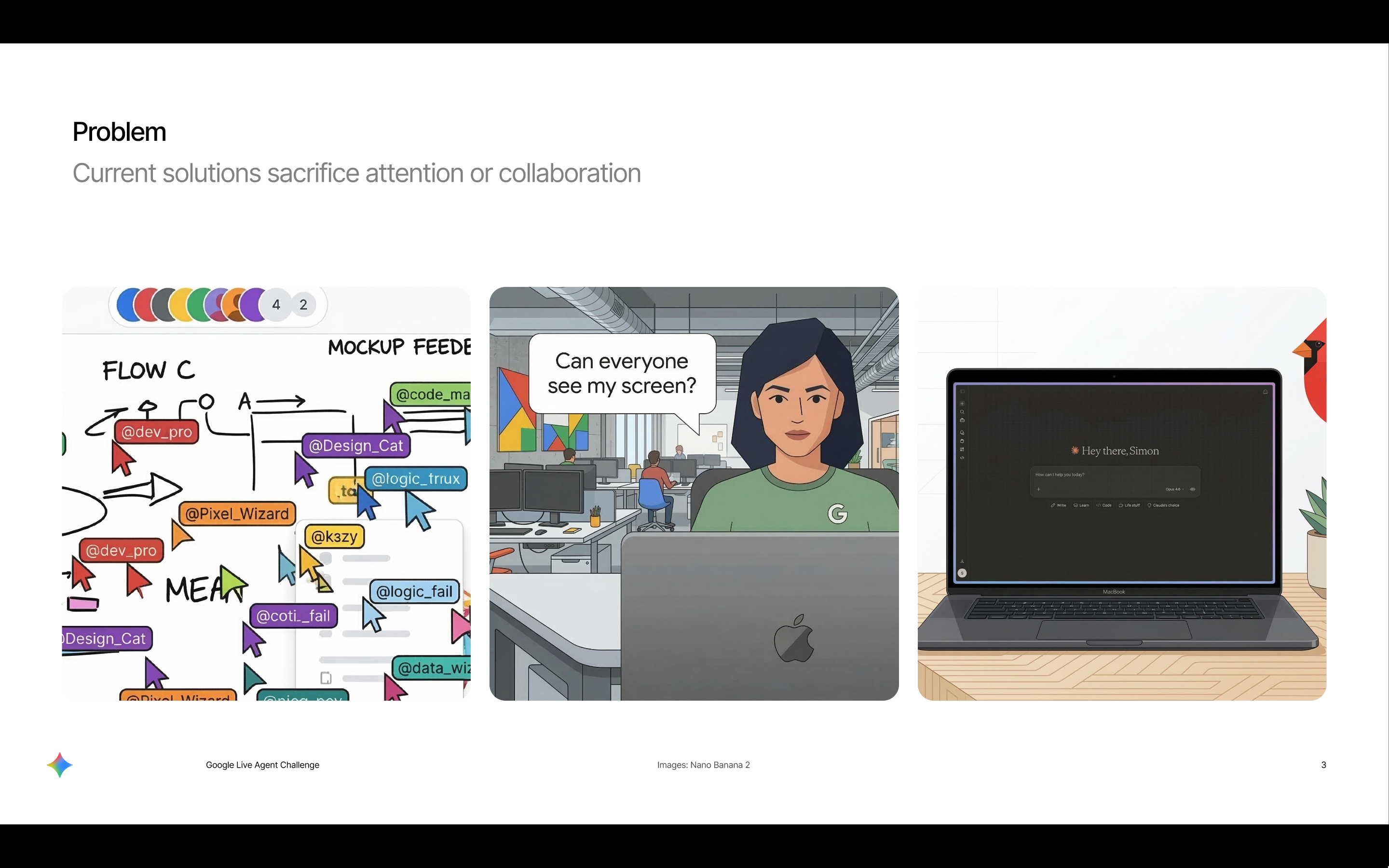
Video calls have never felt like they could match working as a team around a whiteboard. Every solution either sacrificed keeping up with the pace-of-thought that you could achieve quickly writing in real life, or they split the attention of the meeting (like when sharing a screen) and didn't feel as collaborative. For design reviews of systems or working through a technical challenge it always felt like the most important element wasn't native to the medium.
What it does
Mermeet is a collaborative platform that makes diagramming a first-class means of communication, rather than an after thought. You can add humans and/or agents to the call that represent different stakeholders such as SWE, Dev Ops or Product Design and diagrams are created as you speak. You can then enter presentation mode which allows you to navigate around the diagram overlayed on your video feed through pinching and dragging, and then directing your thoughts at a selected node by pointing.
How we built it
I worked backwards from the deliverable we wanted to show: a polished live agent experience that feels like it's been built on top of Google Meet.
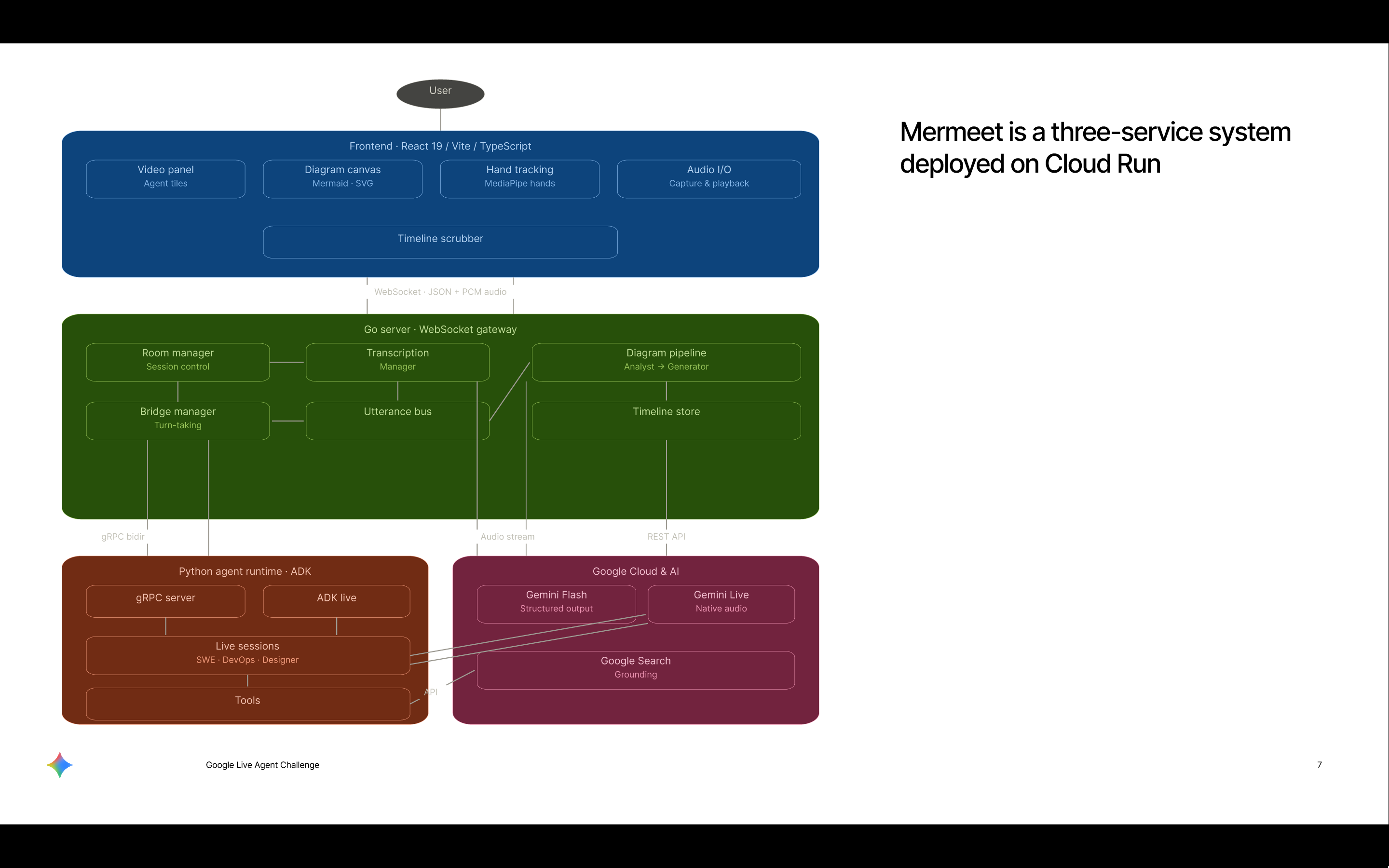
The frontend is a React app that handles the call UI, the shared Mermaid-based diagram canvas, the timeline/history model, and presentation mode. I deliberately used Mermaid because it gave me a deterministic and well understood diagram representation without wasting time building a full whiteboarding tool.
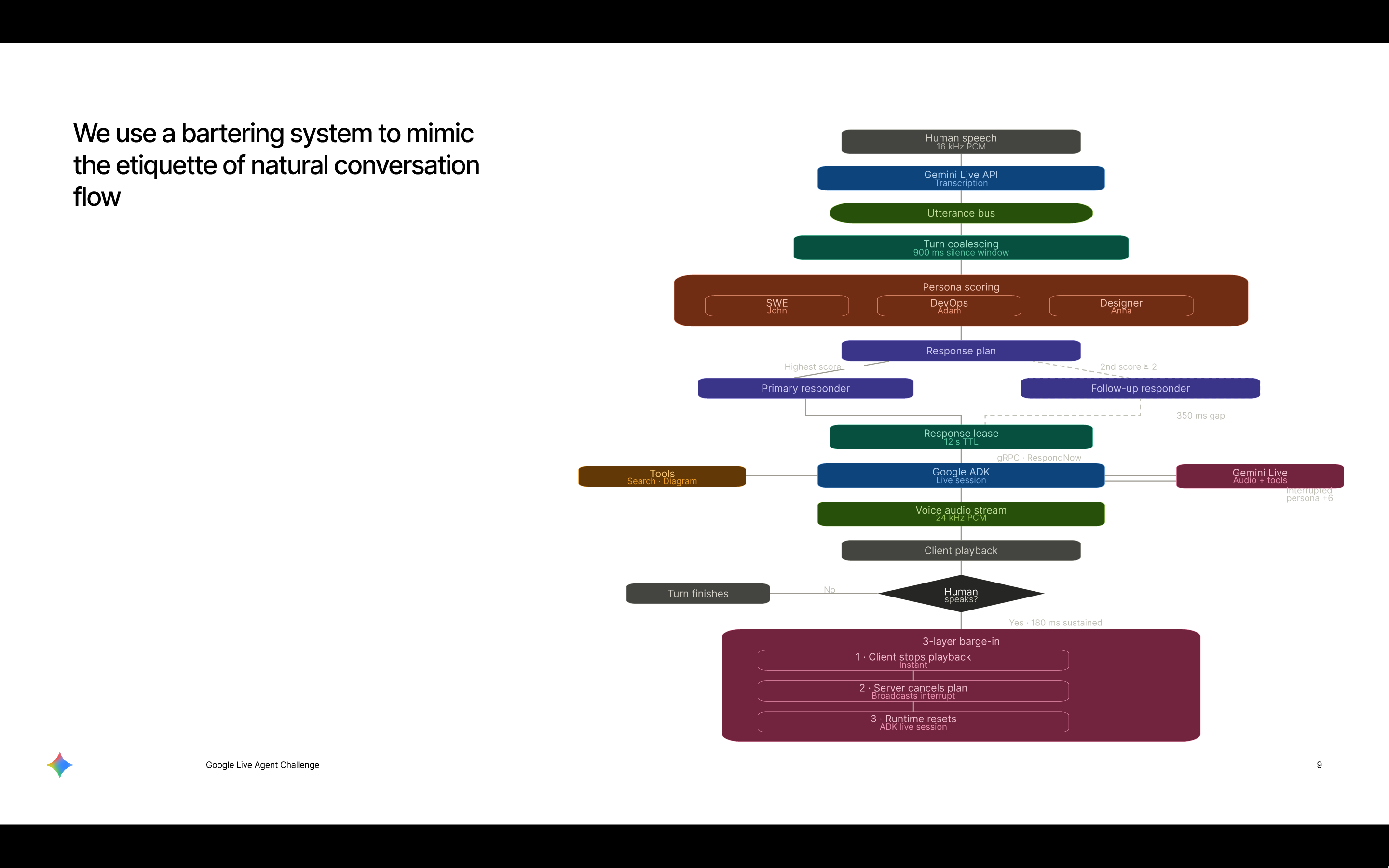
On the backend, I used a Go gateway to manage rooms, WebSocket communication, realtime signalling, and the canonical diagram pipeline. For the agent layer, I moved toward a dedicated runtime using Google’s Live API / ADK patterns so agents can be treated as participants in the room, not just invisible helpers. I separated visible speaking agents from a silent background scribe: the visible agents focus on listening, thinking, speaking, and being interruptible, while the scribe keeps the shared diagram current based on accepted conversation.
For multimodal interaction, voice is always on and passive, while vision is explicit through presentation mode. I used browser-side hand tracking for gestures and synchronise those gestures against the shared node coordinate map so users can tap a node, drag it, or create a connection while still expressing semantic intent through speech.
Challenges we ran into
The biggest challenge was that the first version technically worked but product-wise felt flat. I had diagram generation for humans, but it still felt like we had bolted a tool call onto a meeting rather than created a collaborative meeting experience. That was a hard but useful realisation.
Another major challenge was multimodal alignment in presentation mode. Once you overlay a mirrored diagram on top of a live video feed, everything has to line up exactly. Gesture coordinates, camera transforms, hit-testing, and shared node positions all need to agree or the illusion breaks immediately.
I also had to be opinionated about UX. Because the whole philosophy is natural conversation, I avoided approval queues and interactions that pull users out of flow. That led me toward a timeline-based history model rather than a constant accept/reject workflow, and toward conservative diagram switching rather than over-eager creation of new boards.
Accomplishments that we're proud of
The thing I’m most proud of is that the project now feels like it has a clear product thesis rather than just a collection of technical tricks. The diagram is the shared workspace, that it feels the agents are collaborating on. That gives the whole experience a lot more coherence.
I think the strongest accomplishment is that the system is not prescriptive about how users express themselves. Voice carries semantics, gestures carry spatial intent, and the diagram reflects the conversation rather than demanding that users adapt to the tool.
What we learned
The biggest lesson was that "AI in the loop" is not enough. If you want the interaction to feel live and context-aware, you need clear separation of concerns. Speaking agents should focus on being good meeting participants. A background scribe should focus on keeping the workspace accurate. The diagram itself should have one canonical state.
I also learned that multimodal systems only feel magical when each modality has a clear job. Voice is the best channel for semantic intent. Gesture is the best channel for spatial intent. Trying to make one modality do everything usually makes the experience worse.
More broadly, I learned that the difference between an impressive demo and a compelling product concept is legibility. People should be able to see the experience once and immediately understand why it would be useful in a real Google product.
What's next for Mermeet: Collaborative Diagrams
The next step is to fully lean into the live agent direction. That means making the visible agents more central to the meeting experience with distinct personas, stronger voice presence, and natural barge-in handling. It also means making the Google-native story clearer by hosting the agents on Google Cloud and using the Live API / ADK path in a way that is obvious to reviewers.
On the product side, I want the end-to-end package to feel even more finished: better exports, cleaner session recap, stronger architecture diagrams, and a demo video that feels like something you could use during work. I also want to improve the latency.
Built With
- adk
- cloud-run
- gcp
- gemini
- golang
- google-ai-edge
- mediapipe
- python
- react
- typescript

Log in or sign up for Devpost to join the conversation.