-
-
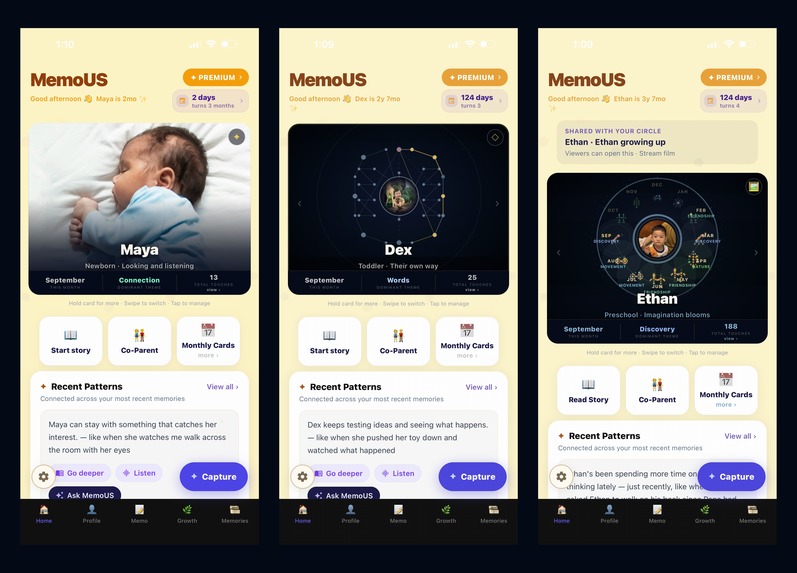
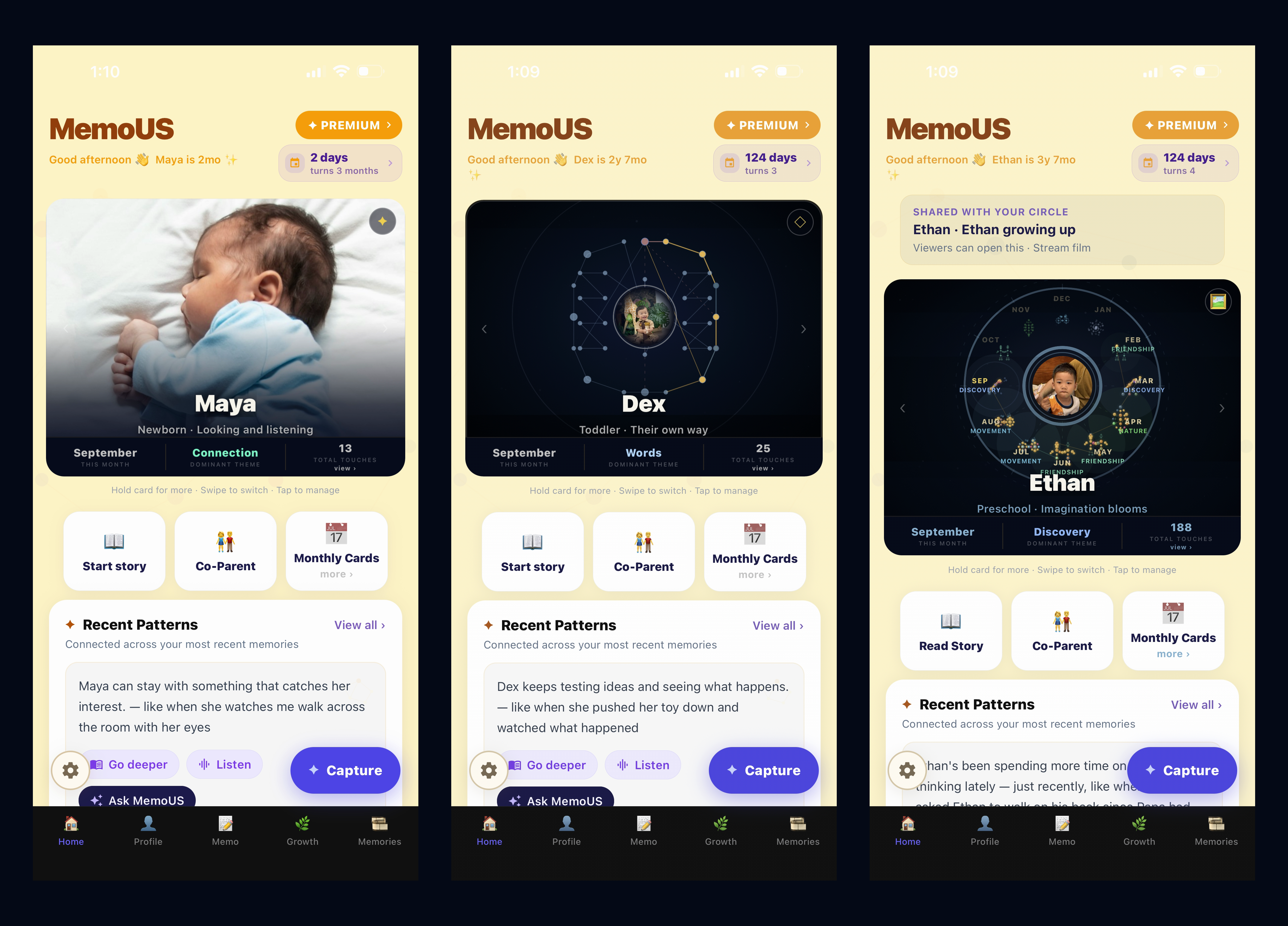
Grows with the child: newborn photo, toddler's first stars, preschooler's full year.
-
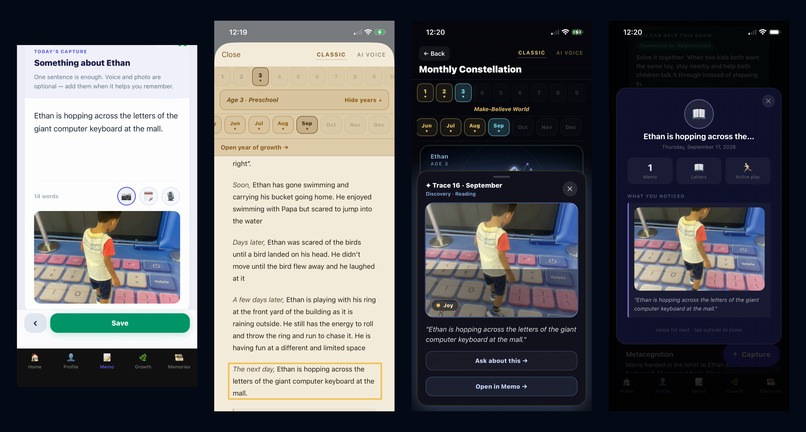
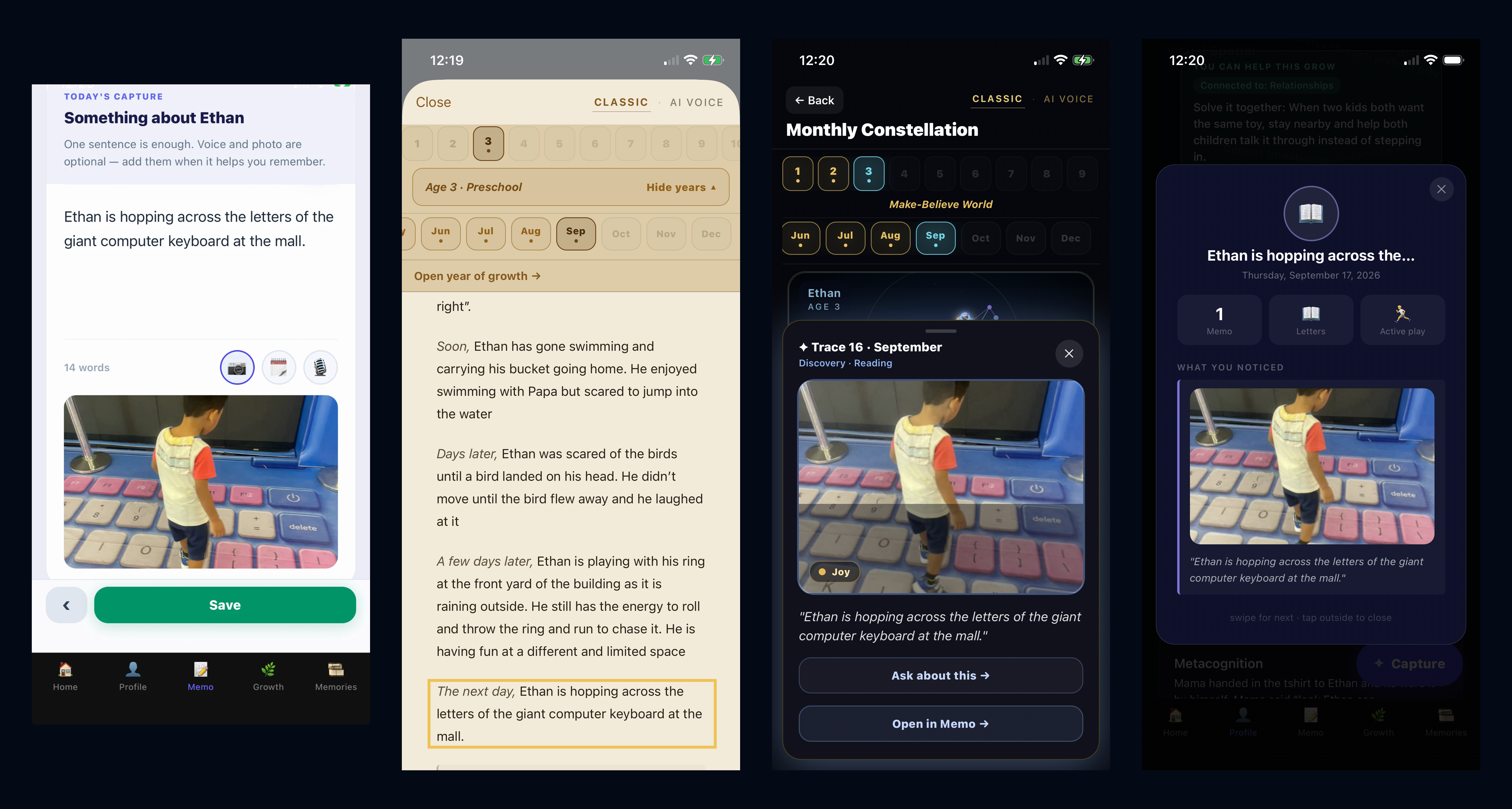
One memo, four places: capture, Life Story, constellation star, Profile.
-
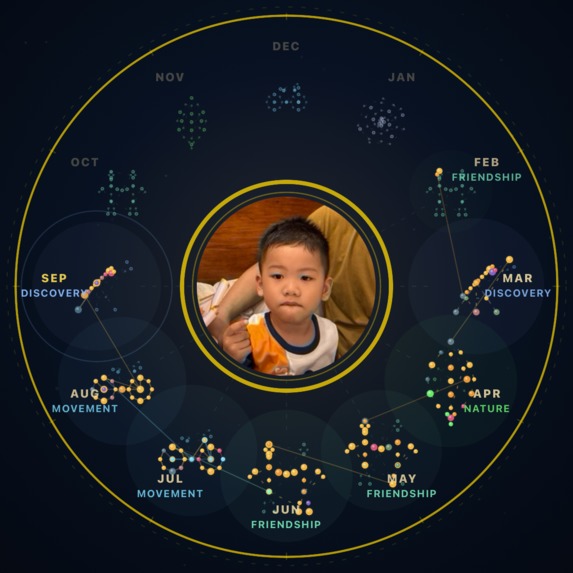
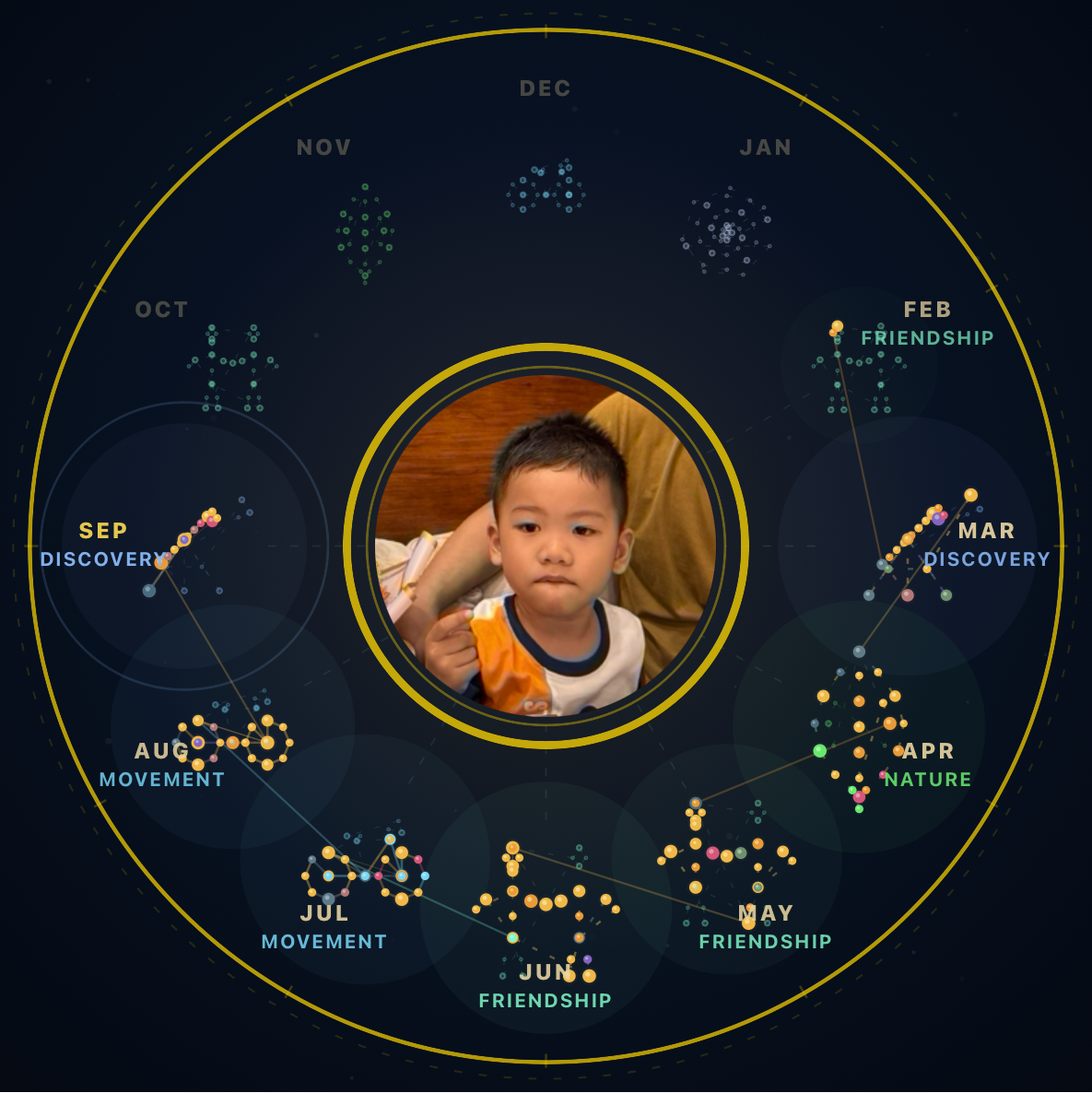
A year of Ethan. Twelve months, shaped by what captivated him. No two years are ever alike.
-
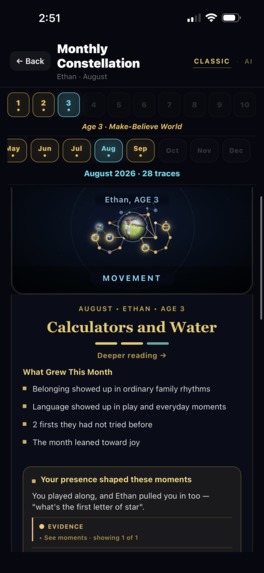
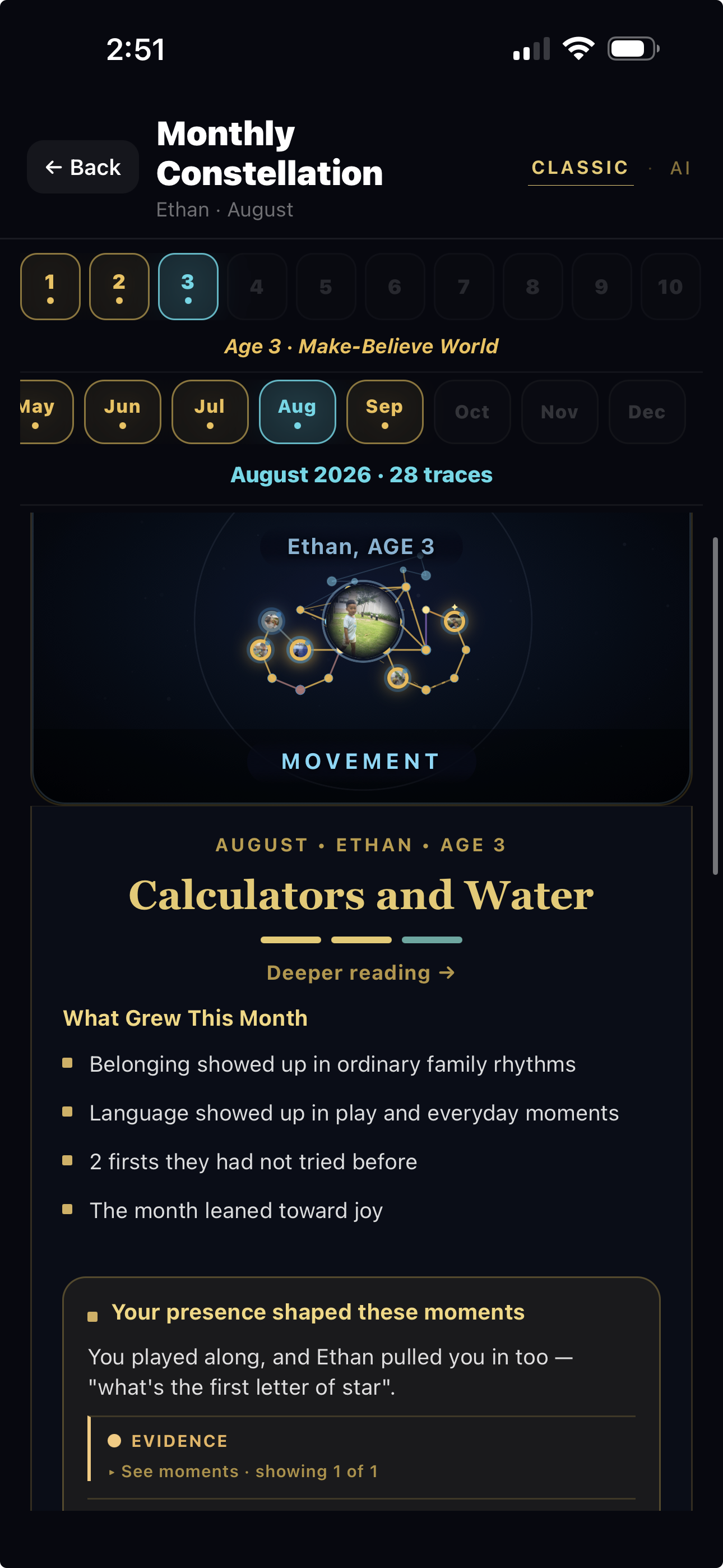
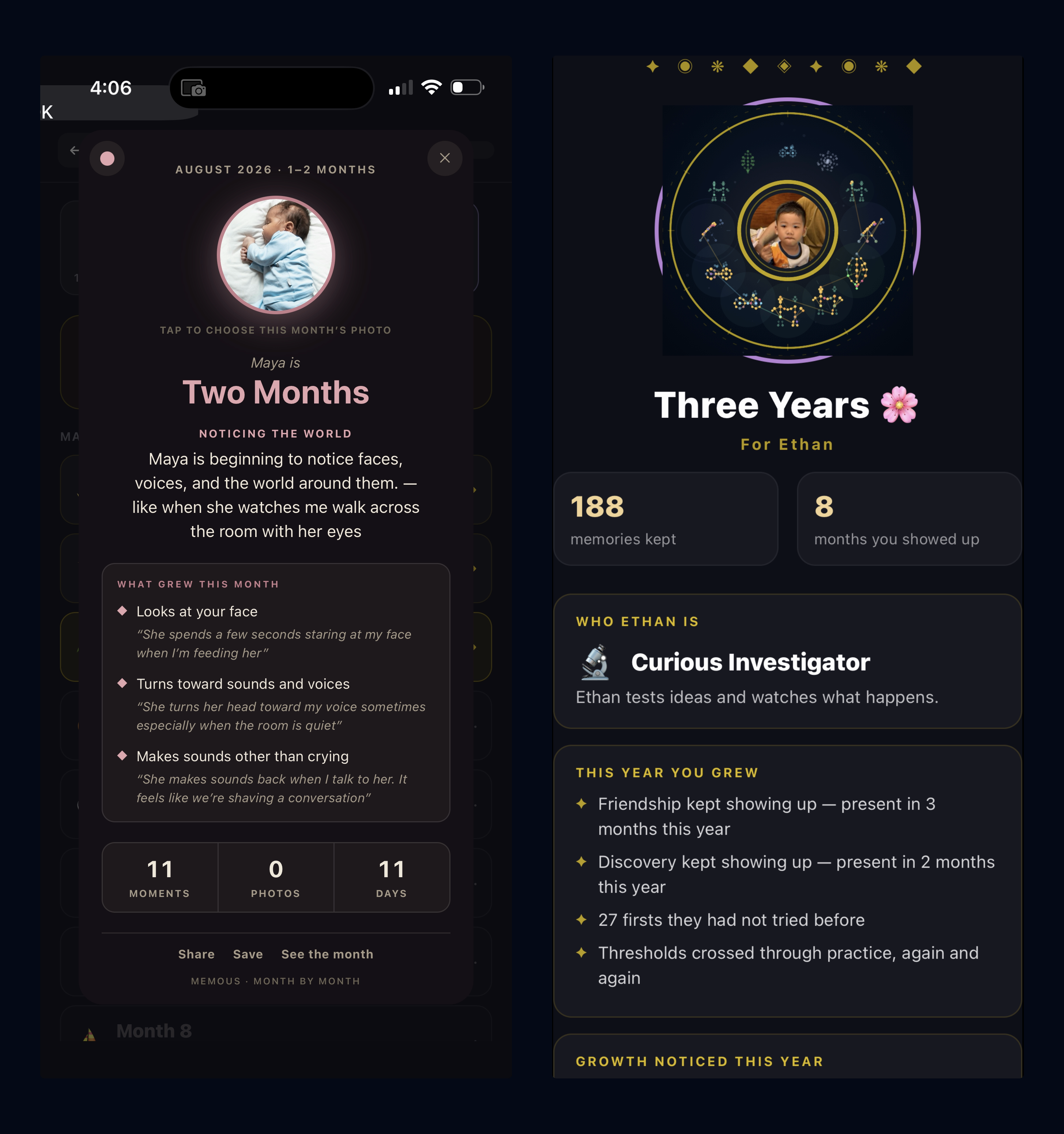
Monthly constellation: each month's pattern, what grew, and how your presence shaped it.
-
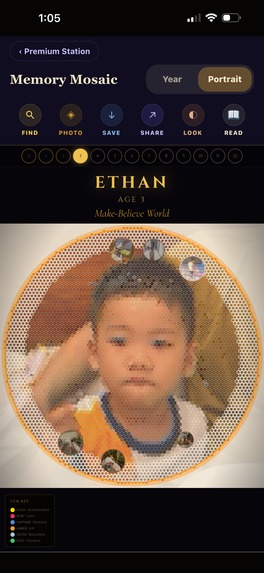
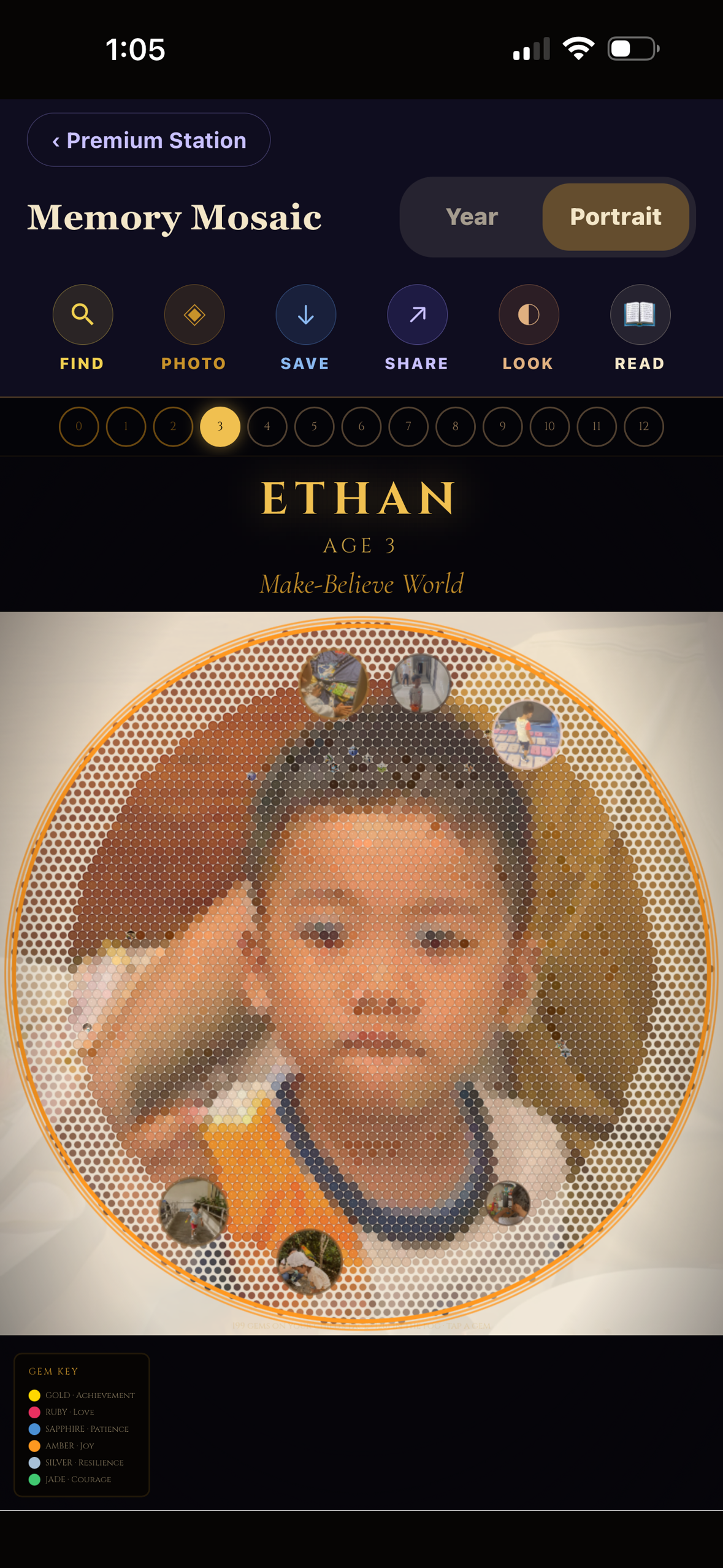
Living Memory Portrait — 4,745 places, one per day from birth to 12
-
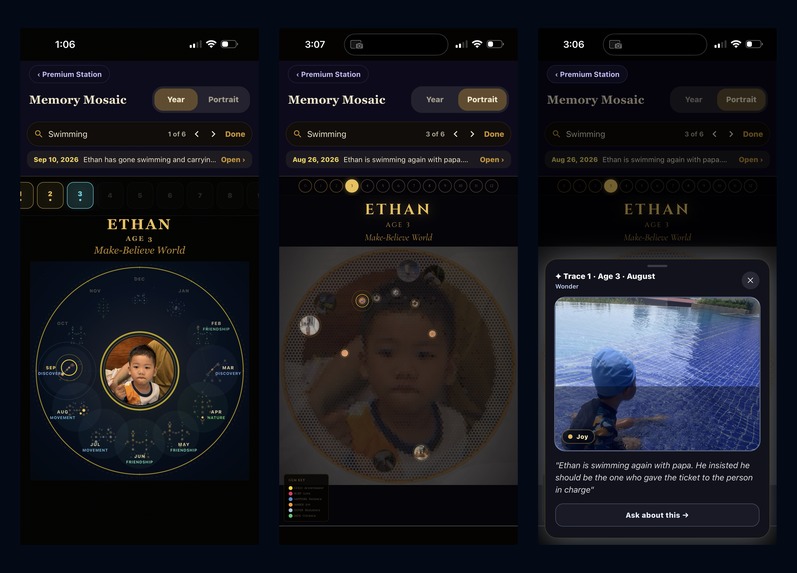
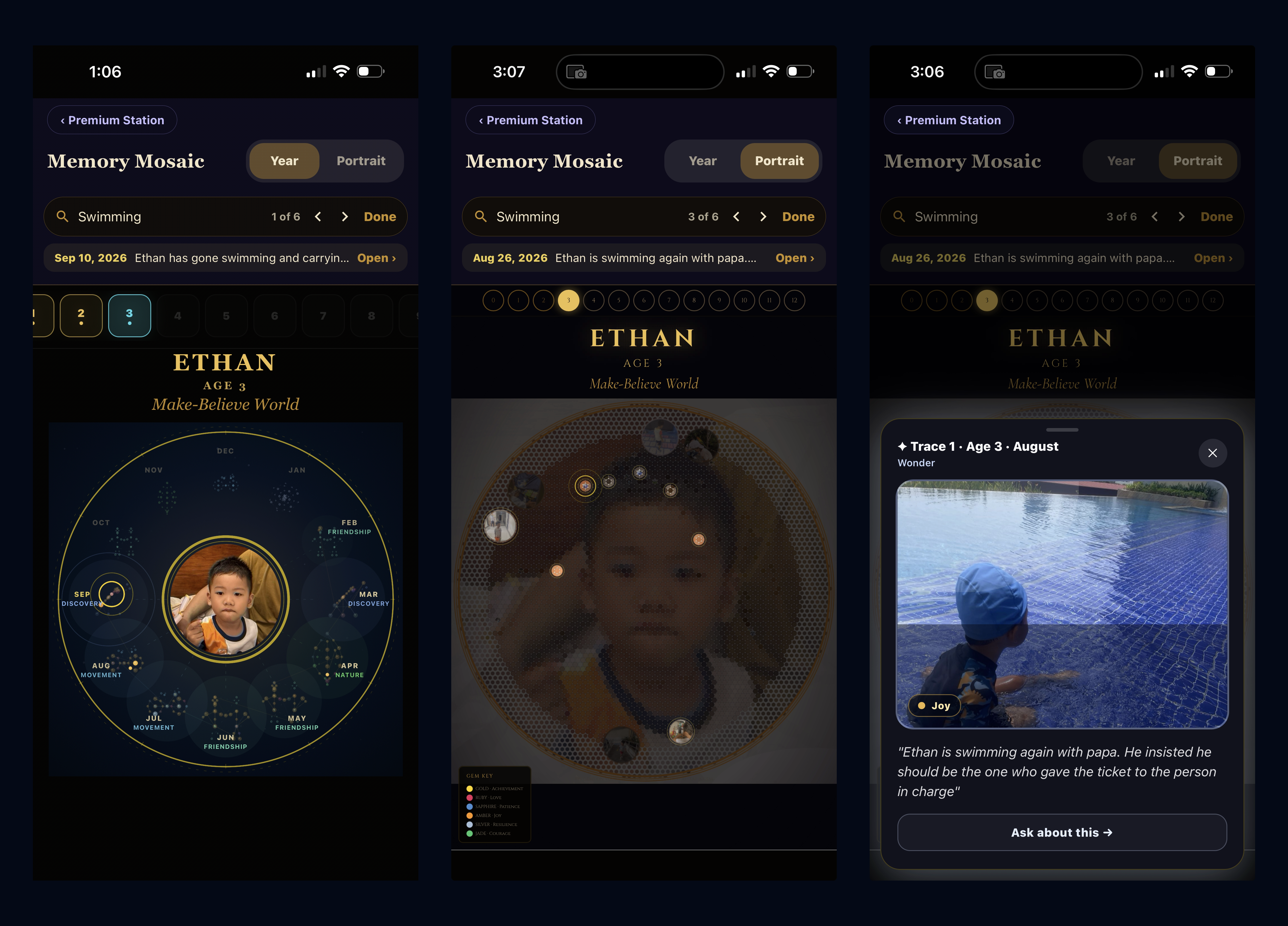
Find: type "swimming", matches light up, open the real memory.
-
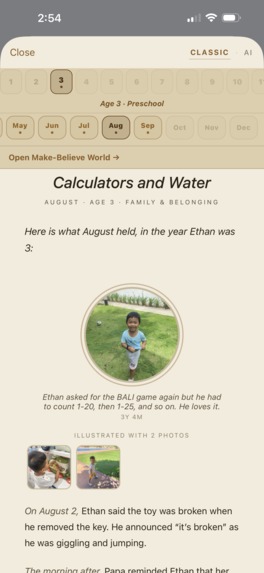
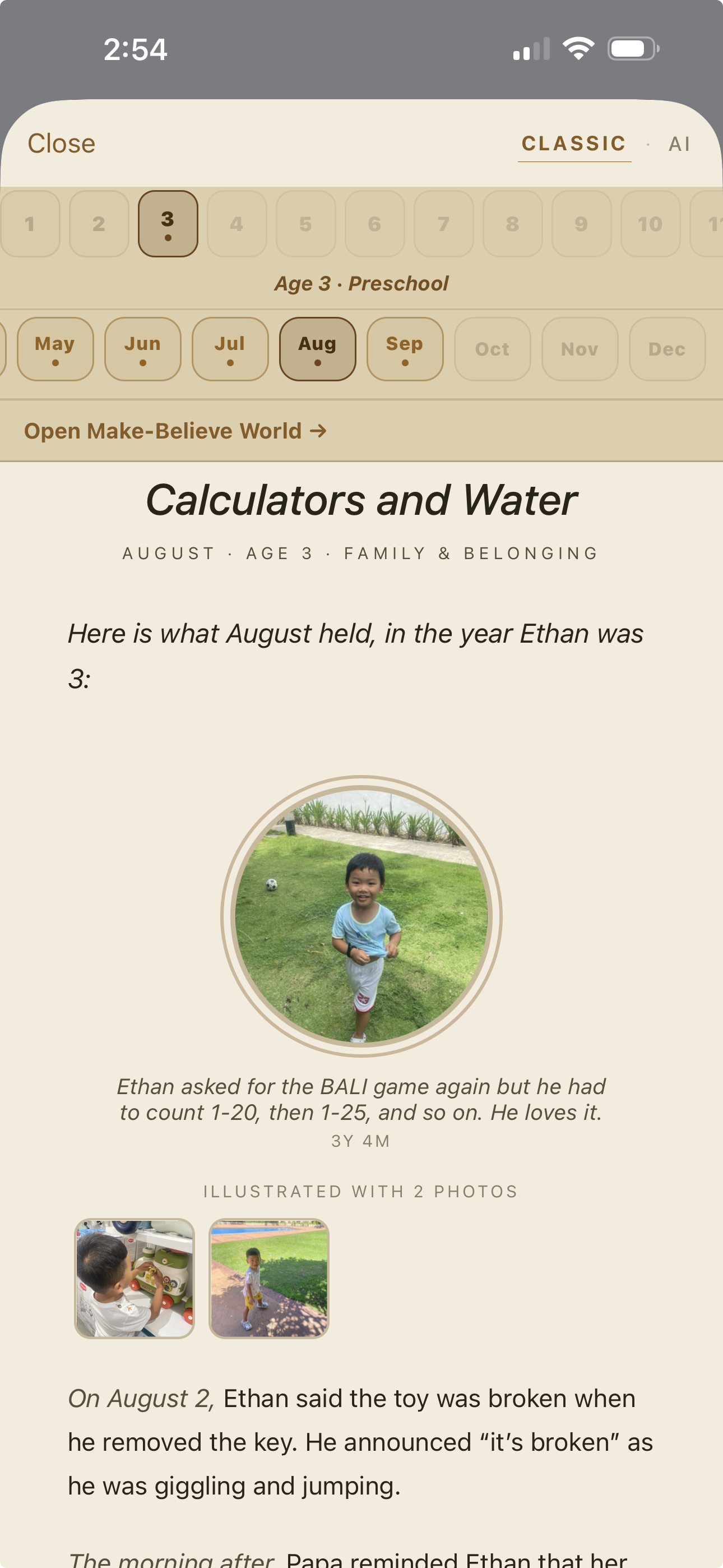
A Life Story chapter in the parent's own words. No AI writes it by default.
-
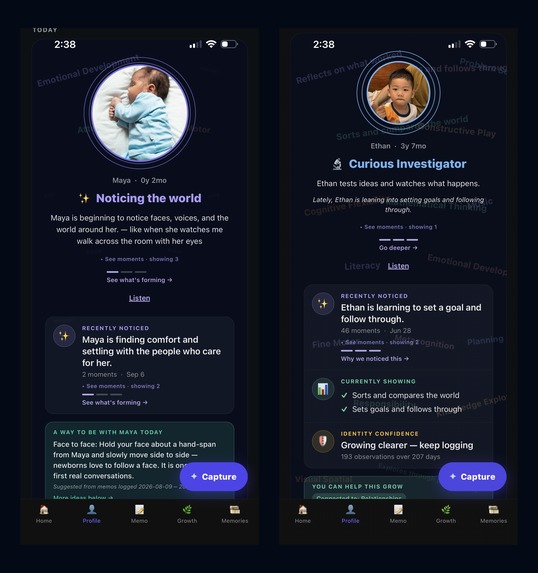
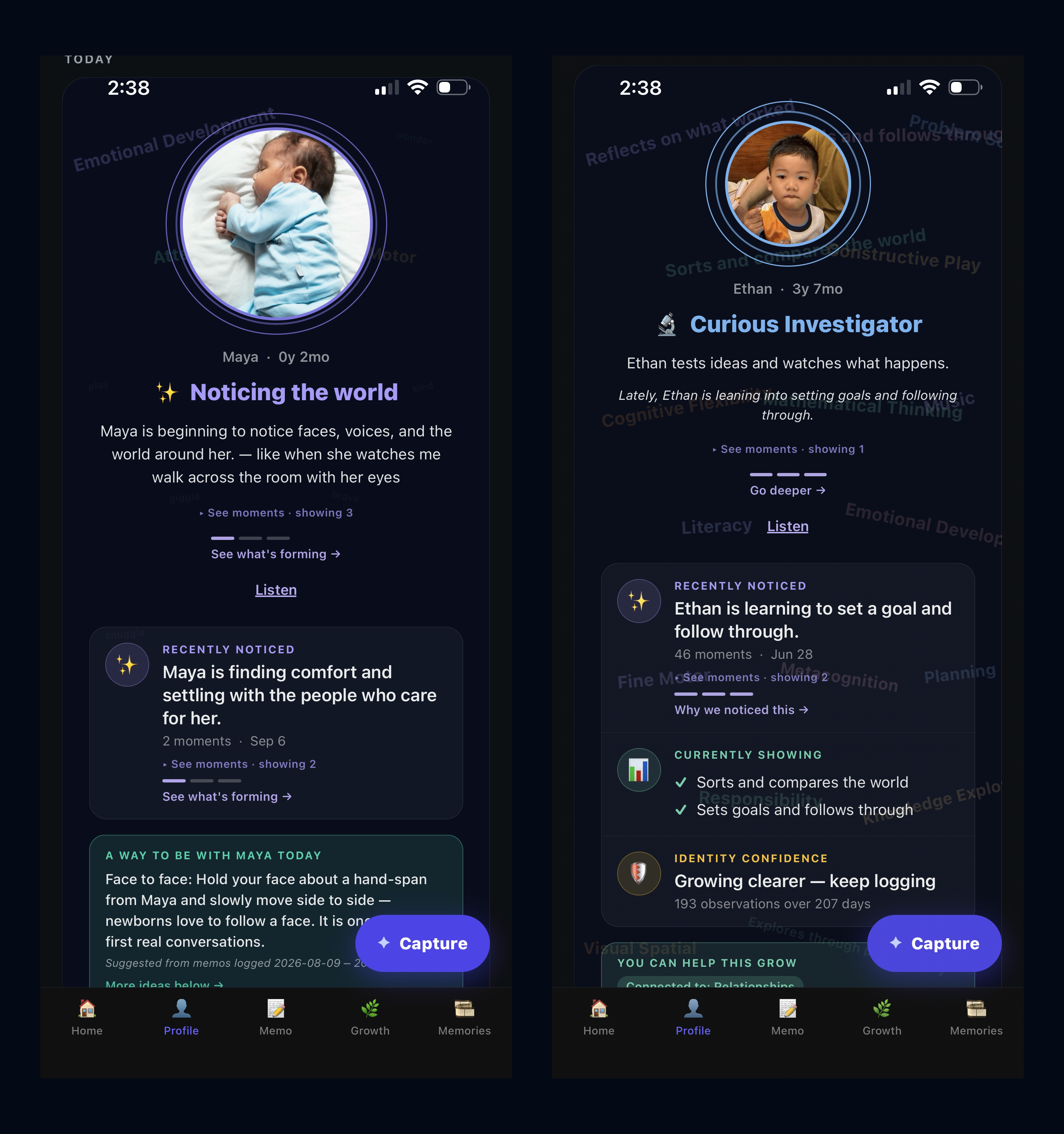
Profile at two stages: newborn vs preschooler.
-
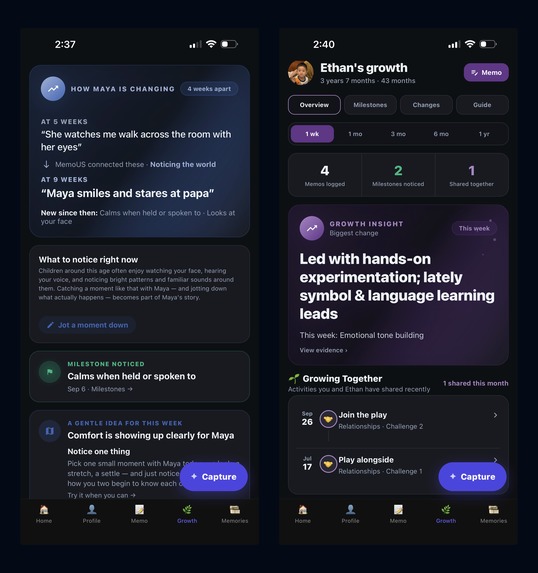
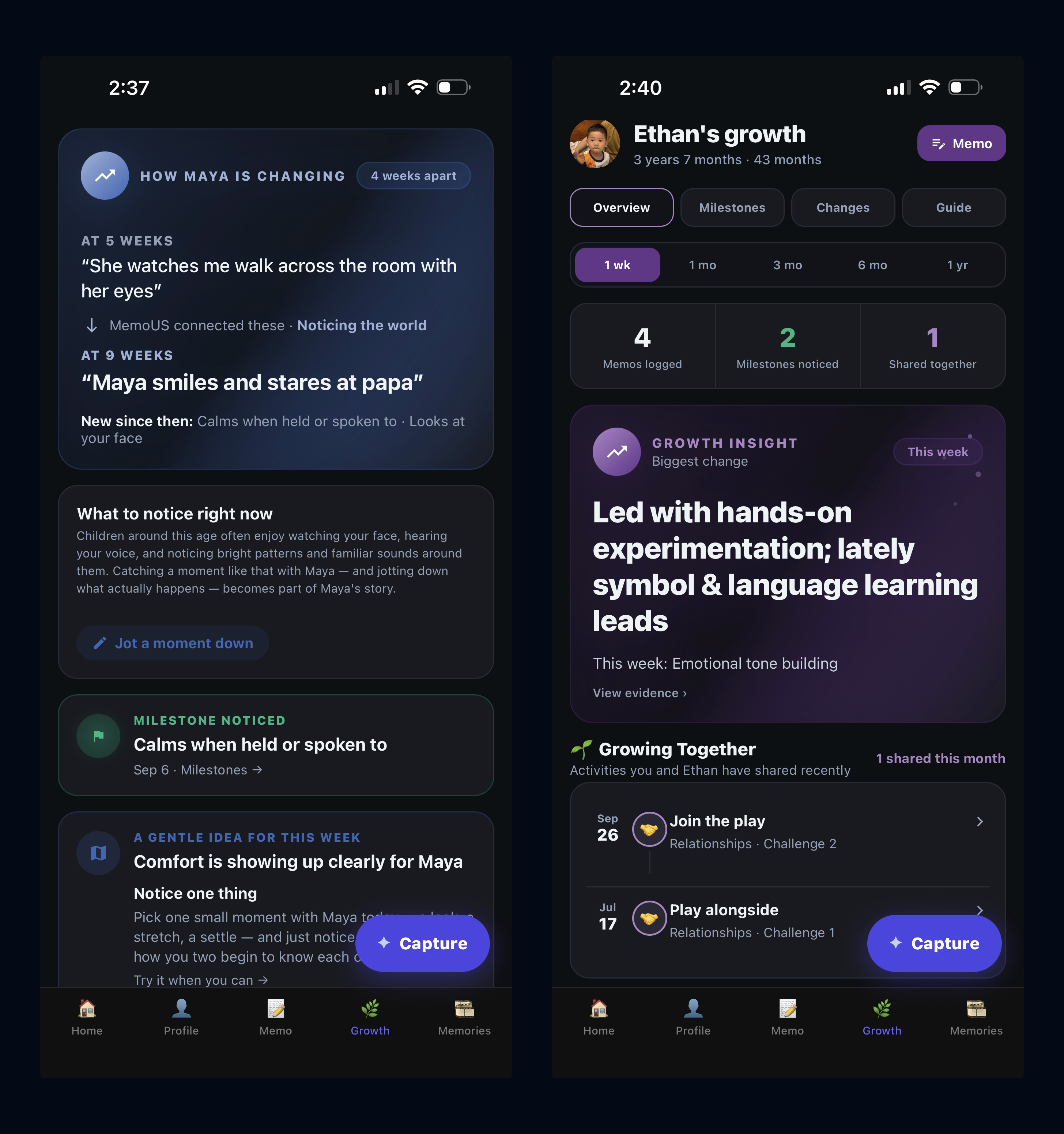
Growth at two stages: newborn vs preschooler.
-
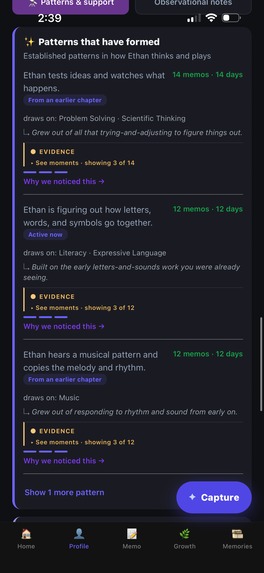
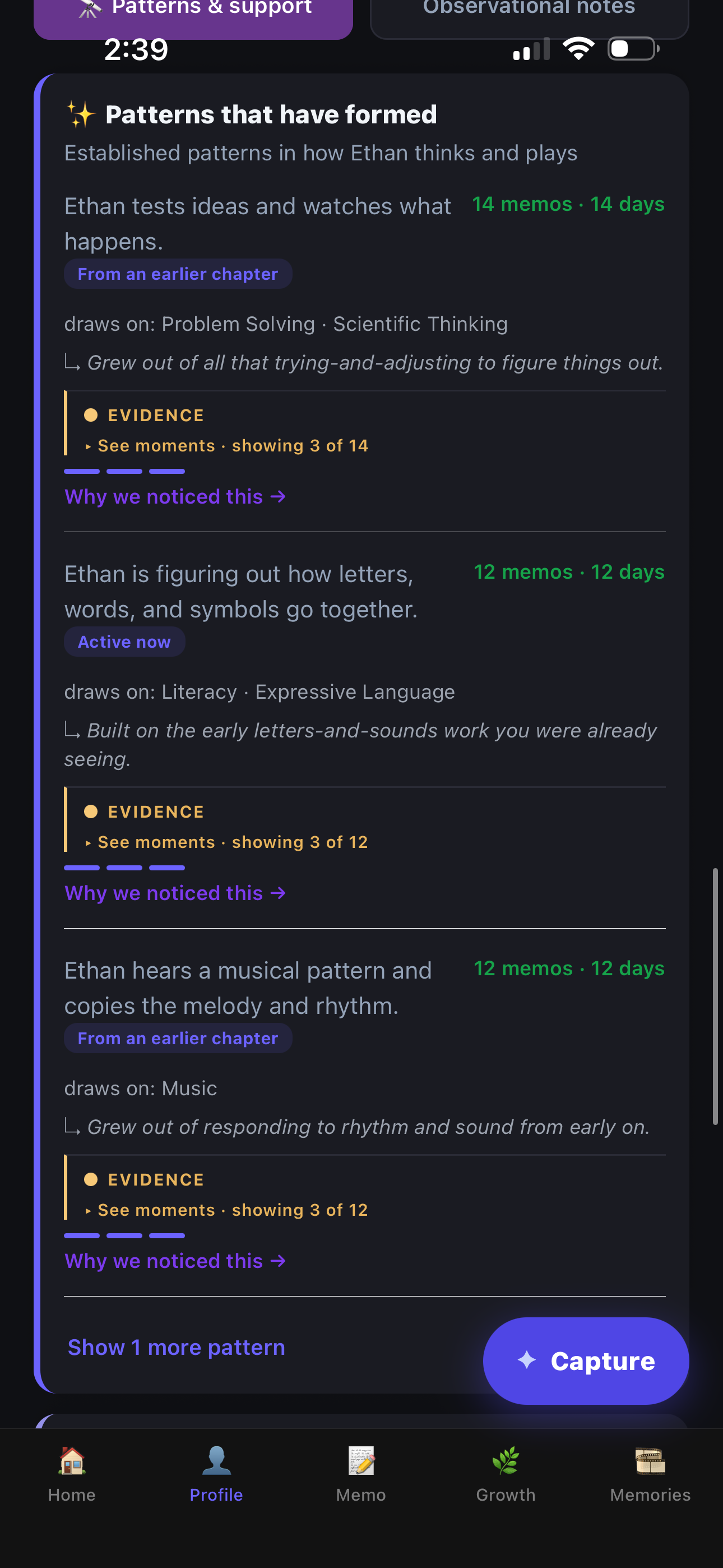
Formed over time, not from one moment: each pattern shows how often it repeated, and where.
-
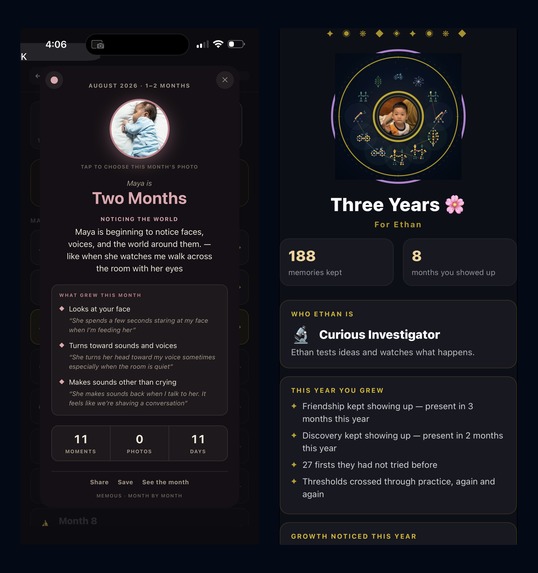
Celebrations that grow: a baby's monthly card and a birthday card.
-
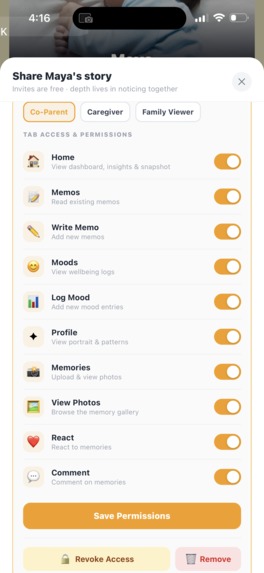
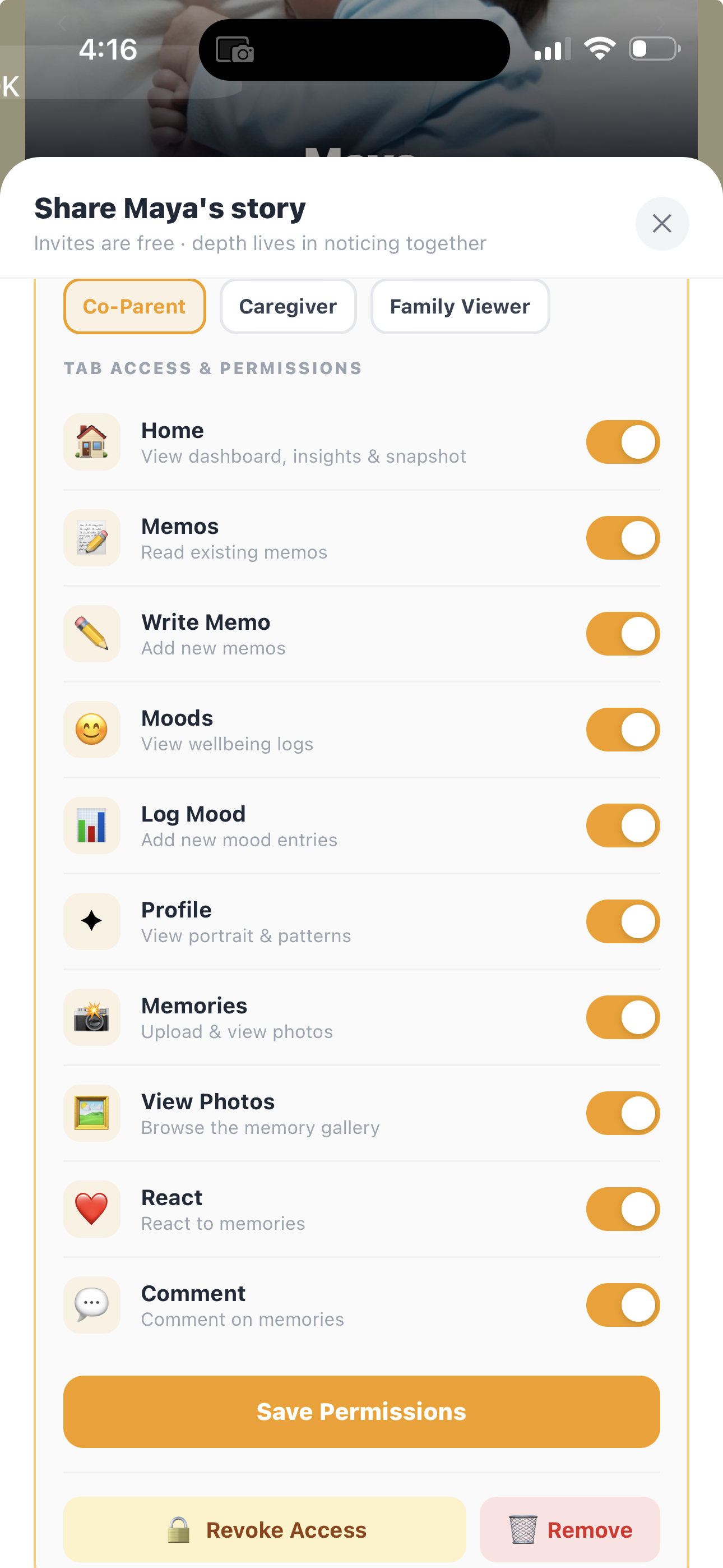
We memo together: free invites, and the parent controls who sees what.
-
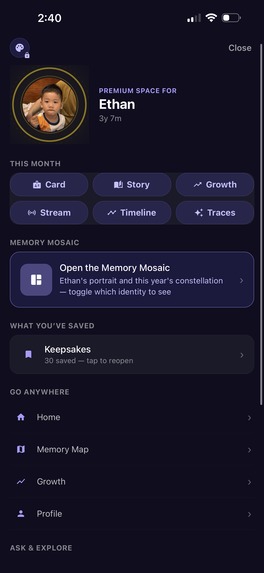
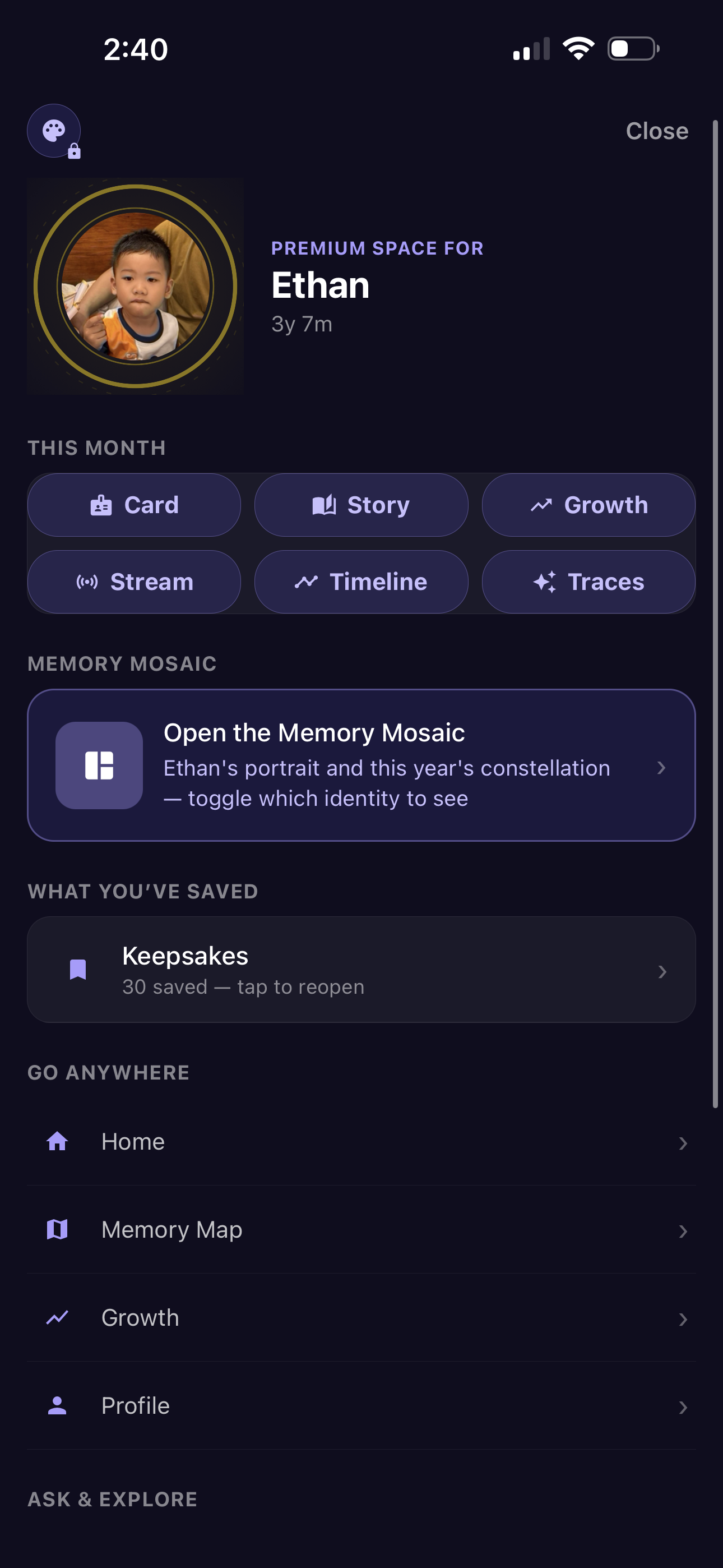
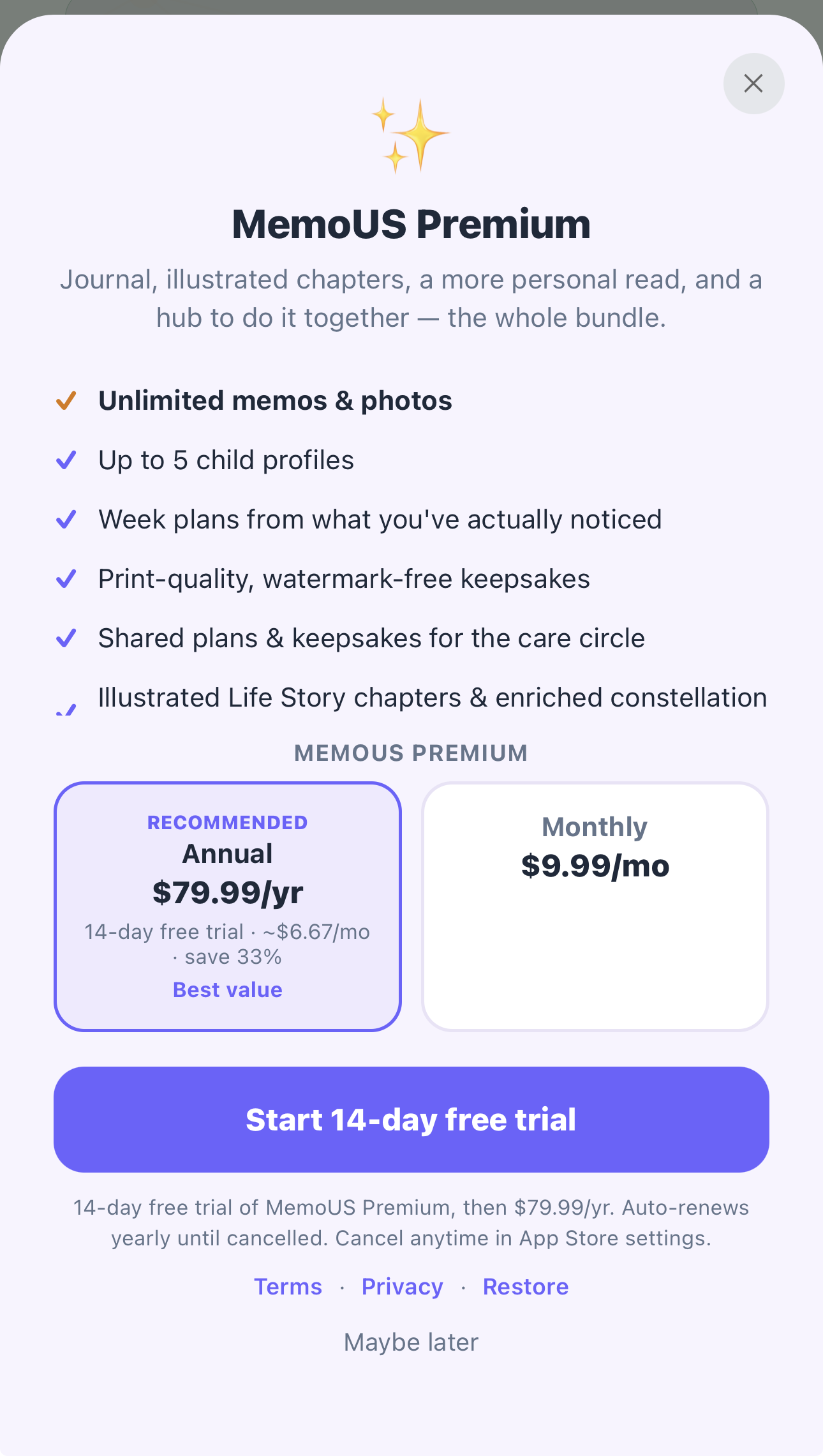
Premium Station: every paid feature in one place.
-
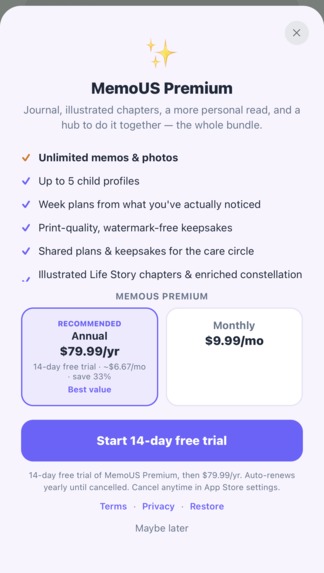
Premium via RevenueCat: $9.99/mo or $79.99/yr, 14-day trial
-
MemoUS (App icon)— we memo together.
Inspiration
I built MemoUS because my son was growing up faster than I could keep up with.
By the time he turned three, I had a sudden, sinking realization: so many precious moments had already begun to fade. The little things he said. The things he learned. The funny moments. The tiny changes that happened so gradually I barely noticed them slipping past.
And at the same time, trying to understand the complex puzzle of a child's growth — what's normal, what's next, what to do — often felt overwhelming.
My memories were running fast. My understanding was running slow.
I tried asking ChatGPT and Gemini about the things I was noticing. But they had no memory of when anything actually happened — no thread, no timeline, no sense of my child. The observations went nowhere.
So about seven months ago I decided to build the thing I wished existed: not another place to dump photos and notes, but a way to actually see the memories, the changes, the patterns, and the story behind them.
Here's the honest part: I'm not a developer. I have no programming background. What I had was a problem I cared about deeply and the patience to keep going — building it solo for about seven months with AI tools like Claude, ChatGPT, and Cursor as my pair of hands. If a parent with no coding experience can ship a real, live App Store app out of love for his son, maybe that says something hopeful about what any of us can make now.
That became MemoUS — and today it's live on the App Store.
I believe every child is a gift — and that gift has gifts of its own: talents, temperament, a way of seeing the world. MemoUS is how you gather those over time. Waiting at the end of childhood are two things you can give back: the Living Book — their story, in your words — and the Memory Portrait, with 4,745 places held open for every day from ages 0–12, slowly filled with the real moments you recorded. When they graduate from these years, what they receive isn't a camera-roll dump. It's a childhood, kept.
What it does
MemoUS turns one captured moment into a living record of who your child is becoming. You write a sentence (age-matched starter lines help on the days words don't come) or add a photo once, and that same moment becomes a star in the Constellation, a place in the Memory Portrait, a line in the child's Life Story, and evidence in their Profile.
Memo + US. US is us: we memo together. U is Understanding: real observations adding up to patterns. S is Story: the same memos composing a life story in the parent's own words.
Capture. A Capture button floats on every screen, so a moment is one tap away: a blank field in your own words, an optional photo, voice dictation, and age-matched starter lines for the days words don't come. Save it and the moment is placed at once, in its colour, in your child's story. You can also share a photo from your camera roll straight into MemoUS Capture.
Constellation. Every moment is a star, and stars connect into named patterns showing what keeps appearing in a child's memories. Each of twelve themes has its own shape and colour, so every month takes the shape of what the child was into, and months not yet lived wait as faint outlines. When I started recording Ethan at 3 years and 2 months he was endlessly curious, and his stars formed Discovery; the next month he was digging in sand and naming plants, and a new pattern formed: Nature. Each monthly card also shows Our story: how your presence shaped those moments — you played along, you asked, you showed up — each line grounded in a memo. Tap a star to open the real memory, or open Explore Traces, the child's full memo calendar, to land on one exact day.
A living Memory Mosaic. Not an archive: it grows with every entry. Every memo or photo lights a star in the Constellation or shines a gem in the Portrait, and the Portrait side holds 4,745 places — 365 days × 13 years — where each photo appears large, then settles among earlier moments. There's no waiting thirteen years for the finished piece: it starts from the child's profile photo automatically, and you can add any other photo inside the Mosaic to remake it around that picture — the memories behind it stay as they are — then save or share it right away. The profile photo itself doesn't change. Tap any place to open its memory, or use Find to type a word and watch the matching moments light up.
Life Story. Each month becomes a chapter, and twelve chapters become a Living Book, in the parent's own words. Chapters adapt to how you write: long notes stay whole, one-line notes each keep their own line, and a busy month opens its extra moments with a tap. By default no AI writes it. An optional Polish pass fixes spelling and minor grammar errors, and a separate, optional AI Story voice can warm the opening, transitions, and closing letter. Both run only when the parent chooses; neither ever adds a moment.
Profile (Understanding). Every memo is read against a fixed developmental framework — nine areas, from language and movement to play and self-care — by a constrained AI classifier that can only use a closed vocabulary, must cite evidence from the memo, and drops anything it isn't confident about. Simple, predictable rules then combine those readings over time: something seen once stays a moment, repeated across days it becomes an emerging pattern, and patterns that hold over time become a trait. This base reading always works, even if the AI is unavailable; a richer AI reading unlocks only when the evidence supports it. Every pattern shows the memos behind it, and Why we noticed this explains the reasoning in plain words.
Ask MemoUS. Ask a question about your own child and get an answer grounded in your recorded moments and their age. It also helps with everyday questions — sleep, tantrums, speech — by suggesting one small, age-appropriate thing to try, tied to what you've recorded. It names a pattern only when your memories already show one, and when they don't yet support a tip, it says so plainly instead of making one up.
Growth. Milestones appear only when a memory genuinely shows the behavior, never from a checklist. A weekly plan suggests what to practise next from your child's age, emerging themes, and what you've already tried — always explainable from your own observations. With little data, it offers a shorter plan and gentle "what to notice" guidance instead of padding the week.
Celebrations. Touch celebrations — the First Fifty, a Hundred Touches — reward the parent's noticing as moments add up; monthly keepsakes mark a baby's months, and birthday keepsakes mark the years.
Memories. A Memory Map of 13 year-bubbles that zoom into months and weeks, plus timelines, slideshows, and a growth time-lapse. A Studio lets families make their own scrapbook pages next to the auto-composed patterns.
Late entries and old photos. Write a memo for any past date, or bring old photos in bulk: Memories → Add photos takes up to 50 at a time, not one by one, and each is dated to the day it was taken. The Constellation, Memory Portrait, and Memories update automatically. When a photo is entered as a memo, it also joins the matching Life Story chapter. So a parent with years of diaries or camera rolls can bring a whole childhood in.
Grows with your child. Two separate axes. By age and data: Home opens on what's honest for right now (a newborn's photo, one living month, then the full year), and Profile and Growth shift their language, colour, and cards from newborn through preschool and beyond. By evidence: understanding matures slowly, from moment to emerging pattern to trait. Age shapes the experience, but it never feeds the Understanding.
We memo together. Invite a co-parent to capture alongside you and family viewers to follow, react, and comment — all under the primary parent's control.
Honest by design. MemoUS never fabricates a memory, milestone, or image. A photo caption can appear in Memories, the Constellation, and the Life Story, but it never counts as a developmental observation. A child should be understood from what parents actually observe, not from what an algorithm invents.
How we built it
I built MemoUS solo, as a parent with a full-time job and no programming background, with Claude, ChatGPT, and Cursor as development partners — and a lot of persistence.
The app is React Native + Expo (TypeScript) on Firebase (Firestore, Cloud Functions, App Check), with Google Gemini powering the AI and RevenueCat handling subscriptions. Gemini is used in two carefully bounded ways: a constrained classifier that turns each memo into evidence-cited developmental signals, and an optional richer reading that only unlocks when the recorded evidence supports it.
The hard part wasn't any single feature. It was the discipline underneath: making one memo flow into a star, a portrait place, a chapter, and a profile at once, while holding a hard line on what's real.
Challenges we ran into
The biggest challenge was life. I was working full-time and caring for my son, so most of the building happened after he fell asleep — for months, on a few hours of sleep a night.
I also had to learn the language of building: git, Firebase, "push to origin." ChatGPT was especially good at explaining those so I could keep moving. Naming was another wall: my first name, KidTrack, was taken, which is how MemoUS — Memo + US — emerged, a name that means the product. I learned to spend AI carefully too: ChatGPT and Claude for brainstorming, Claude for architecture and review, Cursor for implementation, because tokens run out fast if you use every tool for every job.
And I learned the parts nobody warns you about: App Store review, subscriptions, and getting RevenueCat wired correctly.
The hardest thing I built was the Constellation and the Memory Portrait, and it took over two months. The first idea was only a portrait: each year would reveal one more part of the child's face, until the 13th birthday completed it as a masterpiece. After a month the result still wasn't good enough, and I almost gave up. Then the constellation idea came: a sky where every memory is a star, alive, beautiful, and meaningful. It took another month, but when it was done it was clearly art, and it became the heart of MemoUS. Later I realised the portrait didn't need to reveal the face year by year to feel alive. The child's own photo does that, and turning it into a mosaic of real photos made it more alive still. That's why the Constellation and the Memory Portrait share the same span: 4,745 days, one for every day from birth to the 13th birthday.
The hardest decisions were about restraint: choosing not to let AI invent memories or insights, even when it would have been easier and flashier.
Accomplishments that we're proud of
Six months after I started, MemoUS went live on the App Store — a real, working, monetized app built solo by a parent with no development background.
But the accomplishment I care about most: I set out to keep my son's childhood before it faded, and it's working. Ethan's constellation has more than 185 moments, and his year has taken its own shape month by month: Discovery, Friendship, Nature, Movement. His Profile is starting to show real patterns — glimpses of who he is becoming, each one backed by memos I wrote.
And I built it honestly: no AI-generated images, no recreated memories, and his story in my own words.
What we learned
You no longer need to be a traditional developer to build something real. A problem you care about, AI as leverage, and the stubbornness to keep going can be enough to ship.
Restraint is a feature. Refusing to fabricate, and keeping data honest at the source, made the product more trustworthy, not less capable.
Launch taught me who MemoUS is for. The first version reflected the child I built it around: my three-year-old. After launch, my Facebook posts reached my wife's friends — one still pregnant, one a new mother — and they started asking her about MemoUS. So she tried it properly herself, and told me plainly: too many cards, and she couldn't tell what it was really for. She expected a baby app or a milestone tracker, but MemoUS is for every age. It clicked: a new parent was seeing everything built for an older child. She also said the Home screen looked too dark: a near-black constellation with no stars lit. That produced two of MemoUS's core ideas. Age-adaptive: each stage shows what belongs to that child, in its own language and look. Progressive: the app reveals more as the child grows and the evidence builds. It's why a newborn's Home now leads with their photo, and a child with only a few memos sees one living month instead of a year of empty stars.
Even before that redesign shipped, my wife told me her friend — the new mother — had downloaded MemoUS and started using it for her baby, on a version that wasn't yet designed for newborns. I've never spoken to her about it; she found her own way in. That was the proof I needed that it wasn't only something that made sense in my head.
What's next for MemoUS
The immediate challenge is reach: getting MemoUS in front of more parents who feel what I felt.
After that: deeper understanding for older ages, richer celebrations (monthly recaps, time capsules), a public Android release (it's already in Google Play testing), more languages (the app is built for localization; Filipino and Japanese come next after English), and stronger collaboration for families. On the business side, a three-tier ladder — Free, a keepsake-focused Essential tier, and Premium — so every family finds a level that fits. And a printed Living Book — a child's biography in the parent's own words, as a physical keepsake, and the first of a prints-and-gifts line beyond the subscription. My first one will be Ethan's fourth-birthday gift.
The long-term goal is for families to have one home for both the memories and the understanding, instead of stitching a child's story together across a dozen apps — shared by the parents, grandparents, and everyone who cares for that child.
Through all of it, the rule doesn't change: a child's story stays grounded in the family's own words and real moments. Never fabricated.
MemoUS — we memo together.
Built With
- app-check
- chatgpt
- claude
- cloud-firestore
- cursor
- eas
- expo-router
- expo.io
- firebase
- firebase-app-check
- firestore
- ios
- react-native
- react-native-reanimated
- react-native-skia
- react-native-svg
- react-native-webview
- revenuecat
- typescript


Log in or sign up for Devpost to join the conversation.