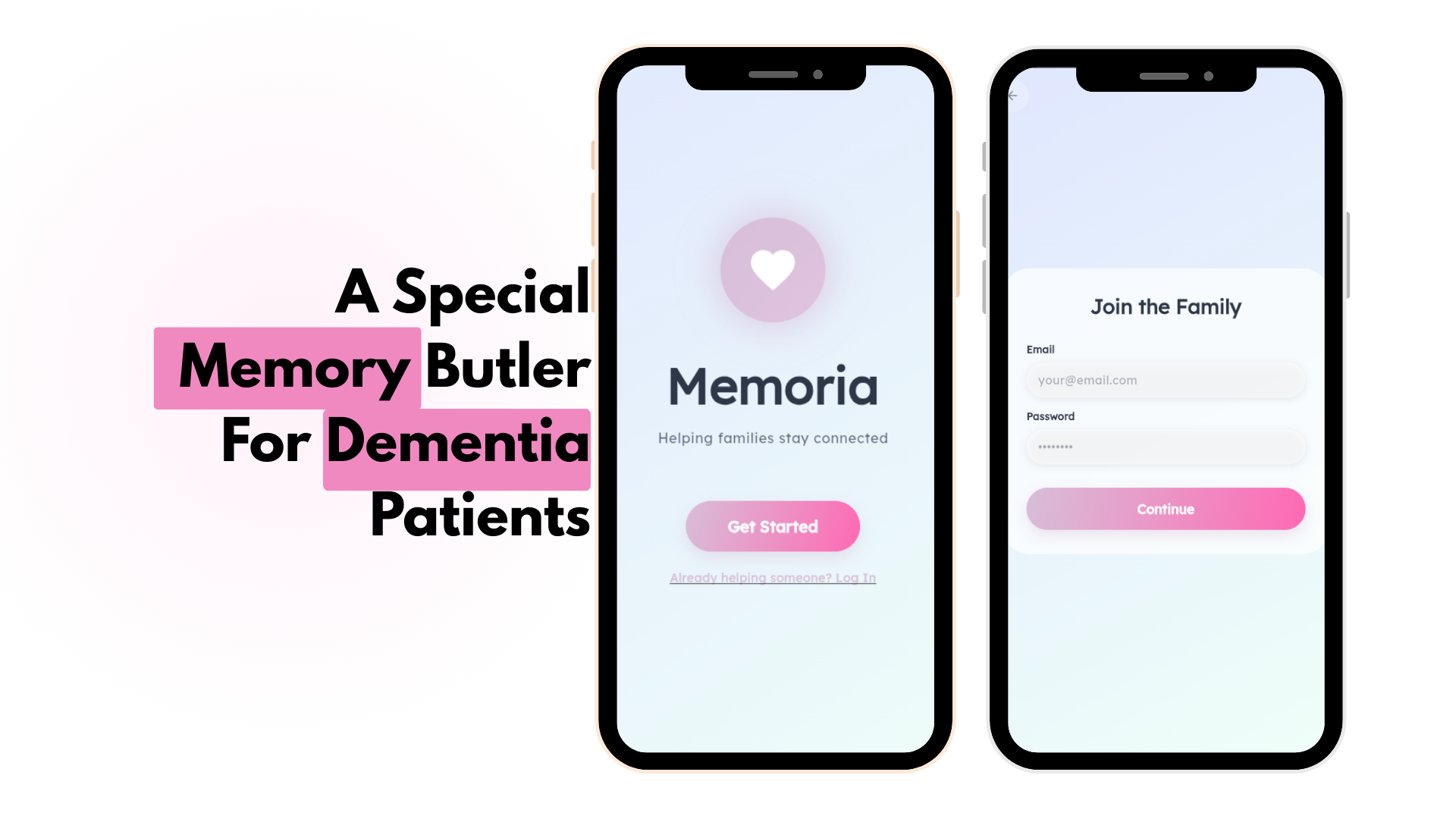
Inspiration
We wanted to make something that is not just a "good-to-have" butler but a "must-have" butler. That's how we decided to do something for the people with Dementia.
Dementia gradually takes away the “everyday certainty” most of us rely on : recognizing loved ones, remembering routines, and keeping track of simple tasks. What makes it especially hard is that the patient often needs the simplest possible interaction, while the caregiver needs structure, logging, and reliability.
We built Memoria Butler to sit right in the middle:
- For patients: a calm, voice-first assistant that feels safe and easy.
- For caregivers: a memory system that stores people, moments, and routines so the patient can reconnect anytime.
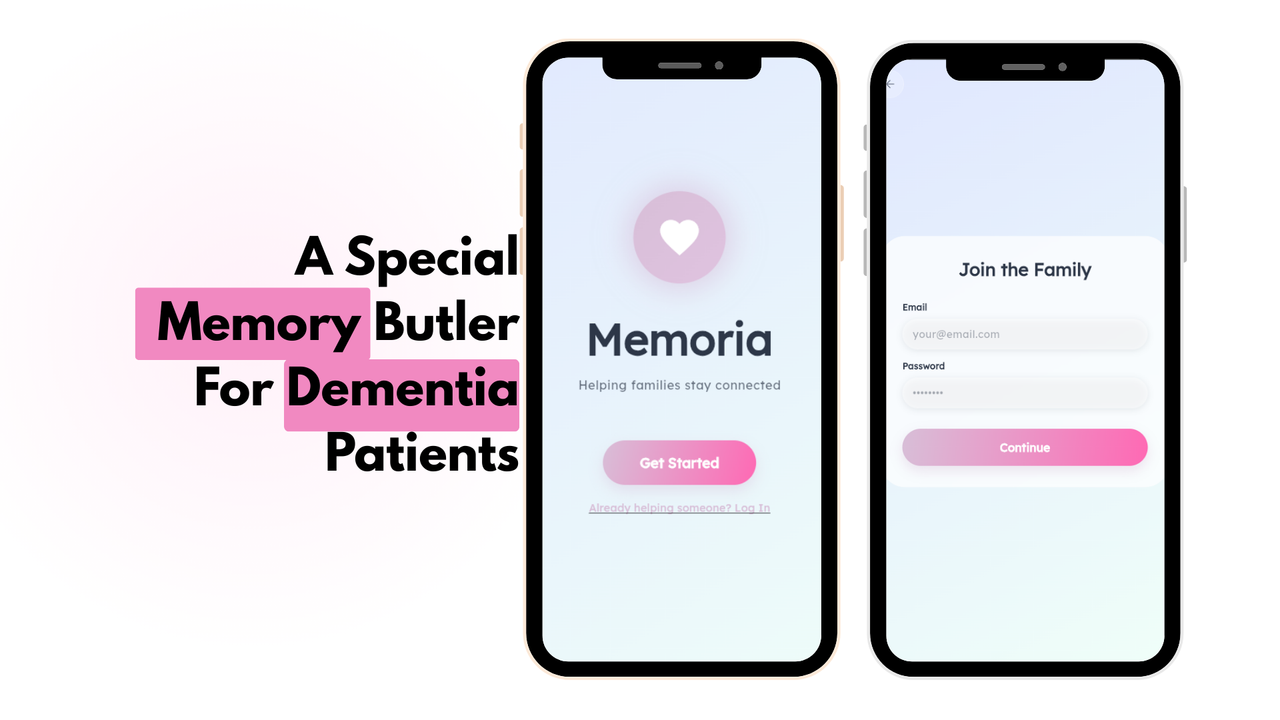
The goal wasn’t to “add more features.” It was to remove friction from the hardest moments and help families stay connected with dignity.
.png)
What it does
Memoria Butler is a Memory + Routine assistant designed for dementia patients and their caregivers.
Core features
Family Circle (Caregiver-managed)
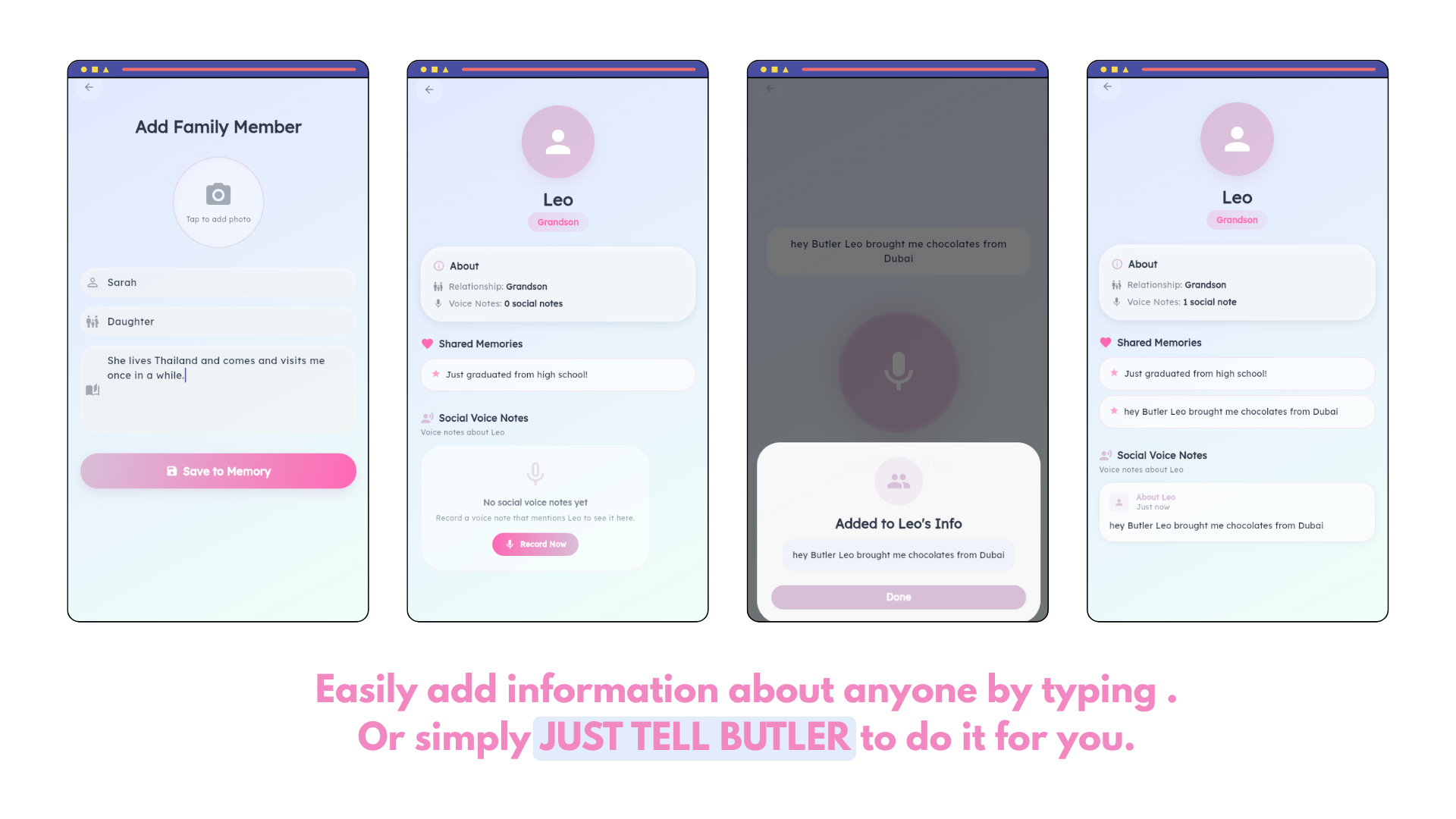
- Add family members with relationship labels, notes, and shared memories.
- Keep social voice notes like “Leo brought chocolates from Dubai” so the app can later reinforce recognition and context.
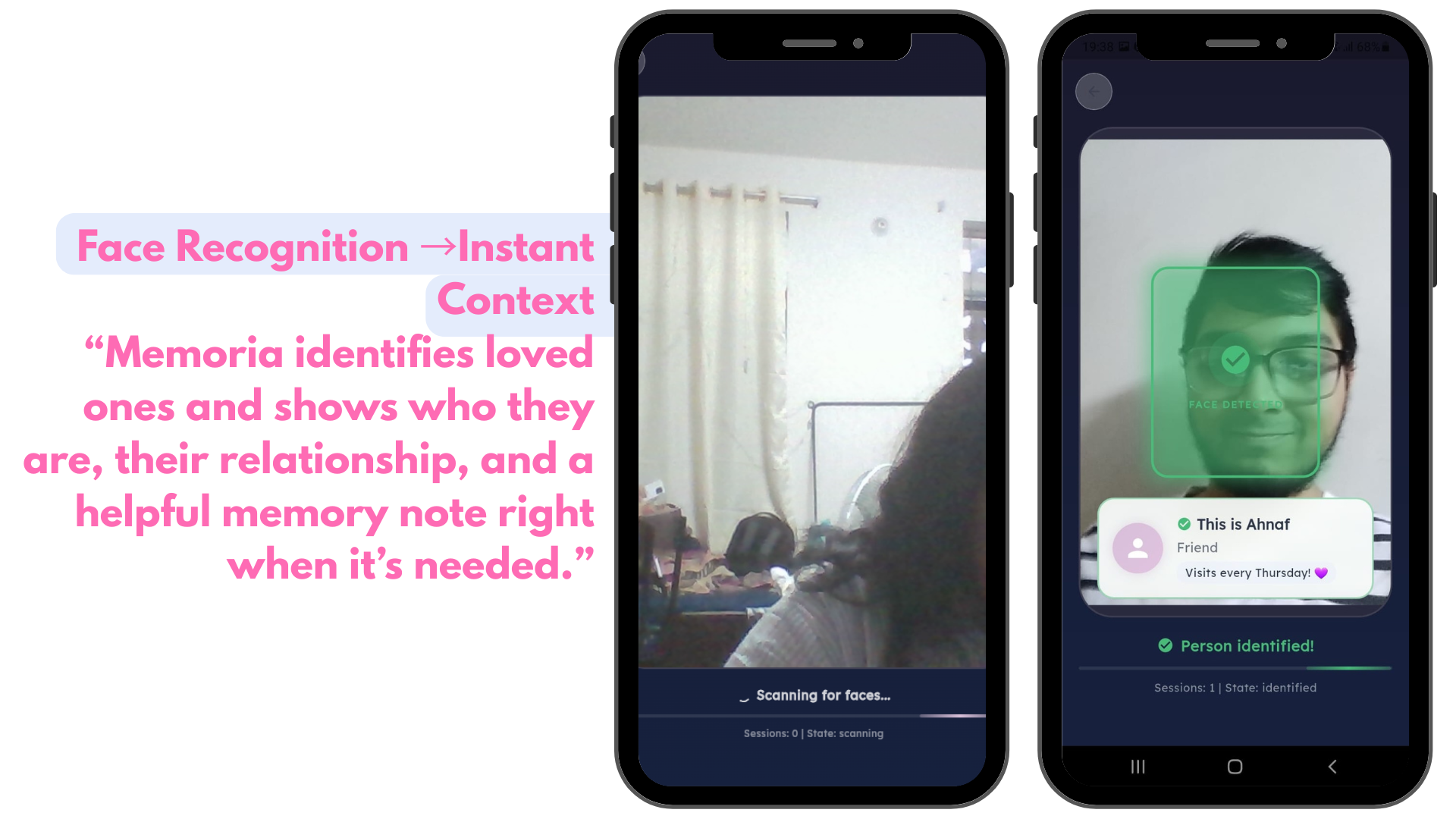
Face Recognition → Instant Memory Recall
- When the patient recognizes/scans a person, Memoria instantly shows:
- Who they are (name + relationship)
- Recent shared memories
- Helpful context notes (caregiver-entered or voice-captured)
.png)
Voice-first “Butler Mode”
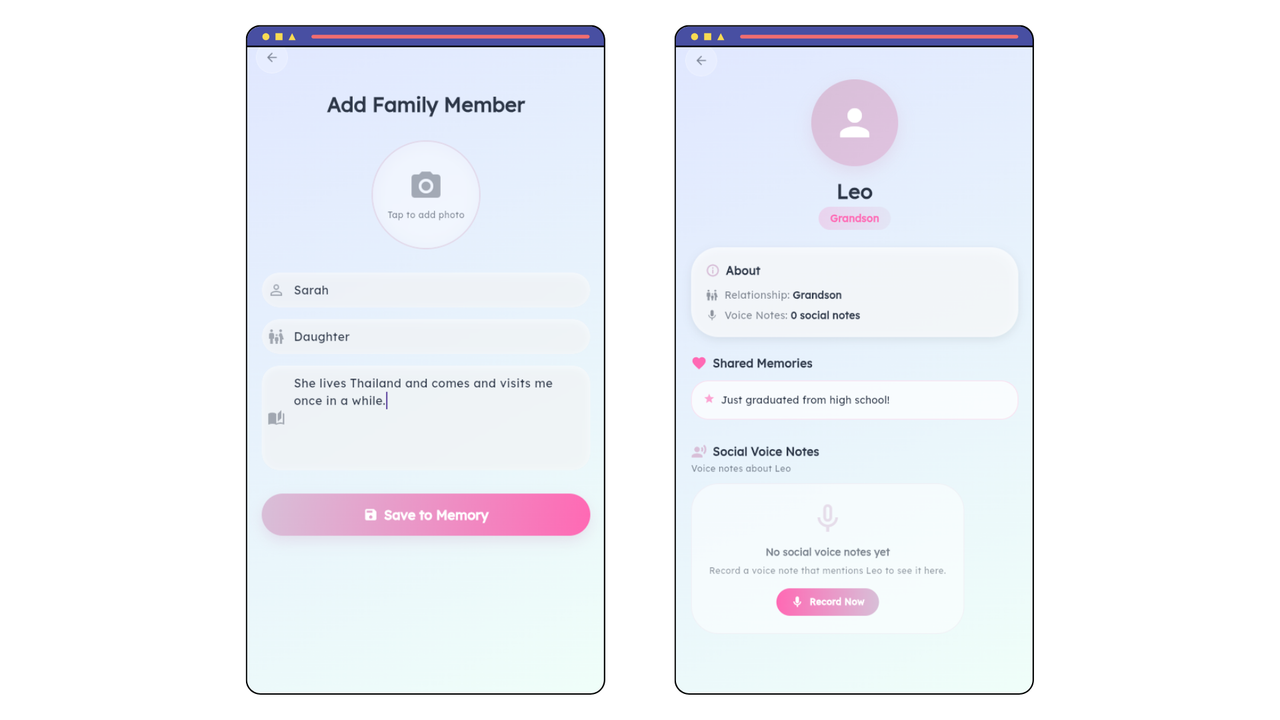
.png) Easily add information about anyone by typing or JUST TELL THE BUTLER to do it for you.
Easily add information about anyone by typing or JUST TELL THE BUTLER to do it for you.
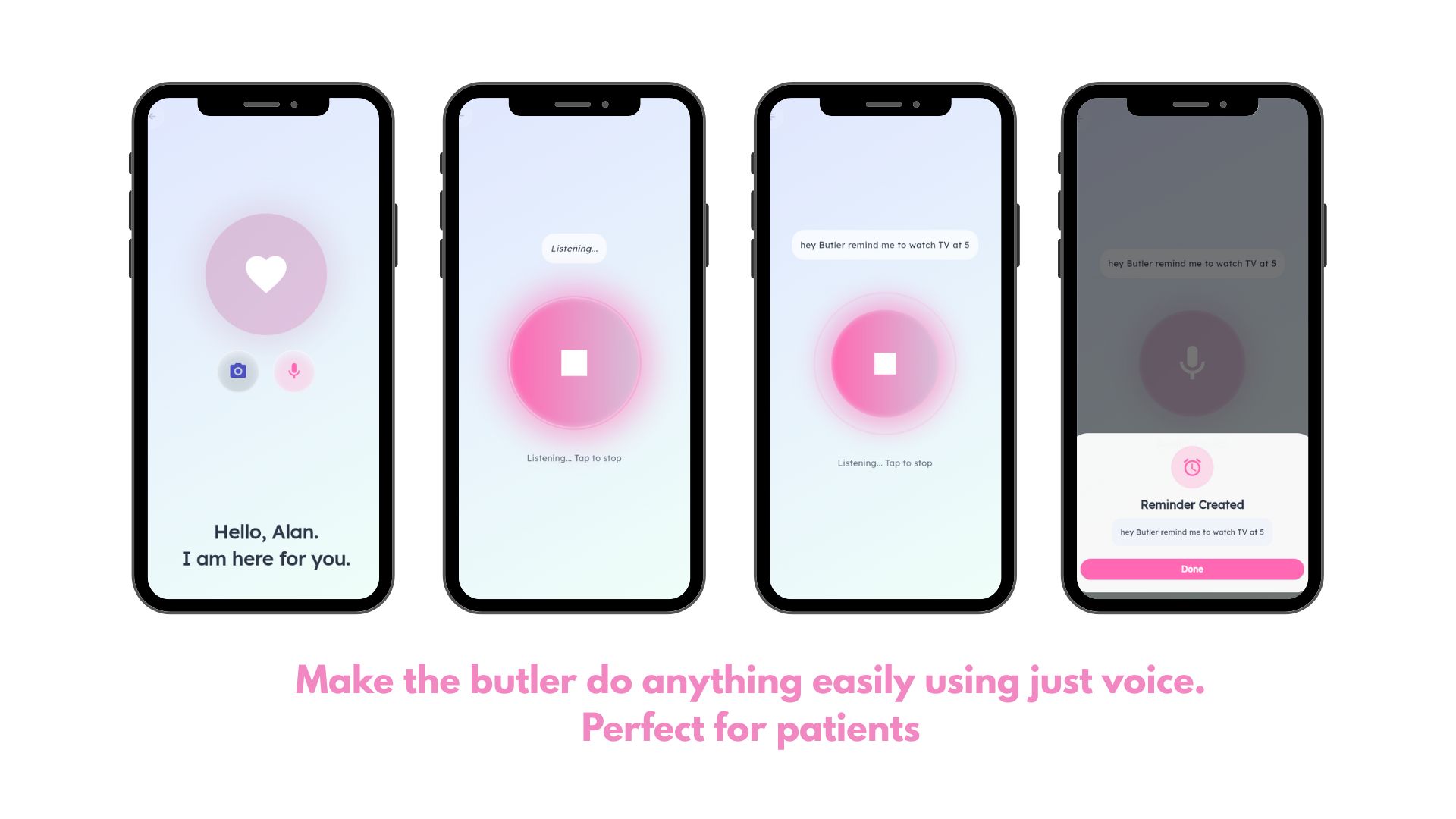
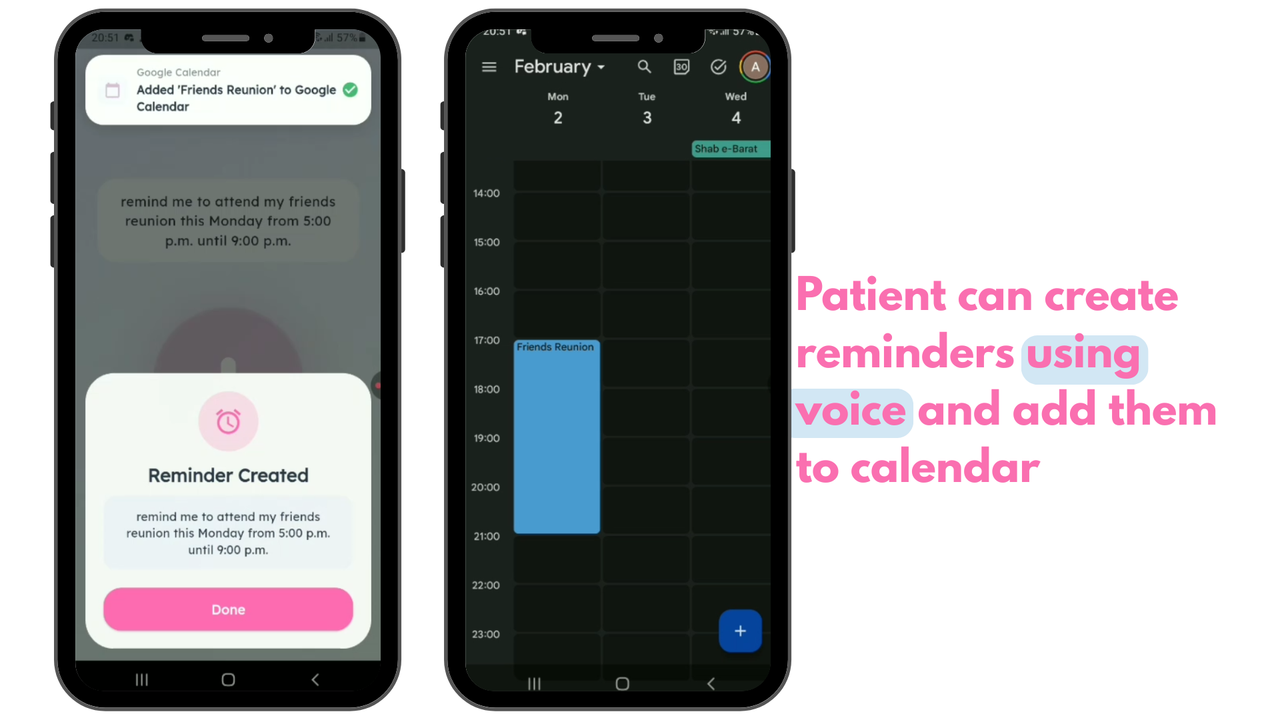
Patients can say simple commands like:
- “Remind me to watch TV at 5.”
- “Add a note: Sara visited today.” and the butler will recognize the command and carry out the task accordingly.
- The UI is intentionally minimal: large buttons, clear states (“Listening…”), and confirmation screens (“Reminder Created”).
.png)
.png)
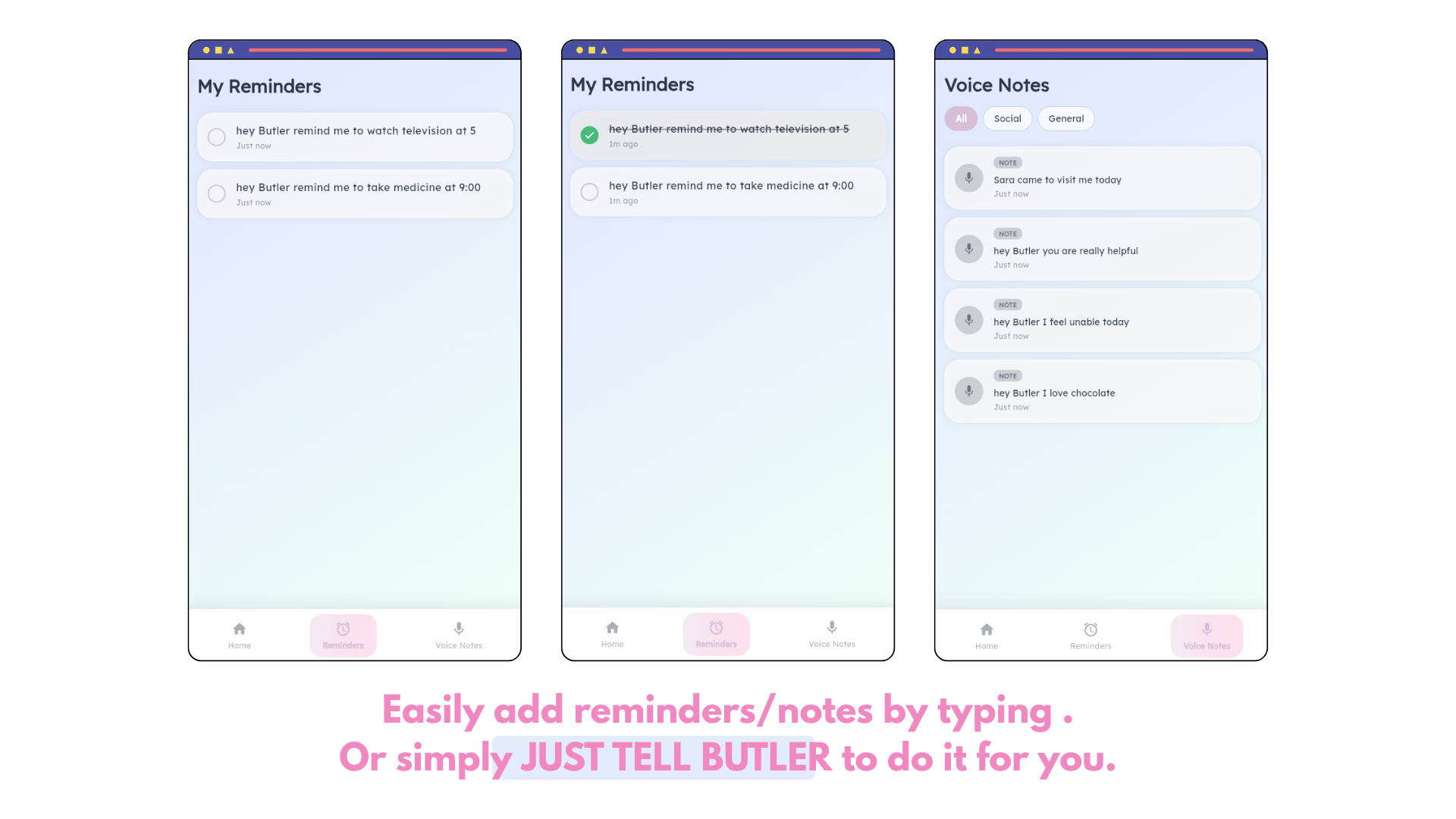
- Reminders & Voice Notes
Add reminders/notes by typing or just speaking.
Organized lists with clear completion states.
.png)
.png)
Notification System (Patient-first)
- Push/local notifications for:
- upcoming reminders (with gentle, readable prompts)
- recurring routines (medicine, meals, hydration)
- caregiver-added urgent notes (“Call Sarah now”)
- Designed to be non-overwhelming: one clear action per notification.
Auto Reminder Set + Smart Reminding
- Caregivers can configure routine templates (e.g., “Medicine 9:00 AM & 9:00 PM”).
- Butler can auto-create reminders from voice notes and patterns, like:
- “Remind me to take medicine at 9” → saved as recurring if repeated.
- Multi-step reminding:
- reminder fires → if not marked done → gentle follow-up reminder (configurable cadence).
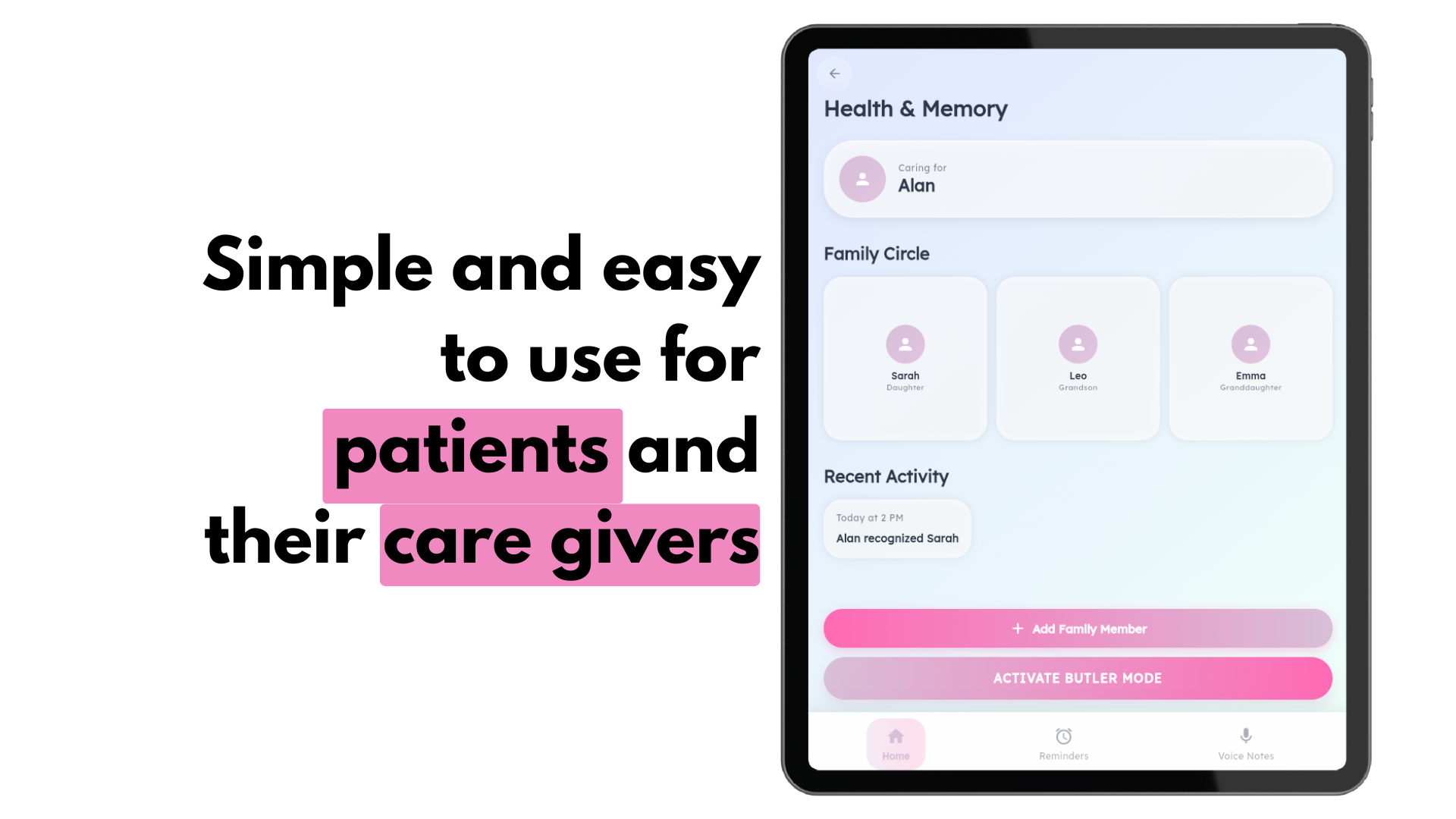
- Health & Memory Home
- A simple hub showing:
- the patient profile (“Caring for Alan”)
- Family Circle
- recent activity (recognition + reminders + memory interactions)
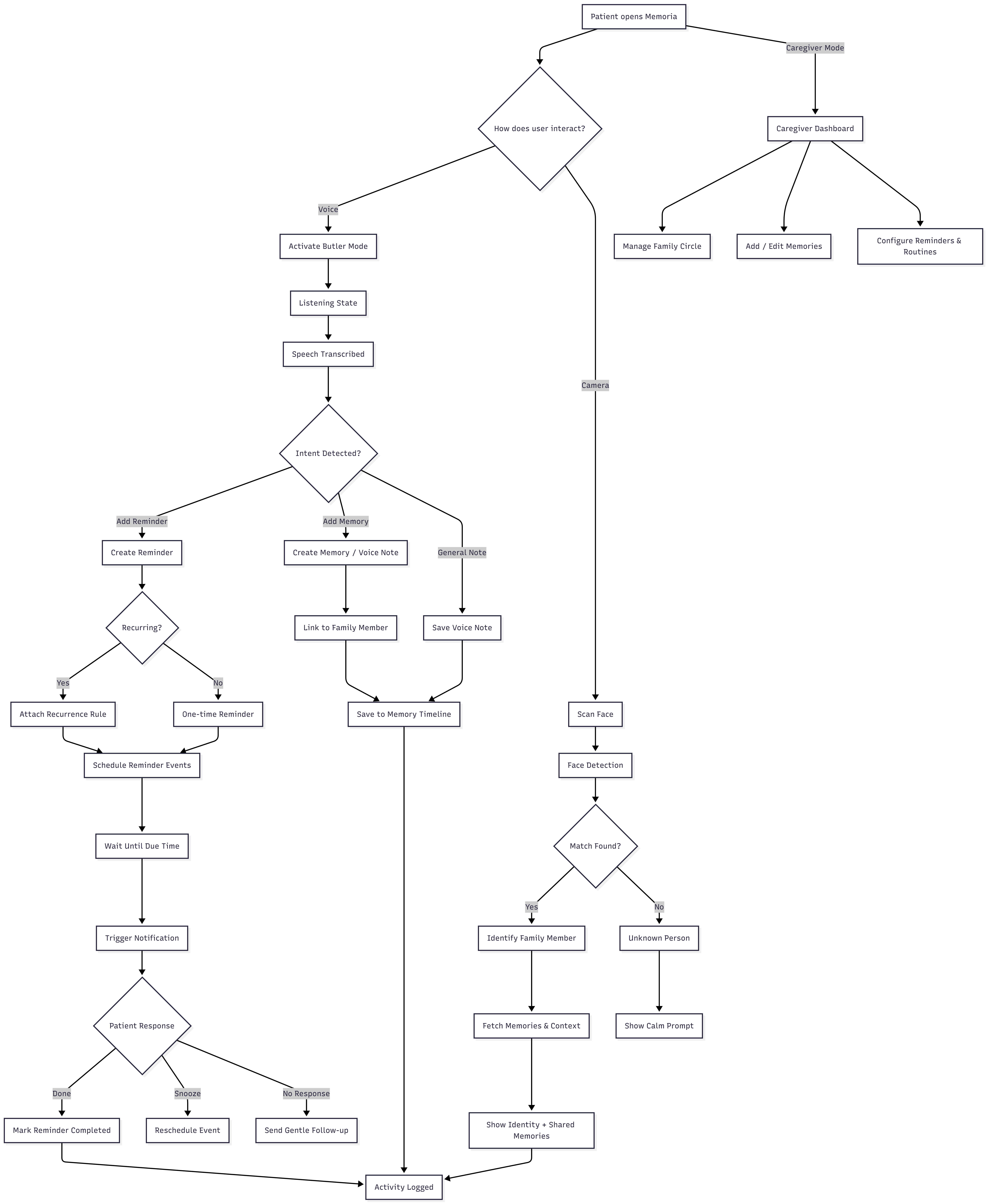
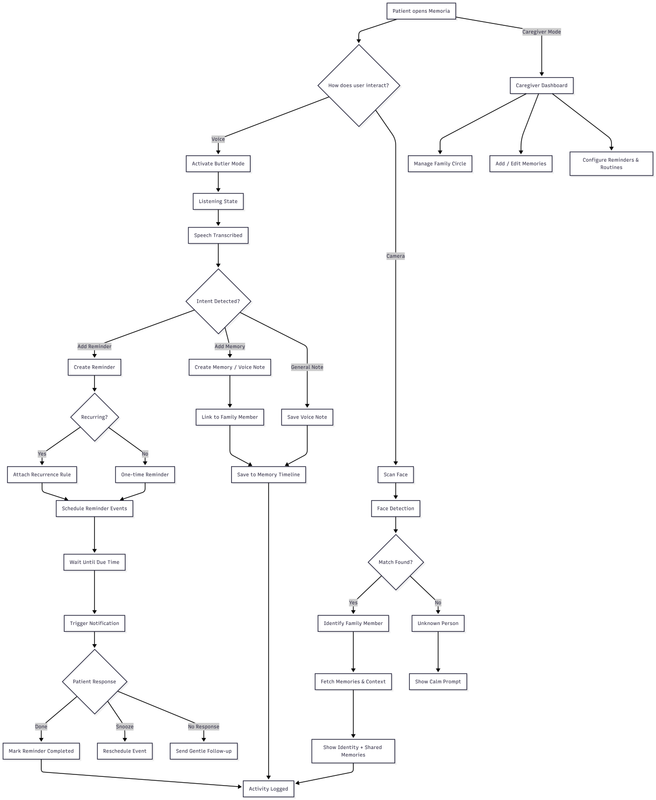
User Flow
How we built it
We focused on technical soundness, reliability, and a calm user experience, using Flutter for accessible cross-platform UI and Serverpod as the orchestration and scheduling backbone of the system. Reminders, retries, and follow-ups are handled through Serverpod background tasks and persisted jobs, while Flutter focuses purely on safe, accessible user interaction.
Flutter (Frontend)
- Built the app entirely in Flutter for smooth, consistent cross-platform performance.
- Designed a dementia-friendly interface with:
- large touch targets
- minimal typing for patients
- high-contrast visual hierarchy
- clear confirmation states to reduce anxiety
- Implemented key patient and caregiver flows:
- Butler voice interaction (listening → transcription → confirmation)
- Family member profiles with memory cards and relationship context
- Reminders and voice notes with simple completion states
- Notification-aware UI, supporting one-tap actions like Done and Snooze
Flutter is responsible for interaction, accessibility, and device-level delivery, while keeping business logic out of the client.
Serverpod (Backend)
We used Serverpod as more than a CRUD backend—it acts as the brain and scheduler of Memoria.
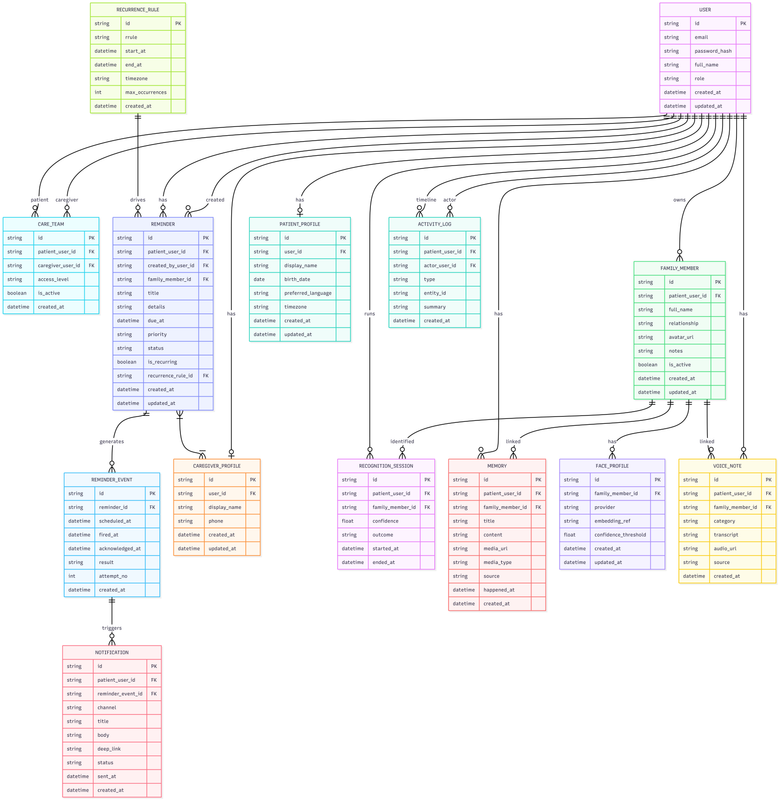
- Typed data models for:
- patients, caregivers, family members
- memories and voice notes
- reminders, recurring rules, and notification events
- Structured API endpoints for:
- managing the Family Circle and shared memories
- creating reminders and recurring schedules
- updating completion states and caregiver-visible logs
- Background tasks and delayed execution
- Serverpod schedules reminder events and follow-ups
- unacknowledged reminders can trigger gentle retries automatically
- Database integration via Serverpod’s ORM
- consistent constraints and relationships
- designed for future extensions (multi-caregiver access, analytics, audit trails)
Serverpod owns when and why things happen, while Flutter focuses on how they’re shown to the user.
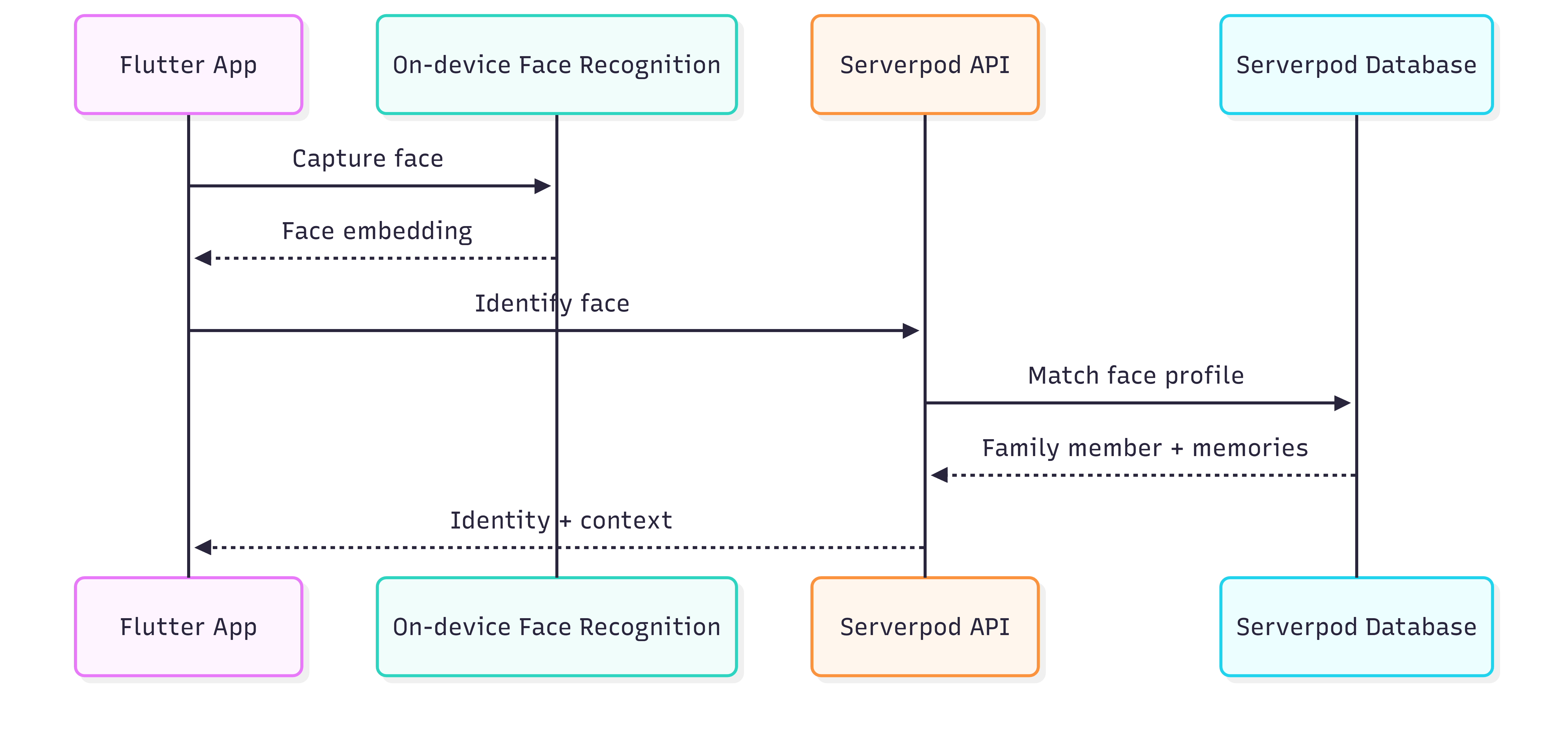
Face Recognition + Memory Linking
- Face recognition runs on the client to detect a face and generate an embedding.
- The embedding is sent to Serverpod, which:
- matches it to a FamilyMember record
- fetches relationship info, memories, and recent notes
- The patient is shown who the person is and why they matter, reducing confusion in real time.
Serverpod ensures identity mapping and memory retrieval are centralized, consistent, and auditable.
.png)
Notifications + Auto-Reminding
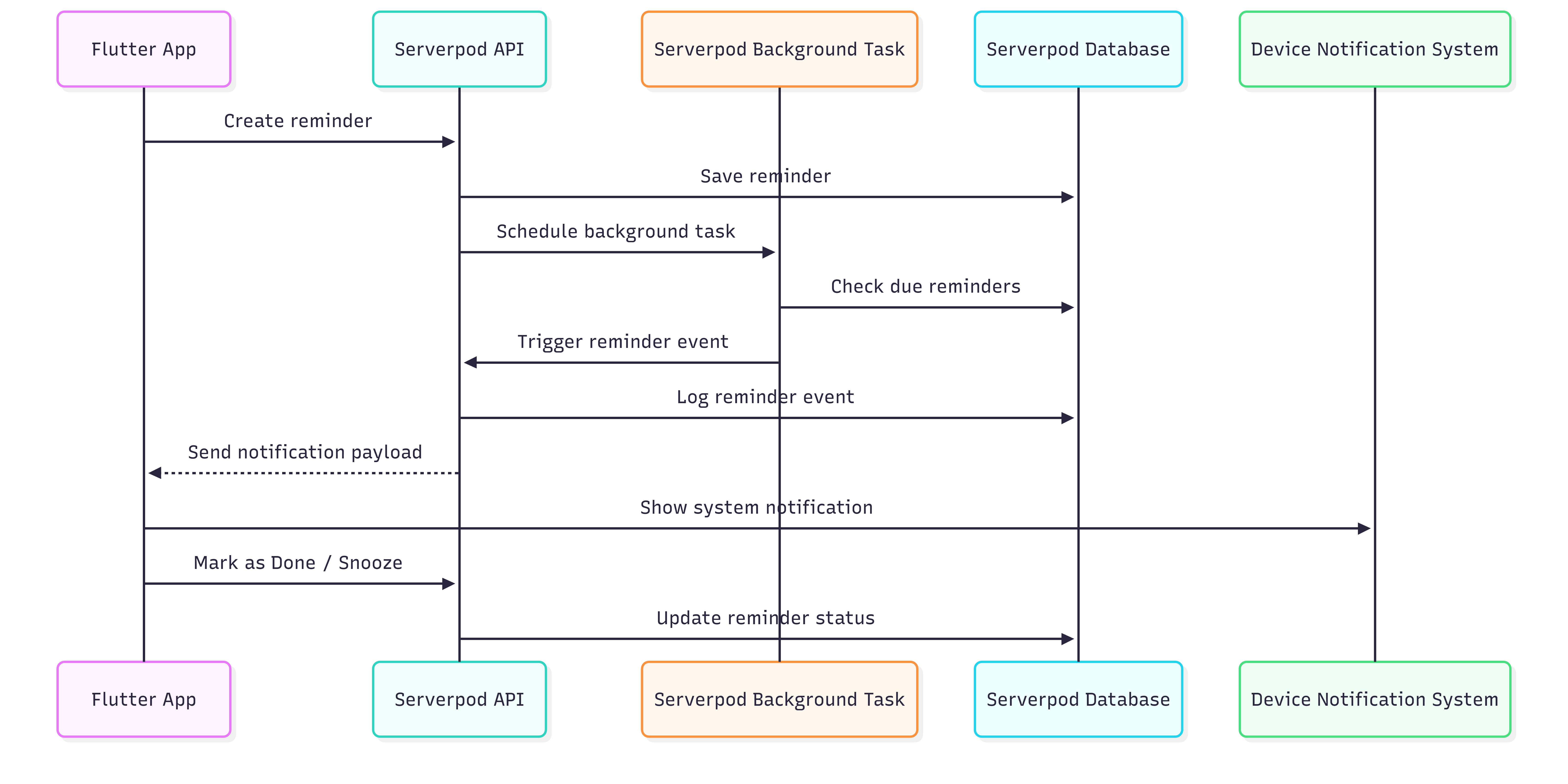
- Reminders (one-time or recurring) are created and stored on Serverpod.
- Serverpod background tasks generate upcoming reminder events.
- Flutter receives notification payloads and displays patient-friendly alerts.
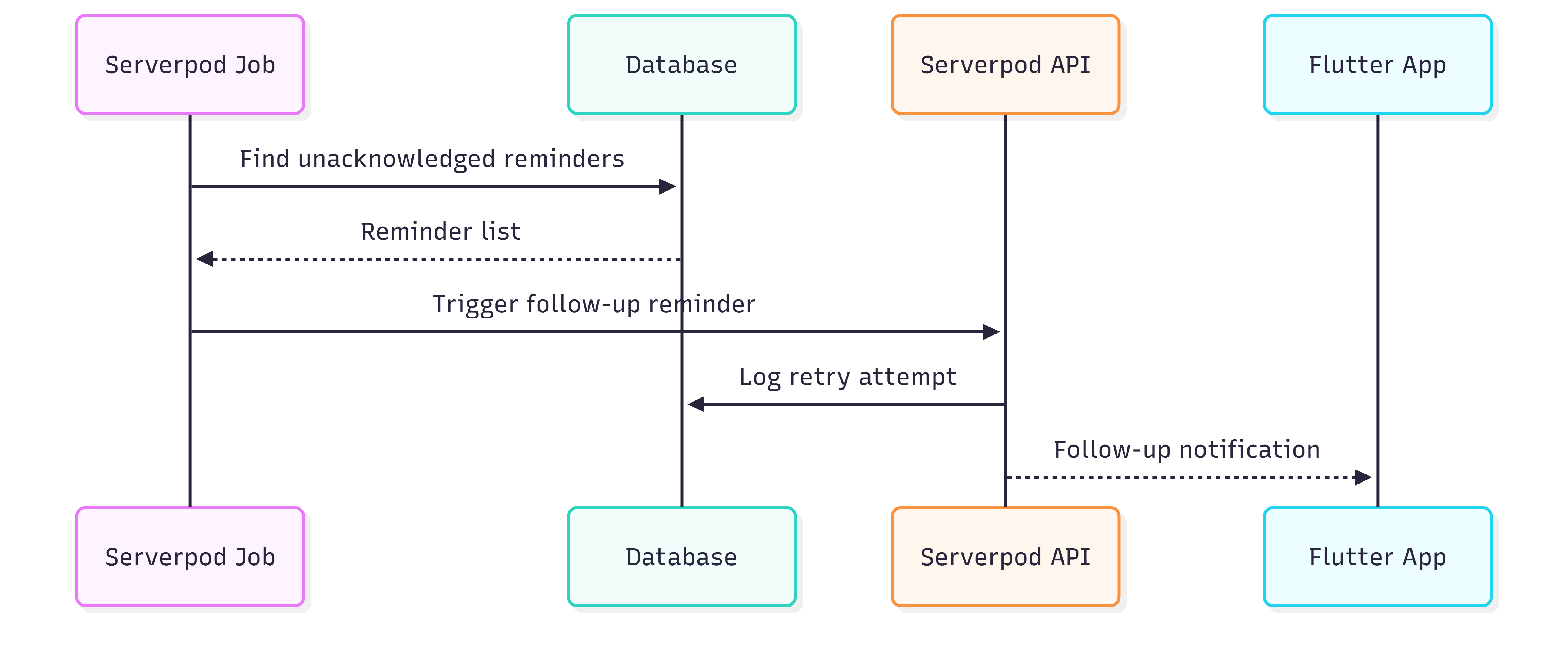
- If a reminder isn’t acknowledged:
- Serverpod can trigger gentle follow-up reminders
- all attempts are logged for caregiver visibility
This avoids fragile client-side scheduling and ensures reminders remain reliable, even across app restarts or connectivity changes.
Reminder + Notification (Using Serverpod Background Tasks) :
.png)
What Serverpod features are used here
-
Future calls / delayed tasks - Background execution logic
- Database-backed scheduling (safe + persistent)
- Clean separation of responsibility
Auto-Reminder + Smart Follow-up (Serverpod logic) :
.png)
Entity Relation Schema
Challenges we ran into
Designing dementia-friendly UX:
“Simple” is hard. Every extra tap or confusing icon can break trust. We iterated heavily on clarity, font sizing, and calm states.Recognition → helpful context (not just a name):
The value is in meaningful memory recall, not detection alone.Balancing patient simplicity with caregiver power:
We had to keep patient screens extremely minimal while still giving caregivers control over reminders, routines, and memory updates.Reminder reliability:
Scheduling recurring reminders and making sure notifications stay consistent (and not overwhelming) required careful logic and prioritization.
Accomplishments that we're proud of
- Built a voice-first Butler flow that’s genuinely usable for patients.
- Created a Family Circle memory system that caregivers can update quickly.
- Integrated face recognition as a trigger for “who is this person + why they matter.”
- Designed a notification + auto-reminder system that supports daily independence.
- Delivered a polished Flutter UI that feels calm and friendly instead of clinical.
- Used Serverpod properly to keep backend logic organized, typed, and scalable—built like a real product foundation, not a hacky demo.
What we learned
- Accessibility is interaction design, not just UI design.
Voice-first is only useful when it has clear states: Listening → Understanding → Confirming → Done. - In dementia support tools, context is everything:
recognition without memories doesn’t reduce confusion. - Reliable reminders require more than a list—they need scheduling, notification delivery, and follow-up logic.
- Serverpod shines when you treat the backend like a product: typed models + clean endpoints + scalable structure from day one.
What's next for Memoria Butler
Advanced notification intelligence
- priority-based reminder stacking (avoid notification overload)
- caregiver escalation if reminders repeatedly go uncompleted
Auto routines + personalization
- pre-built templates (medicine, hydration, meals, sleep)
- personalization by patient habits and doctor/caregiver settings
Richer memory cards
- photo + audio memories
- “memory timeline” per person
- gentle “recognition practice” mode (caregiver-controlled)
Offline-first reliability
- local caching for critical memories/reminders
- sync through Serverpod when connection returns
Caregiver collaboration
- multiple caregivers per patient
- permissions (edit vs view)
- audit logs for edits to memories and schedules
Privacy & compliance readiness
- encryption for sensitive memory data
- consent/guardian flows for patient safety
Memoria Butler is built to be more than a demo—it's a foundation for a real companion that helps families stay connected through the hardest kind of forgetting.
Built With
- android
- camera-apis
- dart
- face-recognition
- flutter
- ios
- local-notifications
- on-device-machinelearning
- postgresql
- restapis
- serverpod
- serverpodbackgroundtasks
- serverpodorm
- speech-to-text-apis


Log in or sign up for Devpost to join the conversation.