-
-
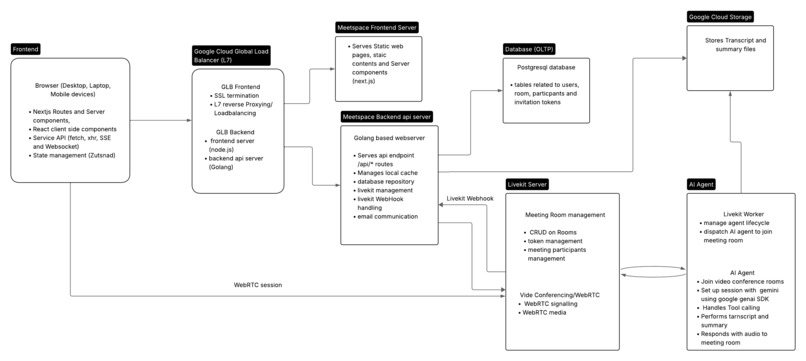
Meetspace server architecture diagram
-
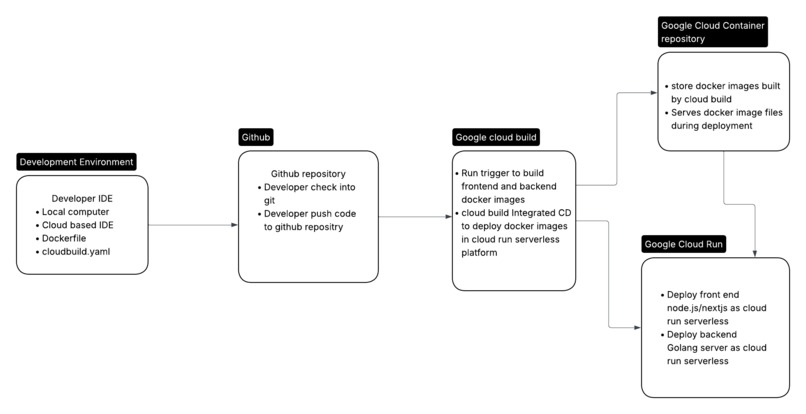
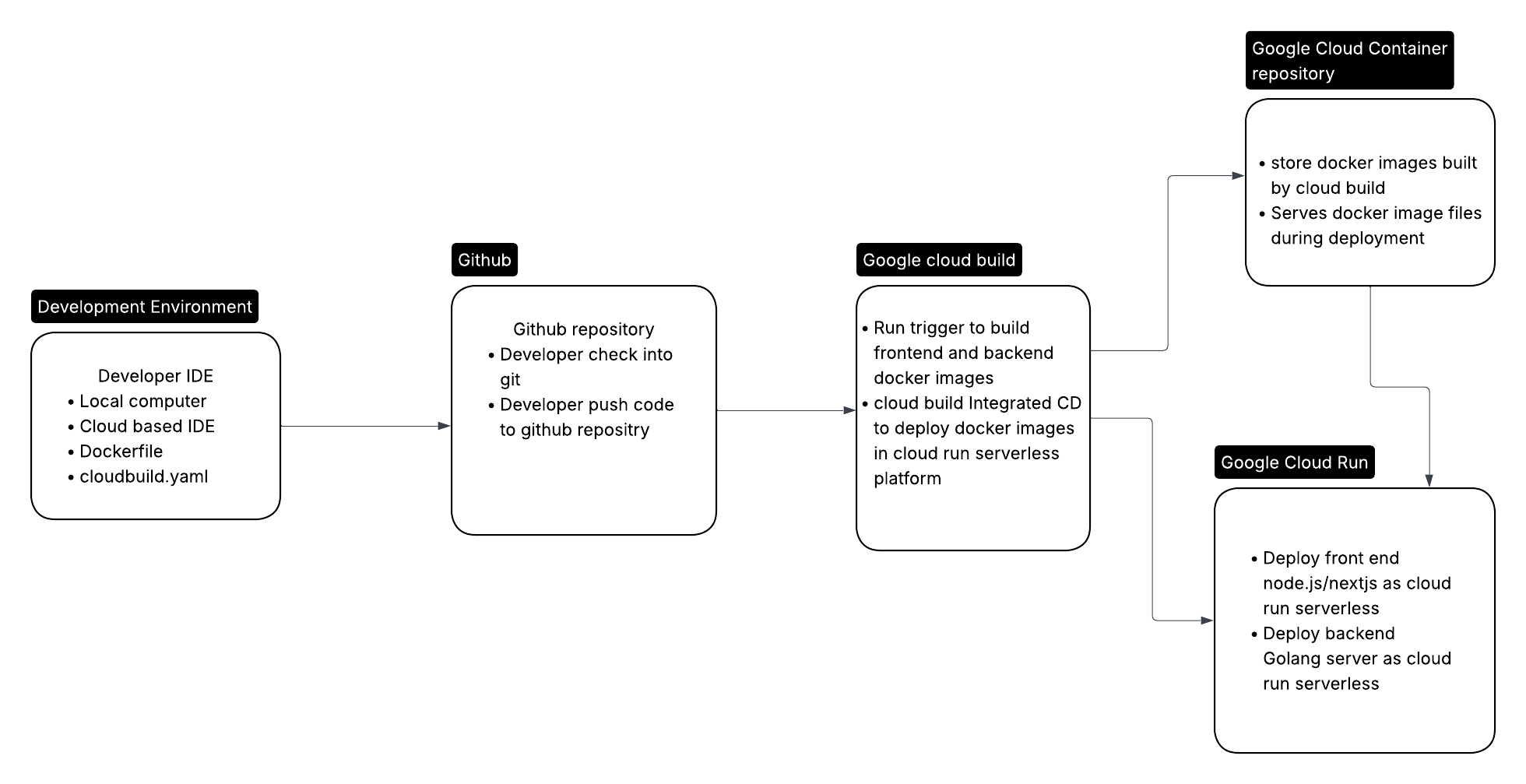
Meetspace Serverless CI/CD flow diagram
-
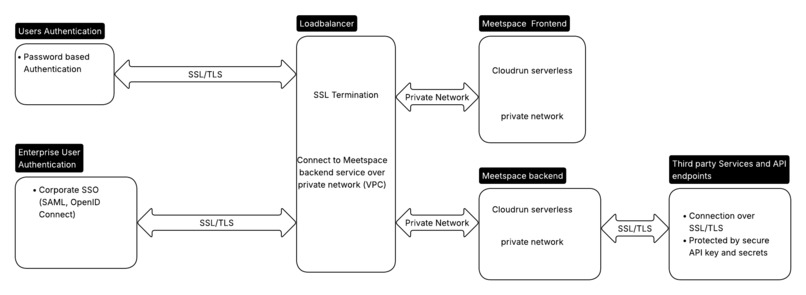
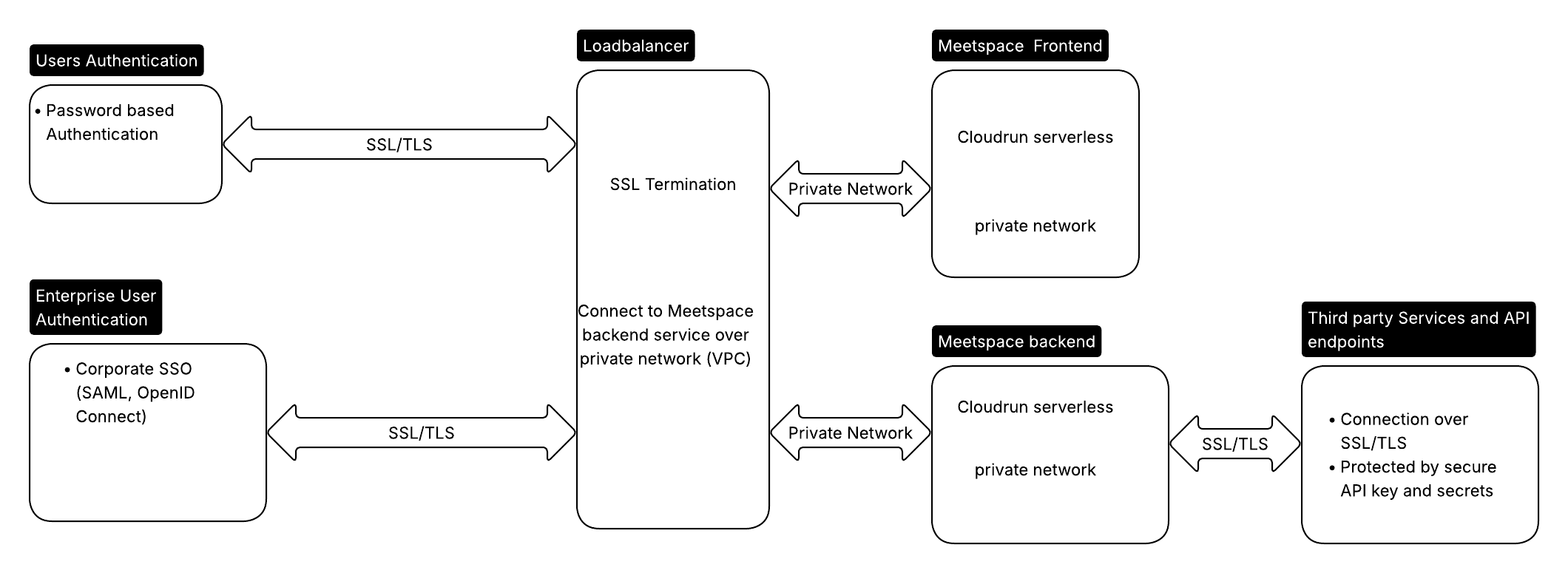
Meetspace security architecture diagram
Inspiration
As a product manager in the telecom industry, I experienced firsthand how product and business success depends on seamless collaboration across internal cross-functional teams and external partners—developers, handset providers, and network suppliers. In our matrix organization, every planning and strategy sessions brought together stakeholders from multiple organizations with no direct reporting lines. The need for accountability and transparency were paramount.
Each meeting presented the same challenges: We needed to dive deep into previous discussions across different organizations, access market dynamics and trends on demand, and stay current on industry events and competitor actions. I found myself wishing for an intelligent meeting space—a room where an AI agent could provide context, deliver real-time research and insights during discussions, and capture key action items before we dispersed to write meeting minutes. Most importantly, all meeting data and shared files would live in one unified space.
Back then, real-time voice AI agents didn't exist as they do today. Now, with available technology, I believe MeetSpace can help organizations maximize their collaborative meetings, whether with internal teams or external partners like suppliers, channel partners, and strategic collaborators.
The potential extends beyond corporate meetings. Sales representatives, lawyers, and healthcare professionals can all benefit from having a workspace where an AI assistant actively participates in their sessions. One particularly compelling use case is telehealth. MeetSpace enables doctors and patients to collaborate remotely during consultations, sharing documents like test reports and prescriptions. With an AI agent present, telehealth discussions can be transcribed, key insights extracted, and integrated into the patient's overall care context for future consultations—ultimately improving patient care effectiveness through better context, organized health records, and intelligent support during provider discussions.
What it does
Meetspace is a video conference-centric collaborative workspace where human participants and AI agents work together in real time. It combines live video conferencing with intelligent AI assistance, persistent rooms that house all meeting transcripts, participant messages and posts, and shared files. During meetings, the AI agent conducts real-time research, provides insights, offers context from past discussions, and delivers market research and competitive intelligence. After each session, transcripts and AI-generated summaries automatically become posts in the room, just like content shared by any other member. Users can continuously share files, messages, and other content, creating a unified workspace for ongoing collaboration. Meetspace serves cross-functional teams collaborating internally, partnerships with external business partners, enterprise client engagement, b2b sales and customer support, R&D collaboration across organizations. In telehealth, Meetspace enables doctors and patients to collaborate remotely during consultations while the AI assistant takes notes, provides insights from previous patient records stored in the room, and surfaces relevant context to improve overall care quality and outcomes.
How we built it
Technology Stack we used
For front end, we used Typescript, nextjs and react. Front end server deployed in Google cloud run serverless platform. For backend, we used Golang for api server and postgresql database for sql database. For video conferencing and webRTC session management, we integrated our system with livekit platform. For integrating AI agent to be an active participant in a WenRTC conference room, we used livekit AI SDK for both node.js and python. For LLM, we used google genai SDK to integrate our voice agent with Gemini Live API. We used Google Search tool with gemini live to enable search capability on the AI agent.
Modular Development Approach
We broke the project into manageable modules: user authentication and login, post-login home page, room management, and participant management. For each module, our team took an end-to-end approach—designing the UI webpage, defining API endpoints with JSON structures, creating DTOs for the backend server, and mapping those to internal model objects that translate directly to database table columns. This layered design, developing frontend and backend simultaneously rather than separately, improved design efficiency and database resilience. We needed fewer database migrations and less iteration when integrating UI and backend components.
AI Agent Development
For developing our AI agent, we used Google AI Studio “Build” as the primary environment for brainstorming, prototyping, and generating TypeScript code. This tool enabled rapid creation of a real-time voice agent powered by the Gemini Live API. Once the base code was generated, we focused on integrating it with the LiveKit Node.js Agent SDK. This integration was a key step in enabling the AI agent to operate within a real-time communication framework. By connecting the Gemini Live API with the LiveKit SDK, we provided the agent with full real-time interaction capabilities — including tool calling through the Google Search API for dynamic information retrieval and contextual responses. This setup allowed our AI agent to combine the natural conversational intelligence of Gemini with the real-time media handling and session management features of LiveKit, resulting in an intelligent, responsive, and extensible voice interaction system.
AI-Assisted Development
We used Google AI studio for generating code for Gemini Live API for developing AI agent integrated with LiveKit WebRTC platform. We also used Gemini CLI for backend development, mix of Gemini CLI and Claude 4.5 for system design and frontend architecture, and other generative AI tools, such as Copilot on for code review and code completion using VS Code IDE. To maximize code quality, we provided detailed documentation to AI tools with specifications on data structures, object functions, and APIs. Writing clear, end-to-end system design documentation with well-defined, small modules gave AI agents sufficient context to generate higher-quality code requiring minimal debugging.
Challenges we ran into
Serverless Debugging
While serverless environments like Cloud Run streamline deployment, initial setup required significant effort, particularly debugging cloud build and runtime issues. Simple bugs—like configuration files not mounting in the correct directory—became tedious to debug without direct visibility correlating issues with logs. Failures related to ServiceAccount access and permission roles during build and runtime proved especially challenging due to indirect correlation between cloud build logs and the serverless environment.
API Integration Complexity
Using a wide range of API-based services introduced complexity in managing API keys as secrets and provide them as environment variables to the cloud run deployments. Ensuring secrets are set up prior to running cloud build added an additional layer dependency that we had to manually handle. Missing a secret or not mounting secrets, config file in the right directory led to unnecessary triggering of building. We plan to make the process more automated as we continue improving our deployment workflow.
Framework vs. Library Trade-offs
Our AI agent needed to run within the LiveKit Agent SDK framework. While most of the Gemini Live integration code was generated using Google AI Studio Build, a key challenge was adapting this generated code to fit seamlessly within the LiveKit SDK environment. Working within a framework inherently provides less flexibility compared to using AI SDKs directly (such as Google GenAI or OpenAI SDK). Throughout development, we continually balanced the trade-offs between leveraging the framework’s capabilities and writing custom code using libraries for greater control.
Accomplishments that we're proud of
AI-Powered Development Workflow
We established an internal development workflow that exemplifies the future of software engineering. By combining Gemini CLI and AI Studio for implementation with Claude Sonnet 4 for system design and requirements gathering, we created a synergistic process where each AI tool plays to its strengths. Gemini CLI's deep repository understanding accelerates coding, while Claude's analytical capabilities help us architect robust, well-thought-out systems before writing a single line of code. This workflow has not only accelerated our development velocity but also improved code quality and architectural decisions, proving that thoughtful AI integration can transform team productivity.
Production-Ready Architecture
Rather than building a prototype to submit for hackathon, we rather took an approach to architect Meetspace for real-world deployment from day one. Our scalable serverless infrastructure on Google Cloud Run, combined with proper security implementations, managed secrets, and enterprise authentication support, means this project can transition directly to production use. We've built on solid foundations—proper database design, comprehensive API architecture, and cloud-native best practices—that will support growth from initial users to enterprise scale.
Solving Real Business Problems
We're most proud that Meetspace addresses genuine pain points we've experienced firsthand in business collaboration. By combining real-time AI assistance, intelligent meeting transcription, secure document sharing, and unified workspace management, we're tackling the fragmented, context-poor meeting experiences that plague modern organizations. We believe Meetspace can measurably improve productivity in business collaboration and communication, helping teams make better decisions with better context, whether they're internal cross-functional groups, external partnerships, or healthcare providers serving patients remotely.
The intersection of these achievements—innovative development practices, production-ready engineering, and real business value—represents what we believe makes Meetspace not just a successful hackathon project, but the foundation of a product that can genuinely improve how people work together.
What we learned
Cloud Deployment
Deploying to a serverless environment presented challenges during initial deployment—errors surfaced at multiple stages: Dockerfiles, code itself, build time, container image creation, and ServiceAccount permissions. However, once deployment succeeded and our service went live with a public IP and domain, subsequent updates became remarkably efficient. Push code, trigger build, and everything's in production!
Initially, we had concerns about debugging and log collection in serverless platforms like Cloud Run. Those doubts vanished quickly—GCP's logging support is advanced and feature-rich, proving that serverless platforms can scale effectively. Managed secrets and SSL certificates also eliminated the burden of manual certificate creation and renewal, as Google Cloud Platform handles these automatically.
Collaboration & Documentation Modern API-based development feels like working with extended teams of developers from the organizations that provide APIs. When integrating APIs from LiveKit, OpenAI, or Gemini, we use the documentation, but the process feel like we are working in collaboration with those development teams. In today's cloud software environment, API developers are virtual team members—their work becomes part of our platform, making us feel like we're building one piece of a larger puzzle.
Clear documentation is crucial. It directly impacts developer productivity, especially for complex integrations where our platform connects to dozens of third-party systems.
AI Coding Tools
We leveraged Gemini CLI, Google AI studio, Claude, and Copilot throughout development. CLI-based tools performed better for our use case due to superior repository awareness. Being specific in prompts and providing system-level requirements—operating system, programming language, SDK details—yielded far better results than just providing prompt with business requirement.
Advanced Real-Time Models
Models like Gemini Live proved faster and more feature-rich than traditional STT→LLM→TTS pipelines for real-time audio processing, offering a significant performance advantage.
Business Strategy
Target Customers & Problem Solving
Every great product solves a real customer problem. MeetSpace is no exception. We invested time whiteboarding our target industries, user segments, their challenges, and how our product addresses those pain points.
Business Model & Revenue Generation
Identifying target customers is half the story; generating revenue is the other half. A product customers love won't survive without a solid profit model. For enterprise customers, we demonstrate ROI to justify pricing that reflects value. For individual users, pricing need to consider API token costs, cloud computing, third-party services, operational expenses and a the margin after covering all the costs to generate earnings for sustainable business growth.
What's next for Meetspace
For product/platform -
- Enhance capability for the AI agent by adding tools including third party tools, custom enterprise tools and MCP servers. Support admin interface to empower enterprise customers to configure their own tools to be used with MeetSpace AI agents.
- Support Enterprise authentication and SSOs including OpenID, SAML, Okta, Google and other OpenID providers.
- Enhance team collaboration and real time messaging functionality, with more scalable caching infrastructure, Pub-Sub and message queue integration.
- Improve the overall system architecture to deliver Meetspace service at scale.
For Business/ Go-To-Market
- lead generation, prospecting and running pilot with enterprise customers from target verticals.
- Content marketing - develop content for marketing and customer supports, content including blogs, user guides, videos, AI sales agent.
- Social media marketing.
- Explore business development and partnership opportunities with businesses whose products are complement with our offering.
Built With
- cloudbuild
- cloudrun
- gcp
- gemini
- golang
- livekit
- nextjs
- node.js
- postgresql
- react

Log in or sign up for Devpost to join the conversation.