-
-
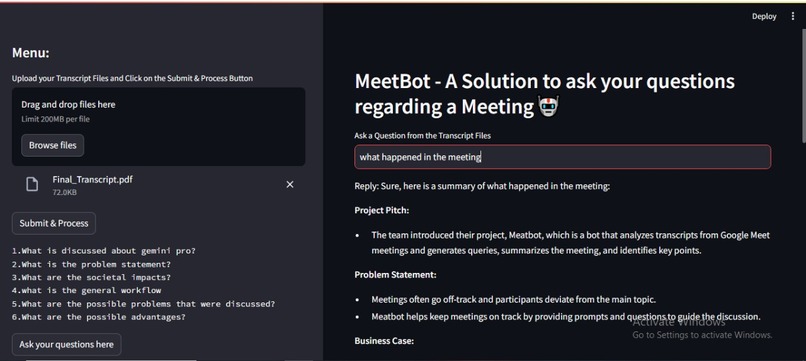
Sample Output
-
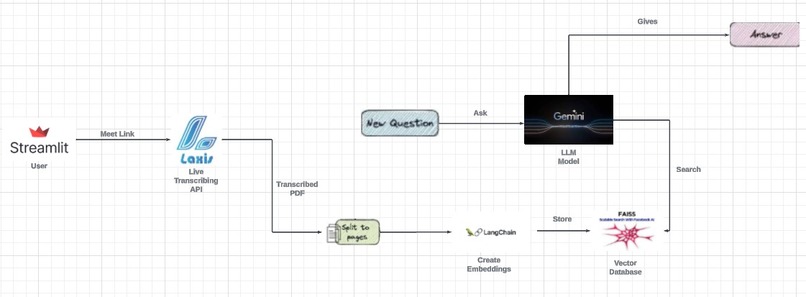
Architecture
Inspiration
Online meetings often lack effective question-and-answer dynamics, hampering professional engagement. This project introduces an interactive conversational agent, using Large Language Models, to enhance real-time questioning and fosters a more interactive and productive virtual meeting environment for working professionals. The goal is to streamline information retrieval and elevate the quality of online professional interaction
What it does
The Laxis API actively listens during meetings, providing real-time transcripts that can be extracted and uploaded to the MeetBot platform. MeetBot then contextualizes these transcripts and stores them in a vector database called faiss. This allows users to generate responses to queries aligned with the meeting's context.
Moreover, MeetBot's sidebar features an option to highlight key agendas or questions addressed during the meeting. Additionally, a generative model is available at the click of a button, capable of addressing queries related to the meeting or external topics. This comprehensive functionality enhances collaboration and decision-making processes within and beyond the meeting room
Target Personas
Working professionals
The common working professional has to attend a multitude of meetings on a day to day basis, which could be quite distinct in context from each other. Keeping detailed notes is a burden, but a necessity. To avoid that sink of energy and time, a conversational agent can prove to be quite the boon.
Students
Every student learns quite differently, that exactly is what makes us unique. MeetBot allows everyone to learn at their own pace, ask their own questions and come back to it at any time needed.
The common man
A plethora of options are available to the common an in the context of using MeetBot. Large PDFs, texts and videos can be made into bit sized portions whenever one needs. Time and energy can be saved yet again!!!
How we built it
Step 1: Extract Document using PyPDF
Utilize the PyPDF library to extract text from the document.
Step 2: Set up Vector Database and Initialize Context Size
Set up the vector database and initialize the context size. Create an index.faiss file to store the context vectors.
Step 3: Text Preprocessing
Employ text preprocessing techniques such as tokenization, stemming, stop words removal, and text transformation to achieve processed text.
Step 4: Processed Text into Faiss Database
Pass the processed text onto the faiss database. Generate a context vector model and update the faiss.index file with the contextual information.
Step 5: Initialize Conversation with Gemini API
Create a general prompt statement to initialize the conversational chain. Call the Gemini API to establish the conversational framework.
Step 6: Vector Database Lookup
From the established context, look up in the vector database for the indexes needed to extract the content relevant to the query.
Step 7: User Interaction in UI
In the user interface, the meeting participants can ask their questions in natural language. The system processes the queries and produces corresponding answers based on the contextual information stored in the vector database.
Conclusion
By following this procedure, the system effectively extracts, processes, and responds to queries based on the meeting transcript, enhancing the efficiency and effectiveness of communication and decision-making processes during meetings.
Technology Stack
- Google Gemini-Pro LLM
- FAISS embeddings
- Streamlit for UI
- Langchain framework
- FAISS LOCAL STORE as a vector store
- Few/One shot learning
Challenges we ran into
Initially, we encountered challenges in pinpointing the optimal vector database tailored to our specific usage context. Fine-tuning the creativity and diversity factor (temperature) was crucial to ensure accurate responses for our users.
Additionally, extracting transcripts in real-time during meetings posed a significant hurdle. Typically, this data is accessible post-meeting, but obtaining it on-the-fly proved challenging. To overcome this obstacle, we devised the Laxis API, enabling live transcription and facilitating the attainment of our objectives.
Societal relevance
A lot of time and effort is spent by the common working man to maintain elaborate notes in distinct business meetings . A large amount of fatigue can be solved.
Students with different learning rates and capabilities can solve a lot of their problems using MeetBot, which in turn can save a lot of time as well. By ensuring a conversational experience, learning can turn out to be quite innovative as well, and of course fun. By ensuring an extremely affordable model, MeetBot is suited for the masses and aims to target all walks of life.
What we learned
We gained valuable insights into the benefits of working in batches and across different phases, recognizing the efficiency that stems from this approach. Understanding the intricacies of vector databases, including index operations and extraction techniques, was pivotal to our learning journey.
Moreover, we delved into the concept of temperature as a delicate balance between diversity and coherence, appreciating the significance of optimizing this factor for optimal results. Additionally, we explored various general prompts and their tailored application depending on the desired output, further enriching our understanding of effective communication strategies
What's next for MeetBot
Corporate sector our most favorable sector, as business meetings happen multiple times on the daily. It saves the working professional a lot of time from maintaining thorough notes for each and every meeting, and allows a conversational experience that is persistent.
We aim to release this as an API or a website or like a Chrome Extension on Google Chrome

Log in or sign up for Devpost to join the conversation.