-
-
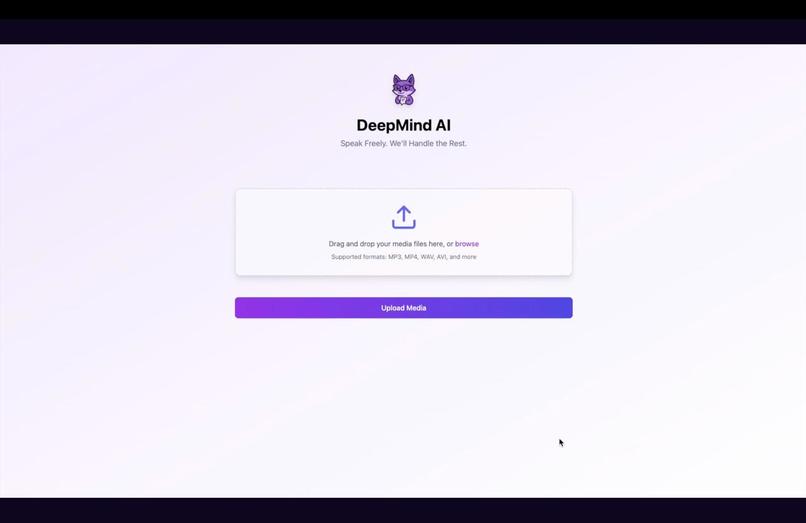
Page 1 UI
-
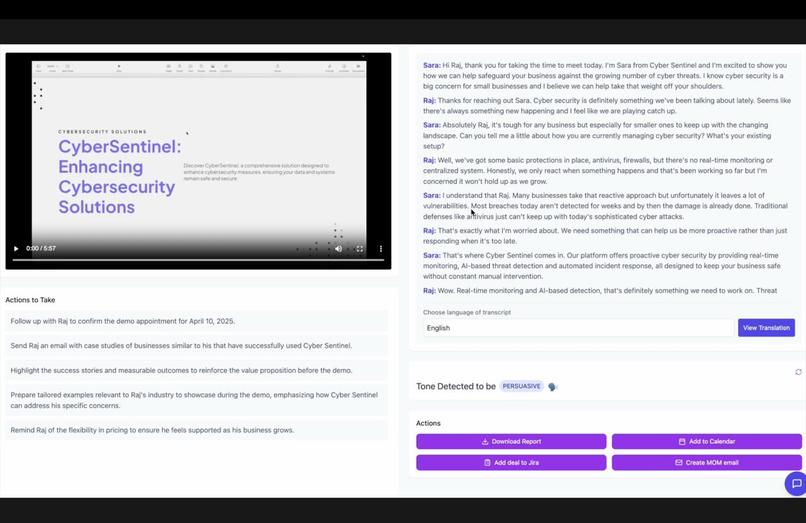
Page 2 UI


MeetMind AI: AI-Powered Meeting Companion
Inspiration
Sales professionals face a daily flood of meetings, pitches, and follow-ups. These high-stakes conversations often move fast, cover critical deal information, and leave little room for manual note-taking. Remembering every ask, capturing subtle cues, and ensuring follow-ups don’t fall through the cracks is vital — yet incredibly difficult.
We were inspired by Case 3 of the AI-Powered Meeting Companion challenge to solve this problem head-on. Our vision was to build more than just a transcription tool — we wanted to create an intelligent assistant that could truly understand and act on what was discussed. From small talk to closing numbers, we wanted to capture it all and present it in a way that salespeople could immediately use.
What It Does
MeetMind AI transforms meetings into actionable insights by:
- Transcribing conversations (supports various file formats) with speaker identification
- Producing intelligent summaries and meeting minutes
- Extracting action items, owners, and deadlines
- Analyzing sentiment and tone for each speaker
- Supporting multilingual processing
But we didn’t stop there. We enhanced the experience by incorporating a complete workflow assistant:
- Jira Integration: Automatically creates action items and deals as Jira tickets.
- Downloadable PDF Reports: Include meeting title, agenda, minutes, key points, and next steps.
- Auto-Scheduling: Follow-up meetings are automatically scheduled in Google Calendar.
- Gmail Drafts: Automatically generated follow-up emails are saved as Gmail drafts.
How We Built It
We modularized development into four key components:
1. Audio Processing Engine
- Utilized OpenAI Whisper for accurate transcription
- Supports MP3, WAV, MP4 uploads.
- Enabled speaker diarization to distinguish participants
2. Intelligence Layer
- Used GPT models for summarization and decision extraction
- Developed a custom module for action item detection with context parsing
- Integrated a sentiment analysis pipeline to track emotional tone
- A Chatbot for any specific info lookup
- Get transcript in 10+ different languages
3. User Interface
- Built with React, TypeScript, and Tailwind CSS
- Includes an interactive transcript synced with audio
- Summary, sentiment, and action panels for instant insights
- Supports 10+ languages
4. Integration Capabilities
- PDF generation for downloadable reports
- Jira integration for real-time task creation
- Google Calendar and Gmail APIs for automated scheduling and drafting
Enhanced Workflow
- Upload or record meeting/audio
- Post-processing transcription with speaker labels
- Summarization and meeting minute generation
- Action item detection and ownership assignment
- Sentiment and tone analysis
- Multilingual translation if needed
- Export PDFs or auto-sync to Jira, Calendar, Gmail
- A chatbot to answer questions about the call — clarifications, context, or specific info lookup
Challenges We Faced
Planning, executing, and troubleshooting within a tight timeline proved challenging. While we quickly settled on the project idea, designing the UI to incorporate all features was tough. We continuously adapted the design while maintaining the initial framework.
Choosing the right tech stack was another hurdle. Some of us were unfamiliar with parts of the tech stack and had to quickly learn as we progressed — it was both challenging and rewarding.
Additionally, creating a secure folder in Git for storing authentication credentials was essential but posed its own difficulties.
With a tight schedule, we had to manage time efficiently for meetings and development. Despite the challenges, the process felt incredibly rewarding, keeping us motivated throughout.
Accomplishments We’re Proud Of
- Early identification of a meaningful use case and the creation of a flexible framework to support it.
- Formation of a passionate, cohesive team that collaborated effectively from the start.
- Integration of AI and NLP to build a functional backend, establishing a strong foundation for future development.
- Development of an intuitive, user-friendly frontend for a seamless user experience.
- Dedication and hard work throughout the hackathon, resulting in not only a working solution but also new technical skills, fresh ideas, and a drive for further innovation.
What We Learned
Each team member brought unique skills, and we learned from one another. Some of us, with a data science background, had limited frontend skills, so we had to contribute to UI development. This allowed us to grow and learn new techniques from each other.
We also realized the importance of cross-team collaboration and knowledge-sharing.
We gained enhanced proficiency in FastAPI, OpenAI API integration, and React with TypeScript. It also provided valuable experience in managing file uploads, API integration, and building resilient, data-driven systems.
What's Next for MeetMind AI
We envision expanding MeetMind AI into a broader team intelligence platform:
- CRM Integration with platforms like Salesforce and HubSpot
- Deeper NLP Models for negotiation analysis and deal forecasting
- Mobile App for on-the-go meeting capture and summary
Impact
MeetMind AI directly supports sales professionals, consultants, and business leaders by eliminating administrative overhead and transforming every meeting into a clear, structured knowledge asset. It allows them to focus on what they do best: building relationships and closing deals.
Theme Alignment: Create. Lead. Innovate.
Our project captures the essence of the Luddy Hackathon theme, Create. Lead. Innovate. We create a dynamic, user-focused AI assistant that revolutionizes the way meetings are managed. We lead by seamlessly integrating the tool throughout the entire sales workflow. And we innovate by leveraging cutting-edge AI, automation, and intuitive UX design to unlock the full potential of every conversation.
MeetMind AI — speak freely, and we will handle the rest.
Built With
- blob
- colab
- css
- fetchapi
- formdata
- gmail
- google-calendar
- gpt
- jira
- json
- llm
- node.js
- postman
- python
- react
- typescript
- visual-studio
- whisper


Log in or sign up for Devpost to join the conversation.