-
-
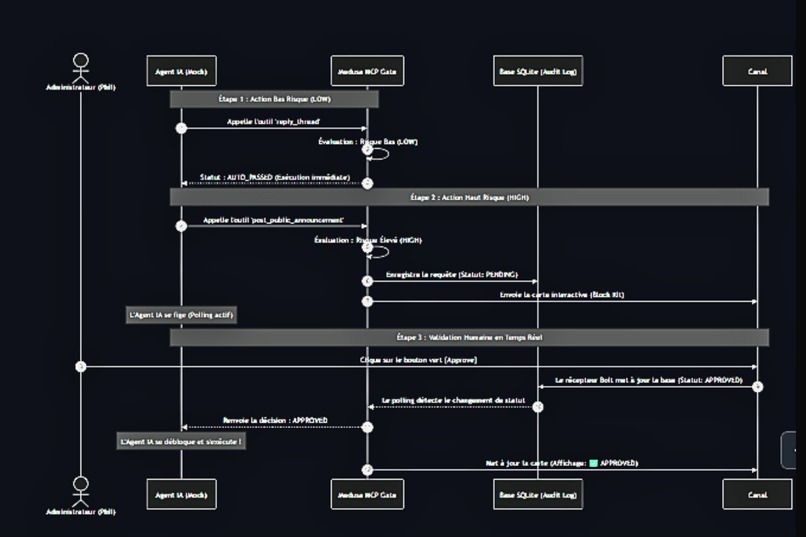
Architecture
Inspiration
Autonomous AI agents are getting real tool access — posting to channels, changing user roles, writing to production. Most agent frameworks have no concept of "this action is dangerous enough that a human should see it first." The agent decides, the agent acts, and nobody is in the loop until it's already done.
I kept coming back to one CTO-level fear: it's not that the agent is malicious — it's that a single confident-but-wrong tool call can broadcast a false outage notice to an entire company, grant admin to the wrong person, or wipe a table. The blocker to deploying agents in production isn't capability. It's the absence of a brake.
So I built the brake — and I put it where teams already live: Slack.
What It Does
Medusa Slack Gate wraps any MCP-connected agent with a deterministic risk gate. Every tool call the agent wants to make is scored and routed:
| Risk level | What happens |
|---|---|
| LOW (reads, replies) | AUTO_PASSED — executes immediately, zero friction, no Slack noise |
| MEDIUM / HIGH (public posts, role changes) | FROZEN — logged as PENDING, a real Slack Block Kit card is posted with Approve / Deny buttons, and the agent blocks until a human decides |
No action in the MEDIUM/HIGH path executes without an explicit human click. There is no silent timeout that defaults to "allow" — if nobody responds, the action is denied by default.
How We Built It
Four components, communicating only through an append-only SQLite audit log so no piece is tightly coupled to another:
1. MCP Gate Server (mcp_gate_server.py) — exposes a request_action tool over the Model Context Protocol. The calling agent asks permission before executing; the server classifies risk deterministically (no LLM in the gate decision itself — least-privilege means anything not explicitly LOW is treated as needing a human).
2. SQLite Audit Log (audit_log.py) — one row per gated action, idempotent state transitions (PENDING → APPROVED / DENIED / TIMEOUT). Idempotency protects against double-clicks and race conditions.
3. Slack Notifier (slack_notifier.py) — posts the Block Kit approval card and edits it in place the instant a decision is made.
4. Bolt Socket Mode Receiver (bolt_receiver.py) — a separate process listening for the button click. Socket Mode means no public endpoint is required — it runs entirely locally, which matters for a security tool you don't want exposed.
Challenges We Ran Into
1. Timeouts silently staying PENDING. Early on, an action that hit its timeout window stayed marked PENDING forever in the database — which meant a stale request could later be resolved by an unrelated click. The fix: persist a real TIMEOUT state so an expired request can never be accidentally approved after the fact.
2. Two processes, one source of truth. The MCP server (talking to the agent) and the Bolt receiver (catching the Slack click) run as separate processes. Coupling them directly would have been fragile. Instead they communicate only through the SQLite audit log — the server polls for a resolution, the receiver writes it. Clean separation, no shared memory.
3. Real Slack vs. offline stub. To keep development and testing possible without a live Slack connection on every run, the notifier falls back to a local console stub when no bot token is present — so the gate pipeline and tests run offline, and only flip to real Slack cards when credentials are configured.
Accomplishments That We're Proud Of
- ✅ Validated end-to-end, live — real Slack workspace, real Block Kit card, real human click unblocking a frozen HIGH-risk action in real time
- ✅ Deterministic risk gate — the approve/deny decision path has no LLM in it; it's explainable and auditable, not a model that can be talked out of blocking
- ✅ Fail-closed by design — no human response = action denied, never a silent "allow"
- ✅ Idempotent audit trail — double-clicks and race conditions can't corrupt a resolved decision
- ✅ Socket Mode — runs locally, no public endpoint to secure
- ✅ Built on MCP — wraps any MCP-connected agent, not a single hardcoded use case
What We Learned
The hardest part of a security gate isn't blocking the obvious bad action — it's the state management around the human being slow. What happens when the approver takes three minutes? Steps away entirely? Clicks twice? The whole value of the tool lives in those edge cases, and getting the TIMEOUT-persistence and idempotency right was where the real work was.
I also learned that putting the approval where the team already works is the entire UX. Nobody wants another dashboard to babysit. A Block Kit card in a channel they already have open turns "AI governance" from a chore into a single tap.
What's Next for Medusa Slack Gate
- Externalize risk rules to YAML config — today the classification is in code; the goal is
pip install+ one config file so a team defines its own risk rules without touching Python - Approver authorization — right now any channel member can click Approve; add role verification so only designated approvers can release an action
- Multi-tenant — one deployment serving multiple workspaces/channels
- Wire into a real agent loop — currently demonstrated with a mock agent; next is a live production agent behind the gate
This is the Slack-facing wrapper of a broader zero-trust harness (medusa-harness) I'm building for autonomous AI agents.

Log in or sign up for Devpost to join the conversation.