Inspiration
It's 11 p.m. The textbook is open in one window, a game is open in the other, and you hear footsteps coming down the hall. You have about half a second to Alt-Tab before a parent's head appears in the doorway. We've all been losing that race since elementary school.
So we asked: what if the computer watched the doorway for us? We couldn't stop at hiding the game. Medusa flips your screen to a Google Doc so you look studious, and a turret swings round to look your parent in the eye with a light.
Then we noticed the same half-second race happens where the stakes are far higher. Shoulder-surfing is one of the simplest ways sensitive data leaks: patient records at a clinic front desk, account numbers at a bank counter, an open-plan office. Privacy filters only block steep angles and dim the screen for the person using it, and they never tell you anyone is watching. Medusa does.
What it does
Medusa is a real-time privacy system running across three processors, two operating systems and two cameras. Its control loop missed zero deadlines while a CPU stress test starved the AI, it finds faces out to about 10 m, its turret teaches itself where to look, and a firmware fault latch keeps a human in charge. All of it is backed by over 450 automated tests.
- It sees who's looking, not just who's there. The laptop webcam tracks 478 facial landmarks per face, irises included, at 30 fps, and combines head pose with eye direction. That catches a side-eye even when the head is turned away. It ignores you, the user, and confirms a peeper after about half a second of sustained looking, so a passer-by's glance doesn't set it off. It finds small, distant and masked faces too: OpenCV's YuNet spots them and MediaPipe re-reads a zoomed crop, finding faces out to about 10 m and masked faces to about 5 m in our tests.
- It hides your screen instantly. On a confirmed peeper, while the turret is armed and the kill plug is in, Medusa brings a Google Docs tab to the front or opens a blank one. Your game (or your patient records) is gone before they've read a word.
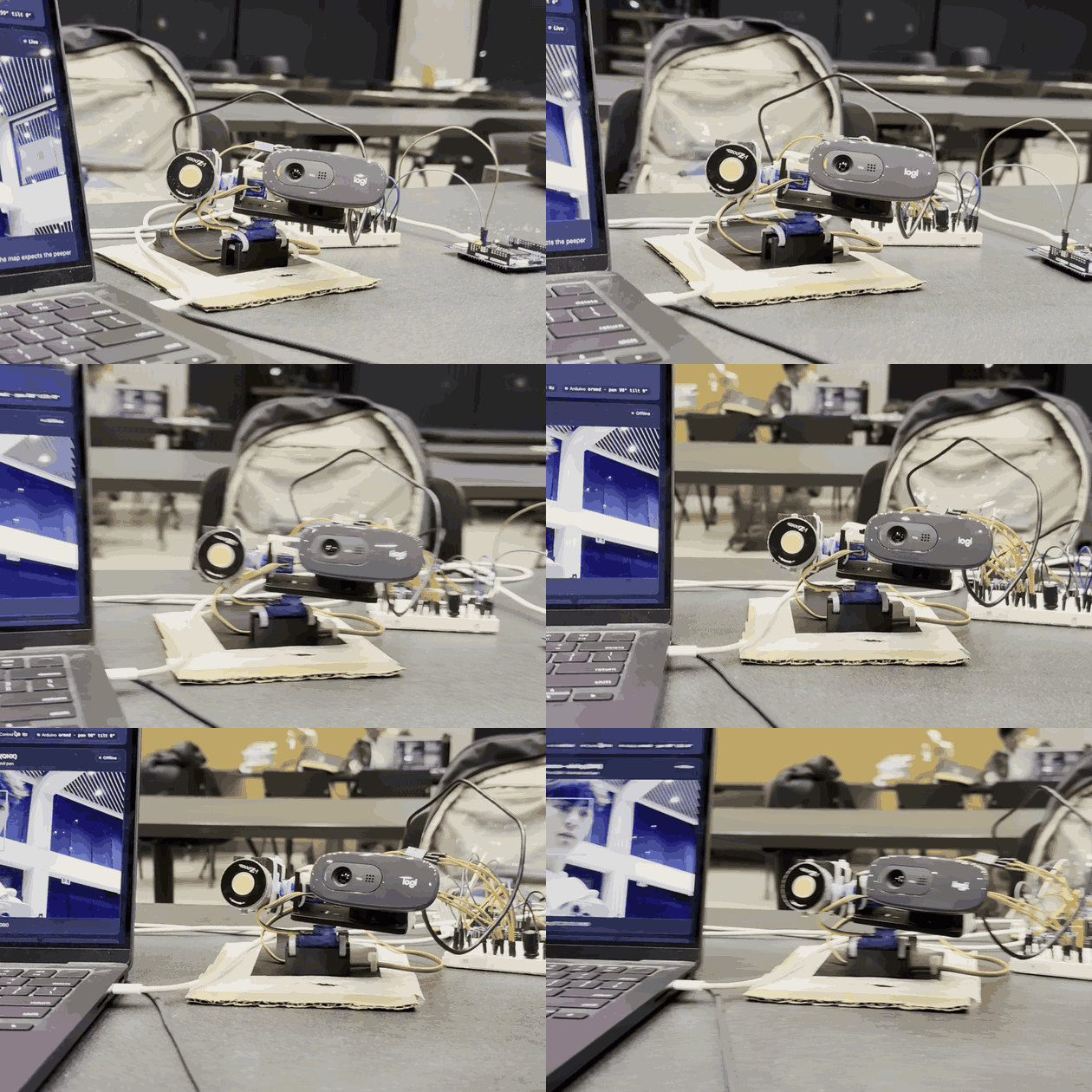
- It locks on and marks them. A pan-tilt turret run by a Raspberry Pi 5 on QNX 8 runs its own face detection (MediaPipe BlazeFace on TensorFlow Lite) on its own camera. It picks out the same person the laptop flagged, not you, centres them, and points a light at them.
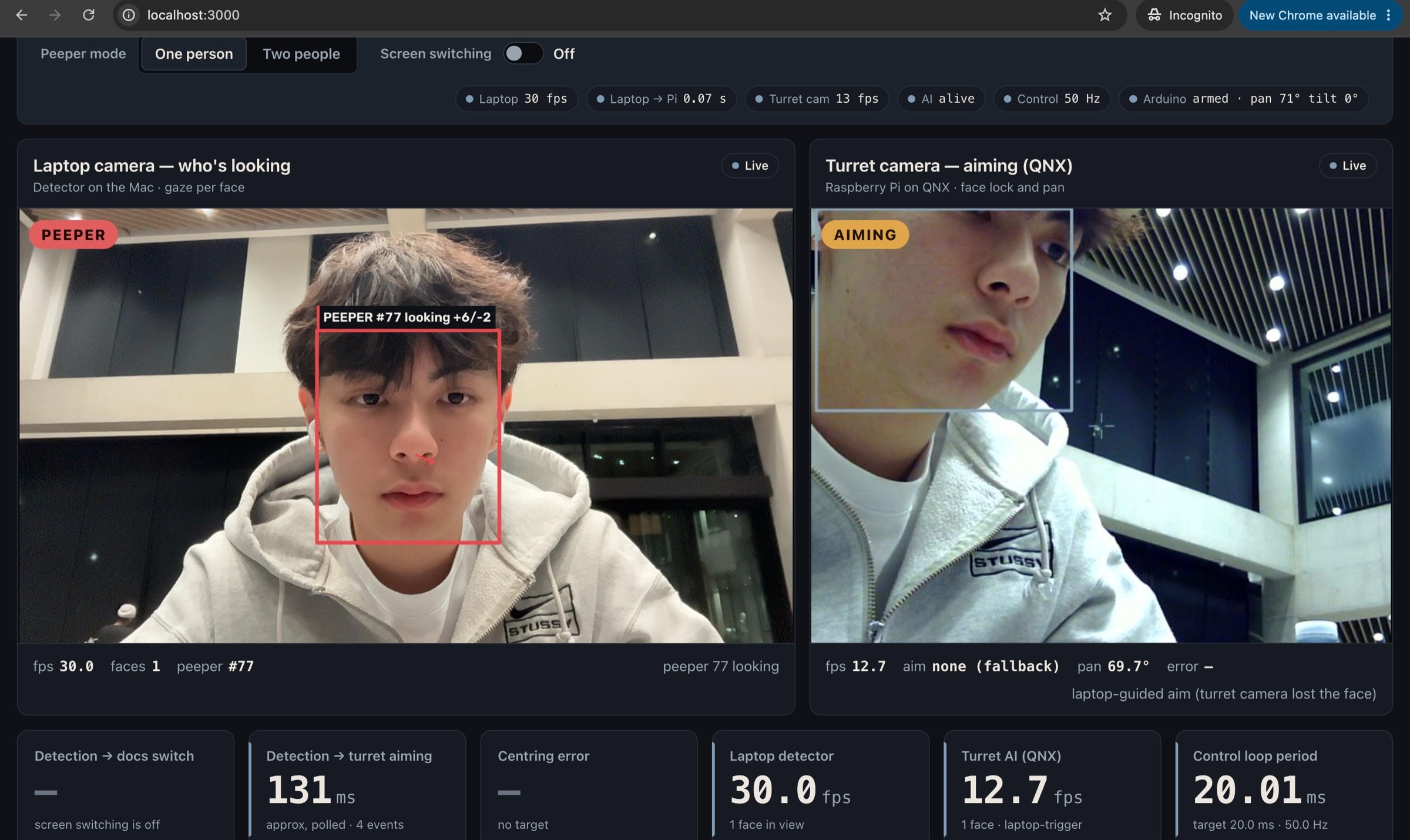
- It teaches itself where to look. If the turret's camera loses the peeper, it keeps aiming from the laptop's view through a laptop-to-turret mapping it learns on its own while both cameras can see the person, and it searches around its best guess if the map is off.
- It fails safe at every layer. Lose the heartbeat, kill the AI, drop the network or pull the kill plug, and the turret disarms within 300 ms. After any fault, a firmware latch refuses remote arming until someone presses the turret's physical button.
How we built it
The pipeline: MacBook → Wi-Fi UDP (0.02 s median) → Raspberry Pi 5 on QNX 8 → UART at 50 Hz → Arduino UNO Q → servos. Three processors, two operating systems, one control loop that missed zero deadlines under load.
Laptop (MacBook): gaze engine. Python with MediaPipe's Face Landmarker: 478 landmarks per face plus each head's 3D pose, at 30 fps. Gaze = head angle + iris angle. For distant, small and masked faces, OpenCV's YuNet finds the face first and MediaPipe reads a zoomed crop of it. Every face is tracked by identity across frames, with smoothing, blink tolerance and enter/exit hysteresis, so the decision never flickers. On a confirmed peeper, AppleScript brings a Google Docs tab to the front and a UDP heartbeat goes to the Pi. Laptop images never leave the Mac.
Turret brain (Raspberry Pi 5, QNX 8): on-device AI. We wrote a C capture bridge against the QNX Sensor Framework to pull frames from a Logitech C270, because QNX had no ready-made Python path for a USB camera. Faces are found with MediaPipe's long-range 256×256 BlazeFace model on the TensorFlow Lite runtime from QNX's open-source packages, at about 13 fps entirely on the Pi. The camera rides on the pan stage, so aiming is a closed visual-servoing loop: each frame nudges the turret toward centring the peeper. We tuned the controller in a closed-loop simulation so it stays stable even when the camera's delay is uncertain. The Pi picks the right face by predicting where the laptop's peeper should appear in the turret's view.
Hard real-time split on QNX. Two processes with different priorities. A high-priority control process (QNX on -p 21) owns the Arduino link and sends commands on absolute deadlines at 50 Hz. The AI runs at normal priority and only hands it targets. The loop holds 50 Hz with zero missed deadlines while a CPU stress test starves the AI (p99 period jitter 2.0 ms, worst period 22 ms; sub-millisecond when idle). If the AI slows or crashes, the turret's timing and safety don't change. A Next.js dashboard shows both camera views live, a Safety panel, the control loop's timing, and a CPU stress-test button so you can load the Pi and watch the timing hold.
Safety controller (Arduino UNO Q). Takes commands over UART in tenths of a degree, eases every move with speed and acceleration limits, reports its real position back 10 times a second, boots disarmed, and disarms itself if commands stop for 300 ms. After any fault, a firmware latch refuses remote arming until someone presses the turret's physical button. The AI can suggest where to aim. It can never override the safety controller.
Hardware. A 3D-printed, screw-free pan-tilt turret on two SG90 servos, an i-Zoom Rota8 puck light that stays on while the turret aims it, and a kill plug (two jumpers in one tab) that physically cuts servo power. We wrote an automated netlist checker for the breadboard and an illustrated build manual. The codebase has over 450 automated tests.
Challenges we ran into
- Catching the side-eye. People don't have to face a screen to read it. A peeper can turn their head away and still be looking with their eyes. We combined head orientation with iris position, worked out the angles from which someone could actually see the screen, and built a confidence-based trigger that acts on real peepers without false alarms.
- A camera that moves with the turret. Every pan changes what the camera sees. Our first predictive tracker oscillated because the camera's real delay differed from our model. We simulated the closed loop, found the instability, and switched to a proportional controller that stays stable across delays.
- A USB camera on QNX. There was no ready-made Python path, so we wrote our own C capture bridge to the QNX Sensor Framework.
- Faces at a distance. The close-range face model lost people past about 1.5 m. Switching to the long-range BlazeFace model lets the turret find faces only about 33 pixels wide, and on the laptop YuNet plus zoomed MediaPipe crops find faces out to about 10 m.
- Peeper or user? Two cameras see two people from two angles. The turret learns how the laptop's view lines up with its own and locks onto the peeper, never the person at the keyboard.
- Seeing inside a distributed system. With vision, control and hardware running across three processors, finding where a bug came from was hard. Our Next.js dashboard, showing both camera feeds, loop timing and safety state, made it possible.
- Mechanical reality. A servo blocked on one side looked exactly like a tracking bug. We found it by measuring the turret camera's view through a full sweep.
Accomplishments that we're proud of
- Real AI inference on QNX: TensorFlow Lite face detection at about 13 fps, entirely on the Raspberry Pi.
- A 50 Hz high-priority control loop that missed zero deadlines while the AI was starved of CPU.
- Side-eye detection from iris position, not just head direction, and faces found out to about 10 m.
- A turret that teaches itself where to look: it keeps aiming when its own camera loses the target, using a mapping it learned on its own.
- Safety at every layer: heartbeat watchdog, boot-disarmed firmware, a fault latch that only a physical button press clears, and a hardware kill plug.
- Over 450 automated tests.
- Most importantly, we finally won the Alt-Tab race.
What we learned
- How QNX's priority scheduling lets safety code and AI code share a processor without the AI's slowness ever reaching the hardware.
- That an AI model should advise, and never have the final say on anything physical.
- How much of a hardware build is power, grounding and mechanics, not code.
What's next for Medusa
- A Medusa Shield PCB to replace the breadboard: a MOSFET light switch, an onboard 5 V supply, screw terminals, status LEDs and a fuse.
- Moving the laptop's gaze model onto QNX too, so every model runs on the embedded device.
- A quiet mode for clinics and offices: hide the screen and alert the user, with no light at all.
Built With
- 3d-printing
- applescript
- arduino
- c
- cmake
- mediapipe
- next.js
- opencv
- python
- qnx
- qnx-sensor-framework
- raspberry-pi
- tensorflow-lite


