-
-
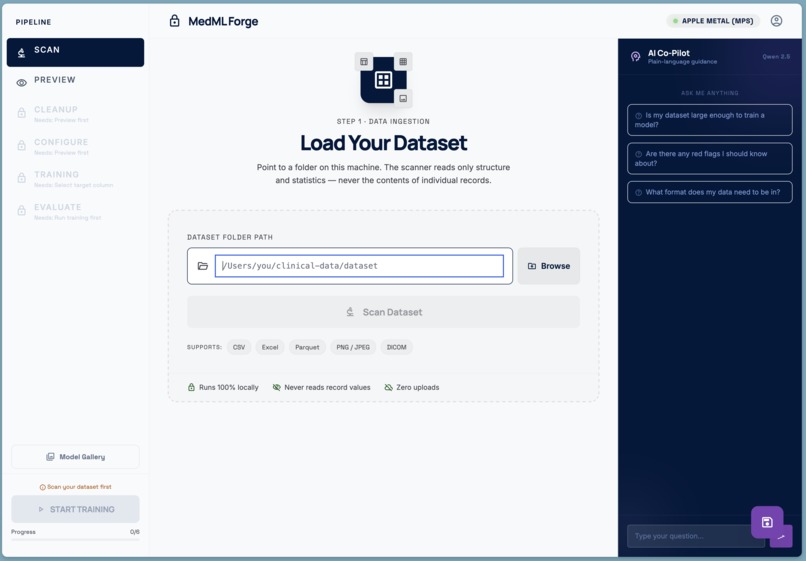
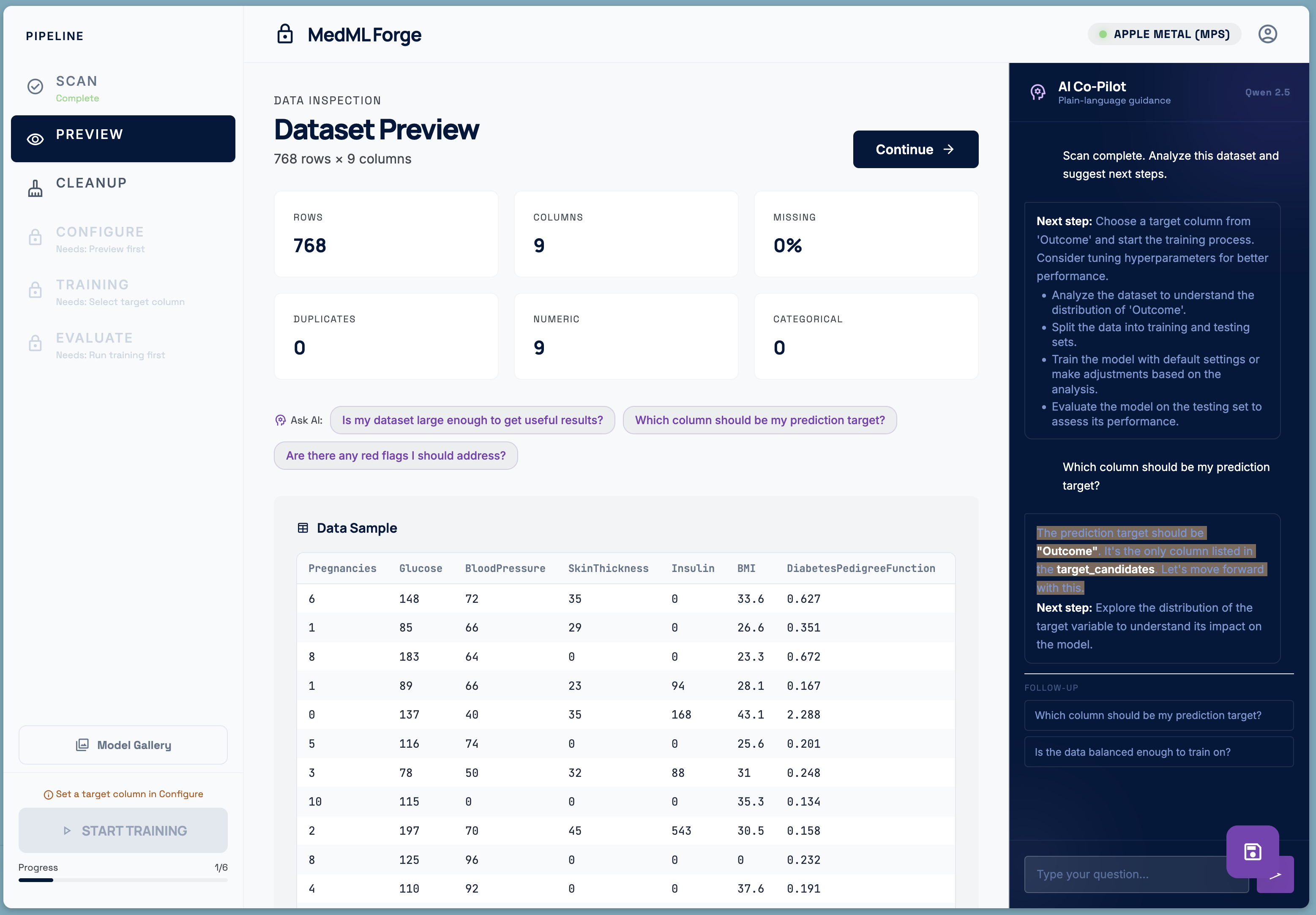
Dataset loading
-
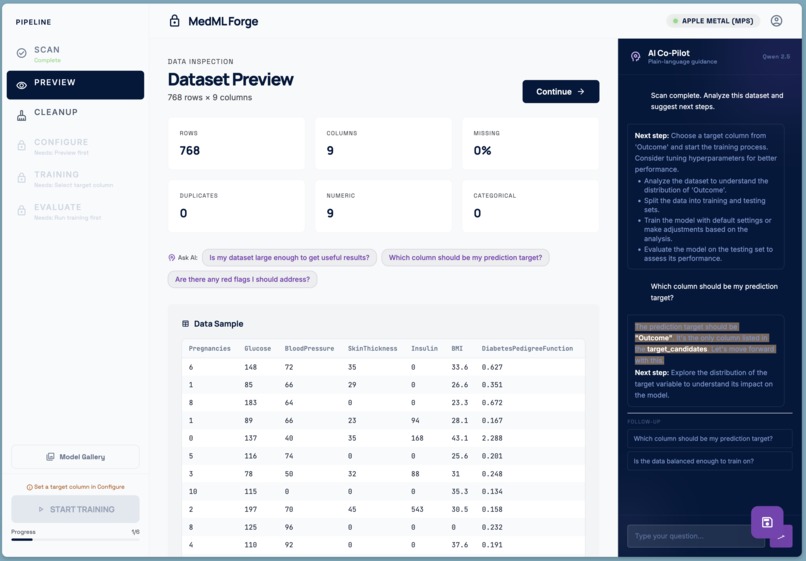
Dataset overview
-
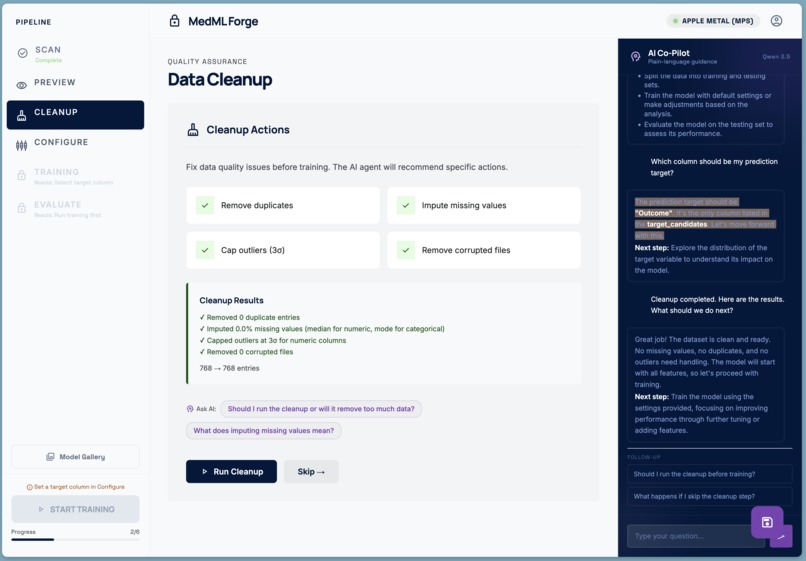
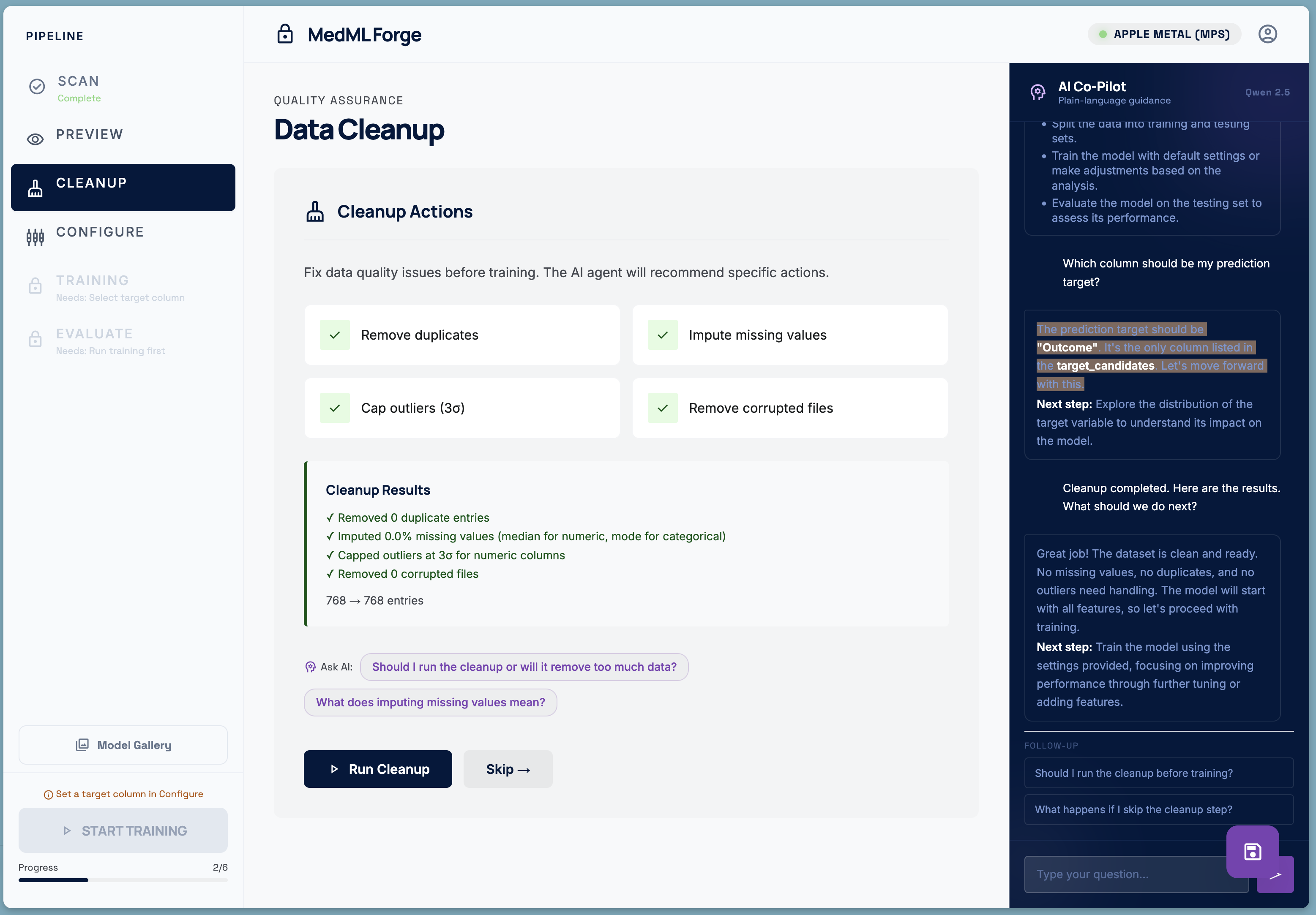
Dataset cleanup
-
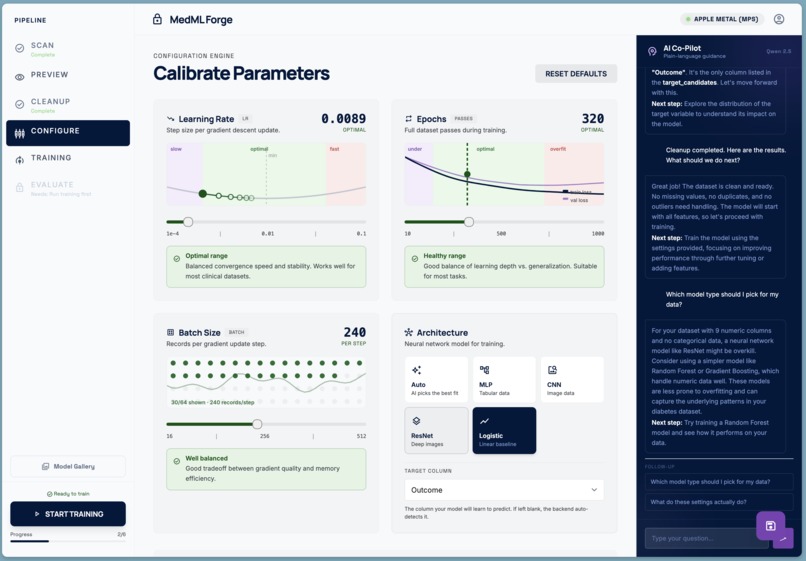
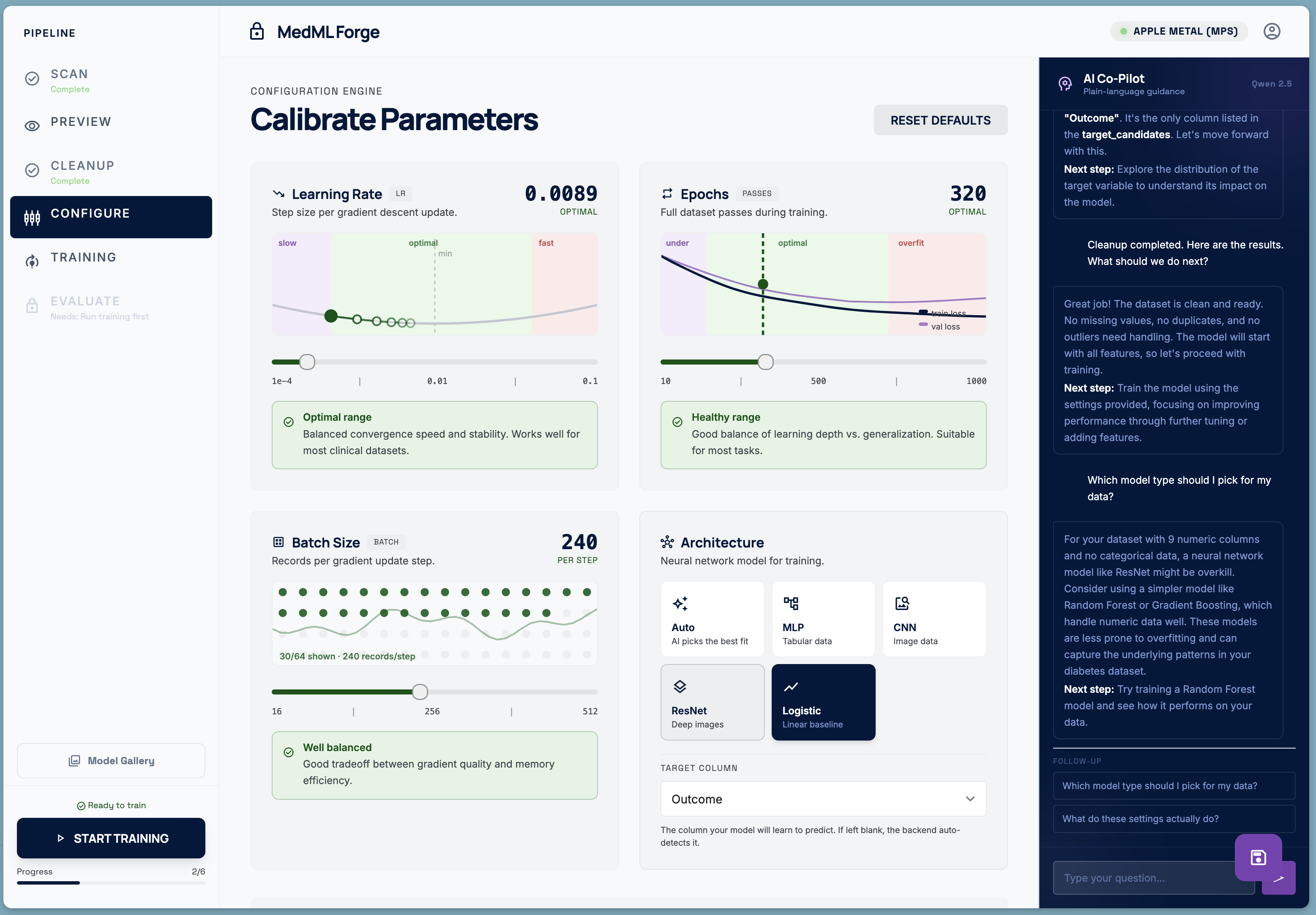
Parameter calibration
-
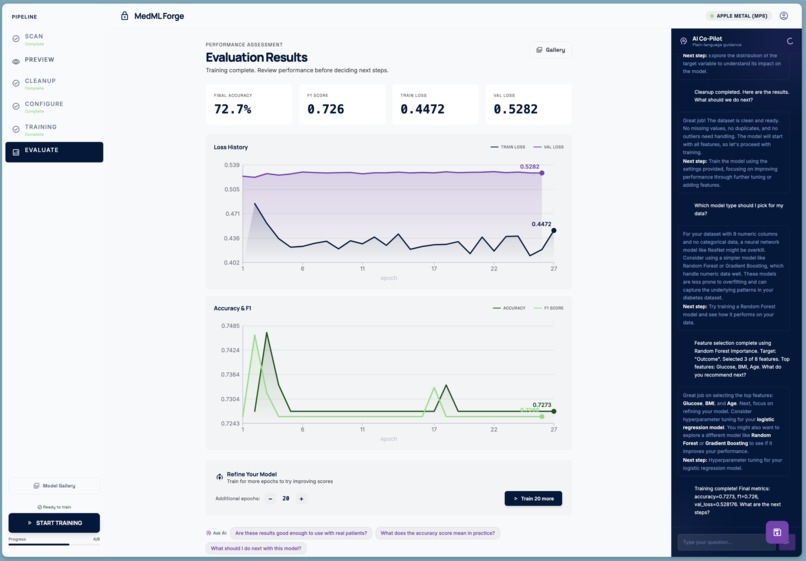
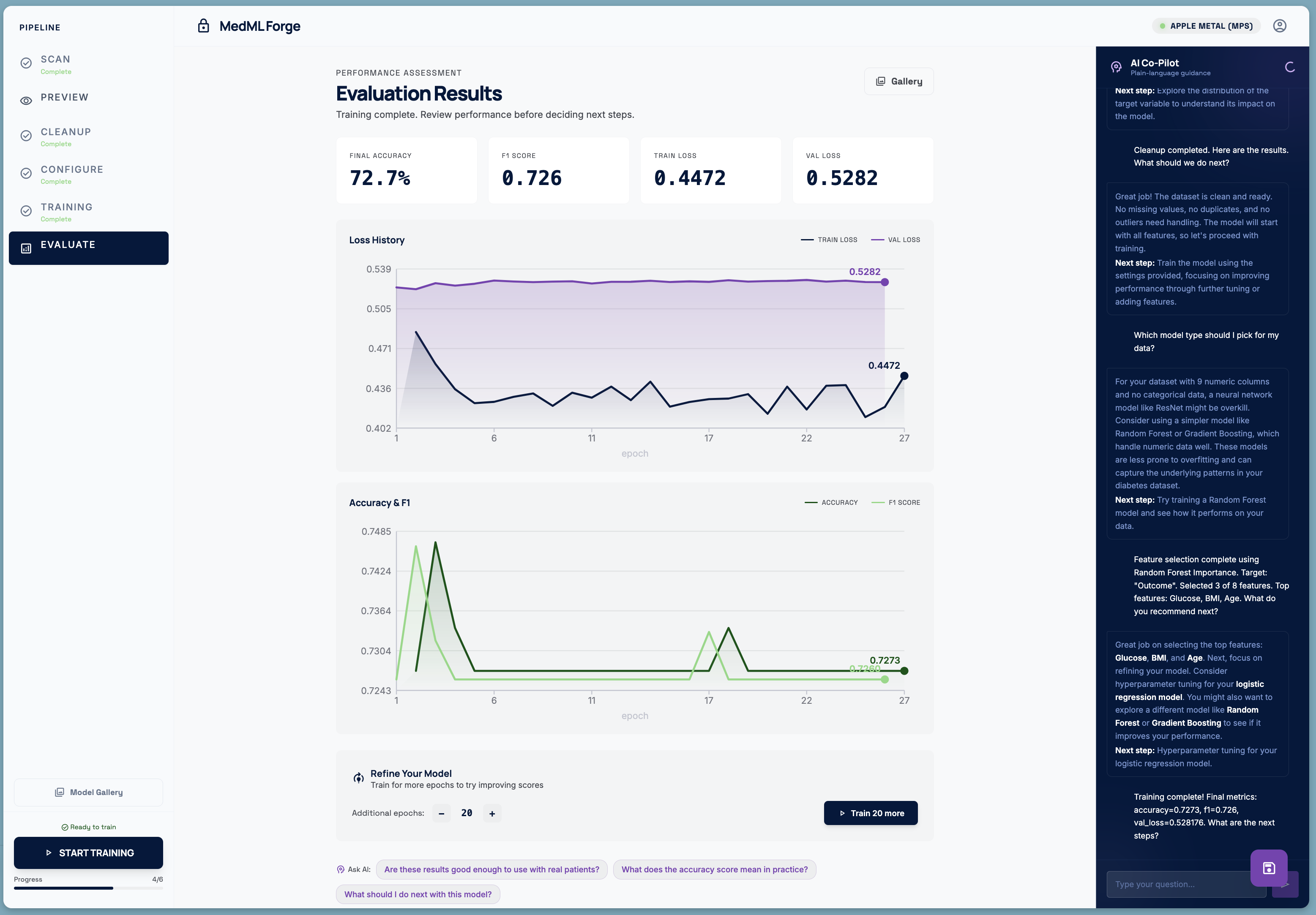
Model Evaluation
-
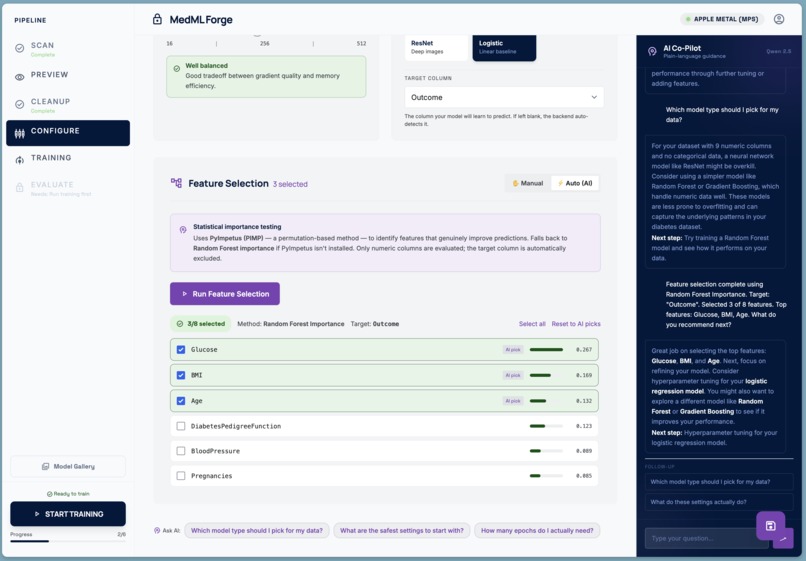
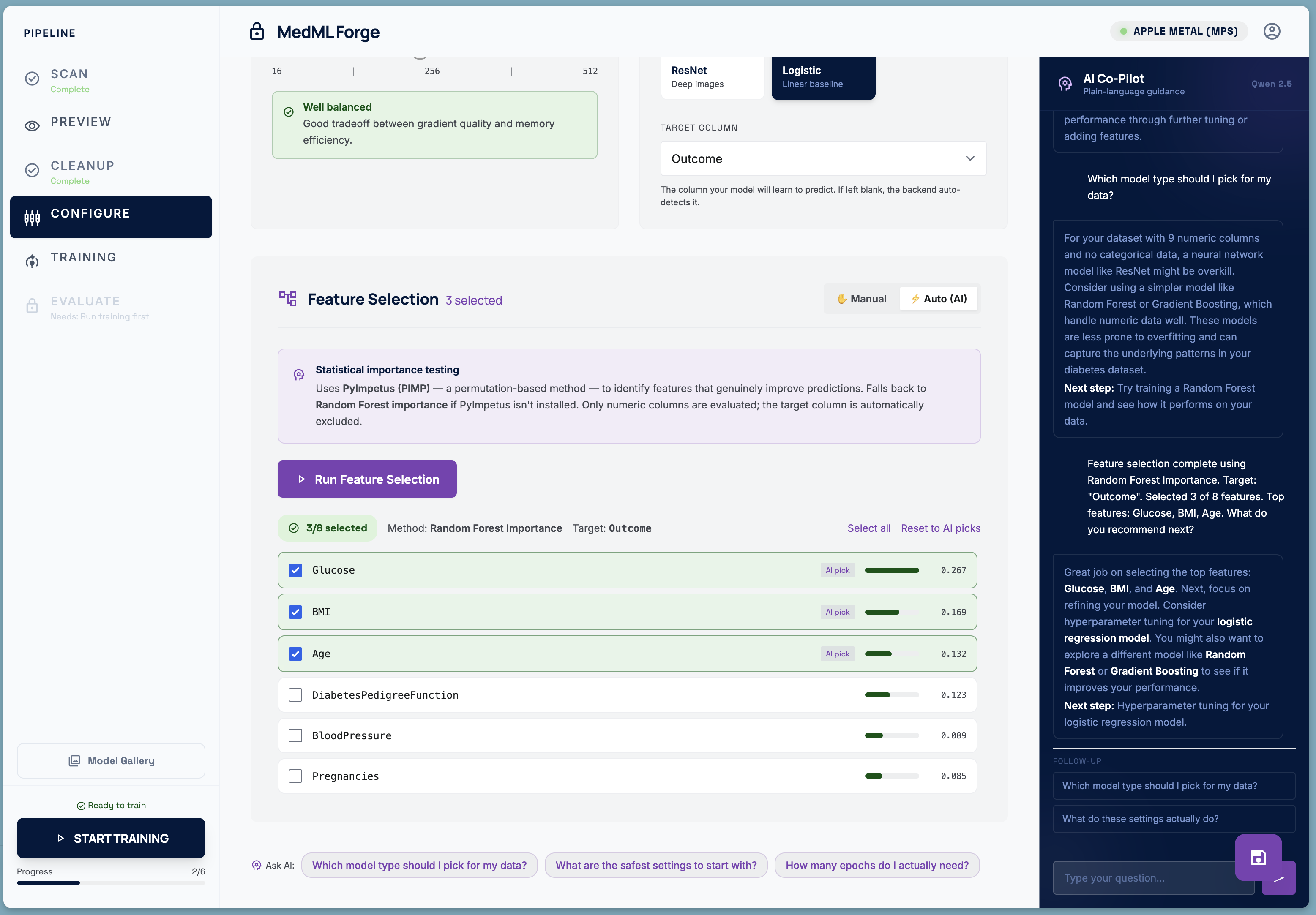
Feature Selection
-
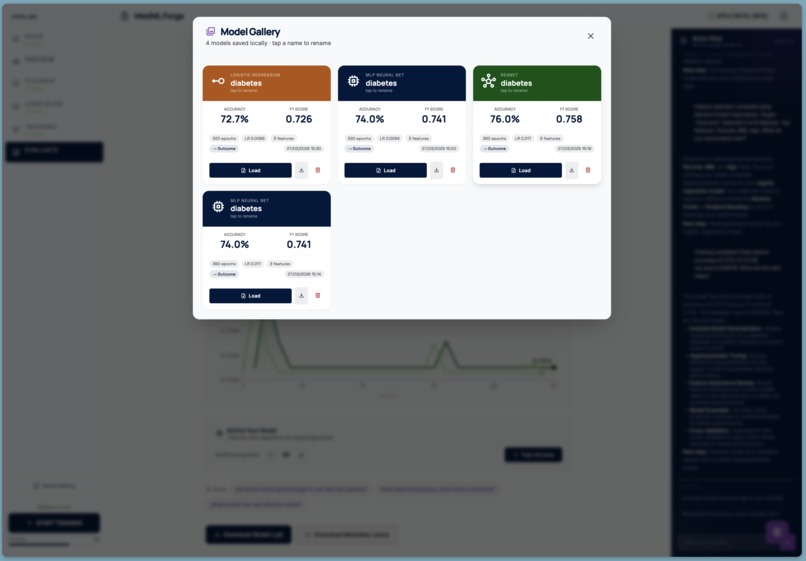
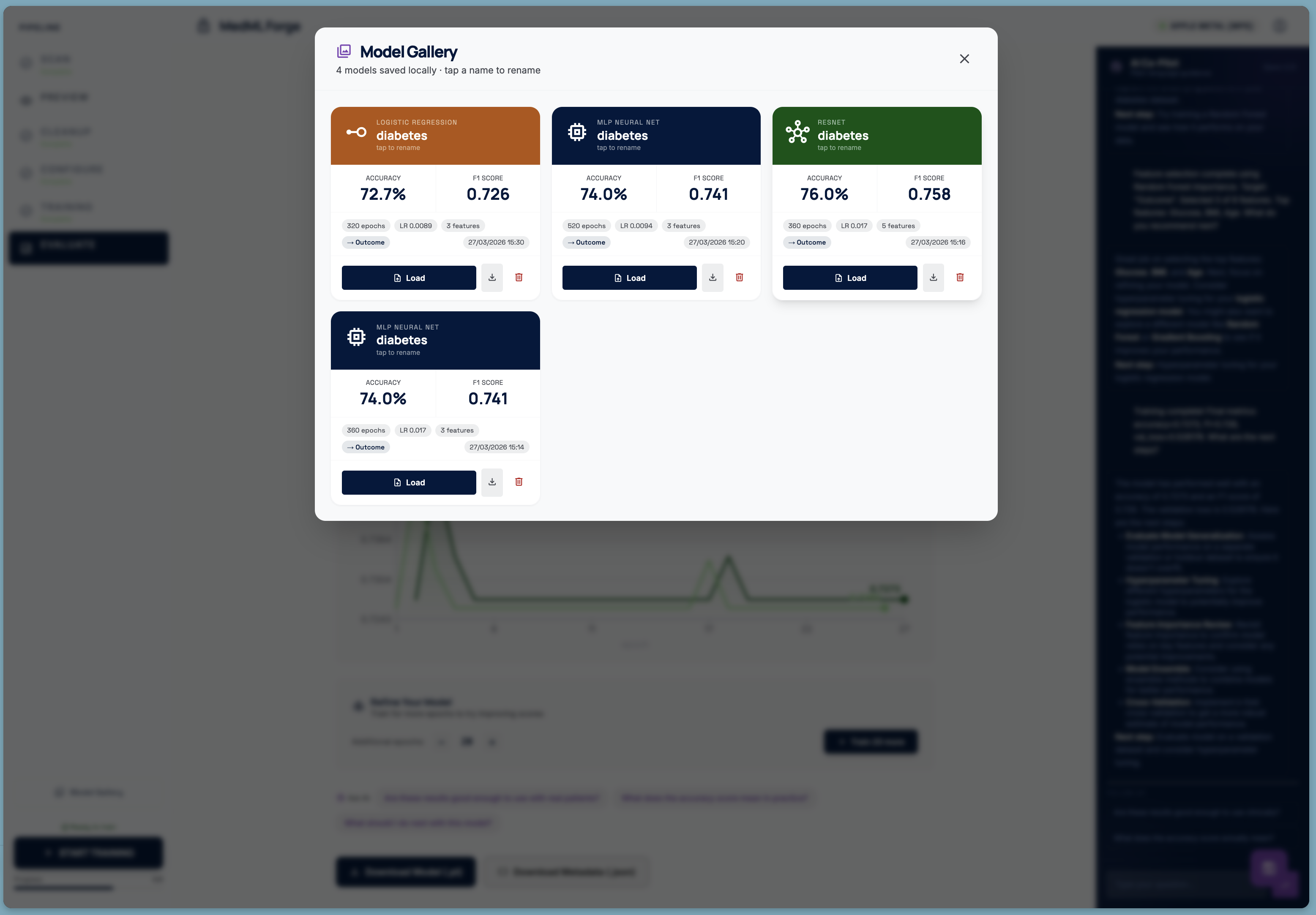
Model Gallery
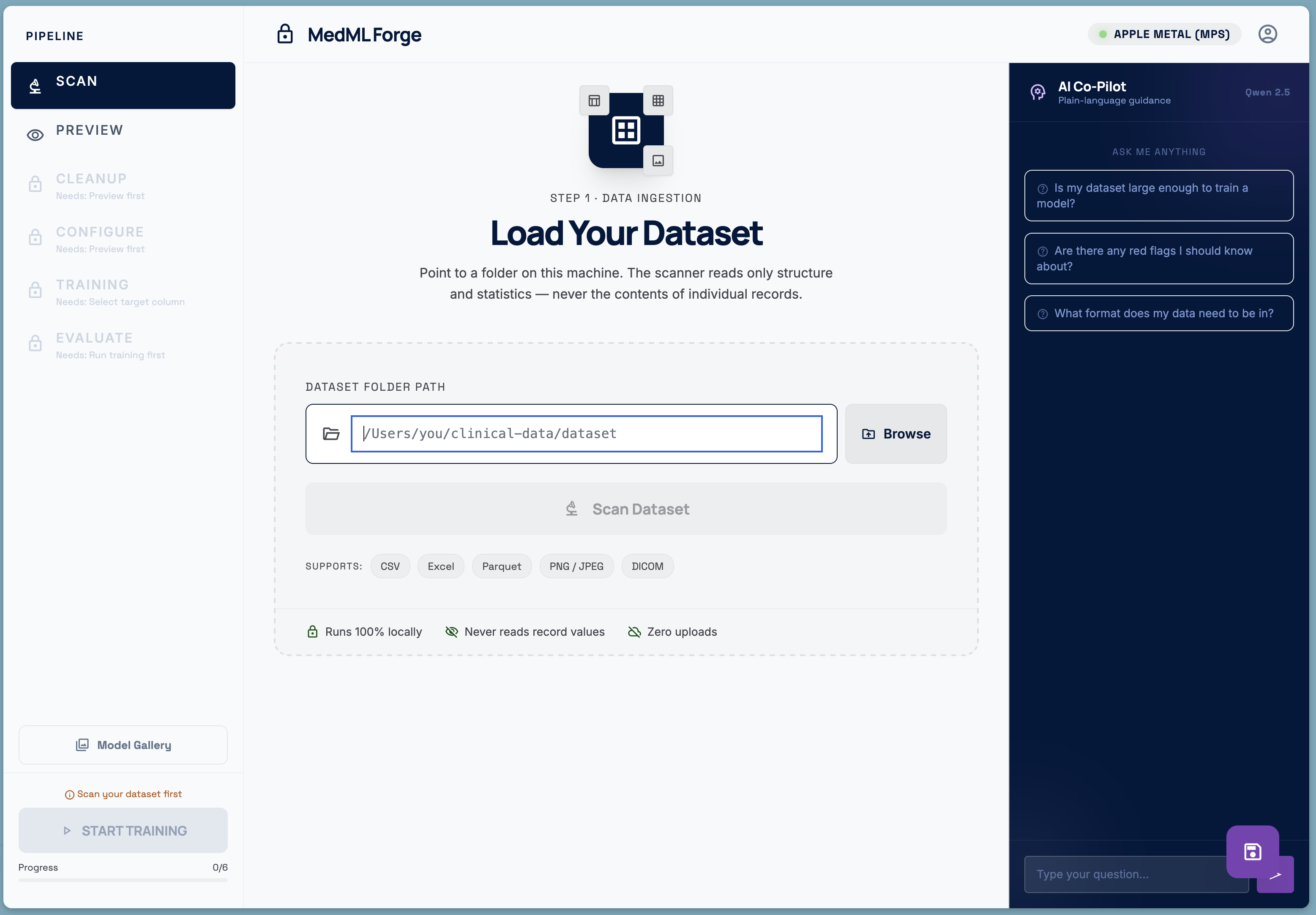
MedML
Inspiration
Medicine generates extraordinary data. Every hospital visit, every scan, every lab result is a data point that in theory — could train a model to catch disease earlier, flag anomalies faster, or personalize treatment. In practice, almost none of that potential is realized, because the people closest to the data — the clinicians cannot use it easily and do not have the technical expertise.
The standard path to a working ML model looks like this: a researcher writes a grant, a hospital negotiates a data-sharing agreement, an ethics committee reviews the protocol, an IT department de-identifies records, and finally a data scientist receives a carefully anonymised export and trains a model — months or years after the idea first surfaced. Even then, the raw patient data has left the building.
We asked a simpler question: what if the model came to the data, instead of the other way around?
Modern consumer hardware — a MacBook or a workstation GPU — is more than capable of training a useful clinical classifier. The obstacle is not compute; it is the tooling. The tools that exist today require Python expertise, familiarity with PyTorch, and comfort reading stack traces. A radiologist who notices a pattern in their imaging data has no realistic way to act on that intuition independently.
MedML is our answer to that gap, it is like a junior data scientist at you disposal, ready to help and maintaining privacy.
What It Does
MedML Forge is a fully local, end-to-end machine learning pipeline designed for clinicians with no coding background. You point it at a folder on your own machine — a directory of CSVs, Excel files, DICOM images, or PNG scans — and it walks you through every step:
- Scan — the scanner reads only structure and statistics. It counts rows, detects column types, measures class balance, flags missing values and duplicates. It never reads the value of a single patient record.
- Preview — a visual inspection of what the scanner found: a sample of the table, column types, missing-value rates, and image thumbnails.
- Cleanup — automated data quality fixes: duplicate removal, missing-value imputation, outlier capping, and corrupted-file detection.
- Configure — illustrated parameter cards explain learning rate, epochs, batch size, and model architecture in plain language — no jargon. An AI co-pilot, powered by a local Qwen LLM running entirely on the same machine, answers questions in non-technical language. Feature Selection can also be performed locally.
- Train — a real PyTorch training loop runs on-device, streaming live loss curves and accuracy metrics to the UI over Server-Sent Events. The model never leaves the machine.
- Evaluate — final metrics, full training history charts, and a one-click model download. If the scores are not good enough, the user can extend training for more epochs and revert to the previous checkpoint if things got worse.
A Model Gallery stores every trained model with its configuration, metrics, and dataset provenance, so clinicians can build and compare a library of models over time.
How We Built It
The stack was chosen entirely around the constraint that nothing leaves the machine.
Backend — Python / Flask
A lightweight Flask server (ml-worker/server.py) handles all computation. PyTorch runs the actual training loops. Scikit-learn provides preprocessing, feature selection (with PyImpetus for permutation-based feature importance), and evaluation metrics. The server communicates with the frontend over a local-only HTTP interface.
LLM — Qwen 2.5 via llama.cpp
A quantised Qwen 2.5 model runs as a local OpenAI-compatible server (llama-server). The Flask backend proxies reasoning requests to it. The system prompt is carefully written to produce short, plain-language, markdown-formatted answers aimed at a non-technical clinical audience — bullet points, bold key terms, no Python, no jargon.
Frontend — React + Vite + Tailwind The UI is a single-page React app served by Vite. Tailwind is configured with a full Material Design 3 colour token system. Custom fonts (Manrope, Inter, Space Grotesk, JetBrains Mono) and Material Symbols icons give it a clean, clinical aesthetic. Training metrics are streamed live over SSE and plotted with hand-written SVG charts — no charting library dependency.
Feature Selection Rather than using all available columns, the pipeline offers an AI-assisted feature selection mode backed by PyImpetus (permutation-based statistical testing) with a Random Forest fallback. Selected features are shown with importance scores so the clinician can override the AI's picks.
Checkpoint & Continue After training completes, the user can extend training for additional epochs. Before doing so, the server copies the current model weights to a timestamped checkpoint. If the new scores are worse, a single "Revert" button restores the checkpoint — no expertise required.
Challenges We Faced
Making ML concepts legible to non-experts The hardest design problem was not technical. Every parameter has a name that means nothing to a doctor. "Learning rate" is meaningless. We replaced the standard hyperparameter form with illustrated cards: a gradient descent animation for learning rate, a train/val learning-curve diagram for epochs, a dot-grid visualisation for batch size. Each card has a zone indicator (cautious / optimal / aggressive) and a plain-language insight panel.
Truly local AI guidance Getting a local LLM to be genuinely useful — rather than producing verbose, jargon-heavy text — required iteration on the system prompt. The key insight was specifying the audience explicitly and constraining the format (markdown bullets, max 10 lines, always end with a "Next step"). The AI co-pilot now receives a structured JSON snapshot of the full pipeline state on every request, so its suggestions reference the user's actual metrics, feature names, and configuration rather than speaking in generalities.
SSE streaming and training state
Coordinating a background PyTorch training thread, a Flask SSE endpoint, a React client, and a "continue training" flow that must resume from saved weights introduced subtle race conditions. The most problematic: after a continuation run starts, the SSE stream would sometimes pick up the old "complete" state before the new thread had set active = True. A small deliberate delay before subscribing to the stream, combined with wrapping all endpoints in explicit try/except blocks that return JSON (never HTML), resolved the class of errors users were seeing.
Privacy by design, not as an afterthought Every architecture decision was evaluated through the lens of data residency. The scanner was written to inspect file metadata and column statistics without ever loading the actual values into memory. The LLM prompt only receives aggregated summaries. The model gallery stores only weights and configuration — not training data. "Zero uploads" is not a marketing claim; it is a structural property of the system.
What We Learned
Building for a non-technical audience is a fundamentally different discipline from building for developers. The interface has to absorb complexity that would normally live in a terminal or a Jupyter notebook. Every error message, every label, every button has to be written for someone whose primary expertise is medicine, not software.
We also learned that a local LLM with a good system prompt and rich context can be a genuinely useful collaborator in a domain-specific tool — not a gimmick, but a first-responder for questions that would otherwise require a data scientist on call.
Finally: the hardest bugs are always in the seams between systems — between the training thread and the SSE stream, between the frontend state and the backend checkpoint, between "what the model knows" and "what the user needs to hear." Good abstractions at those seams pay for themselves many times over.
What's Next
- DICOM-native image pipeline — real CNN training on medical imaging without requiring format conversion
- Federated averaging — multiple sites train local models; only weight deltas are shared, never patient data
- SHAP explanations — post-training feature attribution so clinicians can interrogate why the model made a prediction
- Export to ONNX — deploy trained models to edge devices and clinical decision-support systems without a Python environment
Built With
- claude
- flask
- javascript
- on-device
- python
- qwen


Log in or sign up for Devpost to join the conversation.