-
-
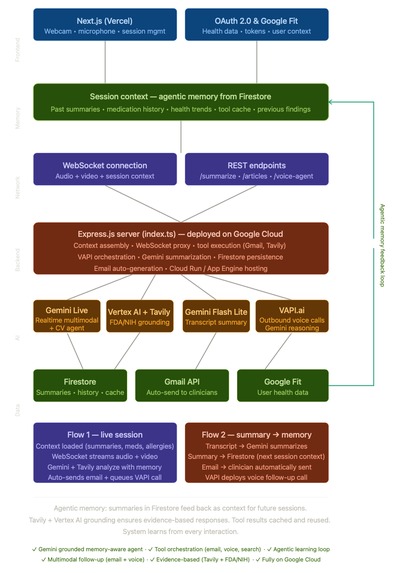
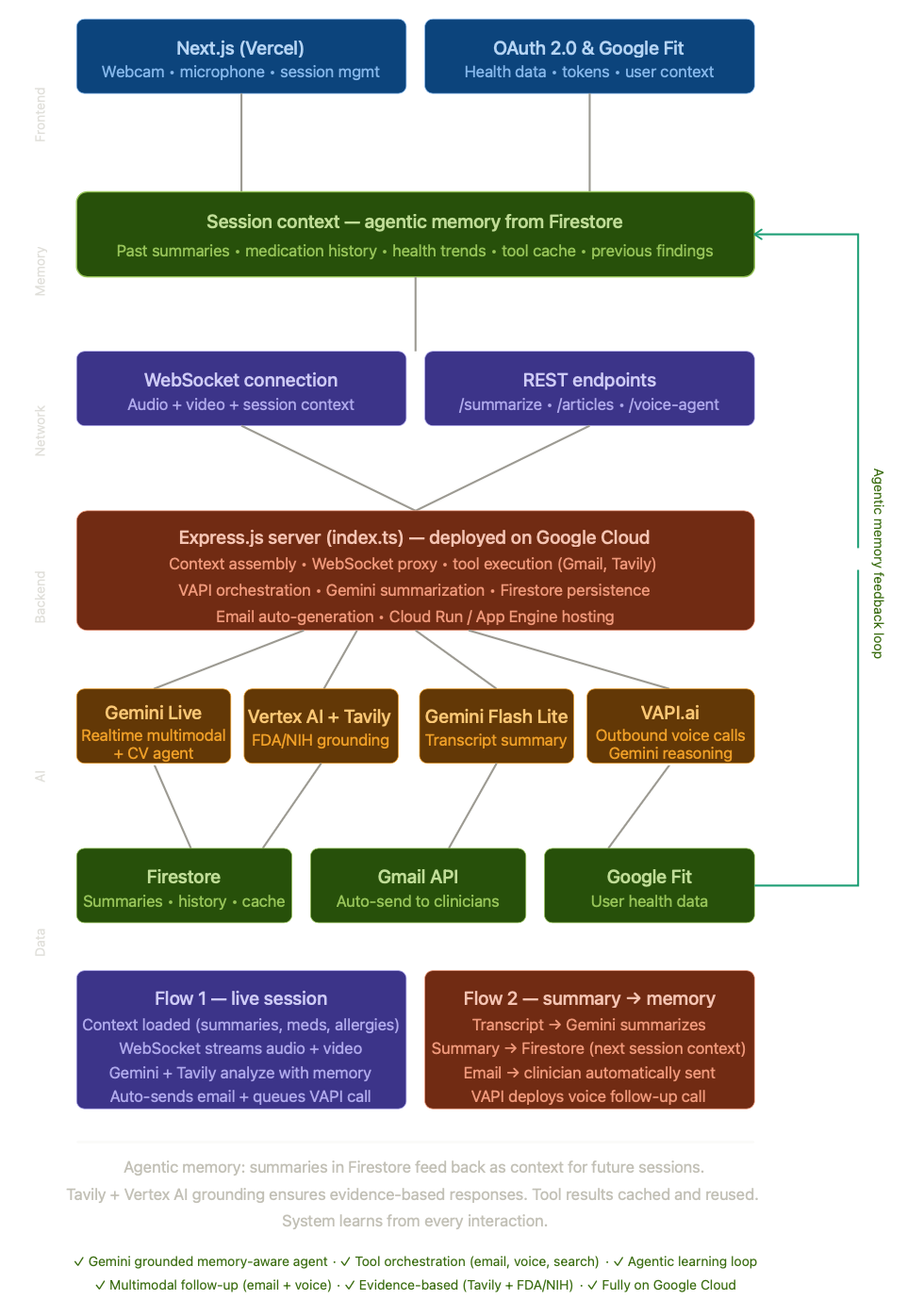
Architecture Diagram
-
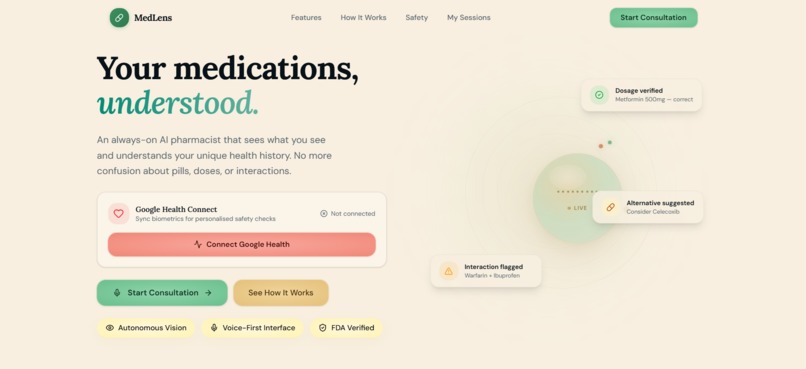
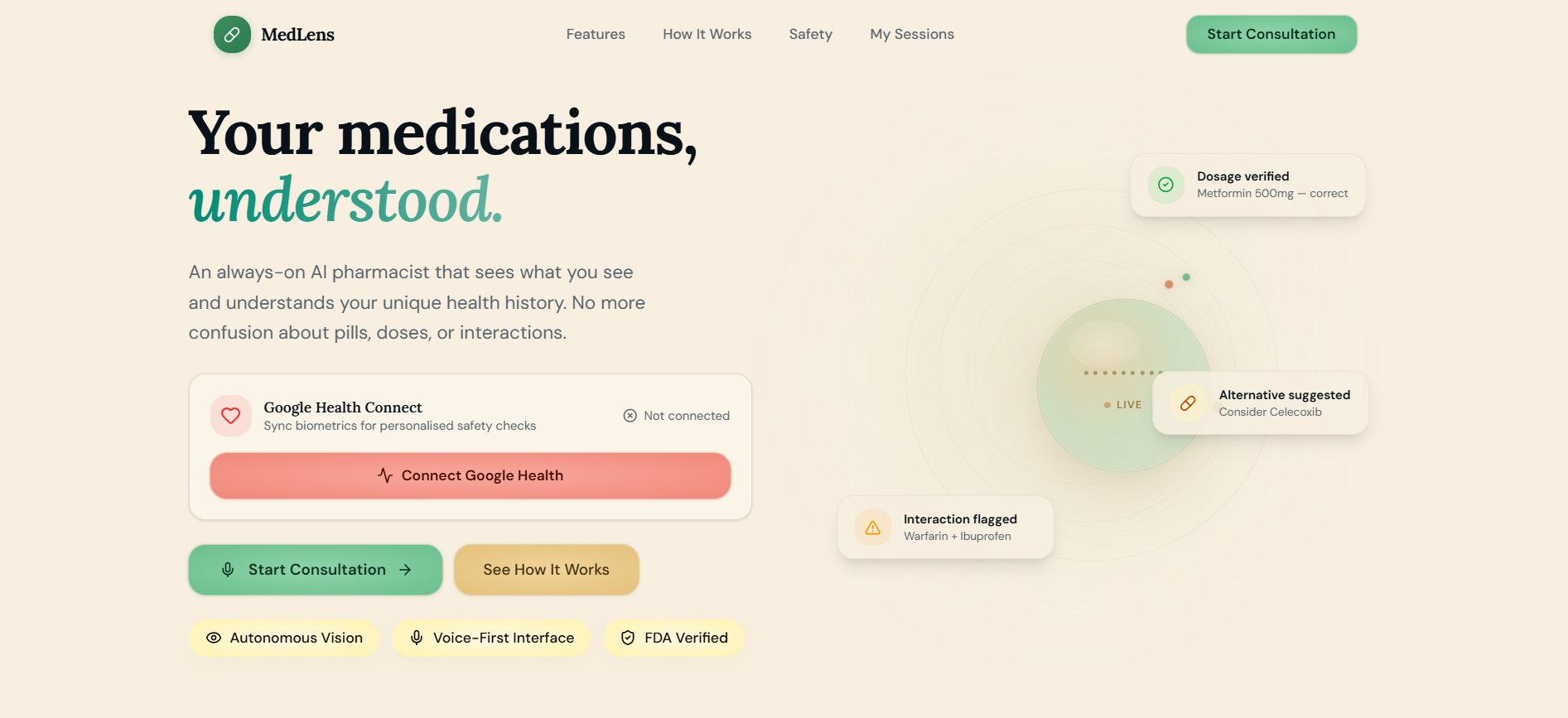
Landing Page
Inspiration
Just last year, a close family relative of mine mixed up their prescription from the doctor, and nearly took the wrong dosage for their heart condition — something that would’ve been fatal, had it not been for another family member noticing immediately. Occurrences like these happen all the time. In the U.S. alone, over 1.5 million people were harmed and 16,000 deaths occurred as a result of prescription mixups in 2025 (U.S. Department of Health and Services). With long pharmacy call times and doctors juggling hundreds of prescriptions, this issue is exacerbated, especially in rural areas where a large amount of people rely on a fixed amount of medical services.
To prevent more life-threatening situations like these, we built MedLens.
What it does
MedLens is the first ever AI-native pharmacy platform, helping users autonomously clarify prescription/medication questions. The platform is completely powered by the Google Ecosystem, the immense power of Google Gemini, and a fully-hosted backend on Google Cloud.
First, users are met with the MedLens dashboard, where they are asked to connect their Google Account to the platform. Once they do that, MedLens extracts biometrics (heart rate, blood pressure, etc.) from the user’s Google Fitness mobile app (completely encrypted).
After this, the user presses “Start Consultation”, which prompts a computer vision-based multimodal AI agent (24kHz playback frame capture) utilizing the Google Gemini Live API and the Gemini SDK. Powered by the Gemini Flash model, MedLens uses agentic memory to draw upon previous sessions along with the biometric data, answering visual and oral questions from the user based on their personalized medical history.
Further, it uses Vertex AI API for constant real-time grounding against FDA and NIH sources, to ensure it is providing accurate suggestions. Additionally, this agent uses event-driven automation, being able to autonomously send emails to the user’s doctor or pharmacist through Gmail, all on the user’s discretion. An important note: users should always consult with a medical professional before acting on any advice. MedLens is designed for clarification of existing prescriptions, not diagnosis or treatment recommendations
Once the user ends the session, MedLens uses Gemini Flash Lite to analyze the call transcript and create structured outputs in the form of concise, summary bullet points. Google Firestore is used to map these call summaries onto an easy-to-read grid.
Beyond the summaries, the users can deploy a voice agent powered by Gemini Flash reasoning and Vapi to call their doctor/pharmacist, use context from the most recent call session with MedLens, and ask questions on behalf of the user. Call summaries from these are also mapped onto the summary grid via Google Firestore. If the doctor/pharmacist recommends a different pill dosage, MedLens will update patients in real-time by storing it on the dashboard's easy-to-read call summaries - ensuring that users are not put into life-threatening situations with incorrect medications.
Users can also use Google Maps to find nearby pharmacies, deploy a search tool powered by Google Vertex AI API grounding + Tavily Search to find relevant articles, and save the MedLens dashboard as a PDF.
How we built it
MedLens Integration:
- WebSocket proxy for real-time Gemini Live streaming (vision + audio)
- Google OAuth 2.0 for Gmail drafting/sending + Google Fit biometric ingestion
- VAPI + Gemini Flash phone agent deployment for post-session doctor/pharmacy calls
Backend (Express + WebSocket):
- Gemini Live proxy, Gmail tool calls, VAPI orchestration, Gemini Summarization, Tavily article search, Firestore persistence
- Google Cloud (entire backend + agents)
AI Models:
- Gemini 2.5 Flash Native Audio — Live multimodal session (webcam frames + PCM16 mic audio)
- Gemini 3 Flash Preview — VAPI deployed voice agent calls
- Gemini Flash Lite for session summarization
- Google Search Retrieval + Vertex AI API — Real-time FDA/medical grounding
Frontend (Next.js 16 + Tailwind + Radix UI):
- session-view.tsx — Live camera/mic capture UI with speech recognition
- use-live-agent.ts — WebSocket client, audio pipeline (PCM16@16kHz→24kHz playback), frame capture
- summary-dashboard.tsx — Call history grid, VAPI sync, article display
- google-health-connect.tsx — Biometric dashboard with orb visualizer
Infrastructure:
- Google Cloud Run (session affinity, 1h timeout)
- Firebase Firestore (per-user session/call storage)
- Skaffold + Docker (node:20-slim, tsc → dist/)
Challenges we ran into
This was the first time we worked with a multi-agent pipeline at this scale, so it was definitely tough to figure out a clean architecture for our codebase. Working across the WebSocket proxy, tool-calling layer, and the summarization service was a significant challenge. Specifically, using the Gemini Flash Lite model to summarize the call transcripts was quite tough to work with, since we’d get inaccurate summaries that lacked context. Finally, equipping our agents with context-aware memory was definitely a struggle, since we’d never worked with that kind of a system before. However, after reviewing documentation for Gemini Multimodal Live API and Cloud Run, we were able to push through, and build every feature we had set out before the hackathon.
Accomplishments that we're proud of
This is the first time we did a hackathon this long, so we’re definitely proud of that. Being seniors in high school, we are quite busy nowadays, but this project was a great way to take our minds off of the hectic stress of school. Additionally, we’re really proud of integrating Google services so deeply throughout our project – it’s something that we really think makes our project stand out, and something we’ll continue to do since all of these services are so powerful. But beyond technical accomplishments, this project is something I can say I’m very proud of. Being able to address such a pressing issue reminds us how powerful AI and technology can be, especially for those dealing with medical issues.
What we learned
We learned that it’s important to deploy to Google Cloud after finalizing a backend — this was done early on in the hackathon, leading to many credits being used and lots of deployments after iterations and pivots :/
What's next for MedLens
We plan to continue expanding Google integrations into MedLens, including shareable Google Docs for doctors to see, along with Google Calendar events being planned by the agent. Additionally, we want to make it so that MedLens can call users for important information, and create a main agent that can access the entire MedLens platform, streamlining and accelerating user efficiency.
Built With
- cloud
- cv
- docker
- firestore
- g-fit
- gemini
- gemini-flash-lite
- gmail
- google-maps
- next
- radix
- tailwind
- tavily
- vapi
- vertex
- websocket


Log in or sign up for Devpost to join the conversation.