-
-
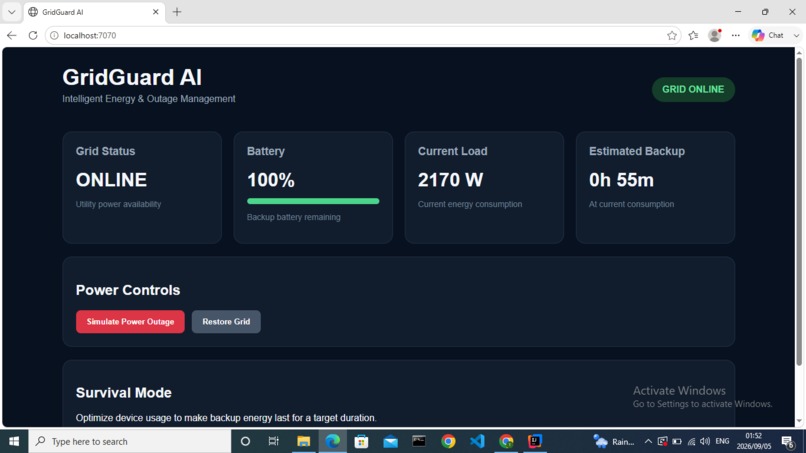
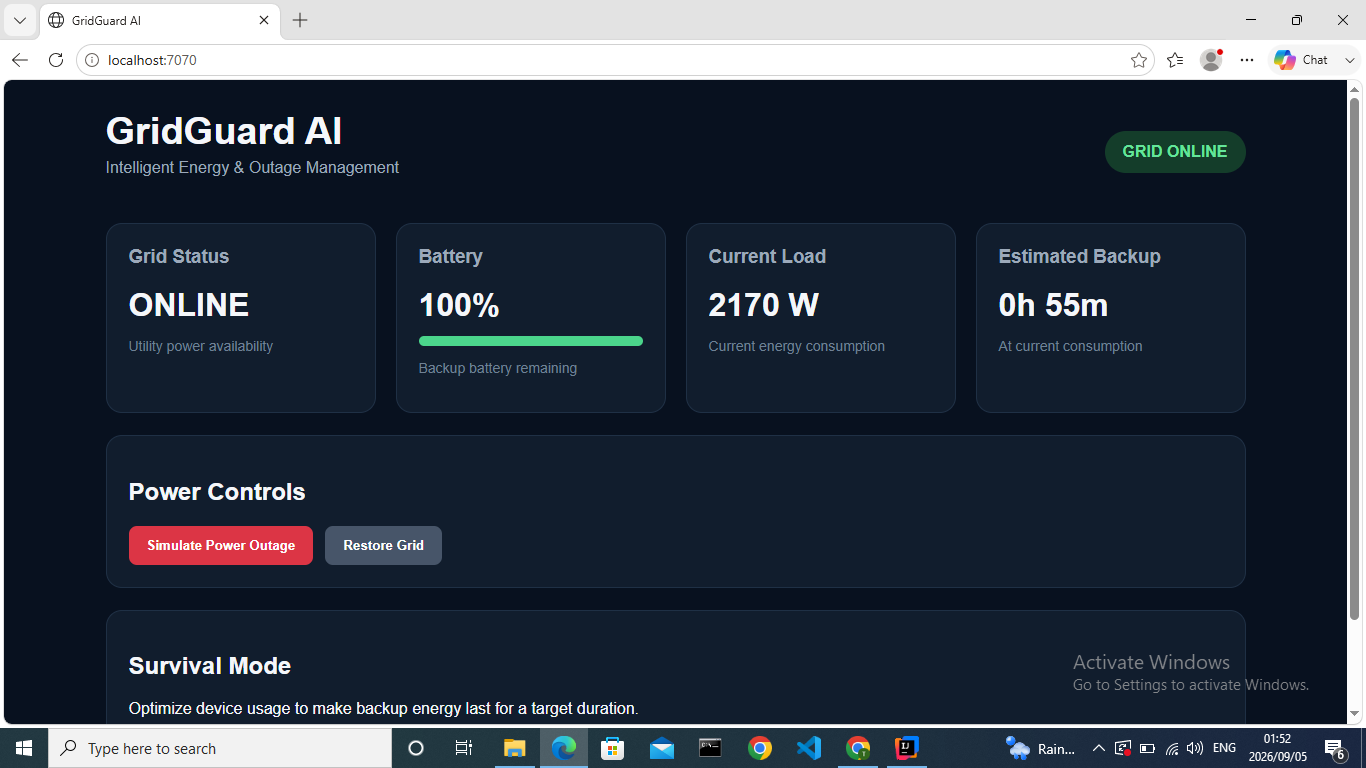
Normal Operation
-
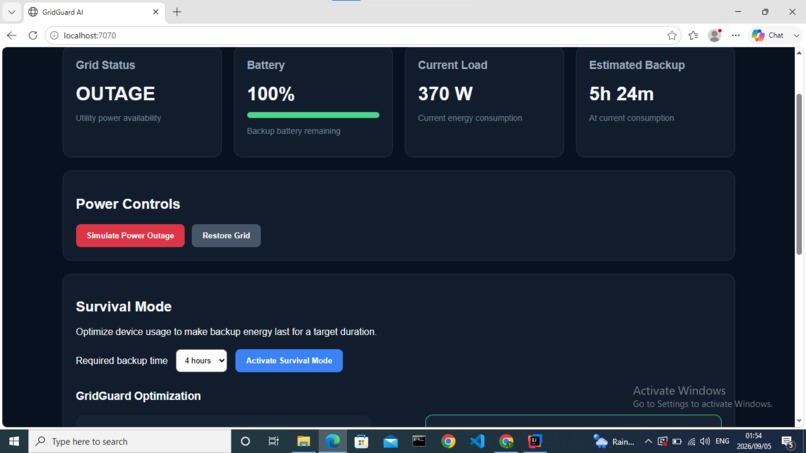
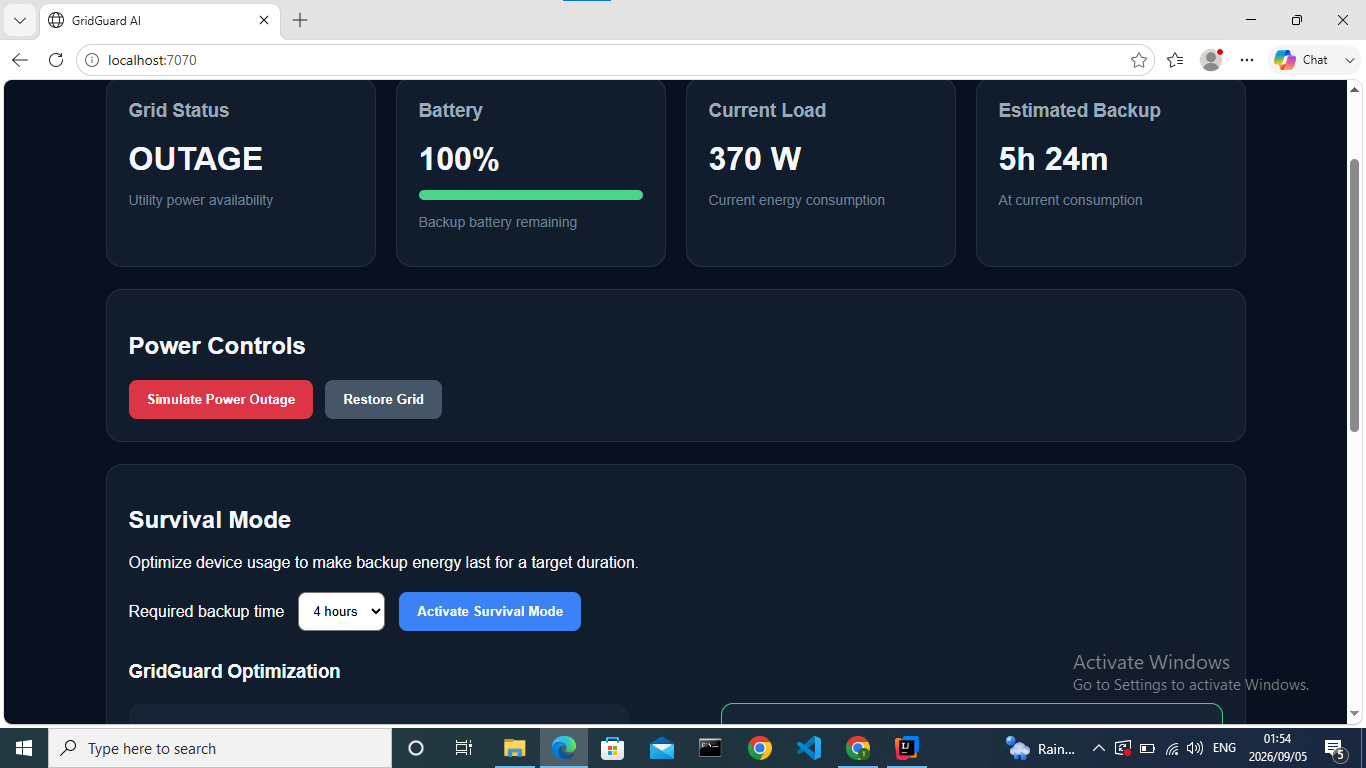
Outage state
-
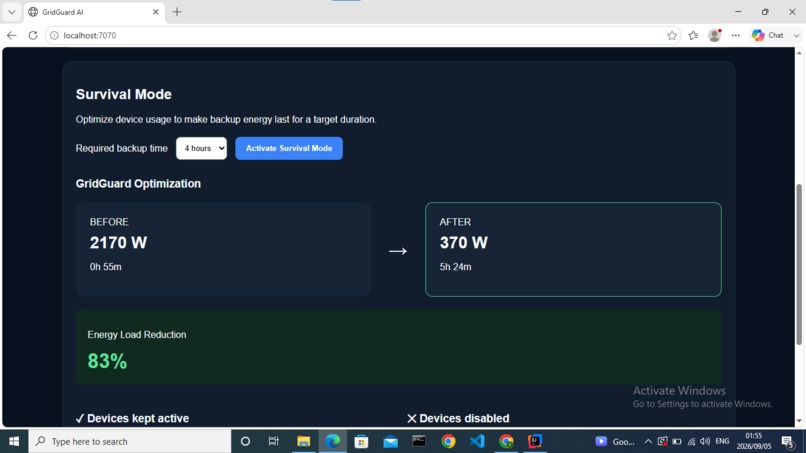
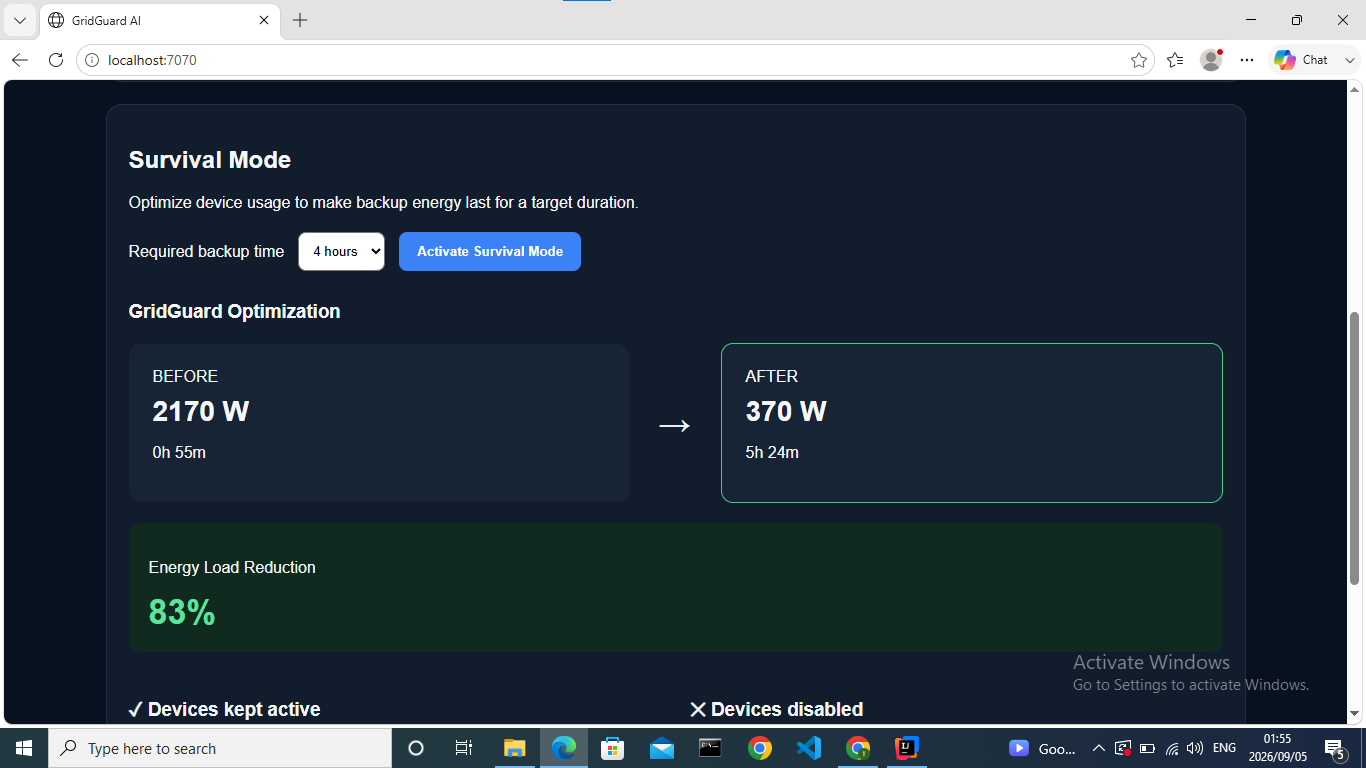
Improvement
-
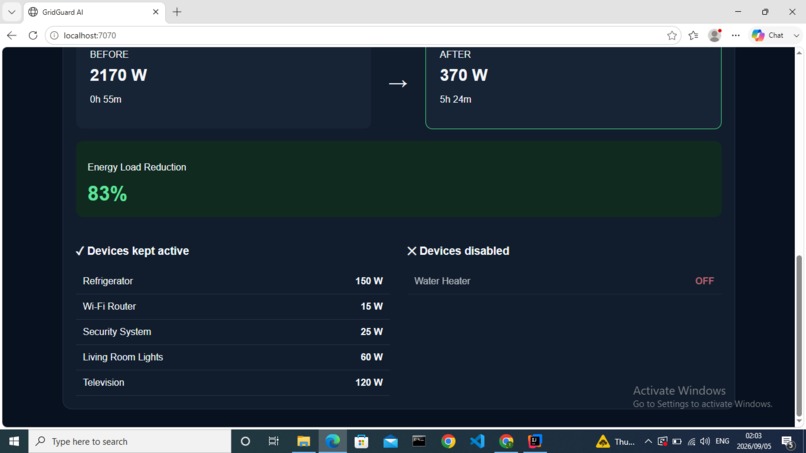
Achieved reduction
-
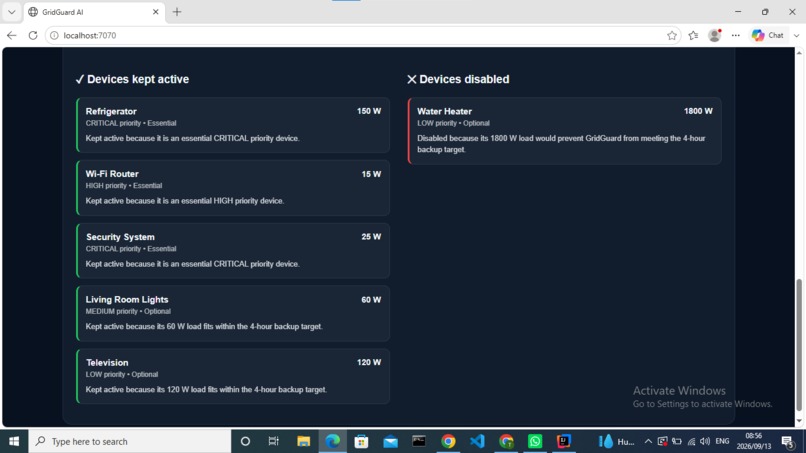
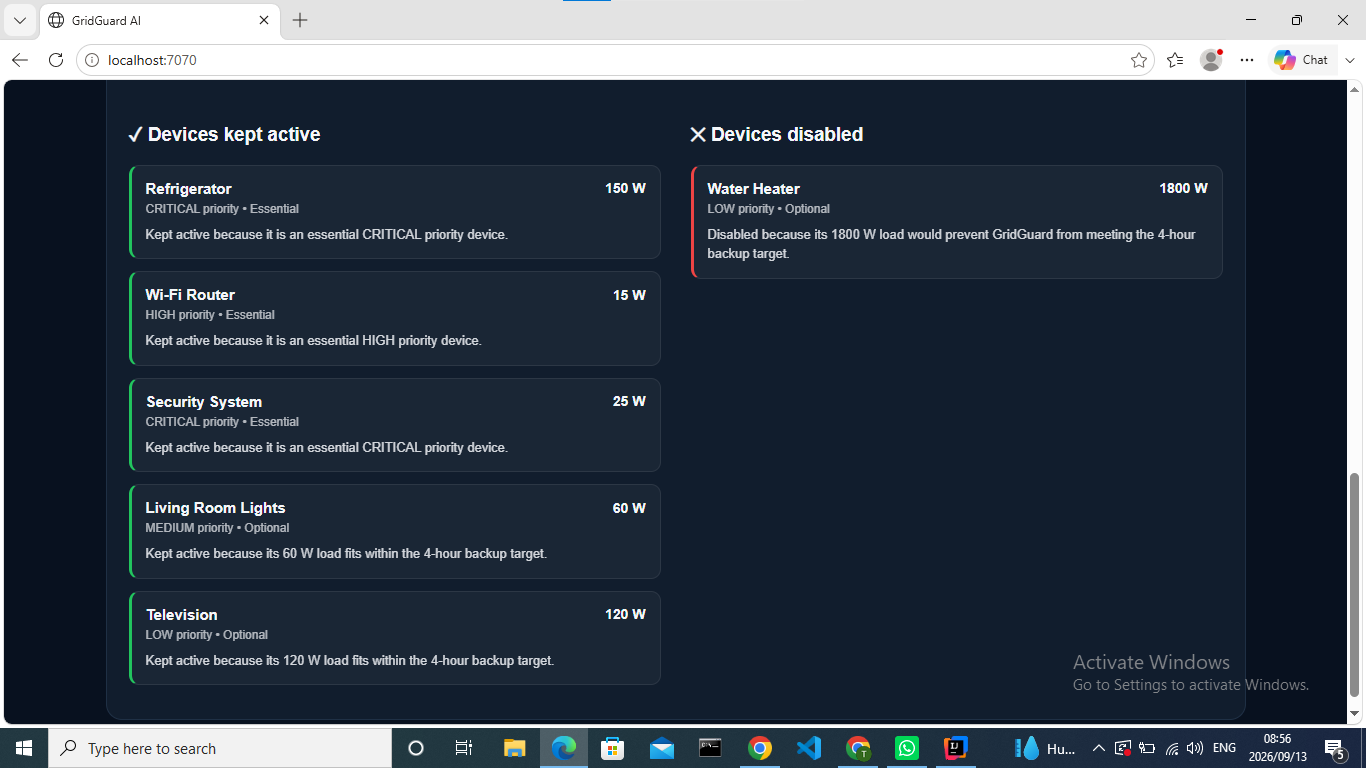
Explains why each device was kept active or disabled
Inspiration
Electricity is something we often notice only when it disappears. Power outages, unstable grids, rising electricity costs, and limited backup batteries can leave homes and small businesses having to decide which devices are important enough to keep running.
This problem is especially visible in communities where reliable electricity cannot always be taken for granted. A backup battery may provide power, but simply having stored energy does not mean that energy is being used intelligently.
That inspired GridGuard AI: an intelligent energy-management system designed to make limited power last longer.
Instead of only monitoring electricity usage, GridGuard AI aims to answer a more useful question:
When energy becomes limited, how should the available power be used?
What it does
GridGuard AI monitors the state of an energy system, including device consumption, grid availability, and available backup power.
When normal grid power is available, the system provides visibility into how energy is being consumed.
When an outage occurs, GridGuard AI detects the change and switches its focus from monitoring to intelligent energy management.
Devices can be classified according to their importance and energy requirements. Essential devices such as refrigeration, connectivity, lighting, or security systems can be prioritized over high-consumption, non-essential devices.
One of the core features is Survival Mode.
Instead of simply showing that a battery has a certain percentage remaining, the user can specify how long they need their backup energy to last. GridGuard AI evaluates the available energy and current device loads, then recommends which devices should remain active, which should be limited, and which should be disabled.
The goal is simple:
Turn energy data into intelligent decisions.
How I built it
GridGuard AI was built as a full-stack energy-management prototype with a Java backend and a browser-based dashboard.
The backend is written in Java using Javalin to expose REST API endpoints for device management, power-system status, outage simulation, energy calculations, and Survival Mode. The frontend is built with HTML, CSS, and JavaScript and communicates with these endpoints to display the current grid state, battery level, power consumption, estimated backup runtime, and optimization results.
At the center of GridGuard is the Survival Mode optimization system. Each simulated household device has properties such as power consumption, priority, whether it is essential, and whether it is currently enabled.
When an outage occurs, the user can choose how many hours they need the backup supply to last. GridGuard then:
- Calculates the energy currently available from the backup battery.
- Measures the total load of the active devices.
- Estimates how long the battery would last at the current load.
- Evaluates devices according to their power requirements and importance.
- Determines which devices should remain active to meet the requested backup duration.
- Disables unnecessary high-consumption loads and recalculates the estimated runtime.
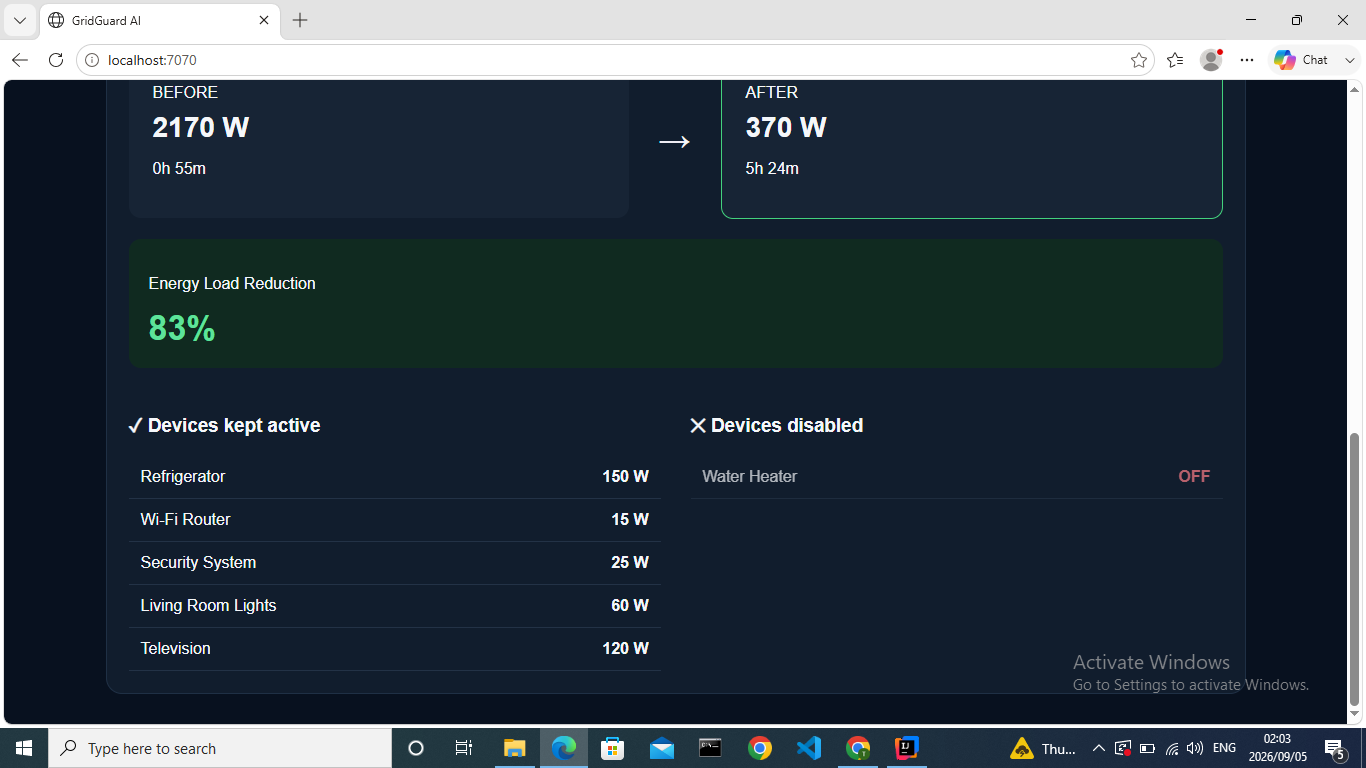
For the demonstration scenario, the system starts with a 2,170 W load and approximately 55 minutes of backup power. After Survival Mode optimization, the load falls to 370 W and the estimated runtime increases to 5 hours 24 minutes, representing an 83% reduction in energy load.
The dashboard makes this decision visible by showing the before-and-after power consumption, estimated runtime, percentage reduction, devices kept active, and devices disabled.
The current prototype uses simulated household devices and battery data, allowing the energy-management logic to be tested safely without connecting directly to household mains electricity. The REST-based architecture also provides a foundation for future integration with smart plugs, IoT sensors, smart meters, solar systems, and battery-management hardware.
Challenges I ran into
One of the biggest challenges was designing the Survival Mode logic. GridGuard needed to decide which devices should remain active during an outage while protecting essential devices and trying to meet the user's requested backup duration. This required balancing device power consumption, priority, essential status, battery capacity, and the target runtime.
Another challenge was making sure the calculations accurately reflected changes in the system. When Survival Mode disabled a device, the dashboard needed to immediately show the new total power consumption and updated estimated battery runtime. Keeping the Java backend and JavaScript frontend synchronized required careful testing and debugging.
I also had to make sure the before-and-after comparison was calculated correctly. GridGuard needed to preserve the original load and runtime before applying the optimization so that users could clearly see the impact of Survival Mode.
A final challenge was making the optimization understandable. Simply disabling devices was not enough, so I added explainable decisions that show why each device was kept active or disabled. This made the results more transparent and helped turn the optimization algorithm into something users can easily understand.
These challenges taught me a lot about debugging, application state, optimization logic, REST API integration, and designing software around a real-world problem.
Accomplishments that I am proud of
I’m proud of building a working end-to-end prototype that can detect a simulated power outage and intelligently prioritize devices during limited backup power. GridGuard reduced the simulated load from 2,170 W to 370 W, extending estimated backup time from 55 minutes to 5 hours 24 minutes—an 83% reduction in energy load while keeping important devices active.
I’m also proud that I built the system across both the backend and frontend, connecting a Java REST API with a real-time dashboard and turning the energy optimization logic into something users can clearly see and interact with.
What I learned
Building GridGuard AI taught me how to design a complete application that connects a Java backend with an interactive web frontend. I gained practical experience building REST API endpoints with Javalin and using JavaScript to fetch data from those endpoints and update the dashboard dynamically.
One of my biggest lessons was learning how to turn a real-world problem into optimization logic. For Survival Mode, I had to consider battery capacity, device power consumption, priority levels, essential devices, and the user's required backup time when deciding which devices should remain active.
I also learned the importance of explainability. Instead of only showing the optimized result, I improved GridGuard so that it explains why each device was kept active or disabled. This makes the system's decisions easier for users to understand and trust.
Testing was another important part of the project. I added automated unit tests for the power and Survival Mode services, which helped me verify that outage handling, runtime calculations, and device optimization behaved correctly.
Most importantly, this project taught me that building an intelligent system is not only about creating complex algorithms. It is about using software to make practical decisions that solve a meaningful real-world problem.
What's next for GridGuard Ai - Smart Energy Management
GridGuard AI could eventually integrate directly with smart plugs, solar inverters, home battery systems, smart meters, and renewable-energy installations.
Future versions could learn household consumption patterns, predict upcoming energy demand, detect abnormal device behavior, incorporate weather and solar-generation forecasts, and automatically schedule flexible loads for periods when renewable or grid energy is most available.
At a larger scale, the same ideas could potentially support schools, clinics, small businesses, apartment buildings, and communities where reliable and efficient energy management matters.
GridGuard AI is not just about measuring electricity. It is about making every available watt count.

Log in or sign up for Devpost to join the conversation.