Inspiration
Access to professional medical advice is still a challenge in many communities across Africa, especially in rural or low-connectivity areas, people don’t have access to internet or medical professionals. I wanted to create an offline, multilingual medical assistant that anyone could use to get reliable symptom-based diagnosis in their own language — without needing internet access.
What it does
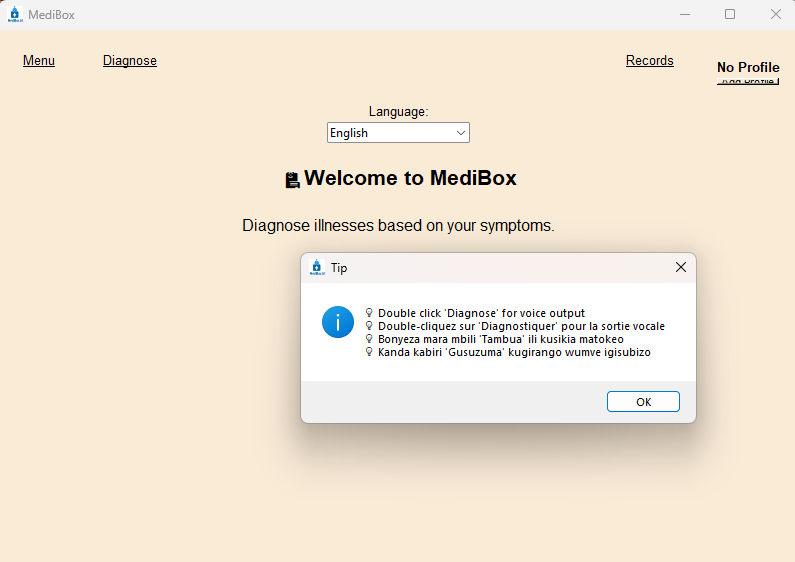
MediBox is a multilingual medical assistant that:
Lets users select or type symptoms in their own language.
Returns a diagnosis and medical advice in that language.
Works in English, French, Kiswahili, and Kinyarwanda.
Supports user profile
Uses text-to-speech to read the diagnosis aloud.
Requires no internet connection — everything works offline.
How i built it
I used Python and Tkinter to build the GUI.
Created a multilingual disease-symptom dictionary, supporting 4 languages.
Built a dynamic translation system for UI elements.
Integrated sqlite3 to store diagnosis records by user.
Added pyttsx3 for offline voice output.
Implemented checkbox-based symptom selection that updates dynamically with language changes.
Challenges i ran into
Matching symptoms across 4 languages while keeping logic accurate was complex.
Tkinter doesn’t support native mobile interfaces, so I had to keep the interface very clean.
Managing real-time translation of UI, symptom options, and matching logic required careful synchronization.
Ensuring consistent diagnosis results regardless of symptom order or language took extra care
Accomplishments that i'm proud of
I built a working offline medical assistant that speaks 4 languages.
Created an interface that is usable by both tech-savvy and non-technical users.
Implemented multilingual text-to-speech for accessibility.
Designed the system to be easily extendable for more diseases and more languages.
What i learned
How to handle multilingual logic and UI in Python.
Better practices in organizing medical logic for real-world utility.
The importance of accessibility and localization in health-tech tools.
Improved my skills in GUI design, modular Python code, and offline UX.
What's next for MediBox_offline medical assistant
Port the app to Android using Kivy so it works on phones.
Add probability-based diagnosis (not just exact symptom match).
Add voice input and support for more local languages.
Add encryption and user authentication for sensitive health records.
Deploy on low-cost devices in clinics or schools in underserved regions.


Log in or sign up for Devpost to join the conversation.