About The Project
Inspiration
Reducing food waste and saving money are two daily pain points. We wanted a planner that actively uses what you already have, fits your macros, and respects your weekly budget. Snapping a fridge photo is faster than typing inventory, so we leaned on vision to detect leftovers and nudge the plan to use expiring items first.
What We Built
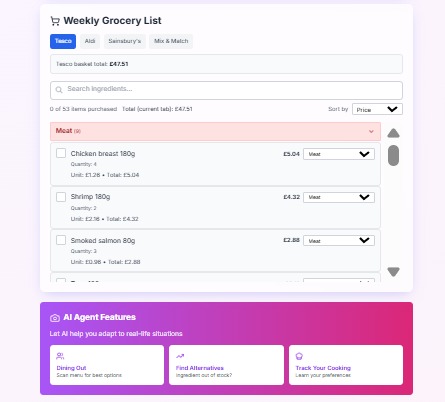
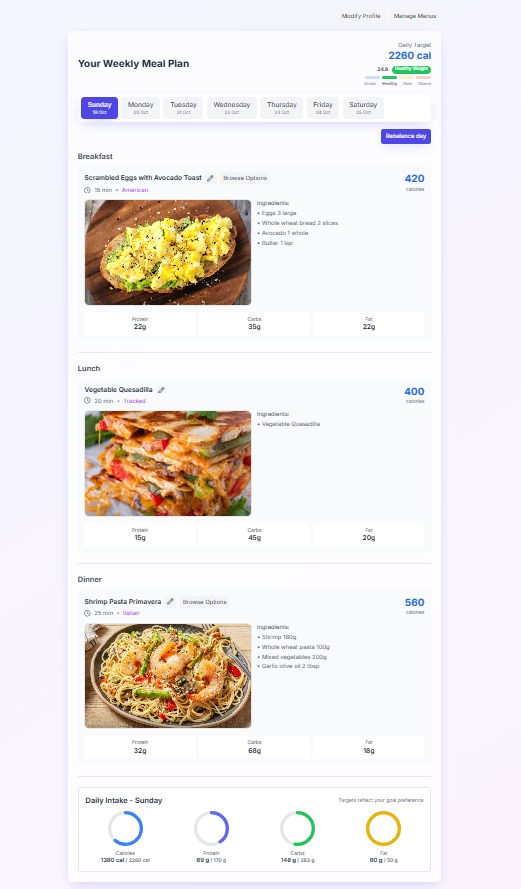
A weekly meal planner that: Generates balanced breakfasts, lunches, and dinners based on goal, macros, and time. Adapts choices to a weekly budget and per‑meal cost targets. Detects leftovers from fridge photos, estimates expiry windows, and prioritizes using them. Subtracts leftover quantities from the grocery list so totals drop automatically.
A clean React UI with:
Options carousel for alternatives. Grocery list grouped by category with per‑store totals and a “Custom” store mode. Accessibility and small touches (tooltips, compact buttons, responsive layout).
How We Built It
Frontend: React (Create React App), Tailwind CSS, Lucide icons.
State: React hooks + localStorage for profile, recipes, deleted recipes, leftovers.
AI: OpenAI Chat Completions with Vision (gpt-4o-mini) for: Menu image → structured dishes/macros. Meal photo → dish + estimated macros. Fridge photo → leftover items + rough time‑to‑expiry.
Planning: Scored candidates per meal using macro proximity, cuisine/time filters, preferences, and cost. Added budget‑aware penalties and a leftover‑urgency boost that grows as items near expiry. Selected daily combos that minimize global penalty (calories/macros + cost overages).
Grocery: Built a normalized ingredient list across the week. Consumed leftover “buckets” (earliest expiry first) day‑by‑day before adding to the shopping list. Computed per‑store and “Custom” totals with safe numeric handling. Key Algorithms (with math) Macros per day from calories and split:
Protein grams: p_g = (C * r_p) / 4
Carbs grams: c_g = (C * r_c) / 4
Fat grams: f_g = (C * r_f) / 9
Where:
C = daily calories r_p, r_c, r_f = macro ratios for protein, carbs, fat (sum to 1) Meal calorie targets by ratio:
r_m in { breakfast: 0.25, lunch: 0.35, dinner: 0.40 } C_m = C * r_m Budget allocation:
Daily budget: B_d = B_w / 7 Per-meal budget: B_m = B_d * r_m Candidate score (schematic): score = nutrition_fit - acost - bover_budget + cprefs + drandom + e*leftover_urgency
Notes:
over_budget = max(0, cost - B_m) Leftover urgency increases as expiry approaches. For leftover with expiry E and meal day D: delta_days = floor((E - D) / 1 day) Example piecewise urgency: if delta_days <= 0: 180 else if delta_days <= 1: 140 else if delta_days <= 2: 100 else if delta_days <= 4: 60 else: 25 Daily combo evaluation: penalty_day = w_calabs(C_total - C) + w_pabs(p_total - p_g) + w_cabs(c_total - c_g) + w_fabs(f_total - f_g) + w_costcost + w_overmax(0, cost - B_d)
What We Learned
Vision prompts benefit from strict JSON response formatting and a fallback parser for robustness. Budget signals need sufficiently strong weights to noticeably shift meal choices without wrecking macro balance. Small UI details (compact icon buttons, object‑cover images) improve perceived polish and usability. Safe numeric guards (e.g., Number(value ?? 0).toFixed(2)) prevent brittle runtime errors in totals.
Challenges
Balancing priorities: macros vs. cost vs. preferences vs. leftovers required iterative tuning. Vision outputs can be ambiguous; merging repeated/near‑duplicate detections while preserving earliest expiry took care. Grocery list math: handling missing store prices and ensuring totals never crash (e.g., undefined toFixed).
What’s Next
Quantity‑aware leftovers in recipes (e.g., partial units, weights) and synonym matching (e.g., “chicken breast” ≈ “chicken”). Show “covered by leftovers” badges in the grocery list and an optional “apply predicted remaining” action after planning. Smarter cuisine/time diversity over the week and user‑tunable “cost vs. macro” trade‑off. Optional online price APIs per store for more realistic totals.
Built With
- api
- css
- javascript
- jsx
- openai
- react

Log in or sign up for Devpost to join the conversation.