-
-
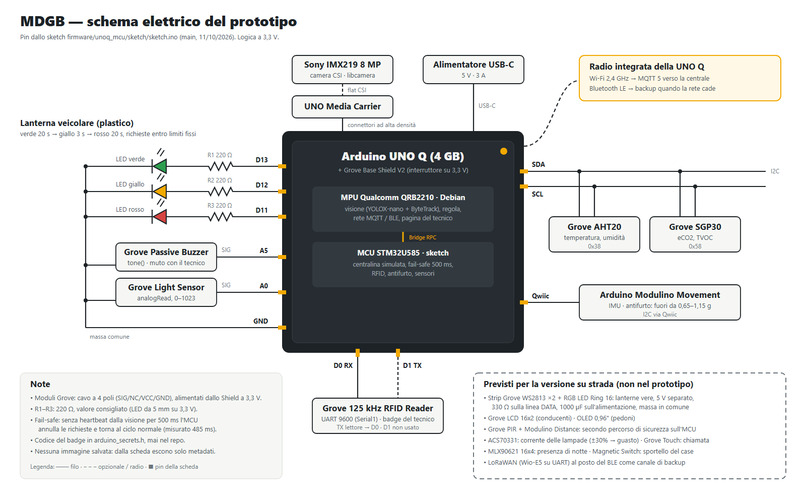
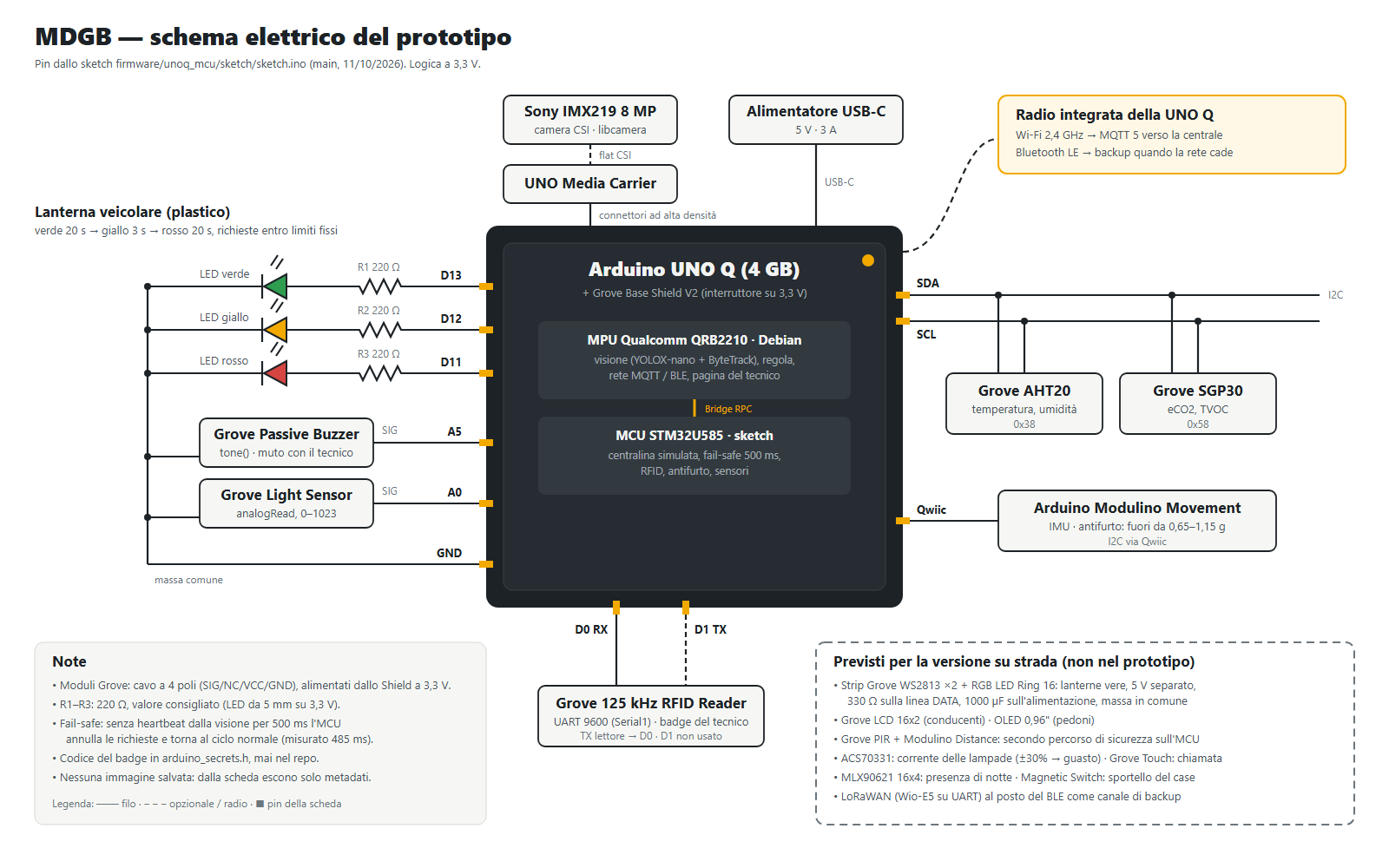
Project hardware schematic
-
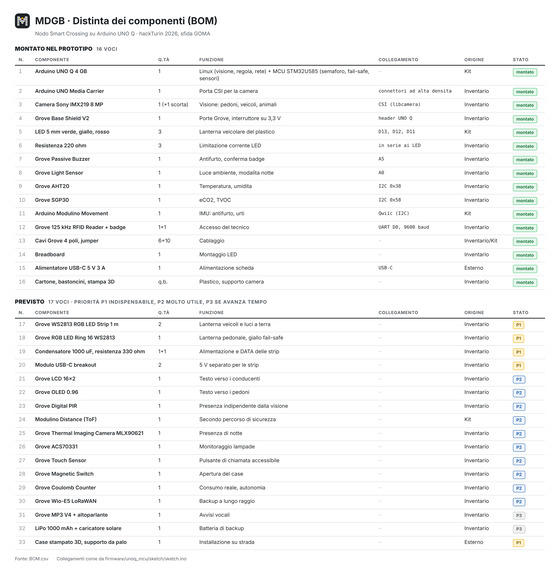
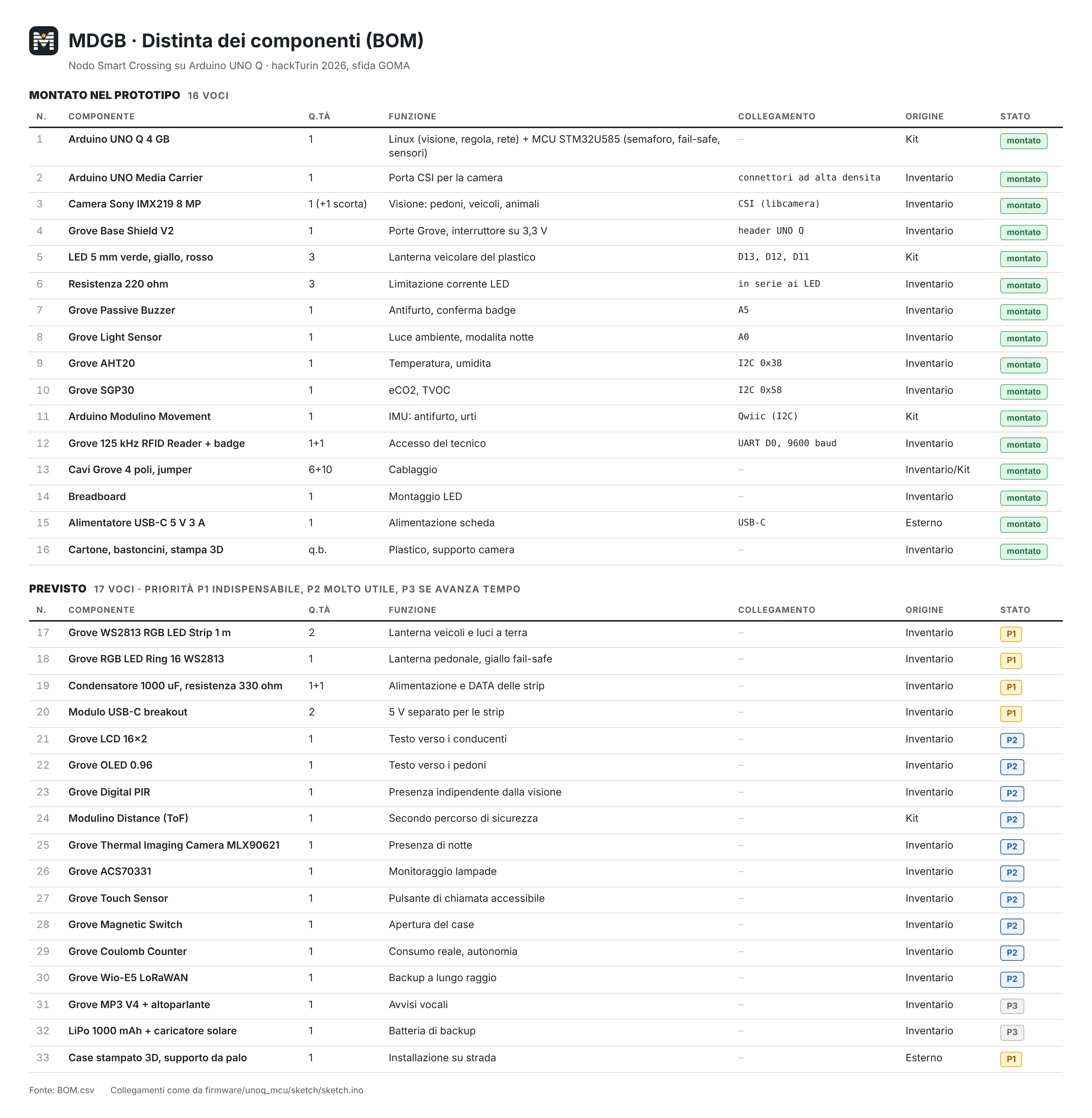
Project BOM
Inspiration
In Italy, 470 pedestrians died on the road in 2024, and there were almost 20,000 accidents involving pedestrians. The people most at risk are the ones who need more time to cross: elderly people, children, people in a wheelchair. Yet the pedestrian green lasts the same for everyone, and it is set for someone walking at average speed. Most "smart" crossings today only detect presence and light up the stripes. They cost thousands of euros each and need new infrastructure. We wanted a crossing that understands what is happening, using the traffic light that is already there.
What it does
MDGB is a small module that mounts on an existing traffic light. A camera and an AI model running fully on the device (no cloud, no internet needed) recognise pedestrians, cyclists, vehicles and animals, and measure how they move.
- Protects: if someone walks slowly, it asks the traffic light controller for more pedestrian green. While they are still on the stripes it keeps the cars on red. If a child alone or a loose animal enters the road, it asks for red immediately.
- Warns: flashing amber towards drivers and red lights on the ground for pedestrians.
- Counts: crossings by direction with no duplicates, near misses, accidents, and how often drivers give way.
- Reports: only anonymous numbers go to a central app over Wi-Fi/MQTT, with a backup radio when the network is down.
- Predicts: the central app estimates the expected flow of pedestrians, cyclists and vehicles at every camera, now and for the next 24 hours, and shares it with customers through API keys limited to a zone.
Safety comes first. MDGB never controls the light directly, it only sends requests, and the microcontroller accepts them within fixed limits that Linux cannot change. If the AI stops, the light goes back to its normal cycle in under half a second (we measured 485 ms). No image is ever saved. The live view exists only in memory, and only for a technician who has scanned a badge and logged in.
How we built it
- Hardware: Arduino UNO Q 4 GB, Sony IMX219 camera on the Media Carrier (CSI), Grove Base Shield at 3.3 V, temperature/humidity (AHT20), air quality (SGP30), light sensor, Modulino Movement (anti-tamper), 125 kHz RFID reader for the technician badge, buzzer, and three LEDs as the vehicle traffic light on our model crossing.
- Vision (Linux side): YOLOX-nano in ONNX on onnxruntime (CPU only, the board has no NPU), ByteTrack for tracking, and a calibration that turns pixels into metres from 4 clicks on the stripes. Italian zebra stripes are 50 cm wide with a 50 cm gap, so we can measure the road without a tape measure. The decision is an explicit state machine with physics formulas (stopping distance, time to collision), and every command carries a readable reason with the numbers behind it.
- Microcontroller: an Arduino sketch with a simulated traffic light controller and fixed limits. If no heartbeat arrives for 500 ms it goes into fail-safe. It also handles the badge with lockout after wrong attempts, theft alarm from the accelerometer, and sensor readings every 500 ms, all without
delay(). Linux and the MCU talk through the UNO Q Bridge (RPC). - Maintenance: the node checks every part once per second: camera (covered lens, glare), AI, link to the traffic light, sensors, event storage. The technician scans the badge, logs in from the phone and sees a page that says what is wrong and what to do. If a service stops, systemd restarts it on its own.
- Telecommunications: every event is saved in SQLite before it is sent and marked as sent only after the broker confirms it (MQTT 5, QoS 1). If no confirmation arrives for 30 s, the node switches to Bluetooth Low Energy beacons (LoRaWAN in production) to keep the central app informed.
- Central app: a single-file app for Mac and Windows with a built-in Mosquitto broker, SQLite database and Flask dashboard with a vector map. It shows the state of every node and tells a broken node apart from a healthy node with the network down. It also shows traffic, safety metrics, alarms and the network numbers (events lost must stay 0). The flow forecast uses gradient boosting with Poisson loss on calendar, weather, nearby places (OpenStreetMap) and land use (ESA WorldCover), then corrects itself with the real counts from the node.
- Team: 4 people, each owning one part (AI, firmware, communications and central app, hardware), with written contracts (C1–C5) between the parts so we could work in parallel.
Challenges we ran into
- Speed on the board: a standard YOLO model ran at 1–2 FPS. We changed the model input to match the image shape (416x256 instead of 320x320), looked only at the region of interest, and tuned threads. We reached 9.2 FPS end to end with the real camera, against a target of 8.
- Lost tracks: tracks of fast objects were followed but never counted, and night tracks lasted under 1 s. We fixed the tracker output, used buffered IoU and remembered which side of the line an object was on when hidden behind a pole.
- Dark frames: one frame in three came out much darker because the automatic exposure of the camera software never settled. We switched it off and set exposure and gain once, measured from the scene at start.
- Bridge limit: the Bridge rejected messages over 238 bytes, while our contract said 512. Our commands were 366 bytes. We now shorten each command in a fixed order so the safety fields always fit.
- Bluetooth from App Lab: App Lab runs Python in a Docker container with no Bluetooth access, so the network runs as a separate service on the board and gets sensor data through files.
Accomplishments that we're proud of
- A safety design where MDGB can never make a crossing less safe than it is today: fail-safe measured at 485 ms.
- Network cut for 100 seconds: the central app showed "network down, node healthy" over Bluetooth, the node was back on Wi-Fi 18 s after the network returned, and we had 0 events lost and 0 duplicates.
- Counting always in the right direction, with no false or double counts on our 8 benchmark videos. Where the camera sees the line well: 17 crossings out of 17.
- Privacy by design: no image saved, only anonymous metadata leave the device, no face analysis. The system measures how a person moves, not who they are.
- A working data service: map with expected-flow halos, 24-hour forecast per camera, and API keys per customer and zone.
- Everything restarts on its own after a reboot of the board.
What we learned
- On embedded hardware, how you feed the model (input shape, region of interest) matters as much as which model you pick.
- Measure on the real board early. The 238-byte limit and the dark frames only showed up there.
- Safety is easier to prove when the rule is explicit and the critical part (the microcontroller) does not trust the smart part (Linux).
- Writing clear contracts between the parts on day one let four people build in parallel and connect everything at the end.
- Be honest about limits. Counting in crowded scenes and far away is still weak (57% of pedestrians and 61% of vehicles on our hardest videos), and our forecast model is trained on simulated history because no real counts exist yet.
What's next for MDGB - Mobility Data and Guardian Beacon
- Pilot: 1–3 real crossings with a municipality, to calibrate on real crossings and retrain the forecast on real counts.
- AI: a classifier for wheelchairs, walkers and strollers; better detection of far vehicles and bikes; thermal camera for night.
- Hardware and firmware: WS2813 LED strips and ring, displays for drivers and pedestrians, a second non-visual safety path (PIR and ToF read directly by the microcontroller), a current sensor to check that the lamp really turns on, and a hardware watchdog.
- Communications: cloud broker with mutual TLS and one certificate per node; LoRaWAN backup radio with a range of kilometres.
- Product: case, backup battery, installation guide, HTTPS for the technician page.
- Later: V2X, sending "hidden pedestrian at X m" directly to approaching vehicles.
I wrote it in English to match the headings, in plain language, using only numbers from your documentation. If the form should be in Italian, I can translate it.
Built With
- 3d-print
- accelerometer
- arduino
- bambulab
- ble
- embedded-system
- html
- javascript
- json
- mqtt
- python
- qualcomm
- rfid
- yolo

Log in or sign up for Devpost to join the conversation.