-
-
Architecture Overview
-
Auth Flow `--auth0-linkauth` (Device Flow UX via LinkAuth + Token Vault)
-
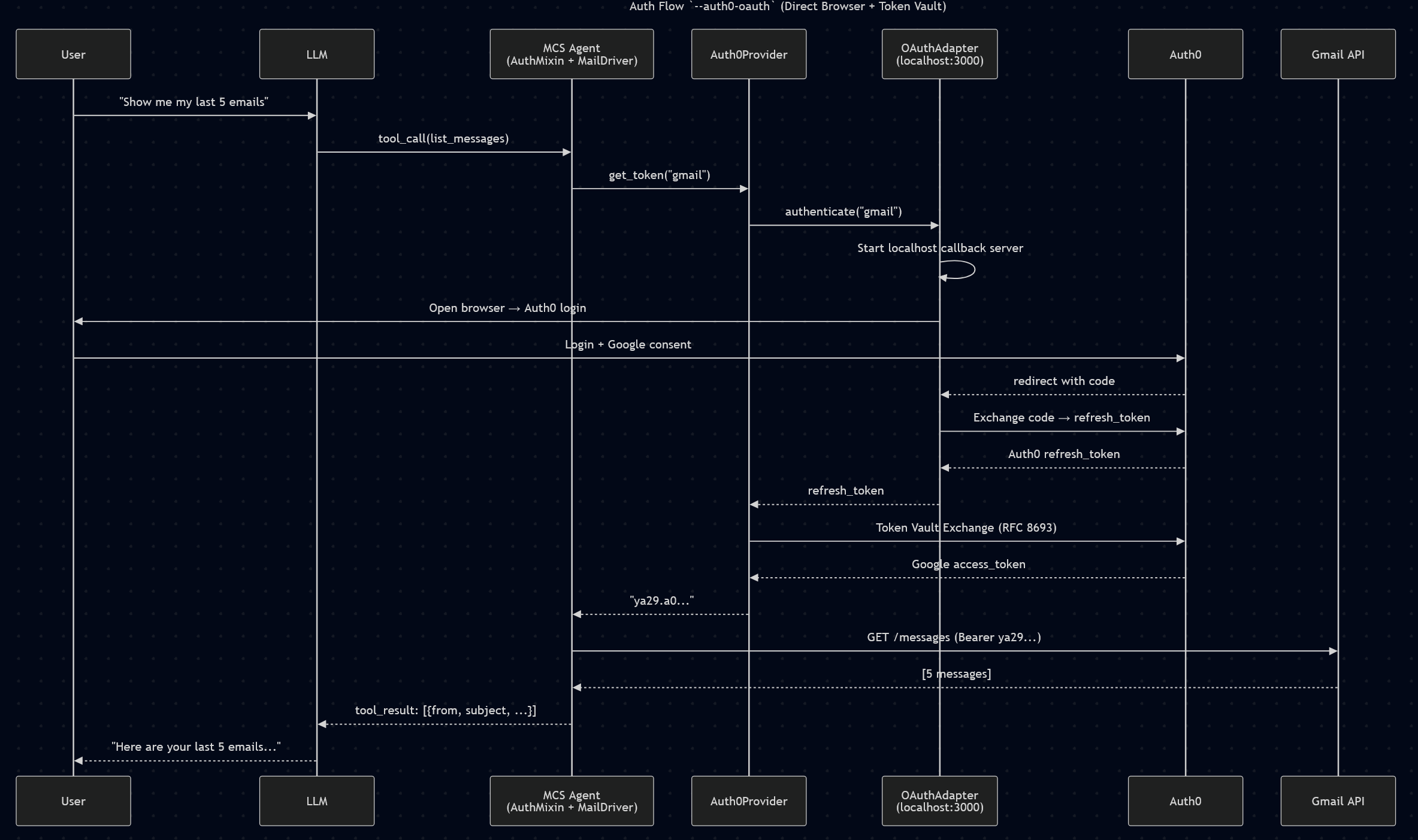
Auth Flow `--auth0-oauth` (Direct Browser + Token Vault)
-
MCS
-
Link Auth
-
Dev.to - Blog Hero
TL;DR: Auth0 Token Vault is powerful, but agents can't use it without a browser callback. I built the missing piece, so that Device Flow and Token Vault are no longer mutually exclusive.
Inspiration
I were building MCS (Model Context Standard), an open-source Python SDK that standardizes how AI agents interact with external services like Gmail, Google Drive, and Calendar. When it came to authentication, Auth0 Token Vault was the obvious choice. One login, access to all connected services, no credential management for the agent developer.
But when I tried to integrate it into a headless CLI agent, I hit a wall. Token Vault requires a Confidential Client. Device Flow requires a Native App. These two are mutually exclusive in Auth0. Our agent had no web UI, no callback server, only a terminal. We couldn't use Token Vault the way it was designed.
That gap became my inspiration. What if you could bring the Device Flow experience (show a URL, enter a code, done) to Token Vault?
What it does
MCS Auth Bridge enables headless AI agents to use Auth0 Token Vault without needing a browser callback or web server. It provides three interchangeable authentication paths. All with identical agent code:
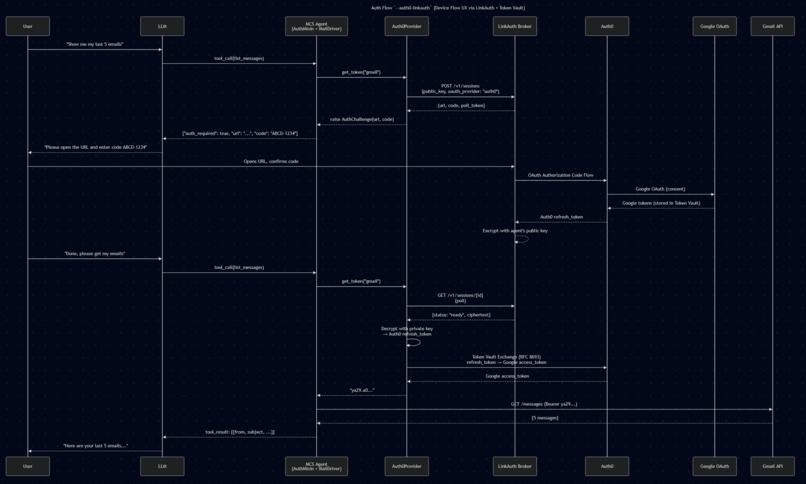
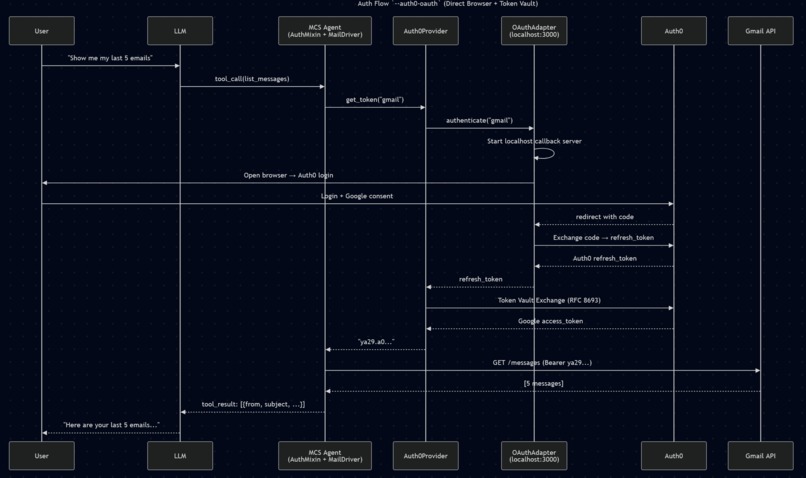
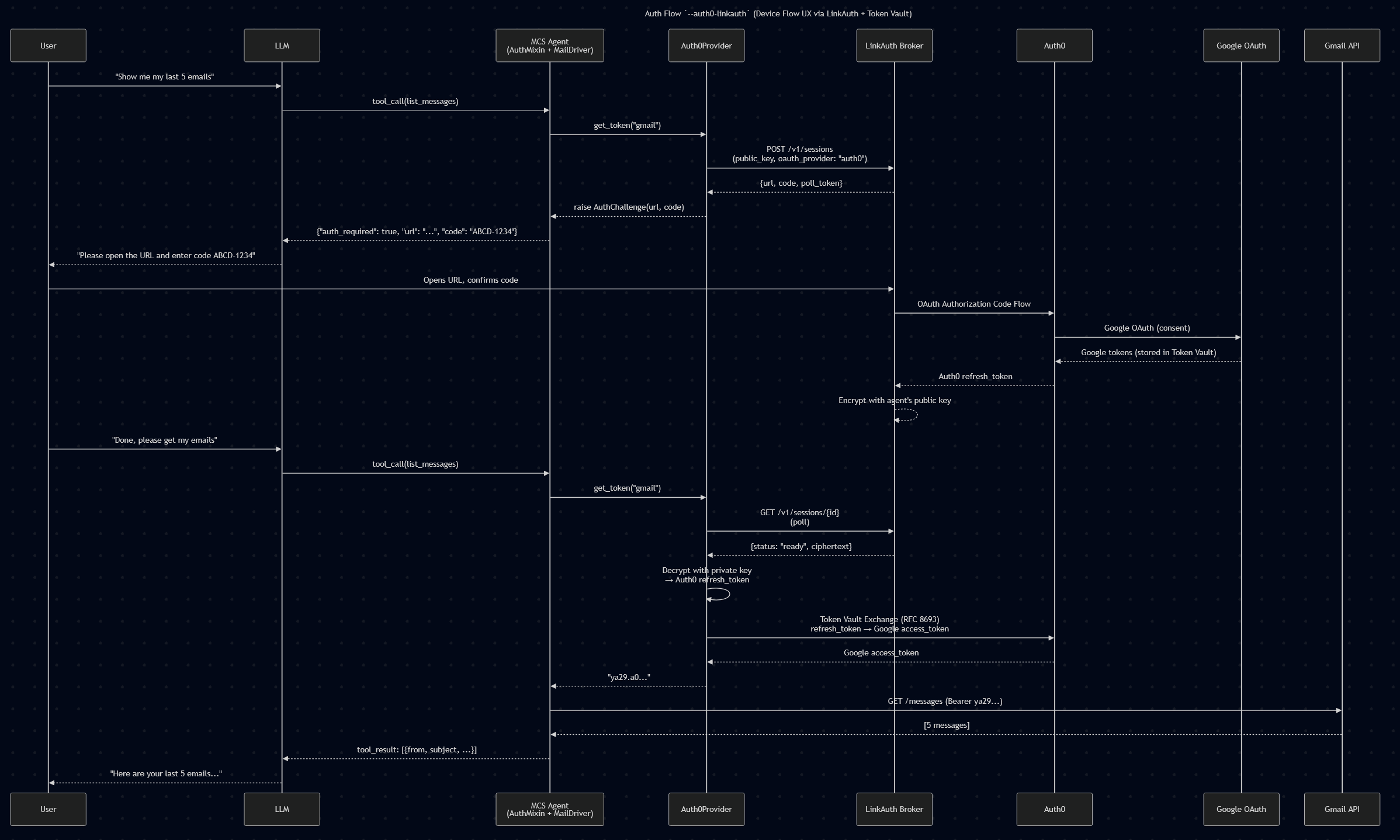
--auth0- Uses a pre-stored Auth0 refresh token for Token Vault exchange--auth0-oauth- Opens a browser for Authorization Code Flow, then Token Vault exchange--auth0-linkauth- Device-flow-like UX via LinkAuth broker. The agent shows a URL + code, the user authenticates in their browser, Token Vault stores the token, and the agent picks it up automatically
The agent itself is completely auth-agnostic. When a tool needs credentials, an AuthMixin intercepts the challenge at the tool execution boundary. The LLM never sees authentication logic, it just works.
How I built it
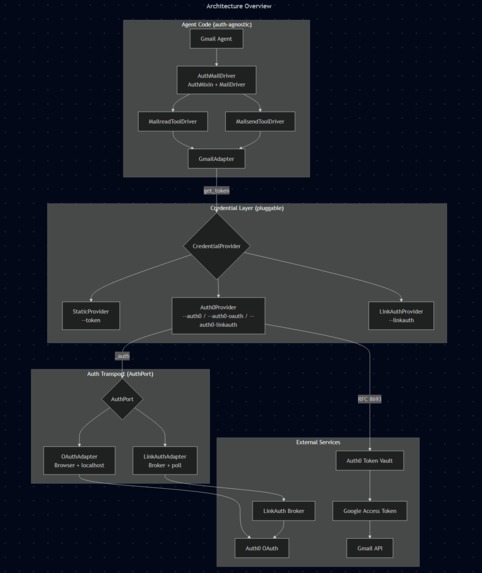
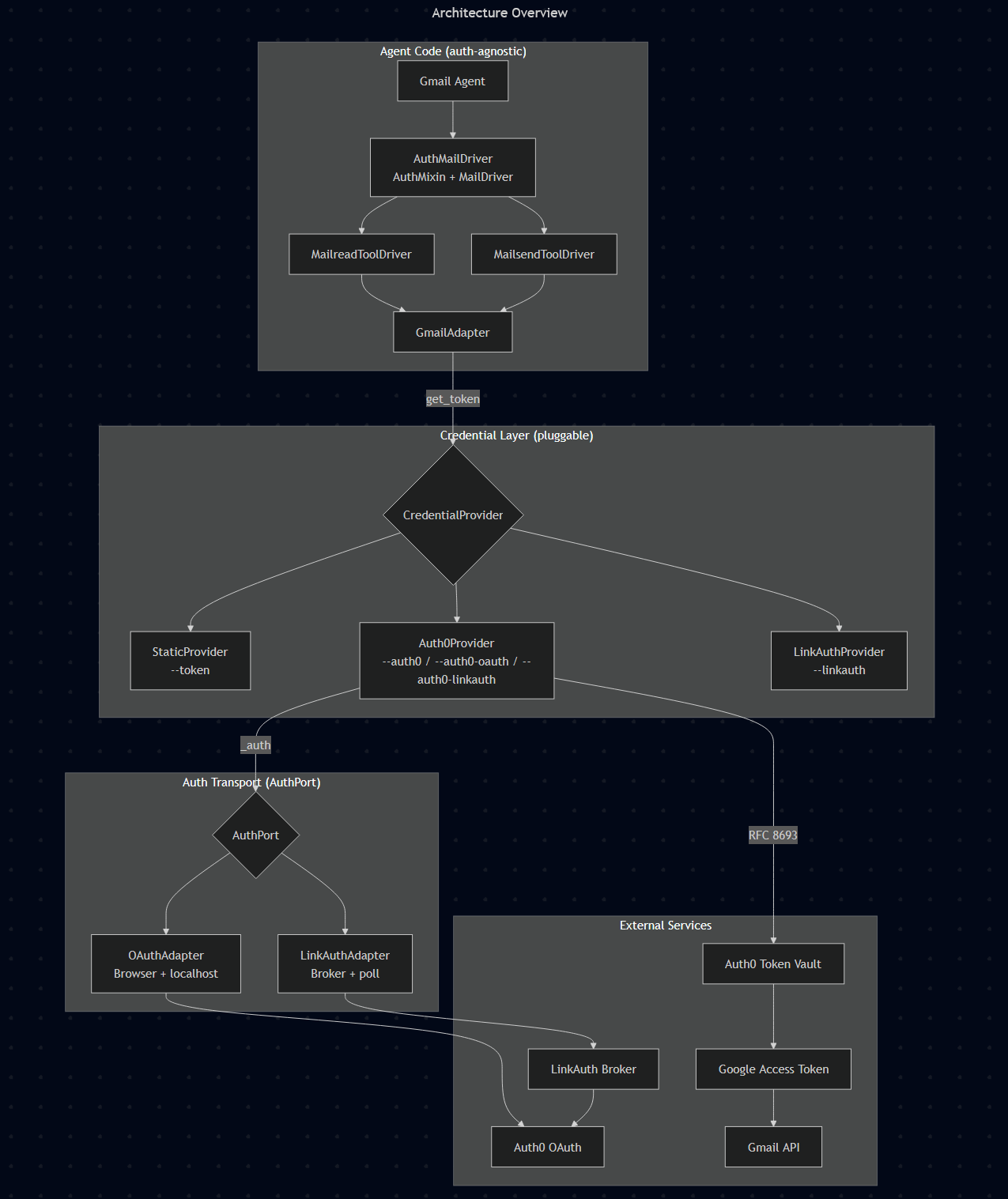
The architecture follows strict SOLID principles with three layers:
MCS Core: Protocol-based driver/adapter architecture. CredentialProvider is a simple protocol: get_token(scope: str) -> str. Any provider (static, OAuth, Auth0, LinkAuth) satisfies it through structural subtyping.
Auth0Provider : Takes a refresh token (from any source) and exchanges it for external provider access tokens via Auth0 Token Vault. It doesn't know how the refresh token was obtained, that's the AuthPort adapter's job.
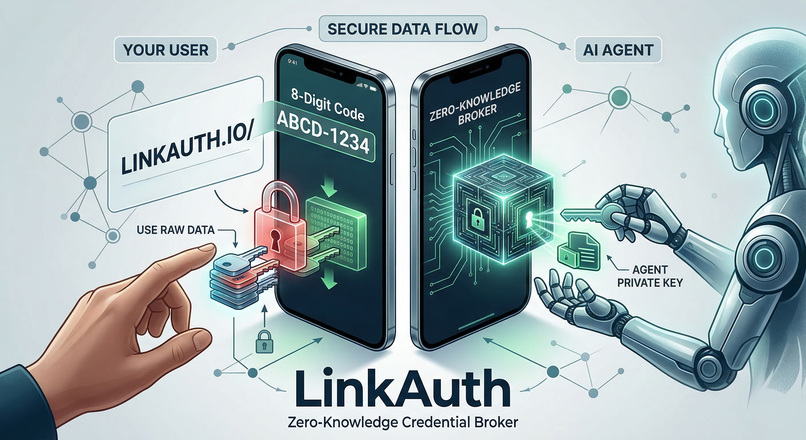
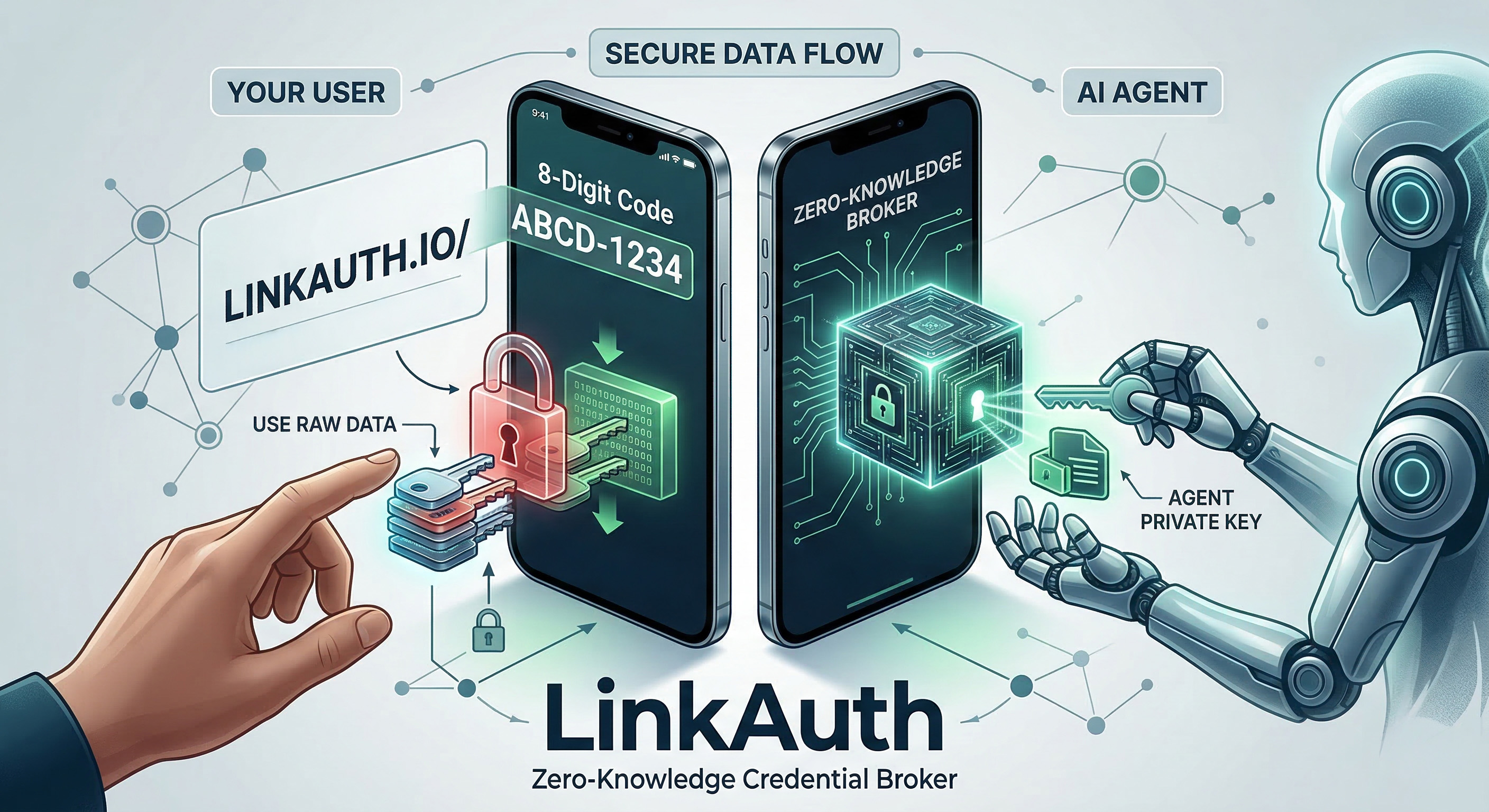
LinkAuth: A zero-knowledge credential broker. The agent generates an RSA keypair, creates a session with its public key, and polls for completion. The user authenticates via the broker's web UI, and credentials are encrypted with the agent's public key before storage. The broker never sees credentials in plaintext (for form-based flows).
The key design pattern: AuthPort is a protocol that any auth transport adapter can implement. OAuthAdapter opens a browser. LinkAuthAdapter creates a session and raises AuthChallenge. The provider doesn't care which one is plugged in.
Challenges I ran into
Device Flow + Token Vault incompatibility: This was the core challenge. Auth0's Device Flow grant type cannot be enabled alongside Token Vault on the same application. I spent considerable time testing different application types and grant configurations before understanding that this is a fundamental product constraint, not a misconfiguration.
The "Double Flow" first-run experience: Auth0's connection mode "Authentication and Connected Accounts" sounds like a single step, log in and get your external token stored in Token Vault, all in one go. In reality, the first time a user connects, they go through two separate flows. First the Auth0 OAuth login to obtain a refresh token, then the Connected Accounts setup (MRRT exchange, /connect, browser consent, /complete) to actually link the external provider. This double consent confused us during development and will confuse users. On subsequent calls the cached refresh token skips the first flow, but the initial experience feels broken even when it works correctly.
Connected Accounts vs. Authentication: I initially assumed that logging in via Google through Auth0 would automatically store the Google token in Token Vault. It doesn't. Token Vault requires either the Connected Accounts API flow or the "Authentication and Connected Accounts" connection mode, plus Multi-Resource Refresh Tokens (MRRT) enabled, plus the correct API audience, plus Allow Offline Access on the API. Each missing piece produced a different error. It took sometime to figure everything out.
Gmail API activation: After finally getting a valid Google access token from Token Vault, Gmail returned 403. The token was correct, but the Gmail API wasn't enabled in the Google Cloud project. A simple fix, but a confusing error after an hour of debugging auth.
Accomplishments that we're proud of
The agent code is truly auth-agnostic. Switching between --auth0-oauth and --auth0-linkauth changes zero lines of agent code. The CredentialProvider protocol and AuthMixin pattern make authentication completely transparent to both the agent developer and the LLM.
LinkAuth as a general-purpose credential broker. What started as a workaround for Token Vault became a standalone project. LinkAuth handles OAuth, API keys, and arbitrary credentials through a single device-flow-like UX with zero-knowledge encryption for form-based flows.
End-to-end Token Vault integration that actually works. From device-flow-like UX through LinkAuth, to Auth0 OAuth, to Token Vault exchange, to Gmail API, the full chain works in a single tool call.
Proven across three fundamentally different environments. The same auth flow - LinkAuth device-flow UX -> Auth0 Token Vault -> Gmail API - works unchanged in a local CLI chat client, as a drop-in OpenWebUI tool, and as a Claude Cowork skill running in a sandboxed container with restricted network egress and stateless process invocations. Each environment threw different challenges (proxy routing, persistent cache on read-only filesystems, NO_PROXY conflicts), and the architecture handled all of them without changes to the core SDK.
What I have learned
Auth0 Token Vault is powerful but not yet agent-ready. The requirement for a browser callback makes it incompatible with the most natural agent authentication pattern (Device Flow). This is likely why Auth0 launched "Auth0 for AI Agents" as a product initiative, the gap is a real use-case.
Auth0 as a single credential gateway is a game changer for agents. The real power of Token Vault clicked when I realized that my agent only needs one OAuth provider credential, that from Auth0. Adding Gmail, Google Drive, Calendar, Slack, or GitHub doesn't require new OAuth clients or credential flows in the agent. You configure the connections once in the Auth0 dashboard, and the agent dynamically accesses any connected service through the same get_token(scope) call. Together with LinkAuth it could be a single stop shop for Agent Authentication and Credential Exchange.
The OAuth ecosystem assumes a browser. Every OAuth flow (Authorization Code, Implicit, even Device Flow with Token Vault) eventually needs a callback URL or a specific client type. Agents that run as background processes, Telegram bots, or CLI tools don't fit this model cleanly.
Separation of concerns pays off. By keeping auth completely out of the driver layer (via the AuthMixin pattern), we could iterate on the auth implementation independently. The Gmail driver never changed, only the credential provider configuration.
What's next for MCS Auth Bridge
Device Flow + Token Vault natively in Auth0. We believe this is the right pattern for agent authentication and hope Auth0 considers enabling it. LinkAuth demonstrates the UX, Auth0 could offer it as a first-party feature.
More providers. Google Drive and Google Calendar adapters are in progress. With Token Vault, adding a new Google service is just a scope change.
LinkAuth as a hosted service. Currently self-hosted, but a managed LinkAuth instance would let agent developers add authentication with zero infrastructure. Just point to the broker URL.
MCS ecosystem growth. Slack, GitHub, Microsoft, each new adapter benefits from the same CredentialProvider abstraction. One auth configuration, unlimited services.
Bonus Blog Post
Originally published on dev.to
Your AI Agent Needed Gmail, Slack, and GitHub. I Gave It One Login.
How Auth0 Token Vault solved the multi-provider problem for AI agents and the three lessons I'd love to share with the Auth0 team.
It started with a dream setup.
I was building MCS (Model Context Standard), an open-source Python SDK that lets AI agents interact with services like Gmail, Google Drive, and Slack through a standardized tool interface. The agent doesn't know it's talking to Gmail. It just calls search_emails(query="invoices from last week") and gets results.
Authentication should be equally invisible. The agent shouldn't care how it gets a token. It just needs one.
Then I found Auth0 Token Vault and immediately understood the promise.
The Promise That Hooked Me
Before Token Vault, every service my agent needed meant another OAuth client. Gmail? Register a Google OAuth app. GitHub? Another OAuth app. Slack? Another one. Each with its own token refresh logic, its own scopes, its own error handling. Multiply that by every agent deployment.
Token Vault flips this. One Auth0 login. One refresh token. Access to every connected service.
token = provider.get_token("gmail")    # → Google access token
token = provider.get_token("github")   # → GitHub access token
token = provider.get_token("slack")    # → Slack access token
Without new OAuth clients, new callback URLs and new token refresh logic. You configure connections in the Auth0 dashboard, and the agent accesses any service through a single method call. The code never changes.
Then I tried to run it.
The Wall: Where Agents Live vs. Where OAuth Expects Them
My agent runs in a Docker container. No browser. No localhost callback. No web UI. Just a terminal.
And Claude Code lives in its sandbox.
The most natural auth pattern for this is Device Flow: show a URL and a code, the user authenticates after following the URL, done. It's the pattern every smart TV and CLI tool uses.
Here's where I hit the wall:
Token Vault requires a Confidential Client. That's a Regular Web Application with a client secret. Makes sense, you don't want agents exchanging tokens without proper credentials.
Device Flow requires a Native Application. That's a public client, no secret. Also makes sense, it's designed for devices without secure storage.
You can't have both on the same application.
This isn't a misconfiguration. It's a product constraint that makes perfect sense from a security perspective, but it creates a real gap for AI agents. Agents are confidential (they have secure storage for secrets), but they behave like devices (no browser, no callback URL).
Auth0 clearly sees this gap. It's exactly why they launched Auth for GenAI. But today, with the current Token Vault, I needed a bridge.
Building the Bridge
What if I bring the Device Flow experience to Token Vault, without actually using Device Flow?
The user experience I wanted:
Agent: I need Gmail access. Please open this URL and enter code ABCD-1234.
User:  *opens URL, enters / checks code, logs in with Google*
Agent: Got it. Reading your emails now.
Under the hood, it's actually a full OAuth Authorization Code Flow with PKCE, which is compatible with Token Vault. The user just doesn't see that. They see a URL and a code, exactly like Device Flow.
To make this work, I needed three things:
- A broker that can receive the OAuth callback on behalf of the agent
- A way for the agent to poll for completion without a callback server
- Zero-knowledge encryption so the broker never sees credentials in plaintext
That became LinkAuth - An open-source credential broker that gives any sandboxed agent a Device Flow UX on top of standard OAuth and more...
The Architecture (Where SOLID Actually Matters)
MCS uses a layered design where each layer has exactly one job:
┌─────────────────────────────────────────────────┐
│  AI Agent (LLM + Tools)                         │
│  "Search my Gmail for invoices"                 │
├─────────────────────────────────────────────────┤
│  MailDriver + AuthMixin                         │
│  Intercepts AuthChallenge, shows URL to user    │
├─────────────────────────────────────────────────┤
│  Auth0Provider (CredentialProvider)             │
│  get_token("gmail") → Token Vault exchange      │
├─────────────────────────────────────────────────┤
│  LinkAuthConnector (AuthPort)                   │
│  Device-flow UX via broker                      │
├─────────────────────────────────────────────────┤
│  LinkAuth Broker                                │
│  Receives OAuth callback, encrypts, stores      │
└─────────────────────────────────────────────────┘
The critical design decision: AuthPort is a protocol, not a base class.
class AuthPort(Protocol):
    def authenticate(self, scope: str, *, url: str | None = None, ...) -> str: ...
Any object with an authenticate method satisfies it. No inheritance. No imports. The provider doesn't know and doesn't care which connector is plugged in.
This means switching auth strategies is a one-line change:
provider = Auth0Provider(
    domain="my-tenant.auth0.com",
    client_id="...",
    client_secret="...",
    _auth=connector,  # OAuthConnector OR LinkAuthConnector - same interface
)

# This line is the same regardless of auth method:
token = provider.get_token("gmail")
Switch connector and you switch from browser login to device-flow UX. Zero changes in agent code. Zero changes in the Gmail driver. Zero changes in the LLM prompt.
The Double Flow Surprise
This one cost me an entire day and it's the kind of insight you only get from building against an API, not reading about it.
Auth0 has a connection setting called "Authentication and Connected Accounts." The name suggests a single step. Log in with Google, Auth0 stores the Google token in Token Vault. One flow, done.
In practice, the first time a user connects, they go through two separate flows:
- OAuth login - The user authenticates with Auth0 (via Google). You get an Auth0 refresh token.
- Connected Accounts setup - You exchange the refresh token for a My Account API token (MRRT), POST to
/connect, the user consents again in a browser, then POST to/complete.
Two browser interactions. Two consent screens. For what the user perceives as "log in with Google."
First run: get_token("gmail")
  → No refresh token → AuthChallenge("Open URL, enter ABCD")
  → User logs in → Auth0 refresh token ✅
  → Token Vault → "federated_connection_refresh_token_not_found"
  → MRRT exchange → POST /connect → AuthChallenge("Open URL again")
  → User consents (again!) → POST /complete ✅

Every subsequent call: get_token("gmail")
  → Refresh token cached → Token Vault → Google access token ✅
  → Instant.
Once set up, the experience is seamless. But that first run is a surprise for both developers and users. To absorb this complexity, Auth0Provider handles the entire state machine automatically. The agent developer never sees the MRRT exchange or the /connect flow, just AuthChallenge exceptions that bubble up as "please open this URL" messages.
The Checklist Nobody Gives You
If you're integrating Auth0 Token Vault for agents, here's the checklist I wish the docs had as a single page:
- [ ] Application type: Regular Web Application (Confidential Client)
- [ ] Grant types: Authorization Code, Refresh Token, Token Vault
- [ ] Connection mode: "Authentication and Connected Accounts" on your Google connection
- [ ] API settings: Allow Offline Access enabled on your API
- [ ] MRRT: Multi-Resource Refresh Tokens enabled (Tenant Settings → Advanced)
- [ ] Audience: Pass the correct
audienceparameter in your authorization request - [ ] Google Cloud: Gmail API enabled in the GCP project linked to your Google OAuth client
- [ ] Scopes: Include
offline_accessin your Auth0 scopes, AND the Gmail scope in yourconnection_scopes
Miss any one of these and you get a cryptic error. federated_connection_refresh_token_not_found is the one you'll see most. It's the catch-all for "something in the chain isn't configured right." A dedicated "Token Vault Setup Wizard" in the Auth0 dashboard could save developers hours.
What Auth0 Gets Right - And Three Ideas to Make It Even Better
Token Vault is the right abstraction for AI agents. The idea that an agent holds one credential and accesses dozens of services through configuration rather than code is exactly how agent auth should work. No other identity platform offers this today as far as I know.
Building this integration gave me three pieces of feedback I'd love to share with the Auth0 team:
1. Bridge the Device Flow Gap
Agents are confidential clients that behave like devices. They have secure storage for secrets (so Device Flow's public-client model isn't needed), but they can't receive callbacks or open browsers (so Authorization Code Flow is awkward). A first-party "Agent Flow" - Device Flow UX backed by a Confidential Client - would eliminate the need for broker infrastructure like LinkAuth entirely. The UX works. We proved it. Auth0 could offer it natively.
Or use LinkAuth in the meantime ;-)
2. Streamline the Double Flow
"Authentication and Connected Accounts" is the right feature, but the first-run experience of two separate consent screens is confusing. If the consent for Connected Accounts could be bundled into the initial login flow (even as an optional "eager connect" mode), the first-run experience would match what the setting name already implies: one flow, authentication and connected accounts.
3. One Page, All the Settings
Token Vault touches Auth0 application settings, API settings, connection settings, tenant-level feature flags, and the external provider's dashboard. A single "Token Vault Setup Guide" or setup wizard that walks through all eight configuration steps in sequence would save every developer the evening I spent chasing federated_connection_refresh_token_not_found through five different settings screens.
Try It
We tested this across three different environments, from a local chat client to a sandboxed AI agent platform. Same SDK, same auth flow, same Token Vault integration. Here's how to run each one.
Prerequisites
All three examples use LinkAuth as the credential broker. LinkAuth is self-hosted - you deploy your own instance and control where credentials flow. Before trying any example:
- Deploy a LinkAuth broker on your own infrastructure (Docker setup takes 5 minutes)
- Note your broker URL (e.g.
https://broker.yourdomain.com) - Configure Auth0 following the checklist above
In sandboxed environments (Docker, Claude Code Desktop), whitelist your broker domain for network egress. The broker also acts as a proxy for Auth0 Token Vault calls, so no additional *.auth0.com whitelisting is needed.
1. CLI Agent (Interactive Chat)
The Gmail Agent example is a fully working chat client that reads and sends email through any LLM. Auth0 Token Vault is one flag away:
# 1. Install
pip install mcs-driver-mail[gmail] mcs-auth-auth0 litellm rich python-dotenv

# 2. Configure (.env)
AUTH0_DOMAIN=my-tenant.auth0.com
AUTH0_CLIENT_ID=...
AUTH0_CLIENT_SECRET=...

# 3. Run with Auth0 + LinkAuth (device-flow UX, works in Docker/CLI)
python main.py --auth0-linkauth

# Or with Auth0 + browser login (dev machine)
python main.py --auth0-oauth
That's it. The agent starts, the LLM discovers the Gmail tools, and on the first call that needs credentials, the user sees a URL to authenticate. From the second call on, Token Vault handles everything silently.
The code that makes this work is surprisingly short. The entire agent class is one line:
class GmailAgent(AuthMixin, MailDriver):
    pass
AuthMixin intercepts any AuthChallenge and turns it into a message the LLM can show the user. MailDriver provides the Gmail tools. The agent itself has zero auth logic.
Switch --auth0-linkauth to --auth0-oauth and the auth path changes from device-flow to browser login. The driver, the LLM prompt, the tool definitions - nothing changes.
2. OpenWebUI (Web-Based Tool)
The same Gmail agent runs inside OpenWebUI as a drop-in tool. No server setup, no callback URLs - paste one Python file and it works.
- Copy
mcs_gmail_tool_auth0.pyinto OpenWebUI's tool editor - Fill in your Auth0 credentials at the top of the file
- Start a chat - the tool auto-discovers Gmail capabilities
When the LLM calls a mail tool for the first time, the AuthMixin catches the AuthChallenge and returns the LinkAuth URL as a chat message. The user clicks, authenticates, and the next message completes the flow. From then on, tokens are cached and every call is instant.
The entire tool definition is a single file because OpenWebUI's tool system maps directly to MCS's driver model: each MCS tool becomes an OpenWebUI tool method with the same name, parameters, and description. No glue code.
3. Claude Code Desktop (CoWork Skill)
This is the hardest environment: a sandboxed container where every skill invocation is a fresh process. No persistent memory, no browser, restricted network egress. Everything we built - the FileCacheStore, the LinkAuth session persistence, the broker proxy for Auth0 - was designed to make this work.
The mcs-gmail skill is a zip file you drop into Claude Code Desktop:
- Add the skill zip via Claude Code Desktop settings
- Whitelist your broker domain and
gmail.googleapis.comin network egress - Ask Claude to read your email
On the first invocation, the skill creates a LinkAuth session and raises an AuthChallenge. Claude shows the URL. You click, authenticate with Google, and the session state (RSA key, tokens) is persisted to ~/.mcs/cache/. Every subsequent invocation restores from cache - no re-authentication, no browser, no user interaction.
The key challenges we solved for this environment:
- Stateless persistence:
FileCacheStorewith fail-fast writable check survives process restarts - No direct auth0.com access: All Token Vault exchanges are proxied through
broker.linkauth.io/v1/proxy - Container proxy quirks:
NO_PROXYoverride ensures Gmail API calls go through the egress proxy
Built for the Auth0 AI Agent Hackathon. Token Vault is the right idea. I just needed to build a bridge to reach it.

Log in or sign up for Devpost to join the conversation.