-
-
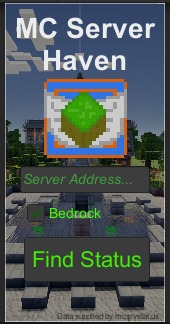
home screen
-
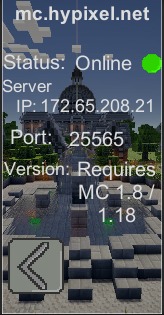
example result
Inspiration
My friends and I love playing together on Minecraft servers. Recently, when we wanted to play together we found that the server we play on was down for maintenance. I wanted to create an app that allows people to view the status of Minecraft servers so they don't run into the same problem as we did. That's why I created MC Server Haven!
What it does
MC Server Haven takes in the server address along with the version of Minecraft the server is on. It returns the status of the server, the server IP, the server port, and the versions of Minecraft needed to play on the server.
How we built it
The app was built on Unity and uses a web API called "Minecraft Server Status". This returns a JSON file. The file is then decoded into variables and shown in a user-friendly UI.
Challenges we ran into
Decoding the JSON file took a lot of trial and error. The app kept producing errors relating to the use of arrays in the file. This was overcome by rewriting a significant chunk of our code to break up lists into individual variables which were then
Accomplishments that we're proud of
I am proud of my new ability to use web requests, APIs, and JSON files in Unity
What we learned
I learned the importance of taking breaks in app-designing. Taking breaks gives you a chance to calm down and think about your project on a bigger scale. This helped improve the quality of my app significantly!
What's next for MC Server Haven
Adding more information about the Minecraft server and showing server icons.


Log in or sign up for Devpost to join the conversation.