

Project Overview
Project Name: Matchmaker 💘
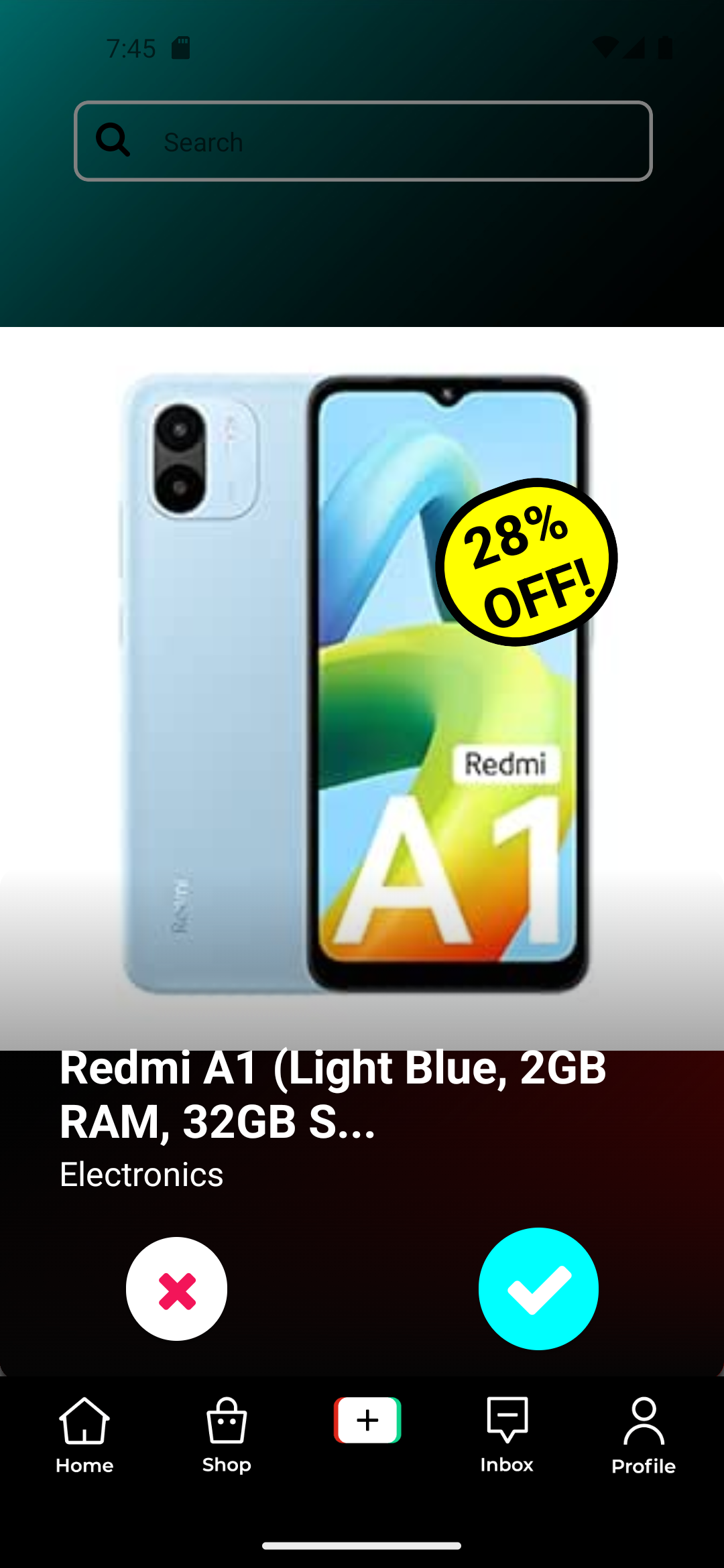
Elevator Pitch: A hyper-personalised For You card that brings you right from your For You page into TikTok Shop by presenting to you a curated selection of products and exclusive offers, all based on your personal preferences and browsing habits. You too, have the power to modify your own preferences directly by swiping left and right on products, where if you do get a match you will be rewarded with an exclusive offer!
1. Inspiration
Having used dating apps before, we know all too well how addictive it can get in drawing your attention due to the ease of swiping and the dopamine hits when you get a match. We thought about the short-form content of TikTok and how difficult it was to hook a user to stay on a video, in a sea of users who swipe quickly and endlessly without giving so much as half a second to a video on their For You Page.
We recall how TikTok gets feedback from users with the use of dark screens interrupting their feed asking questions like if a video is appropriate or if a user feels like making a similar video after watching that video. It catches the attention of users, takes up just a fraction of their time to respond, before continuing on their swiping spree.
So we thought, what if we could do the same to hook the user onto our TikTok Shop card, and bring them right into the shop? They would still have the freedom to continue browsing their feed, yet they would be hooked to try the swiping feature in hopes of getting exclusive discount or discovering new products and ideas for their next shopping spree they did not think they needed.
Thus, we came up with this simple, elegant yet effective solution that is able to hook the user from their browsing session and bring them right into TikTok Shop.
2. What is it?
We designed a personalised For You Page card to showcase relevant TikTok Shop’s products based on how dating apps work. Much like how the discovery of potential matches is gamified in apps like Tinder, we have taken that concept and applied it to products on TikTok Shop instead!
Our solution features a recommendation algorithm that directly takes the users' indicated preferences from their interactions with our Matchmaker feature - namely swiping left to dislike, swiping right to like. Together with personalised data from the 'For You' algorithm and other real-time user interactions on the app, the algorithm would generate tailored product recommendations for each user and enhance the discovery of products in TikTok Shop.
User Actions
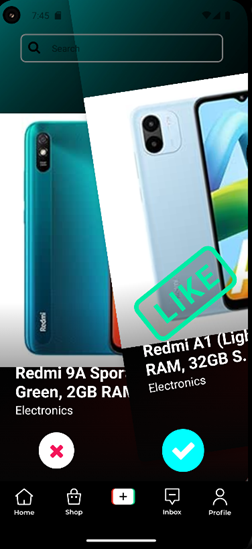
Left Swipes/Tapping on cross button - You are not interested in the product and would like to see the next product. The product card is discarded.
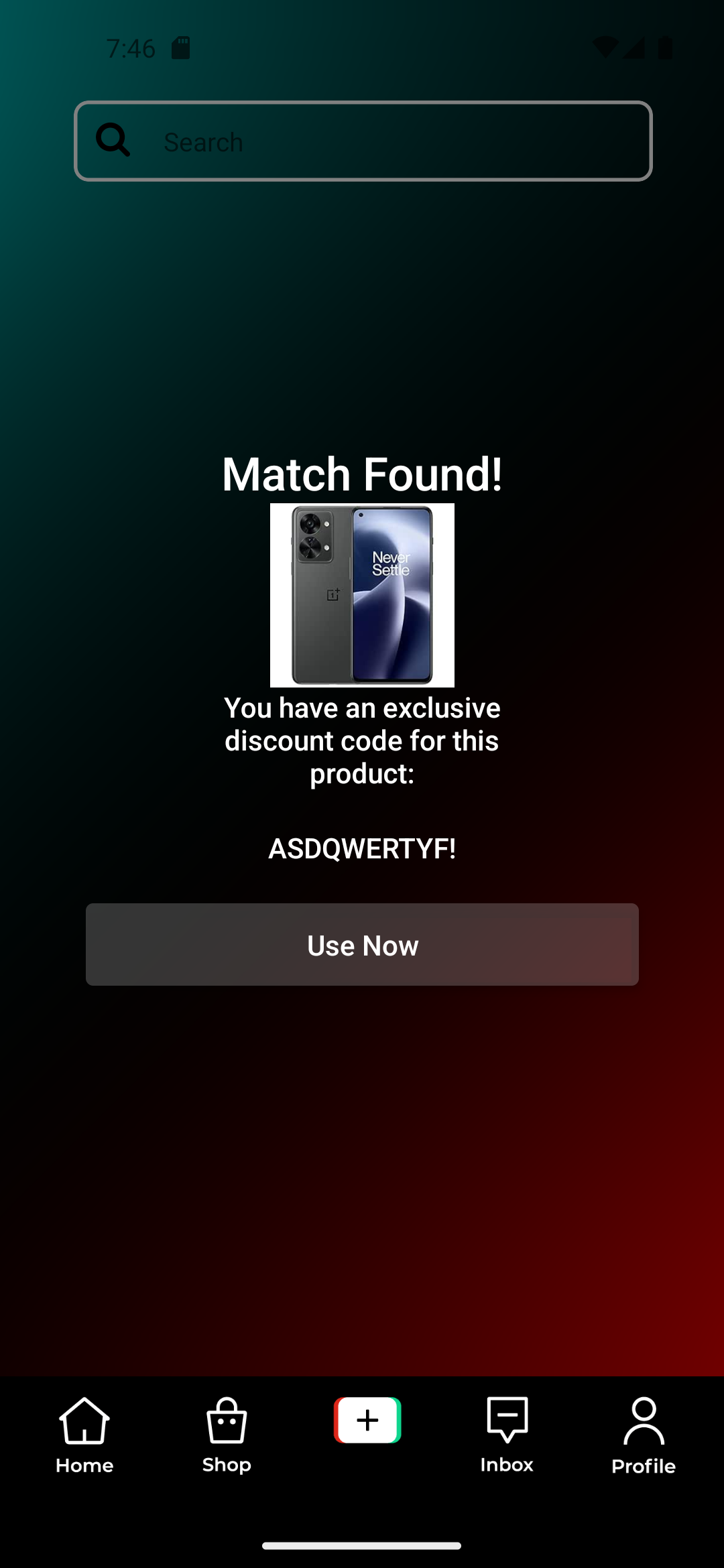
Right Swipes/Tapping on check button - You expend a ‘like’ to indicate interest in the product. Sometimes, a right swipe gets you a ‘Match’ and an exclusive discount code! You will be directed to the product page on the Shop and prompted that the code is only valid for a short period of time if you did get a Match. This incentivises users to deliberate less and buy quickly.
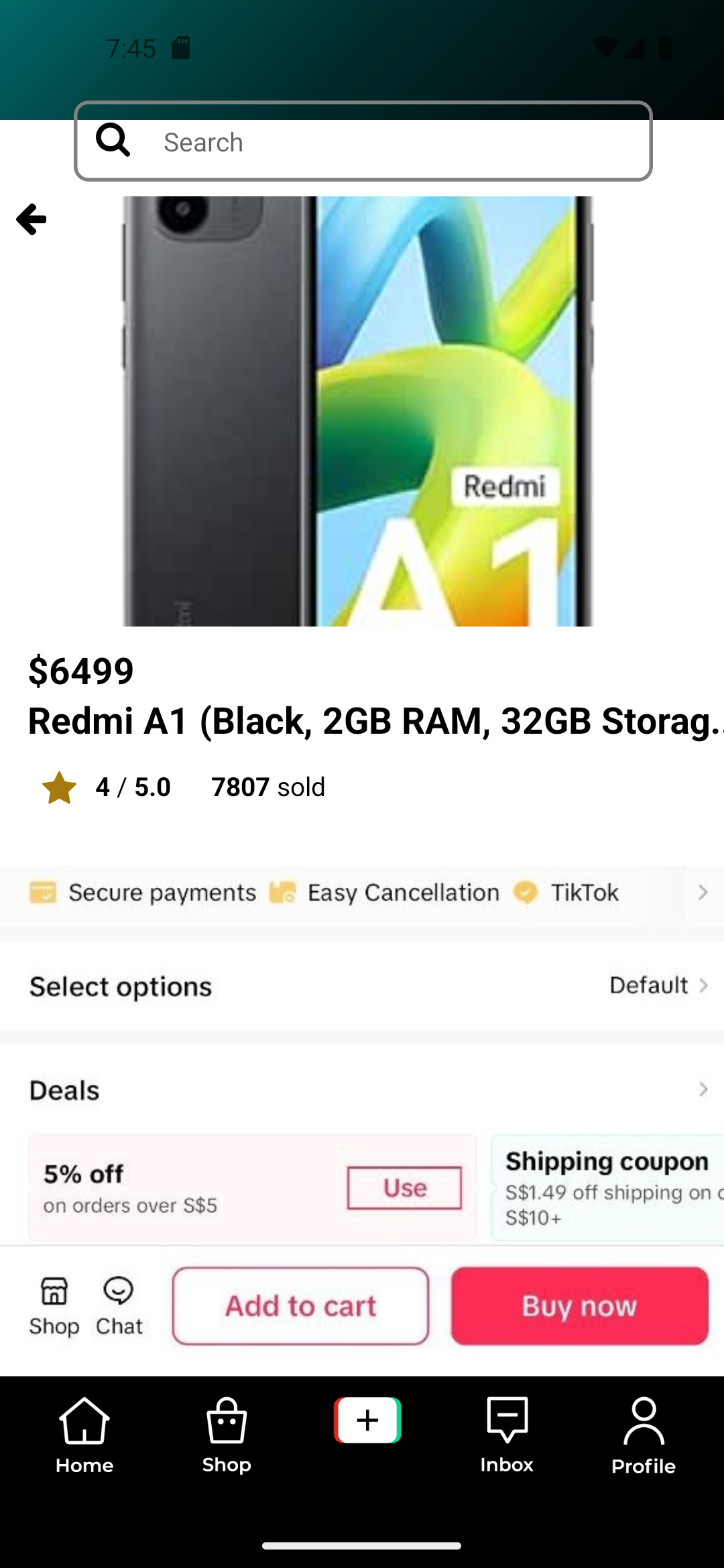
Tap - Tapping on the product brings you to the product details page in TikTok Shop where you can browse the product, purchase it, or browse any other products in the Shop as an entry point into the Shop.
Up and Down Swipes - Navigates between the previous and next video as per normal on the For You page.
Enter a search input on the search bar to search for videos, sounds, and products.
User Circumstances
User circumstances would be used to provide tailored product recommendations for each user in Matchmaker. Examples of circumstances include:
- Past views, clicks and conversions (purchases) on TikTok Shop
- User’s interests based on the ‘For You’ algorithm when consuming content. We assume that the TikTok FYP algorithm is able to derive users’ likes/dislikes based on a multitude of factors such as user’s interactions with the video through duration spent on a video, liking, commenting, sharing, saving posts.
- User’s interest in a product shown via the Matchmaker feature.
- User’s demographic data such as age group, gender and geographical location.
- User’s recent searches.
In our MVP, we will consider user circumstances #3, #4 and #5. Our MVP will assume we have the relevant information in #1 and #2 available via the TikTok API.
Extracting User Circumstances
Left-Right-Tap Swipe Interactions
The Matchmaker feature will use a stack of cards displayed in the For You Page, where each card would feature an item in the set of recommended products for a particular user. In Matchmaker, user circumstances are extracted explicitly through swiping interactions. Users may choose to swipe a card to the left to indicate that the user is not interested in a particular product, and swipe right to indicate their preference. Each swipe interaction will update the user’s preference in the database in real time, thus creating dynamic recommendations which change with each round of interaction.
Why Swipe?
Swiping is a primitive gesture, it is intuitive and quick, and each swipe would also elicit curiosity of what to come next, making it an addictive game for users to discover items and get a discount match in TikTok Shop. Such addiction can be attributed to the constant release of Dopamine, the reward chemical. Dopamine is released by the anticipation that a discount reward or something of interest will come up as users swipe along, especially when the number of likes is limited throughout a certain time interval. This just keeps users coming back for more!
Text Based Search Inputs
User’s search inputs provide a powerful indicator of the products that they may be interested in, thus the Matchmaker model will also take into consideration the user’s text based inputs on recent searches. When users key in a search term in the TikTok search bar, the user database will be updated accordingly with every search action performed.
User Registration Personal Data
User demographic data like age, gender and region can also provide useful insights for recommending relevant products based on general stereotypes. Upon registering for a TikTok account, user data like age group and gender are assumed to be obtained then and available on the database, hence this MVP will not focus on implementing the data collection of demographic data of users.
Ease of Access to TikTok Shop
There are multiple entry points into TikTok Shop:
- Tapping on a product card takes users straight to the product listing in the Shop, regardless if they like or dislike the product.
- Matching with a product gives users an exclusive discount code which they are incentivised to apply immediately by taking them straight into the shop.
Hence with Matchmaker, users can discover a great variety of products in TikTok Shop conveniently through their personalised For You Page.
3. How we built it
System Architecture Diagram
Tech Stack
Frontend: React-Native Expo
Backend: Python Flask with pymongo
Database: MongoDB
Data processing & recommendation systems: nltk, sci-kit learn
Data
For the purposes of this minimum viable product and proof of concept, we have used the Amazon Sales dataset to populate the product pool in MongoDB. We assume that TikTok Shop product data has similar attributes.
4. Recommendation Algorithms in our Model
Matchmaker employs a variety of recommendation system algorithms to tackle various cases depending on the availability of the following data:
Case 1: The user is a new user with no available data
Case 2: The user is a new user with demographic data only
Case 3: The user is a new user but has made searches on the search bar - recent search data is available
Case 4: The user has interacted with Matchmaker and user preference data - liked and disliked products are available
Prior to generating recommendations via the following algorithms, data preprocessing had to first be performed to clean the data.
Natural Language Processing
The textual data available from each product will be first extracted and cleaned. In the data cleaning process, punctuations, symbols, and English stopwords are removed, and the strings are converted into lower case. Lemmatisation and stemming can optionally be performed as well to further clean the text. The cleaned textual data from various product attributes like name, category, description and reviews will then be concatenated before further performing natural language processing.
General Recommendation
For a new user with no data available yet, it may be difficult to come up with a list of products to recommend. To tackle the cold start problem, the top trending products by ratings and rating counts across categories in the product pool will be recommended so that users will be exposed to a variety of categories.
Demographic Filtering
Demographic filtering aims to categorise users based on personal demographics such as age and gender to make generalised recommendations based on their stereotypical descriptions. It does not take into account user’s preferences, but is heavily influenced by the popularity of a certain item. Hence, when a new user creates a TikTok account, the first recommendations made are based on the cumulative preferences of previous users that fall into the same category.
When user preference data is still incomplete but there is sufficient user data such as gender, age group and region, further filtering by region and demographics can be performed as well to narrow down the options for effective recommendations.
Search Engine Recommendation using K-Means Clustering
For users without available preferences data, a search engine based recommendation system can be used to generate relevant recommendations, based on recent search keywords entered on the search bar in the For You Page.
Unsupervised learning with KMeans clustering was performed on the textual data that was preprocessed to group the products into clusters. For the purpose of this MVP, a generic number of clusters k=10 was used, although further analysis can be performed to obtain the optimal number of clusters.
The textual data has to be transformed into feature vectors using the TFIDF Vectorizer from the Python Sci-Kit Learn library before fitting the model. The TF-IDF (Term Frequency-Inverse Document Frequency) is a statistical measure used to evaluate how relevant a word is to a document in a collection of documents. This is done by multiplying two metrics:
Term Frequency (TF): The frequency of a word appearing in a document.
Inverse Document Frequency (IDF): The frequency of the word across a set of documents.
The KMeans model is then fitted with the TFIDF matrix to generate the 10 clusters. Thereafter, the cluster that the recent search keyword belongs to can be obtained and products in the same cluster can be recommended to the user.
Hybrid Recommendation Algorithm
The hybrid recommendation algorithm will incorporate both content based filtering and collaborative filtering methods to obtain effective product recommendations for a specific user. This method is used when user preferences data - liked and disliked products, are available in the database. By combining recommendation techniques, limitations of one algorithm could be overcome by another technique.
As a simple proof of concept, the hybrid recommendation algorithm will take in the userId and the ID of his last liked product as inputs to generate tailored recommendations. Of course in reality, more of the user’s liked items will need to be considered to generate robust relevant product recommendations. The hybrid algorithm will combine results from both content based filtering and collaborative filtering to retrieve recommendations.
Content Based Filtering
Content based filtering does not require other users’ data for recommending products to a specific user. Instead, it uses item metadata to recommend similar items related to the user’s stored liked products. In this context, the item metadata used for content based filtering will include product name, category, description, and review content. During recommendation, the similarity of each item to the user’s past liked items from Matchmaker’s FYP card interactions will be calculated. Products with the highest similarity scores will then be recommended to the user.
Cosine similarity is used as the similarity metric for the content based filtering algorithm. The mathematical formula to obtain the similarity scores is as follows:
To find the similarities of the products based on their textual data, the TFIDF statistical measure once again was used and the textual data will also be transformed into feature vectors. After the TFIDF matrix is constructed, the cosine similarity matrix will be computed to calculate the pairwise similarities of the user’s liked product and the rest of the products in the product pool. The top 10 products with the highest similarity scores will be returned for recommendation to the user.
Collaborative Filtering
Collaborative filtering recommends products to a user based on the purchase history or preferences of like minded users. This method identifies the similarities and patterns between users and items simultaneously using users’ historical data and item ratings to serve relevant product recommendations.
Collaborative filtering employs a utility matrix that consists of all possible user-product preferences, i.e. the product ratings by each user. The utility matrix is sparse as none of the users will buy every item in the product pool, hence most values are unknown. In this method, the user’s liked item will be referenced against the utility matrix based on its ratings to obtain the most similarly rated products. This can also be extended to the user’s purchase history, but for a simple proof of concept, we will only be using the user preference data obtained from the Matchmaker Cards feature.
Optimisation techniques The clustering, calculation of the Cosine similarity and TFIDF matrices for the entire product pool is only done once on initialisation of the app and stored in memory for quick subsequent access to minimise waiting time and improve the performance of the app. Lazy loading may also be employed on the frontend to enhance performance of the app.
5. Challenges we ran into
Being only a 2 man team and having signed up just a week before the deadline we were short of manpower and time. Most of the challenges were fixing bugs and making things work at the expense of having an ugly codebase, and juggling time with work and other commitments.


Log in or sign up for Devpost to join the conversation.