-
-
Matchday: Accessible Football Fixtures with WebMCP
-
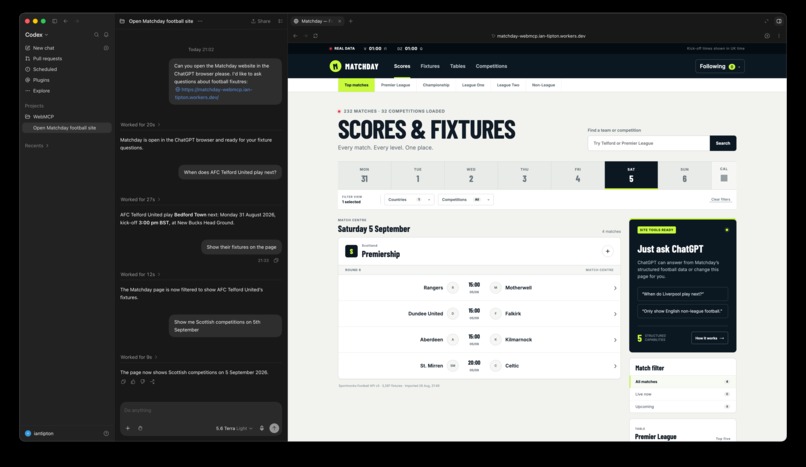
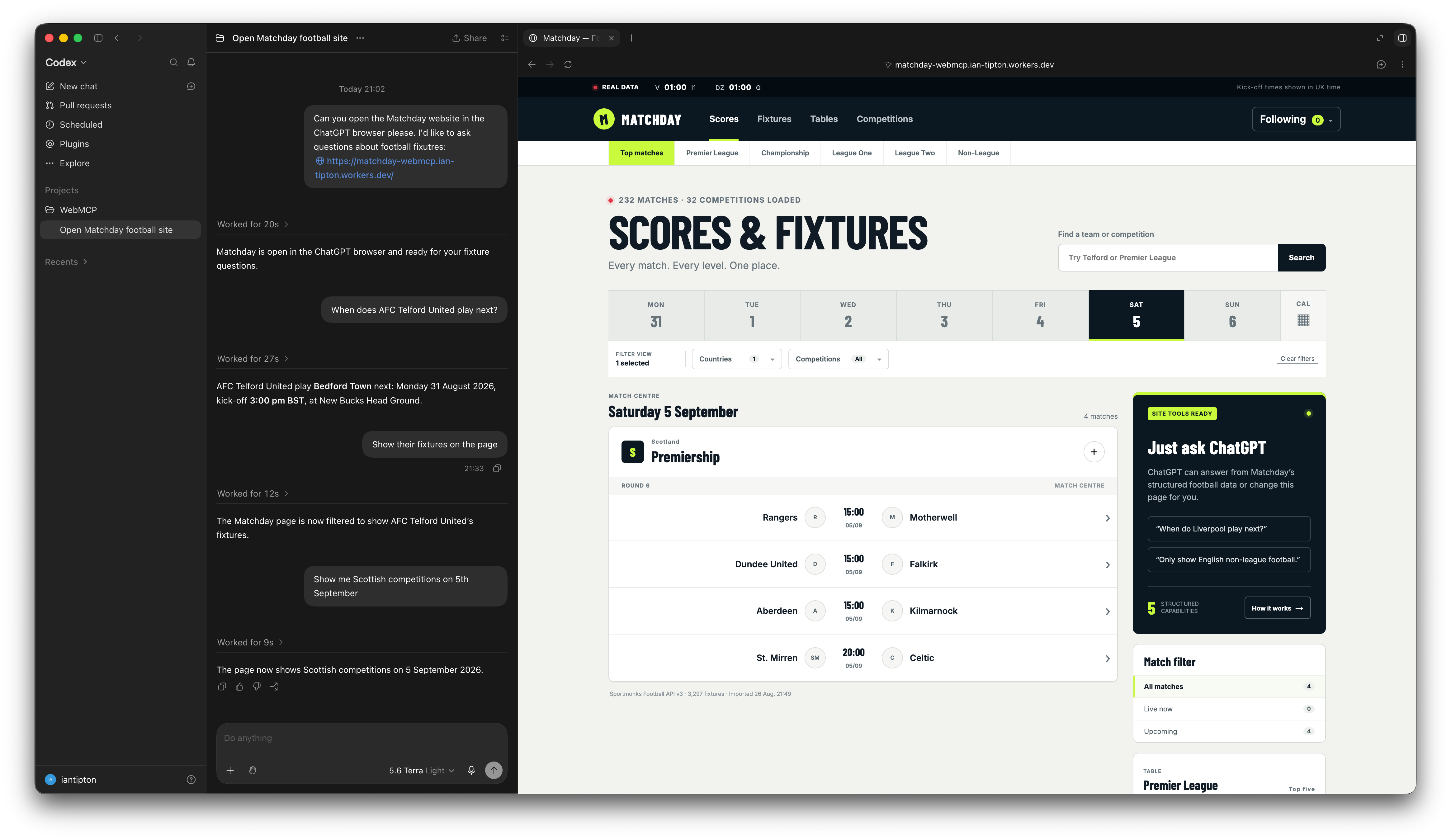
Matchday: MCP in action
Inspiration
My uncle is 80 years old and has loved football since he was a boy. He follows teams at every level, from the Premier League down to local amateur leagues. He has also been blind for most of his life.
He has embraced talking mobile phones, voice assistants and AI to help him keep up with his hobby. But getting a simple answer can still take a surprising amount of effort.
The problem
Football scores and fixtures pages, such as those on BBC Sport, contain a huge amount of information. For my uncle, navigating these dense pages with a screen reader can mean working through many links and headings before reaching the fixtures, then listening through long lists of matches.
That is a lot of navigation when the question is simply: “When does my team play next?”
Voice assistants can help, but in his experience their coverage of smaller clubs is limited and their answers can be inflexible. They might return a few upcoming fixtures without offering an easy way to ask for a different date range or a longer list.
What Matchday does
Matchday is a football scores and fixtures website with a familiar, information-rich layout inspired by conventional sports sites. You can browse competitions, search for clubs, filter matches and follow your favourite teams and leagues.
With WebMCP, there is another way to interact: ask an agent connected to the site for the information or view you want.
For example:
- “When does Liverpool play next?”
- “Show me AFC Telford United’s fixtures in October.”
- “Show Scottish competitions on 30 August.”
- “Show matches involving teams I follow.”
The aim is not to replace an accessible interface. It is to complement it with a more direct route to the information, including for supporters of lower-league clubs.
How I implemented WebMCP
Matchday registers five page-level tools through document.modelContext.registerTool():
search_football_teams— find clubs by name, partial name or alias.get_team_fixtures— retrieve a team’s results and fixtures within a date range.show_team_fixtures— display a selected team’s fixtures on the page.get_match_filter_options— discover the available countries and competitions.set_match_filters— update the visible date, status, country, competition and Following-only filters.
Each tool has a description and input schema, with validation for its arguments. The tools use the same football data and page state as the interface, so an agent can both answer a question and change what the user sees.
Rather than relying only on interpreting the page and navigating its links, the agent has explicit operations for the task.
How I built it
The site uses TanStack Start, TanStack Router, React and TypeScript, and is deployed on Cloudflare Workers.
Football data is imported from the Sportmonks API. The demonstration uses a locally stored snapshot covering 32 competitions, including lower-league football. It is not a live scores feed, and answers are limited to the imported coverage and dates.
Followed teams, competitions and preferences are saved on the user’s device.
Challenges and lessons
The work went beyond retrieving fixtures. Team names and aliases need to resolve consistently, date ranges need validation, and agent actions need to stay in sync with the visible filters.
The interface also needed attention: keyboard-accessible search, labelled controls, dropdown behaviour, modal focus and background scrolling all matter. WebMCP is an additional way to use a website, not a substitute for that work.
The most useful distinction is between getting an answer and controlling the page. Matchday demonstrates both.
What’s next
I would like to test the experience with my uncle and other screen-reader users, improve data freshness and coverage, and use their feedback to guide the next changes.
The goal remains simple: less time navigating, more time enjoying football.
Built With
- cloudflare
- react
- tanstack
- tanstack-router
- typescript


Log in or sign up for Devpost to join the conversation.