-
-
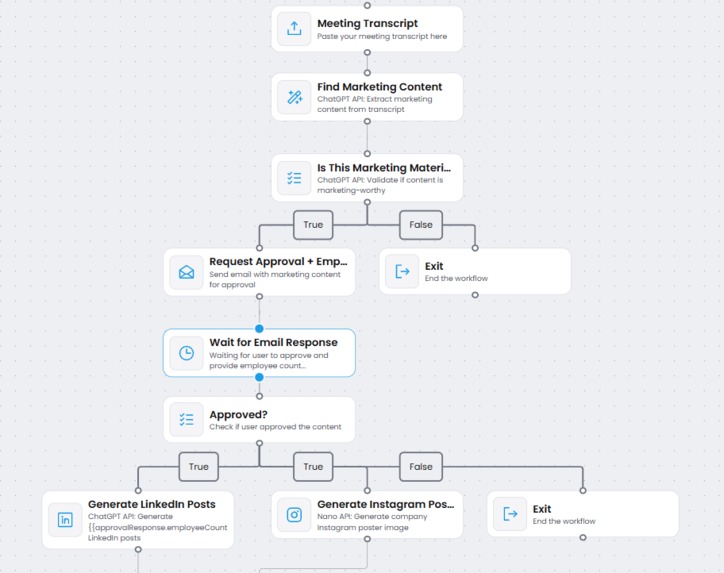
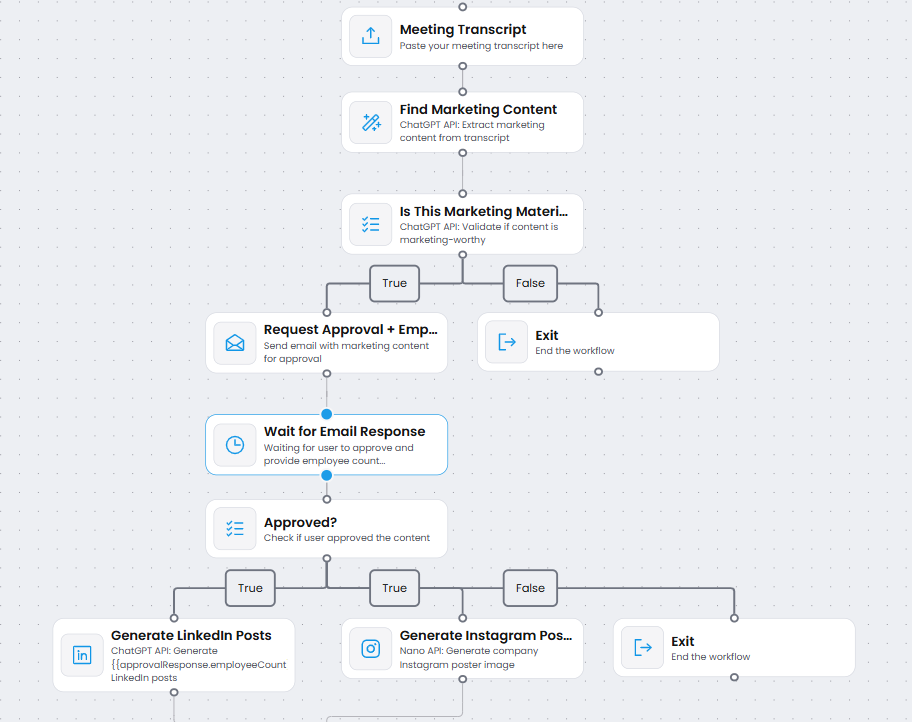
Drag and drop ability and can send to all your employee to what to post.
Marketo - AI-Powered Marketing Automation Platform



💡 Inspiration
Every startup founder knows the struggle: you're in back-to-back meetings discussing exciting milestones—a new funding round, a product launch, a major partnership—but by the time the meeting ends, that marketing opportunity is lost in a sea of notes and to-do lists.
The problem: Companies have marketing-worthy content hidden in their everyday conversations, but extracting, validating, and distributing it requires hours of manual work.
Our vision: What if AI could listen to your meetings, automatically identify marketing opportunities, generate personalized social media content for your team, and get it approved—all without lifting a finger?
That's where Marketo was born. We wanted to build a no-code platform that turns meeting transcripts into viral social media campaigns, making marketing automation accessible to everyone.
🎯 What it does
Marketo is an intelligent, no-code marketing automation platform that transforms meeting transcripts into ready-to-post social media content through a visual workflow builder.
The Complete Flow:
📝 Paste Meeting Transcript
- User pastes their meeting notes or transcript into the platform
🤖 AI Content Extraction (ChatGPT)
- ChatGPT analyzes the transcript and extracts marketing-worthy content
- Identifies funding announcements, product launches, milestones, achievements
✅ AI Validation (ChatGPT)
- Validates if the content is truly marketing material
- Filters out non-promotional content automatically
✉️ Smart Approval Request
- Sends email to
[email protected]with extracted content - Asks: "Do you approve? How many employees should post?"
- User responds: "Yes, 3 employees"
- Sends email to
🎨 Personalized Content Generation
- ChatGPT API: Generates 3 unique LinkedIn posts (one per employee)
- Nano API: Creates branded Instagram poster with company logo
- Each post is personalized and engaging
👀 Final Review
- Sends generated LinkedIn posts + Instagram poster for final approval
- User can approve or request changes
📧 Automated Distribution
- Emails 3 employees with their personalized LinkedIn posts
- Includes Instagram poster for company account
- Provides posting instructions
Result: From meeting → social media content in under 5 minutes, with zero manual effort!
🛠️ How we built it
Architecture Overview
┌─────────────────────────────────────────────────────────┐
│           React Frontend (Workflow Builder)             │
│     ┌─────────────────────────────────────────┐        │
│     │  Visual Workflow Canvas (React Flow)    │        │
│     │  - Drag & Drop Nodes                    │        │
│     │  - Real-time Preview                    │        │
│     │  - Template Library                     │        │
│     └─────────────────────────────────────────┘        │
└──────────────────┬──────────────────────────────────────┘
                   │ JSON Workflow Definition
                   ↓
┌─────────────────────────────────────────────────────────┐
│           Go Backend (Temporal SDK)                     │
│     ┌─────────────────────────────────────────┐        │
│     │  Temporal Workflow Engine               │        │
│     │  - Dynamic Workflow Interpreter         │        │
│     │  - Activity Handlers                    │        │
│     │  - Signal Management (Approvals)        │        │
│     └─────────────────────────────────────────┘        │
└──────────────────┬──────────────────────────────────────┘
                   │
        ┌──────────┴──────────┬──────────────┬─────────┐
        ↓                     ↓              ↓         ↓
   ChatGPT API          Nano API        Email      Database
   (Content Gen)     (Image Gen)      Service     (Postgres)
Tech Stack
Frontend
- React 18 - Modern UI framework
- React Flow - Visual workflow builder with drag-and-drop
- TypeScript - Type-safe development
- TailwindCSS - Utility-first styling
- Vite - Lightning-fast build tool
- pnpm - Efficient package management
Backend
- Go 1.21 - High-performance backend
- Temporal SDK - Workflow orchestration engine
- Fiber/Mux - HTTP routing
- PostgreSQL - Workflow state persistence
- Docker - Containerized deployment
AI & APIs
- OpenAI GPT-4 - Content extraction and generation
- Nano API - AI-powered image generation
- SendGrid/Gmail API - Email automation
- Webhooks - Real-time approval handling
Key Components
1. Visual Workflow Builder (Frontend)
// Custom workflow nodes
- Data Input Node
- Extract Detail Node (AI-powered)
- Conditional Branch Node
- Email Approval Node
- Wait for Approval Node
- LinkedIn Generator Node
- Instagram Poster Node
- Email Employees Node
- Exit Node
Each node is fully configurable with:
- Dynamic property forms
- Variable substitution (
{{variableName}}) - Conditional logic
- API endpoint configuration
2. Workflow JSON Export
The visual workflow compiles to executable JSON:
{
  "nodes": [...],
  "edges": [...],
  "variables": {
    "transcript": "",
    "marketingContent": "",
    "approvalResponse": {},
    "linkedInPosts": [],
    "instagramPoster": ""
  }
}
3. Temporal Workflow Engine (Backend)
func ExecuteMarketingWorkflow(ctx workflow.Context, input WorkflowInput) error {
    // 1. Extract content via ChatGPT
    var marketingContent string
    workflow.ExecuteActivity(ctx, ExtractMarketingContent, input.Transcript).Get(ctx, &marketingContent)

    // 2. Validate via ChatGPT
    var isMarketing bool
    workflow.ExecuteActivity(ctx, ValidateMarketing, marketingContent).Get(ctx, &isMarketing)

    if !isMarketing {
        return nil // Exit workflow
    }

    // 3. Send approval email
    var approvalToken string
    workflow.ExecuteActivity(ctx, SendApprovalEmail, marketingContent).Get(ctx, &approvalToken)

    // 4. Wait for approval signal (human-in-the-loop)
    var approval ApprovalResponse
    signalChan := workflow.GetSignalChannel(ctx, "approval-"+approvalToken)
    signalChan.Receive(ctx, &approval)

    if !approval.Approved {
        return nil // Exit workflow
    }

    // 5. Generate LinkedIn posts (parallel)
    var linkedInPosts []string
    workflow.ExecuteActivity(ctx, GenerateLinkedInPosts,
        marketingContent, approval.EmployeeCount).Get(ctx, &linkedInPosts)

    // 6. Generate Instagram poster (parallel)
    var instagramPoster string
    workflow.ExecuteActivity(ctx, GenerateInstagramPoster,
        marketingContent).Get(ctx, &instagramPoster)

    // 7. Send to employees
    workflow.ExecuteActivity(ctx, EmailEmployees,
        linkedInPosts, instagramPoster)

    return nil
}
4. Activity Implementations
ChatGPT Integration:
func (a *Activities) ExtractMarketingContent(ctx context.Context, transcript string) (string, error) {
    response, err := openai.CreateChatCompletion(ctx, openai.ChatCompletionRequest{
        Model: "gpt-4",
        Messages: []openai.ChatCompletionMessage{
            {
                Role: "user",
                Content: fmt.Sprintf(
                    "Extract marketing-worthy content from: %s",
                    transcript,
                ),
            },
        },
    })
    return response.Choices[0].Message.Content, err
}
Nano Image Generation:
func (a *Activities) GenerateInstagramPoster(ctx context.Context, content string) (string, error) {
    response, err := nanoClient.Generate(NanoRequest{
        Template: "achievement",
        Headline: "🎉 Big News!",
        Body: content,
        Style: {
            BackgroundColor: "#1E3A8A",
            TextColor: "#FFFFFF",
        },
    })
    return response.ImageURL, err
}
Email Approval with Webhooks:
func (a *Activities) SendApprovalEmail(ctx context.Context, content string) (string, error) {
    token := generateApprovalToken()
    approveURL := fmt.Sprintf("https://marketo.app/approve?token=%s", token)

    sendgrid.SendEmail(EmailRequest{
        To: "[email protected]",
        Subject: "✅ Marketing Content Found - Approval Needed",
        Body: fmt.Sprintf("Content: %s\n\nApprove: %s", content, approveURL),
    })

    return token, nil
}

// Webhook handler
func HandleApproval(c *fiber.Ctx) error {
    token := c.Query("token")
    employeeCount := c.FormValue("employeeCount")

    // Send Temporal signal
    temporalClient.SignalWorkflow(
        ctx,
        workflowID,
        "approval-"+token,
        ApprovalResponse{Approved: true, EmployeeCount: employeeCount},
    )

    return c.SendString("✅ Approved!")
}
🚧 Challenges we ran into
1. Dynamic Workflow Execution
Problem: How do we execute user-defined visual workflows without hardcoding every possible combination?
Solution: Built a dynamic workflow interpreter in Temporal that reads the JSON workflow definition and executes activities based on node types. This allows infinite workflow combinations without code changes.
2. Human-in-the-Loop Approvals
Problem: Workflows need to pause and wait for email responses (could be hours/days).
Solution: Used Temporal's Signal feature. When a user clicks approve in the email, a webhook sends a signal to resume the workflow exactly where it left off—even if the worker crashed!
// Workflow pauses here
signalChan.Receive(ctx, &approval)
// Resumes when signal received
3. Variable Substitution Across Nodes
Problem: Users need to reference outputs from previous nodes (e.g., {{approvalResponse.employeeCount}}).
Solution: Built a variable resolution system that:
- Tracks all workflow variables in state
- Parses
{{variableName}}syntax - Replaces with actual values at runtime
4. AI Prompt Engineering
Problem: Getting consistent, usable output from ChatGPT for content generation.
Solution: Crafted specific prompts with structured output requirements:
"Generate exactly 3 LinkedIn posts. Format as:
Post 1: [content]
Post 2: [content]
Post 3: [content]"
5. Real-time Workflow Monitoring
Problem: Users can't see workflow progress in real-time.
Solution: Implemented WebSocket connection between frontend and Temporal, streaming workflow events to the UI for live updates.
🏆 Accomplishments that we're proud of
✅ End-to-End Automation
Built a complete marketing automation pipeline from transcript → AI processing → approval → distribution—fully automated!
✅ No-Code Visual Builder
Created an intuitive drag-and-drop interface that anyone can use to build complex workflows without writing code.
✅ Production-Ready Architecture
Implemented enterprise-grade workflow orchestration with Temporal, ensuring reliability, fault tolerance, and scalability.
✅ AI Integration Excellence
Successfully integrated multiple AI APIs (ChatGPT for text, Nano for images) with intelligent prompt engineering.
✅ Human-in-the-Loop Done Right
Solved the challenging problem of pausing workflows for human approval and resuming seamlessly.
✅ Reusable Node System
Created 9 custom workflow nodes that can be mixed and matched to create infinite automation possibilities.
📚 What we learned
Technical Learnings
- Temporal is Powerful - Learned how to build resilient, long-running workflows that survive crashes and restarts
- React Flow Mastery - Deep dive into building custom visual workflow builders
- AI Prompt Engineering - Discovered how to get consistent, structured output from LLMs
- Go Concurrency - Leveraged goroutines for parallel API calls (ChatGPT + Nano)
- WebSocket Real-time - Implemented live workflow progress streaming
Product Learnings
- Simplicity Wins - Users want simple, automated solutions—not complex configuration
- Templates Matter - Pre-built workflow templates dramatically reduce time-to-value
- Visual > Code - Non-technical users prefer visual workflow builders over YAML/JSON
- Approvals Are Critical - Users need control—automated doesn't mean autonomous
Team Learnings
- Iterative Development - Started simple (transcript → content), then added layers
- API-First Design - Designed backend APIs before building frontend
- Documentation Matters - Clear docs helped us stay aligned on complex architecture
🚀 What's next for Marketo
Short-term (Next 3 months)
1. Direct Social Media Posting
- Integrate LinkedIn API for direct posting (skip manual employee posting)
- Add Instagram Graph API for automated poster publishing
- Twitter/X integration for thread generation
2. More AI Capabilities
- GPT-4 Vision - Extract marketing content from meeting screenshots/slides
- Voice-to-Text - Process actual meeting audio files
- Sentiment Analysis - Ensure generated content matches brand tone
3. Advanced Workflow Features
- Scheduled Workflows - Auto-run every Monday at 9am
- Multi-Channel Publishing - Publish to LinkedIn + Twitter + Instagram simultaneously
- A/B Testing - Generate multiple versions, test engagement
- Analytics Dashboard - Track post performance (likes, shares, reach)
4. Collaboration Features
- Team Workspaces - Multiple users, role-based permissions
- Comment & Feedback - Approve with comments/edits
- Version History - Track workflow changes over time
Mid-term (6-12 months)
5. Enterprise Features
- SSO Integration - Login with Google/Microsoft/Okta
- Approval Chains - Multi-level approval workflows
- Compliance Checks - Legal/PR review before posting
- Brand Guidelines - Auto-check content against brand rules
6. Marketplace
- Template Marketplace - Share and sell workflow templates
- Node Plugins - Custom nodes for specific industries
- Integration Hub - Connect to Slack, Notion, Airtable, etc.
7. Mobile App
- iOS/Android app for approvals on-the-go
- Push notifications for pending approvals
- Quick-edit content from phone
Long-term (1-2 years)
8. Industry-Specific Solutions
- SaaS Playbook - Pre-built workflows for SaaS companies
- E-commerce Kit - Product launch automation
- Event Marketing - Conference/webinar promotion flows
9. AI Agent Evolution
- Autonomous Marketing Agent - AI makes approval decisions
- Predictive Content - AI suggests what to post before meetings
- Trend Detection - Auto-identify trending topics to leverage
10. Scale & Performance
- Handle 10,000+ concurrent workflows
- Sub-second workflow execution
- 99.99% uptime SLA
🎯 Vision
Marketo aims to become the #1 no-code marketing automation platform that democratizes AI-powered marketing for startups and enterprises alike.
Our ultimate goal: Every company, regardless of size, should have access to enterprise-grade marketing automation.
📊 Metrics We're Targeting
- Time Saved: 10+ hours per week per marketing team
- Content Volume: 5x increase in social media output
- Engagement: 30% higher engagement from personalized content
- Adoption: 1,000+ companies in first 6 months
🙏 Acknowledgments
Built with ❤️ using:
- OpenAI GPT-4
- Temporal
- React & React Flow
- Go
- Nano AI
Marketo - From meetings to marketing in minutes.


Log in or sign up for Devpost to join the conversation.