

Inspiration
We noticed a fundamental gap in how people interact with the web: tasks that take humans 30 seconds—filling a form, searching for something, sending an email—require explicit, manual steps every single time. What if you could just tell your browser what you want, and it would handle the tedious parts?
The barrier wasn't the technology. Chrome's Prompt API and Gemini Nano made on-device intelligence possible. But we needed more than a chatbot—we needed an agent: something that could see the page, understand the structure, take actions, observe results, and keep going until the job was done. Something that could learn from your browsing history, understand your documents (resumes, notes, PDFs), remember your preferences, and operate entirely offline without sending a single byte to the cloud.
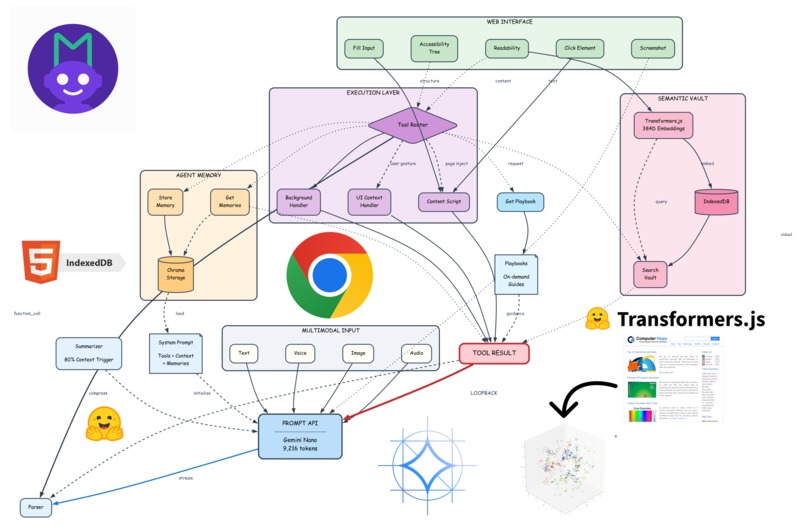
That's why we built Marionette: a multimodal AI agent with local document RAG that removes digital friction while respecting privacy absolutely.
What it does
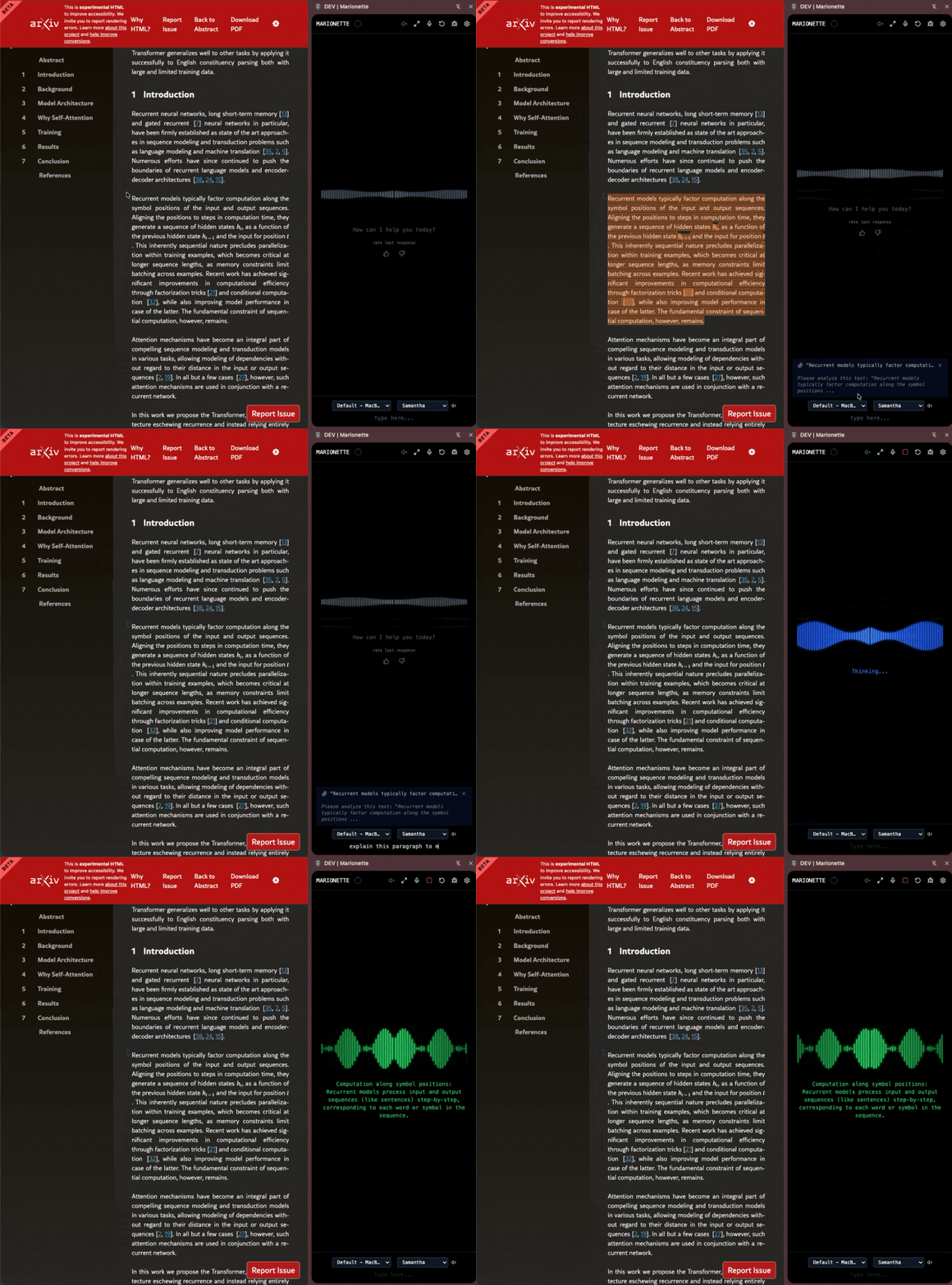
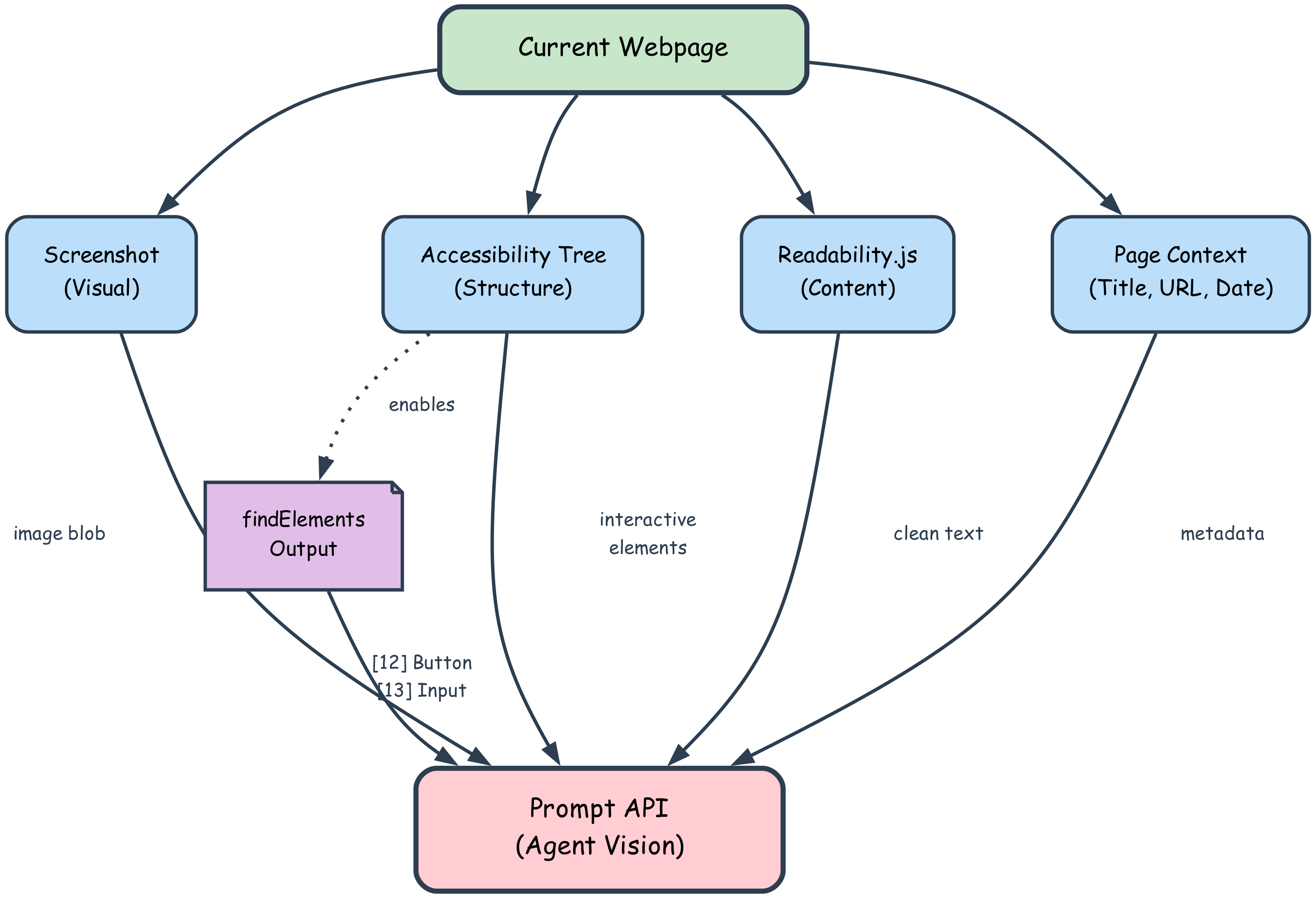
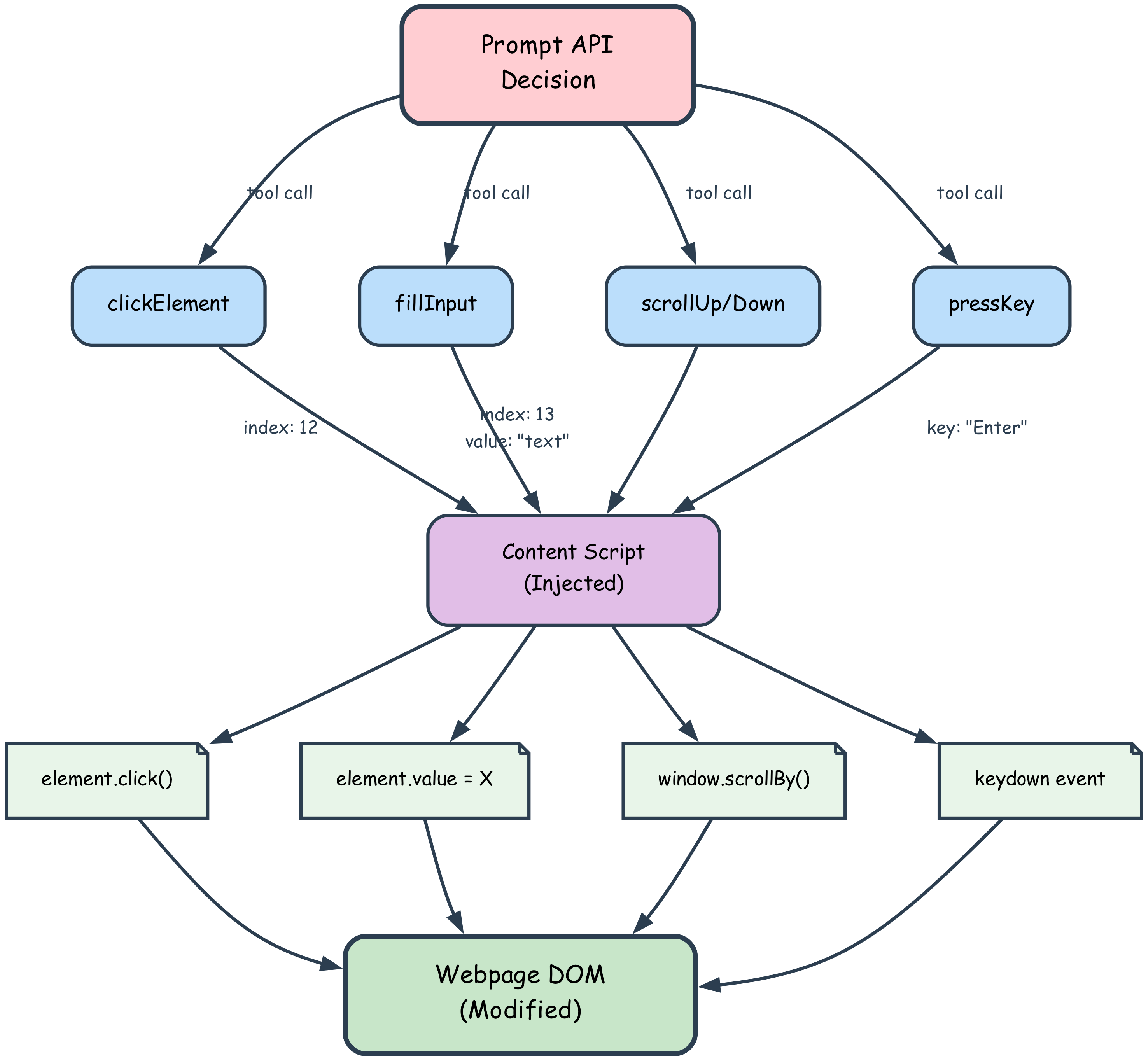
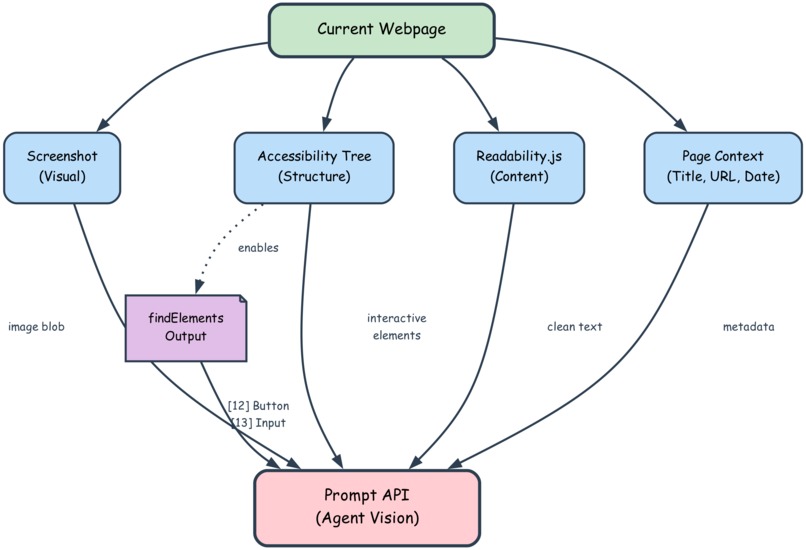
Marionette is a Chrome extension that gives you an AI agent capable of autonomous browser automation. You interact through voice or text; the agent sees what you see (via screenshots and accessibility trees), acts on your behalf (clicking, filling, scrolling), and remembers everything it learns.
Core Capabilities:
- 🎤 Voice-controlled automation: "Fill this form" → agent captures the page, parses fields, checks memories, asks for missing data, fills everything, and submits
- 🧠 Semantic memory vault: Every page you visit gets auto-captured, cleaned, and embedded for semantic search later
- 📄 Drag-and-drop document RAG: Upload PDFs, text files, markdown, HTML, or JSON—the agent chunks, embeds, and searches across both web pages and your documents
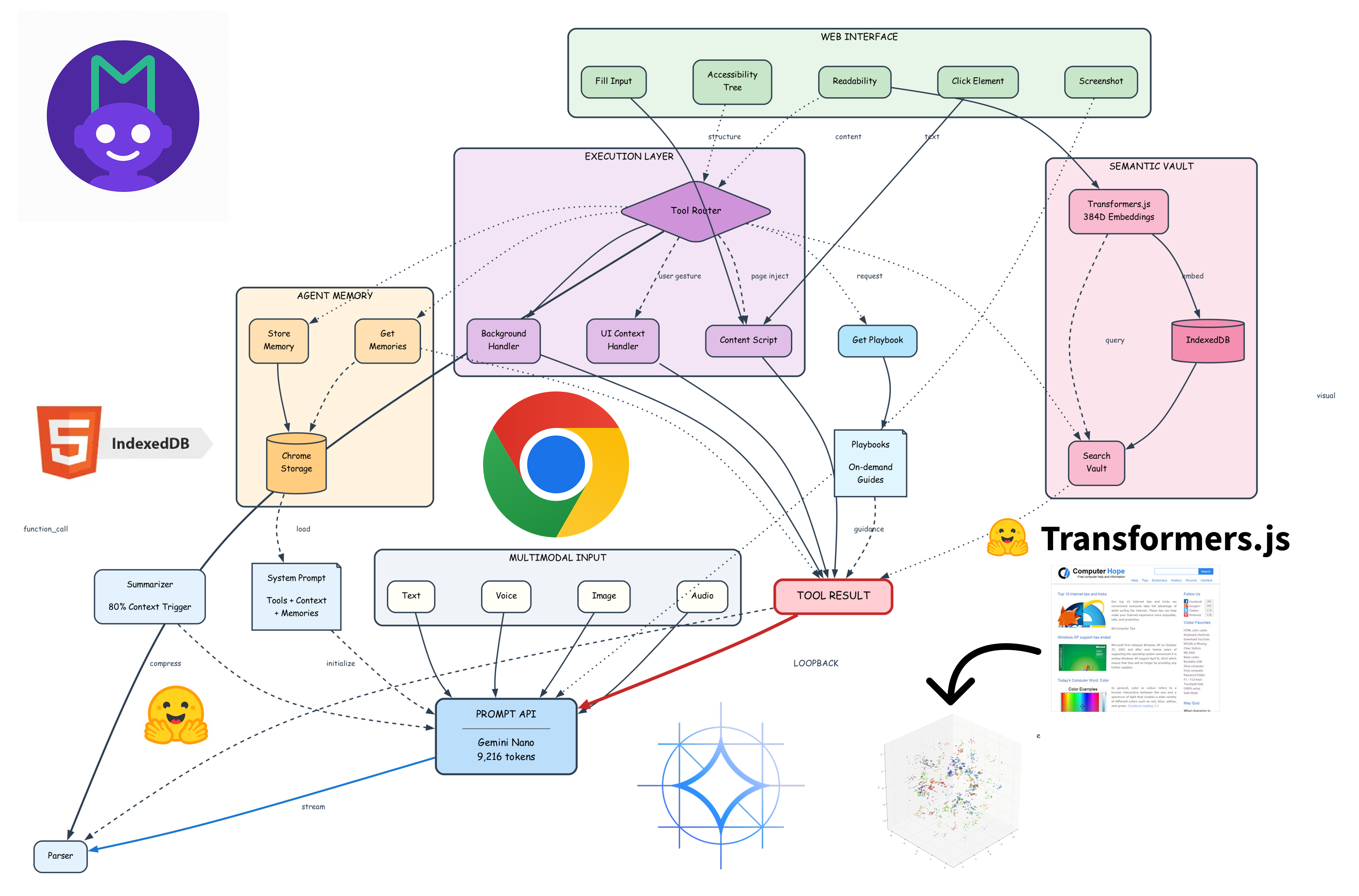
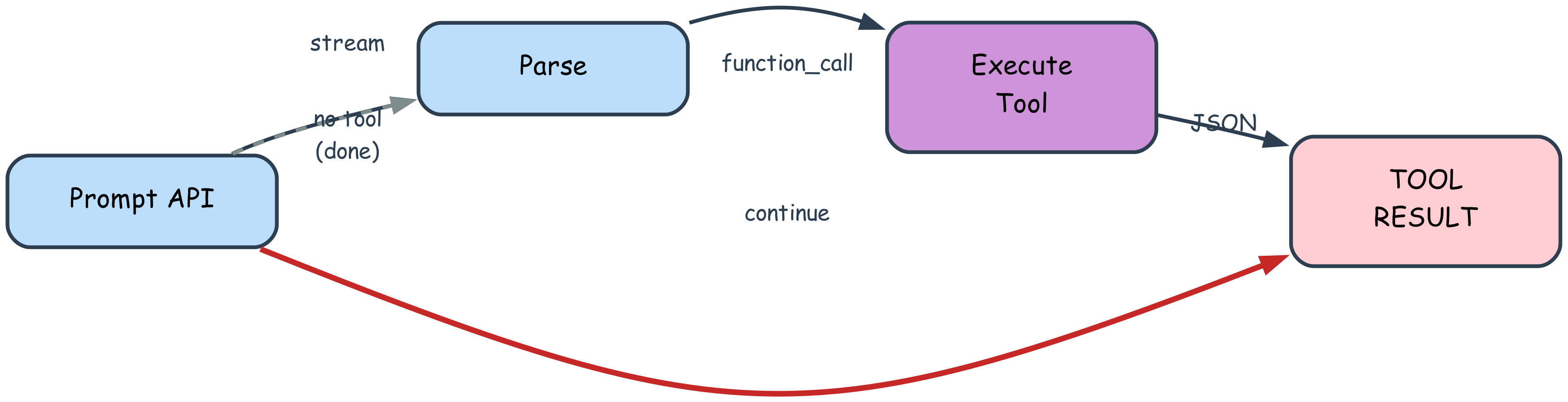
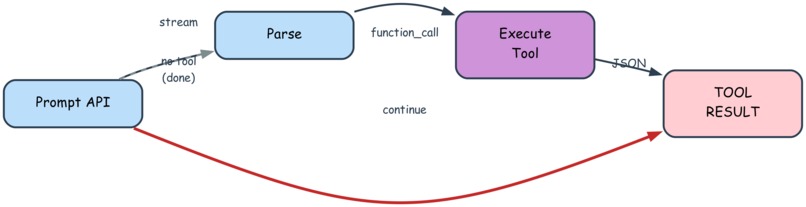
- 🔁 Agentic loopback: The agent doesn't stop after one response—it calls tools, reads results, and keeps acting (up to 60 iterations) until complete
- 🎯 Playbook-guided workflows: Complex tasks follow structured guides that keep the small model aligned and efficient
- 🔒 100% offline: Everything runs on-device. No API keys, no telemetry, no network calls
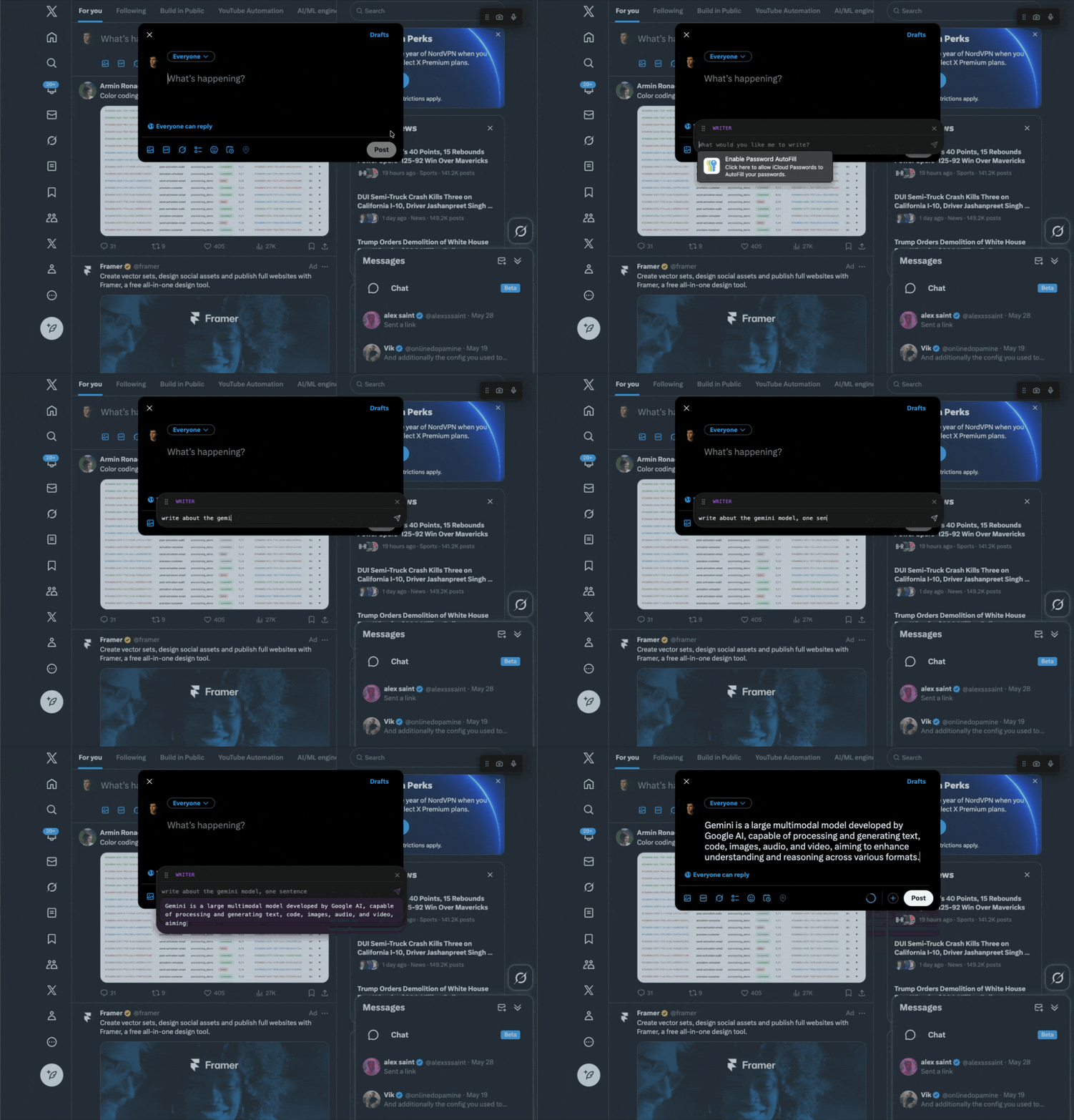
Alongside the autonomous agent, Marionette introduces instant, context-aware analysis tools built directly into the browser.
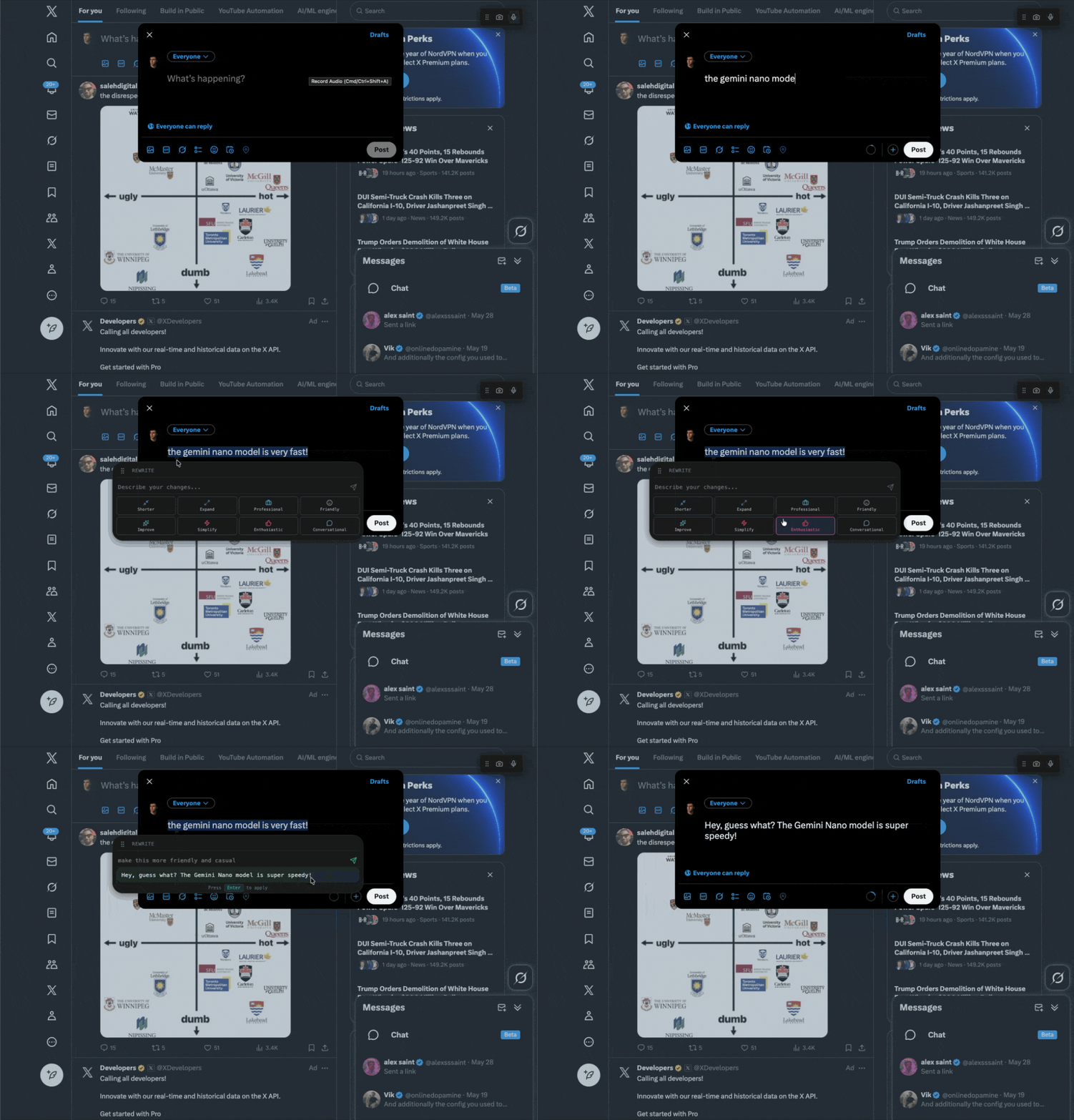
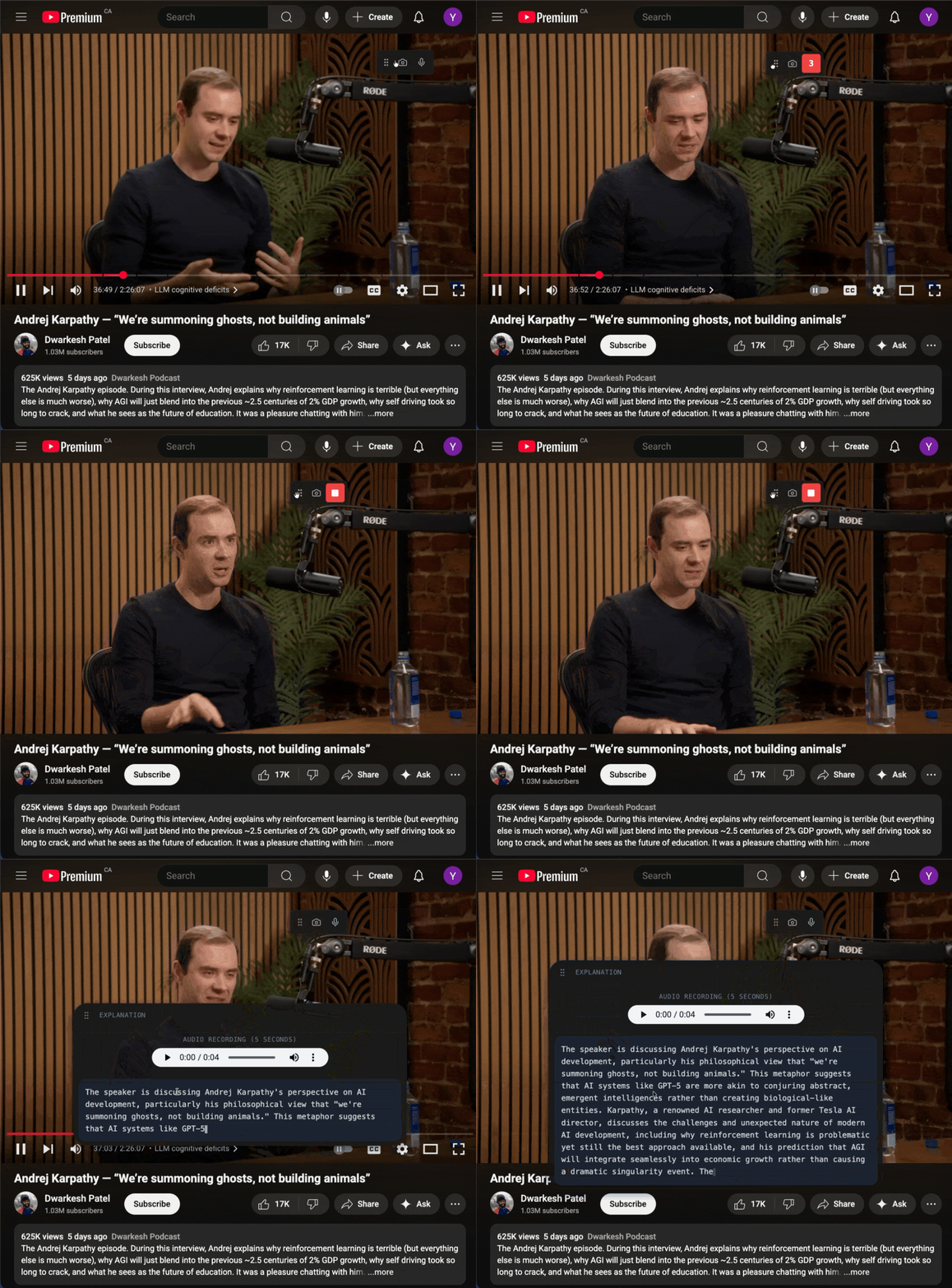
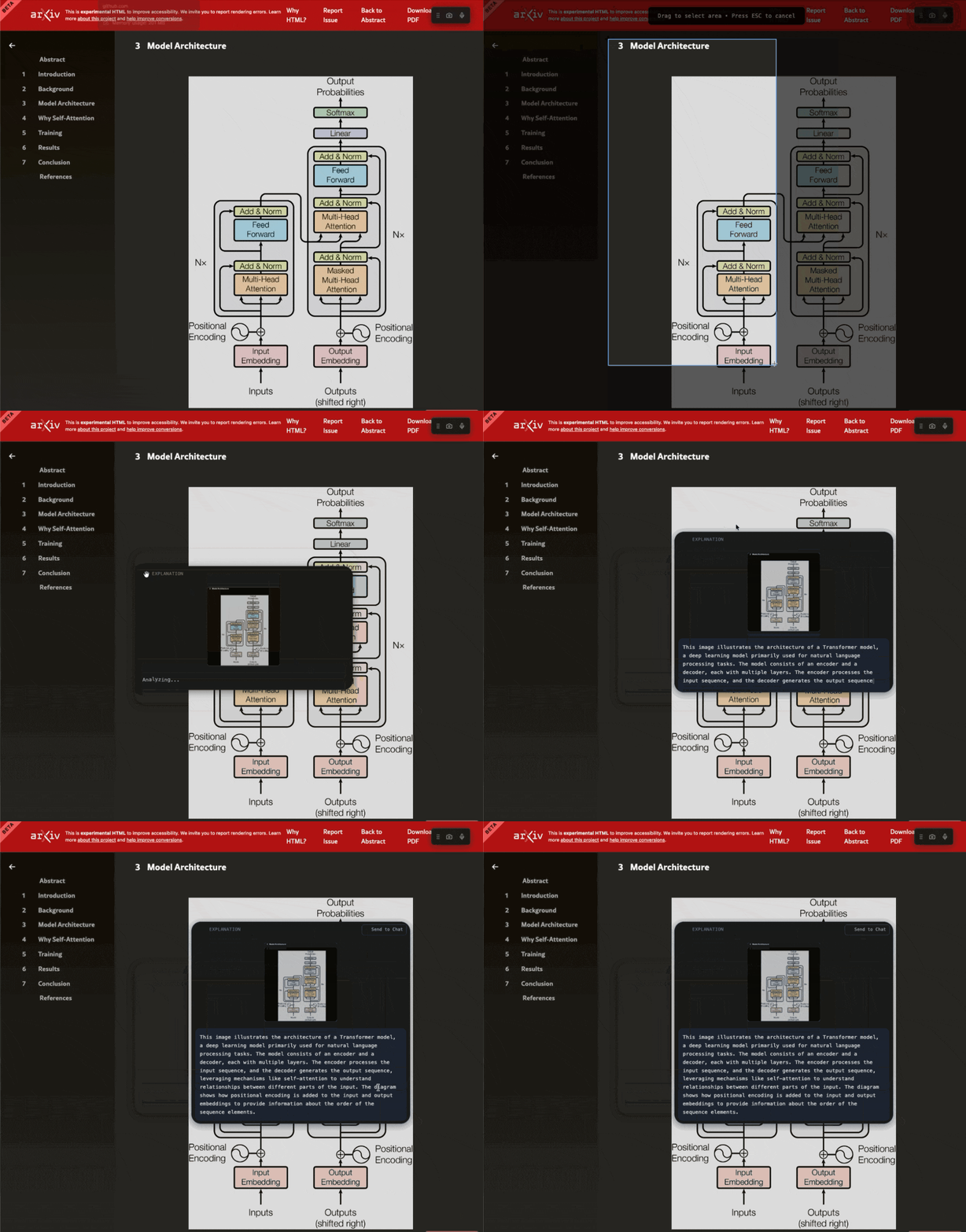
When users select text, Marionette detects its context (paragraph, input field, or comment box) and displays a lightweight overlay with smart actions:
Explain → uses the Prompt API to clarify or summarize meaning
Rewrite → uses the Rewriter API with presets like Shorter, Professional, or Friendly
/write command → triggers the Writer API to generate content in context, like “Write a LinkedIn comment” or “Compose a professional email”
Screenshot & Audio Capture → local multimodal analysis via Gemini Nano (vision + speech), fully offline
All responses stream in under 500 ms, with zero network calls. The system adapts tone and structure to the platform—LinkedIn posts sound professional, GitHub comments stay concise, and tweets remain under 280 chars—all using on-device sharedContext for page and user awareness.
Example Workflows:
- "Search for TypeScript generics" → Opens Google, finds search box, fills query, clicks button, captures results, explains findings
- "Fill this form" → Screenshots page, parses fields, checks stored memories, fills known data, asks for missing values, saves new info, submits
- "What's playing in this video?" → Captures tab audio, sends to Gemini Nano, transcribes and describes content
- Drag PDF resume → Agent extracts text, chunks it, embeds all sections. Later: "What's my work experience?" retrieves relevant sections
How we built it
We started with Chrome's Prompt API (Gemini Nano) as the agent core. But immediately hit constraints: the 9,216-token context window is tight, the model is small (limited reasoning), and we needed it to control a complex, stateful environment (the DOM).
Key Architecture Decisions
1. Agentic Loop
After each tool execution, we feed the result back to the model with [TOOL RESULT]. The model reads it and decides the next action—creating a continuous perception-action cycle.
2. Playbook System
Instead of exposing all 22 tools in the system prompt (~2,400 tokens), we expose 9 core tools (~850 tokens) and load specialized playbooks on-demand. This reclaims ~1,550 tokens (17% of context window) for conversation.
3. Chunk-Based RAG with Embeddings

We use Transformers.js (all-MiniLM-L6-v2) to generate 384D embeddings. Instead of dumping 5,000-word articles into the prompt (6,500 tokens), we return 50-word excerpts (~80 tokens) matched by semantic meaning.
Every page you visit gets auto-captured, cleaned with Readability.js, split into 500-character chunks (100-char overlap), and embedded. The agent searches by meaning across all chunks.
4. Document Ingestion Pipeline
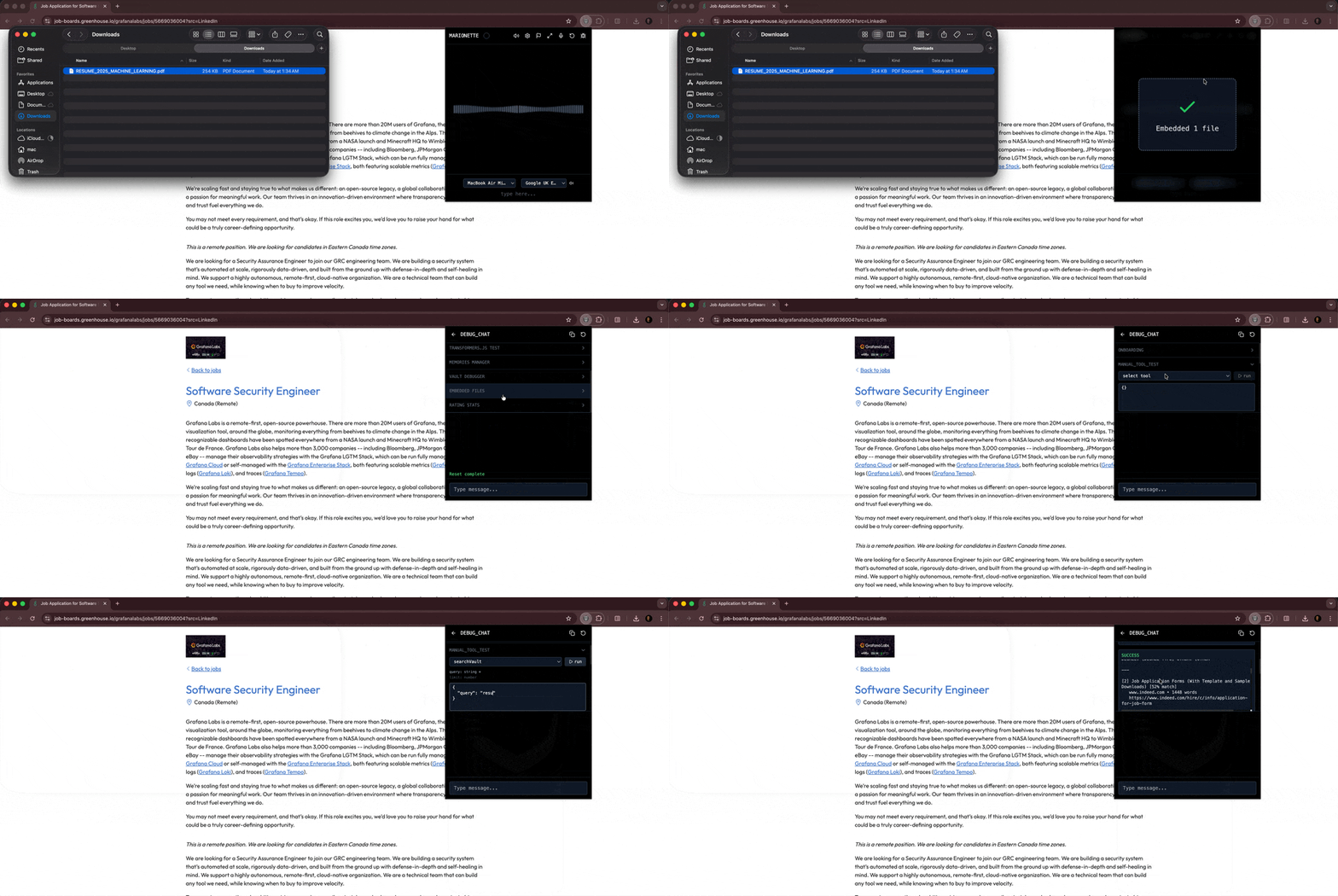
Users drag-and-drop PDFs, markdown, text, HTML, or JSON. We built a complete pipeline:
- PDF parsing: pdfjs-dist (WebAssembly) extracts text while preserving structure
- Chunking: 500-char overlapping chunks
- Unified embedding: Stored in same vault as web captures
- Semantic retrieval: Agent searches across both web pages AND documents
Upload your resume, research papers, or meeting notes—the agent references them when filling forms or answering questions, all without sending anything to the cloud.
5. Multimodal & Tool Routing
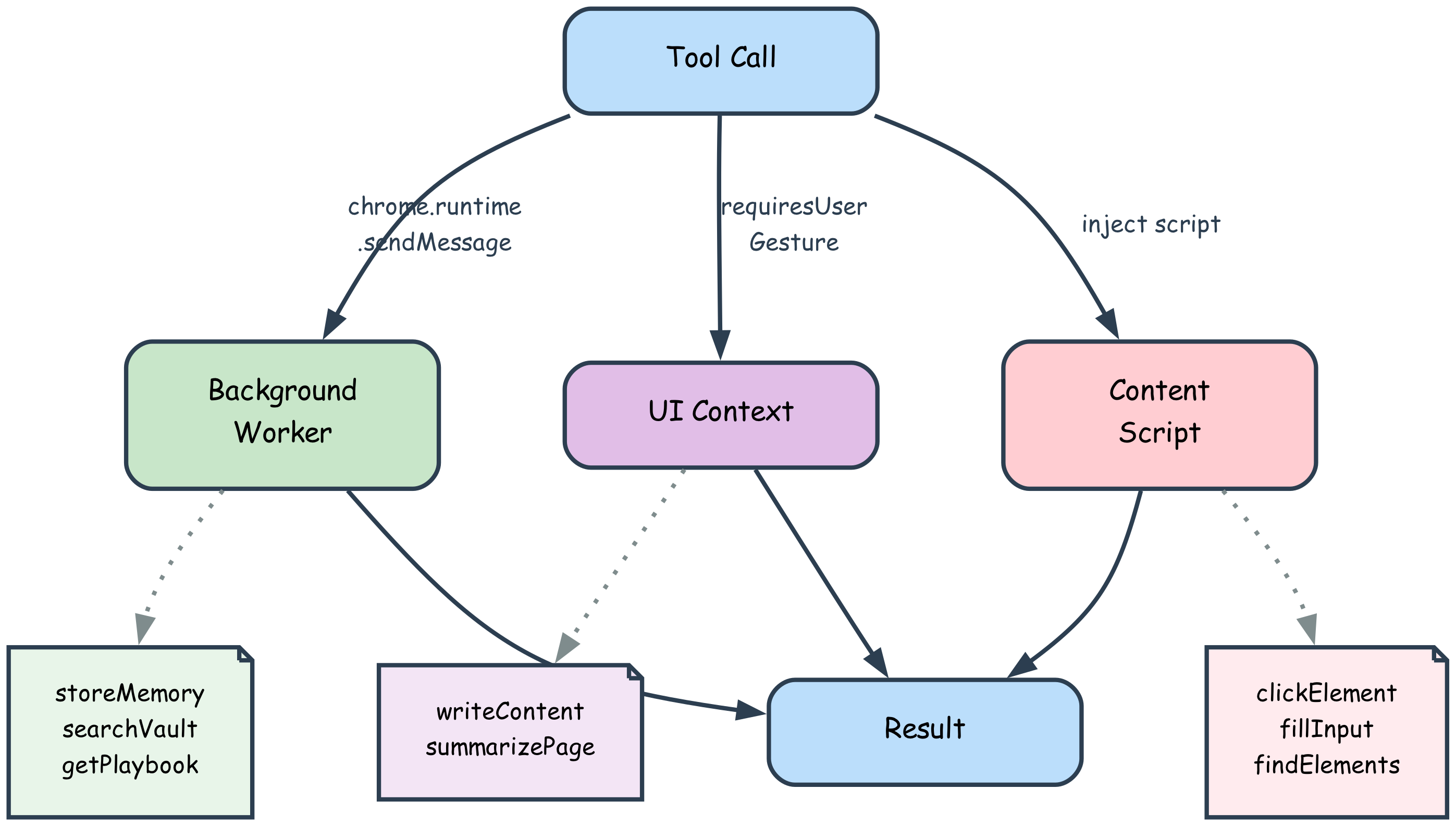
Screenshots and audio get converted to blobs and sent to Gemini Nano alongside text. Tools execute in different contexts (background worker, UI context, content script) with automatic routing.
Tech Stack:
- Chrome Prompt API (Gemini Nano), Summarization API, Writer API, Translation APIs
- Plasmo, TypeScript, React, Tailwind
- Transformers.js (all-MiniLM-L6-v2), pdfjs-dist
- IndexedDB, Web Speech API, Readability.js
6. Interactive Analysis System
We integrated Chrome’s Prompt, Rewriter, and Writer APIs directly into content scripts, using event listeners for text selection and keyboard triggers (/write).
Each overlay action generates a local AI call with structured sharedContext including:
Active domain and page metadata (LinkedIn, GitHub, Gmail, etc.)
Current user preferences (stored in local vault)
Selection text or media blob
This architecture creates a self-contained analysis layer—instant, multimodal, and privacy-preserving—with no server dependency.
Challenges we ran into
1. Small Model Hallucinations
Gemini Nano occasionally invents plausible-sounding but fake data—phone numbers like "+15551234567". We solved this with explicit warnings in prompts, playbook guidance, and pattern detection that warns the agent when it fills fake data.
2. Tool Call Format Drift
The model would forget the <function_call> format after long tool chains. We built aggressive parsing with auto-fixes and corrective error messages. The model self-corrects 90% of the time after one warning.
3. Infinite Loops
Small models get stuck calling the same tool repeatedly. We detect two patterns:
- Identical tool 3x consecutively
- Cyclic sequences (A → B → C → A → B → C)
When detected, we inject: "LOOP DETECTED: Stop and describe what you learned." The agent breaks the loop.
4. Context Window Overflow
At 9,216 tokens, context fills quickly. We engineered a specialized summarization prompt that preserves field indices, user data, and task state—then prepends "IMMEDIATELY continue from where you left off" to keep the agent aligned.
5. PDF Parsing in Browser Extensions
pdfjs-dist expects to load workers from a CDN, but extensions have strict Content Security Policies. We bundled the PDF worker with assets, used chrome.runtime.getURL(), disabled eval/worker fetch, and handled spatial text extraction carefully. The result: fully offline PDF parsing via WebAssembly.
Accomplishments that we're proud of
🏆 True Agentic Behavior on a Tiny Model
We got a 3B-parameter model to reliably execute 10-15 step workflows through corrective feedback and playbook alignment. The loopback system works—the agent thinks between tool calls and adapts to failures.
🔒 Zero-Compromise Privacy
Absolutely everything runs offline: inference, embeddings, storage. No API keys, no telemetry, no "just this one call to our server." Users can unplug their network cable and Marionette still works perfectly.
🧠 Unified Document + Web RAG
Most RAG systems are either web-based OR document-based. We built both into a single semantic vault. Drag a PDF resume, visit job pages, then ask "fill this form with my work experience"—the agent seamlessly searches across uploaded documents AND captured webpages. The chunking strategy (500 chars with 100-char overlap) ensures nothing gets lost at boundaries.
⚡ Context Optimization That Actually Works
The playbook system saved ~1,550 tokens (17% of the entire context window)—the difference between a 10-message conversation and a 30-message one.
🎭 Multimodal Fusion
The agent can see (screenshots), hear (audio capture), listen (voice commands), and read (text + documents). It's not just accepting different input types—it's understanding them together.
⚡ Instant, Context-Aware AI Overlay
First-of-its-kind use of Chrome’s on-device AI APIs for real-time text, image, and audio understanding directly inside web pages—no uploads, no latency, full privacy.
What we learned
Small models are underrated—if you align them correctly. Gemini Nano isn't GPT-4, but with the right scaffolding (playbooks, corrective feedback, structured workflows), it's shockingly capable. Model size matters less than how you prompt it and handle its outputs.
Embeddings are a superpower for constrained contexts. Semantic search with Transformers.js gave the agent access to unlimited history without exploding the context window. Extending this to local documents via PDF parsing created a unified knowledge base that feels magical—users forget they uploaded a document weeks ago, then the agent correctly fills a form field with information from that document.
Error messages are alignment tools. When the agent uses the wrong format or loops infinitely, we don't just fail—we teach. The error message is a corrective signal that guides the model back on track. Most errors self-correct within one iteration.
Privacy and performance are inversely correlated—but users will trade latency for privacy. On-device inference takes 1-3 seconds (vs. <1s for cloud APIs). But when users realize nothing leaves their machine, they're willing to wait. Privacy is a feature, not just a constraint.
We learned that user experience is just as much about latency as intelligence—sub-second on-device inference feels transformative. The overlay tools made AI feel native to the browser, not bolted on.
What's next for Marionette – The On-Device Multimodal AI Agent
Near-Term:
- 🎙️ Fix wake word detection ("Hey Marionette") - Porcupine is integrated but non-functional due to browser audio constraints
- 🗄️ Vault enhancements: export/import, better search UI with filters (web vs documents), re-ranking algorithms
- 📄 More document types: DOCX, Excel, OCR for scanned PDFs, table extraction
Long-Term:
- 🧬 Preference learning: If Chrome adds on-device fine-tuning, use stored ratings to bias the model toward user-preferred behaviors
- 🤝 Multi-agent coordination: Run multiple Nano instances in parallel (one researches, one drafts, one fact-checks)
- 🧠 Advanced memory: Vector clustering and topic modeling to organize the vault by themes
- 🔧 Tool composition: Let the agent combine simple tools into reusable macros
Research Questions:
- Can we train lightweight adapter layers on top of Nano using rating data?
- Can hybrid search (semantic + keyword BM25) improve retrieval accuracy?
- What's the optimal chunk size and overlap for different document types?
Marionette proves that powerful AI agents don't need cloud infrastructure. With the right architecture, even a 3B-parameter model can feel like a personal assistant. We're excited to see how far we can push on-device intelligence.
Install Extension: https://chromewebstore.google.com/detail/lleffmjgcoebjmdnphcfmmeafljckife
Built With
- chrome
- plasmo
- prompt-api
- react
- summarizer-api
- translation-api
- typescript
- writer-api


Log in or sign up for Devpost to join the conversation.