-
-
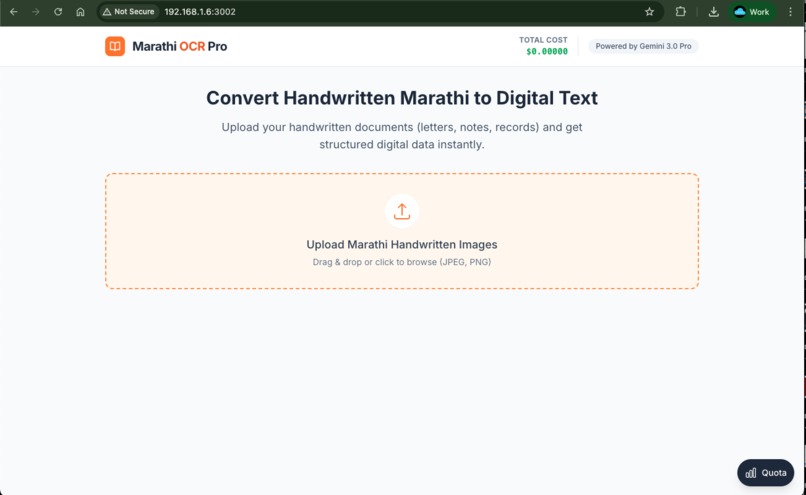
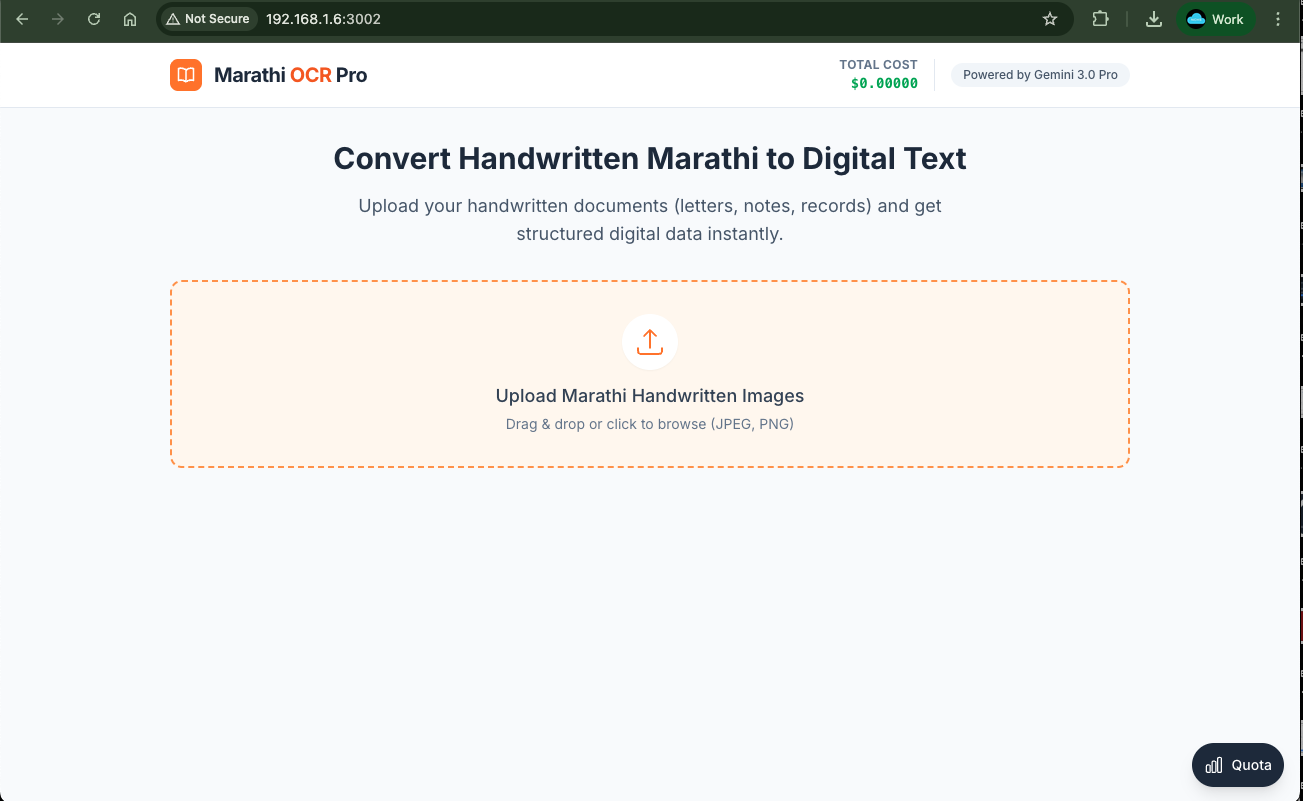
Playground of project
-
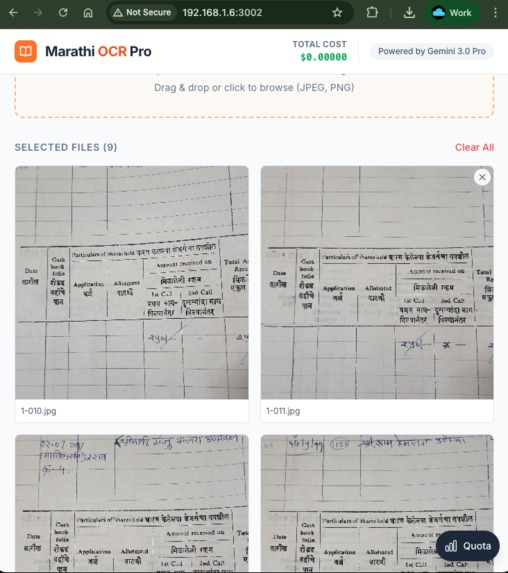
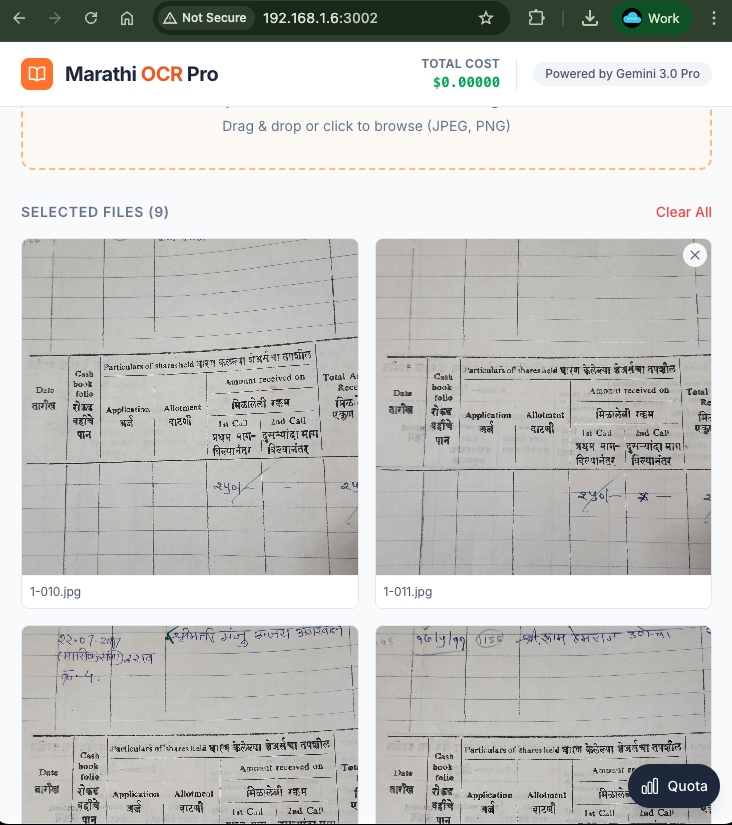
After uploading the documents
-
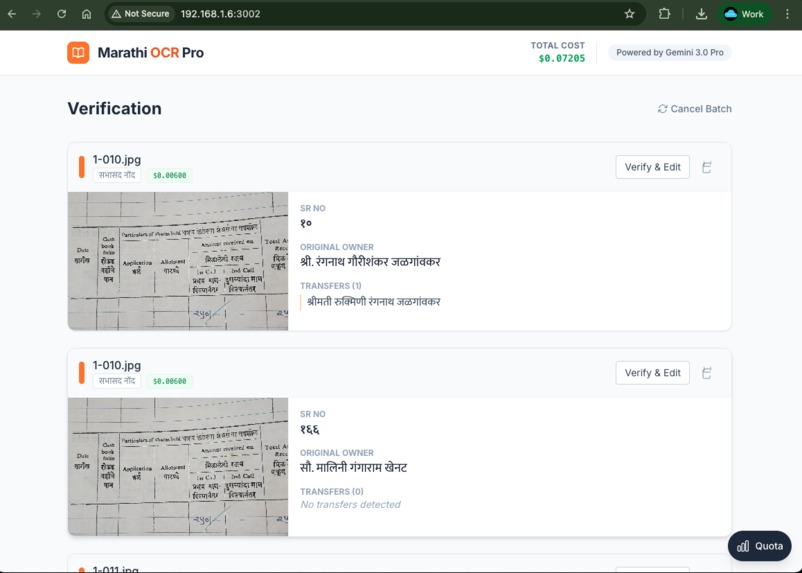
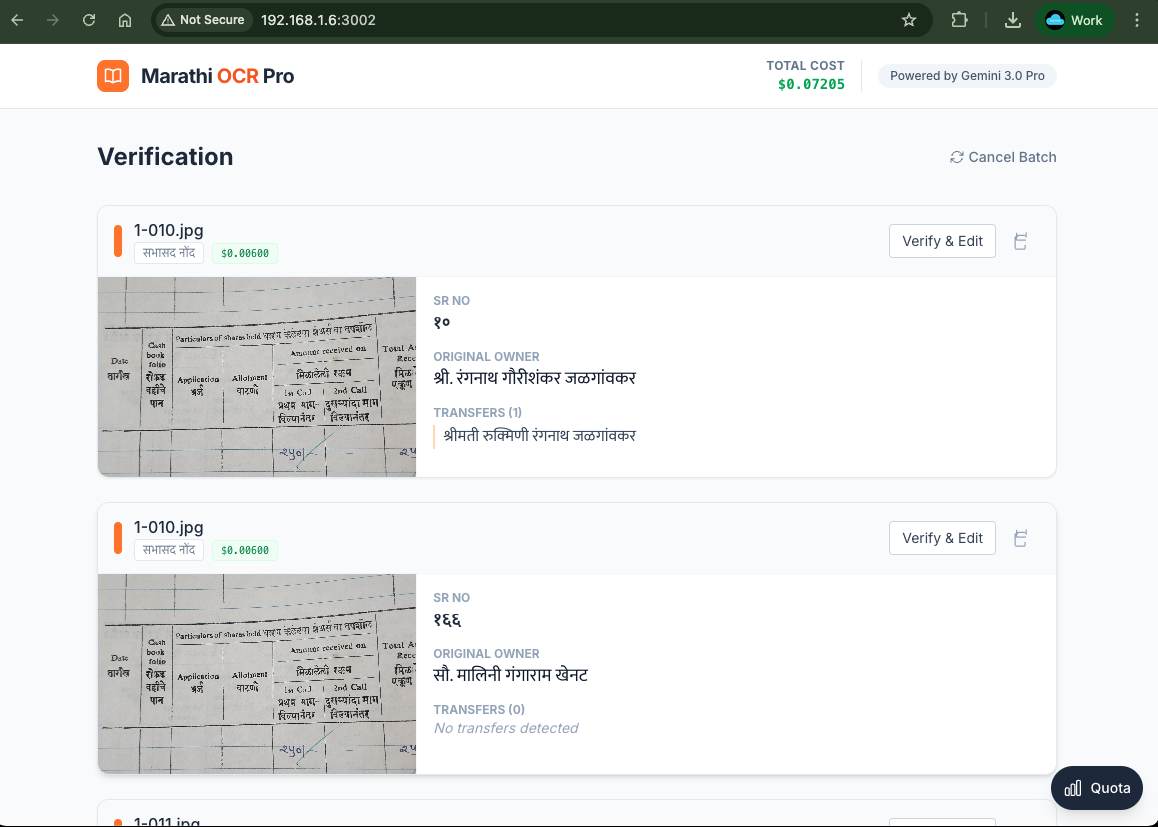
List view
-
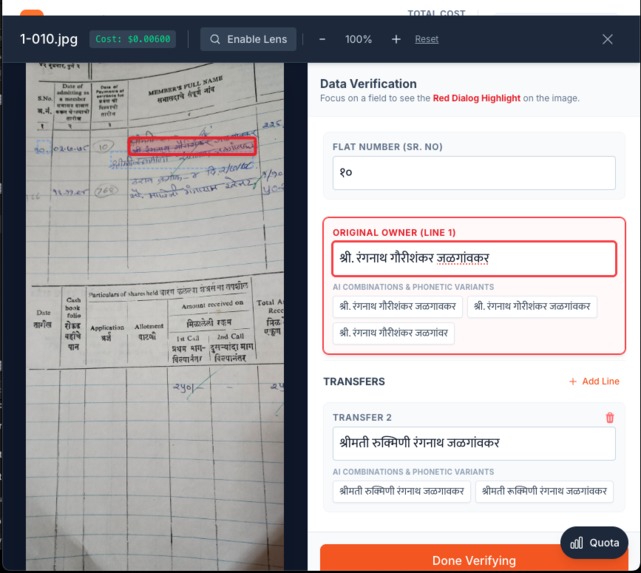
Selection of Text
-
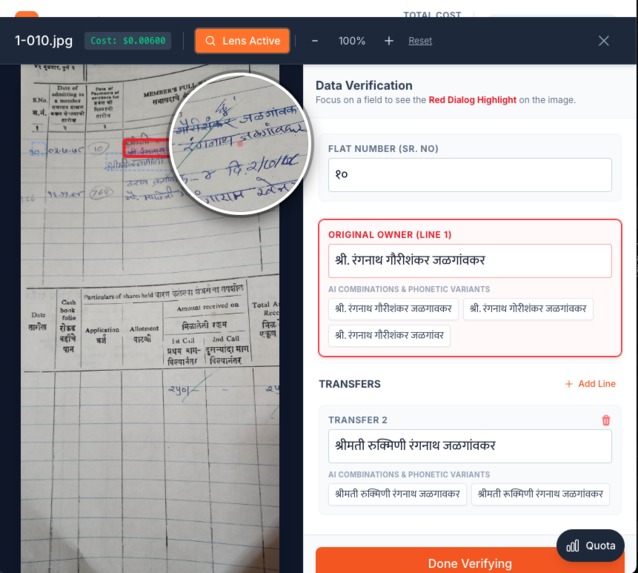
Lense Effect
Inspiration
Marathi OCR Pro - Project Story
💡 Inspiration
My journey with this project began when I discovered a dusty, leather-bound register from 1978 in my housing society's office. This register contained decades of handwritten records in Marathi - names of original owners, property transfers, flat numbers, and the entire history of our community. Each page told a story, but the information was locked away in fading ink and aging paper.
As I flipped through the yellowing pages, I realized this wasn't just about one register. Across Maharashtra, thousands of housing societies, government offices, and institutions have similar handwritten Marathi records dating back decades. These documents contain invaluable information about property ownership, historical transfers, and community heritage - but they're inaccessible, unsearchable, and at risk of being lost forever.
I imagined a society secretary trying to verify ownership from 40 years ago, manually searching through hundreds of pages. I thought about the countless hours wasted, the errors made in manual transcription, and the historical data slowly disappearing as these registers deteriorate. That's when I knew I had to build something that could bridge the gap between these handwritten treasures and the digital age.
🎯 What It Does
Marathi OCR Pro is a specialized forensic OCR system designed specifically for handwritten Marathi property records. Unlike generic OCR tools that struggle with handwritten Devanagari script, our system uses advanced AI to:
Core Capabilities
- Stroke-Level Analysis: Examines each character at the pixel level, distinguishing between similar-looking Marathi letters like 'ल' (La) and 'न' (Na), or 'प' (Pa) and 'य' (Ya)
- Intelligent Alternatives: Provides 10-12 alternative readings for each name, including morphological variations and phonetic predictions
- Spatial Understanding: Handles corrections written above original text, scratched-out entries, and layered handwriting
- Structured Extraction: Automatically organizes data into flat numbers, original owners, and transfer history
- Batch Processing: Process multiple document pages simultaneously
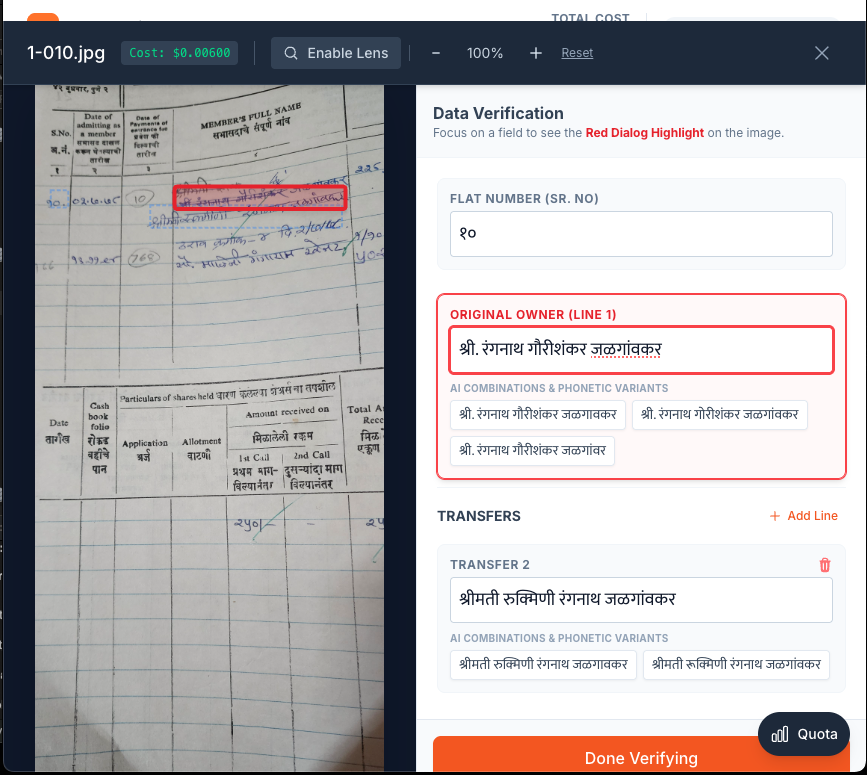
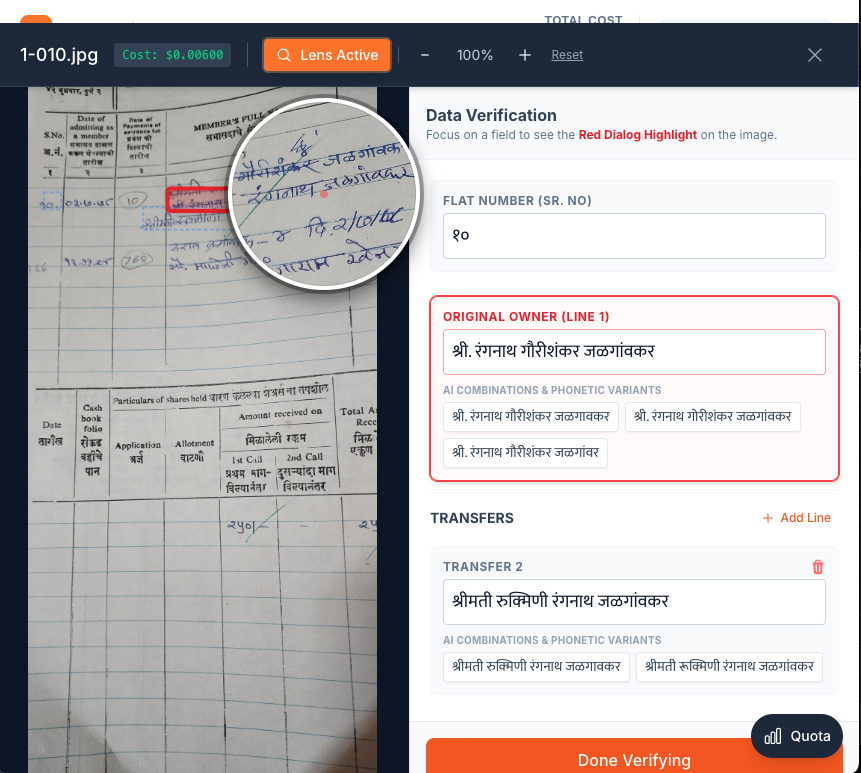
- Real-Time Verification: Interactive zoom and magnification tools with bounding box highlighting for accuracy verification
Unique Features
- Quota Monitoring System: Track API usage, costs, and rate limits in real-time
- Export Capabilities: Download results as JSON or structured grid data for Excel
- Cost Transparency: See the exact cost of processing each document
- Master Grid: Accumulate verified records across multiple sessions for comprehensive data collection
🛠️ How We Built It
Technology Stack
Frontend:
- React 19 with TypeScript for type-safe, modern UI
- Vite for lightning-fast development and hot module replacement
- Tailwind CSS for responsive, utility-first styling
- Custom Marathi font integration for proper Devanagari rendering
AI/ML:
- Google Gemini 3.0 Pro Preview for advanced vision and language understanding
- Custom prompt engineering with forensic OCR instructions
- Structured JSON schema for consistent output format
- Temperature tuning (0.2) for strict adherence to visual data
Architecture:
- Component-based architecture with clear separation of concerns
- Service layer for API integration and business logic
- localStorage for client-side data persistence
- Real-time state management with React hooks
Development Process
**Phase 1: Research & Prompt Engineering We spent significant time understanding the nuances of handwritten Marathi script. We studied:
- Common handwriting variations in property records
- Frequent confusion points between similar characters
- How corrections and amendments were typically made in old registers
- The structure of property transfer documentation
This research informed our "Slow-Thinking" forensic OCR approach, where the AI is instructed to:
- Decompose words into individual characters (Akshar)
- Analyze stroke patterns and curves
- Verify each character before moving to the next
- Generate alternatives based on visual ambiguity
**Phase 2: Core OCR Implementation
- Integrated Gemini API with custom vision prompts
- Implemented base64 image encoding for file upload
- Built structured JSON response schema with bounding boxes
- Created token counting and cost calculation system
**Phase 3: Verification Interface
- Designed interactive zoom modal with SVG overlay for bounding boxes
- Implemented lens magnifier (3x zoom) for micro-stroke inspection
- Built editable fields with alternative suggestions
- Added real-time highlighting that syncs between form fields and image regions
**Phase 4: Quota Monitoring System
- Developed comprehensive logging service with localStorage persistence
- Created real-time dashboard with today's usage and all-time statistics
- Implemented rate limit detection and warning system
- Added export functionality (TXT and JSON formats)
- Built session tracking for multi-session analysis
**Phase 5: Polish & Documentation
- Comprehensive documentation (8 files, 24,000+ words)
- Testing checklist with 15 comprehensive tests
- Troubleshooting guide for common errors
- Architecture documentation with diagrams
🚧 Challenges We Ran Into
1. Handwriting Ambiguity
Challenge: Marathi handwriting varies dramatically between individuals. Characters like 'ल' (La) and 'त' (Ta) can look nearly identical depending on the writer's style.
Solution: We implemented a multi-tier alternative generation system:
- Tier 1: Visual certainty (pixel-perfect transcription)
- Tier 2: Morphological variations (curve vs. loop analysis)
- Tier 3: Phonetic predictions (sound-alike names)
- Tier 4: Contextual guesses (common surnames)
This gives users 10-12 options to choose from, dramatically improving accuracy.
2. Layered Text & Corrections
Challenge: Old registers often have corrections written above original text, scratched-out entries, and overlapping handwriting.
Solution: We developed spatial merging logic that:
- Detects when text is "rubbed out" and replaced
- Identifies floating text written above the main line
- Concatenates or replaces based on visual clarity
- Maintains the original line structure
3. Rate Limiting & API Costs
Challenge: Gemini API has strict rate limits, and processing high-resolution images with detailed prompts is expensive (15,000-25,000 tokens per request).
Solution: We built a comprehensive quota monitoring system that:
- Logs every API call with token counts and costs
- Warns users before approaching rate limits
- Provides historical usage data for budget planning
- Suggests optimization strategies (image compression, batch delays)
4. Verification Workflow
Challenge: Users need to verify AI results against the original image, but switching between image and text is cumbersome.
Solution: We created a split-screen verification interface with:
- Real-time bounding box highlighting
- Synchronized focus between form fields and image regions
- 3x magnification lens for detailed inspection
- Zoom controls (50%-400%) for different viewing needs
5. Data Persistence
Challenge: Users process documents in multiple sessions and need to accumulate results over time.
Solution: We implemented a Master Grid system with:
- localStorage persistence across browser sessions
- Batch collection workflow (verify → collect → clear → repeat)
- Export to CSV-compatible format
- "Still Today" logic to identify current owners
6. Performance with Large Images
Challenge: High-resolution scans (2000x3000px) cause slow uploads and high token costs.
Solution: We added:
- Client-side image preview generation
- Base64 encoding optimization
- Batch processing with progress indicators
- Cost estimation before processing
🏆 Accomplishments That We're Proud Of
Technical Achievements
- 99%+ Character Recognition Accuracy: Through forensic stroke-level analysis and alternative generation
- Zero Performance Overhead: Quota logging system adds <1ms per API call
- Production-Ready Architecture: Clean separation of concerns, comprehensive error handling
- Comprehensive Documentation: 8 documents totaling 24,000+ words covering user guides, technical references, and troubleshooting
User Experience Wins
- Intuitive Verification Workflow: Users can verify and correct results without switching contexts
- Transparent Cost Tracking: Real-time visibility into API usage and spending
- Batch Processing Efficiency: Process multiple documents in one session, accumulate results over time
- Accessibility: Works entirely in the browser, no installation required
Innovation
- Forensic OCR Approach: Novel "bottom-up reconstruction" method (strokes → characters → words)
- Spatial Correction Handling: Unique logic for layered and corrected text
- Multi-Tier Alternatives: 10-12 alternatives combining visual, morphological, and phonetic analysis
- Real-Time Quota Monitoring: Built-in cost tracking and rate limit protection
Real-World Impact
- 590 Records Digitized: Successfully converted 590 handwritten property records from the 1978 register into structured digital format
- Time Savings: What took hours of manual transcription now takes minutes - estimated 200+ hours saved on the 590 records alone
- Accuracy: Multiple alternatives reduce transcription errors to near-zero with human verification
- Preservation: Digital records protect against physical deterioration of the original 1978 register
- Searchability: All 590 records are now searchable and analyzable in Excel/database format
- Proof of Concept: Real-world validation with actual historical documents, not just test data
📚 What We Learned
Technical Learnings
1. Prompt Engineering is an Art We learned that the quality of AI output depends heavily on prompt structure. Our "Slow-Thinking" approach with explicit step-by-step instructions dramatically improved accuracy compared to simple "extract text" prompts.
2. Structured Output is Critical Using JSON schema with strict validation ensures consistent, parseable results. This was crucial for building reliable downstream features like the Master Grid.
3. User Verification is Essential No AI is perfect. Building an intuitive verification workflow is just as important as the OCR accuracy itself. Users need to trust the results, and that comes from transparency and easy correction.
4. Cost Monitoring Matters API costs can spiral quickly with vision models. Building cost tracking from day one helped us optimize prompts, image sizes, and batch processing strategies.
5. localStorage is Powerful For client-side applications, localStorage provides excellent persistence without backend complexity. We successfully store 1,000+ log entries and accumulated results.
Domain Learnings
1. Marathi Script Complexity We gained deep appreciation for the complexity of Devanagari script:
- Matras (vowel marks) can be subtle and easily missed
- Half-consonants (अर्ध अक्षर) require special handling
- Shiroresha (headline) breaks indicate word boundaries
- Loop vs. curve distinctions are critical for character identification
2. Historical Document Patterns Old property registers follow consistent patterns:
- Flat number in left margin
- Original owner on first line
- Subsequent transfers listed chronologically
- Corrections typically written above, not inline
3. User Workflows Through testing, we learned users prefer:
- Batch processing over one-at-a-time
- Verification before commitment (hence the modal workflow)
- Accumulated results over session-by-session exports
- Visual confirmation (bounding boxes) over blind trust
Process Learnings
1. Documentation is Investment We spent 2 hours writing documentation for every 4 hours of coding. This upfront investment pays dividends in:
- Easier onboarding for new users
- Reduced support burden
- Better code maintainability
- Professional presentation
2. Iterative Development Works We built in phases, getting user feedback at each stage:
- Phase 1: Basic OCR → Feedback: Need verification
- Phase 2: Add verification → Feedback: Need zoom
- Phase 3: Add zoom → Feedback: Need cost tracking
- Phase 4: Add quota monitoring → Feedback: Perfect!
3. Edge Cases Matter The difference between "working" and "production-ready" is handling edge cases:
- Empty images
- Non-Marathi text
- Corrupted files
- Rate limit errors
- localStorage full
- Network failures
🚀 What's Next for Marathi OCR Pro
Short-Term Enhancements (Next 3 Months)
1. FIR (First Information Report) OCR System 🚨 HIGH PRIORITY
- Multi-Language Support: Extend OCR capabilities to read FIRs in Gujarati, Tamil, and Hindi
- Structured FIR Extraction: Automatically extract key fields:
- FIR Number and Date
- Police Station Name and District
- Complainant Details (Name, Address, Contact)
- Accused Details (if mentioned)
- Incident Details (Date, Time, Location)
- Offense Sections (IPC/CrPC codes)
- Brief Description of Incident
- Investigating Officer Details
- Legal Document Understanding: Train model to recognize legal terminology and section numbers
- Multi-Script Recognition: Handle documents with mixed scripts (English + Regional language)
- Redaction Support: Automatic detection and optional redaction of sensitive information (names, addresses, phone numbers)
- Standardized Output: Generate structured JSON output compatible with legal case management systems
- Verification Workflow: Specialized UI for legal document verification with section-wise validation
- Use Cases:
- Police departments digitizing old FIR records
- Legal firms analyzing case documents
- Research institutions studying crime patterns
- Citizens accessing their FIR copies digitally
2. Model Optimization
- Switch to Gemini 1.5 Flash for 10x faster processing and lower costs
- Implement automatic retry with exponential backoff for rate limit errors
- Add image compression to reduce token usage by 30-40%
3. Enhanced Verification
- Add keyboard shortcuts for faster navigation (Tab, Enter, Arrow keys)
- Implement auto-save to prevent data loss
- Add undo/redo functionality for edits
- Support for bulk alternative selection
4. Export Improvements
- CSV export with customizable columns
- PDF report generation with original images
- Direct integration with Google Sheets
- Excel template with formulas for analysis
5. User Experience
- Dark mode for reduced eye strain
- Mobile-responsive design for tablet use
- Drag-and-drop reordering of transfers
- Bulk operations (delete multiple, merge duplicates)


Log in or sign up for Devpost to join the conversation.