




Inspiration
Mappit was born from a simple idea: what if finding local happenings and connecting with people around you was as easy as opening a simple map?
- No clicking and scrolling around endless static pages, but a more dynamic game-like user experience.
- In a world that's increasingly digital, I wanted to build a tool that encourages real-world interaction and community building.
- The vision is to create a "living map," a platform where the digital world seamlessly points you to tangible experiences and discussions happening right in your neighborhood, inspired by the community-driven nature of platforms like Reddit, Discord, & Nextdoor.
- BUT most importantly, mappit is NOT to keep you online. It's for real-life, real-world discovery, like Google Maps, but for personal connection, passion, and purpose.
What it does
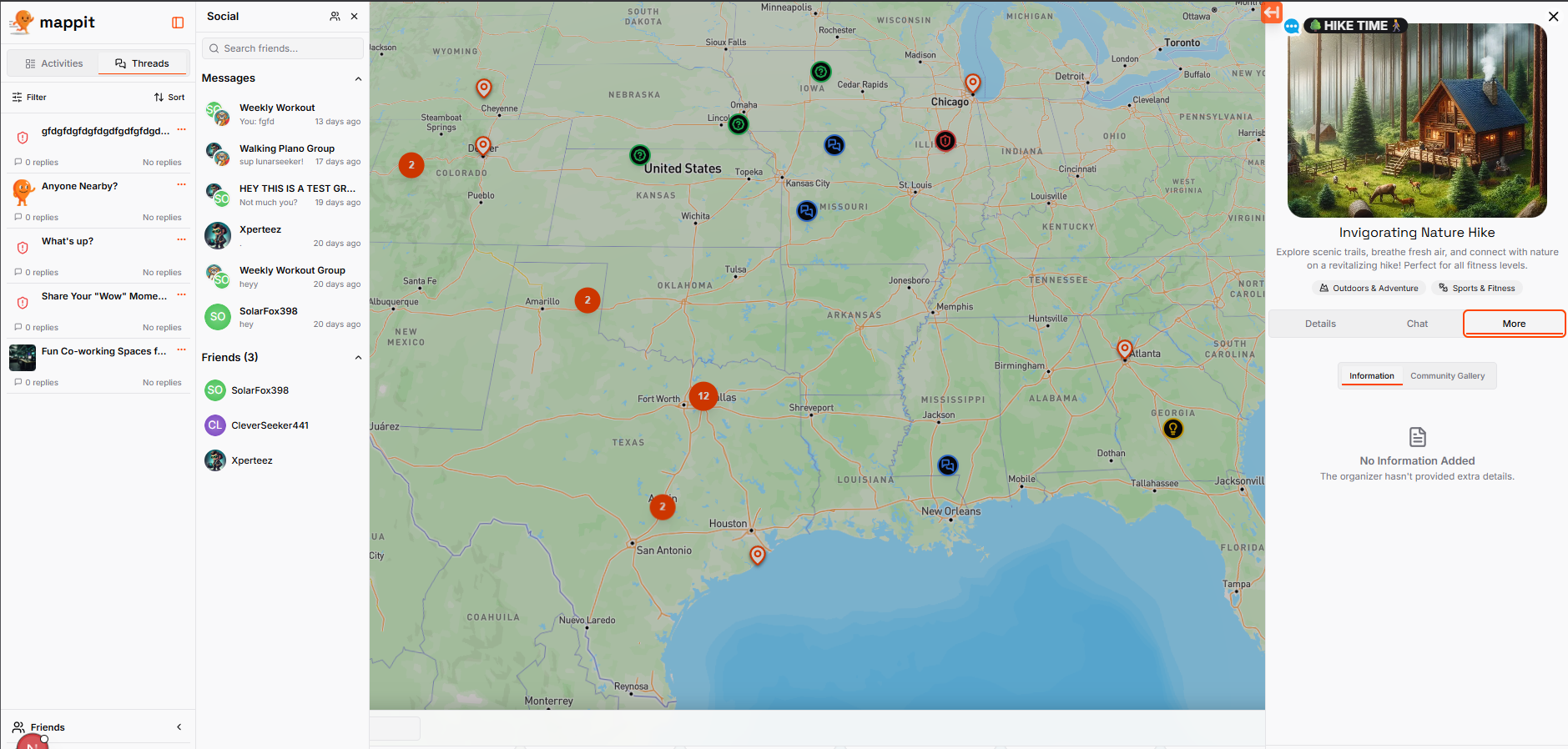
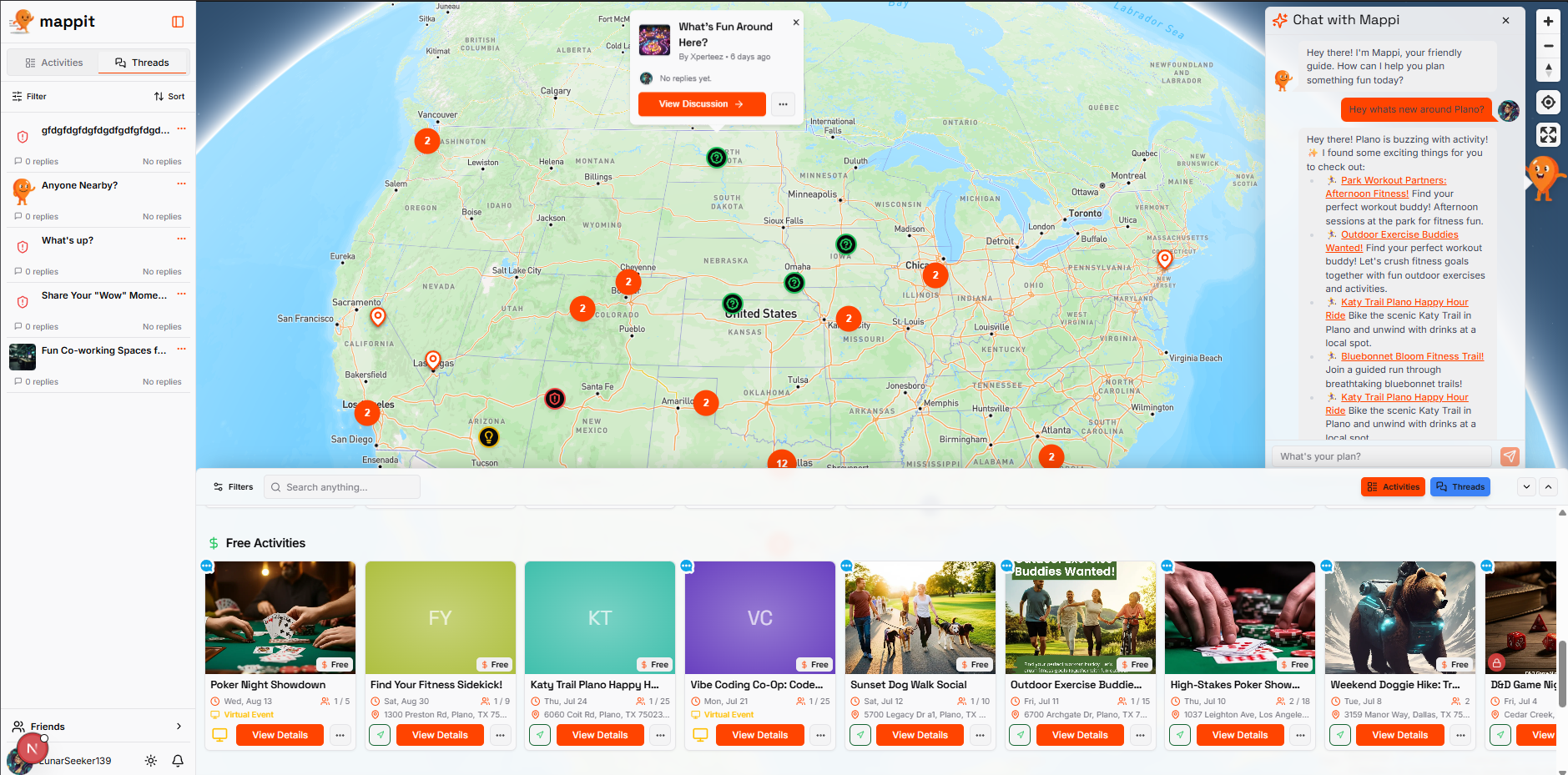
- First off, cloud functions fetch activity and thread counts for country & state levels, showing gorgeous hotspots with counts for wherever there is activity. This gives anyone browsing the website something to see.
- Anonymous registration gives the user access to seeing the map pins, the activities and thread data, but cannot participate.
Full registration gives full use...Users can create activities, meetups, events, drop threads (discussions, questions, ideas, warnings/caution) anywhere on a beautiful map, when zoomed out is a 3D globe with hotspots. Will soon be all 3D google maps tiles for close up.
My ideas stemmed from experiences and struggles, and how difficult it is to find others that I know are all around, or just to be able to communicate about specific areas! I grew up in the age of MySpace, I remember when Facebook just started, and I will tell you one thing, I never got into that style of social media very much. And I think a lot of people feel the same. I have had this dream of building something like this, that could use the web and an app to connect people in various ways together.
Think of it like subreddits from Reddit, but in a google maps & Discord-style UI, with a mix up Nextdoor & Meetup...The goal was to make a comfortable, but a bit different type of user experience, from the typical static, back-and-forth clicking, and dead-scrolling that has consumed so many of our lives. We will still have the doom-scrolling for those interested in scrolling through endless posts of threads or activities of course, if that's your thing, but now there is a dynamic and simple way to do both find something specific anywhere or search for it with any kind of filters. You cannot get lost in this app. Everything is at your fingertips. You don't have to search for anything. You will NEVER click the back or forward button in your browser using mappit. 😁
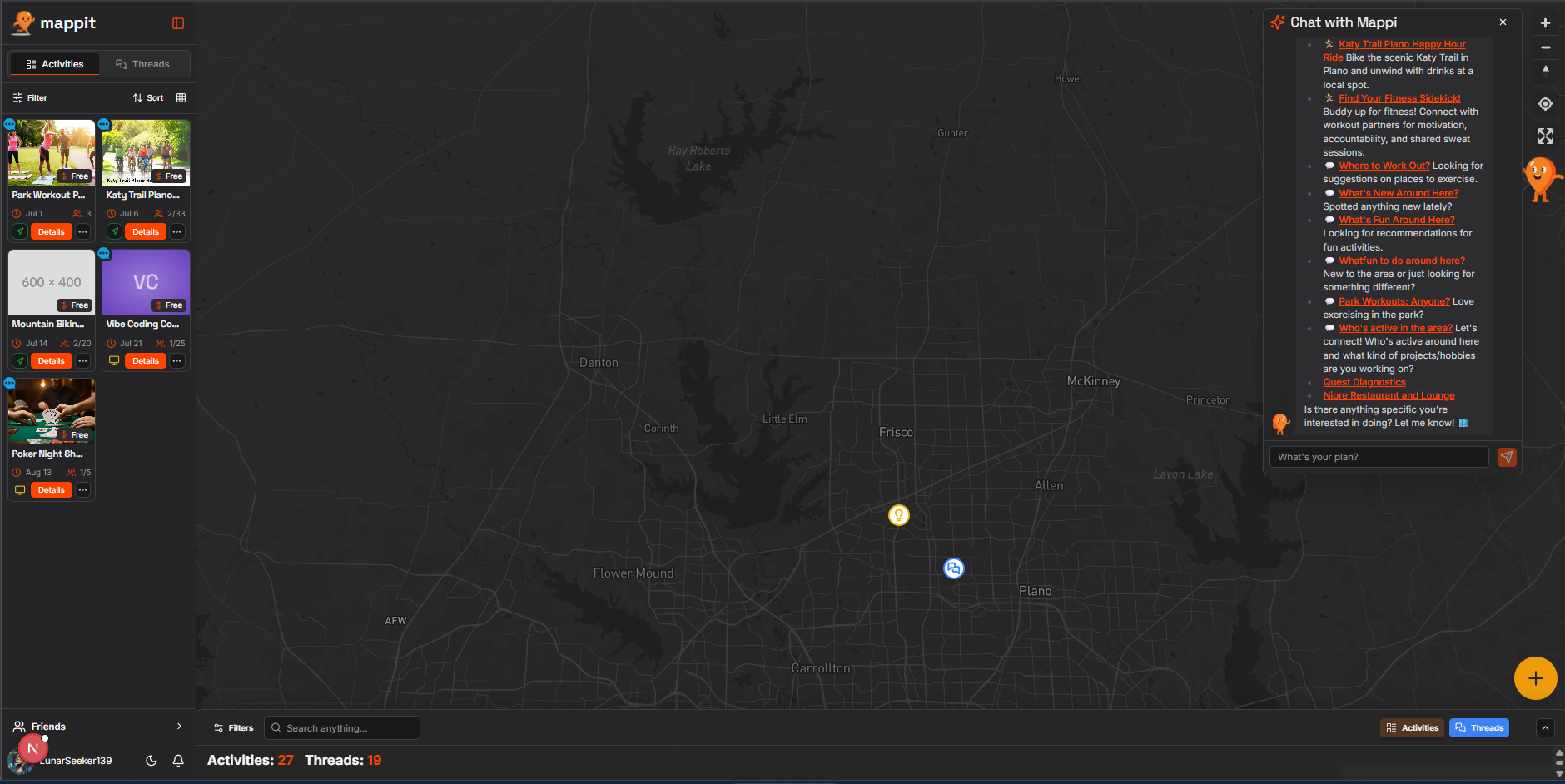
There is real-time chat for all activities, which are date-based, with cost, privacy features, participant control, admin controls, beautiful timeline gallery for chat, but also discussion-style, up/down voting-style post/reply chat like we are all used to for threads. So I included both, because each has it's place in the user experience.
I want people to use this to help find each other, connect through different activities, ideas, and do things together.
- Maybe you see something interesting someone posted nearby, message them, friend them, or join the chat...you might make a new friend who is close by just like that.
...OR maybe there is a Yoga or exercise group activity that you would like to come by and just check it out because you feel a little shy at first. Activities can be public or private... the goal is for more open, non-judgemental connection. Being there for another. Find purpose and passion, and sharing it.
WFH'ers, people new in the area, or moving to an area, are ALWAYS on Reddit, the same questions. Same with some of us who grow up, or our lives drastically change, and making new friends and relationships can be extremely difficult.
....That is why there is a way to add a custom Reddit widget, built using the Reddit development kit Devvit, to share any activity through a dynamic, fully interactive widget at the top of any subreddit, with the option to create a riddle with AI and have people in Reddit solve the riddle to get into the activity!
All activities and Threads have AI creation helper, to quickly fill our a nice title, description, categories/tags with just a few words, or even upload an image or other context (think snap a pic of a park, and create an activity to do something fun there in seconds), with AI image generation or upload for the cover images.
Activities are dated and have more options (cost, participant count, private link, etc) and have a real-time chat with message pinning for the organizer.
Threads have discussion style chat, with voting, etc.
Both have replying, uploading, emojis, etc.
Archiving for activities, deleting for both.
Real-time alerts, notifications, unread message counters, new messages from friends, online users green dot.
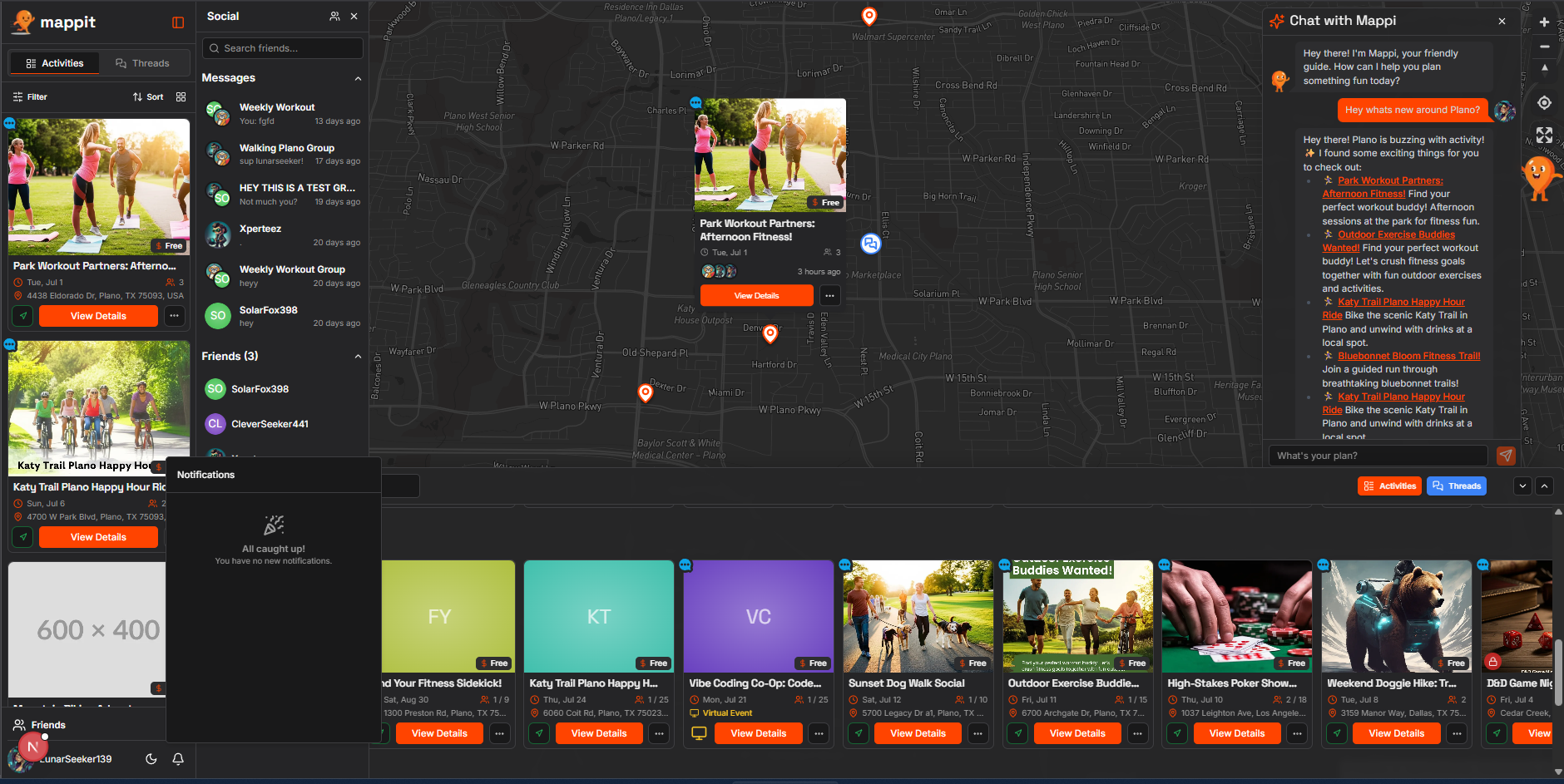
Clustering for the map markers, with beautiful marker popups and different markers for the different thread types and for activities (with custom markers coming soon).
Full functioning real-time friends list, a group chat feature, a side panel dashboard and friends list separately slide out seamlessly from the edge, the activity and thread details slide out from the opposite edge. In mobile they open as modal overlays.
Everything is centered around the map, a single page without having to click back and forth and getting lost between pages...I don't know why this isn't done more often!
Full profile page, with lists to see and edit your threads or activities. Settings and profile overview, username change and about section with an amazing markdown editor.
Usernames are asked at onboarding. That's it. No location data. Nothing. Usernames are randomly generated as a placeholder but the user can change it at the onboarding, for those looking to start using the app quickly without any headaches.
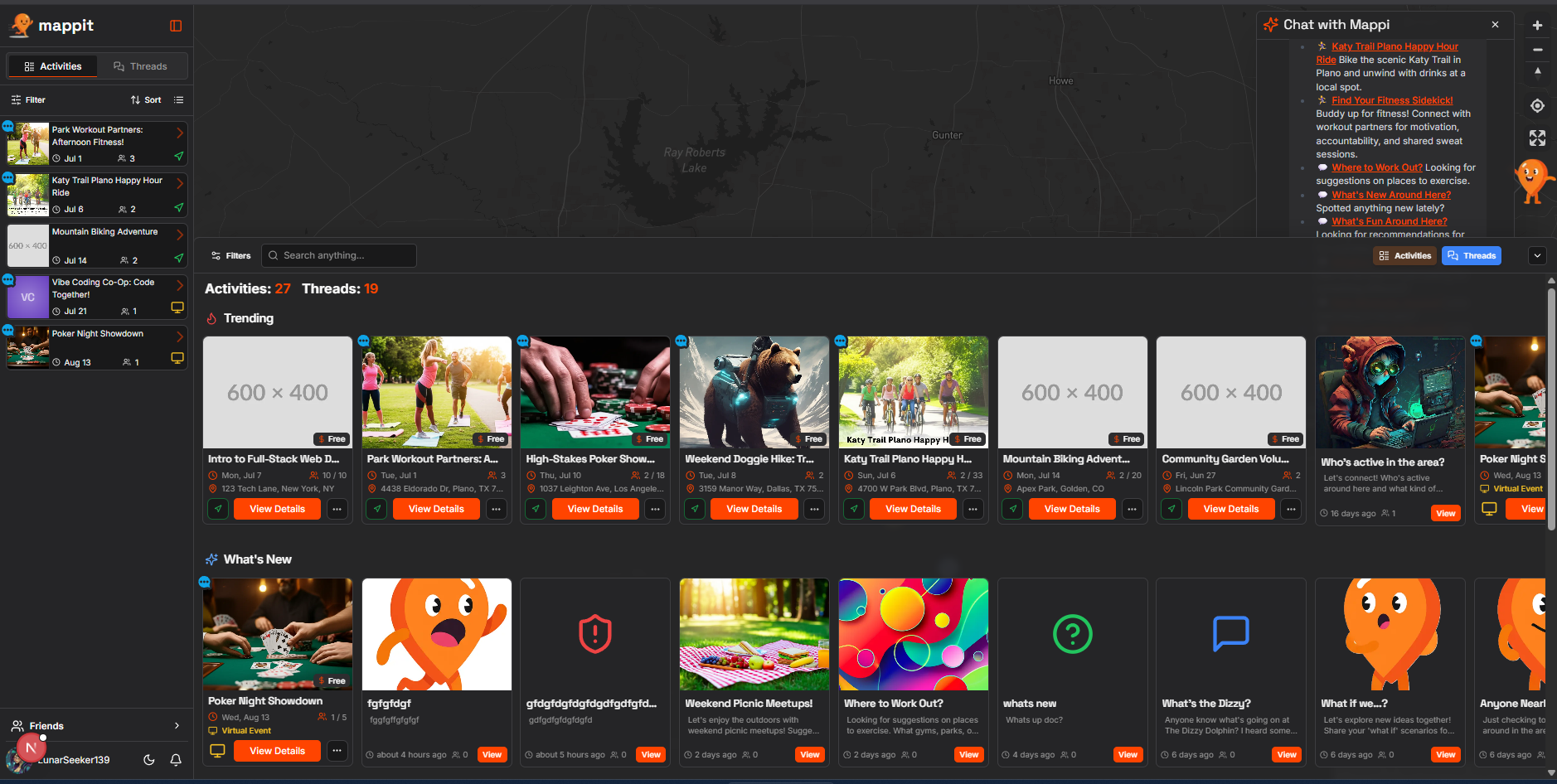
And a gorgeous drawer panel which slides open from the bottom in 3 different sizes, a small sliver, a little over the map to use them together, and larger to display the maps activities and threads in horizontally scrolling sections that scroll down, displaying New, Trending, Free, Virtual rows to quickly search the app. Also full search and filters at the top of the drawer which are always available to use even when collapsed.
And the best part, our AI Chatbot, Mappi. Mappi is mappit's mascot.
- Built to act as an agentic backend, Mappi is hooked up to all the data:
- Vector Embeddings
- Google Maps Places API
- Emotion & feelings understanding
And other genius tools, it can give you ideas about things going on, places to do something, random outings, help when you feel a certain kind of way, and oh so much more....to help connect in a fun and easy way.. it can even provide a real place to connect with an activity to plan things out anywhere!
- This will be the main future of the app, to later create real games and scavenger hunts for users to connect in the real world, and businesses can use to bring the users directly to their establishment!
How I built it
- Frontend: Next.js with React (App Router) & TypeScript
- UI Framework: Tailwind CSS with ShadCN for pre-built, accessible components.
- Mapping: Mapbox GL JS for the interactive map interface currently bc i couldnt get googlemaps to work but i am changing it to the maps 3D map soon. Google Maps static maps.
- Backend & Database: Firebase (Firestore, Firebase Auth, Cloud Storage) for a secure, real-time, and scalable backend infrastructure.
- Generative AI: Google's Gemini models via Genkit. This powered several key features:
- Mappi Chat Assistant: An agentic chatbot using function calling (searchPlacesTool, searchActivitiesAndThreadsTool) and intent detection to provide users with helpful, conversational search results.
- AI-Assisted Creation: Flows like suggestActivityDetails and generateActivityImage streamline the content creation process for users, reducing friction.
- Vector Search: Used text-embedding-004 to create embeddings for all user-generated content, enabling powerful semantic search for the Mappi assistant.
- Serverless Functions: Firebase Cloud Functions were used for backend data processing, such as automatically generating geohashes and embeddings for new items in the items collection.
Challenges I ran into
- The development process was a significant learning experience, marked by several key challenges that ultimately led to a more robust application.
- I used a lot of AI to build this in about a month. It was very difficult to learn to use AI as a professional employee that sometimes knows a little too much for its own good...I had to learn to really manage it. I have tried previously to start a project like this, but it was too much for one person without AI. Today, it is a different ballgame. But definitely hardest was getting to understand how to properly work with AI builders and when to stop and do things myself.
- There were issues with fetching data from firebase and firestore which i am still working on. Google's ecosystem is always a learning game.
- Learning about Google's serverless cloud functions, using them along side my main NextJS app, and environment/deployment setups was hard and took a few days.
- Issues with genkit and ai flows, and server-to-client and back forth, with permission errors.
- Splitting the server-side from client-side data fetching
- Geohashing viewport auto-update of markers, hotspots, splitting data fetching.
- Oh and state management, since this whole application is a MASSIVE state-managed one page app.
Accomplishments that I'm proud of
- I know this has taught me an immense amount.
- The amount of backend i learned, and how to work so much faster using AI, but when to hop in and do things myself.
- But even more so, that i was able to build out this huge application. And there is so much more to come.
What I learned
- I learned a lot about geohashing and building ai agents.
- A LOT about google, firebase, google's whole ecosystem and how INCREDIBLY difficult DevOps is!
- But again, the amount i learned far surpasses any stress I went through!
What's next for Mappit
- So much. First fixing it up for beta release. Hooking up Mappi to geohashes and map, having him zoom in and draw lines or circles.
- Adding Groups.
- Adding Verified Organizations and Businesses.
- New markers, Custom markers
- Premium tier, business tier - monetization
- Lost & Found, Pets & things.
- Tasks- local tasks to do or get done
- Scavenger hunts & Real-World games to bring people together in the real world
- Businesses will be able to use AI to create scavenger hunts & games, for example finding something specific in a store of products using riddles, and enter the code, receive a gift certificate... Bring users directly to their establishment!
- And so much more!


Log in or sign up for Devpost to join the conversation.