-
-
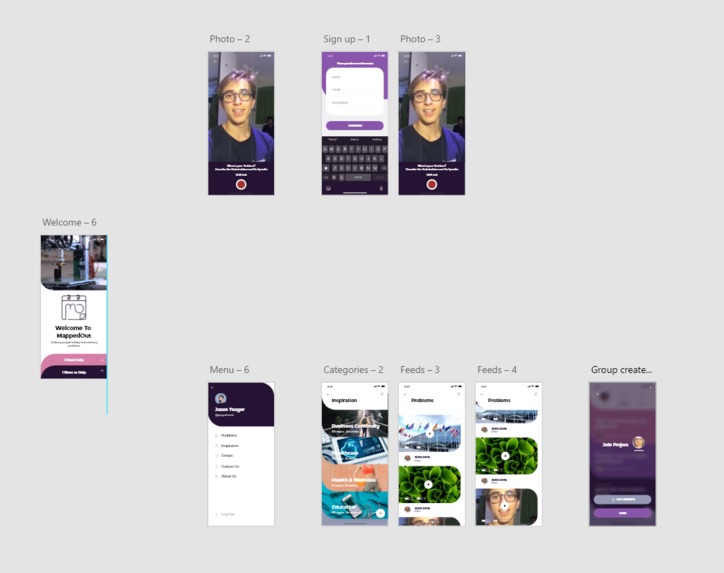
App layout
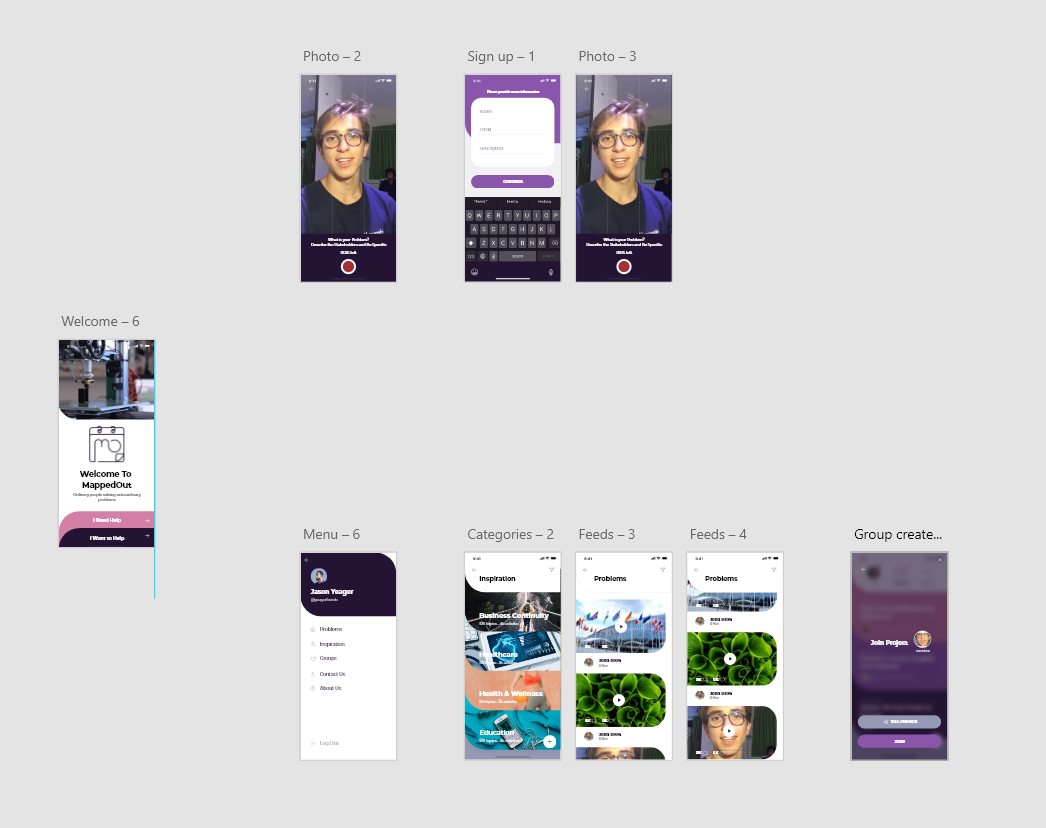
THE PRODUCT FEATURES & FUNCTIONING
MappedOut is an application service aimed at facilitating group coordination of active citizens wanting to solve societies problems. The service is split in two main approaches, people facing an issue (Problem-facers) and people wanting to solve issues (Problem-Solvers).
The idea behind MappedOut is to regroup all the issues submitted by Problem-facers on a social media feed. This feed is the tailored to the problem-solvers abilities, skills and interests. From there, users can create and join the teams collaborating in solving an issue raised by a problem-facer.
As groups form, MappedOut will provide tools and guidance to help the coordination of those emerging solutions and turn them into projects that can later be replicated by others or expanded to reach all the affected by the same issue.
Should projects be successful and turn out to be marketable solutions, MappedOut will help those problem-solvers in becoming entrepreneurs by suggesting teaching material and tools to protect the IP of their solution as well.
MappedOut aims to foster the entrepreneurial spirit and mutual aid in a community of collaborating users working for the greater good.
CVP
MappedOut accompanies people from various backgrounds united by a common problem from their idea to its realization. Its purpose is to make sure its not the lack of tools that slows down the process. The modern world may be facing its largest test to date but with MappedOut, creativity goes on.
USP
MappedOut regroups all the tools a problem-solver might need to accomplish his idea and make it a reality. No platform does that.
MappedOut provides an exclusive A-Z approach to project mentoring in a community based environment.
In times of acute crisis, MappedOut is the perfect tool so that citizens are not left behind with their unaddressed problems but instead push themselves forward through creative creation.
Problem side app:
- Tailored towards community leaders, healthcare providers and governments
- They release problems that they are facing where they fill out tags, and release a 15 second video (snap style)
- Is 15 seconds enough? Maybe give the option to link an "extended" (~5 min?) summary of the problem.
Solution Side app:
- Tailored towards young innovators
- They fill out a spotify styled tag system (skills/location etc)
- And then browse the problems catered to them (like tinder)
- They may sign up individually or as a team
Backend Processes
Background Information
Before we go into the explanation of the application, lets clear up some jargon.
Problem Sponsor:
Problem sponsors are users who have created a problem and are trying to create a team of individuals that can solve their problem. They can choose to work with the team or choose to allow the team to approach the problem any way they want to with minimal guidance.
Problem Team:
The problem team is comprised of individuals that work with varying guidance from their problem sponsor to solve the sponsor's problem. Everyone on the team has access to the team's resources (documents, images, etc...) on the application as well as the ability to chat with other teammates in the app. The team can expand or grow depending on what the problem sponsor requires at the given time. Teammates can communicate their own thoughts about the project to the problem sponsor in private in-app chat rooms.
Tags:
Tags are skill sets that our application uses to display problems to users with the pertinent skills. For example, if a user has the tag "AWS", when they look through our application to solve a problem, the first problems recommended will have to do with web hosting. These tags are also useful for problem sponsors to understand what skills a potential teammate can bring to the table. For example, if the problem sponsor wants to get a team together to solve a data science problem, they will be more likely to accept an individual who has the tag "Python" than someone who doesn't have any tags related to data science.
Application Architecture
There are two entry points into our application. The user can either create an account or sign in to a currently existing account.
User Creates an Account
If the user creates an account, then they have to provide their background information as well as pick the tags they want to associate their account with. These tags will be displayed as images with short descriptions which the user can tap on to add to their profile. The user can also create custom tags to add to their profile. Once the use has completed all of this, then we will store the information inside a relational database explained below.
User Signs in to an Existing Account
If the user signs in to an existing account, they have one of two options. They can either post a problem or join an existing team.
Post a Problem
If the user posts a problem, they must select the problem's associated tags after they supply the app with the problem's title, description, and other information that can be seen in the database diagram (link to database diagram). Once their problem is live, the user has become the problem's sponsor and they will begin receiving requests from other users trying to join their problem-solving team. The user can either accept or reject each of these requests. If the user accepts a potential teammate's request, that teammate will be given access to the team's resources and will be added to the team's information in the database. If the user rejects a potential teammate, then that potential teammate will not be added to the team and is free to look around the app for more problems to solve.
Join an Existing Team
If the user wants to join an existing team, the application will display problems based on the user's associated tags from when they first created their account (these can be edited later on). Once the user finds a problem they like, they can submit a request to the problem's sponsor. If user's request is approved they will be added to the team and will be able to access the team's resources and chat with the team in the app. If the user's request is denied, they will notified of their rejection by the problem sponsor and will be free to find other problems on the app to solve.
Database Management
The application is also connected to a relational database to store user, problem, tag, and team data. Through a relational database, data is stored in a format in which relationships between different items are recognized and redundancy or repetition of data is minimized.
User Account Information
The User_account table represents any user who signs into the application. A User should have a first name, last name, birthday, time zone, email, phone number, should list their LinkedIn profile, and optionally list their prior work experience and have a profile picture for their account. A user can post multiple problems and also join multiple teams. A user may also have multiple tags associated with them.
Team Information
The Team table represents a team of users who are assigned to solve a problem. A team should have a title, a description, the date which that team was formed is recorded and a team can optionally set a profile picture. A team has multiple User accounts associated with it and a team has one problem associated with it which is the problem that the team is meant to solve.
Problem Information
The Problem table represents a problem that a team is assigned to solve. A problem has a title, a description, a date which it was posted, and optionally a problem can have a deadline, sponsor, and a picture representing that problem. A problem can be posted by one user, a problem can have multiple teams trying to solve it, and a problem can have multiple tags associated with it.
Tag Information
The Tag table represents a skill set that a user may have or that a problem may require, an example of this could be 'Coding experience with python.' A tag must have a title, a description, and also a picture representing that tag.
How we will make it
The supplication will be programmed using the swift programming language on XCode, and the UI/UX will be designed using adobe XD. These tools will allow for the creation of an IOS application. The database will be constructed with SQL using MySQL workbench. The constructed database will then be migrated to AWS' Azure Cloud SQL database enmmviorment. Storing the database on AWS' cloud will allow for ease of maintenance, and also scalability, giving the applications' connection to the database low bandwidth and the required storage space.


Log in or sign up for Devpost to join the conversation.