-
-
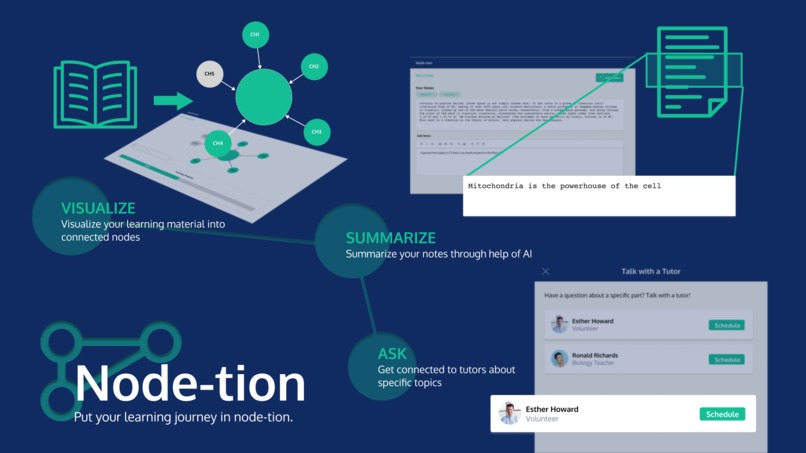
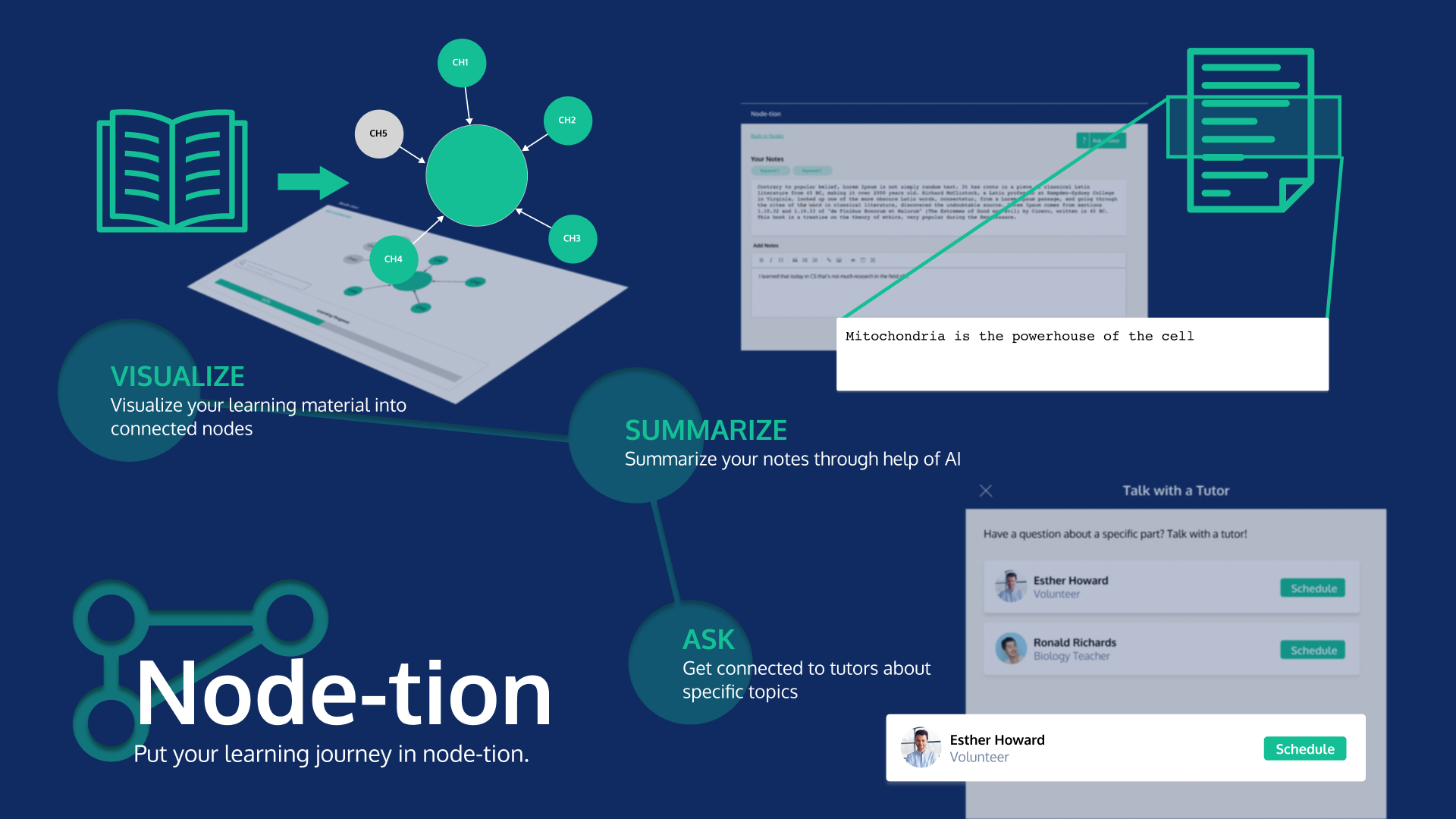
Node-tion and all its features is one page.
Inspiration
The COVID-19 pandemic triggered the accelerated rise of digital learning, and students are rapidly migrating to online platforms to facilitate their studies. Among these, note-taking apps like Notion and Evernote are becoming popular options to organize notes from class lessons or summaries from course textbooks. However, these apps don’t offer graph-like features that allow users to create concept maps or node graphs to connect ideas together. A mapping feature can help students visually map relevant contents and understand applications of lessons on a bigger scale. Therefore, our team realized that creating a note-taking app that enables content mapping through nodes can revolutionize the way we take digital notes, as well as the way students conduct online discussions and learning. Furthermore, since creating concept maps purely online could be tedious for users (since drawing them on paper is much easier), we thought that creating a customized template that they can begin with would be convenient. On this note, our app also includes an NLP-operated text extractor that structures the node map according to the document's headings and chapters, selects major keywords that define the text, and provides short summaries of the text.
What it does
For our app, we focused on summarizing a short section of a course textbook, which a lot of students tend to do when reviewing for exams. Our app begins with a dashboard that displays currently uploaded materials to choose from, as well as a feature to add new materials through a drag and drop bar. When a user adds new material, it is inputted through an NLP model that summarizes the text from the uploaded material and selects major keywords from it. From here, a node map is generated wherein the major keywords in the uploaded document are highlighted within the nodes. Users can then double click on any node to look at specific contents and create their own personal notes. They can also reach out to tutors who can help them on specialized topics, by redirecting them to a Zoom call.
How we built it
We designed wireframes of the website using Figma and implemented its front-end and UI using React.js. We implemented the automatic summarization technique in NLP using Python libraries to extract major keywords, create questions, and summarize uploaded materials. The model is created in Google Colab, and all relevant data were stored using Google Cloud Platform. We used Flask in Python to handle the backend development of the website.
Challenges we ran into
Our team is composed of four members from four different countries at the moment, so collaborating amidst time differences was our major hurdle to overcome. We also struggled with developing the right NLP model to use for our website. There were also slight problems with the deployment of the website, as well as the UI of the node map.
Accomplishments that we're proud of
We are totally proud of creating a fully functional website that has the potential to redefine the way students study and learn in the online education era. What made this sweeter was the fact that all four of us have met for the first time in this hackathon, and we are all attending from different time zones. Being able to pull off a complete project given our circumstances is in itself an amazing feat to achieve.
What we learned
While planning our website, we had so many ideas we wanted to include, since we are really dedicated to the prospect of our app. However, we were confronted with the reality that a lot of those ideas are impossible (or at least extremely laborious) to implement with existing AI or NLP models. We realized that if we truly want to bring this app forward and develop it further, we have to explore more on innovating the models for text extraction, as well as refine the features we want our app to have. If we were to win the Education Hack, in particular, we will all devote ourselves to improving the app with the scalability ideas we have in mind.
What's next for Mapify
Our app so far is a note-taking app that highlights the use of node maps to map out relevant ideas. However, we realized that another difficulty of students in online learning is the lack of opportunities to effectively discuss in groups. With our app’s main node map feature, visualizing lessons through mapping is made easier, and could facilitate group discussions well. Therefore, we can scale our app to improve its features in the note-taking aspect, as well as include new features in the social aspect that will host collaboration, effective crowdsourcing of notes, and hopefully democratization of structured knowledge. We envision that our app could help students be more productive in learning, as well as in reaching out for help through fellow users or experienced tutors on our website.
The specific ways we can scale this app are listed down below.
Notes-Taking Aspect
- Create a full-fledged note-taking app with all the common features (buttons, toggles, pages) that integrate our current app’s main feature, the node map.
- Allow users to import and export notes or node maps. The Anki app is a flashcard app that allows users to import or export flashcards, which reduces the need to create cards from scratch. Since some users may find this feature helpful for crowdsourcing notes and knowledge (or collaboration), it is a great feature to include.
- Improve the micro features of our current app: allow editing or deleting notes, improve the UI features of the node map to make it perhaps three-dimensional and easy to navigate, allow adding new node maps that don’t arise from uploaded materials.
- Develop a more advanced model that efficiently extracts relevant information from all sorts of documents, regardless of size.
Social Aspect
- Implement a built-in communications feature such as a video or audio call. A built-in feature to enable live collaboration could help students be academically productive. We can then use AssemblyAI for speech-to-text extraction, which we can then input in our model to integrate its contents into a node map.
- Make the app compatible for use in common meeting platforms like Zoom. Since Zoom recently launched its own Apps where built-in tools can be used during meetings, we can improve our app so that it can be launched on such popular platforms.
- Include an algorithm that connects users to helpful tutors depending on the lessons they are studying. This can be used to improve the tutors feature.


Log in or sign up for Devpost to join the conversation.