-
-
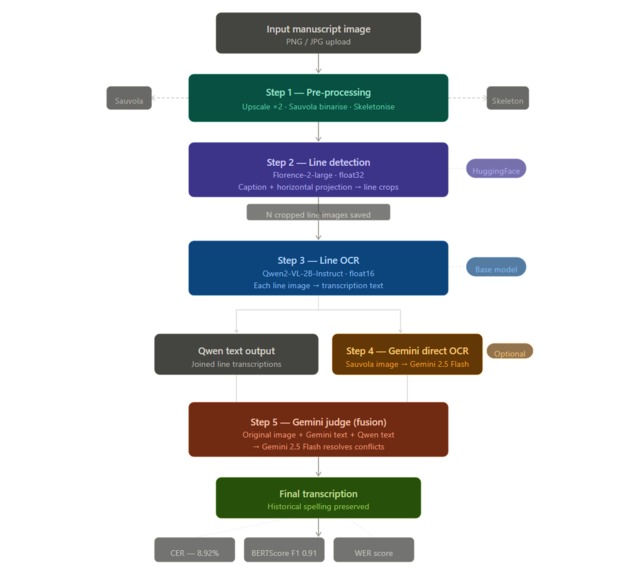
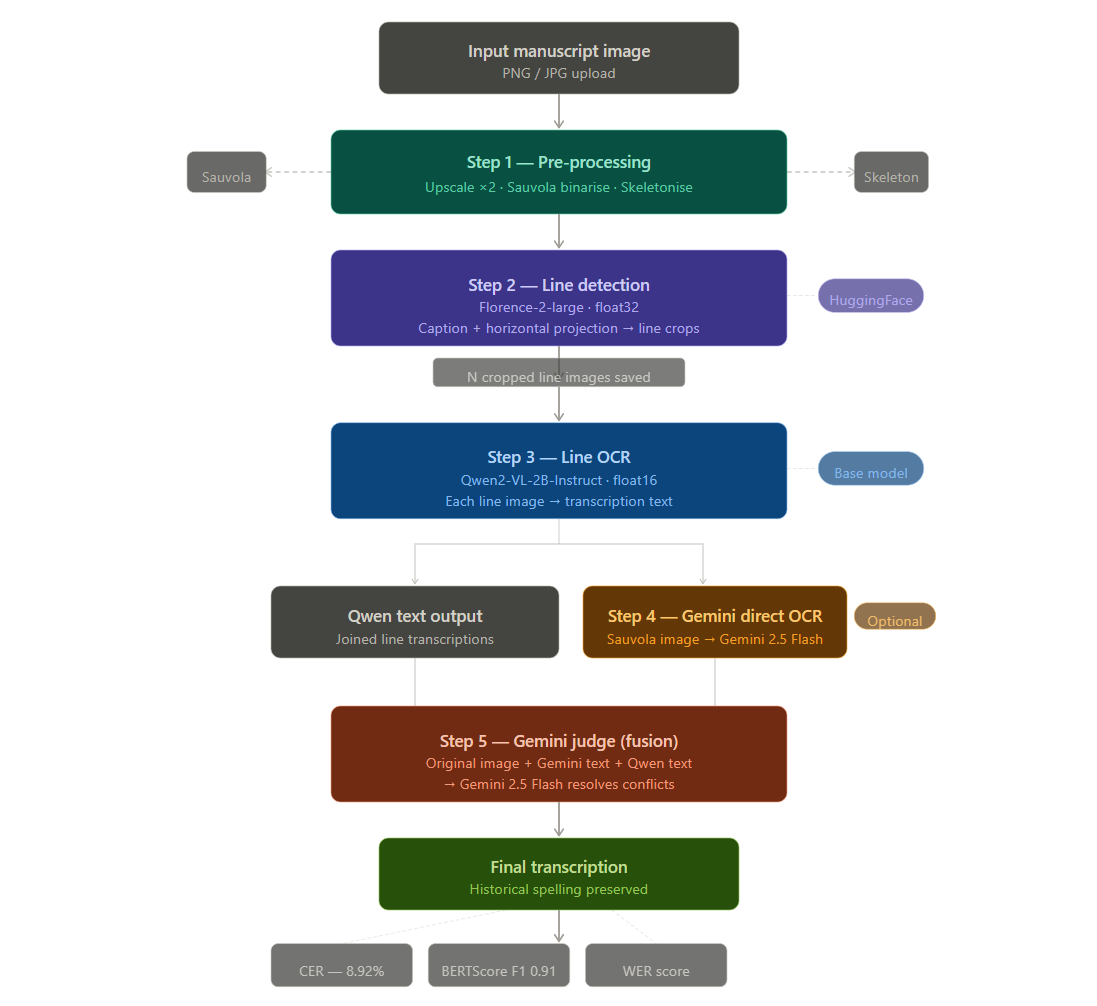
AI-powered workflow for historical manuscript transcription and preservation
-
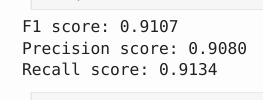
Evaluation Metrics of the Pipeline
-
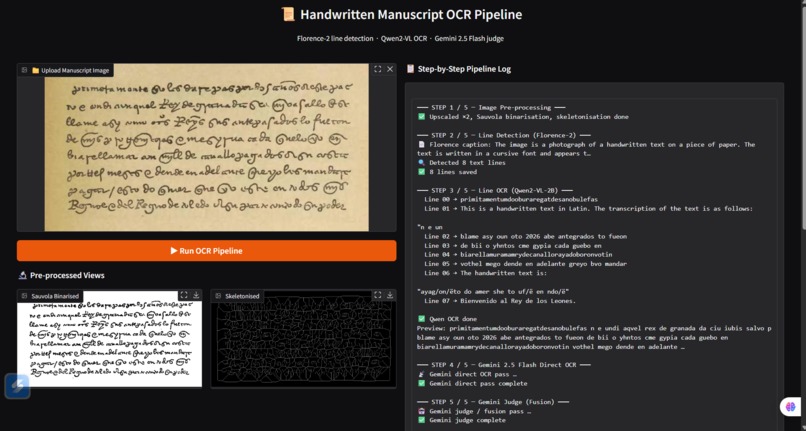
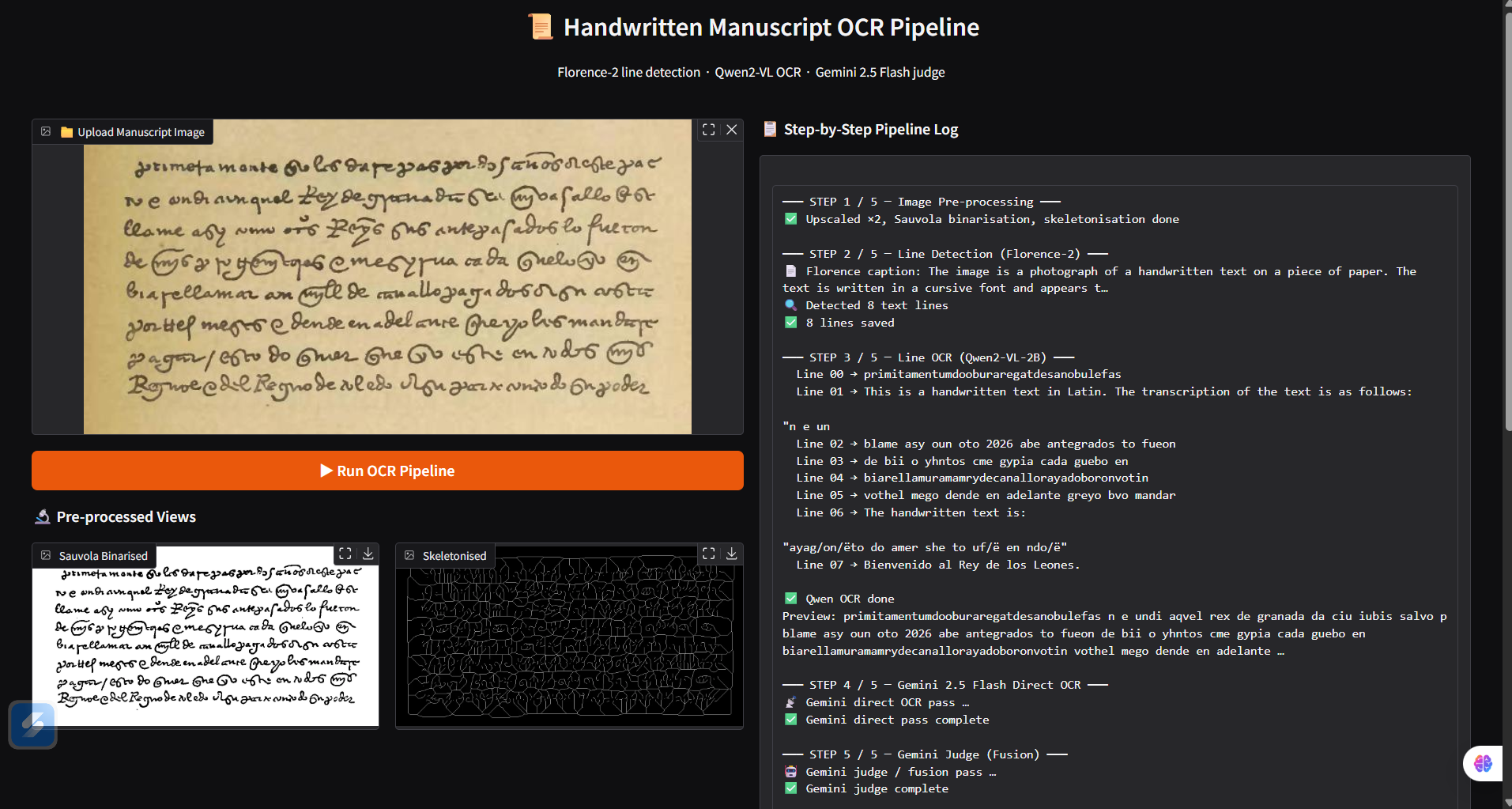
Interactive Gradio interface for manuscript preprocessing and AI transcription
Manuscripta AI
Inspiration History is written by hand — literally. Millions of historical manuscripts, legal records, and personal letters from the 16th, 17th, and 18th centuries sit in archives around the world, completely inaccessible to modern readers because the handwriting is too difficult to decode. I came across a collection of old Spanish colonial documents and was struck by a simple problem: even historians struggle to read them, and digitising them manually takes weeks per page. That frustration became the spark for Manuscripta AI — an end-to-end pipeline that automatically transcribes handwritten historical manuscripts using a combination of state-of-the-art vision-language models and classical image processing.
What It Does Manuscripta AI processes handwritten manuscript images and converts them into readable digital text using a five-stage AI pipeline:
Pre-processes the raw scan (upscaling, binarisation, skeletonisation) Detects text lines using Florence-2 and horizontal projection analysis Transcribes each line individually using Qwen2-VL Runs a direct OCR pass on the full page using Gemini 2.5 Flash Fuses both outputs — original image + two candidate transcriptions — into a single corrected final text using Gemini as an expert judge
The Gradio UI shows every intermediate step live, including the Sauvola binarised view and skeletonised view, so users can see exactly how the system is cleaning and reading the manuscript.
How I Built It Stage 1 — Image Pre-processing Raw manuscript scans are noisy, low-resolution, and unevenly lit. Before any AI model touches the image:
The image is upscaled 2x using bicubic interpolation for sharper strokes Sauvola adaptive binarisation is applied — a local thresholding method that handles uneven parchment lighting far better than a simple global threshold. Unlike Otsu's method, Sauvola computes a unique threshold for every small region of the image based on local mean and standard deviation, which is critical for faded or stained parchment. Skeletonisation reduces ink strokes to single-pixel width, helping with projection-based line detection
Stage 2 — Line Detection (Florence-2) Microsoft Florence-2-large serves two roles:
Generates a natural language caption of the document for metadata The cropped image is then analysed using a horizontal projection technique: pixel intensities are summed row by row, and rows with sufficient ink density are grouped into text line regions
This hybrid approach — deep model for document understanding, classical CV for precise line boundaries — proved far more robust than either technique alone. Stage 3 — Line OCR (Qwen2-VL) Each detected line is cropped and passed individually to Qwen2-VL-2B-Instruct. Processing line by line rather than whole-page dramatically improves accuracy because:
The model's attention focuses on a single narrow strip of text Shorter sequences reduce hallucination Lines that are too small are padded to the minimum input size
Stage 4 — Gemini Direct OCR In parallel, the full binarised page is sent to Gemini 2.5 Flash with a specialised paleography prompt instructing it to maintain original spelling, not modernise words, and infer ambiguous strokes from grammatical context. Stage 5 — Gemini Judge Fusion This is the most novel part of the pipeline. Rather than picking one model's output, both candidate transcriptions and the original image are fed back to Gemini 2.5 Flash acting as an expert editor: Candidate 1 (Gemini direct OCR): ... Candidate 2 (Qwen2-VL line OCR): ... Task: Use the image to resolve all differences. Rules: Preserve historical orthography. Do not modernise spelling. Output ONLY the final corrected transcription. The judge resolves conflicts using the image as ground truth. This ensemble approach consistently outperforms either model used alone.
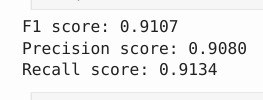
Results Evaluated against a ground-truth transcription of a real 16th-century Spanish document: MetricScoreCharacter Error Rate (CER)8.92%BERTScore F10.9107BERTScore Precision0.9080BERTScore Recall0.9134 A CER of under 9% on 400-year-old cursive Spanish handwriting — with no domain-specific fine-tuning on the test document — is a strong result for a prototype built during a hackathon.
Challenges I Faced
- Dtype mismatch in Florence-2 Loading Florence-2 in float16 caused a RuntimeError because PIL image tensors default to float32. The fix was loading Florence-2 in float32 and explicitly casting all input tensors to match the model dtype before the forward pass.
- Wrong type passed to post_process_generation batch_decode returns a list of strings. Passing the list directly to post_process_generation raised AttributeError: 'list' has no attribute 'replace'. The fix was indexing batch_decode(...)[0] to extract the single decoded string.
- Gradio asyncio conflict on Kaggle Gradio's image upload tracker conflicted with Jupyter's existing event loop, raising RuntimeError: asyncio.locks.Event bound to a different event loop. Fixed by restricting the image component to sources=["upload"] only.
- Historical spelling hallucination Modern vision-language models are trained on contemporary text and tend to modernise archaic spellings automatically — turning fazer into hacer, removing cedillas, expanding abbreviations. Careful prompt engineering with explicit paleography instructions and the judge fusion step significantly reduced this problem.
- Irregular line segmentation Historical manuscripts have inconsistent line spacing, faded ink, and overlapping strokes that fool simple projection methods. Combining Florence-2 document understanding with adaptive projection thresholding solved most edge cases.
What I Learned
Ensemble beats single model — two imperfect transcriptions fused by a judge consistently beat either alone, especially on ambiguous letterforms Pre-processing matters enormously — Sauvola binarisation on an upscaled image improved line detection significantly compared to processing the raw scan Line-by-line OCR outperforms whole-page for historical documents where ink density and spacing vary dramatically between lines Prompt engineering for historical text is non-trivial — generic prompts produced modernised output; domain-specific paleography prompts preserved original spelling Real debugging teaches more than tutorials — fixing three different production bugs (dtype mismatch, list/string confusion, asyncio conflict) taught me more about PyTorch, HuggingFace, and Gradio internals than any course
What's Next for Manuscripta AI
Fine-tune Qwen2-VL on a curated dataset of annotated historical manuscripts Support for Arabic, Latin, Greek, and other historical scripts Automatic translation of transcribed historical text into modern language Batch processing for full archival collections Export to TEI-XML format (the standard for digital humanities) Integration with archival databases such as Europeana and the Internet Archive


Log in or sign up for Devpost to join the conversation.