-
-
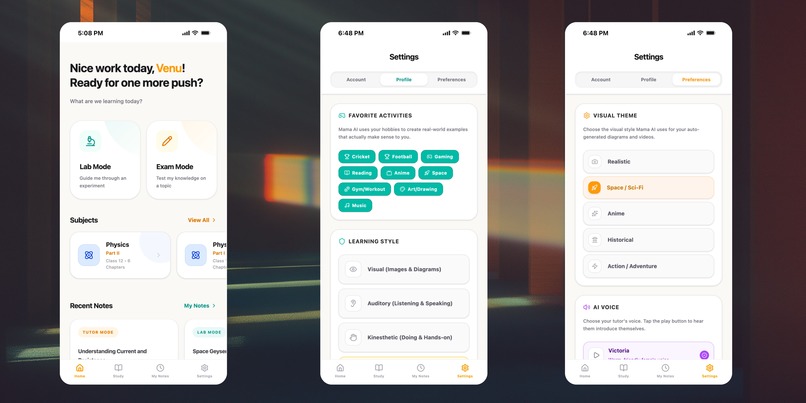
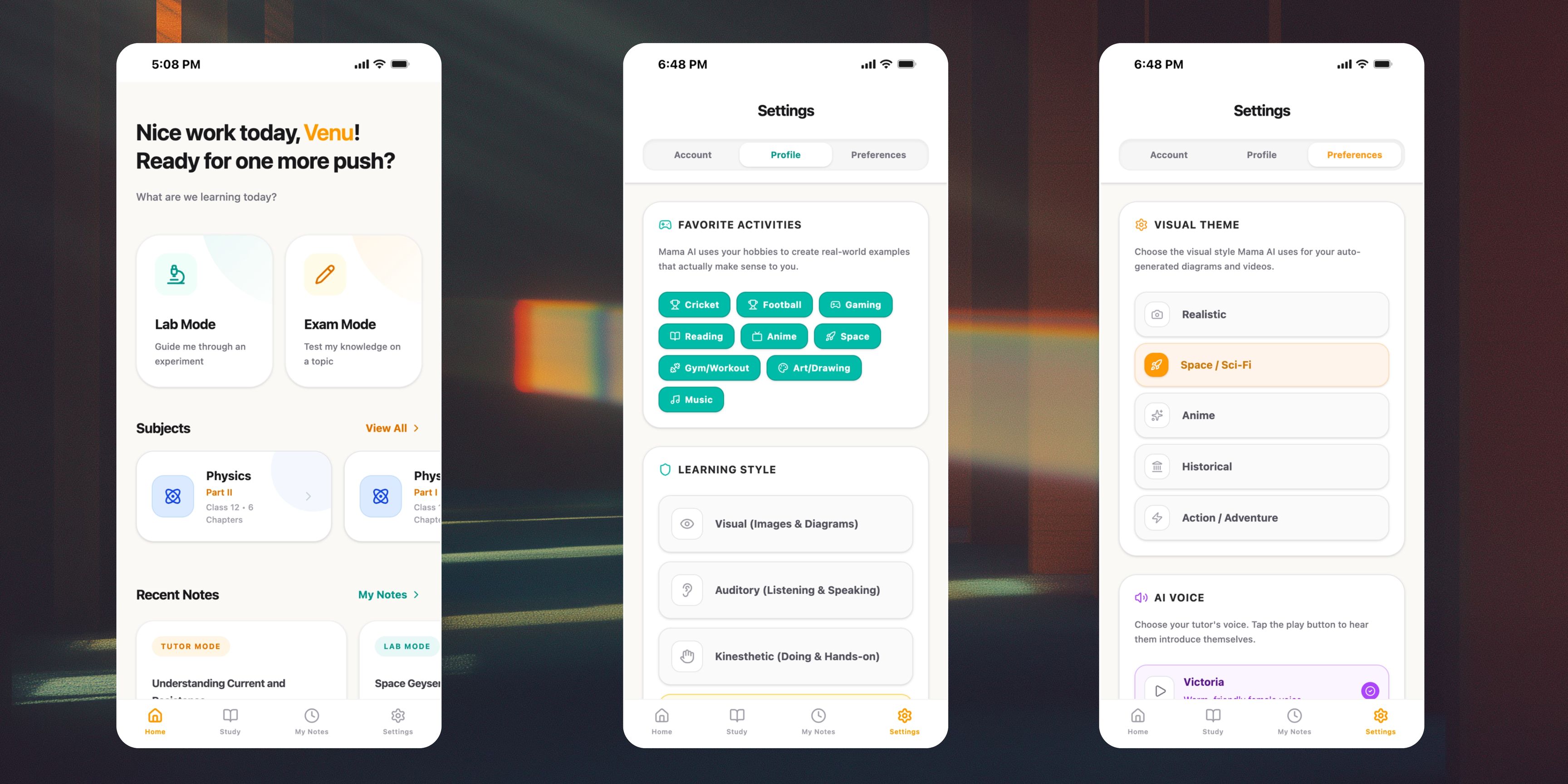
Select your favourite activities and visual style so Mama AI explains any topic in your language, with themed diagrams and videos.
-
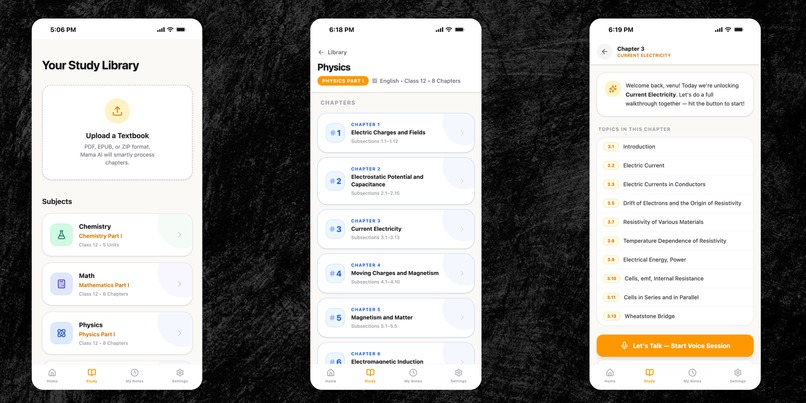
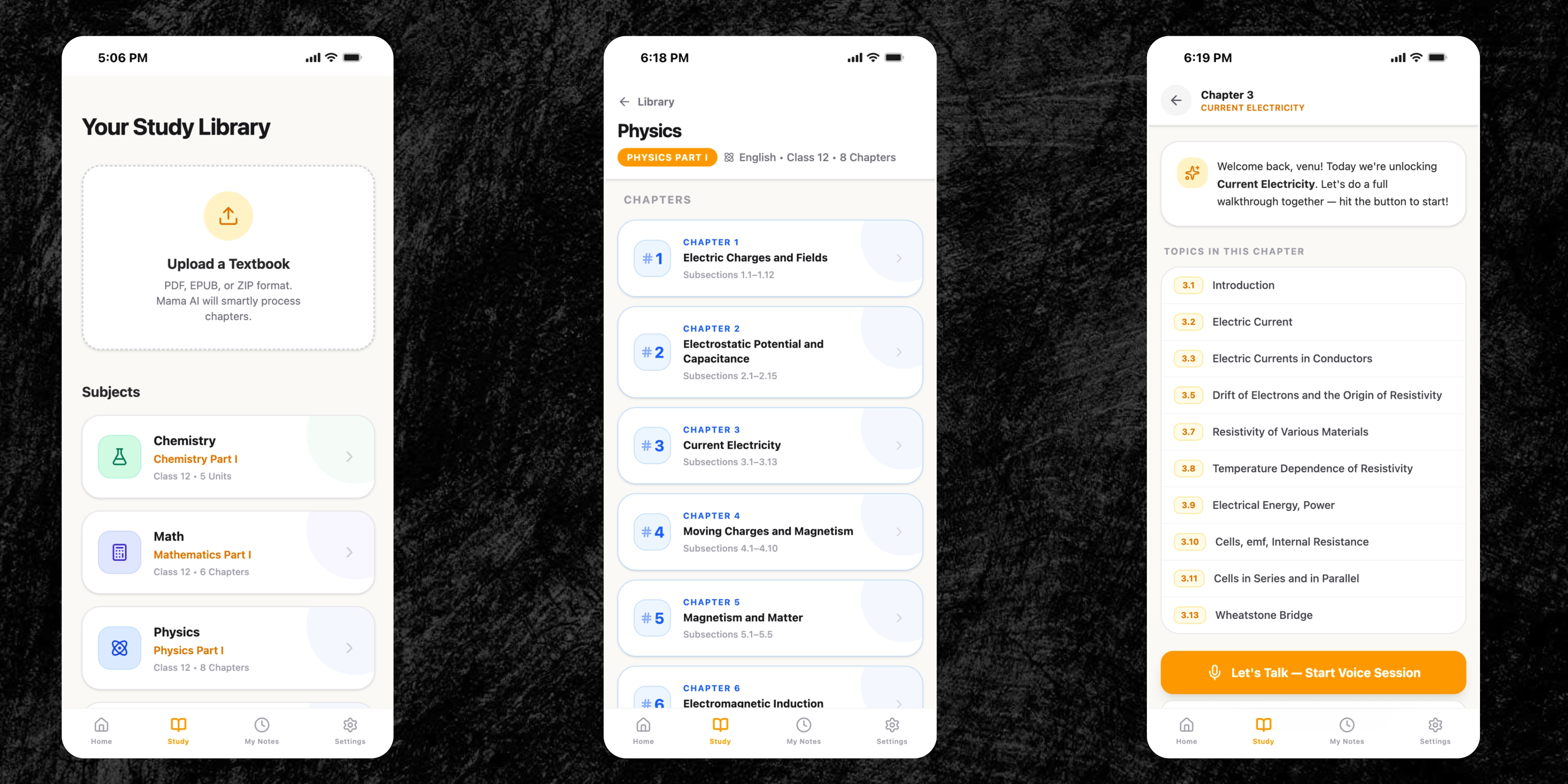
Upload any textbook PDF/EPUB/ZIP and Mama AI grounds every voice session in your syllabus for accurate, least‑hallucination answers.
-
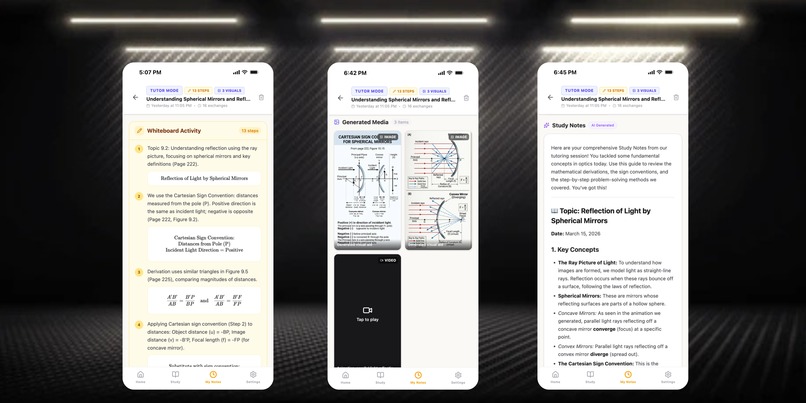
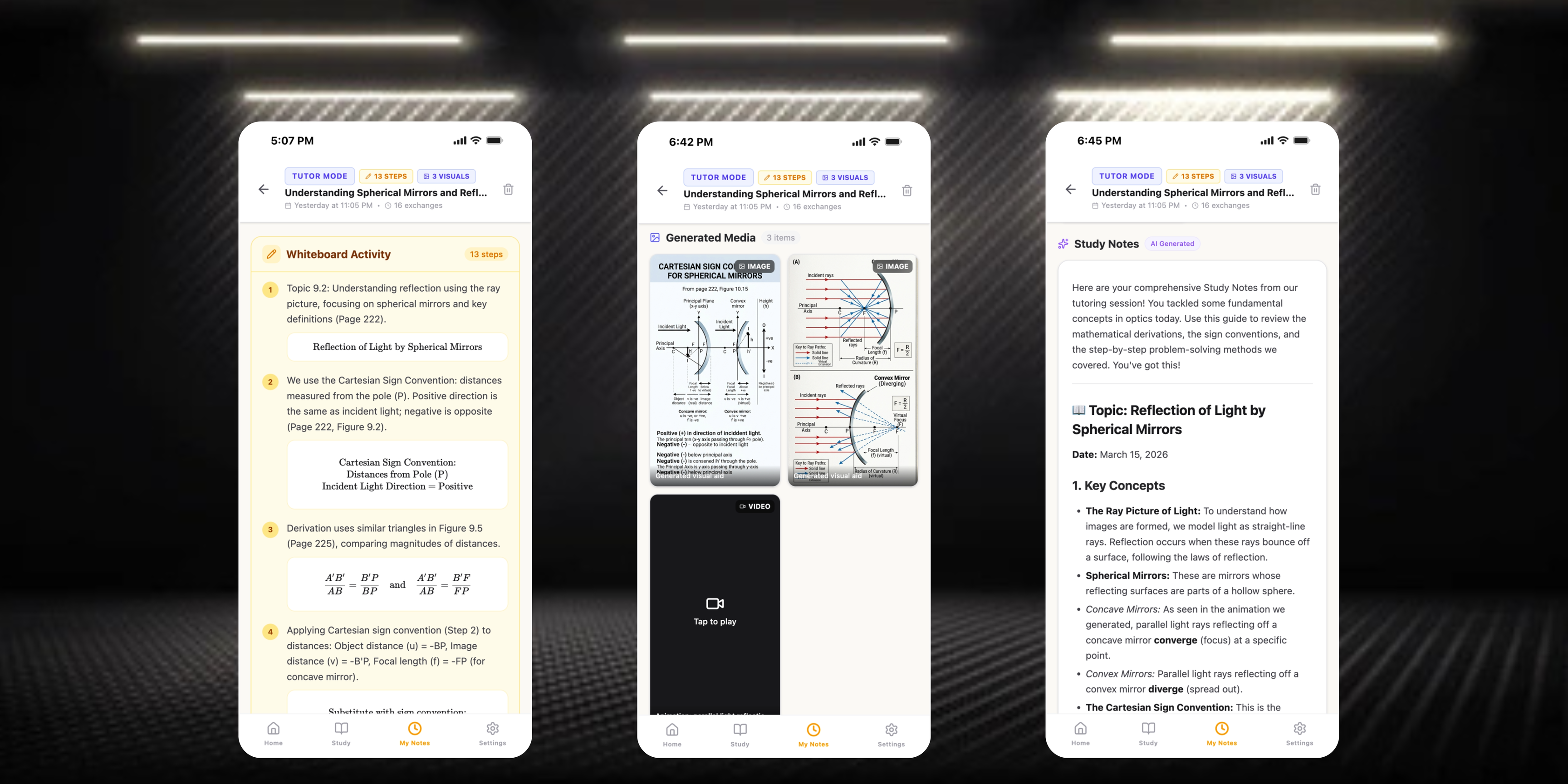
After each session, Mama AI turns the full conversation into clean study notes.
-
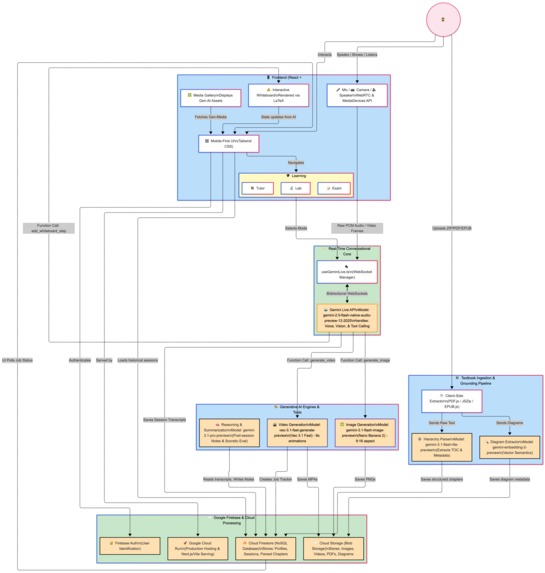
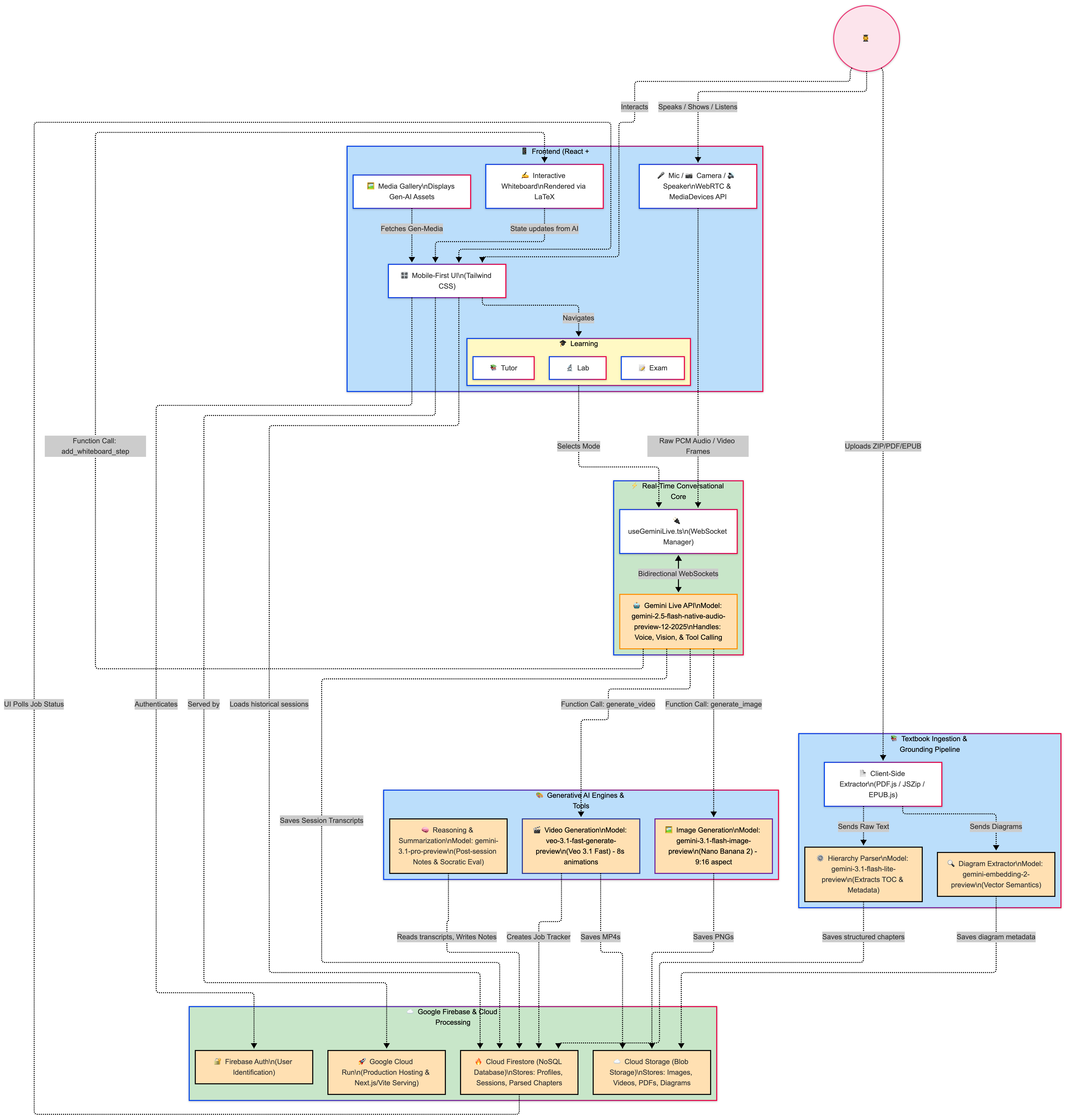
Mama AI Architecture Diagram
Problem: Students Hear About AI, But Don’t Use It for Real Studying
Most school students today know AI exists, but very few use it as a serious daily study tool.
In practice, they run into three frictions:
- No syllabus fit: Explanations often don’t match NCERT/CBSE or their specific textbooks.
- No memory: They upload PDFs, switch tabs, and next time the AI has forgotten everything.
- Too much effort: After school, coaching, homework and family time, they don’t have the energy to manage prompts, files, and “sessions”.
The result: AI becomes something they “try once” instead of something they grow with during the whole school year.
Inspiration: A Tutor That Feels Like “Ours”, Not “Somewhere on the Internet”
This all became real for me while helping my nephews in India with their NCERT books.
They didn’t say “open an AI website.” They said things like:
- “This chapter is confusing.”
- “Can someone explain this diagram?”
- “Can you tell this using cricket?”
At the same time, I discovered the Gemini Live API — an agent that can see, hear, and speak in real time. That made me imagine a simple experience:
- Upload your textbooks once
- Come back any day, pick a chapter, talk to a tutor that remembers your books
- Get explanations in your own words, with diagrams, short videos, and whiteboard math
- Hear analogies in the things you already love (cricket, football, games)
That’s the spark behind Mama AI: a familiar, persistent tutor that lives with your curriculum instead of living in a blank chat box.
Idea: What Mama AI Actually Is
Mama AI is a voice‑first, multimodal AI learning companion designed for the Live Agents (Audio/Vision) category.
At a glance, Mama AI:
- Lets students upload their textbooks once, and keeps them available until they are deleted
- Uses multimodal RAG so explanations are grounded in those textbooks
- Uses the Gemini Live API so students can speak, show, interrupt, and keep going in real time
- Generates diagrams, short animations, and whiteboard formulas to match how STEM is actually taught
The experience is organised into four modes:
Lab Mode – Camera‑Guided Experiments
Students point the camera at their lab setup. Mama AI:- Recognises equipment
- Walks through steps and concepts
- Flags obvious mistakes or risky setups in real time
- Recognises equipment
Exam Mode – Active Recall, Not Just Answers
Instead of solving everything for the student, Mama AI:- Asks exam‑style questions
- Uses their hobbies (cricket, football, gaming) as metaphors
- Nudges them toward the answer instead of handing it over
- Asks exam‑style questions
Tutor / Study Mode – Textbook‑Grounded Explanations
This is the core:- Students upload PDFs (e.g., NCERT / CBSE)
- Mama AI parses, chunks, and embeds the content
- Questions are answered with that textbook context in mind
So “Explain this from Chapter 3” maps to their actual Chapter 3, not some random online explanation.
- Students upload PDFs (e.g., NCERT / CBSE)
My Notes – Turning Conversations into Study Material
After each session, Mama AI:- Summarises key ideas and formulas
- Captures important whiteboard steps
- Links diagrams and animations used in the session
- Stores everything as a revision‑friendly note
- Summarises key ideas and formulas
Underneath all this is a simple promise: come back tomorrow and we’ll pick up right where you left off.
How I Built It: From Idea to Running Live Agent
 I built Mama AI in three main phases using the Google ecosystem.
Phase 1: Shaping the Concept with Gemini 3.1
I started with Gemini 3.1 as a thinking partner:
- Turned raw thoughts into a product document:
- Problem → students overwhelmed and tools forgetful
- Users → exam‑focused school students using structured syllabi
- Modes → Lab, Exam, Tutor, Notes
- Problem → students overwhelmed and tools forgetful
- Sketched flows where:
- The student always starts from subject/chapter, not from a blank chat
- Voice and camera are first‑class, not optional add‑ons
- The student always starts from subject/chapter, not from a blank chat
This turned “I want to help my nephews” into a concrete, testable product design.
Phase 2: Prototyping Behaviour in Google AI Studio
Next, I used Google AI Studio to test how the agent should behave:
- Live conversation:
- Natural follow‑ups
- Clarifications
- Handling interruptions (barge‑in)
- Natural follow‑ups
- Grounded answers:
- Prompts that say: “Answer only from this context; if it’s not here, say so.”
- Prompts that say: “Answer only from this context; if it’s not here, say so.”
- Teaching style:
- Explaining STEM topics through cricket/football/gaming analogies
- Switching between high‑level intuition and formula‑level detail
- Explaining STEM topics through cricket/football/gaming analogies
This phase confirmed that the behaviours I wanted were achievable before wiring up an entire backend.
Phase 3: Full Implementation with Gemini, Firebase, and Cloud Run
For the production version, I moved to Google’s GenAI SDK + Firebase + Cloud Run.
Frontend (React + Vite + TypeScript):
- Mobile‑first interface
- Voice controls to start/stop Live sessions
- Camera integration for:
- Textbook pages
- Homework
- Lab setups
- Textbook pages
- Whiteboard with LaTeX for formulas such as:
- ( x = \frac{-b \pm \sqrt{b^2 - 4ac}}{2a} )
- ( v^2 = u^2 + 2as ), ( F = ma )
- ( x = \frac{-b \pm \sqrt{b^2 - 4ac}}{2a} )
Backend & Data (Firebase + Google Cloud):
- Firebase Auth – user accounts and secure access
- Cloud Firestore – stores:
- User profiles
- Textbooks and chapter metadata
- Embeddings for textbook text and diagrams
- Session logs, study notes, media job status
- User profiles
- Firebase Cloud Storage – stores:
- User‑uploaded PDFs
- Generated images and videos
- Cached media for reuse
- User‑uploaded PDFs
AI & Agent Layer (Google GenAI SDK):
- Live Conversation & Vision
gemini-2.5-flash-native-audio-preview-12-2025for real‑time voice + camera input
- Reasoning & Note‑Making
gemini-3.1-pro-previewfor deep explanations and synthesisgemini-3.1-flash-lite-previewfor quick parsing and lightweight tasks
- RAG & Embeddings
gemini-embedding-2-previewfor per‑user, per‑textbook embeddings
- Visual Generation
gemini-3.1-flash-image-preview(Nano Banana 2) for portrait diagramsveo-3.1-fast-generate-previewfor short educational animations
Deployment:
- Containerised the backend
- Deployed on Google Cloud Run
- Connected Gemini, Firebase, and storage via environment configuration
- Verified the entire backend runs on Google Cloud, as required by the challenge
All of this is built so that one student action — “Open Mama AI and pick Physics Chapter 3” — triggers a full live agent workflow, not just a single model call.
Challenges: Where It Was Hard (and Fun)
1. Making “Upload Once, Reuse Always” Real
The promise sounds simple, but building it meant:
- Designing Firestore to match how students think:
/users/{userId}/textbooks/{textbookId}/chapters/{chapterId}/pages/{pageId} - Parsing PDFs into meaningful chunks (chapters, sections, pages)
- Embedding and retrieving content fast enough for live audio sessions
Once that worked, the experience finally felt like a long‑term tutor, not a one‑time file upload tool.
2. Keeping Explanations Aligned with Textbooks
Students care about what the teacher and exam expect. So I had to:
- Tune prompts so textbook context is the primary source of truth
- Let Mama AI admit “this isn’t in your book” instead of guessing
- Retrieve context at chapter/section level so responses feel familiar
This alignment is what makes the tool exam‑friendly instead of just “AI‑interesting.”
3. Live Audio, Context, and Interruptions
In real usage:
- Sessions grow long
- Students interrupt when something clicks (or doesn’t)
- Audio streams must stay smooth
I tackled this with:
- Session lifecycle management and context limits
- Clear handling of barge‑in so the agent stops, listens, and continues gracefully
- Careful work with the browser AudioContext and stream cleanup
4. Visual Generation Without Killing the Flow
Images and videos take seconds to generate. Blocking everything until they arrive felt wrong.
So I:
- Treated each visual as an async job tracked in Firestore
- Designed responses where Mama AI says it’s “drawing” or “preparing” something while talking
- Auto‑injected the finished diagram or animation into the UI when ready
The agent keeps feeling live and conversational, even while heavy visual work happens in the background.
What I’m Proud Of
Curriculum that actually stays.
Upload once, reuse across the entire term. No endless re‑upload loops.A genuinely multimodal tutoring flow.
Voice, vision, text, diagrams, animations, and whiteboard math work together like a real lesson.Student‑first design.
Everything is built around “Pick subject → Pick chapter → Talk,” not “Upload file → Engineer prompt.”Shipping this end‑to‑end while learning.
I went from exploring Gemini and Google Cloud to running a fully deployed Live Agent that my nephews — and other students — can actually use.
What I Learned
Access is not the main barrier — clarity is.
Many students know AI exists; they just don’t have a tool that fits how they really study.Grounding and persistence beat one‑off cleverness in education.
A tutor that remembers your books and stays aligned with your syllabus is more valuable than a one‑time “wow” answer.STEM is naturally multimodal.
When you combine speech, text, formulas, diagrams, and experiments in one agent, it starts to look a lot like a real classroom.The Gemini + Google Cloud stack is powerful for solo builders.
With Live API, GenAI SDK, Firebase, and Cloud Run, it’s possible for one person to go from idea to a real, cloud‑hosted live tutor that runs on production infrastructure.
Mama AI is my way of turning those lessons into something students can actually open, talk to, and rely on — not just for one question, but for an entire school year.
Built With
- better-sqlite3
- cloudfirestore
- css3
- date-fns
- docker
- epub.js
- express.js
- firebaseauthentication
- firebasecloudstorage
- gemini-3.1-flash-image-preview
- gemini-3.1-flash-lite
- gemini-3.1-pro
- geminiembedding-2
- geminiliveapi
- google-cloud
- googlecloudrun
- googlecloudstorage
- googlegenai-sdk
- html5
- javascript
- jszip
- katex
- lucidereact
- motion
- nanobanana-2
- node.js
- pdf.js
- react-18
- reactrouter-dom
- tailwindcss
- typescript
- veo-3.1-fast
- vite
- webaudioapi
- webrtc

Log in or sign up for Devpost to join the conversation.