Inspiration
I like Linux and I'm also taking Intro to Malware Analysis, so, I wanted to put my (very) rudimentary knowledge to the test in a real-world scenario. I saw the USF challenge with NextEra involving artificial intelligence and malware analysis , I thought it would be the perfect opportunity to combine my passion for CLI's, Linux, and virtualization with malware analysis. Oh boy, was I in for a ride.
What it does
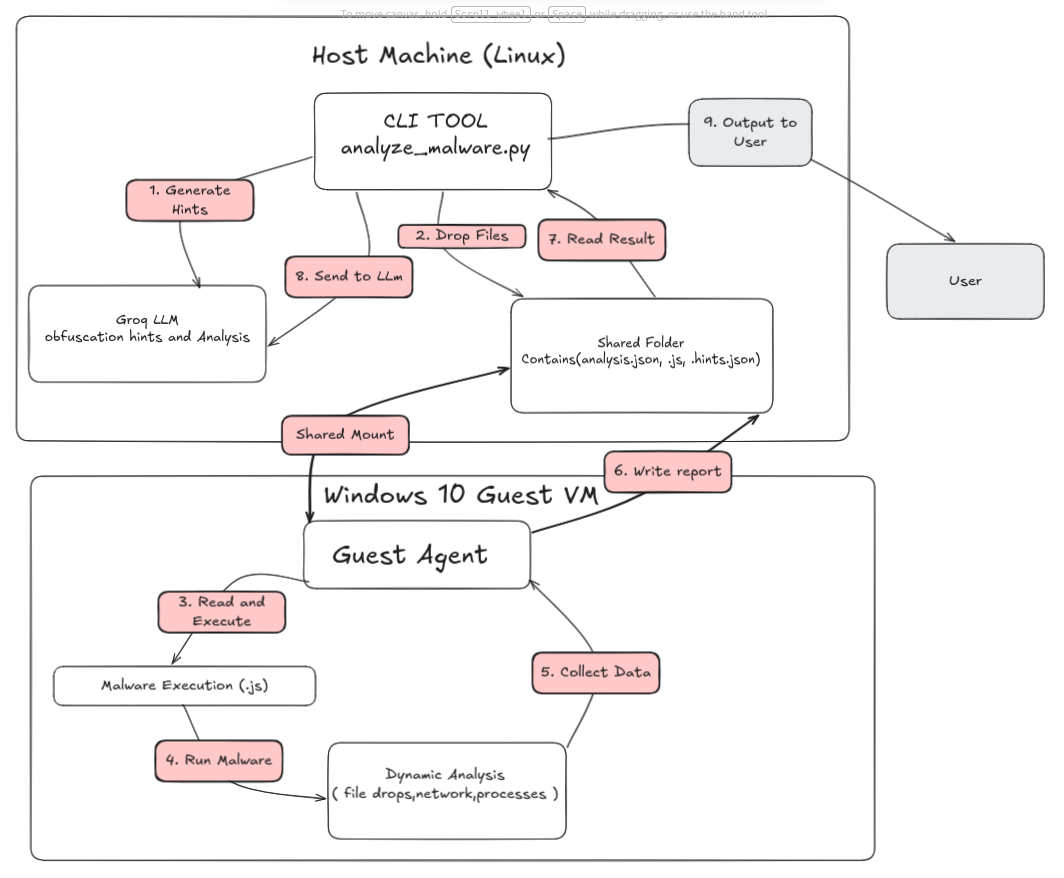
malware-analysis-pipeline is an AI-driven automated sandbox for analyzing obfuscated JavaScript malware. The setup requires:
- A Linux host machine
- A Windows 10 virtual machine running in VirtualBox with a shared folder
How it works:
- The host sends an obfuscated .js sample to the shared folder.
- A sandbox agent running on the Windows 10 VM polls for new files.
- The agent performs static analysis (detecting obfuscation patterns like the IMLRHNEGAR marker) and then safely executes the sample using cscript.exe.
- It monitors system changes, dropped files, and detailed PowerShell activity.
- The results are sent back to the host, where Groq’s LLM (Llama-3.3-70b) interprets the raw sandbox data and generates a clean Malware Analysis Report with insights valuable to both Blue Team and Red Team analysts.
How I built it
I built the entire pipeline in Python.
- Host side (sandbox_analyze.py): Orchestration, LLM hint generation, and final report creation using the Groq API.
- Guest side (sandbox_agent.py): Static analysis + dynamic execution inside the Windows 10 VM.
- Communication between host and guest is handled via a VirtualBox shared folder with polling.
Challenges I ran into
- The malware was extremely obfuscated — using repeated IMLRHNEGAR markers, Unicode junk, and massive string concatenation split across chunks. Static analysis alone was nearly useless, at least to my knowledge with the tools that I investigated.
- The payload turned out to be mostly fileless (AES decryption + in-memory .NET assembly loading), making it very hard for the sandbox to detect meaningful dropped files.
- The PowerShell logs were long and noisy, so feeding them cleanly to the LLM required careful truncation and highlighting.
- Time pressure made deeper integration (like full process monitoring or automatic VM snapshot reset) difficult.
Accomplishments that I'm proud of
- Successfully built a complete end-to-end AI-driven malware analysis pipeline from scratch.
- Got the system to reliably execute the obfuscated JS sample and capture cscript.exe → powershell.exe behavior.
- Integrated Groq LLM to turn sandbox output into readable analysis reports.
- Created a configurable CLI tool that gracefully handles re-analysis and errors.
- Proved that even with limited time, it's possible to automate parts of malware analysis and speed up the workflow for cybersecurity specialists.
What I learned
Cybersecurity is constantly evolving in complexity. AI can be incredibly helpful when used as an assistant to interpret sandbox results, but the quality of the output heavily depends on how well the raw data is prepared and highlighted. I also gained a much deeper appreciation for the challenges of dynamic analysis in real-world scenarios.
What's next for malware-analysis-pipeline
- Improve detection of important dropped files and in-memory activity
- Add automatic VM snapshot reset and boot-up for cleaner analysis runs
- Implement better static deobfuscation techniques and integrate more tools for decoding the large chunks
- Add network traffic capture to observe C2 communication
- Explore running the LLM locally with Ollama for offline use Allow pipeline to handle more than just JS files


Log in or sign up for Devpost to join the conversation.