Malloc Visualizer
A web-based visualizer for dynamic memory allocation in C-style heaps. This interactive tool demonstrates how malloc, free, and realloc work, including allocation, splitting, coalescing, and alignment.
🔹 Demo
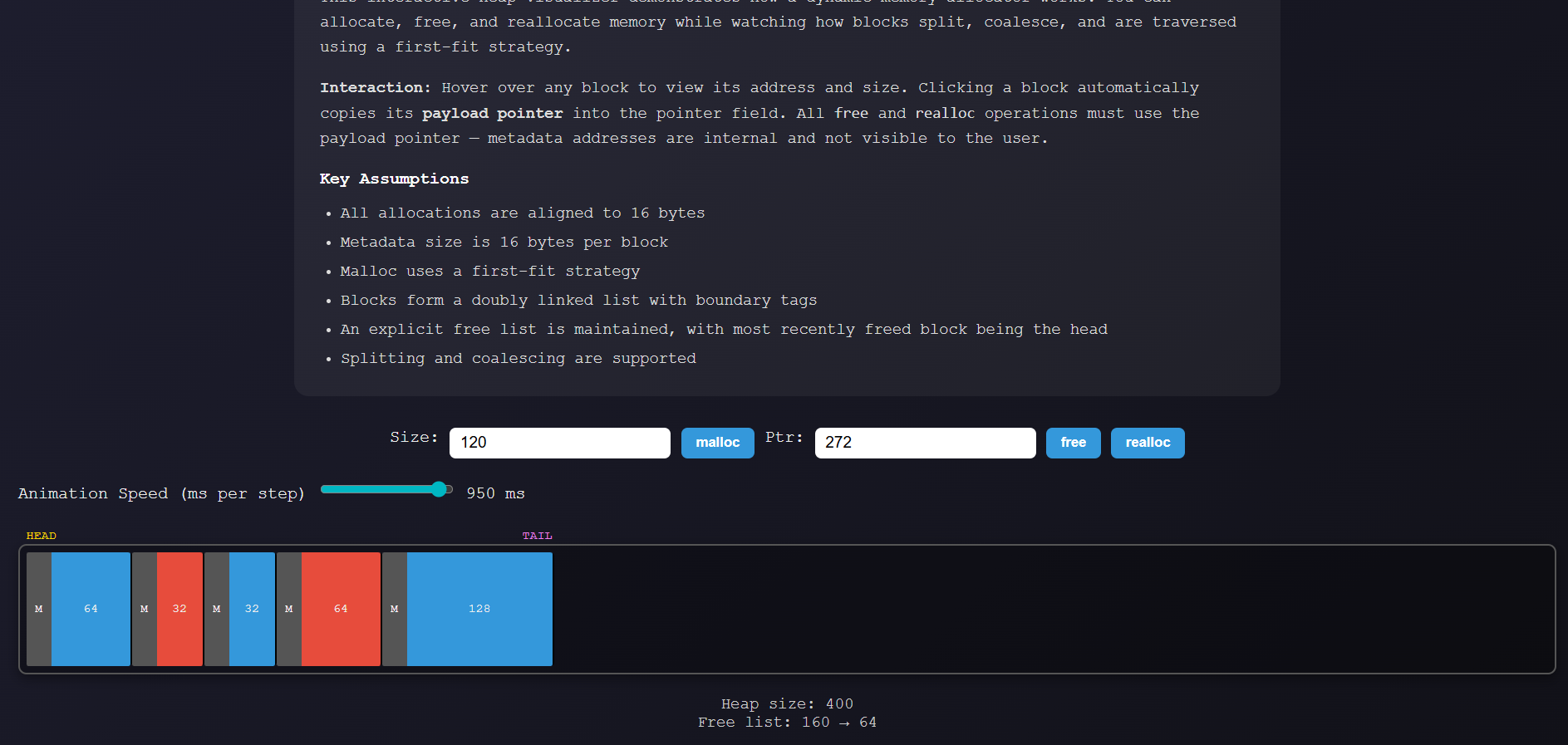
Hover over blocks to view metadata and payload information. Click on a block to select its payload pointer for freeing or reallocating.
Animation Speed: Adjustable via the slider to control visualization speed.
⚙️ Key Features
- Dynamic Allocation:
mallocallocates memory blocks with first-fit strategy. - Freeing & Reallocation:
freeandreallocwork on the visible payload pointer. - Alignment: All allocations are aligned to 16 bytes for proper memory alignment.
- Metadata: Each block contains 16 bytes of metadata (shown for educational purposes) and is tracked with boundary tags.
- Doubly Linked List: Blocks are stored in a doubly linked list to facilitate coalescing and splitting.
- Explicit Free List: Free blocks are tracked in a separate list for efficient allocation.
- Animations: Animated allocation, split, and coalescing to visually demonstrate memory operations.
- Interactive: Hover for details, click to select payload pointers.
📝 Assumptions
- 16-byte alignment for all allocations.
- Metadata is 16 bytes per block.
- First-fit allocation strategy.
- Blocks are doubly linked with boundary tags.
- Explicit free list is used for free blocks.
- Most recently freed block is the head of the free linked list.
- Splitting and coalescing are visualized.
🎮 How to Use
- Enter the allocation size and click malloc.
- Hover over blocks to see:
- Metadata pointer
- Payload pointer
- Total block size
- Click a block to select its payload pointer.
- Enter the pointer in the input field to:
freea blockrealloca block to a new size
- Use the animation speed slider to adjust visualization speed (in milliseconds per step). Higher value = slower animations.
- Invalid operations (double free, negative sizes, invalid pointers) trigger error messages via toast notifications.
- Alignment adjustments show info to indicate requested vs aligned size.
⚡ Implementation Details
- Heap Representation: A single linked list of
Blockobjects withprev_physandnext_physpointers. - Free List: Blocks marked as free are maintained in a separate explicit free list (
prev_free,next_free). - Allocation:
- If a free block fits, it is reused and split if large enough.
- Otherwise, the heap grows by creating a new block.
- Deallocation:
- Frees the block and coalesces adjacent free blocks.
- Reallocation:
- Shrinks blocks in place when possible.
- Expands into neighboring right free block if available.
- Otherwise, allocates a new block and frees the old one.
- User Interaction:
- Only the payload pointer is used for
freeandrealloc. - Metadata pointer is internal, only being shown in the free list and when hovering on the blocks for educational purposes.
- Only the payload pointer is used for
🎨 UI Highlights
- Color Coding:
- Allocated: Blue
- Free: Red
- Split Highlight: Cyan
- Coalesce Highlight: Green
- Search/Allocation: Yellow/Orange
- Tooltips: Show block metadata and size.
- Animations: Smooth transitions for allocation, splitting, and coalescing.
🛠️ Technologies
- HTML/CSS/JS — fully client-side, no server required.
- Vanilla JavaScript — handles all heap operations and animations.
- CSS Animations — highlight memory operations.
🧩 Potential Extensions
- Visualize different allocation strategies (best-fit, next-fit).
- Customize alignment.
- Show memory fragmentation statistics.
- Export heap state as JSON for testing.
📚 Credits
Created by Artem Khaiet, Jimmy Hackney, and Kyle Enkhzul as an interactive teaching tool for understanding dynamic memory allocation.


Log in or sign up for Devpost to join the conversation.