Inspiration
There's a video of someone controlling a robotic arm through a Meta Quest headset. I saw it and thought, the kids who come to my hands-on classes need to feel this.
A real Arduino robotic arm was out of my budget, so I bought what I could myself — a few SG90 servos, an ESP32, and a stack of cardboard. I come from software. This was the first time I'd built a physical thing with no kit and no answer key, and honestly it was a mess. But it taught me more than any finished instruction set ever had. Every time it failed, I had to actually understand why — the pivot, the support, the wiring — instead of just following a diagram.
Left to myself a few years ago, I probably would've given up. Working alongside AI made it feel doable. But here's the thing: the AI couldn't fix my cardboard robot. I still had to watch it flop over, guess what was wrong, change something, and try again.
Most kids meet AI as the thing that does their homework. I wanted them to meet the version I met — the one that keeps you going instead of doing it for you.
What it does
MakerTA runs on a four-session maker curriculum. The point is to let one teacher handle an open-ended robotics class with several groups going at once.
Kits are popular for good reason. They're easy to start, they have predictable answers, and that makes them manageable when a single teacher is fielding twenty questions at once. The problem is that a kid can finish the kit and never once wonder what else that motor could do.
MakerTA starts them somewhere different. Everyone learns the basics through one simple shared build, then they break off and decide what the motor becomes — a dinosaur jaw, a flower that opens, a trap box, whatever. When it fails (and it will), MakerTA doesn't hand over the fix. It gets the group to name the problem, guess at a cause, and pick one thing to change next. Each attempt gets logged with a timestamp.
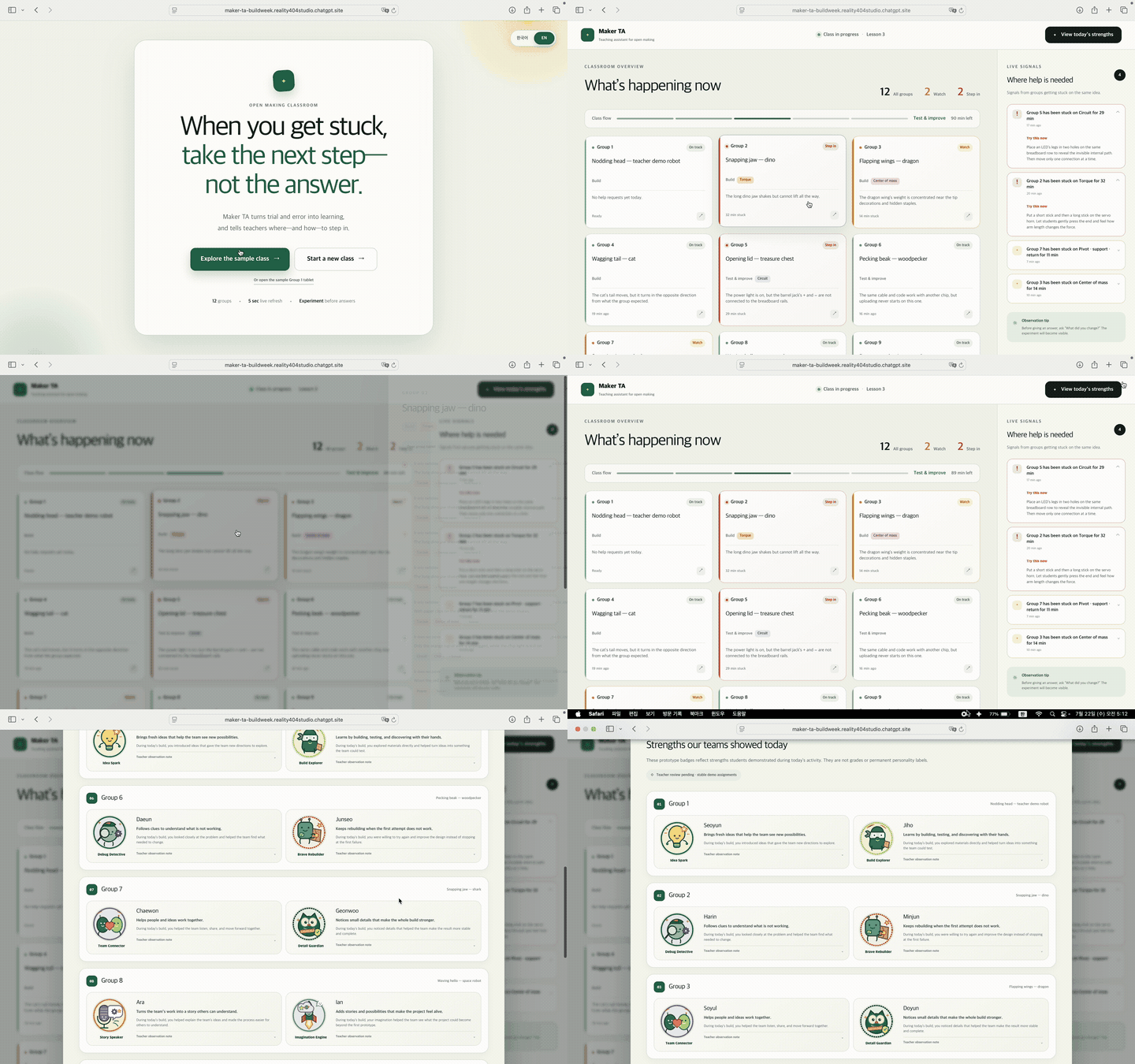
All of that flows up to the teacher dashboard. Instead of scrolling through every group's chat, the teacher sees a summary: what this group is building, what they've already tried, and who actually needs a human right now. So you keep the manageability of a shared kit but hand the kids a lot more room to make something of their own.
How we built it
MakerTA is a local-first prototype with two views that talk to each other — a student workspace and a teacher dashboard.
On the student side, everything runs on one loop: problem, hypothesis, one experiment, observation, next step. The trick was not treating the conversation as a chat log. MakerTA turns it into structured events, so the same messy back-and-forth can be grouped by team, put in order, and summarized. The dashboard is built to answer three questions and nothing more: what's this group making, what have they tried, and where should the teacher step in.
For the physical side I used cardboard, cheap SG90 servos, an ESP32, and craft-drawer junk. That let me hit the exact failures the kids would — floppy supports, a pivot in the wrong spot, too much friction, a bad solder, a structure too heavy for the motor to lift.
Codex did a lot of heavy lifting turning this classroom idea into a working interface, sorting out the data flow between the two views, and making the demo assets. And because school networks are often locked down, running locally was a hard constraint from the start — the classroom's records should live in the classroom.
Challenges we ran into
Budget came first. I wanted something a real school could run without a robotics kit or a fab lab, which shaped basically every decision after it.
The physical build was harder than the software, and that surprised me. A mechanism can die from the pivot position, or the support, or the motor angle, or the weight — or all of them at once, which is worse, because then you don't know which one to fix. My first four prototypes just failed. It wasn't until the fourth that it clicked that the pivot, the support, and the line tension were three separate jobs, not one.
Then there's the tension between freedom and structure. MakerTA has to let kids build wildly different things, but a totally open conversation is a nightmare for both the model and the teacher. So I had to write schemas that nudge students toward mechanisms that actually work — without every project collapsing into the same preset.
The last one was the AI's questions. These kids are roughly Grade 5 to first-year middle school. The model has to speak their language, stop them from changing five variables at once, hold the hypothesis-experiment-observation loop together, and — hardest of all — bite its tongue instead of just handing over the answer.
Accomplishments that we're proud of
I'm proud that MakerTA is built on stuff a school can afford to buy, replace, and let kids wreck.
Commercial kits can be great, but they're often expensive enough that the kit becomes the most precious thing in the room. And once that happens, the teacher starts guarding the parts instead of encouraging kids to push them. MakerTA runs on cardboard, throwaway servos, and an ESP32 that ran me about KRW 8,000 — most of the build is craft materials you can just swap out. When failure is cheap, you're finally allowed to fail.
The other thing I'm proud of: this project doesn't treat failure as the boring part before the "real" learning. The broken builds and the revised guesses are the learning, and MakerTA puts that where both the student and the teacher can see it.
What we learned
The most useful thing AI did for me in physical making was help me ask a better next question.
The model could rattle off a dozen possible fixes, but it had no idea why my robot was actually failing — not until I'd learned to look at the mechanism and put the problem into words. That took four dead prototypes. Turns out you can't outsource the observing.
I also learned that open-ended doesn't mean unstructured. "Make anything" is paralyzing. A good system gives kids just enough of a rail to keep moving while leaving the design space wide enough that their robots come out genuinely different from each other. And a teacher doesn't need every message from every group — they need the compressed version: what the kids meant to do, what changed, what they figured out, and where a human is actually needed now.
What's next for MakerTA
The real next step is getting MakerTA into an actual classroom and seeing whether it genuinely takes monitoring off the teacher's plate while keeping kids pushing through failed builds.
I'd also love for it to remember each kid's maker journey over time — not just the final robot, but the whole trail of guesses, experiments, and rewrites, so you can watch their problem-solving habits grow. Further out, I want a shared library where maker teachers drop their own presets, mechanical patterns, and question flows for others to borrow and adapt. Right now the curriculum aims at roughly Grade 5 through first-year middle school; eventually I'd like to stretch it both younger and more advanced.
Built With
- aduino
- codex
- css
- html
- javascript
- typescript

Log in or sign up for Devpost to join the conversation.