-
-
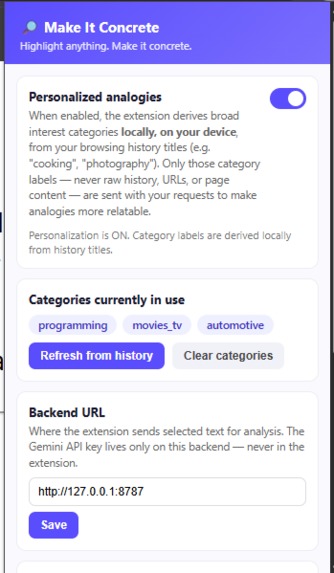
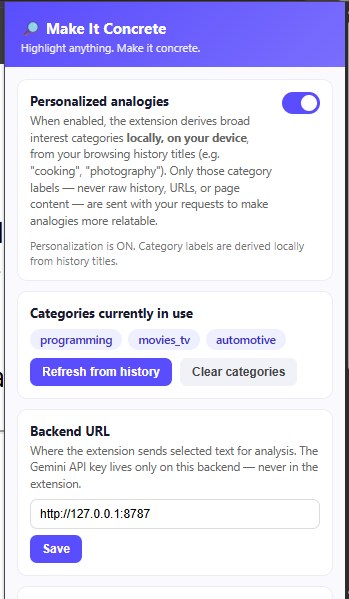
Personalisation enabled
-
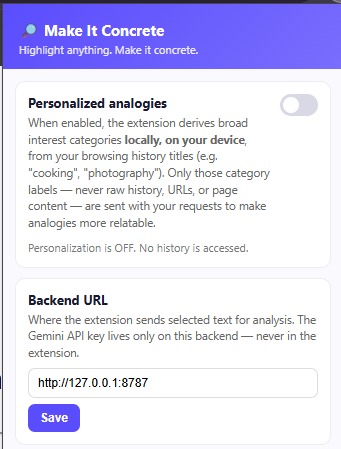
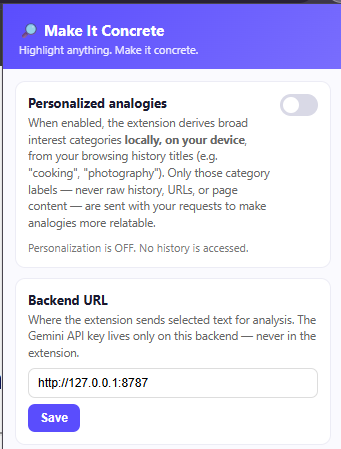
Personalisation disabled
-
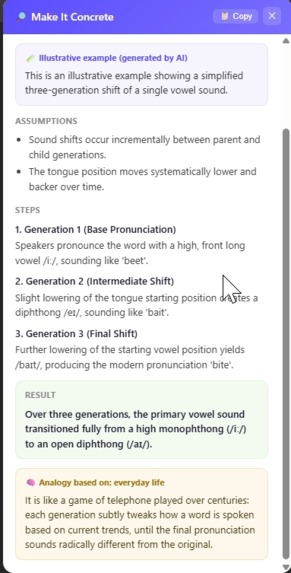
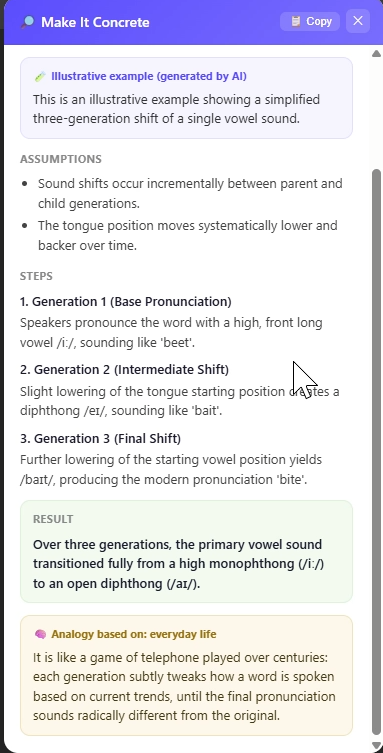
Linguistics
-
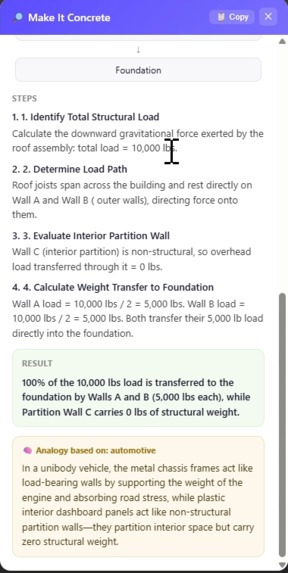
Architecture, with personalised analogy
-
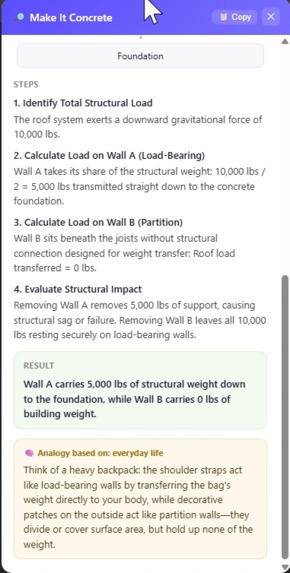
Architecture, without personalised analogy
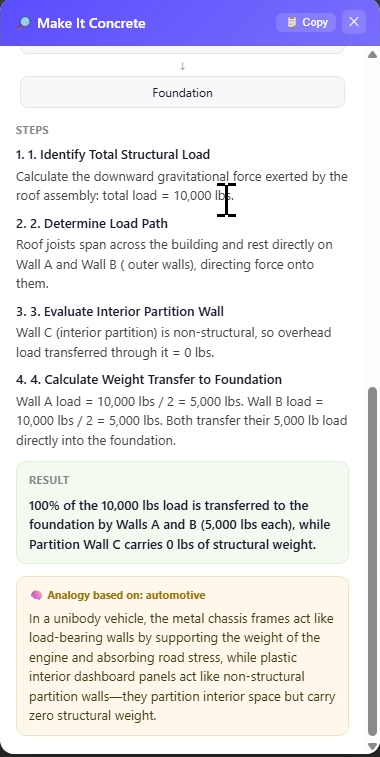
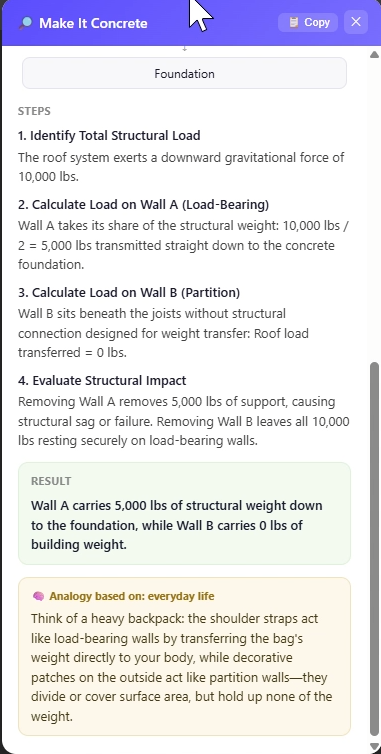
Make It Concrete
Summary: Make It Concrete is a privacy-first Chrome extension that turns abstract technical and educational text into small, worked examples with intermediate steps, final results, and visual explanations.
Why I Built This
I built this because existing models often weren't specific enough when I was learning. They tended to turn simple questions into long, elaborate explanations or rewrite concepts in ways that sounded polished but weren't actually helpful for understanding. I wanted something that would actually show how things work in terms I can understand without relying too heavily on forced analogies and use concrete examples of what happens in real systems and real code, rather than stopping at a purely conceptual explanation.
What it does
Make It Concrete is a Chrome Manifest V3 browser extension that transforms technical or educational text into a concrete, AI-generated example.
The workflow is simple:
- Select text on a webpage.
- Right-click and choose Make It Concrete.
- The extension sends the selected text to the backend.
- Gemini generates a structured worked example.
- The extension displays the example in an in-page panel with intermediate steps, a final result, and a suitable visualization.
The project is intended to be useful during everyday learning rather than requiring users to leave the page they are studying. For example, a student reading about an array algorithm can immediately see the transformation performed step by step, while someone reading about a technical process can receive a corresponding flow visualization. This makes the extension suitable for individual study, online coursework, programming practice, and classroom-supported learning.
The project supports different visualization types, including examples such as array transformations and flow diagrams. For concepts that do not match one of the supported visualization types, it falls back to a generic step list.
There is also an optional Personalized analogies feature. If the user explicitly enables it, the extension reads browsing-history titles locally, classifies them into broad topics such as cooking or programming, and can use up to three category labels to generate a single relevant analogy. Raw URLs, timestamps, and titles are discarded rather than sent to the backend.
How we built it
The project is split into three main pieces:
- Chrome extension: A Manifest V3 extension provides the context-menu interaction, background service worker, settings popup, and in-page overlay. The overlay uses Shadow DOM so its styling does not interfere with the webpage.
- FastAPI backend: The backend is the only component that communicates with Gemini. It validates incoming requests, constructs the prompt, calls the Gemini API, validates the returned structured JSON against a strict Pydantic schema, and sends the validated result back to the extension.
- Local personalization system: A lightweight keyword classifier runs entirely inside the extension. It converts browsing-history titles into a closed taxonomy of broad, non-sensitive interest categories without making a network request.
Security and privacy were built into the architecture rather than added afterward. The extension uses only the minimum required Chrome permissions, with browsing-history access declared as optional and disabled by default. The Gemini API key exists only on the backend and is loaded from an environment variable. AI-generated content is treated as untrusted data and rendered safely using DOM APIs rather than innerHTML or executable code.
The backend uses Python dependencies including FastAPI, Uvicorn, Pydantic, python-dotenv, and Google's google-genai package, while the extension itself uses plain JavaScript and browser APIs without npm dependencies or a build step.
Challenges we ran into
One of the biggest challenges was balancing useful AI personalization with privacy. The project needed to provide personalized analogies without exposing raw browsing history to the AI. The solution was to process history titles locally, discard URLs and timestamps, classify the titles into a small safe taxonomy, and send only abstract category labels to the backend.
Another challenge was making the AI output reliable enough to render in a browser interface. Instead of trusting arbitrary model output, the backend requires structured JSON and validates every Gemini response against a strict schema. Malformed responses are turned into a clean error panel rather than causing the extension to crash.
We also had to think carefully about the intended learning impact. A useful explanation should not merely be shorter; it should help users move from recognizing a definition to understanding how a concept behaves in an actual example. The extension therefore focuses on intermediate steps and visual representations, which can be particularly useful for students who learn more effectively by following a worked process rather than reading an abstract description alone.
Another challenge was making the system useful across different learning contexts without assuming that every user has the same background. A beginner studying programming may need a very small numerical example, while a more experienced developer may need a concrete representation of a technical workflow. This is one reason the project generates examples dynamically instead of relying on a fixed collection of explanations.
We also had to carefully limit browser permissions and prevent accidental access to sensitive information. Automated security checks verify that the project does not use cookies, credential APIs, broad host permissions, eval(), new Function(), innerHTML, hardcoded API keys, or raw browsing-history data in backend requests.
Finally, AI model availability and API limits introduced practical setup challenges. The project documents handling retired or unavailable Gemini models, API-key errors, free-tier quota errors, CORS issues, and backend connectivity problems.
Accomplishments that we're proud of
We are proud that Make It Concrete goes beyond simply asking an AI to "explain" something. It attempts to produce a worked example with real intermediate steps and a tangible visualization, making abstract concepts easier to interact with and understand.
We are also proud of the potential reach of the idea. Because it works directly on webpages, the same interaction can support students studying programming, algorithms, mathematics, computer science, and other technical subjects, as well as self-learners and developers reading documentation. It can be used without requiring the user to copy the explanation into a separate AI chat, helping keep the learning process within the context where the concept was encountered.
The project is also designed around a practical learning benefit: reducing the amount of mental effort required to translate an abstract explanation into a concrete example. While the current MVP does not yet claim a measured improvement in retention or reading speed, the architecture is designed around the hypothesis that worked examples and visual explanations can make difficult material easier to follow and recall. This gives the project a clear direction for future user testing and classroom evaluation.
We are also proud of the privacy-first architecture. Personalization is off by default, raw browsing history is never sent to the AI, and the extension does not require broad website access. The system also fails closed when permissions are denied or services fail, rather than silently requesting additional access or falling back to less-private behavior.
Another accomplishment is the dedicated automated security check system. It provides repeatable checks for sensitive browser APIs, permissions, API-key handling, data flow, and unsafe JavaScript patterns.
What we learned
We learned that building an AI-powered product is not only about getting a model to generate good answers. The surrounding architecture matters just as much. Structured outputs, schema validation, safe rendering, controlled permissions, and clear failure behavior are necessary when AI-generated data is being displayed inside a browser extension.
We also learned that privacy can be incorporated directly into the system design. Instead of sending raw browsing information to an AI service, the project demonstrates how information can be transformed locally into a much smaller and safer representation before it ever leaves the browser.
The project also highlighted the importance of designing for a specific learning problem rather than simply adding AI to an existing workflow. The target users are not only people looking for an answer; they are people who have already encountered an explanation but need help seeing how it works. This distinction shaped the focus on worked examples, intermediate reasoning steps, and visualizations.
The project also highlighted the limitations of simple approaches. The local interest classifier is intentionally a conservative keyword matcher rather than an ML model, meaning it can miss uncommon phrasing. Visualization support is also currently limited to seven visualization types, with unusual concepts falling back to generic steps.
What's next for Make It Concrete
The next improvements are focused on making the experience faster, more flexible, and more user-controlled.
Planned improvements include:
- Adding a keyboard shortcut and toolbar-button trigger alongside the existing context menu.
- Caching recent results locally so that re-selecting the same text can produce an instant result.
- Allowing users to manually edit or remove individual interest categories instead of only being able to clear them all.
- Expanding visualization support so more types of technical and educational concepts can receive purpose-built visual explanations.
- Adding an automated end-to-end browser test harness, which is currently outside the MVP's scope.
- Conducting user studies with student groups and self-learners to measure whether worked examples improve comprehension, time-to-understanding, or short-term recall compared with reading the original explanation alone.
- Exploring classroom use cases where instructors could use the extension to turn difficult material from online notes, documentation, or course resources into concrete examples during guided learning.
These evaluations would help move the project from a promising learning tool to a more evidence-driven educational product, while identifying which types of examples and visualizations provide the greatest benefit for different groups of learners.
The long-term goal is to make Make It Concrete a fast, privacy-conscious bridge between reading an abstract explanation and actually understanding it through a concrete example.
AI Usage Disclosure
The ideation, problem identification, research direction, feature selection, and overall concept development were done by me. AI was used to assist with organizing and clearly writing the project description and implementing it in a structured manner. The technical concepts and proposed features were selected and defined as part of my own project ideation.
Built With
- chrome
- chrome-context-menus-api
- chrome-history-api
- chrome-storage-api
- css
- fastapi
- google-gemini-api
- google-genai
- html
- javascript
- pydantic
- python
- python-dotenv
- uvicorn

Log in or sign up for Devpost to join the conversation.