Inspiration
A supplier emails a shop: batch K-0719 of a ceramic mug set has a glaze fault that can leach lead into hot drinks. Please contact your buyers and refund them.
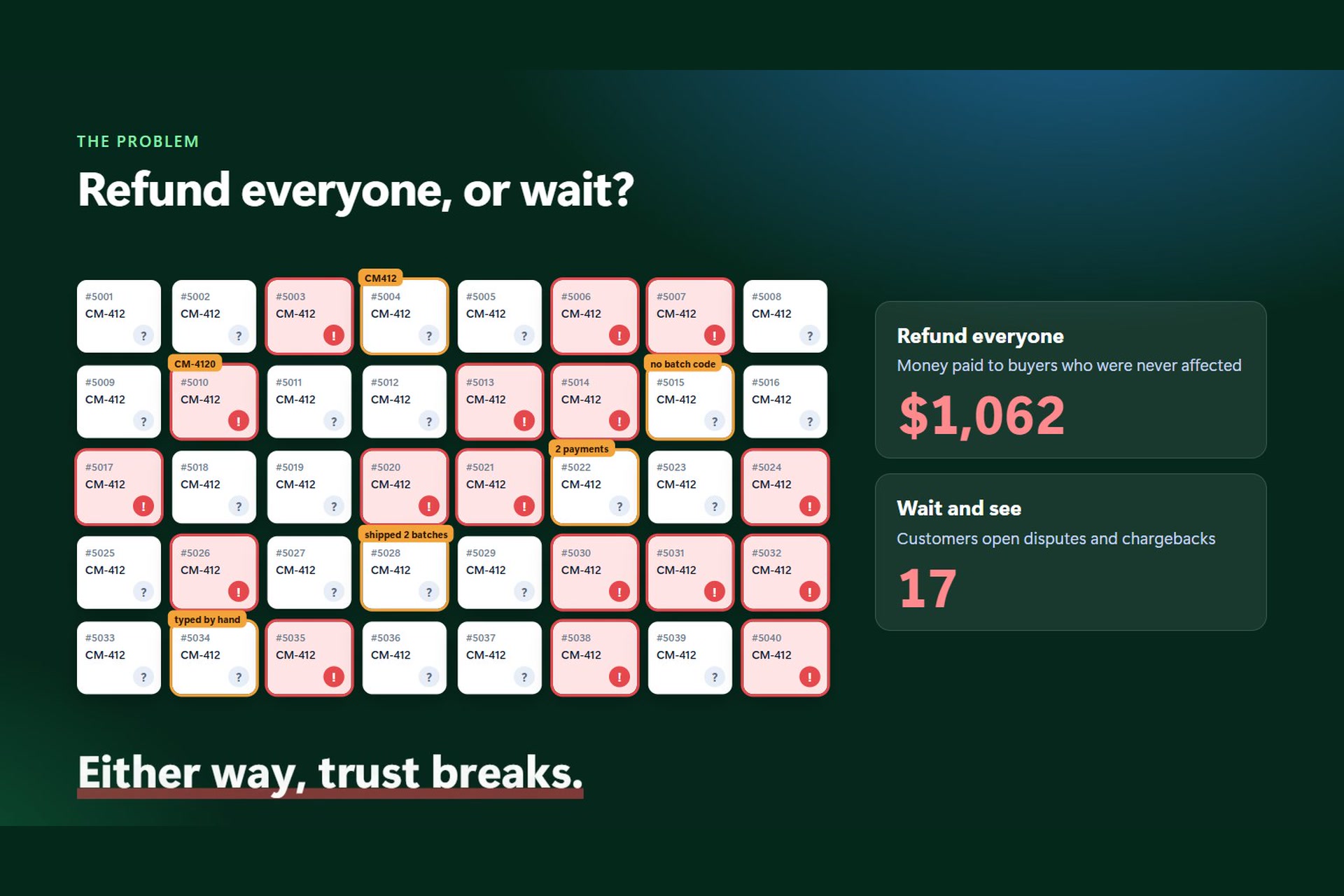
Sounds easy. Then the shop owner opens PayPal and finds 32 orders for that mug set, and nothing in PayPal says which batch any of those customers received. The batch code is stamped on the bottom of the mug. It might be in a packing record, or a spreadsheet someone kept, or nowhere at all.
So the shop picks one of two bad options. It refunds everyone and pays people who were never affected. Or someone refunds by hand from a spreadsheet, misses a few people, pays a couple twice, and keeps no record of why anyone got what they got. When a regulator or the supplier later asks "who did you refund, and why?", there's no good answer.
We kept coming back to one point. Pressing "refund" in PayPal is the easy part. The hard part is working out who is owed money, why, and how much, when the supplier's notice, the shop's own orders and PayPal's payments don't agree with each other. That's the part we built Make Good for.
What it does
Make Good takes a recall from "the supplier sent us an email" to "PayPal confirms these people were paid", and keeps the evidence for every step. A recall case runs through eight steps, each one a tab in the app.
1. Notice. Paste or attach the supplier's notice. Gemini reads it and pulls out the affected product codes, batch codes, unaffected batches, dates and the remedy the supplier asked for. Every value has to come with a word-for-word quote from the notice, and plain code then checks that the value really is inside the quote. Anything that fails is dropped. There's also a "pattern rules" reader that uses no AI at all, so the step still works if AI is switched off. A person reviews the result and saves it as the case's rules, in their own name.
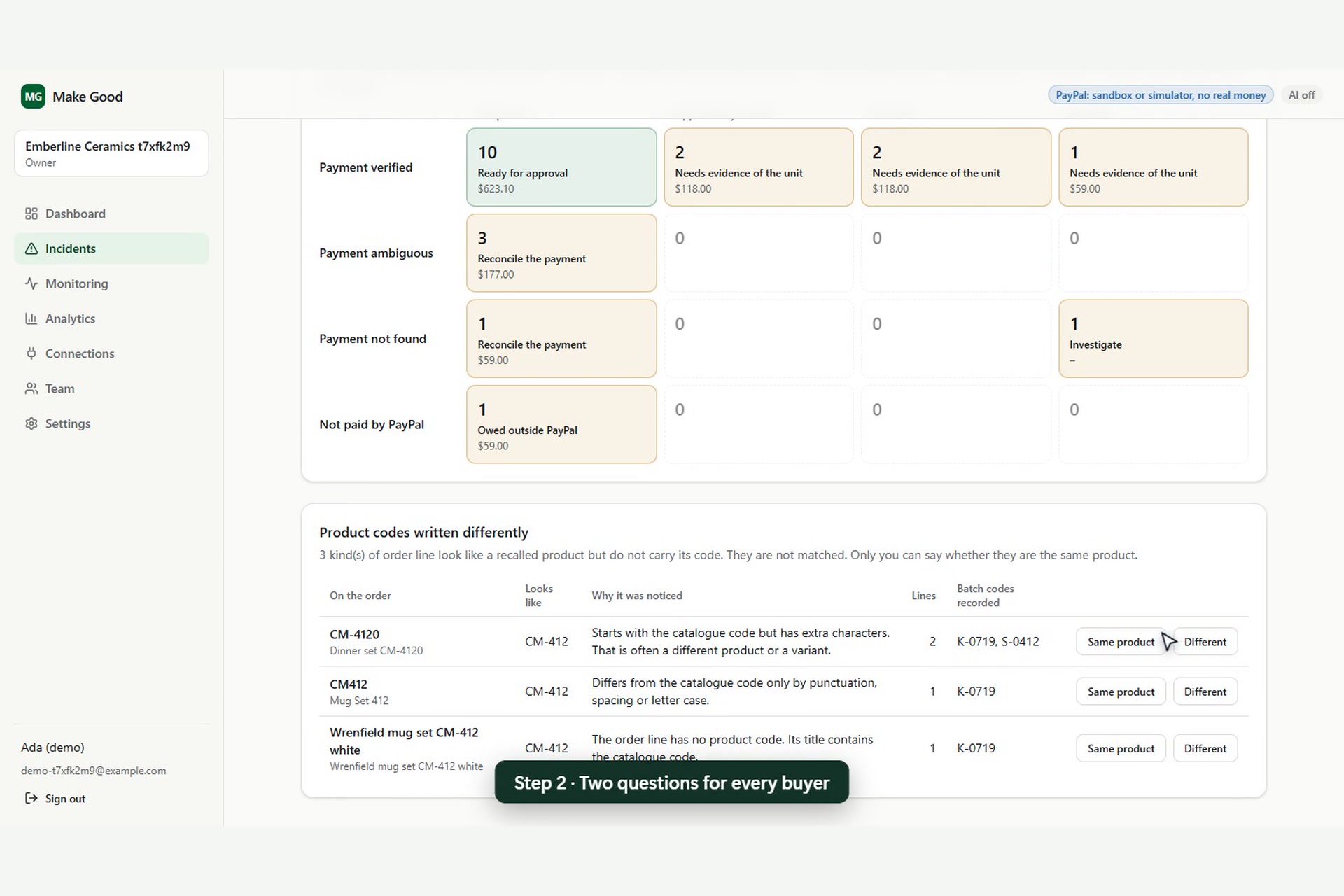
2. Customers. For each order line, Make Good answers two questions separately:
- Does this PayPal payment belong to this order?
- Did this customer actually receive the recalled batch?
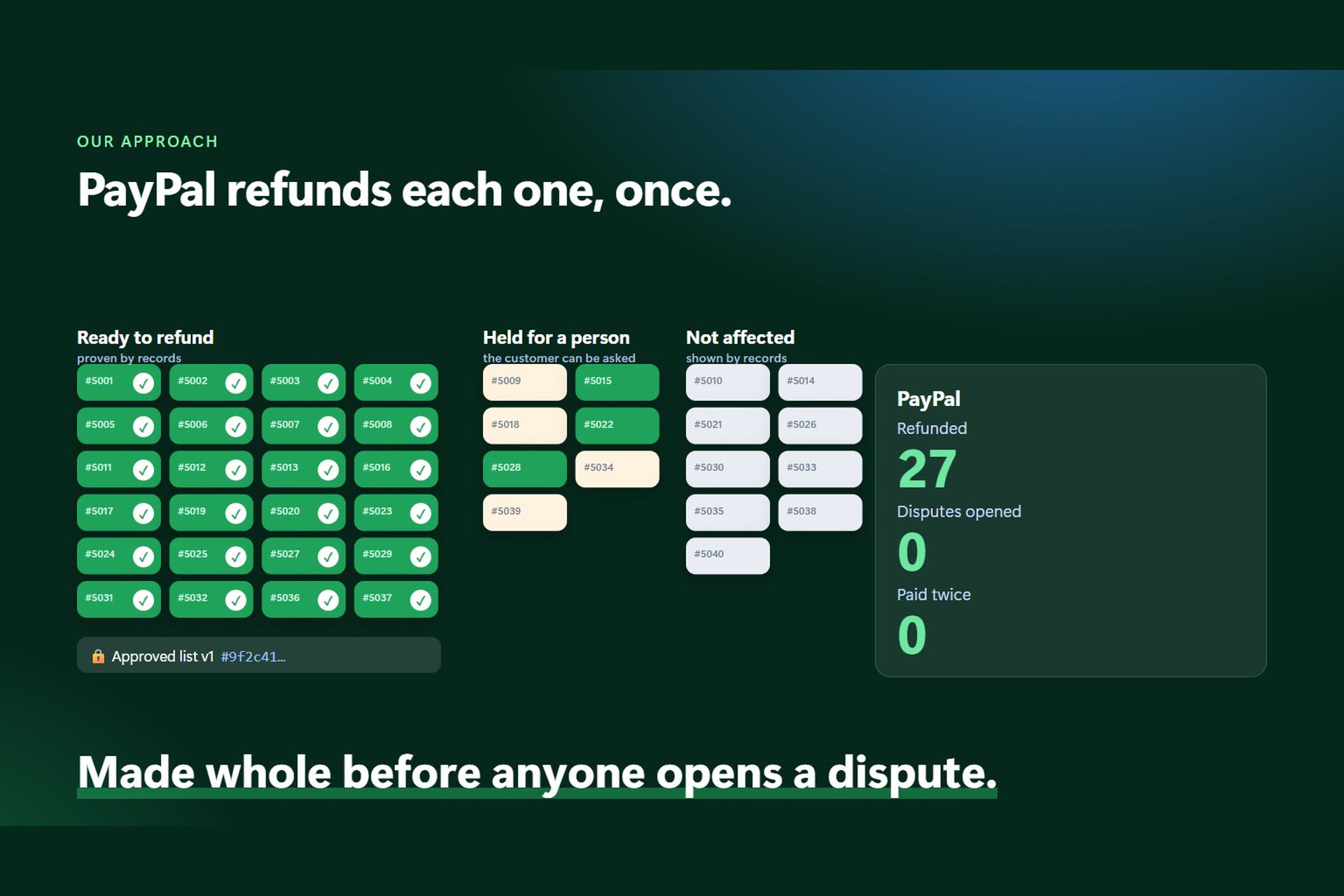
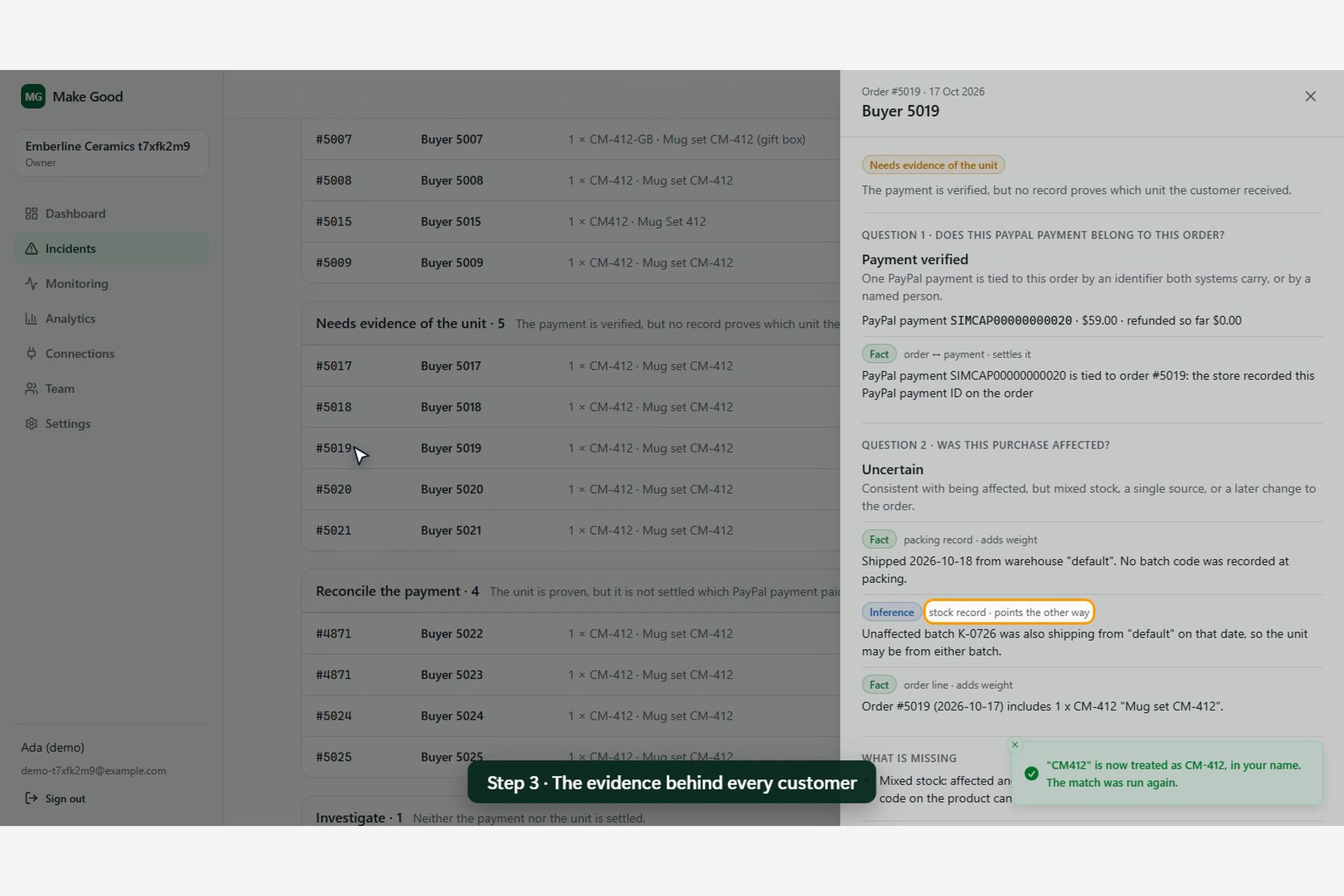
PayPal can help with the first one. It can never answer the second, because PayPal doesn't know about batches. Only the shop's packing records, or the customer, can. Crossing the two answers puts every record in one of a few clear states: proven, shown not affected, unknown, payment not found, and so on. In the demo case, 26 order lines give 10 records settled by the evidence, 11 held for a person and 4 cleared. Make Good also asks PayPal about disputes on each payment before anyone is paid.
3. Evidence. Each record shows the evidence behind it, labelled as fact, inference or assumption. For records waiting on a person, Gemini writes a short explanation that may only cite the numbered evidence (E1, E2...) and gaps (M1, M2...) it was given.
4. Timeline. A Bryntum Scheduler chart puts the whole recall on one screen: when each batch was shipping, the days when two batches were going out at once (mixed stock, where packing records matter most), the ship date of every customer's order, and how much of PayPal's 180-day refund window each payment has left. Under the chart, a list shows records still owed whose window closes within 30 days.
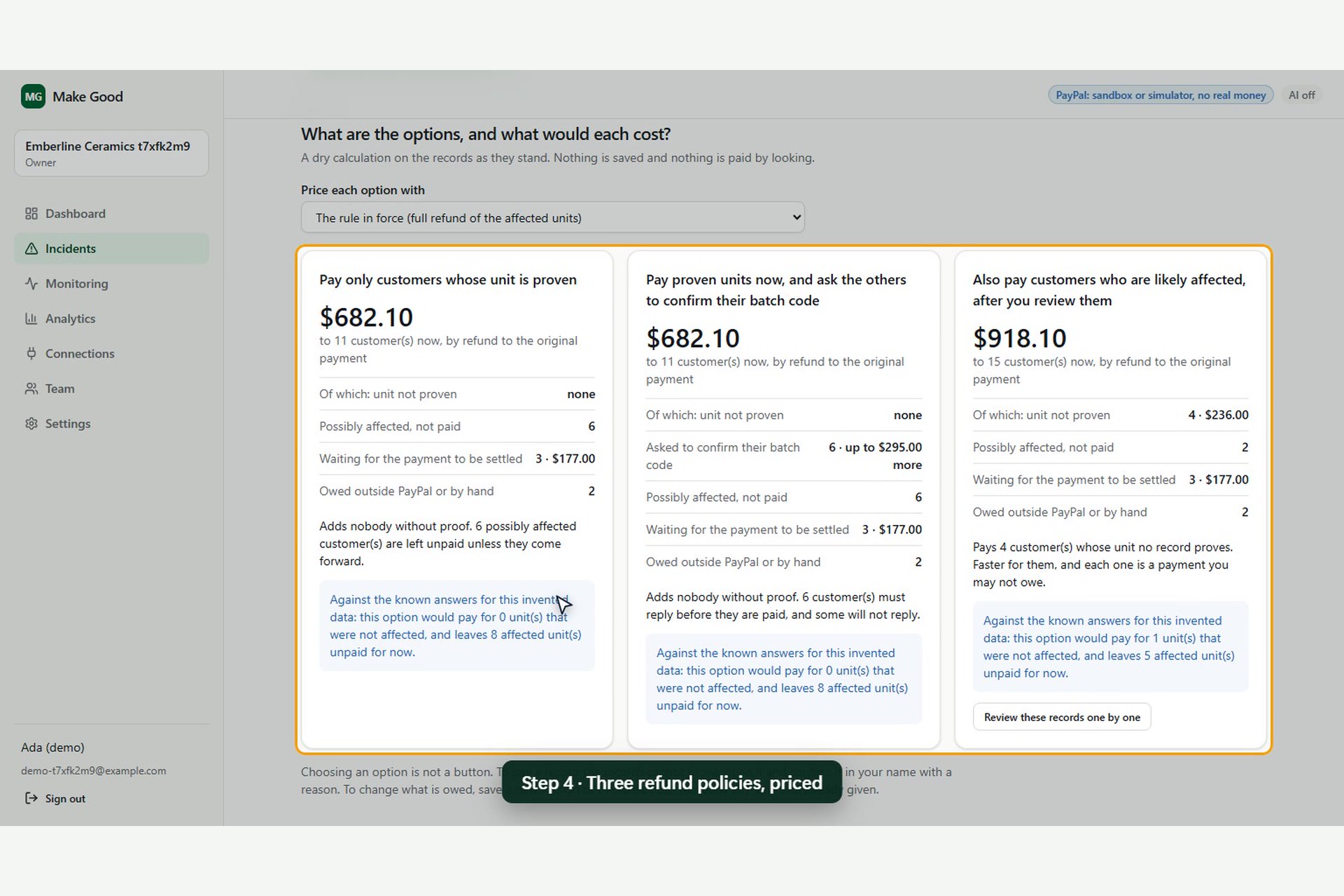
5. Options. The shop chooses a refund rule: a full refund of the affected units, half the price, a fixed amount per unit, or a replacement value from the Channel3 catalogue. Make Good works out what each option costs right away, including tax, shipping, discounts and refunds already made, without saving or paying anything. On the invented demo data it also says how many unaffected units an option would pay for and how many affected units it would leave out.
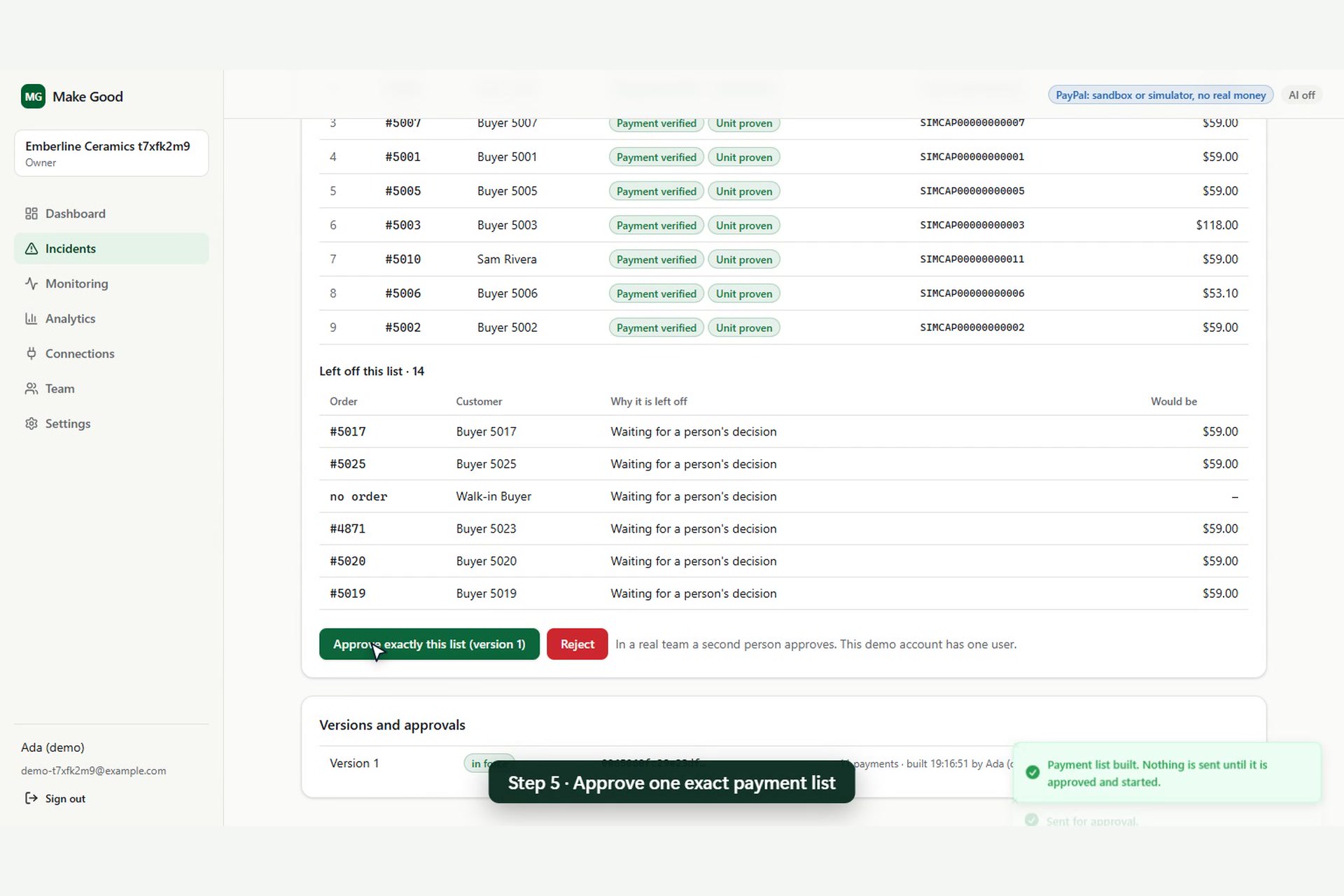
6. Approval. The payment list is frozen into a manifest that can't be edited. The person who built it can't approve it; a second person has to. If anything under the list changes after approval (a new customer, a changed rule, a refund someone made directly in PayPal), the approval is withdrawn and the worker won't send it.
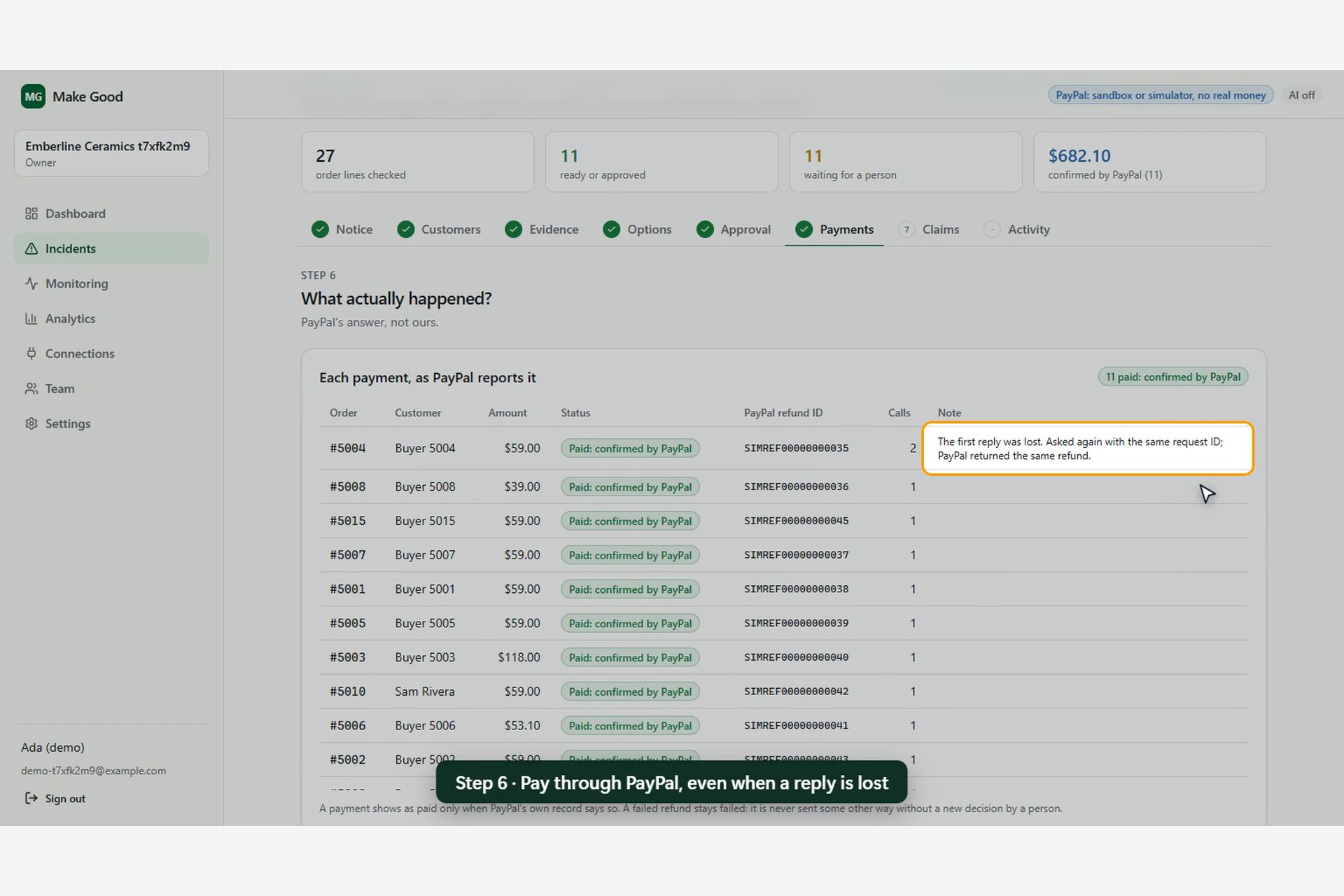
7. Payments. A background worker sends the refunds through PayPal's Payments API. Every call carries a PayPal-Request-Id, so if a reply gets lost and we retry, PayPal hands back the same refund and nobody gets paid twice. If PayPal refuses a refund, Make Good marks it failed. It never quietly switches to a payout to cover it.
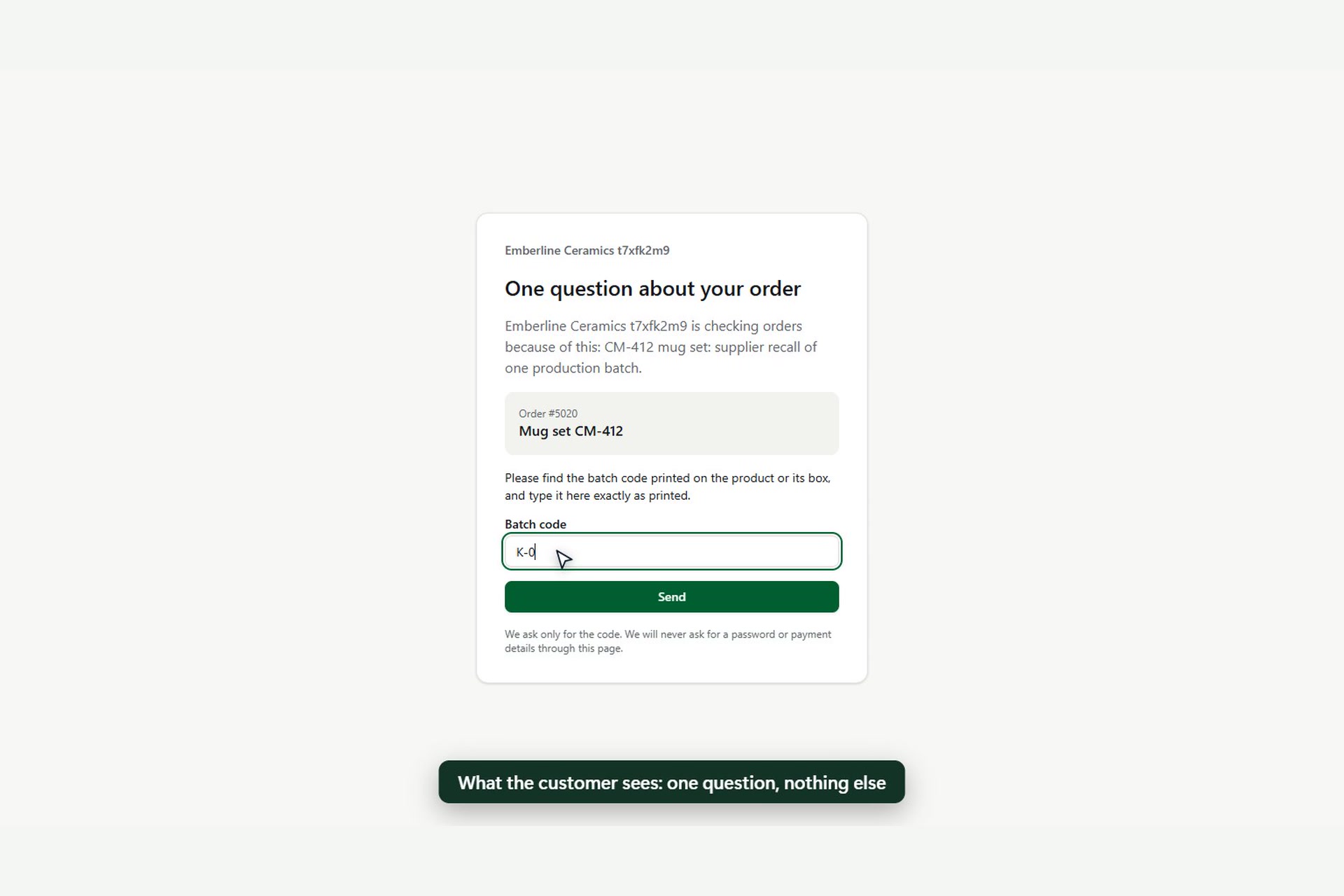
8. Claims. Customers whose records are unclear get a link to a public claims page. They can upload up to five photos of the batch code, and staff review each claim next to the matching orders.
The rule across all eight steps: a payment shows as paid only when PayPal's own record says so. A lost reply is "unknown", never "failed", and never sent a second time without asking PayPal first.
How we built it
The stack
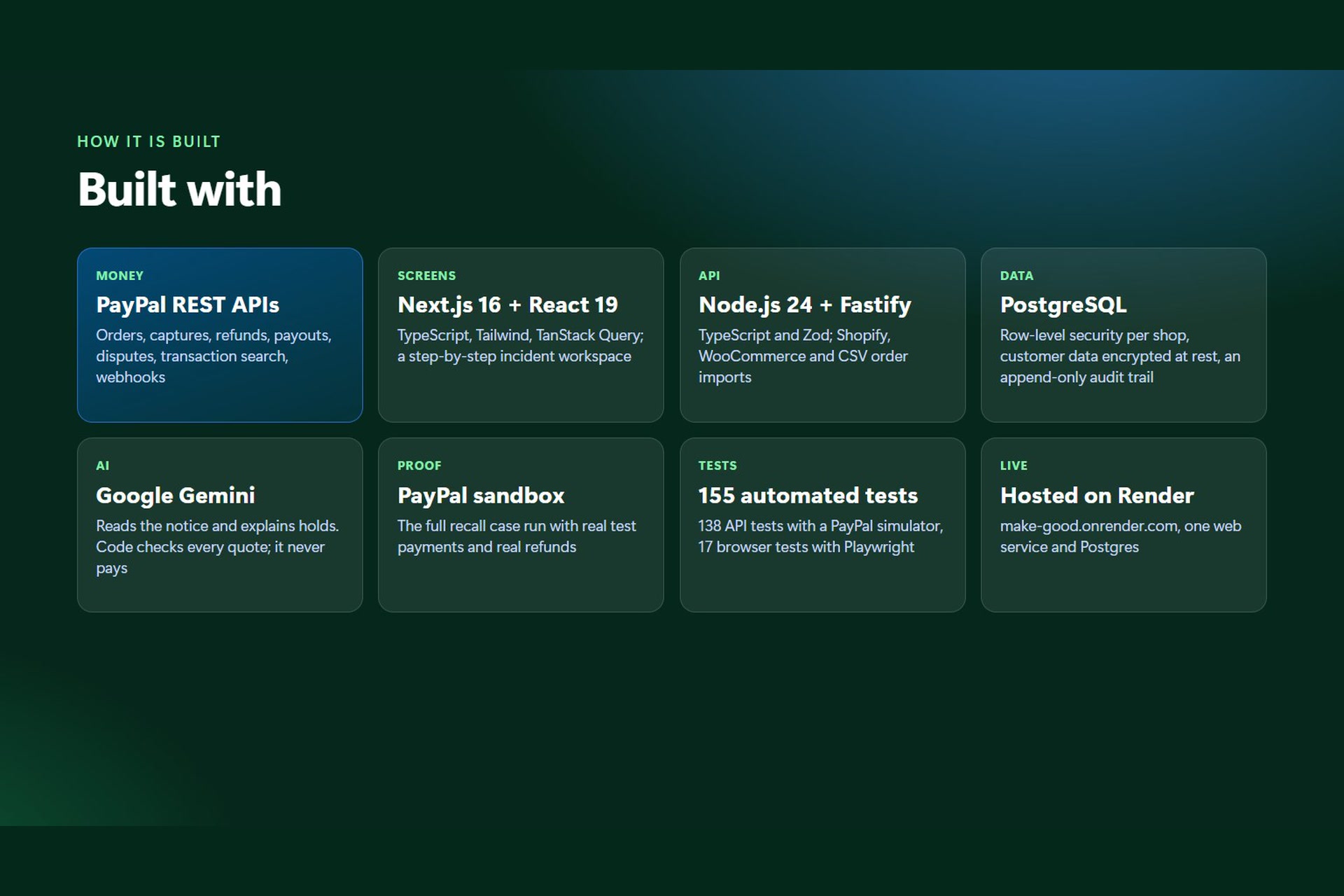
- Backend: Fastify 5 and TypeScript, run directly by Node 24, with Zod for every input and output. PostgreSQL holds everything: PGlite (Postgres compiled to WebAssembly) for local work and tests, and Render Postgres in production. A job queue in the same database runs the refund worker, staff alerts and emails. Each job is queued in the same transaction as the change that caused it.
- Frontend: Next.js 16 with React 19, Tailwind CSS 4 and TanStack Query. The landing page has a small Three.js scene of the recall.
- Other pieces: order import from Shopify (GraphQL Admin API) and WooCommerce (REST API) or a CSV file, team invitations by email, email through Resend, monitoring and analytics pages, error tracking, a full workspace export, and privacy, terms and "how AI is used" pages.
PayPal
Everything runs on the PayPal sandbox. Live mode is refused unless it's switched on deliberately.
- OAuth 2.0: connects a workspace to its PayPal app and checks which permissions it has.
- Orders API v2: creates real sandbox payments by test card for the recall case.
- Payments API v2: fetches each captured payment by ID, refunds it, and reads the refund back to confirm its status and amount.
- Payouts API: an option for customers who can't be refunded to the original payment.
- Disputes: checked before a payment goes on the list.
We also mapped PayPal's error names (CAPTURE_FULLY_REFUNDED, DUPLICATE_INVOICE_ID and others) to clear states on screen, so a refusal reads as a reason, not a stack trace.
Gemini
Google Gemini (gemini-flash-latest) is called over plain HTTPS, and its answers are held to a JSON schema. It has three jobs: read the supplier notice, say whether an odd product code on an order means a catalogue product, and explain held records. It has no tools. It never decides who is affected, never approves anything and never moves money, and each workspace can turn it off in Settings.
Sponsor tools
Render hosts the whole thing from a render.yaml Blueprint: one web service plus a Render Postgres database. The web service runs Next.js on the public port and the API on a private port next to it. If either process stops, the other is stopped too, so Render restarts both together. Secrets (the Gemini, Resend and Channel3 keys, the email settings and an error webhook) are marked sync: false, so a Blueprint sync can never wipe values set in the dashboard. /api/health reports the database type and whether row-level security is active, which is how we caught a live bug (see Challenges). The demo at https://make-good.onrender.com runs there.
Bryntum Scheduler draws the Timeline step. We used the free Community edition (8.0.1, MIT licence) through its React wrapper, and only its free features. The server builds the data from what the matching engine already stored, and the chart just draws it. The rows are:
- one bar per batch while it was shipping: red if recalled, blue if not, grey while still in stock;
- orange bars for mixed-stock periods, when two batches were going out at the same time;
- one row per customer record, with a diamond on the ship date and a bar for PayPal's 180-day refund window: teal while open, orange in the last 30 days, red once closed.
Hovering a bar shows where it came from. The chart is read only: nothing on it can change a record or move money. It answers the question a merchant has before approving anything: "Is anyone about to run out of time to be refunded?" Bryntum's icon font normally loads from a CDN, which our content security policy blocks, so we bundle the icons from the @bryntum/core-community package instead.
Channel3 answers a pricing question: what would a replacement cost today? On the Options step, staff search Channel3's product catalogue by product name, using the POST /v1/search and GET /v1/products/{id} endpoints. Only the search words leave Make Good, never a customer's name, email or order. A person has to click "This is the recalled product" before anything is saved. The server then looks at that product's retailer offers. It uses new, in-stock offers if there are any (any new offers if not), keeps the currency with the most offers, and takes the median price. With an even number of prices it takes the lower middle one, so the figure is always a price a real retailer asked. It saves that price with the date, the number of retailers and the name of the person who confirmed it. Saved rows are never changed. Affiliate buy links are not stored.
The confirmed price then appears as a pricing option. For \( n \) affected units and a median price \( \tilde{p} \), the option pays
$$\text{total} = n \times \tilde{p}$$
In our live test, a Gibson stoneware mug set came back at 23.97 USD across 3 retailers. For the 11 proven units that's \( 11 \times 23.97 = 263.67 \) USD, against 623.10 USD for a full refund of the purchase price. As always, it's a dry run until someone approves a list.
Security and privacy
Customer names, emails, addresses and raw payloads are encrypted at rest with AES-256-GCM, and emails are matched through a keyed hash, so search still works. PostgreSQL row-level security keeps each workspace's data apart, even if a query forgets its filter. On top of that there's CSRF protection, a strict content security policy, rate limits stored in the database, email verification and password reset.
Testing
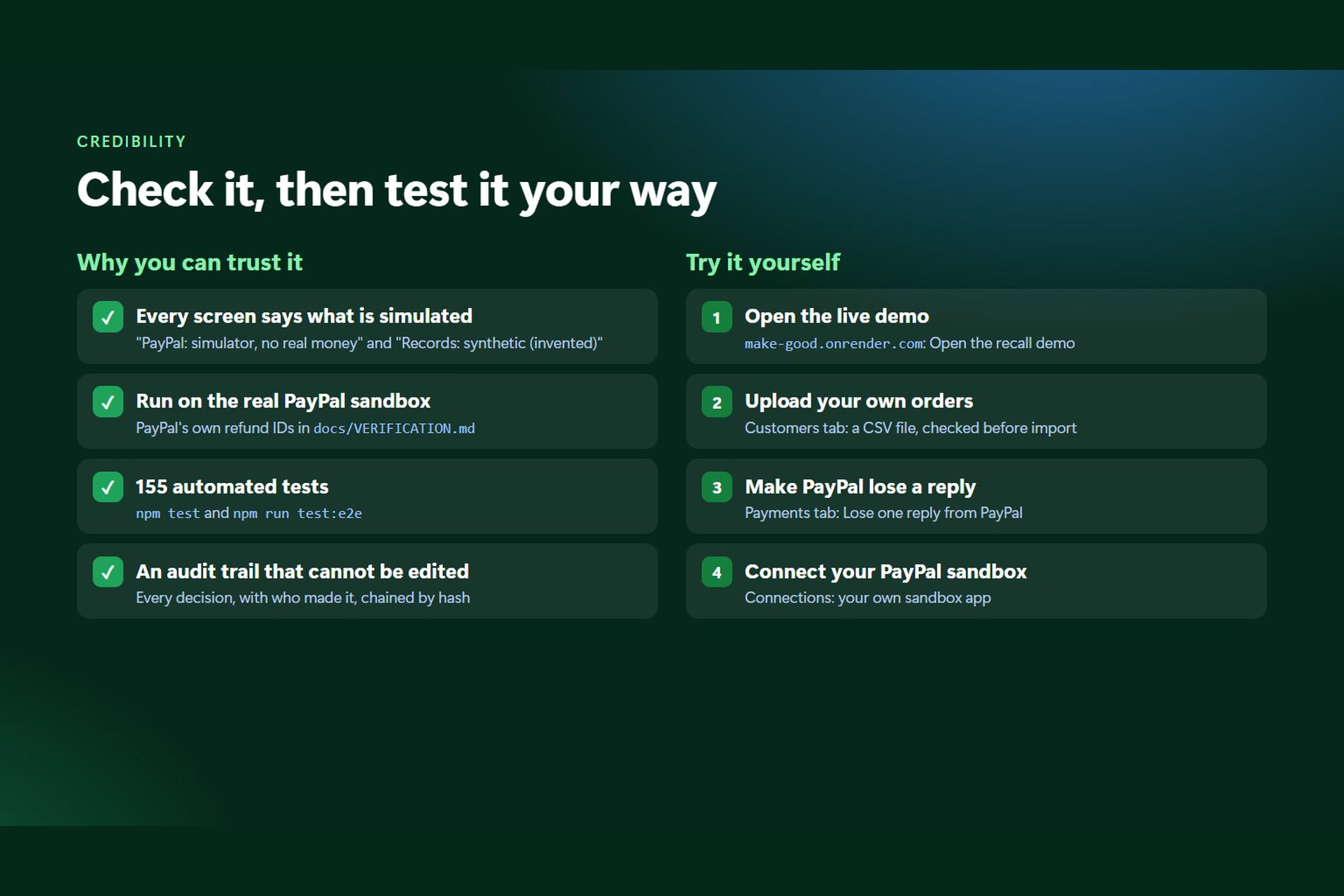
145 API tests run on a real Postgres engine in-process, covering matching, pricing, approval manifests, the money path with faults injected (lost replies, 5xx errors, a stopped worker, duplicate jobs), the timeline and the Channel3 catalogue. Playwright browser tests click through the whole recall case. A separate script, npm run catalog:verify, checks Channel3 against the real API.
What we tested on the real PayPal sandbox
npm run sandbox:recall makes real sandbox payments by test card, runs the recall on them, then asks PayPal what actually happened. In the last full run, all 47 checks passed: 26 of 26 payments were found by ID, and an approved list of 16 refunds (977.10 USD) went through. The orders and packing records in that case are invented, and the app labels them that way. The payments and refunds are PayPal's.
The sandbox caught things we'd have got wrong:
- PayPal refused a second payment with an invoice number it had already seen (
DUPLICATE_INVOICE_ID). Two orders ended up pointing at one payment, and Make Good held both as ambiguous instead of guessing. - We refunded one payment directly in PayPal after the list was approved. Our own refund was then refused (
CAPTURE_FULLY_REFUNDED). It stayed marked failed, and no payout was created to cover it. - Sending the same refund twice with the same request ID gave back the same refund. Only half of each payment had been refunded, so nothing went out twice.
Challenges
Keeping the AI in its lane. Letting Gemini decide who gets refunded would have been easy. We didn't trust it with that. Every value it pulls out is checked against the source text, and otherwise it only writes explanations. The decisions come from rules and a person.
Lost replies. When a refund call times out, you don't know whether the money moved. Most code treats that as a failure and retries, which is exactly how people get paid twice. We added a third state, "unknown", and settle it by asking PayPal before doing anything else.
Row-level security on the live site. Right after the first Render deploy, about a third of requests failed with invalid input syntax for type uuid: "". A pooled database connection kept an empty workspace setting, and our security policy tried to cast it to a UUID. A small migration that treats an empty setting as "no workspace" fixed it.
A timeline with no bars. The Bryntum chart looked right on our machines but showed only text labels on the live site. Bryntum's theme uses the CSS light-dark() function. Next.js's production CSS build rewrites that into helper variables that only a color-scheme rule defines, and we didn't have one. Every bar colour came out invalid and was drawn transparent. Development mode doesn't do the rewrite, so we never saw it locally until we tested a production build. The fix was a single color-scheme line in our global CSS.
A price from one shop. Channel3 often lists a product at only one or two retailers, so a "replacement value" can rest on a single price. Searching by bare model code also tended to find the wrong item. So the screen shows the retailer count and date next to every price, nudges people to search by product name, and requires a person to confirm the product.
Things PayPal won't tell you. Our sandbox app doesn't have Transaction Search, so we can't list every payment. Make Good fetches each one by its ID instead. And cancelling one test payout returned a 500 on every try, so a single 1.00 USD sandbox payout is still sitting unclaimed.
What we learned
The refund is the easy bit. Nearly all the work is in the records around it. We also learned to treat "we don't know" as a real answer. An honest "unknown" in front of a person is worth more than a confident wrong number, and most of this product is about being honest with uncertainty.
On the sponsor side: free tiers are enough to ship something real. Render ran our whole stack on its free plan, Bryntum's Community edition covered everything the timeline needed, and Channel3 gave us live prices with two endpoints. The bugs we hit were in the seams between tools, not in the tools themselves.
What's next
We haven't interviewed a real merchant yet, so that comes first. After that: try the Shopify and WooCommerce imports on real stores, add proper database backups on a paid Postgres plan, and use Channel3's product webhooks to spot when a recalled product disappears from retailers. Then the same flow could handle other mass refunds, like double charges and cancelled events.
Built With
- bryntum
- fastify
- gemini
- github-actions
- google-gemini-api
- next.js
- node.js
- paypal
- paypal-payouts
- paypal-rest-api
- paypal-sandbox
- pglite
- playwright
- postgresql
- react
- render
- resend
- shopify
- tailwindcss
- tanstack-query
- three.js
- typescript
- woocommerce
- zod
