-
-
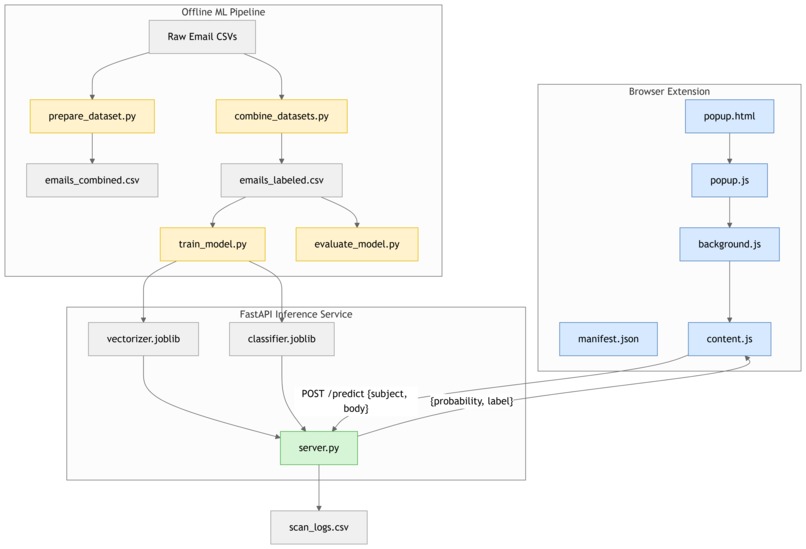
Software Architecture of MailWatch
Inspiration
Every day, millions of people receive emails that look trustworthy, but are actually sophisticated phishing scams. Traditional spam filters miss context-based threats that mimic legitimate brands. Our team wanted to create something that makes email security transparent and explainable, so even non-technical users can understand why an email looks suspicious.
That’s how MailWatch was born, like Grammarly, but for email safety, using Chrome’s built-in AI to detect and explain phishing risks with emails before you even click and open them by turning awareness into the first line of defense.
What it does
MailWatch is a Chrome Extension that scans emails directly inside Gmail and assigns a risk badge - 🟢 Safe, 🟠 Review, or 🔴 Scam beside each sender. Hovering over the badge reveals an AI-generated explanation (e.g., “Contains urgency terms and a shortened suspicious link”), helping users learn while staying protected.
It delivers:
- AI-powered detection using TF-IDF + Logistic Regression, trained on 150K+ real emails.
- Explainable insights powered by Gemini Nano’s Prompt & Summarizer APIs.
- Privacy-safe design - runs locally with zero data leaving the device.
- Real-time protection - scans inbox emails in < 0.3 seconds.
How we built it
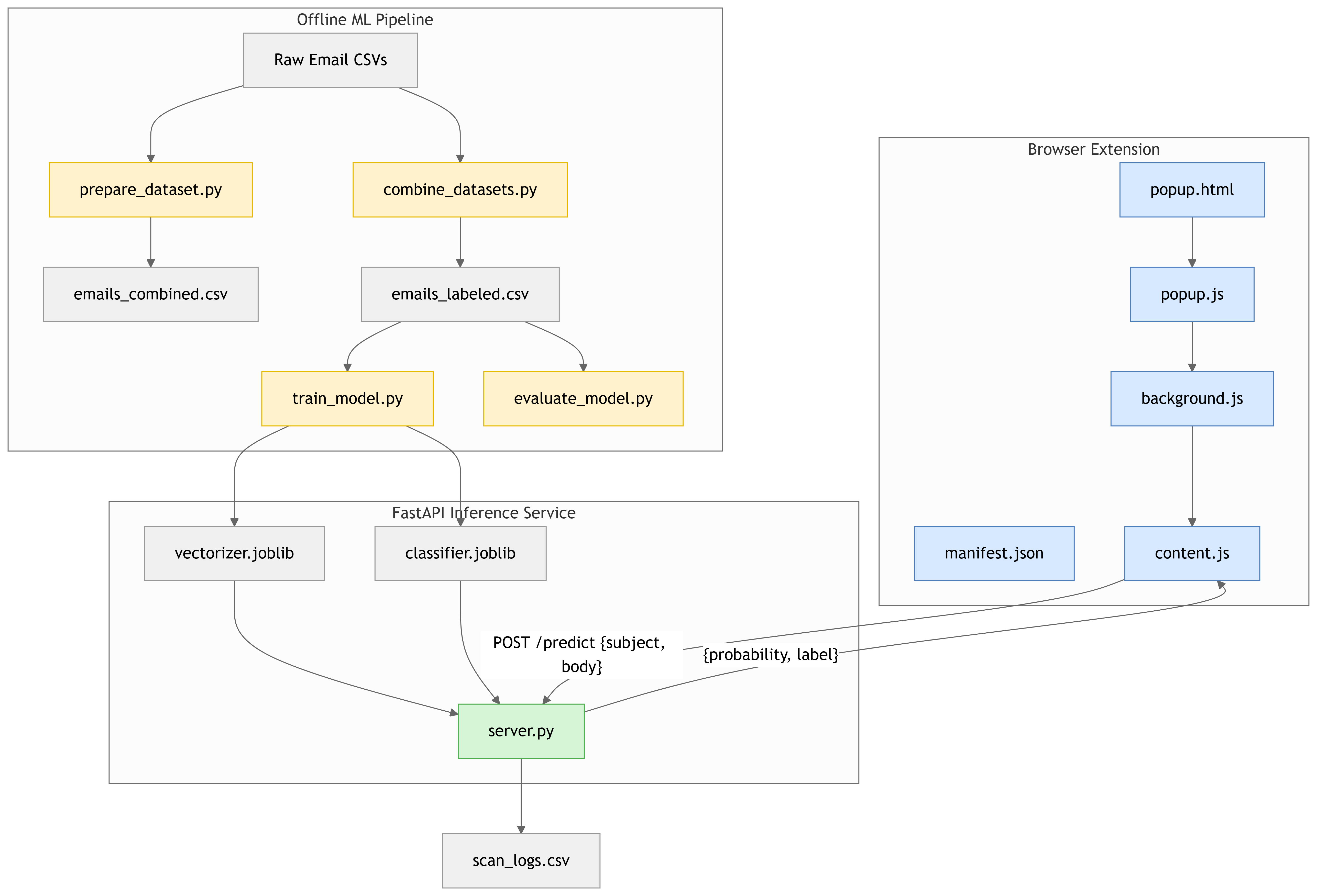
- Frontend: Chrome Extension (JavaScript) overlays risk indicators inside Gmail.
- Backend: FastAPI (Python) microservice handles model inference.
- Model: TF-IDF vectorization + Logistic Regression trained on 8 open datasets (CEAS_08, Enron, SpamAssassin, Phishing_Email, etc.).
Built-in AI APIs:
- Prompt API: contextual reasoning and tone analysis.
- Summarizer API: concise explanations for tooltips.
- Proofreader API: detects manipulative or urgent language patterns.
Challenges we ran into
- Integrating Chrome’s new built-in AI APIs with local ML inference required careful async design.
- Balancing accuracy vs speed - optimizing inference to under 0.3 s per email.
- Building explainability that’s simple yet technically correct.
- Designing UI elements that feel native to Gmail. Each of these challenges pushed us to design a faster, safer, and more human-centered email protection experience.
Accomplishments that we're proud of
- Achieved 99% recall for phishing detection with minimal false positives.
- Created a fully explainable security assistant for webmail users.
- Integrated Gemini Nano APIs to make detection contextual and privacy-preserving.
- Designed an extension that runs completely offline without server dependency. Finally, despite tight timelines, we’re proud to have achieved measurable real-world performance and trust-building outcomes.
What we learned
- Chrome’s client-side AI opens new privacy-preserving possibilities.
- Explainability transforms user trust - people prefer understanding why over blind alerts.
- Building for webmail requires UI precision and minimal latency. On the whole, the biggest lesson: users value clarity and control as much as protection as explainable AI bridges that gap beautifully.
What's next for MailWatch
- Fine-tune Gemini Nano for contextual phishing classification.
- Extend to Edge & Brave browsers.
- Add voice alerts for visually impaired users using Chrome’s Text-to-Speech API.
- Publish on Chrome Web Store with open-source transparency.


Log in or sign up for Devpost to join the conversation.