-
-
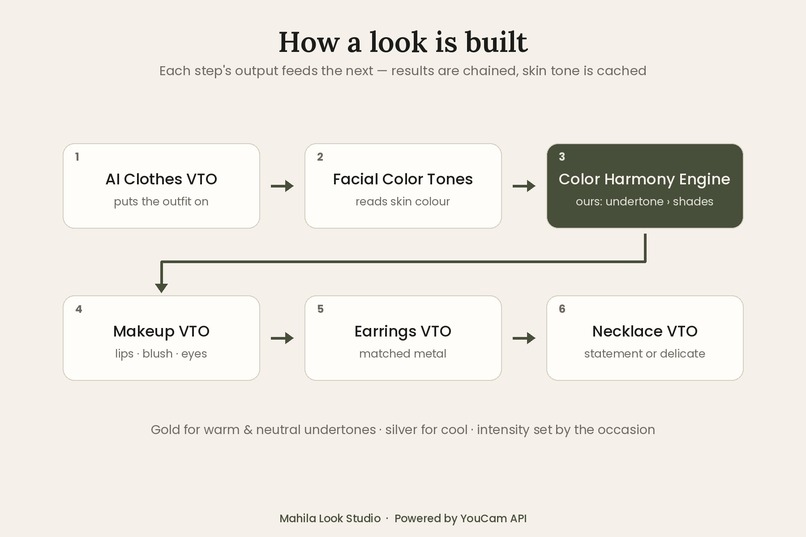
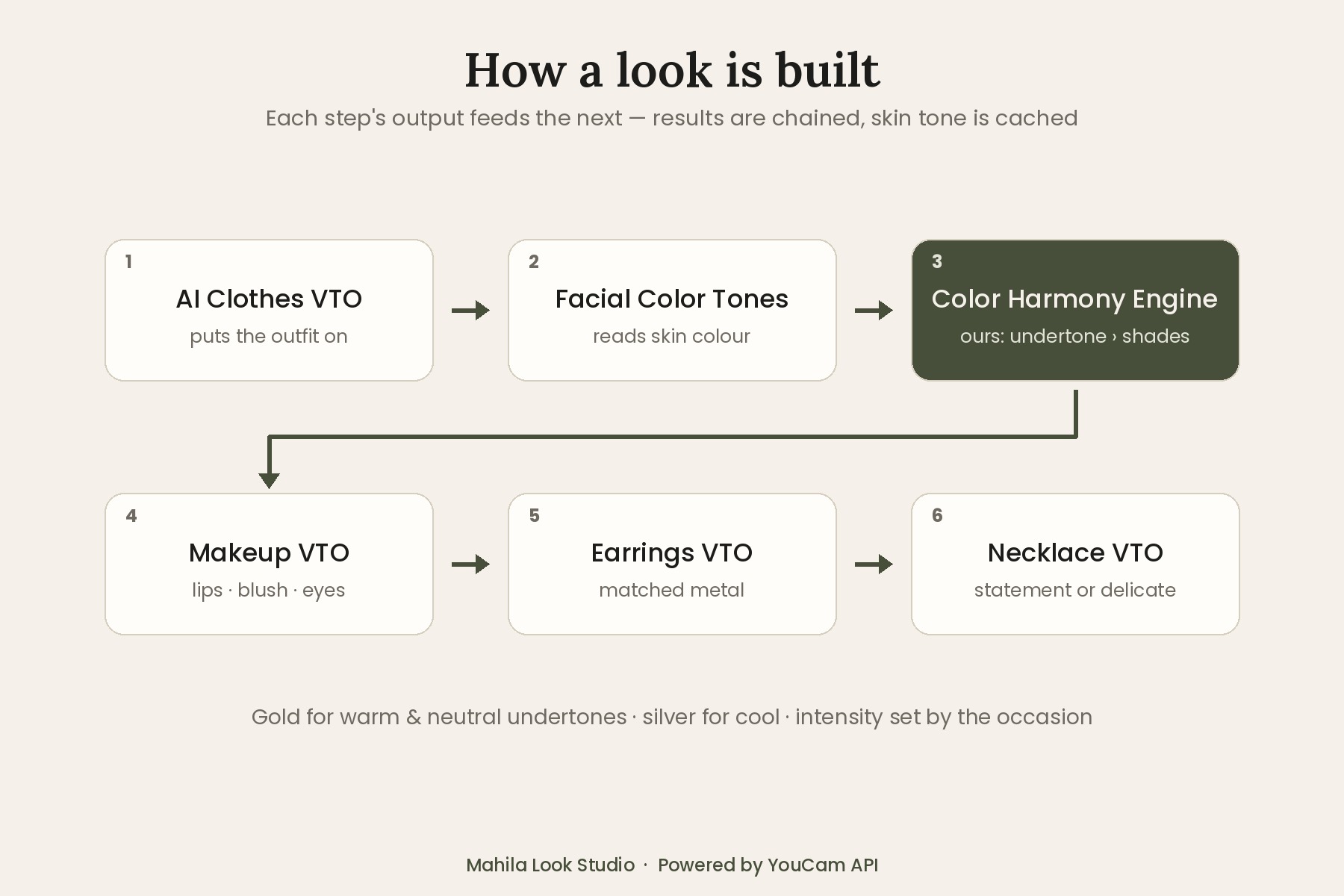
Five YouCam APIs chained, with our own Color Harmony Engine in the middle.
-
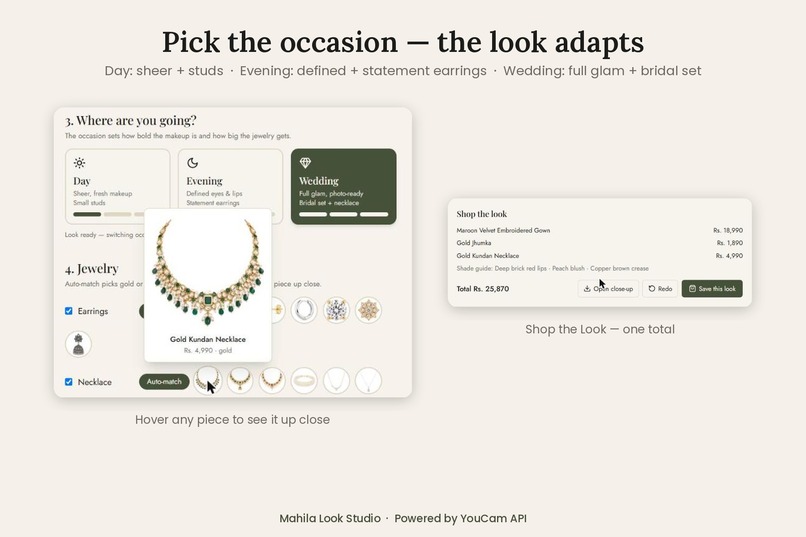
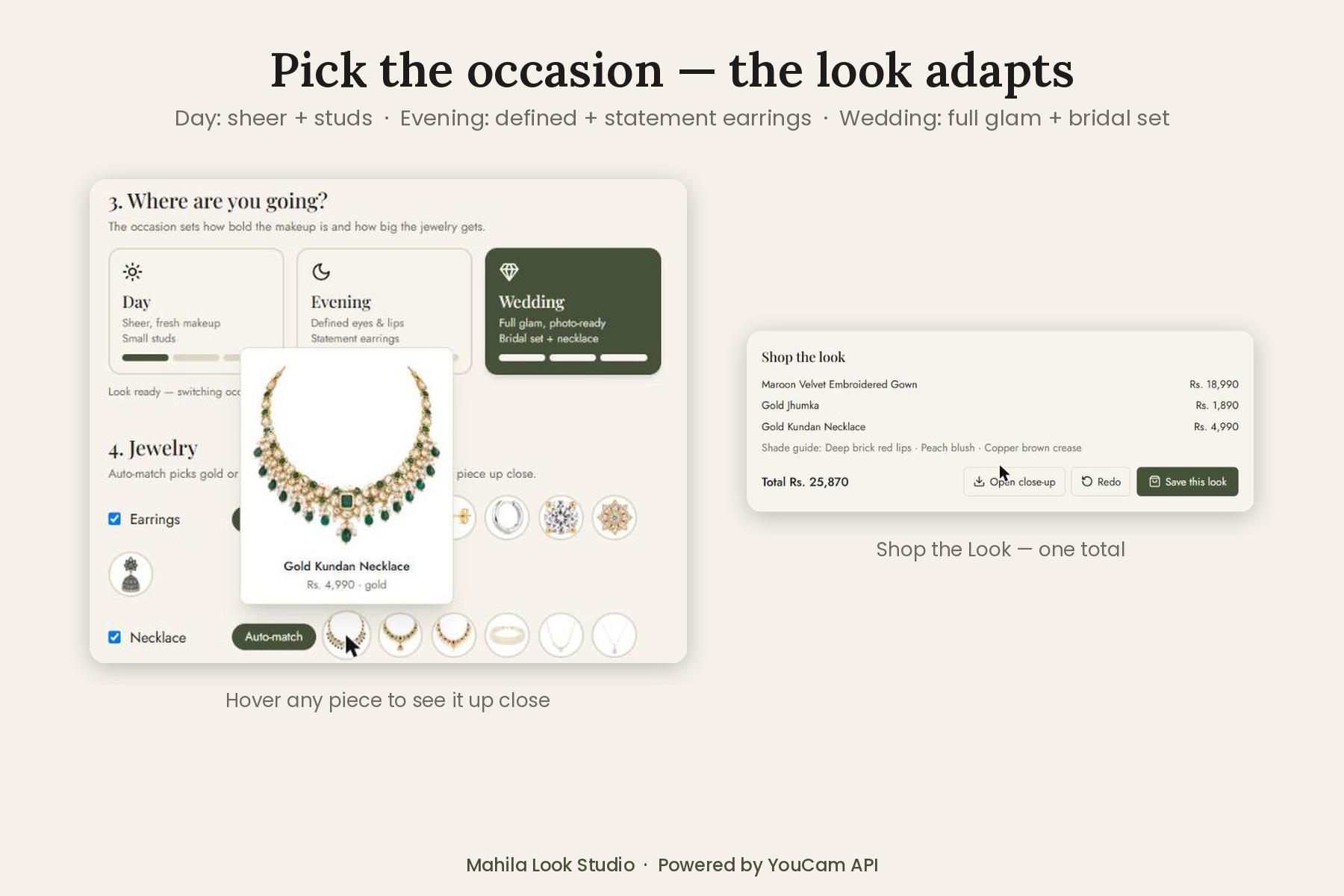
Pick Day, Evening or Wedding and the makeup intensity and jewelry size adapt. Hover to preview any piece, then Shop the Look with one total.
-
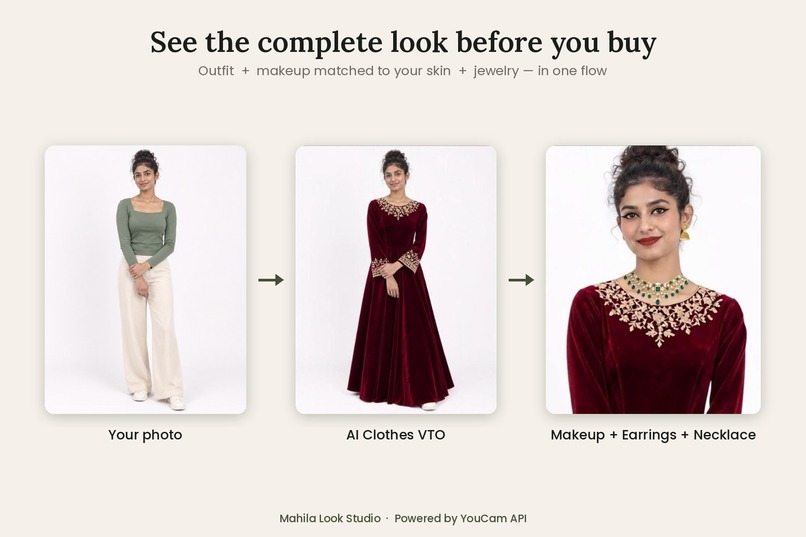
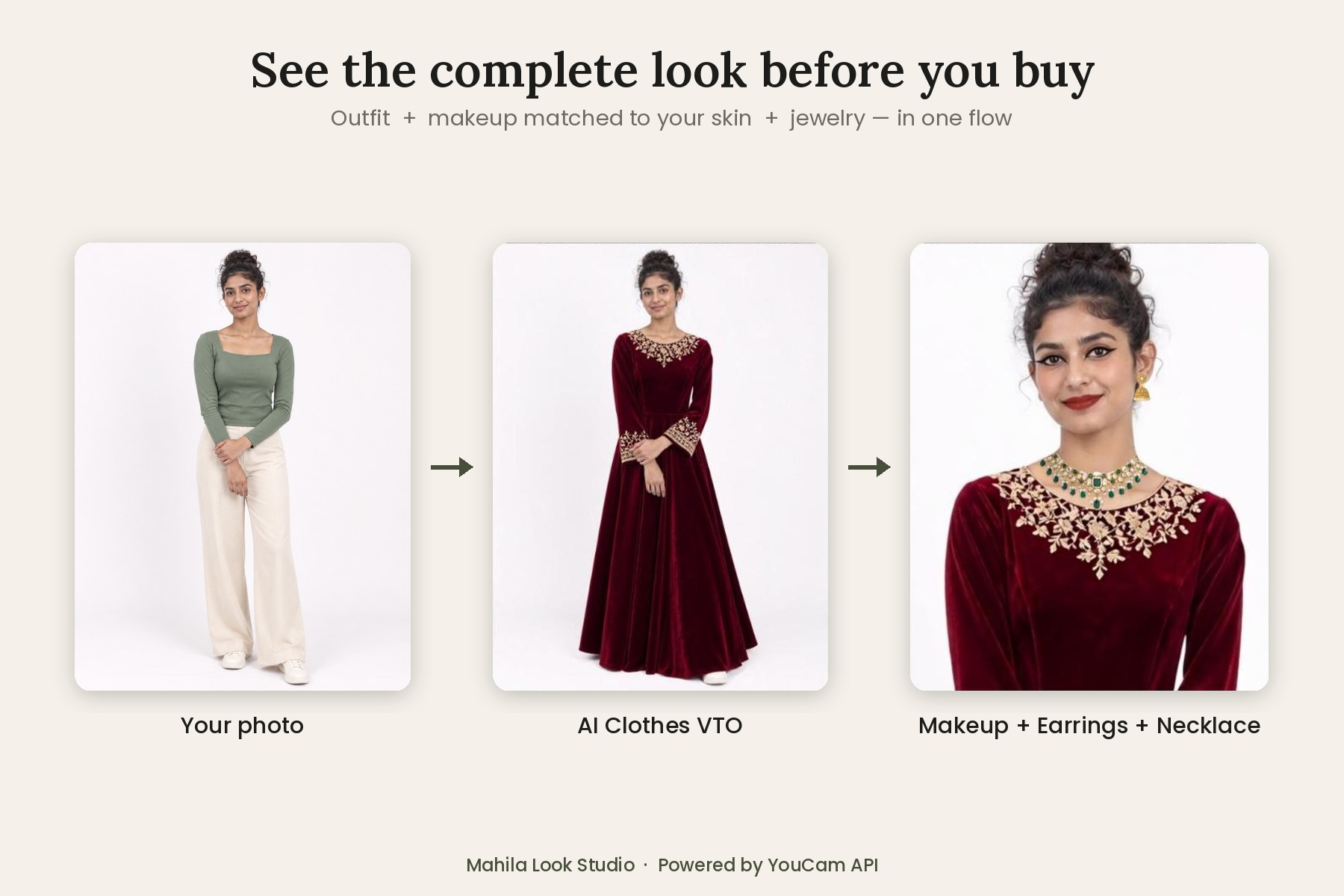
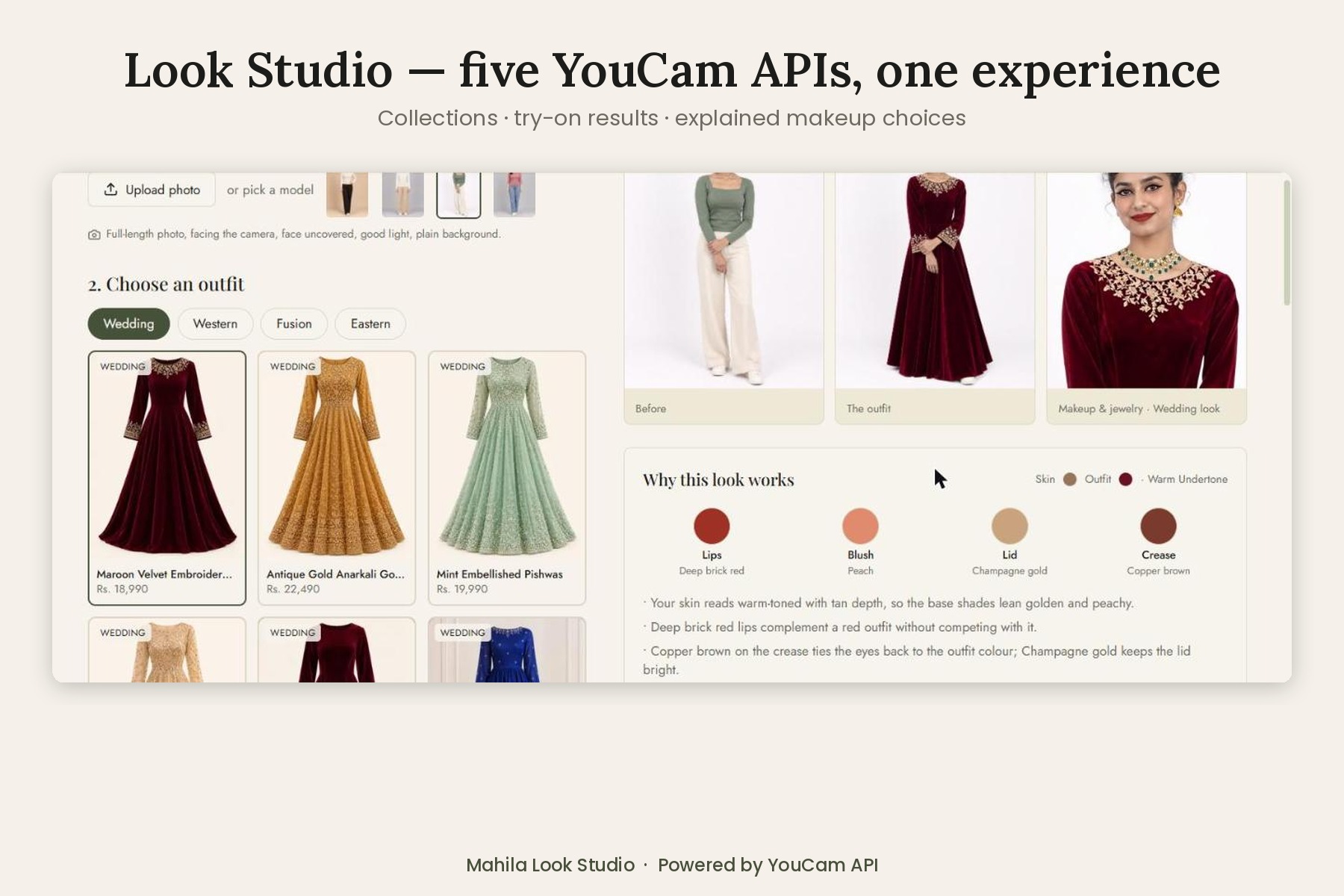
From photo to complete look: AI Clothes VTO puts on the outfit, then makeup, earrings and a necklace are added, all matched to the shopper.
-
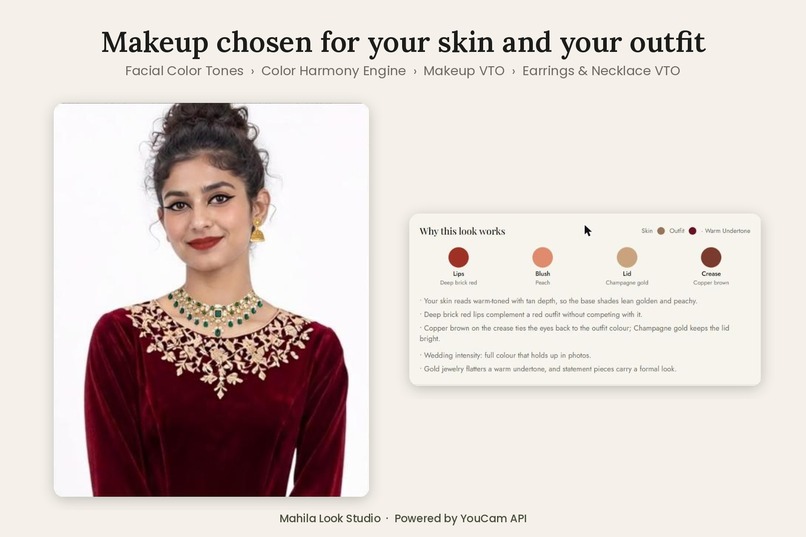
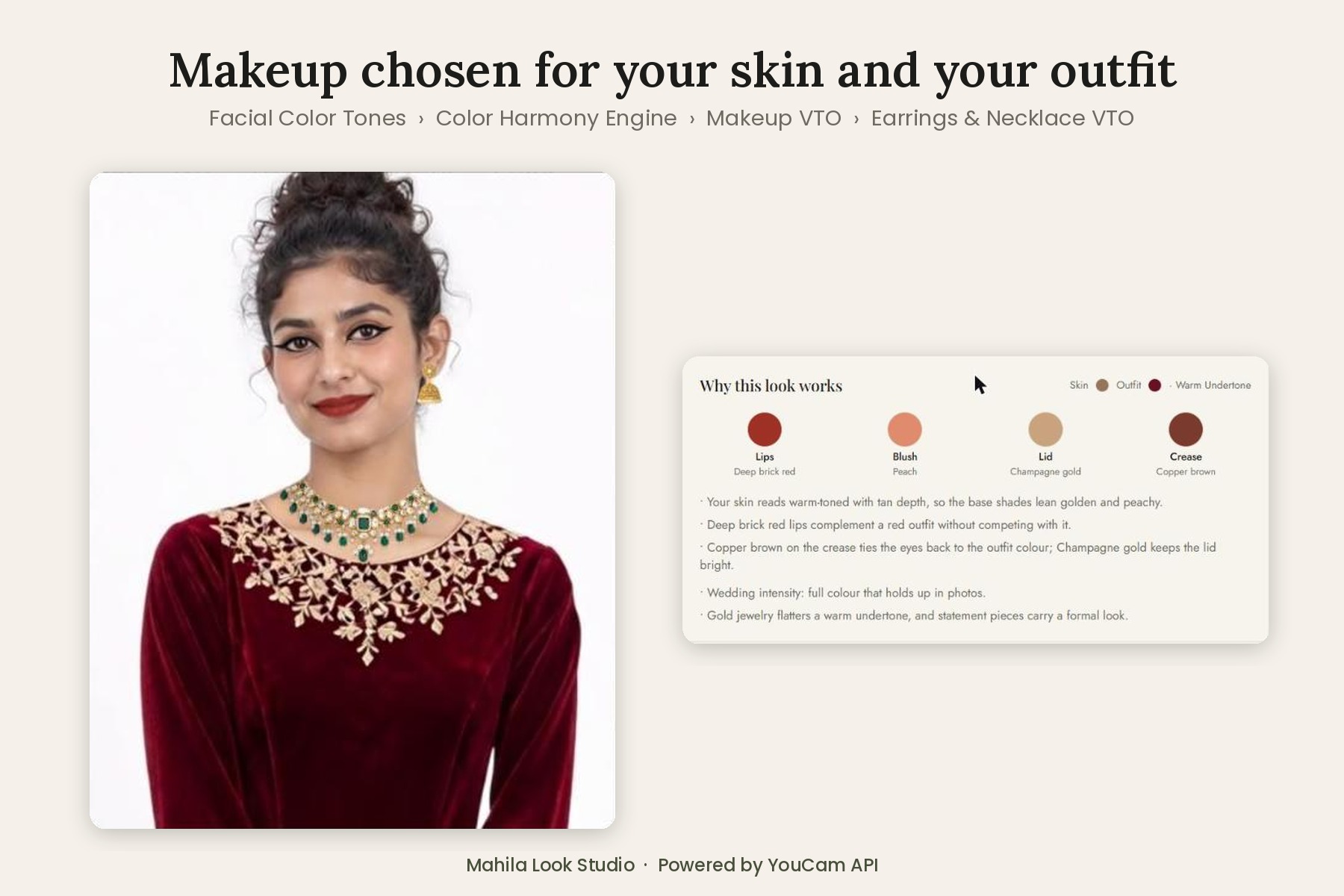
Makeup picked for your skin tone and outfit colour, with the reason for every shade.
-
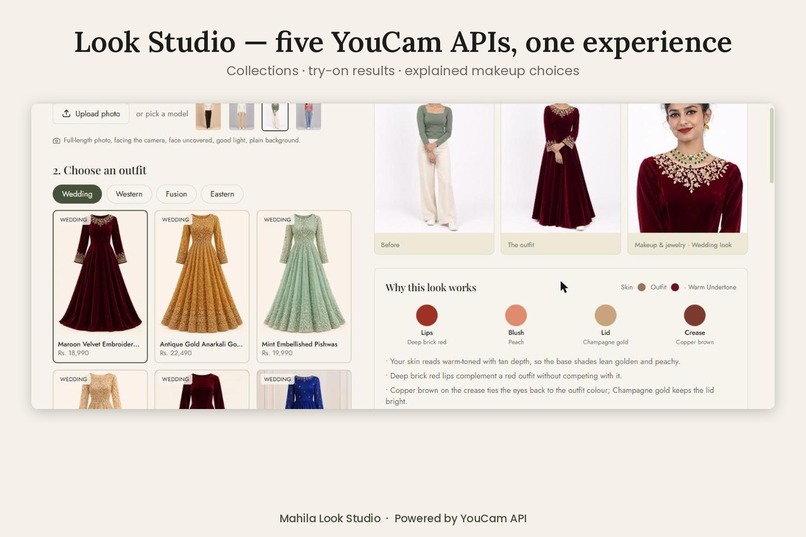
The Look Studio: Wedding, Western, Fusion and Eastern collections, with before, outfit and close-up results side by side.
Inspiration
In Pakistan, an outfit for Eid or a wedding is never bought on its own. It comes with makeup and jewelry that have to work with it. Online stores only show you the dress, so shoppers are left guessing: which lipstick suits a maroon velvet gown? Gold or silver for my skin? How will the whole look come together? That guesswork leads to abandoned carts and returns.
We wanted one place where a shopper sees the complete look (outfit, makeup and jewelry) on themselves before they buy.
What it does
Mahila Look Studio builds the complete look in one flow:
- Pick a photo and an outfit from the Wedding, Western, Fusion or Eastern collections.
- Choose the occasion (Day, Evening or Wedding). This sets how bold the makeup is and how big the jewelry gets.
- The app tries the outfit on, reads the shopper's skin tone, chooses makeup that suits both the skin and the outfit colour, applies it, and adds matching earrings and a necklace.
- It explains every choice in a "Why this look works" card: the undertone, why these lips suit this outfit, why gold or silver flatters this skin.
- Shop the Look puts the outfit, earrings and necklace together with one total.
Details that make it feel like a real store:
- Tops are framed waist-up, so the shopper's own bottoms never distract. Dresses and gowns are tried on head to toe.
- Switching the occasion re-renders only the makeup and jewelry, not the whole look.
- Hover over any jewelry piece to preview it up close, and click any result to view it full screen.
How we built it
A Next.js + TypeScript storefront with Tailwind CSS, deployed on Vercel. All AI calls go through server-side API routes, so the YouCam API key never reaches the browser.
Each look chains five YouCam APIs, with our own step in the middle:
| Step | What it does |
|---|---|
| AI Clothes VTO (cloth-v4) | Puts the outfit on the shopper |
| AI Facial Color Tones Analyzer | Reads the skin colour |
| Color Harmony Engine (ours) | Picks makeup shades and jewelry metal |
| AI Makeup VTO | Applies lips, blush, eyeshadow and liner |
| AI Earrings VTO + AI Necklace VTO | Add the jewelry |
The Color Harmony Engine. We convert the skin colour from the Facial Color Tones API into CIELAB and use the hue angle to find the undertone:
$$h = \operatorname{atan2}(b^, a^)$$
A higher angle means yellower skin (warm, \( h \ge 62^\circ \)) and a lower angle means pinker skin (cool, \( h \le 52^\circ \)). Values in between are neutral. Lightness \( L^* \) gives skin depth, from fair to deep. We then classify the outfit's dominant colour into a colour family and choose lip, blush, eyeshadow and liner shades that complement both. Gold jewelry goes with warm and neutral undertones, silver with cool. The occasion sets the intensity: sheer for day, defined for evening, full colour for a wedding.
Framing for each API. Face-based APIs need a large face, but shoppers upload full-length photos. We use sharp to cut a tight face crop for skin-tone analysis (the face must fill more than 60% of the width) and a head-and-shoulders close-up for makeup and jewelry (the necklace API needs a clearly visible neck). Jewelry product images have their backgrounds removed automatically.
Efficiency. Results are chained by URL without re-uploading, the skin tone is cached per photo, and requests are rate-limited so a public demo can't drain the API units.
Built during the hackathon: Mahila was our existing storefront. Look Studio was built during the Submission Period: the five-API pipeline, the Color Harmony Engine, the occasion system, the wedding, western, fusion and eastern collections, the jewelry catalogue, the close-up framing and the new UI.
Challenges we ran into
- Eastern wear. Generic try-on struggles with two-piece South Asian outfits (long kameez with shalwar). We rebuilt the catalogue around one-piece garments such as gowns, frocks, maxis and anarkalis, and framed tops waist-up.
- Face size. Skin-tone and makeup APIs failed on full-length photos until we added automatic head crops tuned for each API.
- Jewelry API format. The 2D jewelry APIs use a different request shape (
source_info/object_infos) from the other features, which we worked out from the error responses. - Visible ears. Earrings need clearly visible ears, so we added friendly guidance and per-model settings that turn earrings off when the ears are covered.
Accomplishments that we're proud of
- Five YouCam APIs working as one experience, not five separate demos.
- A colour-matching step that explains its reasoning instead of only showing a result.
- A complete shopping flow, from photo to "Shop the Look", that feels like a real store.
What we learned
- Every try-on model expects its input differently, and small framing decisions (crop, face size, background) change the quality a lot.
- Explaining why a recommendation fits builds more trust than the recommendation alone.
- Testing on real South Asian outfits showed us exactly where generic VTO still falls short.
What's next for Mahila Look Studio
- One-tap add-to-cart for the full look, connected to the store's inventory.
- Real brand SKUs for makeup and jewelry, so every shade and piece can be bought.
- Deedar: our own try-on model, fine-tuned for two-piece eastern wear, to cover the outfits generic VTO can't yet handle.
- A live camera mode using the YouCam Camera Kit for guided photo capture.
Built With
- ai
- api
- css
- mongodb
- next.js
- node.js
- react
- sharp
- tailwind
- typescript
- vercel
- youcam
