-
-
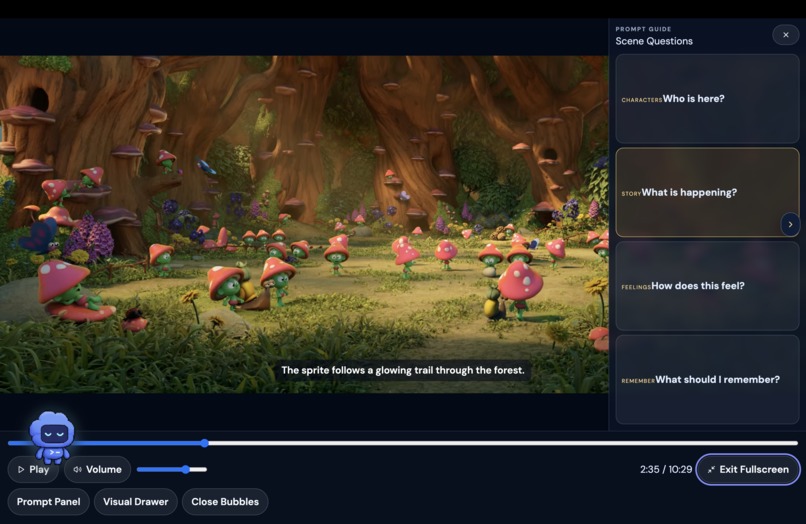
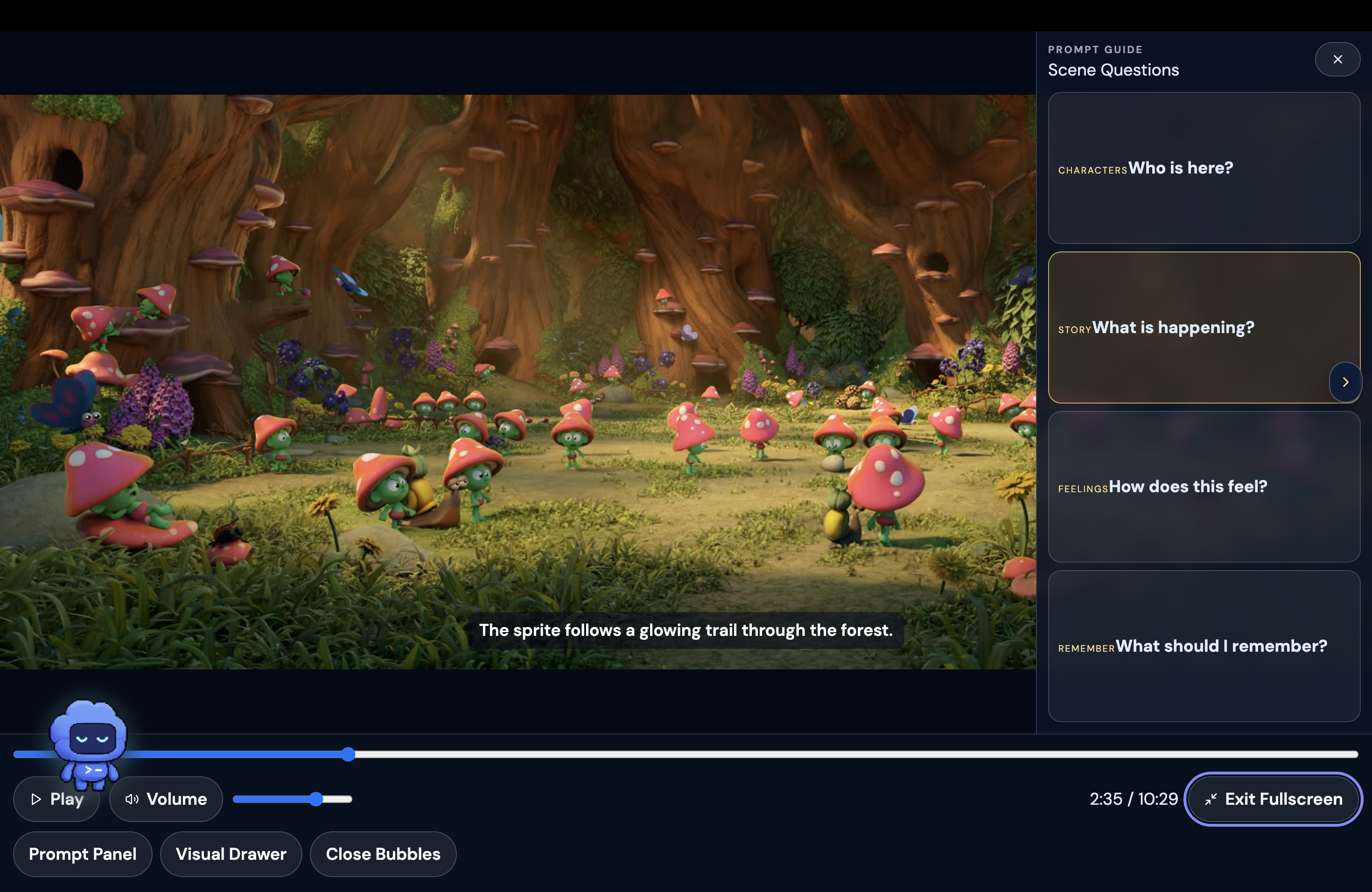
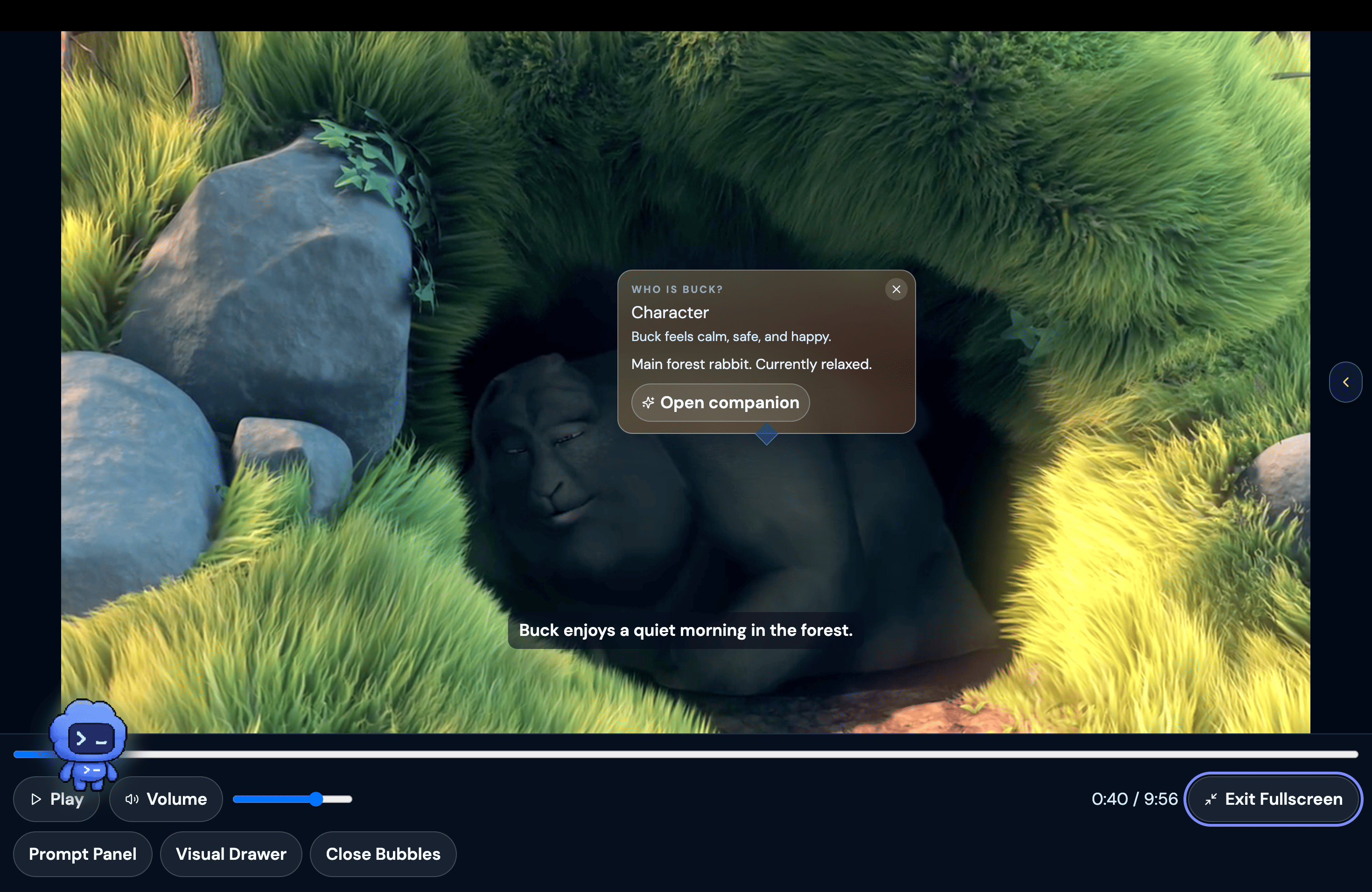
Prompt Panel
-
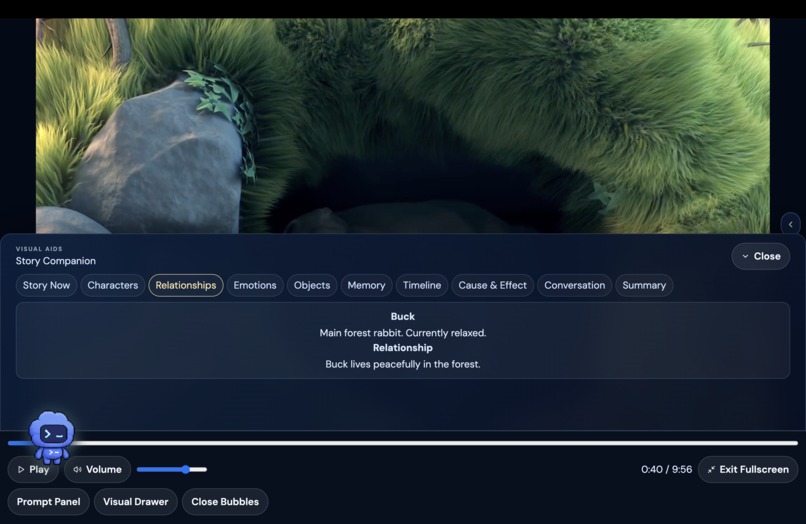
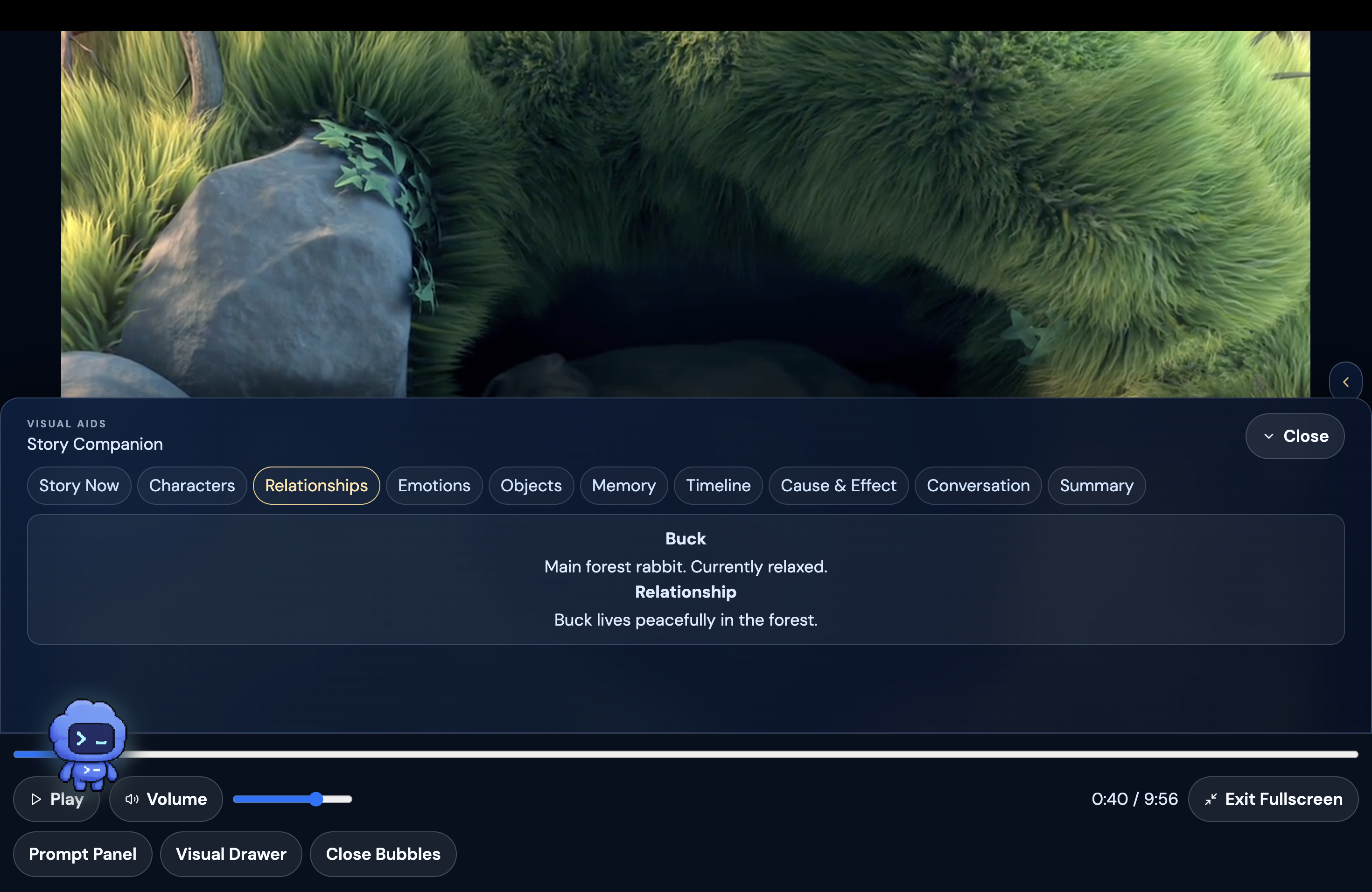
Visual Drawer
-
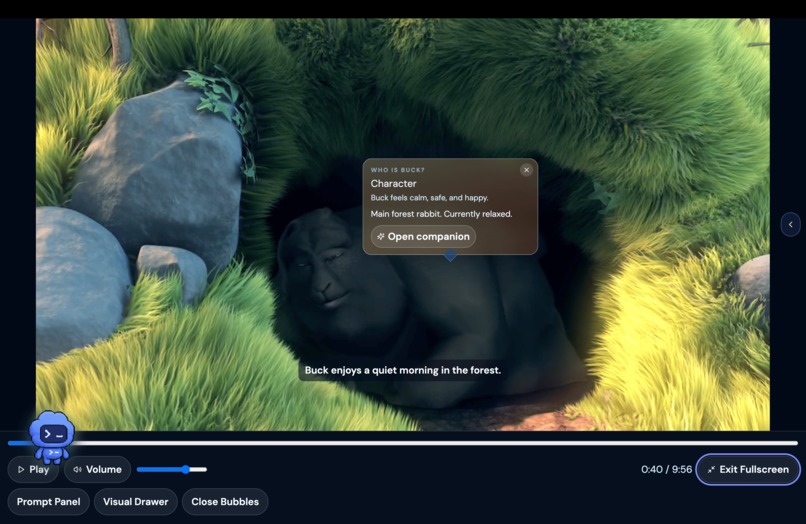
Character Bubble
-
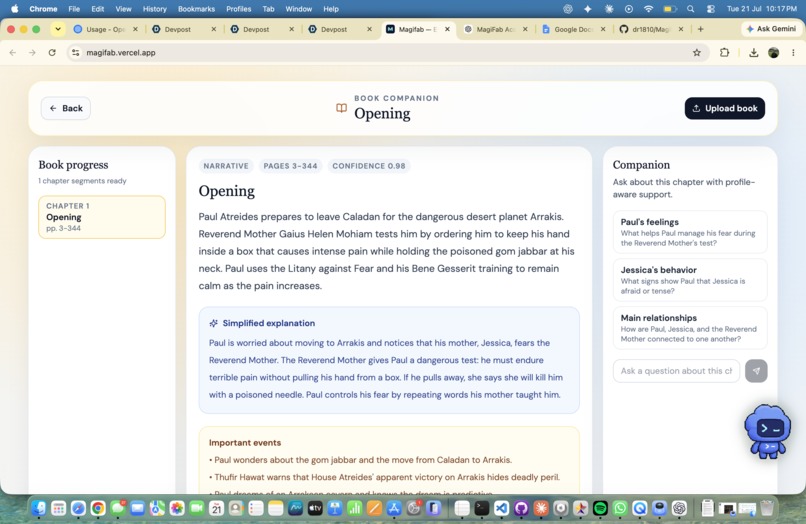
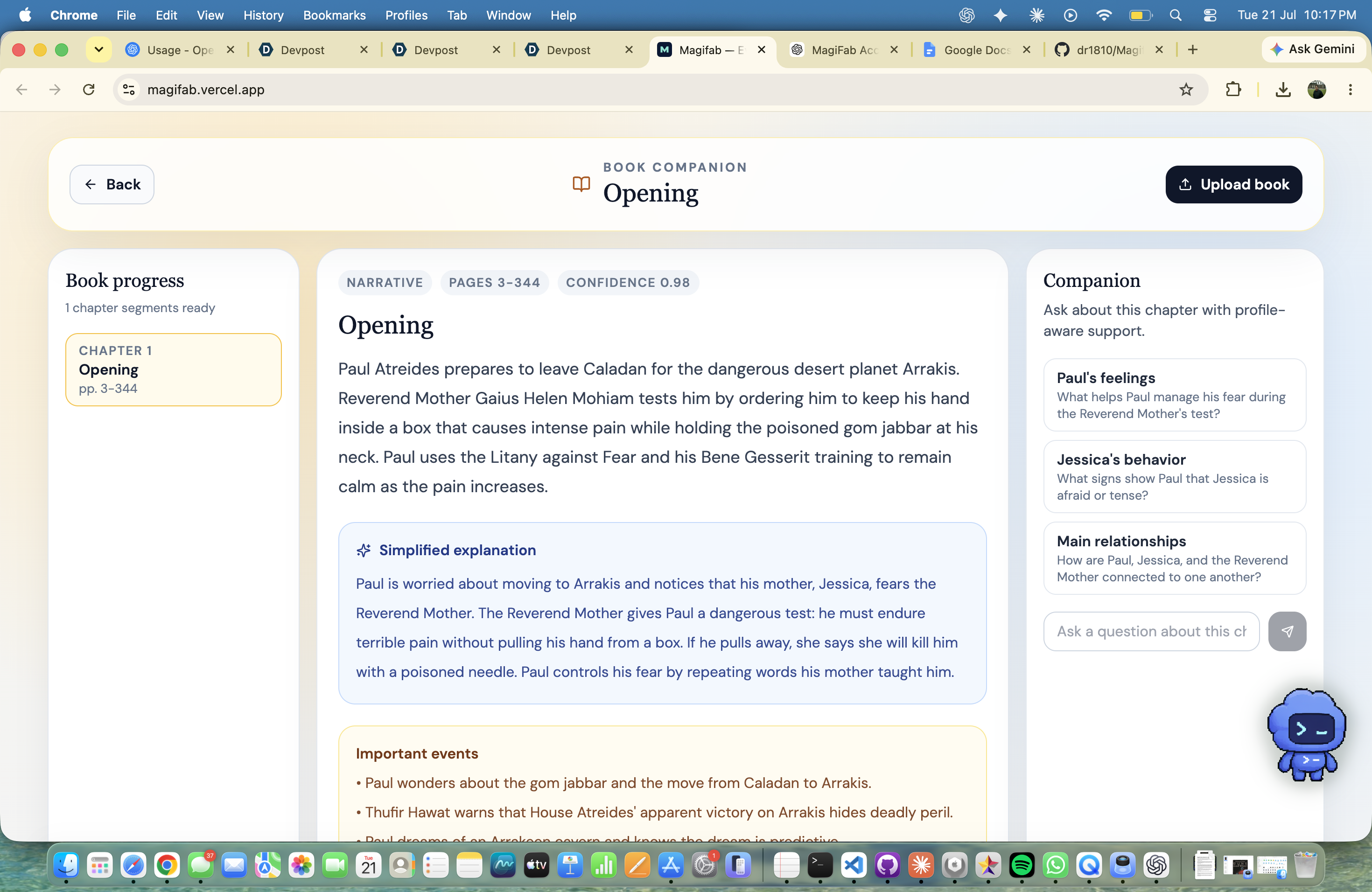
Book UI
-
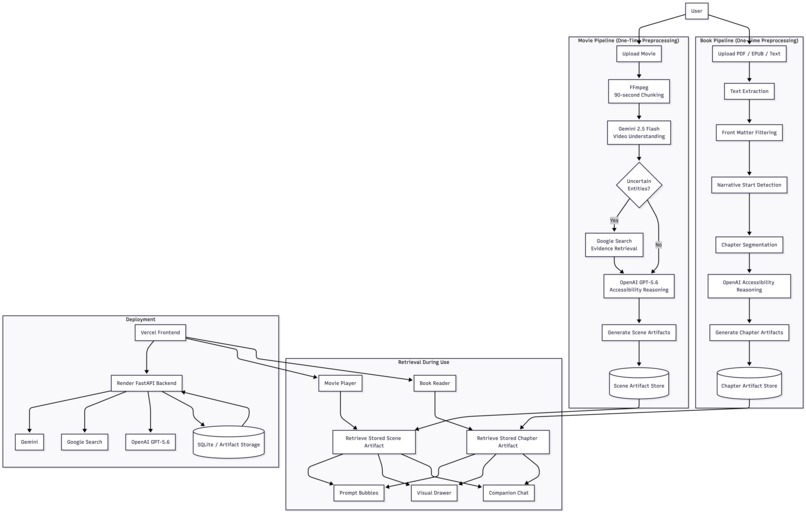
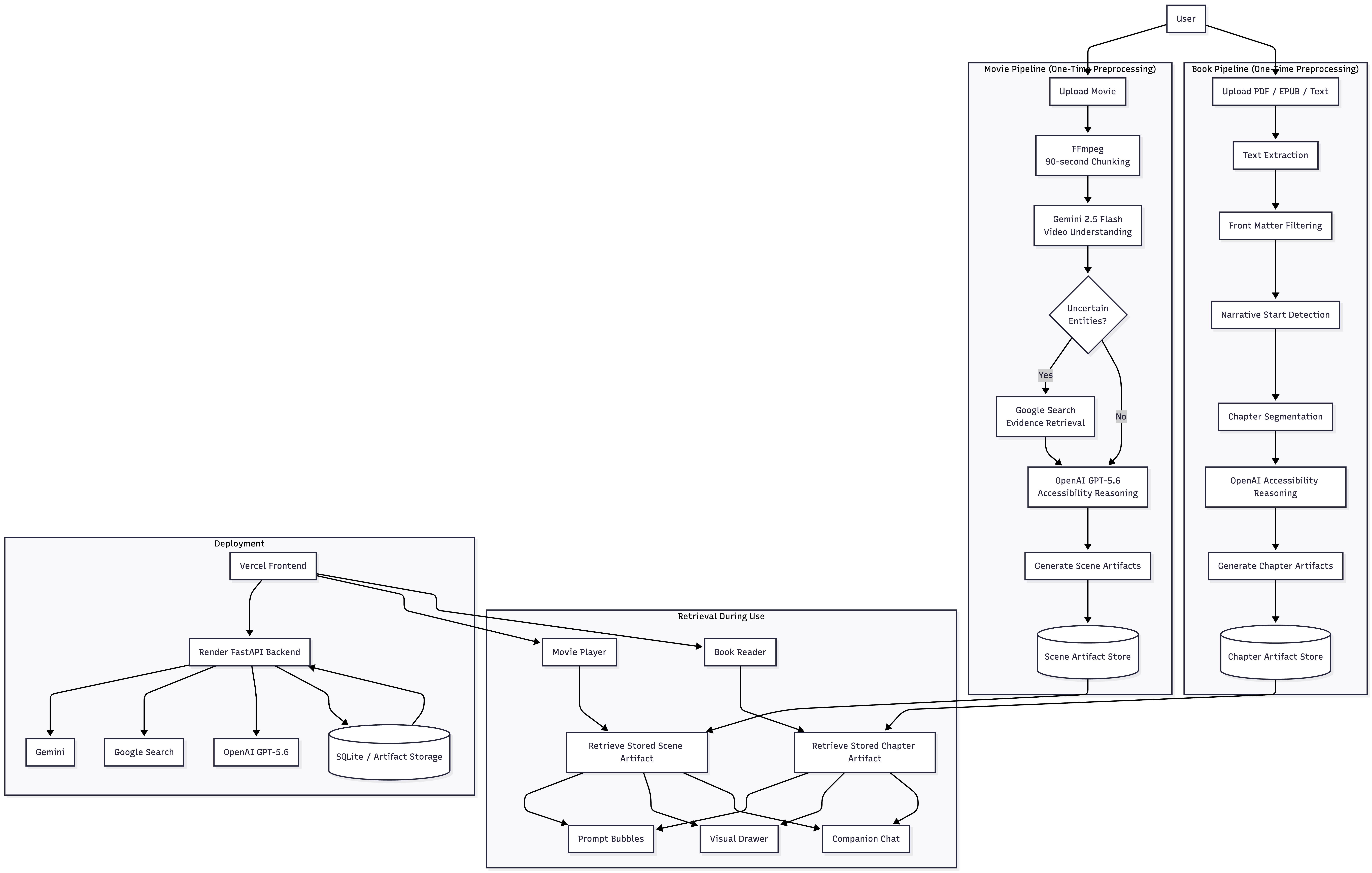
Diagram
-
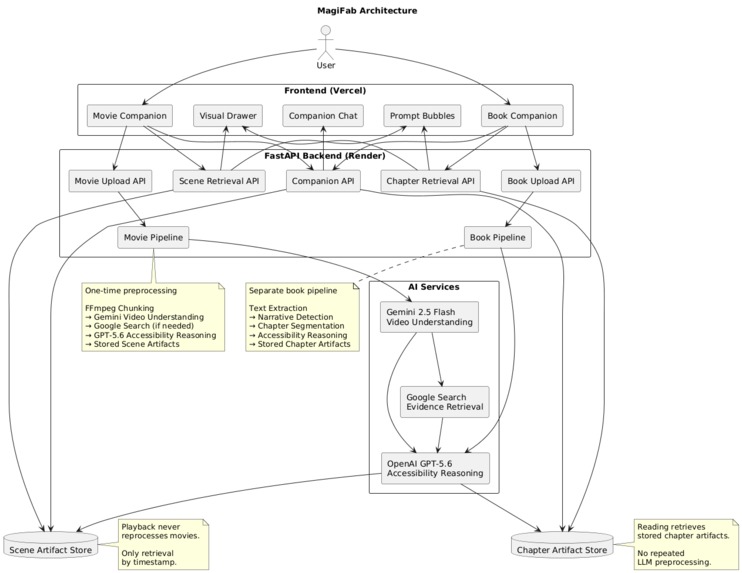
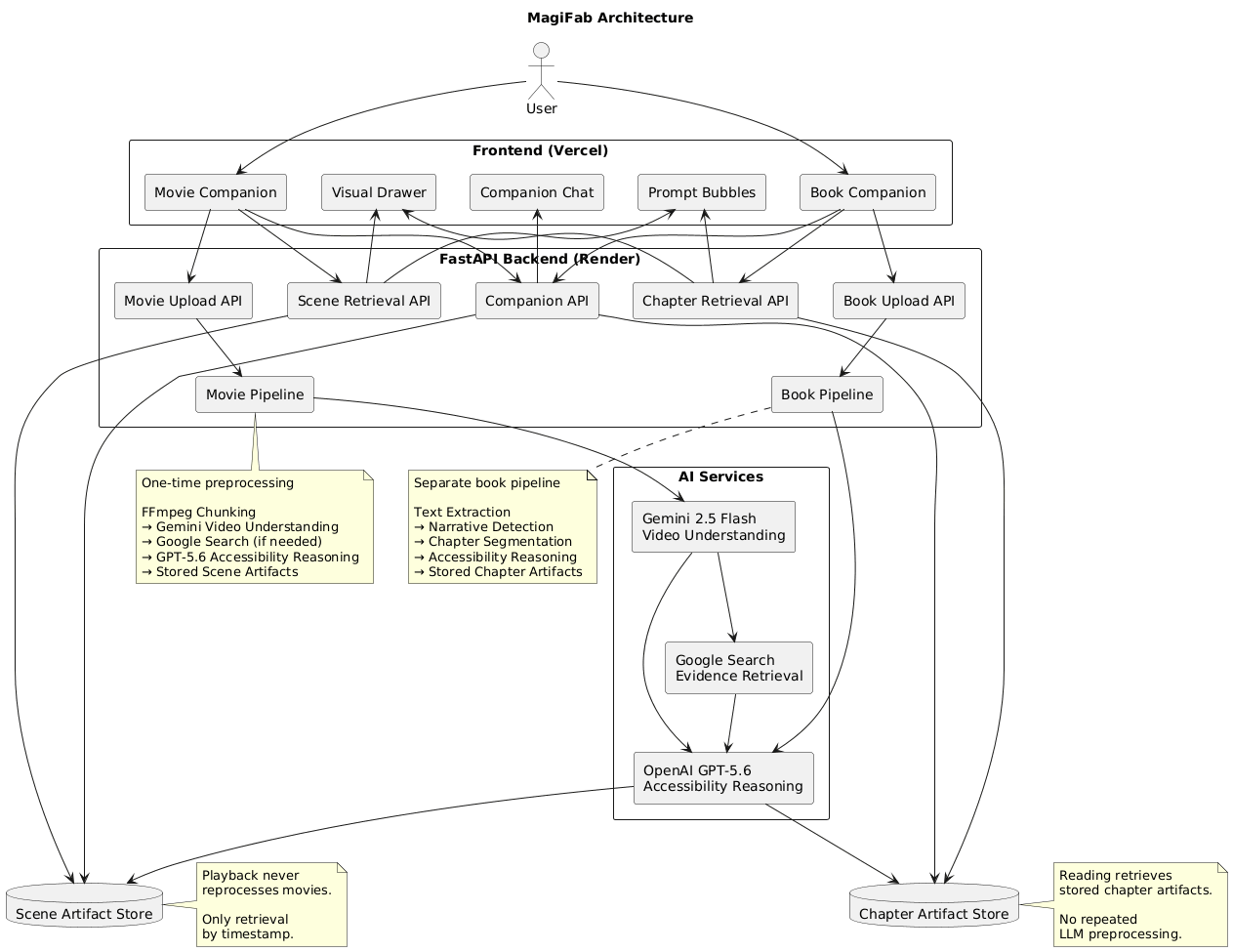
Architecture
Inspiration
Walt Disney believed that technology should always serve the story, and that entertainment should be accessible to everyone. That philosophy became one of the foundations of MagiFab. I envision a world where everyone can understand and enjoy stories, regardless of how complex they are. MagiFab's accessibility experience was inspired by applications like MapHabit and BeeVisual, which demonstrate how thoughtful design can make information easier to understand. I wanted anyone—whether they were watching Dune, reading A Memory Called Empire, or experiencing any complex story—to be able to follow and visualize what was happening. One of my biggest inspirations was Mahit Dzmare's relationship with her imago, Yskandr Aghavn: a neurological companion that helps her understand, remember, and reason throughout the story. I imagined MagiFab becoming that kind of companion for every user. I noticed a gap between AI assistants and accessibility tools. Most AI systems expect users to know what questions to ask and often respond with long blocks of text. Many accessibility tools, on the other hand, help people access content but not truly understand the narrative. MagiFab bridges that gap with simple prompt bubbles, visual explanations, and personalized guidance that appear naturally as the story unfolds. Imagine watching a movie with friends when someone struggles to understand what's happening. Instead of pausing the film or relying on someone else to explain every scene, MagiFab quietly provides contextual guidance in real time, helping them catch up and stay engaged without interrupting the experience.
What it does
To understand what the application does we can divide it into 2 parts:
UI/Profile
- Personalised user onboarding based on what the user struggles with while watching movies, series or reading books.
- Allows the user to create a personalised AI companion to assist them throughout the experience.
- A questionnaire which understands how the companion could help them better.
- If the user wants to understand who a character is and clicks on a prompt, a small water bubble glows, immersing into the colour scheme of the movie or book.
- If the user wants to understand what is happening in a scene and why, the companion provides contextual explanations supported by simple visual aids.
- The user simply moves toward the side of the screen and the companion panel appears with intelligent prompt bubbles.
- Minimalistic visual aids designed specifically for people with disabilities using simple shapes, relationships, timelines and contextual explanations instead of overwhelming diagrams.
Model Functionality/Specification
- Predicts what difficulties the user might face based on their accessibility preferences and answers during onboarding.
- Analyses movies and books into semantic intervals rather than waiting until the user becomes confused.
- Builds contextual story memory as the story progresses.
- Creates intelligent prompt bubbles based on predicted moments of confusion instead of waiting for the user to ask questions.
- Maintains story state including:
- Characters
- Relationships
- Emotions
- Timeline
- Memory
- Cause & Effect
- Objects
- Conversations
- Story Summary
- Generates contextual visual drawers that evolve naturally with the story.
How we built it
Technologies
- OpenAI Codex with the $100 credits provided through Devpost
- GPT-5.6 (Terra Medium)
- TypeScript
- Python
- FastAPI
- HTML
- CSS
- JavaScript
- Gemini 2.5 Flash
- Google Search
Codex with GPT-5.6
- I explored how OpenAI Codex and GPT-5.6 could be used to build an application almost entirely through AI-assisted development.
- Used Codex as an AI software engineering partner throughout the project.
- Developed the application using GPT-5.6 Terra Medium with structured development workflows instead of one large prompt.
- Broke development into phases including system architecture, backend pipelines, frontend experience, accessibility features, API integration, debugging, and iterative UI improvements.
- Used Codex to rapidly generate components, refine architecture, debug issues, and iterate on both the frontend and backend.
Backend
I designed the complete system architecture before implementing the application.
Rather than preprocessing content during playback, MagiFab creates durable accessibility artifacts before a user begins watching a movie or reading a book. During playback or reading, the application simply retrieves the appropriate stored artifact.
Movie pipeline
The movie pipeline performs:
- Upload processing
- FFmpeg 90-second chunk generation
- Gemini video understanding
- Google Search evidence retrieval for uncertain entities
- OpenAI accessibility reasoning using the companion profile
- Prompt bubble generation
- Visual Drawer generation
- Scene artifact generation
- Persistent scene storage
- Timestamp-based retrieval during playback
Gemini analyzes continuous video chunks rather than isolated frames. When uncertain about identifiable entities, Google Search provides supporting evidence. OpenAI then combines these observations with the user's accessibility profile, companion personality, explanation preferences, and learning needs to generate contextual scene artifacts.
Each stored artifact contains:
- Prompt bubbles
- Scene explanations
- Character information
- Memory cues
- Visual aids
- Timeline information
- Relationship data
- Companion responses
During playback, MagiFab retrieves the closest scene artifact using the movie timestamp. No additional preprocessing or Gemini calls occur while the user watches the movie.
Book pipeline
Books follow a completely separate pipeline and are never processed as videos.
The book workflow performs:
- PDF, EPUB, or text extraction
- Front-matter filtering
- Narrative start detection
- Chapter and section segmentation
- Accessibility reasoning
- Relationship construction
- Chapter artifact generation
- Reading-time retrieval
Each chapter generates durable accessibility artifacts including:
- Chapter summaries
- Simplified explanations
- Character cards
- Relationship maps
- Important events
- Difficult concepts
- Memory aids
- Companion questions
During reading, the application retrieves stored chapter artifacts instead of repeatedly reasoning over the original document.
Novel Architecture
One of MagiFab's primary architectural contributions is separating preprocessing from the user experience.
Traditional multimodal assistants repeatedly send content to an LLM whenever a user asks a question or advances through a story. This increases latency, API usage, and the likelihood of inconsistent explanations.
Instead, MagiFab performs a one-time preprocessing pipeline that constructs durable accessibility artifacts before the experience begins.
For movies, the reasoning engine combines:
- Gemini video understanding
- Google Search evidence
- Companion accessibility profile
- User explanation preferences
- Accessibility requirements
to generate contextual scene artifacts that can be retrieved instantly during playback.
For books, the reasoning engine constructs chapter-level accessibility artifacts that provide summaries, simplified explanations, relationship maps, timelines, memory aids, and companion interactions without reprocessing the original text.
This retrieval-first architecture means playback and reading only access stored artifacts through dedicated APIs rather than repeatedly invoking Gemini or OpenAI.
The result is:
- Faster responses
- Lower API usage
- Consistent explanations
- Reduced repeated reasoning
- Personalized accessibility guidance
- A scalable retrieval-first architecture
Frontend
GPT-5.6 helped produce polished, accessible user interfaces with a strong visual hierarchy.
The interface was intentionally designed to reduce cognitive overload while allowing assistance to appear only when needed.
For movies, users receive contextual prompt bubbles synchronized to the current playback timestamp together with a Visual Drawer containing:
- Characters
- Relationships
- Timeline
- Objects
- Memory
- Emotion
- Cause & Effect
For books, the interface provides a dedicated reading experience with:
- Chapter navigation
- Simplified explanations
- Companion chat
- Character cards
- Relationship maps
- Timelines
- Memory aids
- Visual maps
By separating preprocessing from retrieval, the frontend remains lightweight and responsive while delivering personalized accessibility assistance exactly when it is needed.
Debugging
- I identified bugs while testing the application.
- Codex analysed stack traces, logs and backend behaviour to diagnose and resolve issues.
- Multiple architecture refactors were performed as the reasoning pipeline evolved.
Challenges we ran into
- Video storage and selecting the right cloud service to stream large movie files.
- Designing the UI, especially the prompt panel where there were conflicting interaction states while reaching for the scrollbar.
- Debugging the UI and making it thoughtful, accessible and intuitive.
- Making sure API calls were optimised for only $5 worth of credits while still demonstrating complete functionality.
- Creating prompt bubbles that appear naturally without interrupting immersion.
- Designing an interval pipeline that analyses the story ahead of the user.
- Iterating the reasoning system and pipeline multiple times.
It should follow the analogy I gave — it shouldn't just create the map, it should continuously learn from that map as the story progresses.
- Handling hallucinations (for example calling Big Buck Bunny a bear).
- Multiple architecture refactors while improving reasoning quality.
- Improving visual recognition for difficult scenes such as Sprite Fright ("The Secret Life of Pets", "young boy", "British flag shirt", "train", etc.).
- Balancing accessibility with preserving the original storytelling experience.
- Building a companion that understands context rather than simply recognising objects.
Accomplishments that we're proud of
- Fully functional UI with playback controls.
- Personalised accessibility onboarding.
- AI companion creation workflow.
- Designed and implemented a novel interval-based story reasoning architecture.
- Built persistent story memory that evolves throughout the movie.
- Context-aware prompt generation.
- Dynamic visual drawers driven by story state.
- Optimised API usage with limited billing.
- Successfully built a working end-to-end prototype almost entirely using Codex and GPT-5.6.
What we learned
- How to optimise UI/UX for people with different accessibility needs.
- How to design minimalistic interfaces that reduce cognitive overload.
- How to architect an AI reasoning pipeline instead of relying on a single prompt.
- How persistent story memory dramatically improves contextual explanations.
- How prompt engineering and system architecture directly influence accessibility.
- How rapidly complex AI systems can be prototyped using Codex and GPT-5.6.
What's next for Magifab
- Improve the movie reasoning pipeline.
- Extend the same AI companion experience to books and educational content.
- Improve multimodal understanding across movies, books and visual media.
- Better predict moments where users may struggle before confusion occurs.
- Richer interactive visual explanations with lightweight diagrams and animations.
- More personalised companions that adapt to users over time.
- Support additional accessibility needs and learning styles.
- Reduce preprocessing latency while improving explanation quality.
Built With
- cloudflare
- codex
- css
- gemini
- github
- gpt
- html
- javascript
- openai
- python
- render
- typescript
- vercel
- visual-studio

Log in or sign up for Devpost to join the conversation.