Inspiration
Studying often means switching between a notebook, a graphing calculator, a textbook, and an AI chat window. We wanted help to appear directly where we were already thinking. Our idea was a magic pen: point to an area, say what you need, and keep working with the result.
What it does
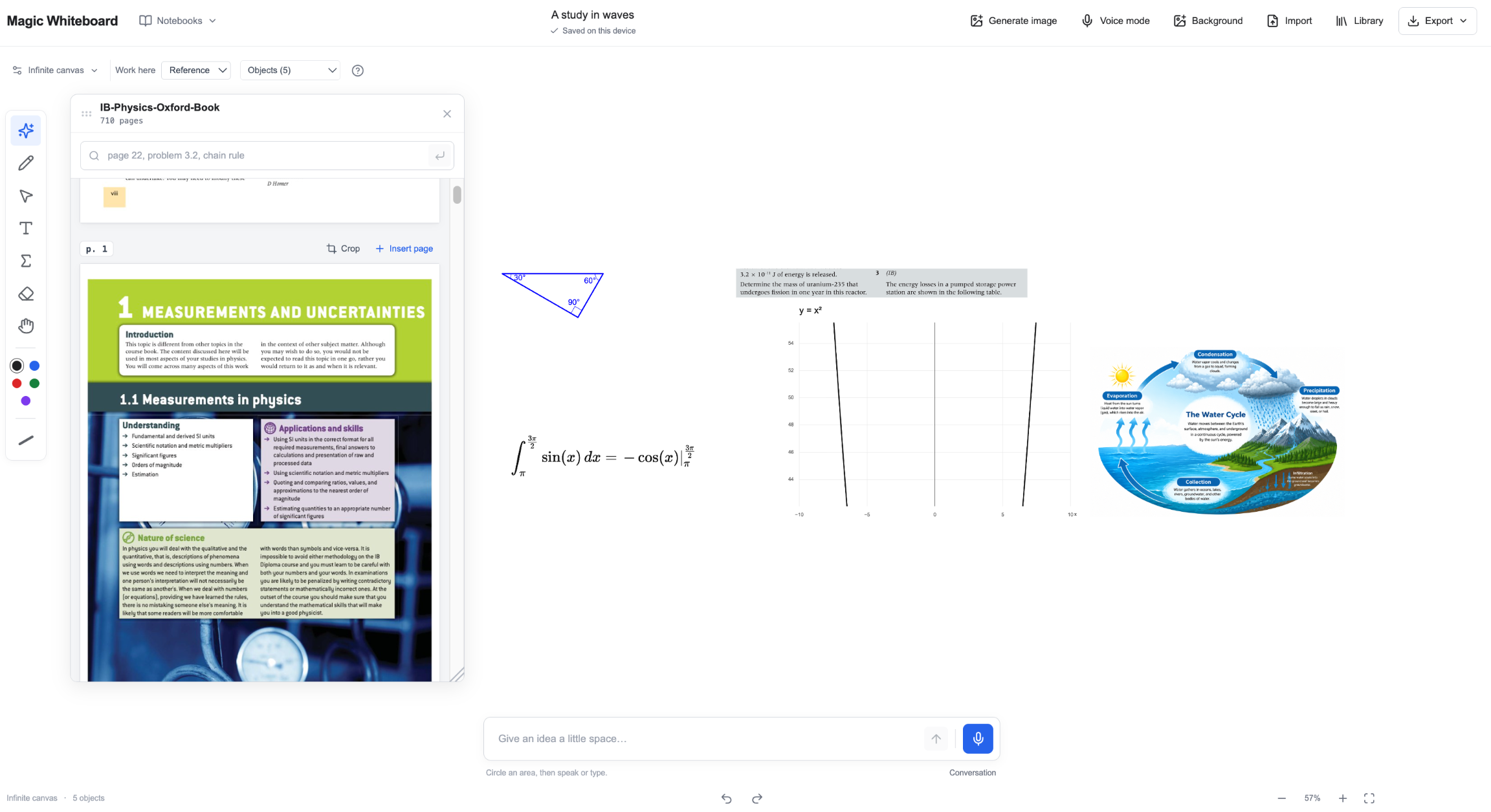
Magic Whiteboard combines voice with the location of your pen or cursor. Circle a region and say, “Plot y = sin(x) over two periods.” Dictate an integral, create a shape, or ask to change an existing graph’s range. Equations, graphs, text, and geometry remain editable, so you can continue by speaking, typing, or drawing.
Our team also built PDF import and a local textbook library. Students can annotate worksheet pages, search a textbook’s existing text for an example or exercise, and bring a page or cropped problem onto the whiteboard. Separate notebooks, local saving, and image/PDF export help keep the work organized.
How we built it
We used React and TypeScript for the interface, Excalidraw for canvas interactions, and a Node.js/Express backend. OpenAI Realtime connects speech to structured board actions. KaTeX and MathLive render and edit mathematics, mathjs evaluates supported expressions, and PDF.js handles PDF pages and text extraction.
Each board object has an identity and editable source. The application validates proposed changes before applying them, while temporary previews show work in progress. API credentials stay on the server, and notebooks are stored locally in the browser.
Challenges we ran into
The hardest problem was making speech, pointing, and delayed AI responses agree about what should change. We encountered malformed LaTeX, ambiguous selections, missing transcripts, and rate limits. Retrying had to preserve completed work, and a late response could not overwrite a newer edit. We addressed these problems with explicit targeting, validation, cancellation, and bounded recovery.
Accomplishments that we're proud of
We connected the central interaction: point, speak, see a useful object appear, and keep editing that same object. We also brought documents, drawing, mathematical notation, and graphing into one workspace, and built automated checks around the failure cases we encountered.
What we learned
An AI interface needs a reliable document model and clear feedback. Small details—whether a selection is a strict boundary, whether a phrase should append, or whether a retry is safe—have a large effect on how natural the product feels.
What's next
We want better handwriting recognition, lower speech-to-math latency, cloud synchronization, and collaboration. We also plan more iPad and Apple Pencil testing and will evaluate native packaging. The current prototype is a browser application.
Built With
- excalidraw
- express.js
- indexeddb
- katex
- mathjs
- mathlive
- node.js
- openai-api
- pdf-lib
- pdf.js
- react
- tldraw
- typescript
- vite
- vitest
- webrtc

Log in or sign up for Devpost to join the conversation.