Inspiration
It started as a joke about flat-pack furniture. One of us had built a desk backwards, another had leftover screws and no idea where they belonged, and everyone had a story like that. Then we went through a real manual for a UPLIFT V3 standing desk and noticed that step 9 was one small drawing hiding four separate actions. If you miss one, you're taking the whole thing apart again.
That made us think about the people who have it much harder than a group of engineering students: grandparents setting up furniture on their own, people with low vision, and anyone who just learns better by watching than by squinting at diagrams. The theme this year was Conjure Reality, so we asked ourselves: what if the manual could come alive and walk you through it?
What it does
MagicManual turns a paper furniture manual into a 3D guide that talks you through every step.
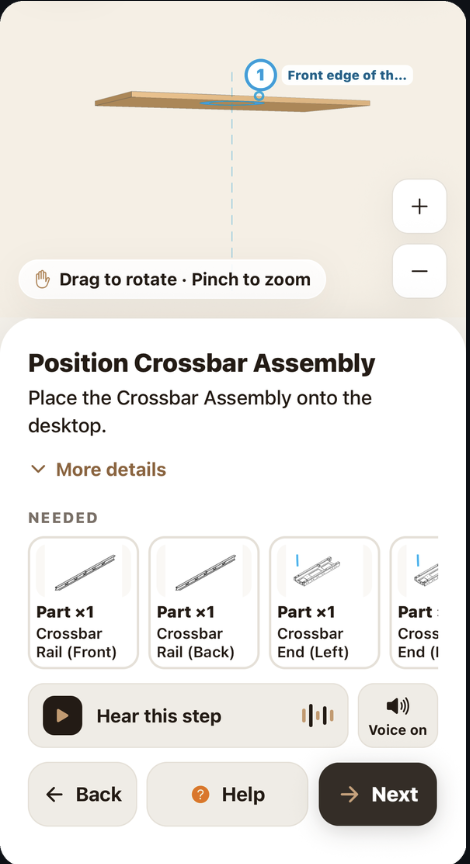
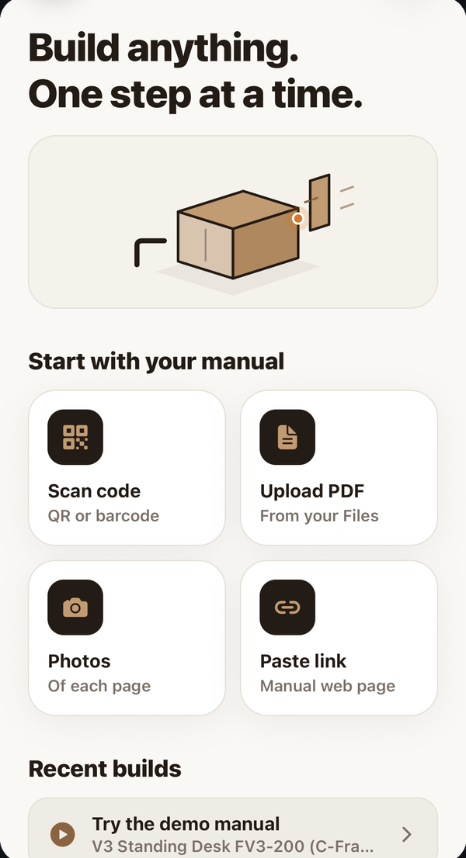
You can scan the QR code on the box, upload the PDF, take photos of the pages, or paste a link. Gemini reads the manual and breaks it into small, one-action steps, so "step 9" becomes 9.1 through 9.4. Each step plays as a 3D animation you can rotate and zoom: parts slide into place, screws turn, and the desk flips over. A calm ElevenLabs voice reads each step out loud.
A few things we think make it actually useful:
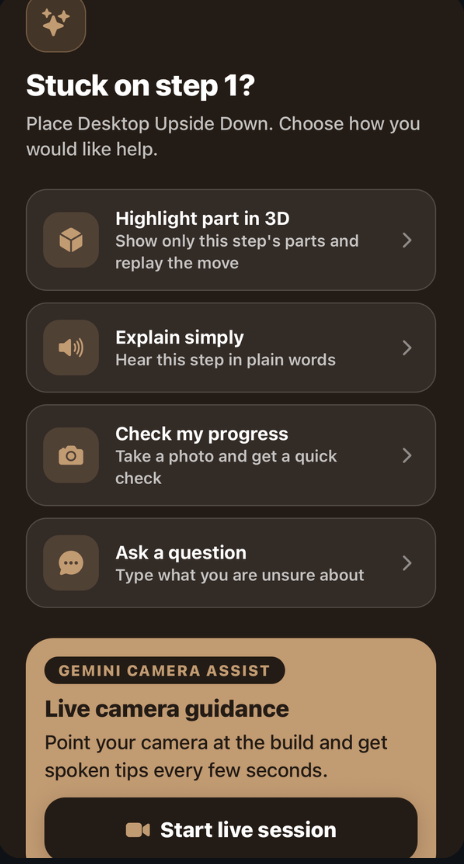
Every step shows what you need: the parts, the tool, and the right screw with a ✓ next to it. The screw that looks almost the same gets an ✗. Help that knows where you are: take a photo or turn on the live camera, and Gemini checks your build against the exact step you're on. Designed to be calm: big text, short instructions, and no account needed to start. You can sign in later to save your builds.
How we built it
The app is built with Expo and React Native. The 3D scenes use Three.js through expo-gl, and we wrote our own animation timeline for moves like placing, rotating, flipping, tightening, and removing parts. The backend is a Node and Express server in TypeScript. It handles the AI calls so none of our API keys ever end up on the phone.
The part we spent the most time on is how a manual becomes a plan. Gemini first produces a structured plan, then a second pass reviews it. Our server checks that every step from the original manual made it into the plan, and if something is missing or crammed together, it asks Gemini to fix just that part. ElevenLabs handles the voice, and Supabase handles accounts and saved builds. We set up Supabase so the server acts as the signed-in user, which means database security rules always apply. We wrote 75 tests along the way, including tests that prove one user can't see another user's data.
Challenges we ran into
Our biggest problem was the AI quietly skipping things. On the first full run of the desk manual we got 32 steps, and step 11 was just gone. Gemini also liked to squash three actions into one step. We fixed it by having Gemini list every manual step and count its actions, rejecting any review that lost steps, and adding a repair pass. The same manual now comes out as all 18 steps, split into 36 single actions.
There were plenty of smaller fires too. The newest Three.js needs WebGL 2, but Expo only supports WebGL 1, so we had to pin an older version and write a small adapter. The audio player kept crashing because it was released before we tried to pause it. Then the campus Wi-Fi wouldn't let our phones talk to our laptops, so we switched to Cloudflare tunnels. We spent a while confused by an "HTTP 530" error before realizing it meant the tunnel had died, not that our code was broken.
Accomplishments that we're proud of
We're proud that it works end to end on a real phone with a real manual, and that every one of its 18 steps comes through. The ✓/✗ screw callout is a small feature, but it targets one of the most common mistakes people make. We also didn't cut corners on security, even when it would have been faster. Most of all, we built something we'd actually hand to our parents or grandparents.
What we learned
We learned not to trust a single pass from an AI model. What made it dependable was putting structure and checks around it, and asking the model to count the actions in each step turned out to matter a lot. We also learned that accessibility is mostly about taking things away: fewer words, one action at a time, and a voice. Finally, we got a lot of practice merging four people's work under pressure and deciding what to keep based on what the app needed rather than who wrote it.
What's next for MagicManual
Next, we want to test it with a lot more manuals on real phones and keep measuring how many steps it gets right. We'd also like to add narration in more languages, which ElevenLabs already supports, and get MagicManual QR codes printed directly on furniture boxes. Further out, we'd love to try it with an assisted-living community and expand beyond furniture to appliances, bikes, and home repairs.
Built With
- elevenlabs
- expoaudio
- expogl
- expogo
- exporouter
- express.js
- gemini
- node.js
- reactnative
- three.js
- typescript


Log in or sign up for Devpost to join the conversation.