Inspiration
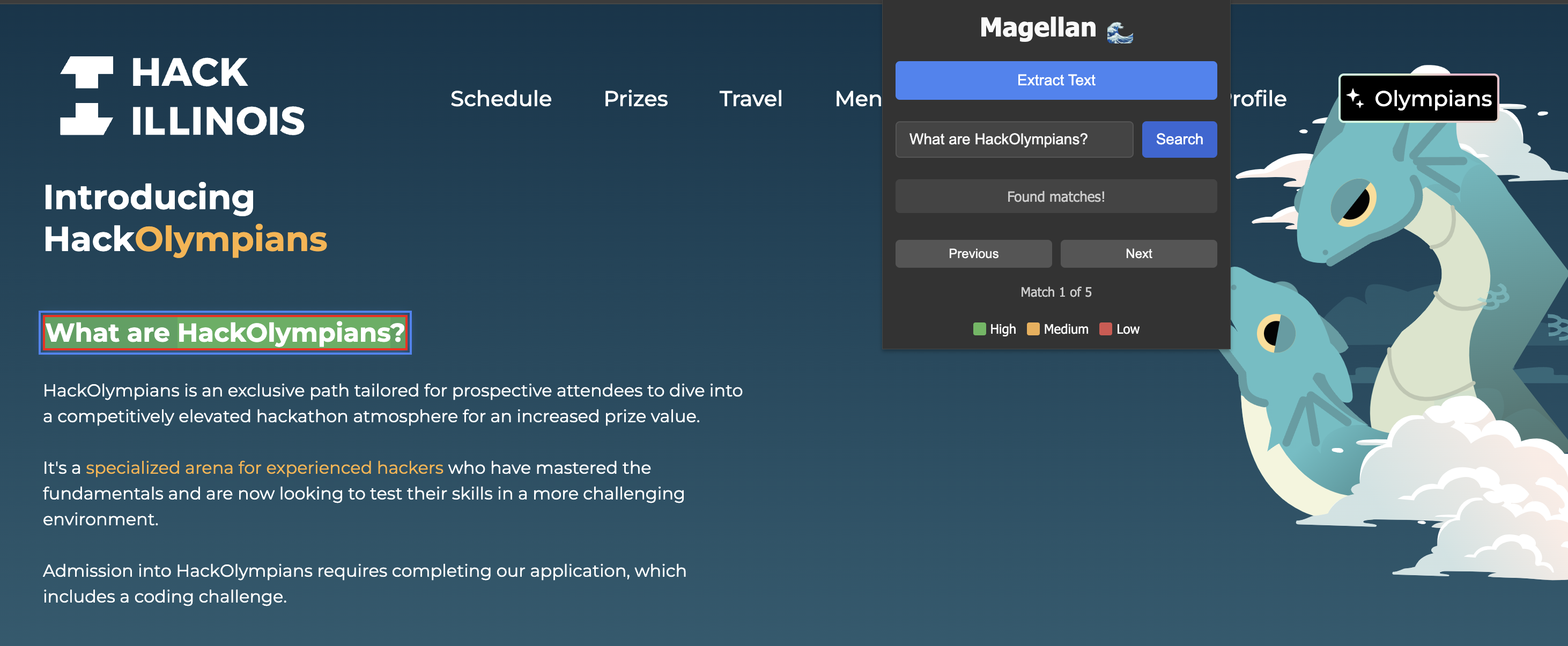
Traditional Ctrl+F only works with exact words, making it frustrating to find relevant information on long web pages. We wanted a smarter way to search—one that understands meaning, not just keywords.
What it does
Our Chrome extension lets users search web pages using natural language. Instead of matching exact words, it finds relevant sentences, highlights them, and allows seamless navigation between results.
How we built it
We used JavaScript and Chrome Extensions API for extracting page text, Flask & Python for natural language processing, and semantic search models to rank relevant sentences. The frontend was built with HTML, CSS, and JavaScript for smooth user interaction.
Challenges we ran into
Parsing and structuring webpage text for effective search. Ensuring fast and accurate sentence retrieval. Implementing smooth autoscrolling and highlighting like Ctrl+F. Debugging Chrome extension permissions and CORS issues.
Accomplishments that we're proud of
Successfully implemented semantic search that understands user queries. Created an intuitive UI with smooth navigation between matches. Built a fully functional Chrome extension that enhances web browsing.
What we learned
Optimizing text extraction for real-world web pages. Improving search accuracy with NLP models. Handling browser-based scripting limitations effectively.
What's next for Magellan
Ability to search PDFs Improve sentence similarity algorithm Ability to recognize text in images Enhance with LLMs

Log in or sign up for Devpost to join the conversation.