
Inspiration
With more than a million public pieces of music, MuseScore is the most widely used composition platform. Despite the scale, there exists no way for AI to assist you in your composition (seriously, none at all). The only technology out there is for generating audio, not proper scores to be played by musicians.
Composing music by ear remains an archaic process, with no engine to bridge this gap. Similarly, transcribing music requires tediously copying across large scores, or simply manually copying in notes individually. Modern software lacks support for brainstorming new melodies, experimenting with arrangements, and mitigating writer's block; the modern music composition process lacks any form of AI-integrated workflow.
With two of our team members being composers and all three loving music, our direction seemed clear: Maestro is the world's first AI companion to empower every composer.
What it does
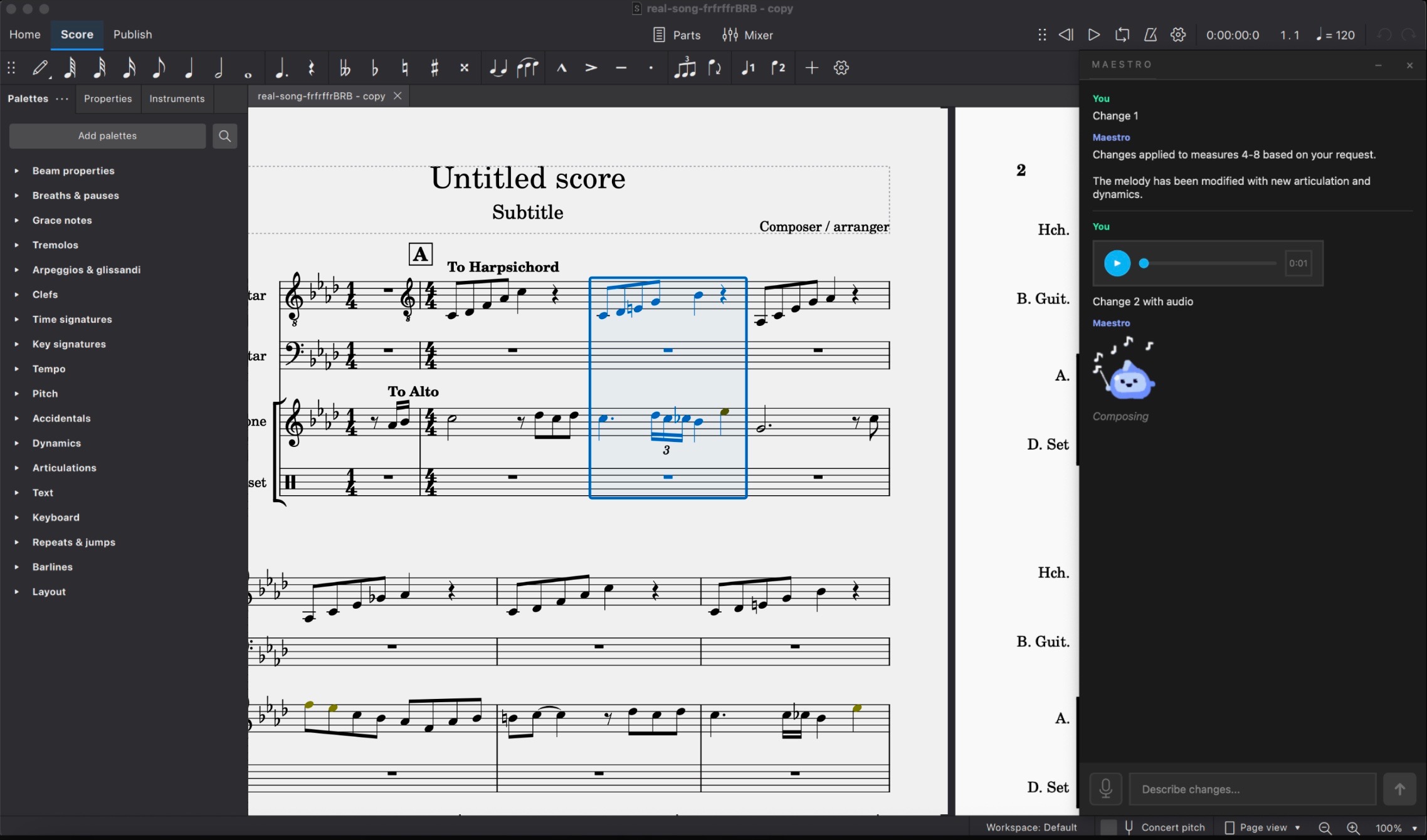
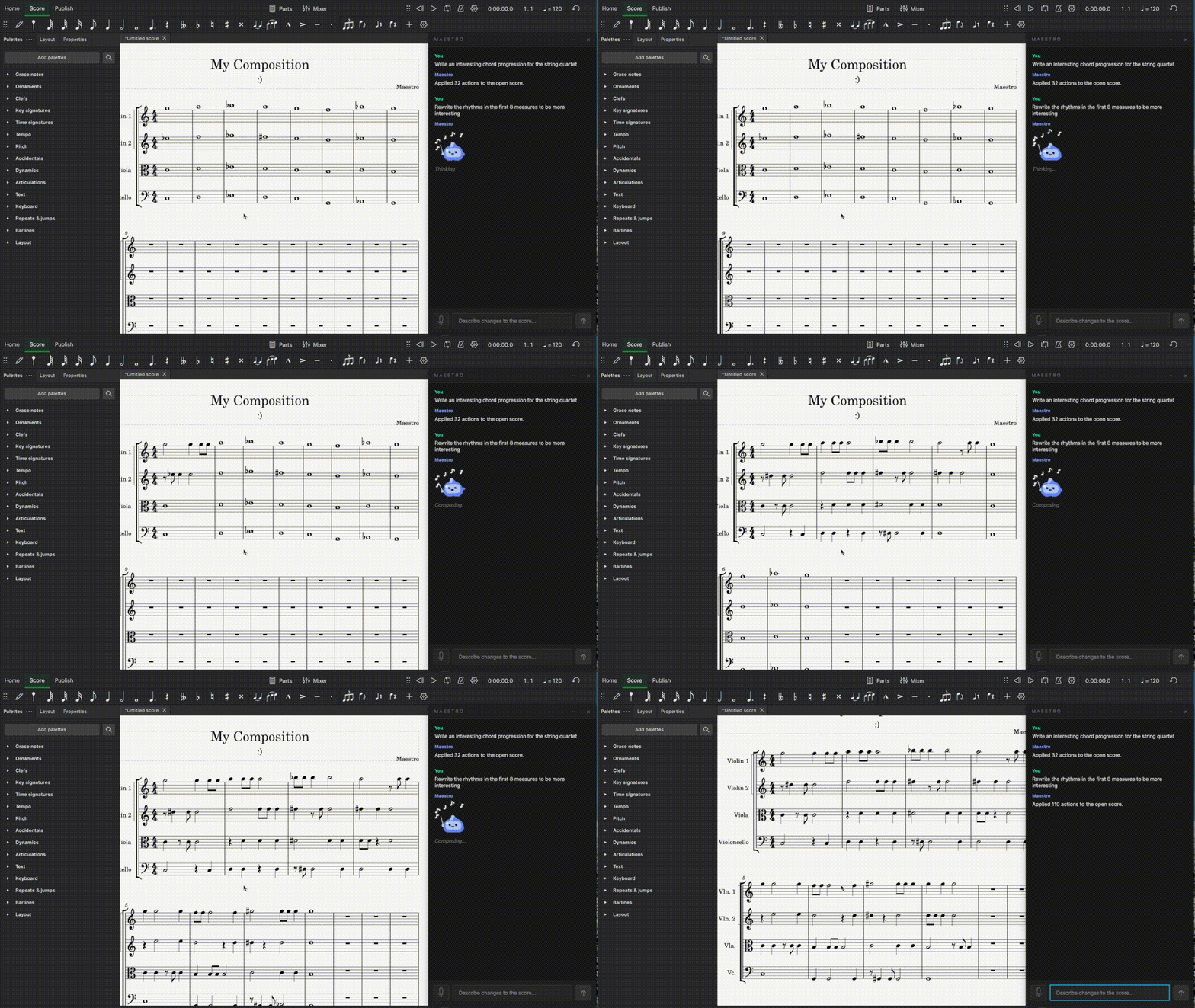
With Maestro, simply come with an idea or hum a melody into your microphone, and the changes are implemented directly on your score in under 15 seconds (what would previously take minutes of manual note entry).
Upon opening MuseScore and launching Maestro, you can describe what you want and optionally record audio. Maestro reads your existing score for context, processes your request, and implements the changes directly in your composition. Everything can seamlessly be undone with MuseScore's built-in undo. No new software to learn, and no exported audio files to deal with.
Whether you're writing your first composition or experimenting with different melodies, Maestro serves as a tool for all composers. Here's what it can do:
- Text-to-score generation: describe what you want in plain English and Maestro writes the notes
- Multimodal input: hum or sing a melody alongside a text request, and Maestro combines both to produce exactly what you're hearing in your head
- Wide breadth musical vocabulary: Maestro can write notes, chords, rests, dynamics, tempo markings, key and time signatures, articulations, fermatas, arpeggios, tuplets, lyrics, rehearsal marks, expression text, fingerings, breath marks, and more
- Context-aware editing: Maestro reads your current score before making changes, so its additions fit musically with what you've already written
- Seamless undo: every Maestro action integrates with MuseScore's native undo/redo, so experimentation is risk-free
How we built it
The Application Interface
maestro_gui.py is the user-facing layer: it accepts a text request and an optional voice recording, runs the workflow in a background thread, and sends the result into the live MuseScore bridge.
Our Architecture and Custom Layers of Abstraction
The system is split into small libraries so the LLM works against clean musical abstractions instead of raw plugin commands or raw MusicXML.
maestroxml gives the model a score-structured Python API, agent-core builds and executes the edit runtime, and maestro-musescore-bridge translates those high-level actions into concrete MuseScore plugin operations.
This layered design makes the stack more complex, but it improves reliability because each layer has one job: represent music, generate edits, or apply them to the open score.
Creating Context from Sheet Music, Audio, and Text
When a request is submitted, the current score is exported from MuseScore, converted from MusicXML into maestroxml Python, and passed to the model as editable score context. If the user hums, the audio is transcribed into note data and added as another context channel alongside the written request. The model also receives package documentation, so it writes Python edits against the existing score instead of trying to author sheet music directly. The generated Python is then executed to produce bridge actions, which the MuseScore plugin applies to the live score.
Challenges we ran into
MuseScore Application Layer
One of our first challenges was figuring out how to edit the MuseScore file itself. We initially thought to create a new file with the changes and swap it out directly, but MuseScore lacks a frictionless way to do this, as opening saved scores takes the user through several refresh screens. We decided instead to build on top of MuseScore's plugin system, which integrates native commands with outside components. However, there was still a large gap between the low-level commands available and the high-level instructions an AI could parse. We built two middle-layer libraries to bridge this: one wrapping raw plugin commands into composable operations, and another mapping AI-generated instructions down into those operations.
Multimodal Input: Combining Audio, Composition, and User Ideas
To make Maestro as intelligent as possible, we needed the generative model to take in context not only from the sheet music, but also from user text requests and user-recorded audio (where they can hum or sing a tune they want transcribed to the score). Extracting information from these various sources and input types and combining it into a format the generative model could use effectively to compose was a significant engineering challenge.
Multisystem Integration
Maestro is not a single program, but several independent systems that all need to work together. A desktop frontend captures user input, a backend service handles orchestration and OpenAI calls, a humming-detector package extracts pitch and rhythm from audio, and a MuseScore plugin applies edits directly to the score. Between these sit shared packages like agent-core for prompt construction and output validation, and MaestroXML for reading and writing notation. We also defined explicit contracts specifying how each system communicates with the others. Each component is written in a different language (Python, QML, JavaScript) and operates at a different level of abstraction, so getting them all to integrate reliably was one of our biggest engineering challenges.
Accomplishments that we're proud of
Creating an End-to-End Product and System Integration
Beyond building each individual component, we put significant effort into making Maestro feel like one cohesive product. A user comes with an idea or hums a melody, and within 15 seconds, notes appear on their score. Making that pipeline feel seamless meant carefully handling every handoff, from audio to pitch data, to structured request, to AI response, to validated score actions, to actual notes on the page. Every failure point had to be caught and handled gracefully so the user never sees a broken intermediate state.
User Experience
We wanted Maestro to feel delightful to use, not just functional. We designed and animated our own mascot (the little conductor blob you see), built the interface so interacting with Maestro feels natural, and added audio preview widgets and loading states so the user always knows what's happening. Small details like these made Maestro something we genuinely enjoy using ourselves.
Developing for MuseScore!
As we have used MuseScore for years, it was really rewarding to develop software for a platform we know and love. Opening the application, seeing Maestro, and watching it turn our ideas and recordings into notes on the score was genuinely one of the coolest moments of the project.
What we learned
Plugin Integration
This was our first time building a MuseScore plugin. The documentation is sparse, especially for MuseScore 4's QML-based system, so we relied heavily on reading source code and experimenting. We learned firsthand the tradeoffs between different approaches to score editing, from directly modifying the file to working through the plugin API, and why we ultimately needed to build our own abstraction layers on top of what MuseScore provides.
Agentic System Design
The biggest lesson was that connecting an LLM to a real application is not just about getting good outputs from the model. It requires building a full agentic pipeline: the model needs to read the current score, interpret the user's intent across text and audio, plan a sequence of structured actions, and have those actions validated and executed reliably. Building this end-to-end system taught us how to design contracts between components that each operate at very different levels of abstraction.
UI Design
We learned that for a tool embedded inside an existing workflow, the UI needs to stay out of the way. Every extra click or context switch undermines the value of the AI. Designing the interface, the loading states, and the audio recording pushed us to think about UX not as a layer on top, but as core to whether Maestro actually feels useful.
What's next for Maestro
Maestro was motivated by a real problem, and we explicitly built it as a plugin for a reason: we hope to bring Maestro's generative capabilities to real sheet music composers around the world. Users would be able to stick with MuseScore, a software they have experience with, but install Maestro with the click of a few buttons to add an intelligent agentic layer. We have already talked with and garnered support from members of two of Yale's premier orchestras just a couple hours before writing this!
Simultaneously, we would continue to add more features and improve core functionality. One such feature, which we would add given a few extra hours, is dynamic note autocomplete: if a user is manually creating a well-known or repetitive musical structure, say a scale, Maestro picks up on the pattern and suggests the next few notes or musical elements to reduce the tedious work of the composer.
Built With
- javascript
- openai
- pyin
- python


Log in or sign up for Devpost to join the conversation.