🤖 Madad AI - Enterprise IT Support
An enterprise-grade AI IT support platform powered by Google Gemini AI
Live Demo :- https://youtu.be/Ln5Uyxk9C8A
✨ Features
🎯 Core Capabilities
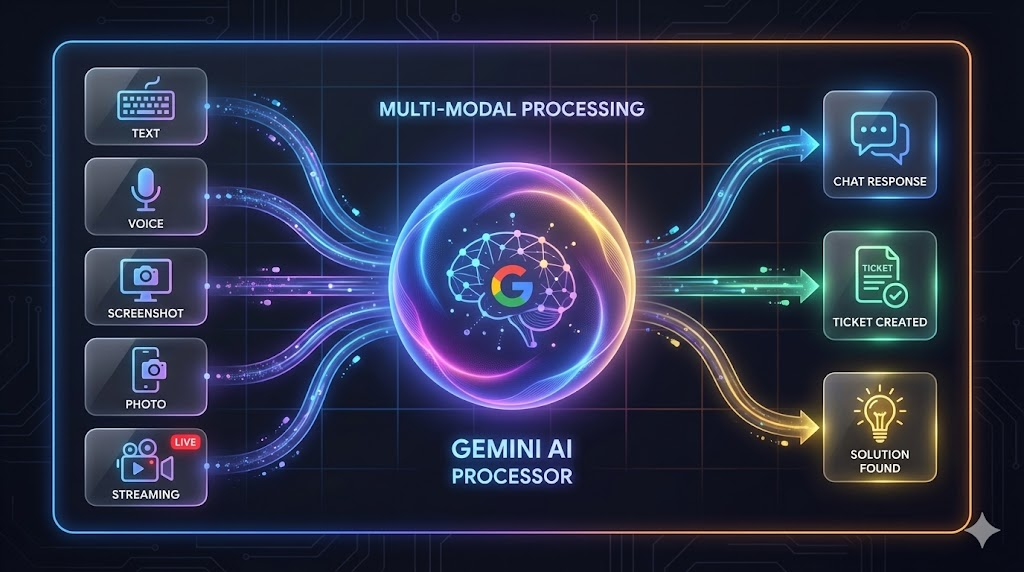
- AI-Powered Diagnostics - Leverages Google Gemini 2.5 Flash for intelligent issue analysis
- Multi-Modal Input - Supports text, voice, screenshots, camera, and live video streaming
- Automatic Ticket Generation - Creates structured IT tickets with categorization and priority
- Real-time Voice Recognition - Speak your issues naturally with speech-to-text
🎨 User Experience
- Google Material Design 3 - Beautiful, modern UI following Google's design language
- Dark Mode Support - Seamless light/dark theme switching
- Responsive Layout - Works perfectly on desktop, tablet, and mobile
- Animated Gradients - Premium Gemini-inspired visual effects
🏢 Enterprise Features
- Conversation History - Maintains context across multiple interactions
- Session Management - Track and manage support sessions
- Ticket Export - Export tickets for integration with ticketing systems
- Escalation Workflow - Built-in escalation pathways for complex issues
🎯 Usage
Text Input
Simply type your IT issue in the chat input and press Enter or click the send button.
Voice Input
Click the microphone button to activate voice recognition. Speak clearly and your words will be transcribed in real-time.
Screenshot Capture
Click "Screenshot" to capture your current screen. The AI can analyze what you're seeing to provide contextual help.
Camera Capture
Use "Camera" to take a photo of hardware issues, error messages on external displays, or equipment problems.
Live Video Stream
Enable "Live Video" for real-time assistance. The AI can analyze frames from your video stream to provide continuous support.
🔧 API Reference
GeminiService
// Get AI solution for an IT issue
const response = await geminiService.getSolution(
  issueText: string,
  imageBase64?: string
);

// Response structure
interface GeminiSolutionResponse {
  solution: string;
  ticket: Ticket;
  confidence: number;
  suggestedActions?: string[];
}
Ticket Structure
interface Ticket {
  id: string;           // Format: INC-XXXXXX
  title: string;
  description: string;
  category: 'Hardware' | 'Software' | 'Network' | 'Access' | 'Other';
  priority: 'High' | 'Medium' | 'Low';
  status: 'Open' | 'In Progress' | 'Resolved';
  createdAt: Date;
  updatedAt: Date;
}
🎨 Theming
The application uses Google's Material Design 3 color system:
| Color | Light Mode | Dark Mode | Usage |
|---|---|---|---|
| Primary | #1a73e8 |
#8ab4f8 |
Actions, links |
| Surface | #ffffff |
#1f1f1f |
Backgrounds |
| Error | #d93025 |
#f28b82 |
Error states |
| Success | #1e8e3e |
#81c995 |
Success states |
🔒 Security
- API keys are stored in environment variables, never in source code
.envfiles are gitignored by default- All communication with Google APIs uses HTTPS
- No sensitive data is logged or persisted locally
🤝 Contributing
Contributions are welcome! Please feel free to submit a Pull Request.
- Fork the repository
- Create your feature branch (
git checkout -b feature/AmazingFeature) - Commit your changes (
git commit -m 'Add some AmazingFeature') - Push to the branch (
git push origin feature/AmazingFeature) - Open a Pull Request
**Built with ❤️ using Google Gemini AI**
Built With
- cloud

Log in or sign up for Devpost to join the conversation.