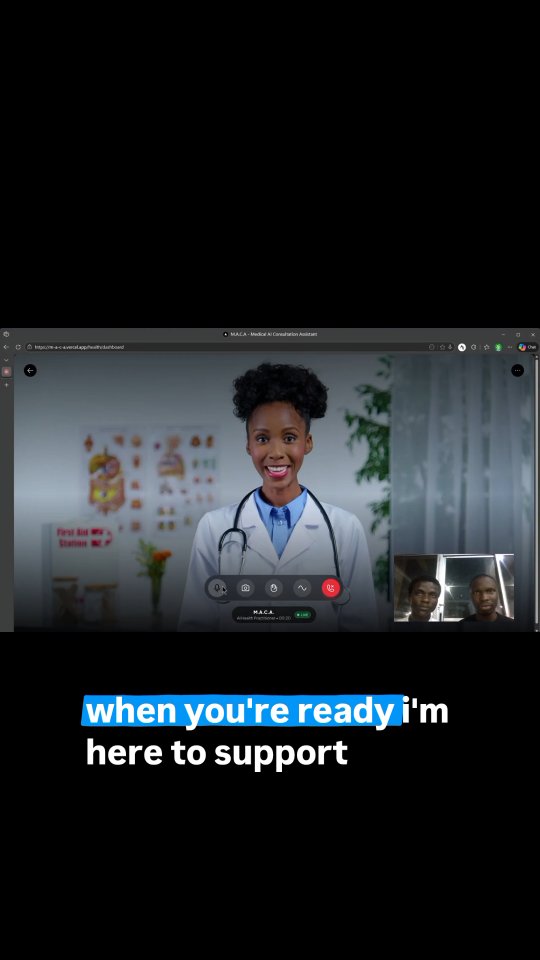
MACA - Multimodal Assistant for Clinical Analysis
An AI medical consultamt powered by LiveAvatar.com technology with LiveKit integration.
Features
- Real-time video conversations with AI medical professionals
- Voice and text interaction capabilities
- Responsive UI optimized for healthcare consultations
- Secure session management
Dependencies
- Next.js 16
- React 19
- Tailwind CSS v4
- react-icons
- LiveKit Client SDK
- LiveKit React Components
Prerequisites
Before running this application, you'll need:
- Node.js (version 18 or higher)
- PNPM package manager
- LiveAvatar API credentials:
- LIVEAVATAR_API_KEY (from https://docs.liveavatar.com/)
- LIVEAVATAR_AVATAR_ID
Note: This app uses CUSTOM mode, which only requires an avatar ID. You'll manage your own LLM/conversation logic.
Setup Instructions
Clone the repository:
git clone <repository-url>
cd maca
Install dependencies:
pnpm installCreate a
.env.localfile in the root directory:cp .env.example .env.localConfigure your LiveAvatar credentials in the
.env.localfile:- Sign up at LiveAvatar to get your API key
- Find your API key on the LiveAvatar settings page
- Get your Avatar ID from the LiveAvatar dashboard
- See the Quick Start Guide for more details
Start the development server:
pnpm devOpen your browser to
http://localhost:3000to access the application
Environment Variables
The application requires the following environment variables:
LIVEAVATAR_API_KEY: Your LiveAvatar API key for authenticationLIVEAVATAR_AVATAR_ID: The ID of the avatar you want to use
See .env.example for a template.
Note: Using CUSTOM mode means Voice ID and Context ID are not needed. You handle your own conversation logic.
Available Scripts
pnpm dev: Start the development serverpnpm build: Build the production applicationpnpm start: Start the production serverpnpm lint: Run ESLint
LiveAvatar Integration
This application uses LiveAvatar.com's API in CUSTOM mode with LiveKit for real-time avatar experiences.
What is CUSTOM Mode?
In CUSTOM mode, LiveAvatar handles video generation from audio only. You manage:
- Your own LLM/conversation logic
- Audio input (TTS or microphone)
- When to send audio to the avatar
LiveAvatar generates the corresponding video of the avatar speaking.
Integration Flow
- Create a session token with avatar configuration (CUSTOM mode)
- Start the session to get LiveKit room credentials
- Connect to the LiveKit room
- Send audio data to the avatar via LiveKit data channel
- Receive video stream of the avatar speaking
Custom Mode Utilities
The app includes utilities for CUSTOM mode:
sendAudioToAvatar()- Send audio data to generate avatar videosendTextAsAudio()- Convert text to speech and send to avatarMicrophoneAudioSender- Capture and stream microphone audio
See src/lib/liveavatar-livekit/customModeUtils.ts for implementation details.
Resources
Demo Page
Visit /liveavatar-demo to test the LiveAvatar integration with a simple interface.
Built With
- css
- next.js
- react-icons
- tailwind

Log in or sign up for Devpost to join the conversation.