-
Main Logo
-

Lyner Mascot
-
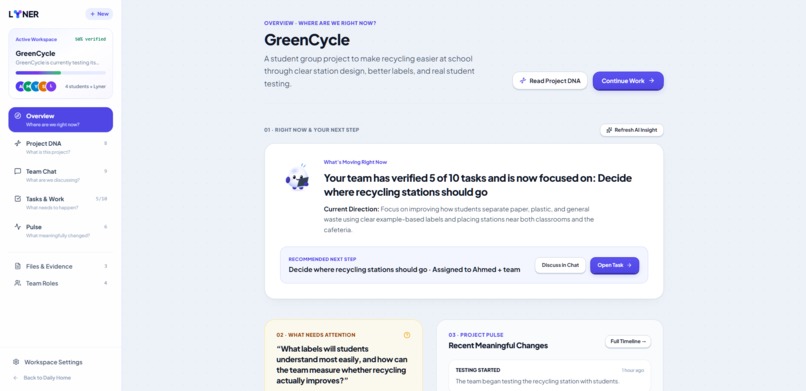
Overview
-
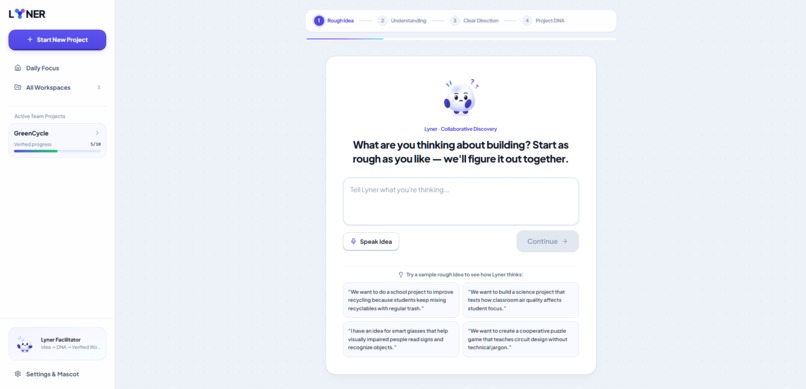
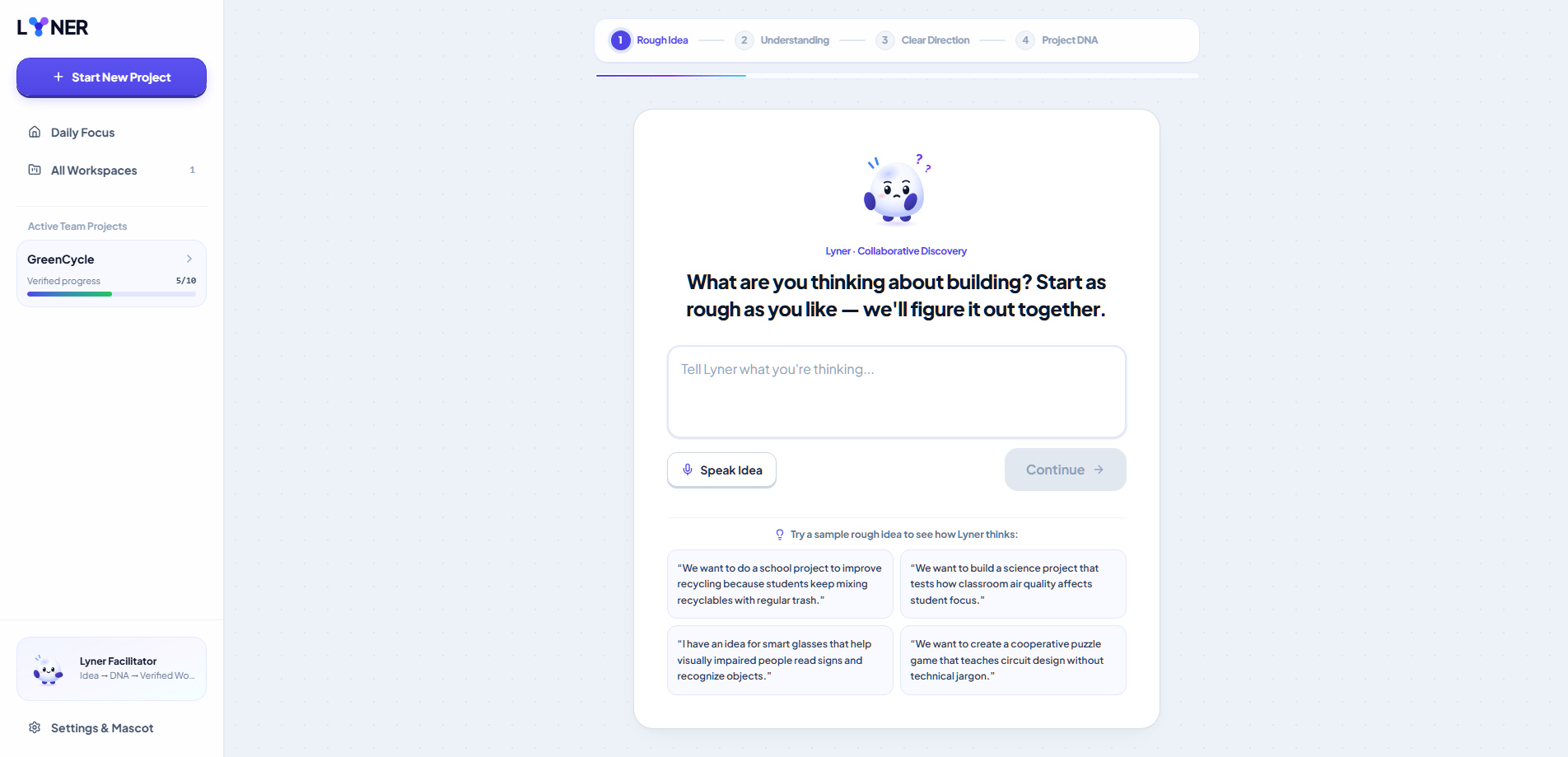
New Project Page
-
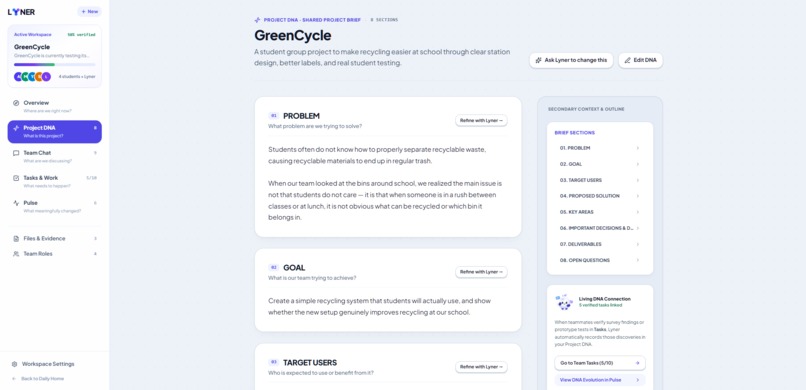
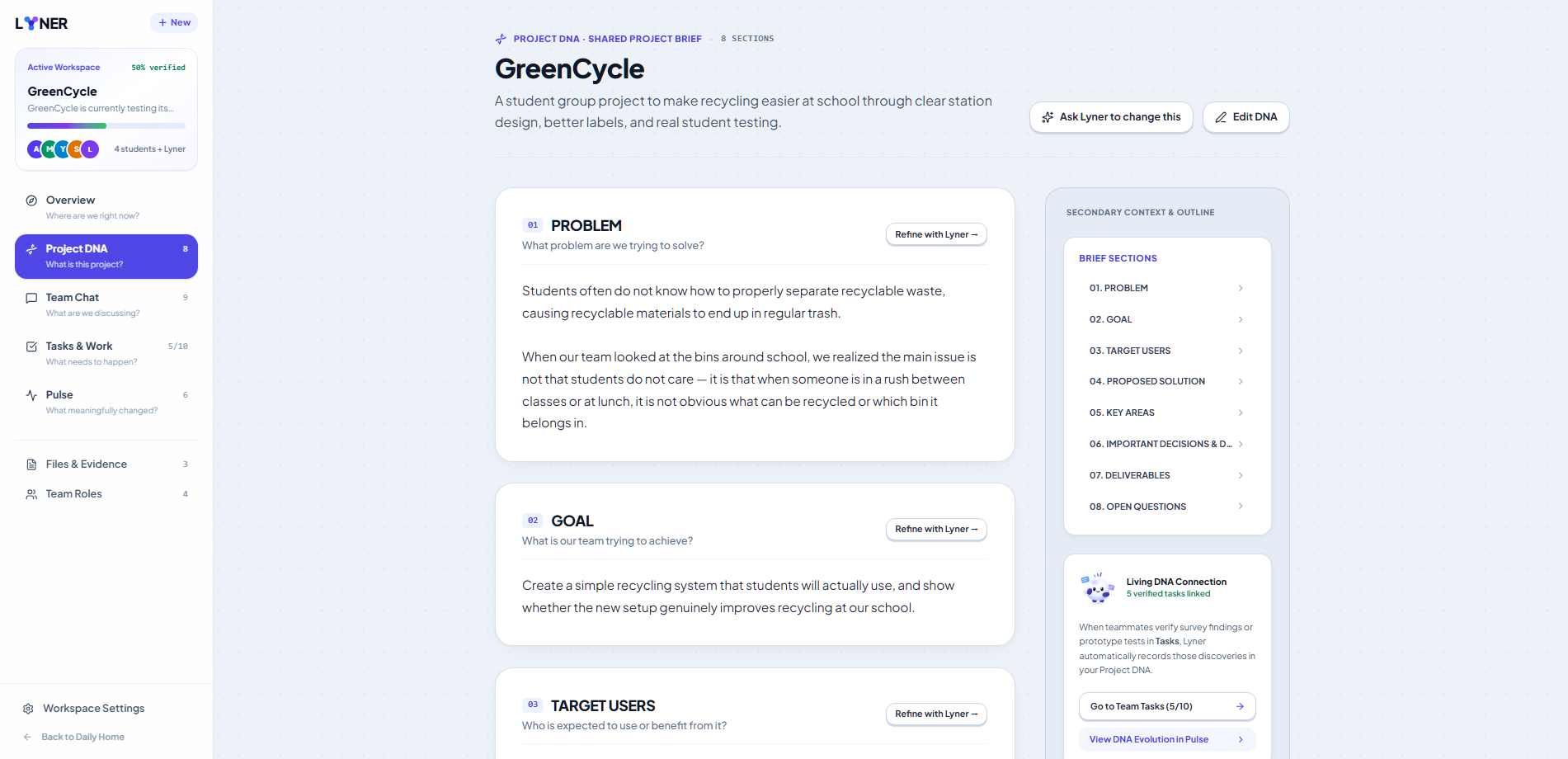
Project DNA Page
-
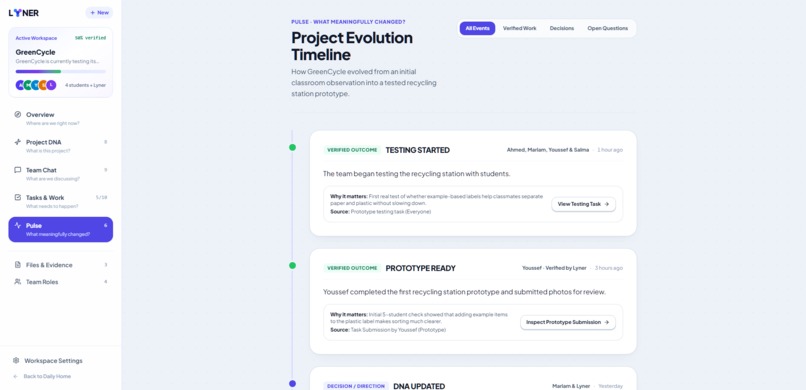
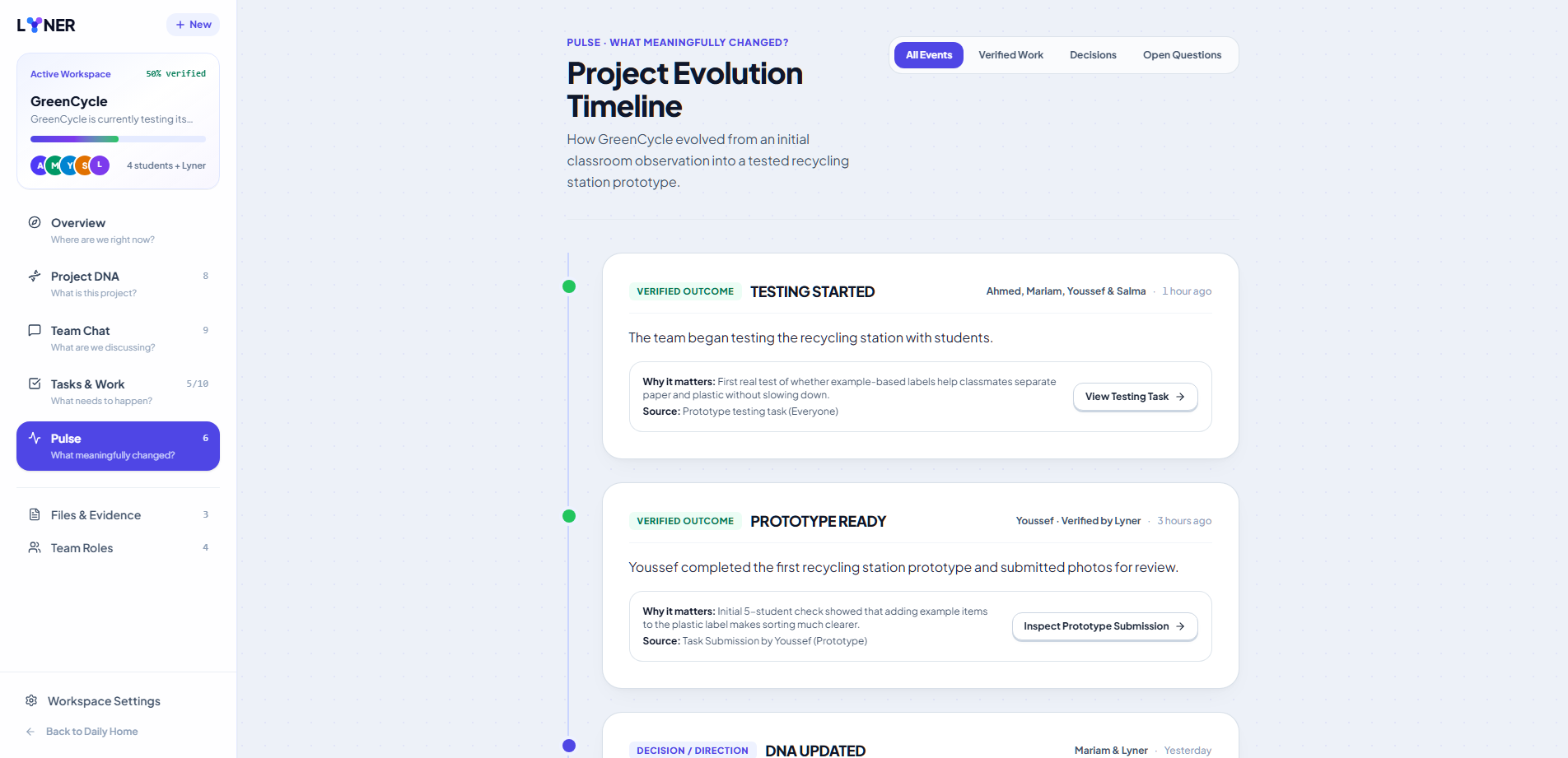
Ideas Log Page " Project Pulse"
-
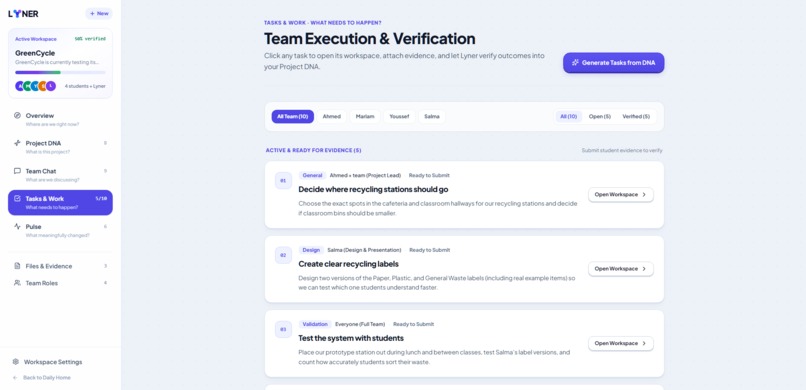
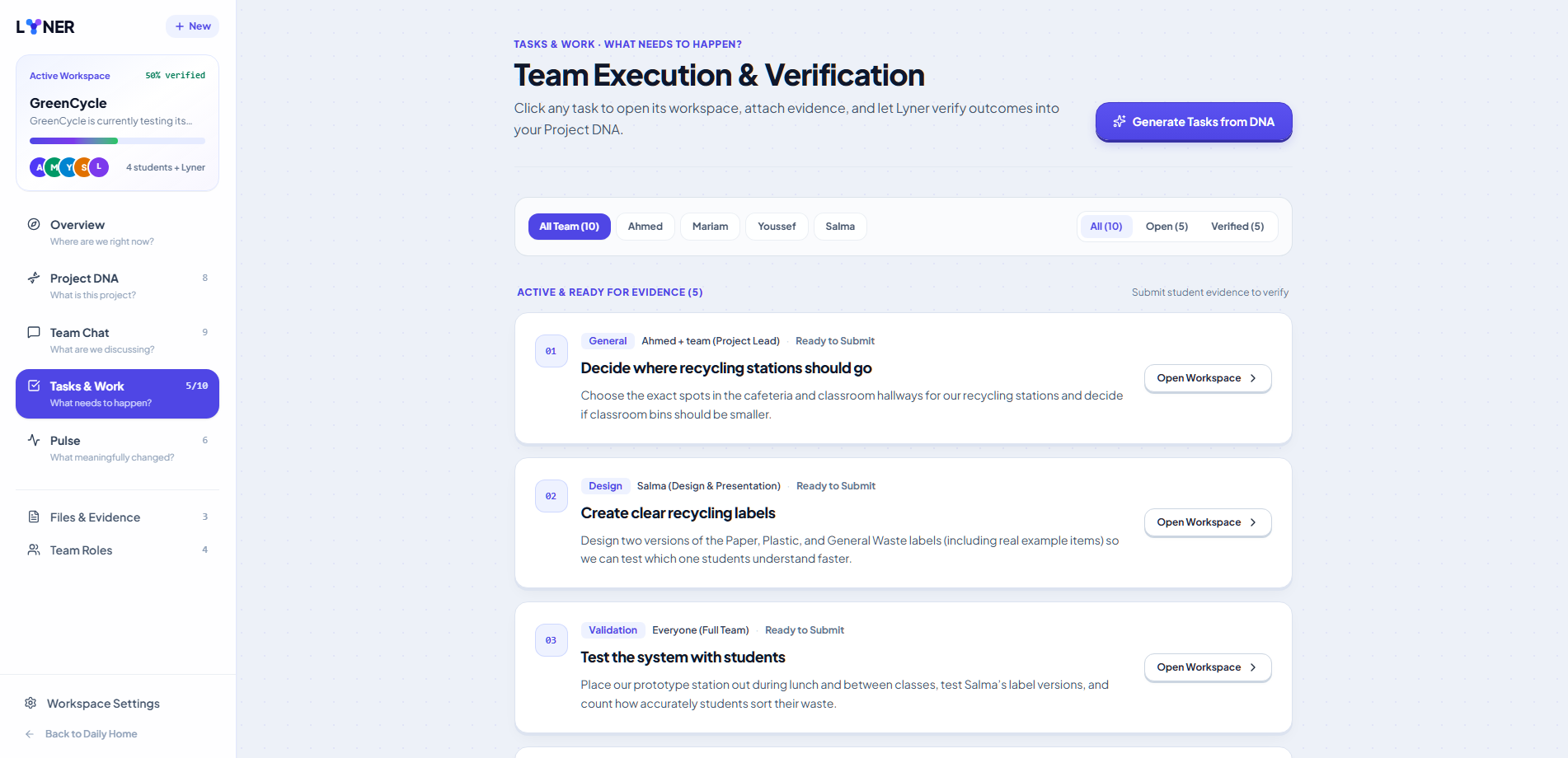
Tasks Submission and Progress
-

Mascot expressions


Inspiration
School projects are supposed to teach students how to work together.
But in practice, group projects often create a different problem: students can be working on the same project without actually having the same understanding of what they are building.
One student may be researching the problem, another may already be building a prototype, another may be preparing the presentation, and someone else may still be asking what the final idea actually is.
The problem is not always a lack of effort.
It is often a lack of alignment.
That was the starting point for Lyner.
I wanted to explore a simple question:
What if a tool could help a student team understand their project before trying to manage it?
I did not want to build another task manager where students are given a board full of cards and told to organize themselves.
I also did not want to build another AI chatbot that students could ask questions to but that had no real understanding of the project around it.
I wanted to build something in between:
A workspace where the team's conversations, decisions, understanding, and actual work are connected.
This became the idea behind Lyner.
The goal is simple:
Help students align their teams and turn teamwork into progress.
The project was developed specifically with student projects in mind because this is where the problem becomes especially visible. School projects often have limited time, different skill levels, unclear responsibilities, and students who are learning how to collaborate for the first time.
Instead of assuming students already know how to manage a project, Lyner tries to support them through that process.
The Problem
A typical school project can look something like this:
A group of students gets an assignment.
They have an initial idea.
They create a group chat.
Someone suggests a direction.
Someone else suggests something different.
They start dividing tasks.
A few days later, everyone has worked on something, but the team is no longer completely sure whether everyone is still building toward the same goal.
Information becomes scattered between conversations, documents, task lists, and individual work.
The result is not necessarily that students are lazy or unproductive.
The problem is that the project's shared understanding is fragile.
Students need answers to questions like:
- What are we actually building?
- What problem are we solving?
- Who are we building it for?
- What have we already decided?
- What is still unclear?
- What does each person need to accomplish?
- Why am I doing this task?
- How does my work affect the rest of the project?
- What changed while I was working?
Most existing project-management tools begin after these questions have already been answered.
Lyner starts earlier.
It starts with the idea itself.
Why Existing Tools Were Not Enough
I looked at the problem from the perspective of a student rather than a professional project manager.
A student team does not necessarily need another complicated dashboard with:
- productivity scores
- large analytics panels
- complicated project hierarchies
- endless configuration
- artificial KPIs
- dozens of status fields
The team needs clarity.
That led to one of the main design principles behind Lyner:
Complexity should exist in the intelligence of the system, not in the interface.
The interface should remain simple while Lyner works in the background to understand the project.
This is why Lyner is intentionally not designed as a Trello, Asana, or traditional project-management clone.
It is also not designed as a standalone AI chatbot.
The unique part is the connection between the two.
What Lyner Does
Lyner is a collaborative workspace designed for student teams working on projects.
It helps a team move through one continuous process:
Idea → Understanding → Decisions → Project DNA → Tasks → Work → Verification → Progress
Instead of treating every part of a project as a separate tool, Lyner treats them as different views of the same project.
The project has a shared understanding.
That understanding becomes the foundation for the team's work.
The Core Idea: Project DNA
The most important concept in Lyner is Project DNA.
Project DNA is not meant to be another project-management document that students have to manually fill out.
It is Lyner's current understanding of the project.
It captures things such as:
- the problem
- the target users
- the solution
- the project's goal
- scope
- constraints
- important decisions
- research findings
- current state
- unresolved questions
The idea came from a simple observation:
If a new student joins a project, they should not have to read hundreds of messages to understand what the team is doing.
They should be able to open the Project DNA and understand the project.
At the same time, the DNA should not become frozen.
If the team learns something new, makes a decision, changes direction, or completes important work, the project's understanding can change too.
That makes Project DNA a living representation of the project, rather than a static document.
How Lyner Works
1. Start with an imperfect idea
A student does not need to know everything before starting.
The project can begin with something as simple as:
"We want to make recycling easier in our school."
Lyner does not expect the student to turn that into a perfectly structured project plan.
Instead, it helps clarify the idea.
The design deliberately avoids a giant questionnaire.
Lyner can ask targeted questions such as:
What problem are you trying to solve?
Who is this for?
What would success look like?
But it should only ask questions that are useful based on what the student has already said.
The goal is not to complete a form.
The goal is to understand the project.
2. Turn the conversation into understanding
As the student explains the idea, Lyner builds an understanding of what they are trying to accomplish.
The Project DNA can begin to take shape from that conversation.
For example:
Problem
Students often put recyclable and non-recyclable waste into the same bin.
Target User
Students in school.
Goal
Build a working prototype.
Solution
A recycling system that helps students sort waste correctly.
The important part is that Lyner should not invent information that the student never established.
The system should distinguish between what is known, what is assumed, and what is still unclear.
3. Let the team discuss normally
Once the project exists, students can communicate naturally.
Chat is not supposed to feel like an AI chatbot.
It is primarily the team's normal project conversation.
Students can:
- discuss ideas
- disagree
- ask questions
- share files
- mention teammates
- brainstorm
- make suggestions
Lyner should not interrupt every conversation.
Instead, it becomes useful when something meaningful happens.
For example, the team might start discussing whether a prototype needs an external alert device.
Lyner can recognize that this is not just another message.
It may represent an actual project decision.
That can become a contextual intervention:
Possible decision detected
Your team appears to be deciding whether the project needs an external alert device.
The team can then explore the decision.
This is one of the key differences between Lyner and a normal chatbot.
Lyner is not simply responding to messages.
It is trying to understand what those messages mean for the project.
4. Make decisions explicit
Teams make many decisions inside conversations without formally recording them.
Later, people forget why a decision was made.
Lyner turns important decisions into explicit project knowledge.
For example:
Decision
Should the system use a separate external alert device?
The team can discuss the options.
Lyner can summarize the main tradeoff:
Hardware independence vs. MVP simplicity.
The team then makes the decision.
For example:
Use phone notifications for the MVP.
And the reason:
The team chose the simpler implementation so they could focus on the core recycling functionality within the project deadline.
That decision can then become part of Project DNA.
This creates a connection:
Conversation → Decision → Project DNA
5. Turn understanding into actual work
Once the team knows what it is building, the next question becomes:
What actually needs to happen?
Lyner connects project understanding to tasks.
For example:
Implement phone notification system
Owner: Ahmed
Status: In progress
Deliverable:
A working notification prototype triggered by the agreed fill-level threshold.
Dependency:
ESP32 telemetry.
Acceptance criteria can describe what must actually be demonstrated.
This means the task is connected to the project's context instead of being an isolated checkbox.
The task exists because of something the team decided or learned.
6. Completing a task means showing the work
One of the things I did not want Lyner to become was another system where:
Done = clicked checkbox.
Instead, completing meaningful work should involve explaining what actually happened.
A student can submit:
- what they accomplished
- how they implemented it
- the result
- evidence such as files, screenshots, links, or other project artifacts
Lyner can then evaluate the submission against the task and the project's requirements.
The goal is not to pretend that AI can perfectly judge every piece of work.
Instead, the system should be able to distinguish between situations such as:
Verified
The submission provides enough evidence.
Needs more evidence
The student may have completed the work, but the provided evidence is insufficient.
Unable to verify
There is not enough information for Lyner to make a reliable judgment.
This creates another connection:
Task → Work → Evidence → Verification
7. Update the project when something meaningful changes
Project progress is not just a percentage.
A project can be 70% complete and still be completely unclear.
Instead, Lyner focuses on meaningful changes.
This is the purpose of Pulse.
Pulse represents the project's evolving story.
Examples include:
- Direction clarified
- Direction changed
- Important decision made
- Project DNA updated
- Task milestone reached
- Submission verified
- New open question discovered
It deliberately avoids meaningless activity such as:
Ahmed opened a task.
or:
Ahmed logged in.
The question is:
Did something important happen to the project?
If yes, Pulse should help the team understand what changed and why it matters.
8. Give the student a clear next step
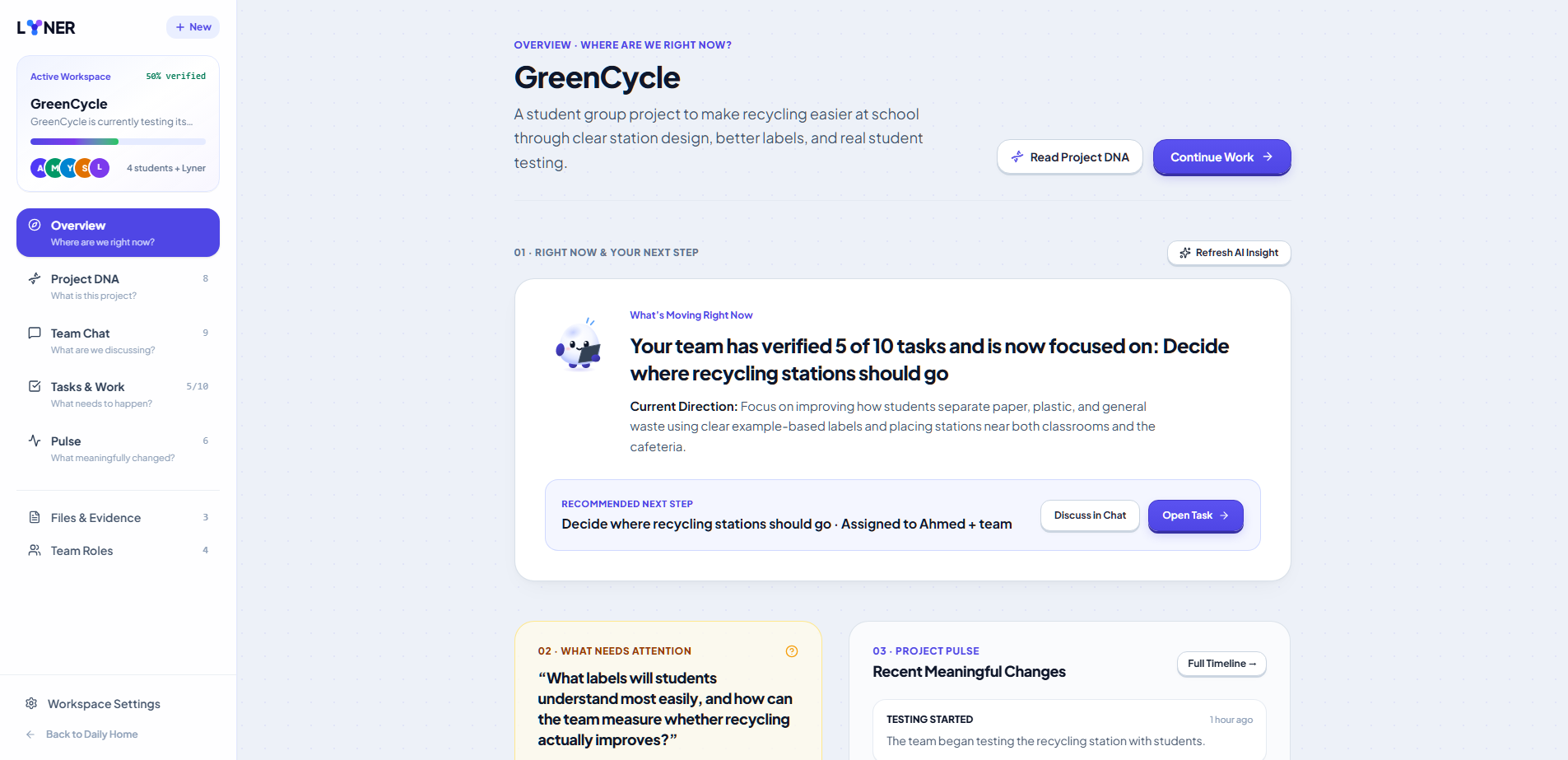
The Overview brings everything together.
Instead of showing students a wall of statistics, it answers a few practical questions:
Where are we?
What changed?
What needs attention?
What should I do next?
This makes the Overview an orientation layer rather than an analytics dashboard.
The goal is for a student to open Lyner after being away from the project and understand the current state quickly.
The Student Perspective
Although Lyner can eventually be used for startups, research, competitions, and other collaborative projects, the hackathon version was deliberately designed around school projects.
The reason is simple.
School projects are one of the first places where students are expected to:
- work with people who have different skills
- divide responsibilities
- make decisions together
- manage deadlines
- communicate technical ideas
- resolve disagreements
- turn research into a real product
- explain and present what they built
These are skills students will continue using far beyond school.
Lyner is intended to help them practice those skills rather than simply automate them away.
How I Built It
I built Lyner as a solo project.
The product was developed as a web-based collaborative workspace with a React and TypeScript frontend and Vite-based development/build tooling.
The project is deployed through Vercel and maintained through GitHub.
The AI layer is connected through Featherless AI.
The current primary model configuration uses:
DeepSeek-V4.1-Flash
through Featherless AI.
The architecture was designed so that the AI provider/model can be changed without redesigning the rest of the application.
AI in Lyner
AI is not an extra feature attached to Lyner.
It is part of the core interaction model.
Lyner's AI is intended to help with:
- understanding conversations
- maintaining project context
- identifying unclear ideas
- identifying contradictions
- deciding what clarification is useful
- synthesizing project information
- creating or updating Project DNA
- proposing meaningful tasks
- understanding task submissions
- supporting verification
- identifying meaningful project changes
- helping students understand what to do next
The important principle is:
Lyner should support the team's thinking, not replace it.
For example, if the team has two possible approaches, Lyner should not simply choose one and tell the students what to do.
It should be able to explain the tradeoff, identify assumptions or risks, and help the team make an informed decision.
This was also why I intentionally avoided designing Lyner as a giant AI chatbot.
The AI should appear when it is useful.
AI Tools Used During Development
I used AI throughout the development process, but in different ways.
ChatGPT
I used ChatGPT as a development and thinking partner throughout the project.
It was used for:
- brainstorming product ideas
- challenging and refining the product concept
- exploring UX patterns
- thinking through project architecture
- writing and refining product specifications
- debugging development issues
- refining interface copy
- designing interaction flows
- generating implementation prompts
- evaluating design decisions
- thinking through how AI should behave inside Lyner
The AI was used as a collaborator during development, not as a replacement for understanding the product.
Google AI Studio
Google AI Studio was used as part of the actual application-building workflow.
It helped turn the product specifications and UI requirements into working application code and supported iterative implementation and debugging.
The project was repeatedly refined through prompts describing specific product behavior, UI changes, interactions, responsive behavior, and functional requirements.
Featherless AI
Featherless AI is part of the final Lyner product rather than only a development tool.
It provides the hosted model infrastructure used by Lyner.
The current primary model is:
DeepSeek-V4.1-Flash
The project was designed around a server-side AI architecture so that the API key is not exposed to the browser.
DeepSeek
DeepSeek-V4.1-Flash is the current primary model used by Lyner for project understanding and AI interactions.
The model is responsible for helping Lyner reason over project context rather than simply generating isolated chatbot responses.
AI Was Used, But I Still Built the Product
One of the most important things I wanted to preserve was ownership of the final result.
AI helped me move faster and explore more possibilities, but I remained responsible for:
- the product idea
- the problem definition
- the UX direction
- the product architecture
- the interaction model
- the feature decisions
- the visual design direction
- the implementation
- debugging
- testing
- deployment
- final product decisions
AI-generated suggestions were reviewed, changed, rejected, or rewritten when necessary.
I also made sure that I could explain the product and its technical decisions rather than treating AI output as automatically correct.
This is particularly important because the hackathon explicitly allows AI tools while requiring participants to disclose their use and understand and explain their final project. :chatgpt-content-reference{index="1"}
Design Process
A major part of building Lyner was figuring out how much complexity should be visible to the student.
I explored project-management interfaces, collaboration tools, conversational interfaces, and guided learning experiences.
One of the strongest UX references was the interaction structure used by Duolingo.
The goal was not to copy Duolingo's branding.
Instead, I looked at the interaction principles:
- reducing cognitive overload
- breaking complex experiences into manageable steps
- adapting the experience based on previous responses
- using different interaction types
- providing immediate feedback
- keeping the next action obvious
The UX research we used specifically discusses Duolingo's bite-sized progression, adaptive question selection, multimodal interactions, immediate feedback, and friendly tone. :chatgpt-content-reference{index="2"}
I translated those principles into Lyner's project creation experience.
Instead of:
Fill out seven fields → submit → create project
the goal became:
Rough idea → conversation → clarification → understanding → project.
That difference became one of the most important parts of the product.
Why the Interface Is Designed This Way
I wanted Lyner to feel approachable enough for a student but serious enough to be used for real technical projects.
That meant avoiding:
- futuristic AI interfaces
- cyberpunk aesthetics
- giant chatbot panels
- excessive gradients
- excessive glassmorphism
- complicated dashboards
- fake productivity metrics
- unnecessary gamification
The interface uses a friendly visual identity, the Lyner mascot, clear hierarchy, subtle motion, and contextual AI interactions.
The mascot is intentionally treated as a companion rather than a decorative character.
The product should feel human without becoming childish.
Project Architecture and Core Loop
The core architecture follows the idea that all project information should remain connected.
Conceptually:
Conversation
↓
Understanding
↓
Project DNA
↓
Decisions
↓
Tasks
↓
Work
↓
Submission
↓
Verification
↓
Project Update
↓
Pulse
↓
New Understanding
This means the project is not just a collection of pages.
The pages are different views into the same evolving project.
The current project navigation reflects that:
- Overview
- DNA
- Chat
- Tasks
- Pulse
- Files
- Members
- Settings
Each view answers a different question.
Challenges We Ran Into
1. Avoiding another project-management dashboard
The easiest solution would have been to build a normal task-management application.
But that would have missed the actual problem.
The challenge was deciding what information students actually need and what information would simply create more work.
That led to the principle:
Do not make students manage the system. Let the system help them understand the project.
2. Making AI useful without making it annoying
Adding AI everywhere is easy.
Making AI useful is much harder.
If Lyner responds to every message, it becomes distracting.
If it never intervenes, it becomes just another chatbot.
The challenge was finding the moments where AI adds genuine value:
- unclear direction
- contradictions
- decisions
- missing information
- project synthesis
- verification
- meaningful changes
3. Keeping Project DNA trustworthy
If AI is allowed to automatically write the project's understanding, it can become dangerous if it invents information.
The Project DNA therefore needs to represent what the team actually established.
This led to the principle:
If the team did not establish it, Lyner should not pretend that it knows it.
This is especially important when AI is being used to support students.
4. Connecting conversation to execution
It is easy to build a chat application.
It is easy to build a task application.
The difficult part is connecting them meaningfully.
Lyner tries to make the chain explicit:
"We discussed this."
becomes:
"We decided this."
which becomes:
"This is now part of the project."
which becomes:
"This work needs to happen."
which becomes:
"This work was completed."
which becomes:
"This changed the project."
That connection is the heart of Lyner.
What I'm Proud Of
I'm most proud that Lyner became more than a collection of collaboration features.
I started with the problem of students struggling to work together.
The final concept is a system where:
communication creates understanding,
understanding creates decisions,
decisions create work,
work produces evidence,
and
meaningful work changes the project's understanding.
The Project DNA concept is particularly important to me because it gives the project a memory that is readable by humans.
Instead of forcing a new team member to understand the entire history of a project, Lyner can provide the current shared understanding in one place.
What I Learned
Building Lyner taught me that collaboration is not simply communication.
A team can communicate constantly and still be misaligned.
I also learned that project management is not always about tracking more things.
Sometimes it is about making the right things clear.
I learned that AI is most useful when it can understand context rather than simply generate text.
And I learned that building a product for students requires a different mindset from building a product for professional project managers.
Students should not have to become project-management experts just to use the tool.
The tool should meet them where they are.
Impact
The immediate goal of Lyner is to help students work better on school projects.
But the underlying skills are broader.
A student using Lyner is practicing:
- communicating ideas
- clarifying requirements
- making decisions
- dividing responsibilities
- documenting reasoning
- evaluating completed work
- understanding dependencies
- responding to new information
- collaborating with people who have different skills
These are skills that remain valuable beyond school.
The goal is not simply to help students finish assignments faster.
It is to help them become better collaborators.
What's Next
The current version is an MVP.
There is still a lot I want to explore.
Future versions could improve:
- AI project understanding
- long-term project memory
- decision detection
- Project DNA reliability
- task generation
- evidence-based task verification
- real-time collaboration
- project research
- integrations with files and external tools
- richer team collaboration
- more sophisticated project evolution tracking
I also want to expand Lyner beyond school projects eventually.
The same underlying problem exists in:
- competitions
- research projects
- startups
- technical teams
- creative projects
- student organizations
But the school environment is where I wanted to start because it is a real problem students encounter early.
The Bigger Idea
Lyner is built around one simple belief:
Teams don't just need a place to work. They need a shared understanding of what they are working toward.
That is what Lyner tries to create.
Not another dashboard.
Not another chatbot.
Not another task list.
A workspace where the team's thinking and work stay connected.
Align your team.
Turn teamwork into progress.
Built With
- React
- TypeScript
- Vite
- Tailwind CSS
- Featherless AI
- DeepSeek-V4.1-Flash
- Vercel
- GitHub
- Google AI Studio
- ChatGPT
AI Use Disclosure
AI played a significant role in both the development of Lyner and the final product.
During development, I used AI tools including ChatGPT and Google AI Studio to brainstorm, explore product concepts, refine UX ideas, write and debug code, develop implementation plans, solve technical problems, and iterate on the interface.
I also used Featherless AI as part of the final product. Lyner currently uses Featherless AI with DeepSeek-V4.1-Flash to support project understanding and contextual AI interactions.
AI was used for:
- product ideation
- UX exploration
- interface design iteration
- code generation and refinement
- debugging
- technical problem solving
- project architecture exploration
- copy refinement
- AI interaction design
- project-context reasoning
I remained responsible for the final product decisions, architecture, implementation, testing, deployment, and design.
AI-generated suggestions were reviewed and modified rather than being accepted automatically.
I can explain the architecture, the product decisions, the role of AI, and how the final system works.
Sources & Inspiration
The project was developed through a combination of direct product exploration, UX research, community discussion, and iterative prototyping.
Hackathon Brief
The CSC Back-to-School Hackathon specifically asks participants to identify a real school-life problem and build an app, website, AI tool, prototype, or gadget that helps students, teachers, or schools solve it. It also requires participants to disclose AI usage and list the technologies and tools used. :chatgpt-content-reference{index="3"}
This requirement strongly influenced the decision to focus Lyner specifically on student collaboration rather than presenting it as a generic productivity platform.
UX Research
UX research on Duolingo's interaction model influenced the project creation experience, particularly the use of manageable steps, adaptive interactions, immediate feedback, and friendly interaction patterns. :chatgpt-content-reference{index="4"}
The goal was not to copy Duolingo's branding or visual identity, but to learn from the interaction principles that make a complex learning experience feel approachable.
Community Discussion
The earliest exploration of the problem also included discussion and observation of real conversations around project collaboration and the difficulties people experience when working in teams.
Original Reddit discussion: [ADD ORIGINAL REDDIT POST LINK HERE]
This source should be added once the original discussion is included so that the exact discussion can be referenced rather than paraphrased without a source.
Product Iteration
The rest of the product evolved through repeated prototyping and testing of:
- project creation
- conversational clarification
- Project DNA
- team communication
- decision capture
- task generation
- task execution
- submission
- verification
- project evolution
- overview and project navigation
The final MVP represents the result of those iterations rather than a single predefined design.
Built With
- ai
- app
- artificial
- collaboration
- communication
- edtech
- education
- experience
- generative
- intelligence
- language
- learning
- machine
- management
- natural
- processing
- productivity
- project
- project-based
- projects
- teamwork
- ui
- user
- ux
- web

Log in or sign up for Devpost to join the conversation.