-
-
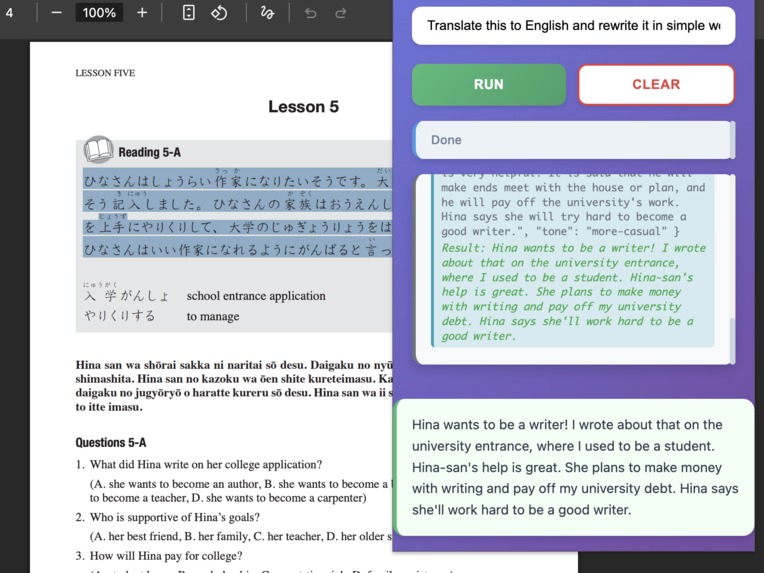
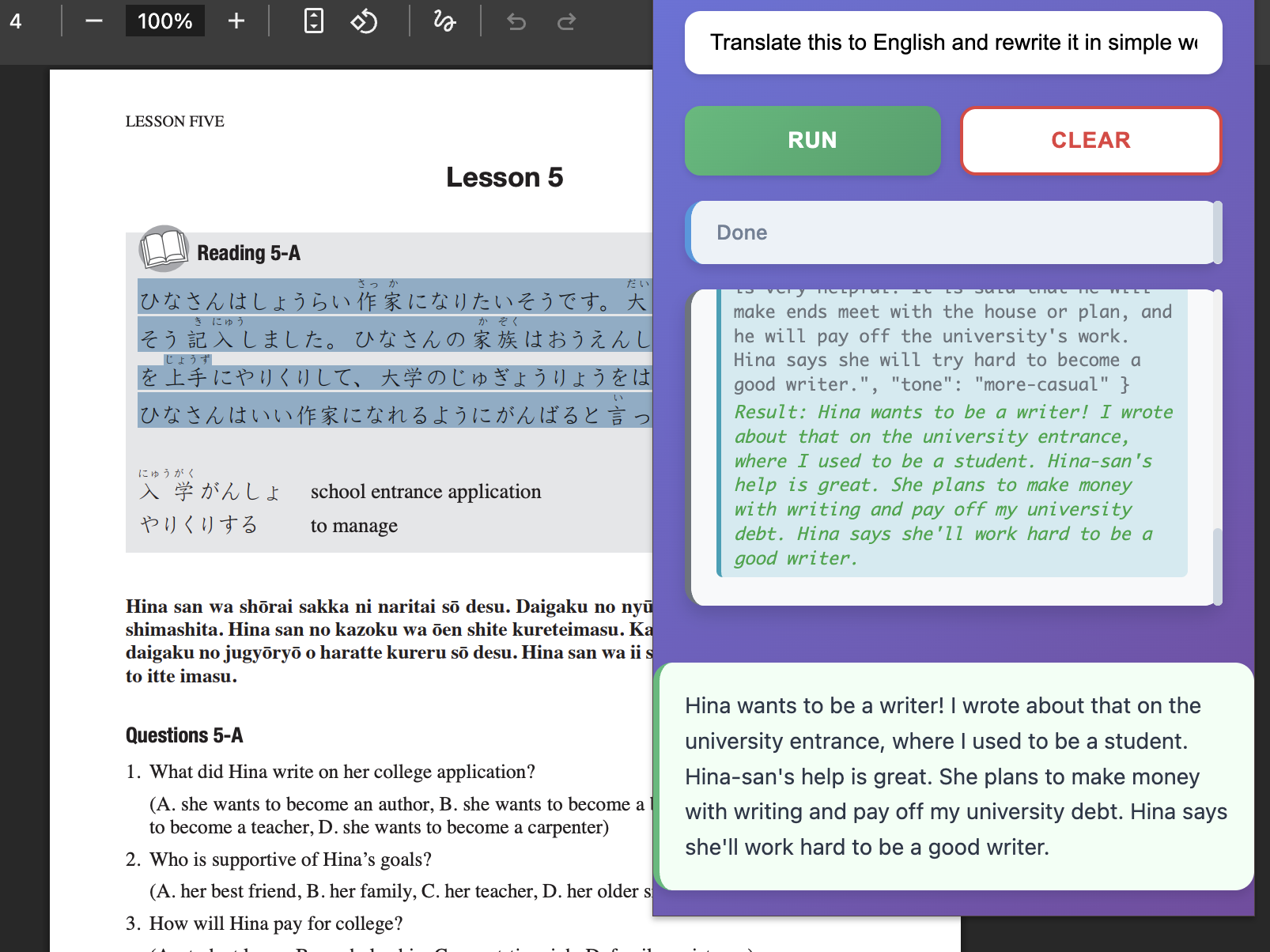
translating japanese into english then rewriting them into more casual form
-
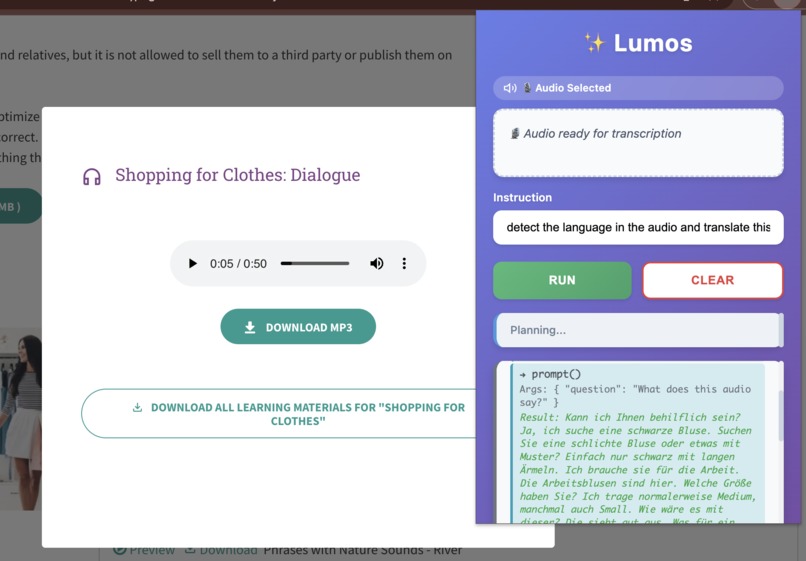
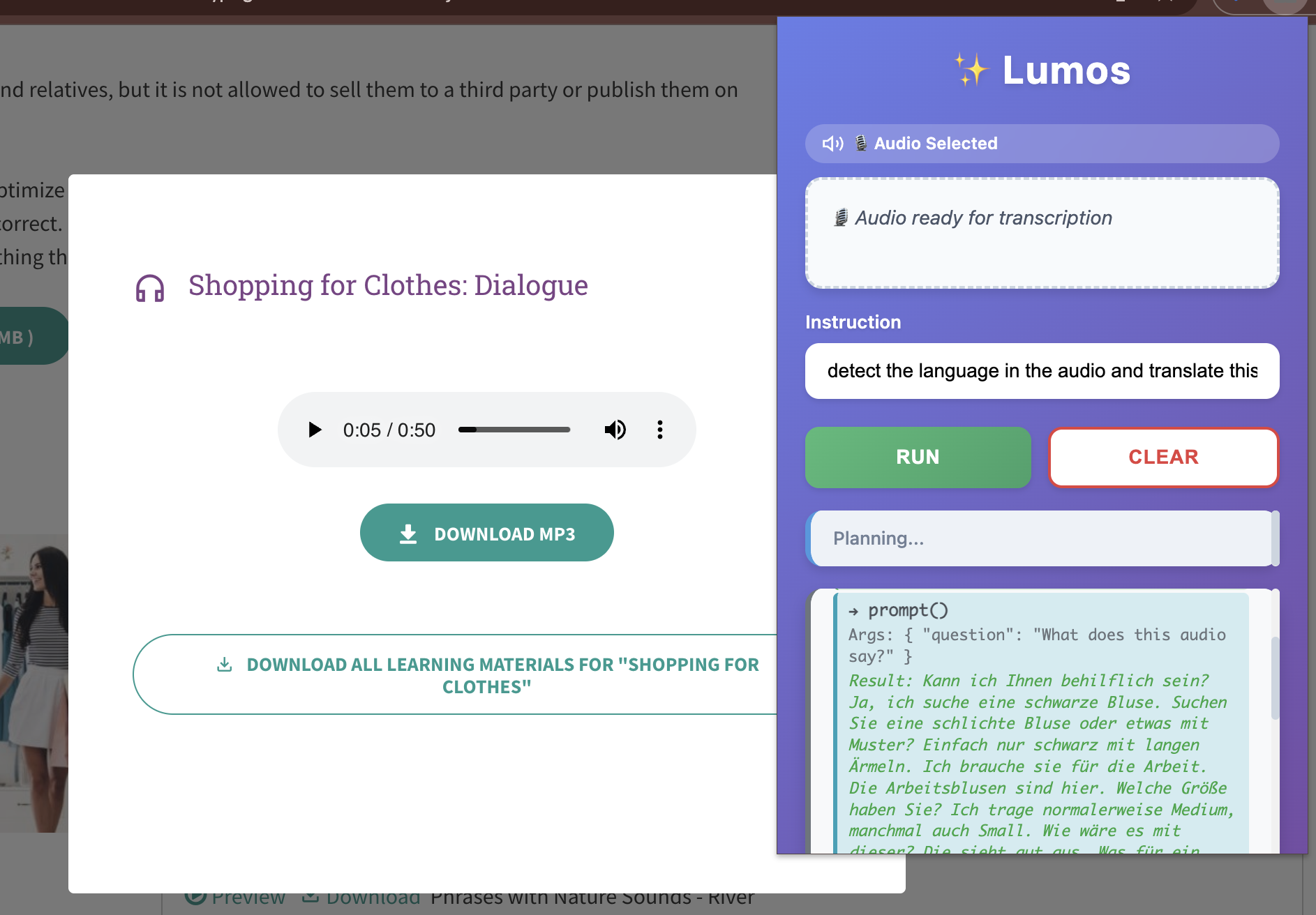
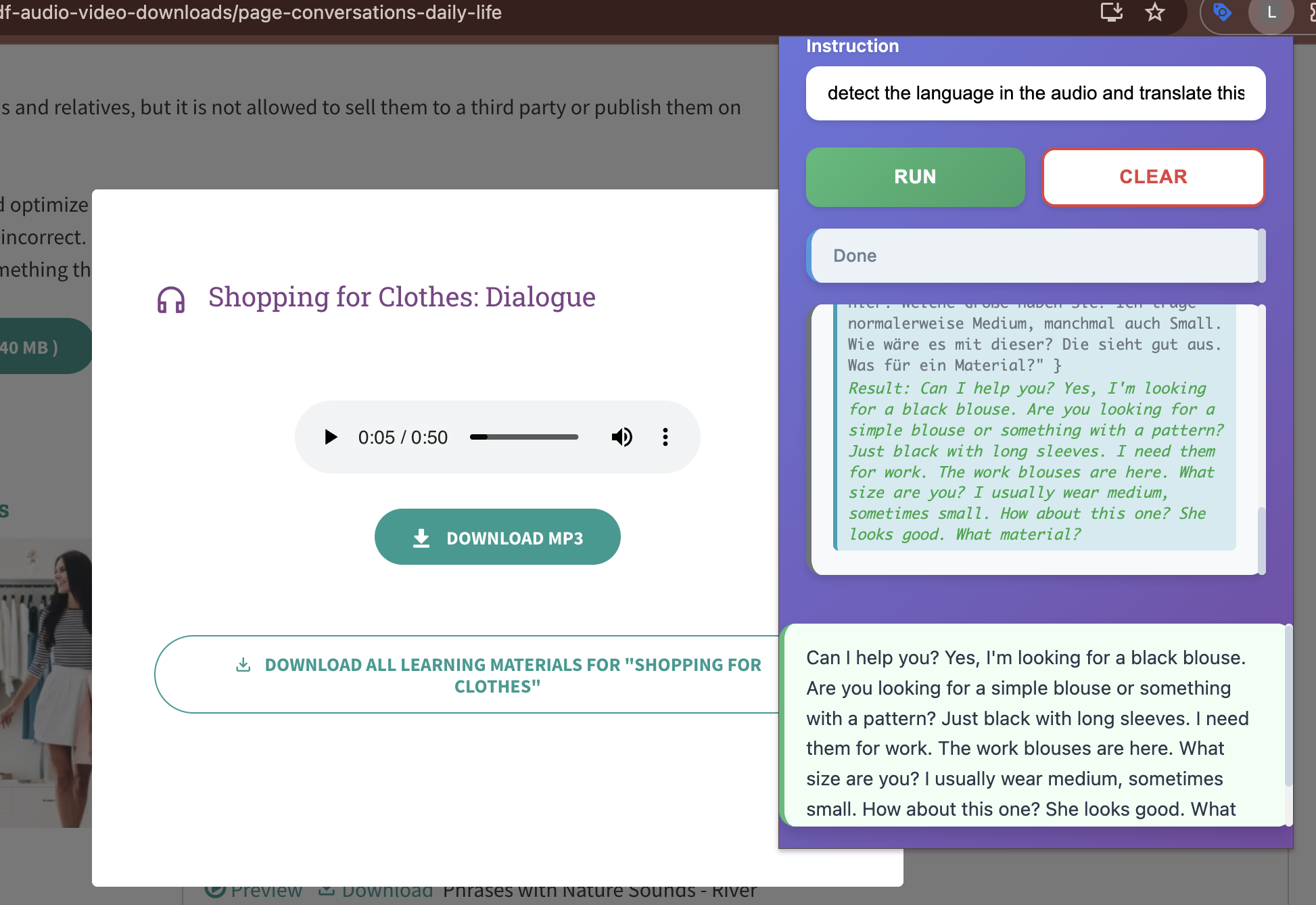
detecting the language of the audio,translate to english then rewrite in simple form
-
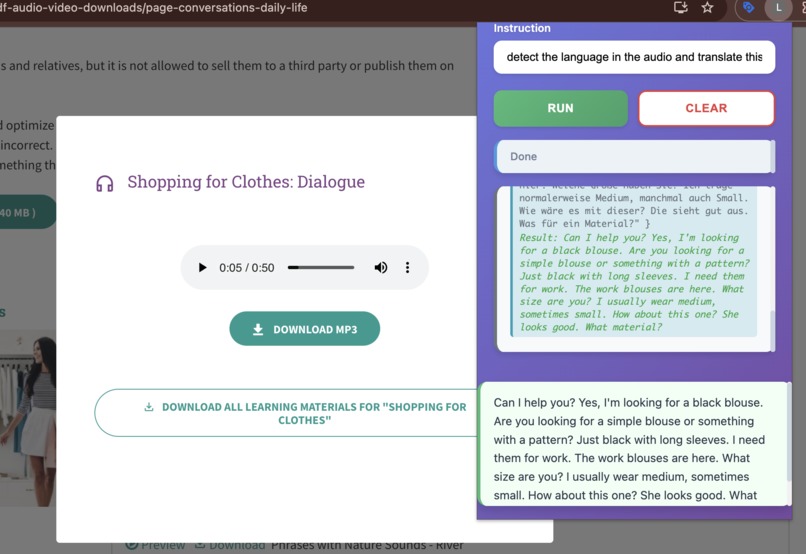
detecting the language of the audio,translate to english then rewrite in simple form
-
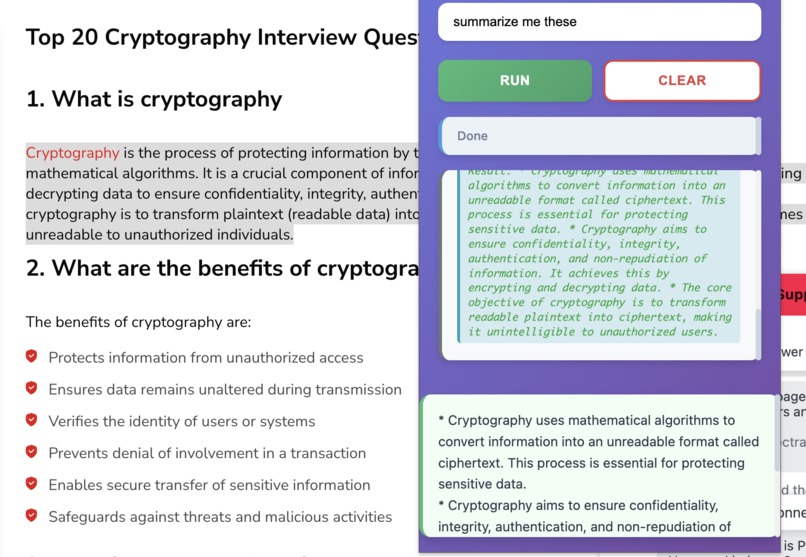
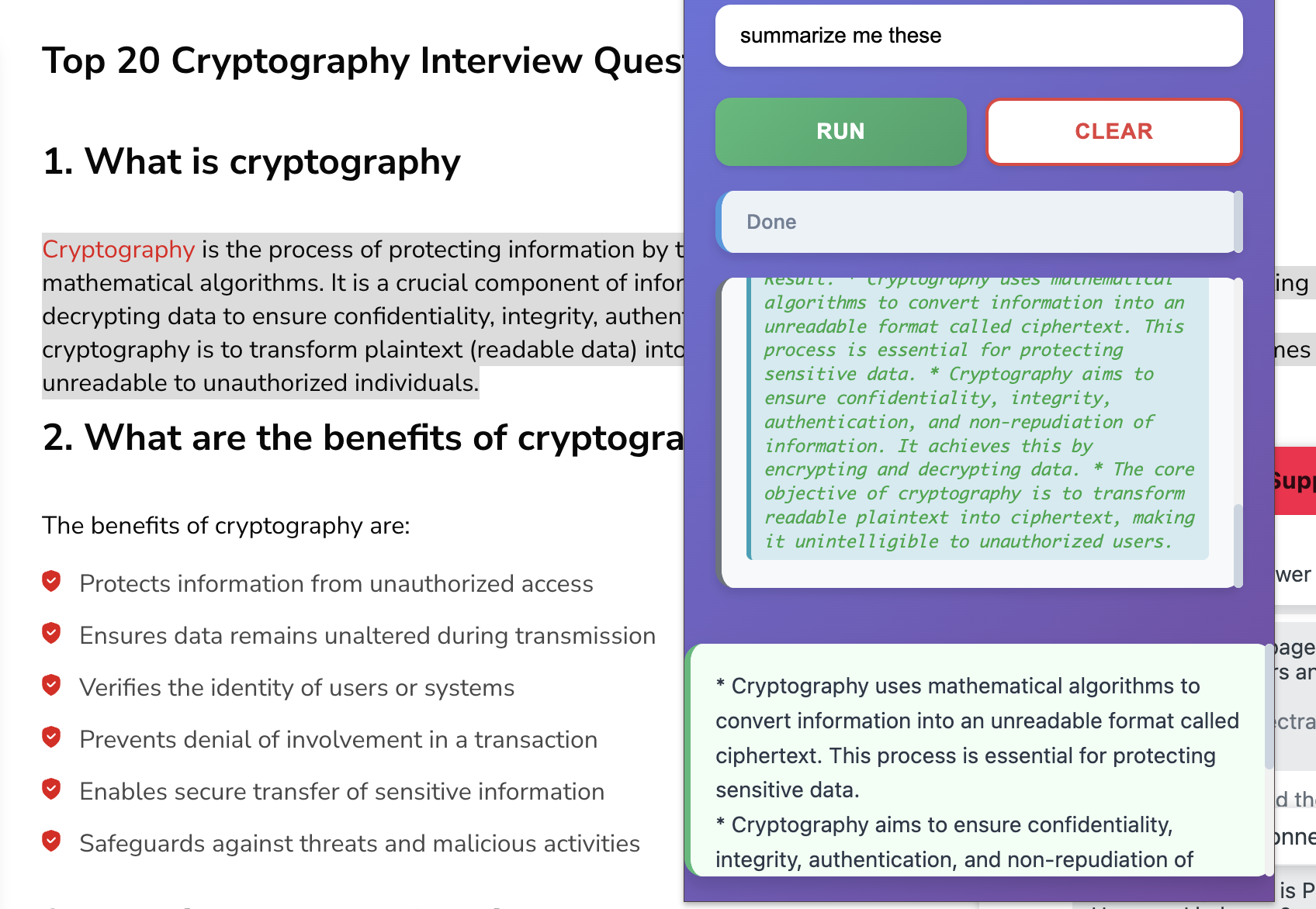
summarizing the contents in web page
-
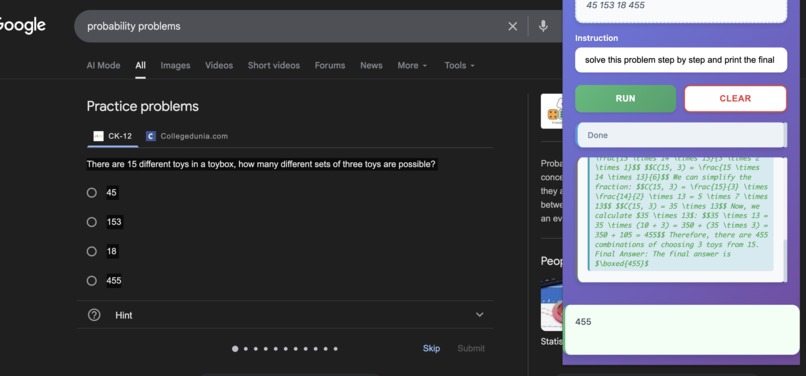
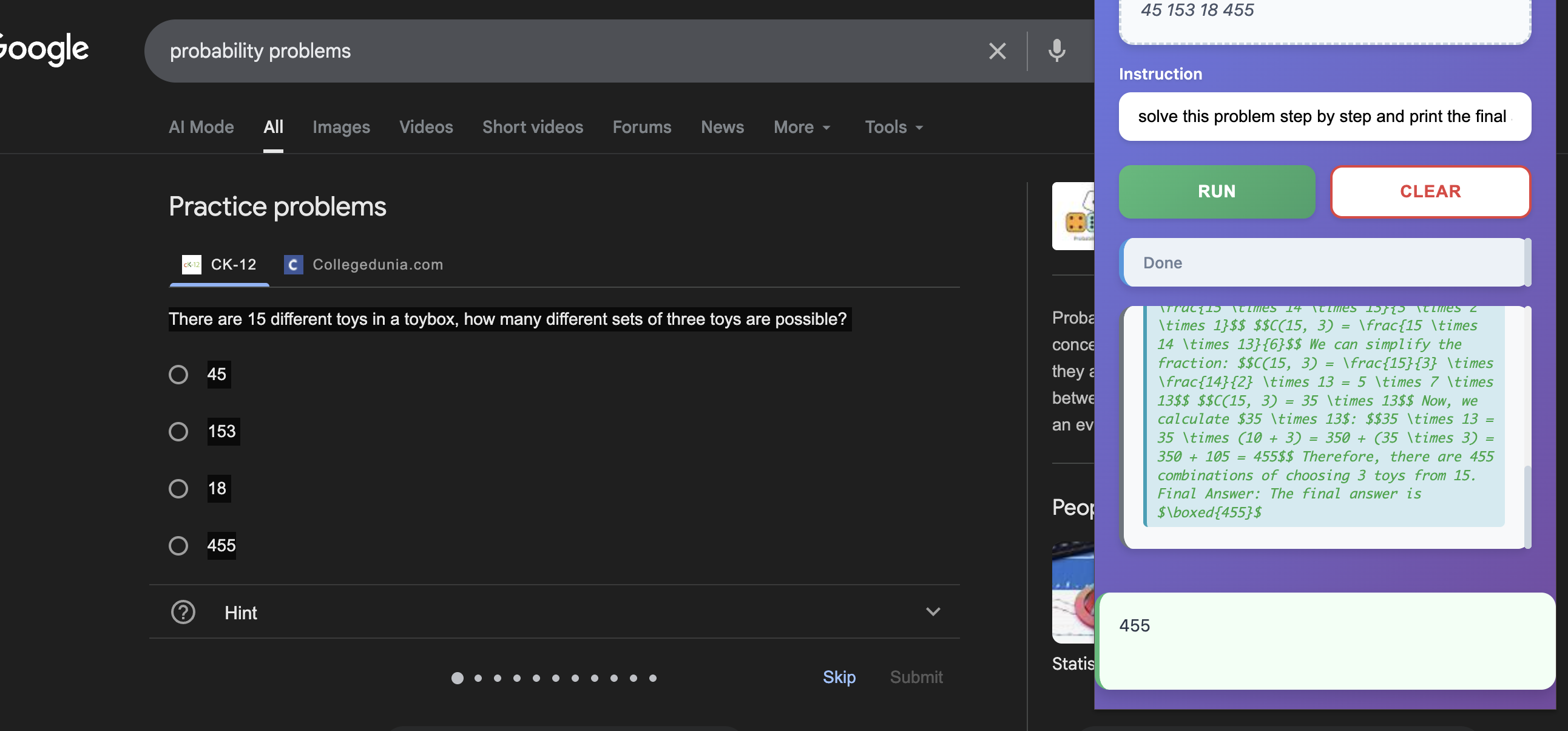
solving math problem with lumos (2)
-
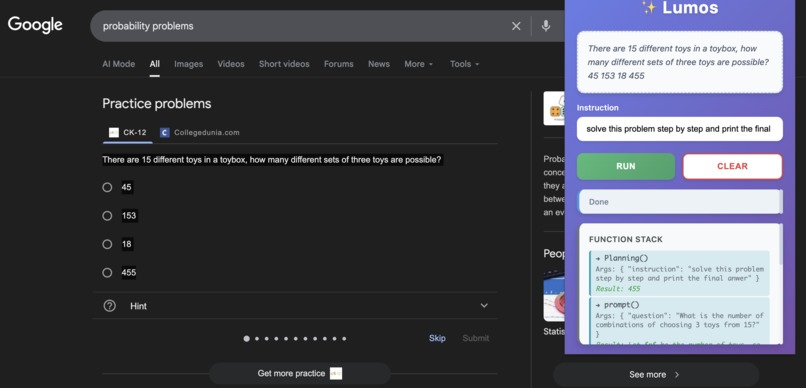
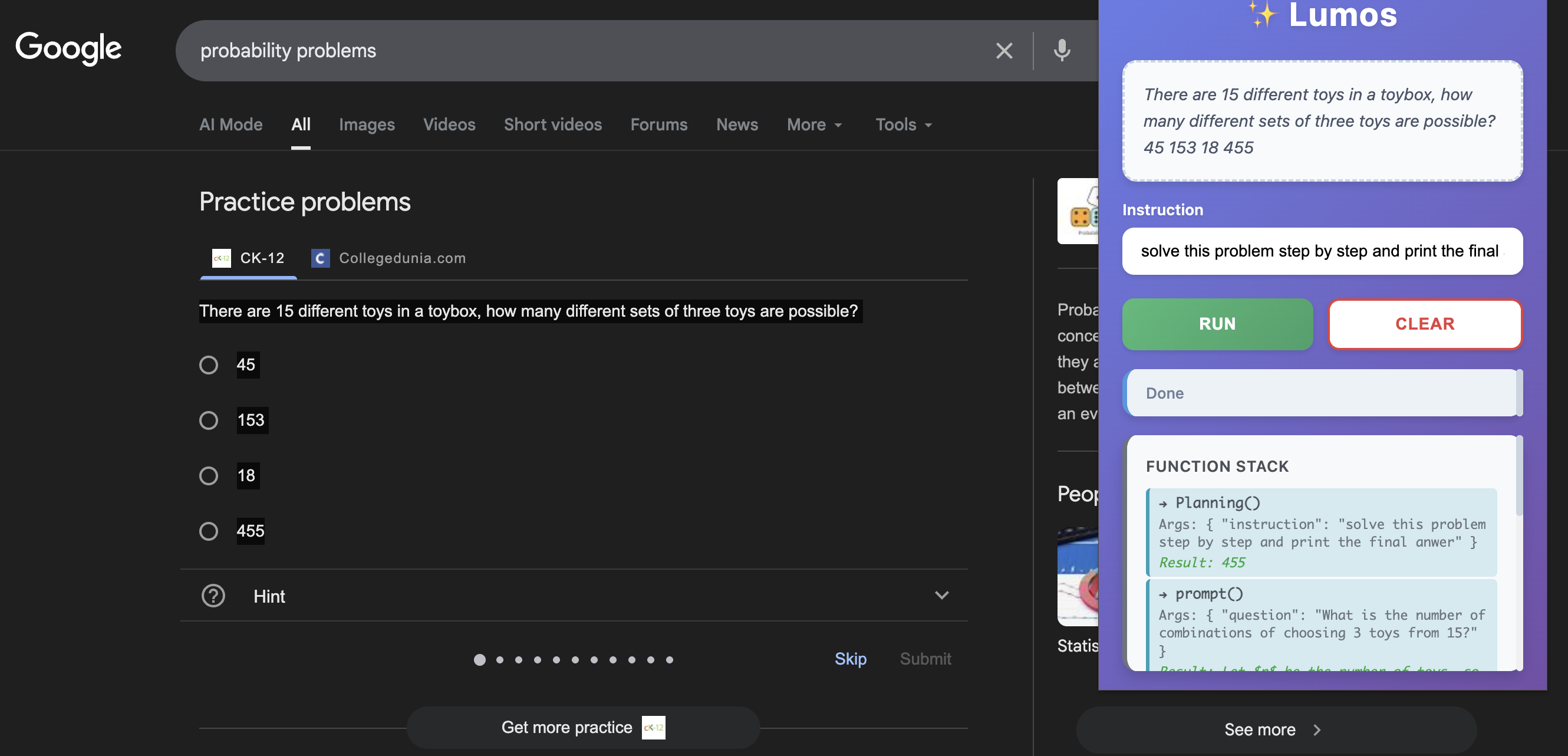
solving math problem with lumos (1)
What Inspired Me
The inspiration for Lumos came from a simple frustration: I wanted AI-powered text processing tools, but I was concerned about privacy. Most AI tools send your data to external servers, which means your text, audio, and documents could be stored, analyzed, or shared without your control.
When I discovered Chrome's on-device AI APIs, I realized I could build a solution that gives users powerful AI capabilities while keeping everything 100% private. The data never leaves your device—it's processed locally using Chrome's built-in AI models.
The name "Lumos" comes from the spell in Harry Potter that creates light—this extension brings clarity and understanding to your content, illuminating it with AI capabilities, all while protecting your privacy.
What I Learned
Chrome Extension Development (Manifest V3)
Building Lumos taught me the intricacies of modern Chrome extension development:
Service Workers: Unlike traditional background pages, Manifest V3 uses service workers that are event-driven and can be terminated. I learned to handle state management, message passing, and the lifecycle of service workers.
Message Passing Architecture: The extension has three main components:
- Background script (service worker) — handles context menu and coordination
- Content script — interacts with web pages and extracts audio blobs
- Popup — user interface for instructions and results
Communication between these components uses chrome.runtime.sendMessage, ports, and chrome.storage.local.
- Context Menus API: I implemented right-click context menus that detect both text selections and audio elements, requiring different handling for each context type.
Chrome AI APIs Deep Dive
This project was my first deep dive into Chrome's on-device AI APIs:
LanguageModel API: Used for both the planning orchestration and audio transcription. I learned about:
- Expected inputs/outputs configuration
- Handling audio blobs as
Uint8Array - User gesture requirements for API access
- Model availability states (available, downloadable, unavailable)
Specialized APIs: Integrated multiple Chrome AI APIs:
Summarizer— for text summarizationRewriter— for tone transformation (formal/casual)Translator— for language translation with language pair supportLanguageDetector— for automatic language detection
Error Handling: Learned to handle cases where models aren't available, need downloading, or require user gestures.
LLM Orchestration & Prompt Engineering
One of the most challenging and educational aspects was building the orchestration system:
The Planning Problem: Users give natural language instructions like "summarize this and translate to Spanish." The system needs to:
- Parse the instruction
- Create a step-by-step execution plan
- Execute steps sequentially, passing results between them
- Know when to stop vs. continue
Prompt Engineering Journey:
- Started with a complex prompt (600+ lines) that had contradictory rules
- The LLM would randomly add unnecessary steps (like translating when only transcription was requested)
- Learned that simpler, clearer prompts work better than complex rule systems
- Reduced prompt from 600+ lines to ~80 lines with better results
Key Lessons:
- The planner needed clear rules about
continueFlag: never set it tofalsewhen calling functions - Explicit examples were crucial for teaching the LLM the correct pattern
- Less is more—removing unnecessary rules improved behavior
Audio Processing
Implementing audio transcription required learning:
- Blob Extraction: Audio elements on web pages can be
<audio>tags withsrcattributes or JavaScript-created blob URLs - Content Script Injection: Content scripts run in the page context but have limited access to the DOM
- Blob URLs: Understanding how
blob:URLs work and fetching them requires being in the correct context - Storage Management: Audio blobs are large—I learned to store them efficiently and clean them up after processing
JavaScript & Async Patterns
- ES6 Modules: Structured the codebase with ES modules (
import/export) - Async/Await: Heavy use of async operations for API calls, storage, and message passing
- Promise Chaining: Handling user gesture timeouts and waiting for confirmations
- Error Propagation: Proper error handling across async boundaries
How I Built It
Phase 1: Foundation (Days 1-3)
Setup & Basic Extension
- Created Manifest V3 structure
- Set up background service worker
- Built basic popup HTML/CSS with modern gradient design
- Implemented context menu for text selection
Learning Curve: Getting familiar with Chrome extension debugging tools and the service worker lifecycle.
Phase 2: Core AI Integration (Days 4-7)
Single Function Operations
- Integrated
SummarizerAPI for text summarization - Built
rewrite()function for tone transformation - Created
translate()function with language detection - Basic error handling for API availability
Challenge: Understanding the async nature of Chrome AI APIs and handling different availability states.
Phase 3: Orchestration System (Days 8-14)
The Planning System This was the most complex part:
- Built the Planner (
orchestrator/planner.js):
- Uses LanguageModel API to analyze user instructions
- Generates JSON execution plans with steps and
continueFlag - Iterative execution—can chain multiple operations
- Created Tools Wrapper (
orchestrator/tools.js):
- Clean abstractions over Chrome AI APIs
- Consistent error handling
- User gesture management for model downloads
- Communication System:
- Storage-based events for function stack visualization
- Real-time updates to popup UI showing execution progress
The Hardest Part: Getting the LLM to generate correct JSON consistently. Had to:
- Parse JSON from markdown code blocks
- Handle cases where LLM adds explanations
- Validate response format
- Provide error feedback to improve subsequent attempts
Phase 4: Multi-Step Operations (Days 15-18)
Chain Execution
- Made the planner understand "and" and "then" keywords
- Result passing between steps (e.g., summarize result → translate input)
- Handling cases where steps depend on previous results
Refinement:
- Reduced false positives (LLM adding unnecessary steps)
- Improved prompt to be more deterministic
- Better examples for common use cases
Phase 5: Audio Processing (Days 19-23)
Audio Transcription Feature
- Extended context menu to detect audio elements
- Created content script for blob extraction
- Implemented audio blob storage and cleanup
- Added visual indicator in popup when audio is selected
Challenges:
- PDF embeddings were incorrectly detected as audio (fixed with validation)
- Blob URL fetching required correct execution context
- Large audio files needed efficient storage handling
Phase 6: Polish & Security (Days 24-28)
Code Quality:
- Removed excessive console.log statements that exposed user data
- Cleaned up prompt to remove contradictory rules
- Added proper error messages
Security:
- Identified and removed trial tokens from public repo
- Created setup instructions for users
- Implemented proper data cleanup after processing
User Experience:
- Added function stack visualization
- Improved error messages
- Better loading states and progress indicators
Challenges I Faced
Challenge 1: LLM Generating Unnecessary Steps
The Problem: When users asked to "transcribe this audio," the LLM would randomly add translation, summarization, or rewriting steps—even though the user only requested transcription.
Root Cause: The prompt had too many rules and contradictory instructions. The LLM was overthinking simple requests.
Solution:
- Simplified the prompt from 600+ lines to ~80 lines
- Added explicit rule: "Only do what the user explicitly asks for"
- Removed examples that encouraged over-engineering
- Added specific examples for simple requests
Learning: Sometimes less guidance leads to better results. The LLM performed better with clear, concise instructions than with exhaustive rules.
Challenge 2: continueFlag Logic
The Problem: The LLM would set continueFlag: false when calling a function, causing the execution loop to stop prematurely.
Example:
{"steps": [{"name": "translate", ...}], "continueFlag": false} // Wrong!
Solution:
- Added explicit rule: "If your response has 'steps' array → ALWAYS set continueFlag: true"
- Only set
continueFlag: falsewhen providingfinalResponse(no steps) - Added multiple examples showing correct vs. incorrect patterns
Learning: The LLM needed very explicit, unambiguous rules about state management.
Challenge 3: Audio Blob Extraction
The Problem: Audio elements on web pages can be:
- Regular
<audio src="url">tags - JavaScript-created blob URLs (
blob:http://...) - Embedded in iframes or shadow DOM
Solution:
- Background script detects audio context menu click
- Sends message to content script for blob URLs
- Direct fetch for regular URLs
- Validation to skip PDF embeddings and other non-audio elements
Learning: Different web technologies require different extraction strategies. Content scripts have the correct context for blob URL access.
Challenge 4: Managing State Between Components
The Problem: Chrome extension components (background, content, popup) have separate JavaScript contexts. Passing data between them can be tricky.
Solutions Used:
chrome.storage.localfor persistent state (selected text, audio blobs)chrome.runtime.sendMessagefor immediate communication- Ports for long-lived connections (popup ↔ background)
- Storage events for reactive updates (function stack)
Learning: Each communication method has trade-offs. Storage is good for state, messages for events, ports for bidirectional streams.
Challenge 5: Error Handling & Edge Cases
Challenges:
- What if an AI model isn't available?
- What if translation fails?
- What if user cancels model download?
- What if audio blob extraction fails?
Solution: Implemented comprehensive error handling:
- Graceful degradation when APIs aren't available
- User-friendly error messages
- Proper cleanup even on errors
- Fallback responses when operations fail
Learning: Building robust software means handling not just the happy path, but all the failure modes too.
Challenge 6: Privacy & Security
The Problem:
- Trial tokens were hardcoded in manifest.json
- Console logs exposed user data (text selections, audio blobs)
- Sensitive information could leak through DevTools
Solution:
- Removed trial tokens from public repo
- Created setup instructions for users to add their own tokens
- Identified and documented all console.log statements
- Prepared for future logging utility (development vs. production mode)
Learning: Security isn't just about preventing attacks—it's about protecting user privacy even in development.
Technical Achievements
1. Intelligent Orchestration
The system can understand complex instructions and break them down into execution plans:
User: "Summarize this article and translate the summary to Spanish"

System Plan:
1. summarize(text) → summary_result
2. translate(summary_result, "en", "es") → final_result
This required teaching an LLM to:
- Parse natural language
- Generate valid JSON
- Understand dependencies between steps
- Know when to stop
2. Privacy-First Architecture
Every operation runs 100% on-device. The mathematical model:
$$P(\text{Data Privacy}) = 1 - P(\text{Data Transmission}) = 1$$
Since $P(\text{Data Transmission}) = 0$ (no external API calls), privacy is guaranteed mathematically.
3. Efficient State Management
The extension uses minimal storage and cleans up after itself:
- Selected text: Cleared after popup opens
- Audio blobs: Removed after transcription
- Temporary flags: Removed after processing
This prevents data accumulation and privacy leaks.
What Makes This Project Special
- Complete Privacy: Unlike other AI tools, Lumos never sends your data anywhere
- Intelligent Planning: Not just simple function calls—the system understands context and chains operations
- On-Device Only: Works offline, no internet required after initial setup
- Multi-Modal: Handles both text and audio processing
- Real-Time Feedback: Visual function stack shows exactly what's happening
Future Improvements
- [ ] Add image processing capabilities
- [ ] Support for more languages
- [ ] Custom model fine-tuning
- [ ] Export/import functionality
- [ ] Batch processing for multiple selections
Conclusion
Building Lumos was a journey of discovery. I learned about Chrome extension architecture, LLM orchestration, prompt engineering, and privacy-first development. The biggest lesson was that simpler is often better—especially when working with LLMs. A concise, clear prompt outperformed a complex rule system.
The project demonstrated that powerful AI capabilities can exist alongside complete privacy. Users shouldn't have to choose between functionality and data protection—they can have both.
Built with ✨ privacy in mind
All processing happens locally. Your data never leaves your device.

Log in or sign up for Devpost to join the conversation.