
Inspiration
I tried to build my wife a wedding gift: one place for every guest's photo and video, in full quality. We had no budget for a photographer, and a friend suggested disposable cameras — I thought an app would be better. I built one in 14 days. The App Store approved it two hours before the party, and it barely worked. It was also my speech and my gift, and I'd bet everything on it. (We're still married.)
Driving home that night, a friend mentioned a disposable-camera app someone had used at a wedding the same day. I realised I didn't want a gimmick — I wanted the thing I'd actually pictured: not just the party, but the everyday. Full quality. Yours. Private by default. The next year threw a lot at us, but the idea never let go — because the photos that matter most aren't the posed ones. They're the ones the people who were there took, from angles no one else was standing in.
What it does
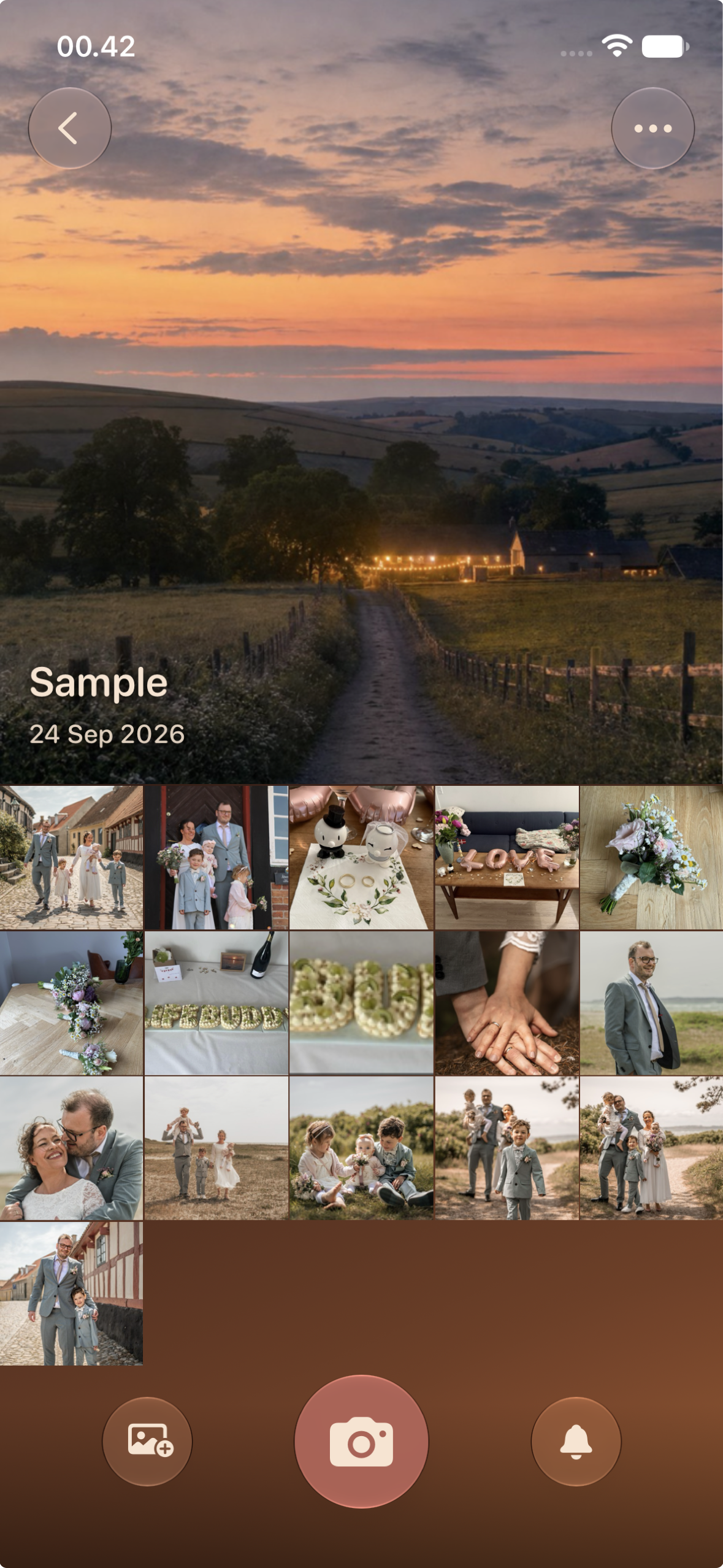
- Create an event, invite guests with a QR code. Guests join through an App Clip — no install needed. Every photo and video lands in one shared feed, live, in full quality: 4K60 HDR video and full-resolution photos, exactly as the guest's phone captured them.
- End-to-end encrypted, zero-knowledge. Only the people at the event hold the keys. The backend never sees a photo — and neither does the shared display: the Portal decrypts on the screen itself.
- Portal. A live slideshow on the TV at the party (Apple TV app or any browser), and an ambient frame for the years after. Send any event to it from the phone.
- Memories. A personal archive that keeps the everyday captures between the big days and stores originals long-term — with cost that is honest about what 4K really weighs.
- The card. Every event gets a card — cover, stickers, title, mood — that guests see when they join and that becomes the event's face on the Portal.
How I built it
- 100% AI-native, architect-directed. Solo, alongside a full-time job and three kids. I made every decision and set the taste; AI wrote the code, under a review gate, contract tests and screenshot guards. A build method, not a shortcut on craft.
- iOS: SwiftUI, Swift 6, iOS 26 (Liquid Glass), a hand-built gallery engine that stays smooth at 15,000 photos, a camera that never compromises on quality, widgets, Live Activity, lock-screen capture and a Camera Control integration. An Android client (Kotlin/Compose) is in progress; iOS ships first.
- Backend, entirely Cloudflare: one Durable Object per event (its own SQLite), D1 as the global index, R2 for every blob, Queues for push fan-out, Workers for the API and the upload/download edges. Push goes straight to APNs.
- Security is two layers: P-256 device-key signatures for request auth, and App Attest assertions on the ECDH keys for peer authenticity — the anchor against a compromised backend. No accounts, no passwords. ECIES + AES-GCM for end-to-end encryption.
- Portal: a tvOS app and a React 19 + Vite web player, both decrypting on the device that shows the photos.
How I monetize (RevenueCat)
RevenueCat is the single source of truth for every product, price and offering — a genuinely dual model, both powered by the SDK:
- Event packages — one-time purchases, about $1 per guest: XS $24.99 (25 guests) up to L $299.99 (300 guests), plus multi-day variants. One purchase creates one event with a fixed capacity, so the price is honest about storage.
- Memories — auto-renewable subscription for the personal archive and long-term storage of originals.
A server-side RevenueCat webhook drives entitlements and affiliate attribution (photographers, planners and venues get a share of the events they bring in). Offer codes for partners are ordered and handed out from our own admin through the App Store Connect API.
Challenges I ran into
- Two rebuilds before this one. Flutter first (the wedding-gift prototype), then a 95%-done React Native build I scrapped for not being good enough — ironically, for last year's Shipaton. I moved to Swift and did it properly.
- Storage economics. Guest-photo apps have died of storage cost at scale. Originals are the product, so the cost model is built around them: fixed capacity per event, R2 with free egress, and a subscription for what is kept beyond the event.
- Real end-to-end encryption, solo. Zero-knowledge and key-based auth are hard to get right with no team to check you — and every screen that shows a photo, including the TV, has to hold a key.
- Full quality at event scale. 15,000 photos in one event breaks a naive grid, so the gallery is hand-built to Apple Photos parity, and 4K60 HDR video is transcoded on the guest's phone, never in the cloud.
Accomplishments I'm proud of
- A warm, premium interface people describe as a relief from the clinical, Instagram-y norm: golden hour and candlelight, one ink, no feeds, no algorithm.
- End-to-end encrypted even on the shared display.
- A storage cost model that keeps the price honest instead of subsidising a burn rate.
- Shipped: approved and released on the last day of the window, by one person.
What I learned
- The ordinary days matter as much as the big ones. That became the soul of the product.
- Shipping beats perfect — I learned it the hard way, twice.
- AI-native building lets one person hold a large, correct system — if you bring the taste, the gates and own the decisions.
What's next
- 1.1 is already built and goes to review this week: lock-screen capture, widgets, faster uploads, and the card.
- Android and Portal on Google TV and tablets.
- Distribution through wedding photographers, planners and venues (affiliate program, already built).
- Seasonal expansion — christenings, confirmations, birthdays. The family's celebration app, not a one-wedding tool.

Log in or sign up for Devpost to join the conversation.