-
-
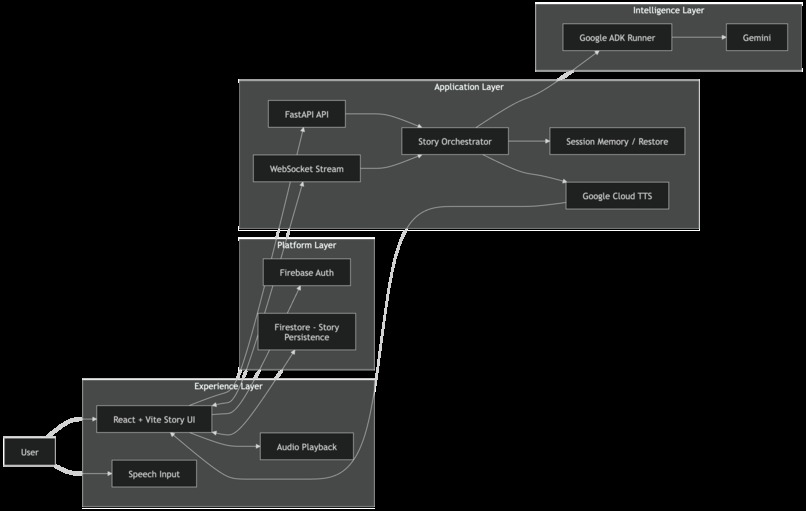
Luminary is based on how Google Cloud orchestrates real-time storytelling via WebSockets,through Google ADK
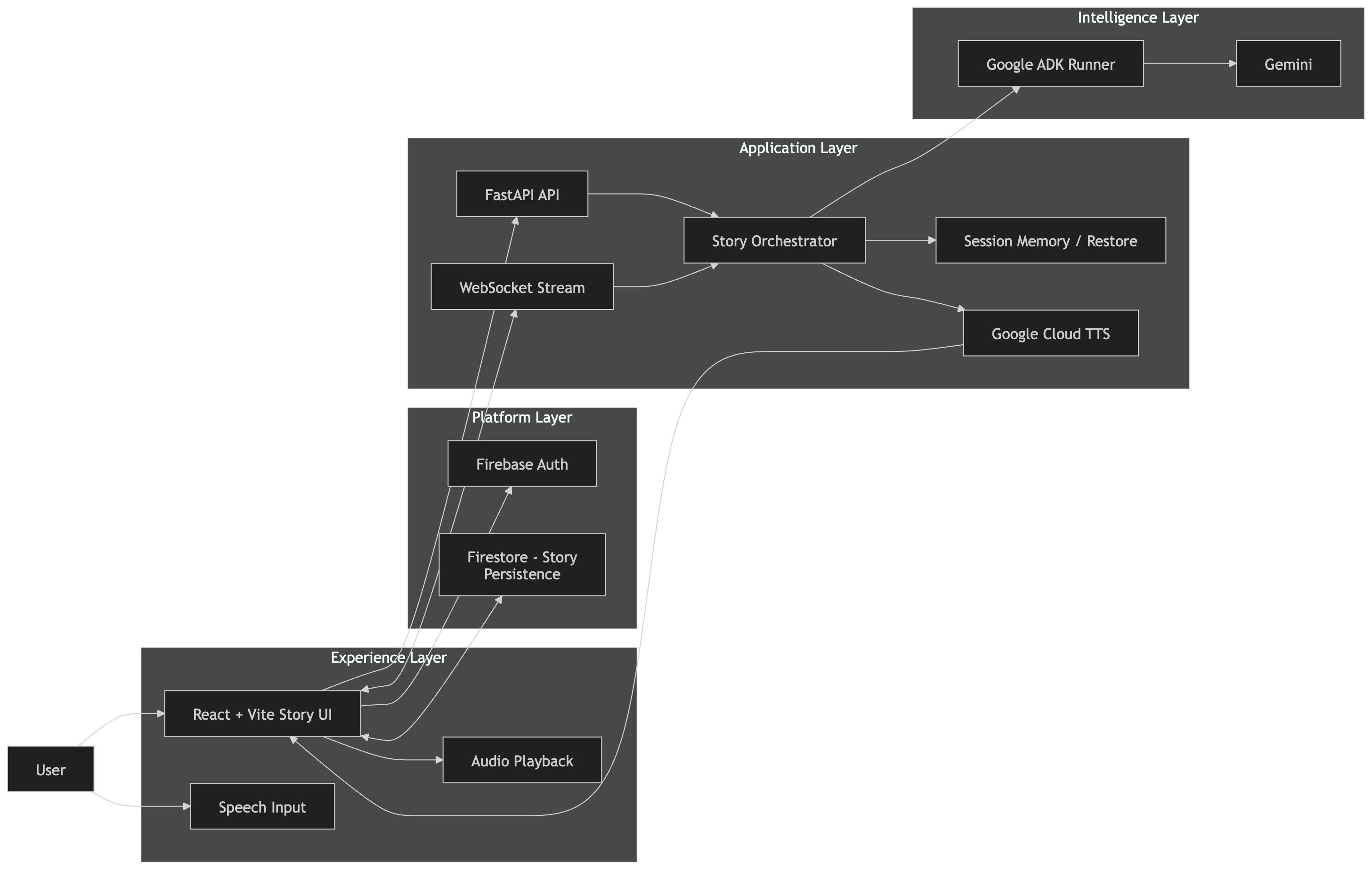
Luminary
Luminary is an ADK-powered cinematic storytelling agent that turns typed or spoken prompts into live, branching stories with AI-generated visuals, narration, and interactive choices.
Inspiration
I built Luminary because I kept feeling the same limitation in most AI products: they are powerful, but they still feel like text boxes.
Storytelling should feel more immersive than that. It should feel like speaking an idea out loud, watching a world appear, hearing the scene narrated back, and shaping what happens next in real time. I wanted to create an experience that felt less like chatting with a model and more like collaborating with a live creative director.
That became Luminary: a multimodal storytelling system where a user can type or speak a prompt, receive a cinematic story beat with generated visuals and narration, and then guide the next scene through branching choices or freeform direction.
What It Does
Luminary is designed as an interactive story engine that combines multiple modalities in one continuous experience.
It allows users to:
- start a story with either text or voice
- receive AI-generated story beats in real time
- view generated scene imagery alongside the narrative
- hear narration for a more immersive experience
- shape the story through choices or custom prompts
- save and resume stories later
Instead of returning a single block of text, Luminary delivers the experience as a sequence of cinematic beats. Each beat is meant to feel like a scene in a living storybook rather than a message in a chat thread.
How I Built It
I built Luminary as a full-stack multimodal application with a React frontend and a FastAPI backend.
Frontend
- React + Vite for the interface
- Firebase Authentication for login
- Firestore for saved stories and retrieval
- browser-based speech input for voice prompts
- browser speech playback and optional cloud narration support
Backend
- FastAPI for APIs and WebSocket connections
- WebSockets for live story streaming
- Google ADK as the orchestration layer for the storytelling agent
- Google GenAI / Gemini for story generation and multimodal outputs
- Google Cloud Text-to-Speech for narration audio
Flow
- A user starts with a typed or spoken prompt.
- The frontend opens a story session and connects over WebSockets.
- The backend routes the request through an ADK-powered storytelling agent.
- Gemini generates the next story beat, including narrative and visual content.
- The frontend presents the scene, narration, and next actions in real time.
- Firestore stores story progress so it can be resumed later.
Challenges I Faced
This project was much harder than building a normal text-based AI app.
Making the output feel cohesive
It was not enough to generate text, an image, and audio separately. The real challenge was making them feel like parts of the same moment. I had to think about pacing, continuity, timing, and how the interface should reveal each piece without breaking immersion.
Managing real-time state
Because the app uses WebSockets and live session updates, I had to solve problems around stale connections, repeated renders, reconnect behavior, and keeping story progress synchronized between frontend and backend.
Authentication and persistence
Supporting login, saved stories, and restore flows introduced edge cases around account state, local cache, and Firestore synchronization. A lot of effort went into making saved sessions feel reliable.
Model reliability and quota issues
Multimodal generation is exciting, but also less predictable in practice. I ran into rate limits, incomplete responses, and image-generation reliability issues, which forced me to make the pipeline more resilient and improve error handling.
Moving to a real agent architecture
One of the most important technical improvements was converting the runtime so the storytelling loop is actually orchestrated through Google ADK, rather than just being a sequence of direct model calls. That made the project much closer to a true agent system.
What I Learned
This project taught me that multimodal AI is not just about model capability. It is about orchestration.
I learned how to:
- design beyond text-in/text-out interaction
- combine voice, visuals, and narrative into one experience
- manage streaming state across a full-stack app
- use Google ADK to structure agent behavior
- build around real-world issues like auth bugs, reconnect logic, and quota limits
- think about immersion as a product and systems problem, not just a generation problem
One way I came to think about Luminary was:
[ \text{Immersion} = \text{Narrative Quality} + \text{Visual Continuity} + \text{Responsive Interaction} ]
If one part breaks, the overall experience feels less magical.
Why I’m Proud Of It
What I like most about Luminary is that it moves beyond the text box. It lets users speak, see, hear, and direct the experience as the story unfolds.
It is both a creative tool and an experiment in what multimodal agents can feel like when they are designed as experiences rather than just assistants. My goal was to make AI storytelling feel alive, and Luminary is my step toward that.
Tech Stack
- Google ADK
- Google Gemini / Google GenAI SDK
- Google Cloud Text-to-Speech
- FastAPI
- WebSockets
- React
- Vite
- Firebase Auth
- Firestore
Built With
- adk
- authentication
- browser
- cloud
- css
- fastapi
- firebase
- firestore
- gemini
- genai
- html
- javascript
- python
- react
- sdk
- speech
- text-to-speech
- vite
- web
- websockets


Log in or sign up for Devpost to join the conversation.