Lumina AI — Illuminate Your Learning
A voice-first AI tutor that thinks, talks, and draws on a live whiteboard simultaneously.
Inspiration
Learning has always been a fundamentally human experience a conversation, a sketch on a chalkboard, a moment of "aha!" when something finally clicks. Yet most AI tools today are either voice-only or text-only, forcing learners to context-switch constantly.
We were inspired by the way the best teachers in the world work: they talk and draw at the same time, bringing ideas to life visually while explaining them verbally. We asked ourselves what if an AI tutor could do exactly that? That question became Lumina.
What It Does
Lumina is a voice-first AI tutor that thinks, talks, and draws on a live whiteboard simultaneously. It lets you have a real, natural spoken conversation with an AI while watching it illustrate concepts in real time on an interactive canvas.
- Talk to it — Speak naturally using your microphone (click-to-talk or hands-free with
Ctrl+H). Lumina listens, thinks, and responds with voice. - Watch it draw — As it explains, Lumina autonomously generates flowcharts, mind maps, architecture diagrams, SVG illustrations, and educational visuals directly on an Excalidraw whiteboard.
- Upload research papers — Drag and drop a PDF; Lumina reads the full text and uses it as context. You can even open the PDF on the canvas, mark a region, and ask "Explain this" — it will read that exact section and draw supporting visuals.
- Canvas awareness — Lumina can see the whiteboard (via screenshot) and inspect its elements (positions, shapes, dimensions), so it never overlaps existing content and always builds on context.
- Animated playback — Replay any AI-drawn diagram as a step-by-step animation.
- Dark / Light theme — Follows your system preference with a manual toggle.
How We Built It
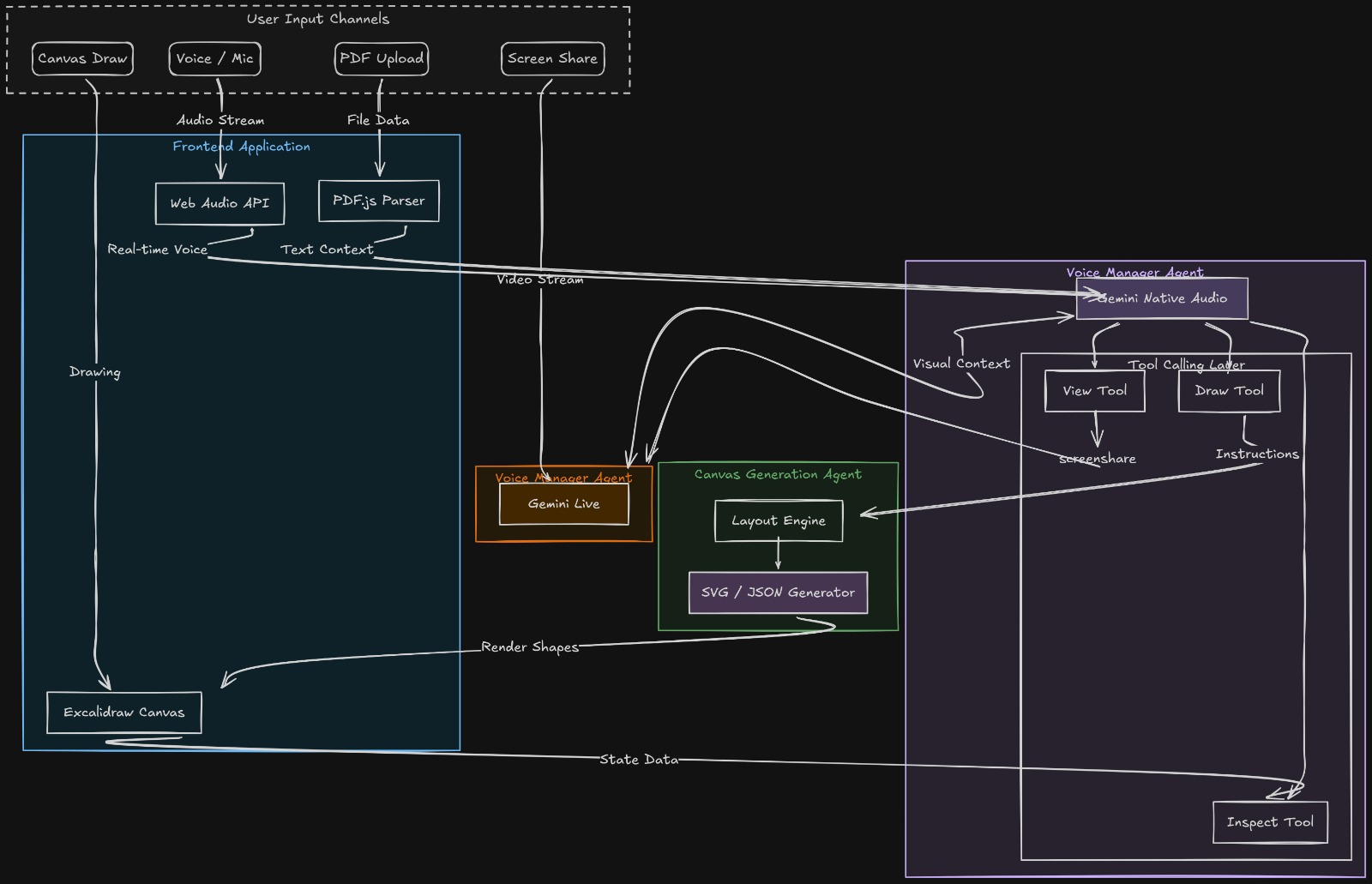
Lumina is built on a manager-agent architecture that separates real-time conversation from canvas drawing:
| Component | Model | Role |
|---|---|---|
| Voice Manager | gemini-2.5-flash-native-audio |
Real-time voice conversation, decides when to draw, delegates to canvas agent |
| Canvas Agent | gemini-flash |
Generates Excalidraw JSON / SVG from natural language drawing requests |
The Voice Manager has three tools at its disposal:
draw_on_canvas— delegates a drawing request to the canvas agentview_canvas— captures a PNG screenshot of the whiteboardinspect_canvas— returns structured element data (positions, types, dimensions)
The audio pipeline uses the Web Audio API with custom AudioWorklet processors (mic-processor.js, playback-processor.js) running at 24 kHz for low-latency mic capture and audio playback.
PDF parsing uses pdfjs-dist for full text extraction. For marked canvas regions, the app combines PDF page coordinates with canvas viewport transforms to extract the exact text or figures the user selected.
The frontend is built with React 19 + TypeScript + Vite, using @excalidraw/excalidraw for the canvas and excalidraw-animate for playback. The entire app runs in the browser — no backend server required.
Tech Stack
| Layer | Technology |
|---|---|
| Framework | React 19 + TypeScript |
| Build | Vite |
| Canvas | @excalidraw/excalidraw |
| Animation | excalidraw-animate |
| AI | @google/genai (Gemini Live API + Vertex AI) |
| PDF Parsing | pdfjs-dist |
| Audio | Web Audio API + AudioWorklet (24 kHz) |
Challenges We Ran Into
- Synchronizing voice and drawing — Making the voice manager and canvas agent work in true parallel without blocking the audio stream was non-trivial. Tool calls had to be async and non-interrupting.
- Spatial awareness on the canvas — Teaching the AI to place new diagrams beside existing content (not on top of it) required building a layout engine that feeds element bounding boxes back to the agent.
- Audio latency — Achieving natural, low-latency voice interaction in the browser required custom AudioWorklet processors at 24 kHz rather than the simpler MediaRecorder API.
- PDF region selection on canvas — Mapping a user's drag-selection on the canvas back to the correct region of a rendered PDF page involved complex coordinate transforms between PDF space, canvas space, and viewport space.
- Prompt engineering for Excalidraw JSON — Getting the canvas agent to produce valid, well-positioned Excalidraw elements consistently required extensive prompt design and a
skills.mdreference file injected into every agent call.
Accomplishments That We're Proud Of
- Built a genuinely simultaneous voice + whiteboard experience — not turn-based, not sequential, but truly parallel.
- The manager-agent pattern worked elegantly: the voice model stays fluid and conversational while the canvas agent handles the heavy lifting of diagram generation.
- Lumina can see its own canvas — using
view_canvasto take a screenshot andinspect_canvasto read element data — making it spatially aware in a way most AI tools are not. - The PDF-on-canvas feature with region marking is a genuinely novel interaction model for studying research papers.
- Zero backend required — everything runs in the browser using Gemini's Live API and Vertex AI.
📚 What We Learned
- The Gemini Live API (
gemini-2.5-flash-native-audio) is remarkably capable for real-time voice interaction, but orchestrating tool calls during a live audio session requires careful state management. - Multi-agent systems shine when tasks have clearly different latency requirements — keeping the voice agent fast and offloading heavy generation to a secondary agent was the right call.
- Prompt engineering is engineering — the
skills.mdfile injected into the canvas agent's context was as important as any code we wrote. Structured drawing "skills" made output reliable and consistent. - Excalidraw's JSON schema is powerful but demanding. Building robust element converters (
aiTools.ts) to translate AI output into valid canvas elements took significant iteration. - Browser-based audio at low latency is absolutely possible but requires dropping down to AudioWorklet — the higher-level APIs simply aren't enough.
What's Next for Lumina AI
- Multi-user collaboration — Real-time shared whiteboard sessions where multiple students can join, with Lumina as the shared tutor.
- Subject-specific skill packs — Pre-loaded drawing vocabularies for math (graphs, equations), biology (cell diagrams), CS (data structures), and more.
- Memory and session persistence — Lumina remembers past conversations and canvas states across sessions, building a personal learning history.
- Mobile support — Bringing the voice + whiteboard experience to tablets, especially for students.
- Assessment mode — Lumina asks questions, evaluates the student's verbal answers, and draws feedback directly on the canvas.
- LMS integration — Connect with platforms like Google Classroom or Notion so Lumina can pull in course materials automatically.
Built With
- gemini
- javascript
- typescript
- vite
- webrtc
- websocket

Log in or sign up for Devpost to join the conversation.